Software development has changed dramatically over the last decade. Businesses are no longer able to rely on slow deployment cycles, isolated IT teams, and manual infrastructure management. Modern organizations must deliver software quickly, maintain reliability, reduce downtime, and continuously improve their applications to stay competitive. Customers now expect faster updates, better performance, stronger security, and seamless digital experiences across every platform they use.
To meet these expectations, companies around the world have embraced DevOps practices. DevOps combines software development and IT operations into a unified workflow that improves collaboration, increases automation, and accelerates software delivery. It is one of the most important methodologies in modern technology environments because it helps organizations deploy applications faster while maintaining stability and efficiency.
As cloud computing has become increasingly important, Microsoft Azure has emerged as one of the most powerful cloud platforms available. Azure offers a massive ecosystem of services for infrastructure, networking, storage, analytics, artificial intelligence, databases, and software deployment. Alongside Azure, Microsoft created Azure DevOps, a comprehensive platform designed to help organizations manage the entire software development lifecycle.
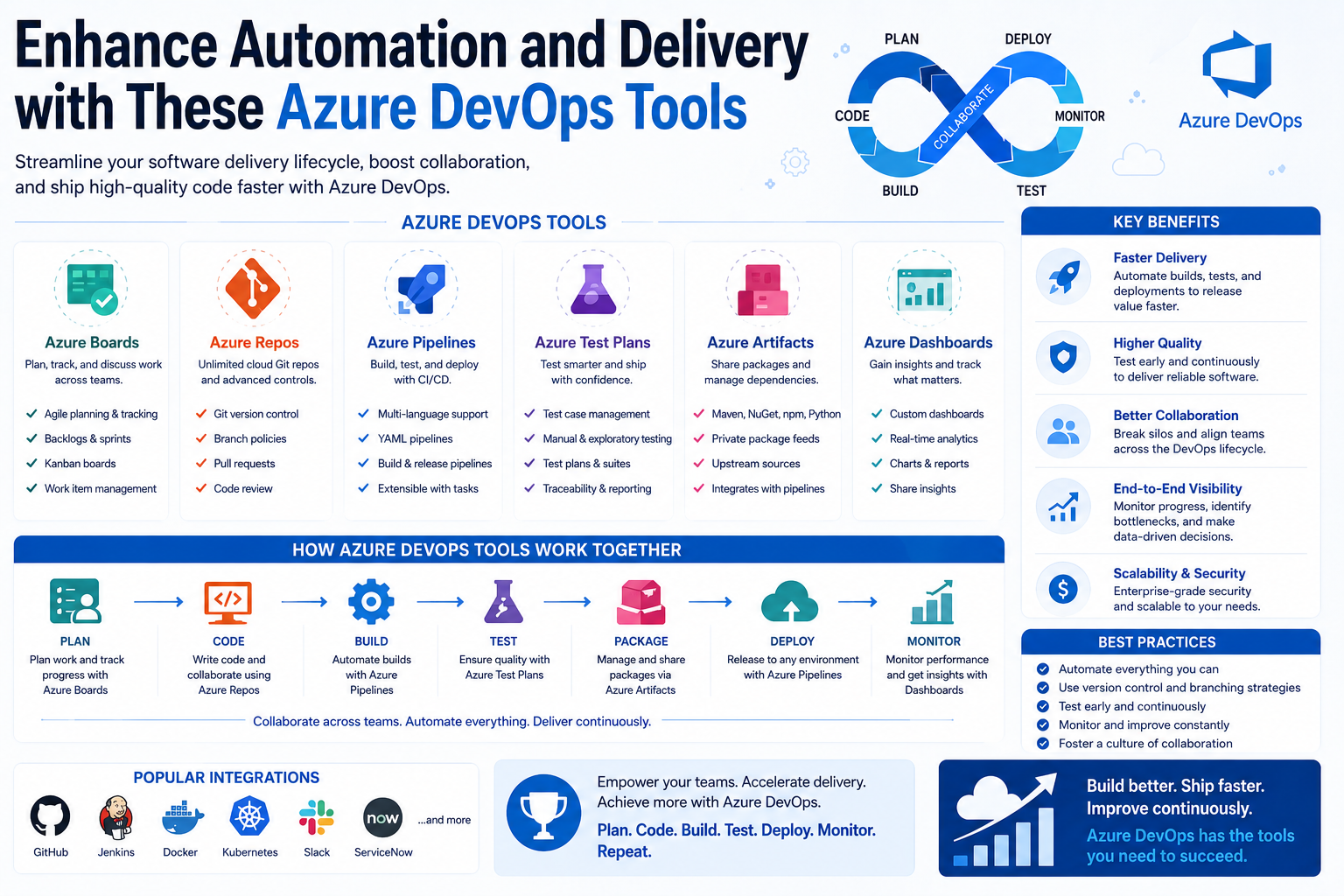
Azure DevOps provides tools for planning projects, managing repositories, automating deployments, running tests, and monitoring development pipelines. Instead of using multiple disconnected systems, development teams can centralize their workflows within a single platform.
Today, Azure DevOps skills are in extremely high demand. Organizations need professionals who understand automation, CI/CD pipelines, infrastructure management, cloud services, and Agile workflows. Businesses are actively investing in DevOps engineers who can modernize software delivery processes and improve operational efficiency.
This guide explores the foundations of DevOps, explains the importance of Microsoft Azure, and introduces several core Azure DevOps tools that help organizations build reliable, scalable, and efficient software delivery systems.
Understanding DevOps
DevOps is a modern approach to software development and IT operations that focuses on collaboration, automation, continuous improvement, and faster delivery cycles. The term itself combines two major disciplines: development and operations.
Traditionally, development teams and operations teams worked separately. Developers focused on creating applications while operations engineers handled servers, deployments, security, and infrastructure management. Although both teams worked toward the same business goals, they often operated independently with very little communication.
This separation created serious challenges.
Developers frequently completed coding tasks without fully understanding the infrastructure environment where applications would eventually run. Operations teams often received applications late in the process and discovered configuration issues, compatibility problems, security risks, or missing dependencies.
As a result, deployments became slow, unstable, and difficult to manage.
Organizations faced several common problems in traditional environments:
- Long software release cycles
- Frequent deployment failures
- Poor communication between teams
- Manual operational processes
- Slow troubleshooting
- Inconsistent environments
- Limited scalability
DevOps was introduced to eliminate these barriers.
Instead of maintaining separate workflows, DevOps encourages development and operations teams to work together throughout the entire software lifecycle. Teams collaborate during planning, development, testing, deployment, monitoring, and maintenance.
This collaborative approach helps organizations deliver software faster and more reliably.
The Core Principles of DevOps
DevOps is built around several important principles that help organizations modernize software delivery and infrastructure management.
Automation
Automation is one of the most important components of DevOps. Modern IT environments involve thousands of repetitive tasks that would be difficult and time-consuming to manage manually.
DevOps automation helps organizations streamline processes such as:
- Code integration
- Application testing
- Infrastructure provisioning
- Software deployment
- Security scanning
- Monitoring
- Configuration management
By automating these tasks, organizations reduce human error and improve operational consistency.
For example, instead of manually deploying software updates to production servers, DevOps teams can create automated deployment pipelines that perform the entire process automatically.
Automation improves:
- Deployment speed
- Operational reliability
- Efficiency
- Consistency
- Scalability
It also allows engineers to focus on innovation instead of repetitive maintenance work.
Continuous Integration
Continuous Integration, commonly known as CI, is the practice of integrating code changes into a shared repository regularly.
Whenever developers submit new code, automated systems immediately build and test the application. This process helps teams identify problems early before they become major issues.
CI improves collaboration because developers continuously merge code changes instead of waiting until the end of long development cycles.
Benefits of continuous integration include:
- Faster bug detection
- Better code quality
- Reduced integration conflicts
- Improved collaboration
- Faster release cycles
Without continuous integration, large software projects often become unstable because multiple developers make conflicting changes over long periods.
Continuous Delivery
Continuous Delivery extends the principles of continuous integration by preparing software for deployment automatically.
Instead of deploying large updates every few months, organizations can release smaller updates continuously.
This approach significantly reduces deployment risk because smaller changes are easier to test, monitor, and troubleshoot.
Continuous delivery allows organizations to:
- Release features faster
- Improve software quality
- Reduce downtime
- Respond quickly to customer feedback
- Maintain competitive advantages
Many organizations now deploy updates several times per day using automated CI/CD pipelines.
Monitoring and Feedback
Modern DevOps environments continuously monitor infrastructure, applications, and services.
Monitoring tools collect:
- Performance metrics
- Error logs
- Security alerts
- Usage analytics
- System health information
This visibility helps teams detect issues quickly and improve software reliability.
Continuous feedback loops are essential for DevOps success because they allow organizations to improve systems based on real-world performance data.
Collaboration and Culture
DevOps is not only about technology. It also represents a major cultural transformation.
Successful DevOps environments encourage:
- Open communication
- Shared accountability
- Cross-functional teamwork
- Continuous learning
- Transparency
Rather than blaming specific teams when problems occur, DevOps organizations focus on solving issues collaboratively.
This cultural shift often improves productivity, morale, and operational efficiency.
Why Businesses Are Adopting DevOps
The technology industry has become extremely competitive. Customers expect rapid innovation, stable applications, and constant improvements. Organizations that cannot deliver updates quickly often struggle to keep up with competitors.
DevOps helps businesses meet these modern expectations.
Faster Time to Market
Traditional software delivery models often required months to release new features.
DevOps dramatically shortens release cycles through automation and continuous integration.
Organizations can now deliver features much faster while maintaining stability.
Improved Reliability
Automated testing and deployment pipelines reduce deployment failures.
Applications become more stable because problems are identified earlier in the development lifecycle.
Reduced Operational Costs
Automation eliminates many manual tasks, reducing labor costs and minimizing downtime caused by human error.
Better Collaboration
DevOps improves communication between developers, testers, operations engineers, and project managers.
Teams work together more effectively because they share tools, workflows, and responsibilities.
Enhanced Scalability
Cloud-native DevOps environments can scale dynamically based on workload demands.
Applications can handle increased traffic without major infrastructure investments.
Stronger Security
Modern DevOps practices often integrate security directly into development pipelines.
This approach, commonly called DevSecOps, helps organizations identify vulnerabilities earlier.
Continuous Innovation
Organizations using DevOps can experiment and improve continuously.
Rapid feedback loops help businesses respond quickly to customer needs and market changes.
What Is Microsoft Azure?
Microsoft Azure is one of the largest and most powerful cloud computing platforms in the world. It provides organizations with a massive collection of cloud services for building, deploying, and managing applications.
Instead of maintaining expensive physical infrastructure, businesses can use Azure’s global network of data centers to run applications on demand.
Azure supports a wide variety of services including:
- Virtual machines
- Databases
- Networking
- Storage
- Analytics
- Artificial intelligence
- Kubernetes
- Machine learning
- Security tools
- Serverless computing
Organizations use Azure to support everything from small business applications to massive enterprise systems.
The Benefits of Microsoft Azure
Azure offers several important advantages that make it attractive to businesses of all sizes.
Scalability
Organizations can scale resources dynamically depending on demand.
Applications can automatically increase computing resources during peak usage periods and reduce them when demand decreases.
This flexibility helps businesses control costs while maintaining performance.
Global Infrastructure
Azure operates data centers across multiple regions worldwide.
Organizations can deploy applications closer to users to improve speed and reliability.
Cost Efficiency
Azure uses a pay-as-you-go pricing model.
Businesses only pay for the resources they consume rather than maintaining expensive physical hardware.
Security
Microsoft invests heavily in cloud security.
Azure includes advanced features such as:
- Identity management
- Threat detection
- Encryption
- Security monitoring
- Compliance certifications
Hybrid Cloud Support
Many organizations operate both cloud and on-premises infrastructure.
Azure supports hybrid environments that allow businesses to integrate traditional systems with cloud services.
Flexibility
Azure supports multiple programming languages, operating systems, frameworks, and development environments.
This flexibility makes Azure suitable for diverse technology ecosystems.
Introduction to Azure DevOps
Azure DevOps is Microsoft’s integrated platform for managing the software development lifecycle.
It provides cloud-based tools that help organizations:
- Plan projects
- Manage repositories
- Automate testing
- Build applications
- Deploy software
- Monitor development workflows
Instead of relying on separate tools for each task, Azure DevOps centralizes development operations into one platform.
This integration improves collaboration and visibility across technical teams.
Azure DevOps supports:
- Agile workflows
- Source control
- CI/CD pipelines
- Package management
- Infrastructure automation
- Automated testing
The platform supports multiple technologies including:
- .NET
- Java
- Python
- JavaScript
- Node.js
- Docker
- Kubernetes
- Linux
- Windows
This flexibility makes Azure DevOps suitable for organizations with diverse development environments.
Why Azure DevOps Is Important
Modern software development requires speed, consistency, and scalability.
Azure DevOps helps organizations achieve these goals by automating workflows and improving collaboration.
Several factors make Azure DevOps especially valuable.
Centralized Development Workflows
Azure DevOps allows organizations to manage the entire development lifecycle from one platform.
This reduces complexity and improves efficiency.
Improved Automation
Automation tools reduce repetitive work while increasing consistency.
Organizations can automate builds, deployments, testing, and infrastructure management.
Better Visibility
Project managers, developers, testers, and operations teams can all track progress in real time.
Dashboards and reporting tools improve transparency across projects.
Support for Agile Methodologies
Azure DevOps supports Agile development frameworks including Scrum and Kanban.
Teams can organize tasks, track sprints, and manage backlogs efficiently.
Cloud Integration
Azure DevOps integrates seamlessly with Microsoft Azure services.
Organizations can automate cloud deployments and infrastructure provisioning more easily.
Enterprise Scalability
Azure DevOps supports small development teams as well as massive enterprise environments.
Organizations can scale projects and workflows efficiently as business needs grow.
The Growing Demand for Azure DevOps Skills
As cloud adoption continues to accelerate, organizations increasingly require professionals with Azure DevOps expertise.
DevOps engineers play critical roles in:
- Automation
- Infrastructure management
- CI/CD implementation
- Cloud deployment
- Monitoring
- Security integration
Azure DevOps skills are valuable because businesses want faster software delivery without sacrificing reliability.
Professionals who understand Azure DevOps often work in roles such as:
- DevOps Engineer
- Cloud Engineer
- Site Reliability Engineer
- Infrastructure Engineer
- Automation Engineer
- Platform Engineer
These roles frequently offer strong career growth opportunities because modern businesses rely heavily on cloud-native development practices.
Azure DevOps knowledge is especially useful for organizations already using Microsoft technologies because the platform integrates seamlessly with Azure cloud services and enterprise environments.
For many IT professionals, learning Azure DevOps can open doors to high-demand careers in cloud computing and software engineering.
Azure Boards and Modern Project Management
Successful software development requires much more than writing code. Development teams must organize workloads, track bugs, manage deadlines, monitor project progress, and coordinate communication between multiple departments. Without structured project management, even highly skilled teams can become overwhelmed by complexity.
Azure Boards is one of the most important services within Azure DevOps because it helps organizations manage software projects efficiently. It provides a centralized platform for tracking work items, organizing development tasks, and improving visibility across teams.
Modern software environments often involve developers, testers, operations engineers, security teams, project managers, and business stakeholders working together simultaneously. Azure Boards allows everyone to remain aligned throughout the software development lifecycle.
One of the biggest advantages of Azure Boards is its flexibility. Organizations can customize workflows based on their operational needs while still maintaining clear visibility across projects.
Azure Boards supports several work item types including:
- Tasks
- User stories
- Features
- Epics
- Bugs
- Issues
- Requirements
Each work item can contain descriptions, priorities, deadlines, comments, attachments, status indicators, and assigned users.
This structure helps organizations manage both small development tasks and large enterprise projects more effectively.
Agile Development with Azure Boards
Agile development has become one of the most widely adopted software development methodologies in the world. Instead of following rigid long-term development cycles, Agile focuses on continuous improvement, rapid feedback, and iterative progress.
Azure Boards is specifically designed to support Agile workflows.
Teams can organize work into smaller development cycles called sprints. Each sprint contains specific tasks and objectives that teams aim to complete within a defined period.
This iterative approach allows organizations to:
- Deliver updates faster
- Improve collaboration
- Adapt to changing requirements
- Reduce project risks
- Improve customer satisfaction
Azure Boards supports Agile frameworks such as:
- Scrum
- Kanban
- Basic Agile planning
Development teams can customize boards and workflows according to their preferred methodology.
For example, Scrum teams often organize work into product backlogs and sprint backlogs. Product owners prioritize features while development teams estimate workloads and track sprint progress.
Kanban teams use visual workflow boards that allow tasks to move through multiple stages such as:
- New
- Active
- In Progress
- Review
- Testing
- Completed
This visual management approach improves transparency and helps teams identify workflow bottlenecks quickly.
Sprint Planning and Team Coordination
Sprint planning is one of the most important aspects of Agile development.
Azure Boards allows teams to create structured sprint cycles that improve organization and accountability.
During sprint planning sessions, teams can:
- Define sprint goals
- Assign development tasks
- Estimate workloads
- Prioritize requirements
- Track dependencies
- Allocate resources
Azure Boards provides dashboards that allow project managers and team leaders to monitor sprint progress in real time.
Teams can track:
- Completed tasks
- Remaining work
- Sprint velocity
- Bug counts
- Team workloads
These analytics help organizations improve planning accuracy over time.
Development teams benefit greatly from this visibility because it reduces confusion and improves communication between departments.
Backlog Management
Large software projects often involve hundreds or even thousands of tasks.
Without proper backlog management, important requirements can easily become lost or delayed.
Azure Boards provides powerful backlog management capabilities that help organizations organize development priorities effectively.
Teams can:
- Rank work items by importance
- Create hierarchical project structures
- Define dependencies
- Group related features
- Track long-term objectives
This structure ensures that critical business requirements receive appropriate attention.
Backlog management also improves collaboration between technical teams and business stakeholders because everyone can clearly understand project priorities.
Dashboards and Reporting Features
Data visibility is critical for effective project management.
Azure Boards includes customizable dashboards and reporting tools that provide real-time insights into project performance.
Managers and stakeholders can monitor:
- Sprint completion rates
- Work item trends
- Team productivity
- Bug statistics
- Release readiness
- Development velocity
These reports help organizations make informed decisions about project timelines, staffing requirements, and operational improvements.
Dashboards also improve accountability because team members can easily track progress and identify outstanding tasks.
For enterprise environments managing multiple development teams simultaneously, these analytics become extremely valuable.
The Importance of Continuous Integration and Continuous Delivery
Modern software development environments demand rapid deployment cycles and high application reliability.
Traditional manual deployment processes are too slow and error-prone for today’s fast-moving business environments.
Continuous Integration and Continuous Delivery, commonly known as CI/CD, solve these challenges by automating software delivery workflows.
CI/CD pipelines allow organizations to:
- Build applications automatically
- Run automated tests
- Validate code changes
- Deploy software consistently
- Detect issues earlier
- Release updates faster
Azure Pipelines is Microsoft’s powerful CI/CD automation service within Azure DevOps.
It plays a central role in modern DevOps environments.
Understanding Azure Pipelines
Azure Pipelines enables organizations to automate application builds, testing procedures, and software deployments across multiple environments.
Instead of relying on manual processes, development teams can create automated workflows that handle repetitive operational tasks efficiently.
Azure Pipelines supports a wide range of technologies and environments including:
- Cloud applications
- Web applications
- Mobile applications
- APIs
- Containers
- Kubernetes clusters
- Hybrid cloud systems
- On-premises infrastructure
This flexibility makes Azure Pipelines suitable for organizations of all sizes.
One of the most valuable aspects of Azure Pipelines is its support for multi-platform development environments.
The service supports:
- Windows
- Linux
- macOS
Development teams using different operating systems can collaborate efficiently within the same CI/CD environment.
Build Automation in Azure Pipelines
Build automation is a foundational component of modern DevOps practices.
Whenever developers submit new code to repositories, Azure Pipelines can automatically initiate build processes.
Automated build workflows often include:
- Compiling source code
- Installing dependencies
- Packaging applications
- Running scripts
- Generating build artifacts
This automation helps ensure that applications remain stable throughout the development lifecycle.
Without automated builds, organizations often face inconsistent environments and integration issues.
Automated builds improve:
- Reliability
- Speed
- Consistency
- Collaboration
- Software quality
Developers receive immediate feedback whenever build errors occur, allowing issues to be fixed quickly.
Automated Testing with Azure Pipelines
Testing is one of the most important parts of software development.
Applications that are not tested properly can introduce serious problems into production environments.
Azure Pipelines supports extensive automated testing capabilities that help organizations improve software quality while reducing deployment risks.
Teams can automate several types of testing including:
- Unit testing
- Integration testing
- Functional testing
- Regression testing
- Performance testing
- Security testing
Automated testing helps organizations detect issues early before software reaches production environments.
This early detection significantly reduces troubleshooting costs and improves user experiences.
Automated testing also supports continuous deployment strategies because teams can deploy software confidently after validation processes complete successfully.
Continuous Deployment and Release Automation
Continuous deployment is one of the most powerful DevOps practices because it allows organizations to release software updates automatically.
Azure Pipelines supports automated deployments to multiple environments including:
- Development
- Testing
- Staging
- Production
Deployment automation reduces human error while improving consistency across environments.
Organizations can create deployment workflows that include:
- Approval processes
- Automated rollback procedures
- Security validations
- Configuration management
- Environment monitoring
These capabilities improve deployment reliability significantly.
Azure Pipelines also supports blue-green deployments and canary releases, allowing organizations to minimize downtime during updates.
This flexibility is especially important for enterprise environments that require high availability.
Infrastructure as Code
Infrastructure management has become increasingly complex as organizations adopt cloud-native architectures.
Traditionally, infrastructure provisioning involved manually configuring servers, networks, and operating systems.
Modern DevOps environments now use Infrastructure as Code, commonly known as IaC.
Infrastructure as Code allows organizations to define infrastructure configurations using code files.
Azure Pipelines supports several Infrastructure as Code technologies including:
- Terraform
- ARM templates
- Bicep
- Ansible
- PowerShell
- Kubernetes manifests
These tools allow organizations to automate infrastructure deployment and configuration management.
Infrastructure automation provides several major benefits:
- Faster provisioning
- Improved consistency
- Reduced configuration drift
- Better scalability
- Easier disaster recovery
Organizations can recreate entire environments quickly using automated templates.
This capability is critical for modern cloud-native systems.
The Business Benefits of Azure Pipelines
Azure Pipelines provides enormous operational value for organizations modernizing software delivery workflows.
Several major business benefits make Azure Pipelines highly attractive.
Faster Software Delivery
Automation dramatically shortens release cycles.
Organizations can deploy features faster while maintaining stability.
Improved Reliability
Automated workflows reduce human error and improve deployment consistency.
Reduced Operational Costs
Automation minimizes repetitive manual work and improves operational efficiency.
Better Collaboration
Developers, testers, and operations teams can work together within shared deployment pipelines.
Improved Security
Security scans and compliance checks can be integrated directly into pipelines.
Scalability
Azure Pipelines supports enterprise-scale deployments across hybrid and multi-cloud environments.
These advantages make Azure Pipelines one of the most powerful automation tools within Azure DevOps.
Understanding Azure Repos
Source code management is one of the most critical aspects of software development.
Organizations need secure, reliable systems for storing, managing, and tracking application code.
Azure Repos provides version control and repository management services within Azure DevOps.
It allows development teams to store source code securely while improving collaboration across projects.
Azure Repos supports:
- Git repositories
- Team Foundation Version Control
- Branch management
- Pull requests
- Code reviews
- Repository permissions
This flexibility makes Azure Repos suitable for both modern and legacy development environments.
Version Control and Collaboration
Version control systems allow organizations to track changes made to source code over time.
Without version control, development teams would struggle to manage collaborative projects efficiently.
Azure Repos allows developers to:
- Create branches
- Merge code changes
- Track revisions
- Restore previous versions
- Review modifications
- Resolve conflicts
These capabilities improve collaboration significantly.
Multiple developers can work on different features simultaneously without interfering with one another.
Version control also improves accountability because every code change is tracked and documented.
Branching Strategies
Modern development teams often use branching strategies to organize development workflows.
Azure Repos supports several branching models including:
- Feature branching
- Release branching
- GitFlow workflows
- Trunk-based development
These strategies help organizations manage development cycles more efficiently.
Developers can create isolated branches for new features or bug fixes before merging changes into production codebases.
This approach reduces deployment risks and improves code quality.
Pull Requests and Code Reviews
Code reviews are essential for maintaining software quality.
Azure Repos includes pull request functionality that allows developers to review proposed code changes before merging them into shared repositories.
Pull requests improve:
- Collaboration
- Security
- Code quality
- Knowledge sharing
- Consistency
Team members can provide feedback, suggest improvements, and identify potential problems before deployment.
This review process helps organizations maintain higher development standards.
Repository Security and Access Control
Security is extremely important in software development environments.
Azure Repos includes advanced permission management features that help organizations control repository access securely.
Administrators can:
- Define user permissions
- Restrict repository access
- Control branch policies
- Enforce approval requirements
- Monitor repository activity
These capabilities help organizations protect sensitive source code while maintaining compliance standards.
Secure repository management is especially important for enterprise environments handling proprietary software and confidential business data.
Understanding Azure Test Plans
Testing is one of the most critical phases of software development. Even small coding mistakes can create major problems when applications move into production environments. Poor testing often leads to software crashes, security vulnerabilities, performance issues, and negative customer experiences. Modern businesses cannot afford unstable applications because downtime and software failures can damage both revenue and reputation.
Azure Test Plans is Microsoft’s testing management solution within Azure DevOps. It provides organizations with tools that help teams create, organize, manage, and execute software testing processes more effectively.
Testing in modern software environments has become increasingly complicated. Applications now run across multiple platforms, browsers, operating systems, cloud services, and mobile devices. Development teams must validate software performance under many different conditions before deployments occur.
Azure Test Plans helps organizations simplify this complexity by providing centralized testing management capabilities.
Teams can use Azure Test Plans to:
- Create testing strategies
- Manage test cases
- Track testing progress
- Record test results
- Identify software defects
- Validate deployments
- Improve software quality
The platform integrates directly with other Azure DevOps services, allowing development teams to connect testing workflows with repositories, pipelines, and project management tools.
This integration improves visibility across the software development lifecycle.
Manual and Exploratory Testing
Although automation plays an important role in modern software testing, manual testing still remains valuable for many applications.
Azure Test Plans supports manual testing workflows that allow testers to validate user experiences and application behavior directly.
Manual testing is especially useful for:
- User interface validation
- Usability testing
- Visual inspections
- Customer experience evaluation
- Exploratory testing
Exploratory testing allows testers to interact with applications freely while identifying unexpected issues that automated tests may overlook.
Azure Test Plans includes tools that help testers:
- Record testing sessions
- Capture screenshots
- Document bugs
- Track testing activities
- Create detailed feedback reports
This functionality improves communication between testers and developers because issues can be reproduced more easily.
Automated Testing Integration
Automation has become essential for large-scale software development environments.
Azure Test Plans integrates with automated testing frameworks and tools that allow organizations to validate applications continuously.
The platform supports testing frameworks such as:
- Selenium
- NUnit
- JUnit
- xUnit
Automated tests can run during CI/CD pipelines, helping organizations detect issues before deployments occur.
Automation improves software quality by ensuring that applications are tested consistently across multiple environments.
Automated testing also reduces repetitive manual work, allowing testing teams to focus on more advanced quality assurance activities.
Bug Tracking and Defect Management
Bug tracking is one of the most important aspects of software quality management.
Azure Test Plans integrates closely with Azure Boards, allowing organizations to connect defects directly to work items and development tasks.
When testers discover issues, they can create detailed bug reports containing:
- Error descriptions
- Screenshots
- Logs
- Reproduction steps
- Severity levels
- Environment information
Developers can then investigate and resolve issues more efficiently.
This integration improves collaboration between testing and development teams while reducing communication gaps.
Test Reporting and Analytics
Data visibility is essential for improving testing strategies.
Azure Test Plans includes analytics and reporting features that provide insights into software quality and testing performance.
Organizations can monitor:
- Test execution rates
- Pass and fail statistics
- Defect trends
- Release readiness
- Testing coverage
- Performance metrics
These reports help organizations identify recurring issues and improve development processes over time.
Testing analytics also support better release decisions because managers can evaluate software stability before deployments occur.
Why Software Testing Is Essential
Software testing is no longer optional in modern development environments.
Applications today often support millions of users, financial systems, healthcare platforms, e-commerce services, and cloud infrastructure. Even small defects can create major operational problems.
Effective testing helps organizations:
- Improve software quality
- Reduce downtime
- Prevent security vulnerabilities
- Increase customer satisfaction
- Reduce operational risks
- Improve system reliability
Organizations that invest heavily in testing typically experience fewer production failures and better customer experiences.
Azure Test Plans helps businesses implement structured testing workflows that improve overall software stability.
Understanding Azure Artifacts
Modern software development depends heavily on external packages, libraries, and reusable components.
Applications often rely on hundreds of dependencies that developers must manage carefully.
Azure Artifacts is Microsoft’s package management service within Azure DevOps. It helps organizations store, manage, secure, and share development packages across teams.
Package management is extremely important because dependency issues can create compatibility problems, security risks, and deployment failures.
Azure Artifacts simplifies dependency management by providing centralized repositories for software packages.
The platform supports multiple package types including:
- NuGet
- npm
- Maven
- Python packages
- Universal packages
This flexibility allows organizations to support diverse development environments and programming languages.
Centralized Package Management
One of the biggest challenges in software development is ensuring that teams use consistent package versions across environments.
Azure Artifacts provides centralized package storage that improves consistency and reliability.
Teams can:
- Publish internal packages
- Share reusable code
- Control package versions
- Manage dependencies
- Monitor package usage
Centralized package management reduces confusion and improves collaboration across development teams.
Developers no longer need to search for packages manually or worry about inconsistent dependencies.
Improved Security and Access Control
Package security has become increasingly important because attackers often target software supply chains.
Azure Artifacts includes security controls that help organizations protect development packages and prevent unauthorized access.
Administrators can:
- Define package permissions
- Restrict publishing rights
- Monitor package activity
- Control repository access
- Enforce authentication policies
These capabilities improve software supply chain security.
Organizations can ensure that only approved users and trusted applications access sensitive packages.
Version Management
Managing package versions manually can become extremely difficult in large projects.
Azure Artifacts simplifies version management by allowing teams to organize and track package releases efficiently.
Version control helps organizations:
- Maintain compatibility
- Prevent dependency conflicts
- Roll back problematic updates
- Track release history
Consistent version management improves deployment stability and reduces operational risks.
Integration with Azure DevOps Services
Azure Artifacts integrates seamlessly with other Azure DevOps tools including:
- Azure Pipelines
- Azure Boards
- Azure Repos
This integration allows organizations to automate package publishing and dependency management during CI/CD workflows.
For example, development teams can configure pipelines to publish packages automatically whenever applications are built successfully.
This automation improves efficiency and consistency across development environments.
The Importance of Package Management in DevOps
Modern applications are built using reusable components and open-source libraries.
Without proper package management, development environments can quickly become unstable and difficult to maintain.
Effective package management helps organizations:
- Improve consistency
- Reduce dependency conflicts
- Improve collaboration
- Enhance security
- Accelerate development
Azure Artifacts provides a reliable platform for managing these dependencies efficiently.
Organizations using centralized package management often experience smoother deployments and fewer operational problems.
Understanding the Azure Extensions Marketplace
Modern development environments require flexibility and customization.
Every organization has unique workflows, infrastructure requirements, security policies, and operational preferences.
The Azure Extensions Marketplace provides a centralized platform where organizations can discover and install extensions that enhance Azure DevOps functionality.
Extensions allow teams to customize development environments according to their operational needs.
The marketplace includes integrations for:
- Automation tools
- Security platforms
- Testing frameworks
- Monitoring systems
- Cloud services
- Development utilities
These extensions help organizations improve productivity and streamline workflows.
Improving Productivity with Extensions
Extensions can automate repetitive tasks and simplify complex operational processes.
Organizations often use marketplace extensions to:
- Improve CI/CD workflows
- Integrate third-party services
- Enhance monitoring
- Improve reporting
- Add security scanning tools
- Simplify deployments
These capabilities allow teams to create highly customized DevOps environments.
Instead of building every feature manually, organizations can install extensions that provide immediate functionality.
Popular Development Integrations
The Azure Extensions Marketplace supports integrations with many widely used development technologies.
Examples include:
- Docker
- Kubernetes
- GitHub
- Jenkins
- Terraform
- SonarQube
These integrations help organizations connect Azure DevOps with existing infrastructure and development ecosystems.
This flexibility is especially valuable for enterprises operating hybrid environments or multi-cloud architectures.
Security and Compliance Extensions
Security has become one of the most important priorities in software development.
Many marketplace extensions focus specifically on security and compliance automation.
Organizations can install tools that provide:
- Vulnerability scanning
- Dependency analysis
- Compliance reporting
- Security monitoring
- Secret management
Integrating security directly into DevOps workflows helps organizations identify risks earlier in the development lifecycle.
This proactive approach improves overall application security.
Monitoring and Analytics Extensions
Operational visibility is critical for maintaining reliable systems.
Marketplace extensions often provide advanced monitoring and analytics capabilities that help organizations track infrastructure and application performance.
Monitoring integrations can help teams:
- Detect outages quickly
- Analyze performance trends
- Monitor deployment health
- Improve troubleshooting
- Optimize infrastructure usage
These insights improve operational efficiency and system reliability.
Customization and Flexibility
One of the greatest strengths of Azure DevOps is its flexibility.
The Azure Extensions Marketplace allows organizations to customize workflows based on specific business requirements.
Development teams can build highly specialized DevOps environments without developing every integration internally.
This flexibility accelerates innovation while reducing operational complexity.
The Future of Azure DevOps
Cloud computing, automation, and artificial intelligence are transforming the technology industry rapidly.
Azure DevOps continues evolving alongside these changes.
Several major trends are shaping the future of DevOps environments.
Artificial Intelligence and Automation
AI-powered automation tools are becoming increasingly common in software development.
Future DevOps environments will likely include:
- Predictive analytics
- Automated troubleshooting
- Intelligent monitoring
- AI-assisted testing
- Automated optimization
These technologies will help organizations improve efficiency and reduce operational risks.
Increased Cloud Adoption
More organizations continue migrating infrastructure and applications to cloud environments.
Azure DevOps will remain important because it supports cloud-native development and deployment workflows.
DevSecOps Growth
Security integration is becoming essential in modern software delivery pipelines.
Organizations increasingly embed security checks directly into development workflows.
This trend will continue expanding as cybersecurity threats grow more sophisticated.
Infrastructure Automation
Infrastructure as Code and automated provisioning technologies will become even more important in enterprise environments.
Organizations want faster scalability, improved consistency, and simplified disaster recovery capabilities.
Containerization and Kubernetes
Containers and orchestration platforms such as Kubernetes continue gaining popularity.
Azure DevOps supports containerized deployments effectively, making it highly valuable for cloud-native environments.
Building a Career with Azure DevOps
Azure DevOps expertise has become highly valuable in the technology industry.
Organizations across nearly every sector require professionals who understand automation, cloud computing, infrastructure management, and CI/CD workflows.
Professionals with Azure DevOps skills often work in roles such as:
- DevOps Engineer
- Cloud Engineer
- Platform Engineer
- Site Reliability Engineer
- Automation Specialist
- Infrastructure Engineer
These careers frequently offer strong salaries and long-term growth opportunities.
Azure DevOps knowledge is especially valuable because many enterprises already rely heavily on Microsoft technologies and Azure cloud services.
Professionals who combine Azure DevOps expertise with cloud architecture, security, scripting, and automation skills are often highly sought after.
Conclusion
Azure DevOps has become one of the most powerful and comprehensive platforms for modern software development and infrastructure management. As organizations continue adopting cloud technologies and automation-driven workflows, the need for reliable DevOps platforms continues growing rapidly.
Services such as Azure Boards, Azure Pipelines, Azure Repos, Azure Test Plans, Azure Artifacts, and the Azure Extensions Marketplace help organizations streamline development processes, improve collaboration, automate deployments, and maintain software quality more effectively.
These tools allow businesses to release applications faster while improving reliability, scalability, and security.
Modern software environments are far more complex than traditional IT systems. Organizations now manage cloud-native applications, hybrid infrastructure, distributed teams, automated deployments, and rapidly changing customer requirements. Azure DevOps helps businesses navigate this complexity through centralized workflows and integrated automation tools.
For technology professionals, Azure DevOps skills have become increasingly valuable. Companies actively seek engineers who understand cloud infrastructure, CI/CD pipelines, testing automation, package management, and infrastructure as code.
As cloud computing and automation continue shaping the future of technology, Azure DevOps will remain a critical platform for organizations building scalable and efficient software delivery systems.