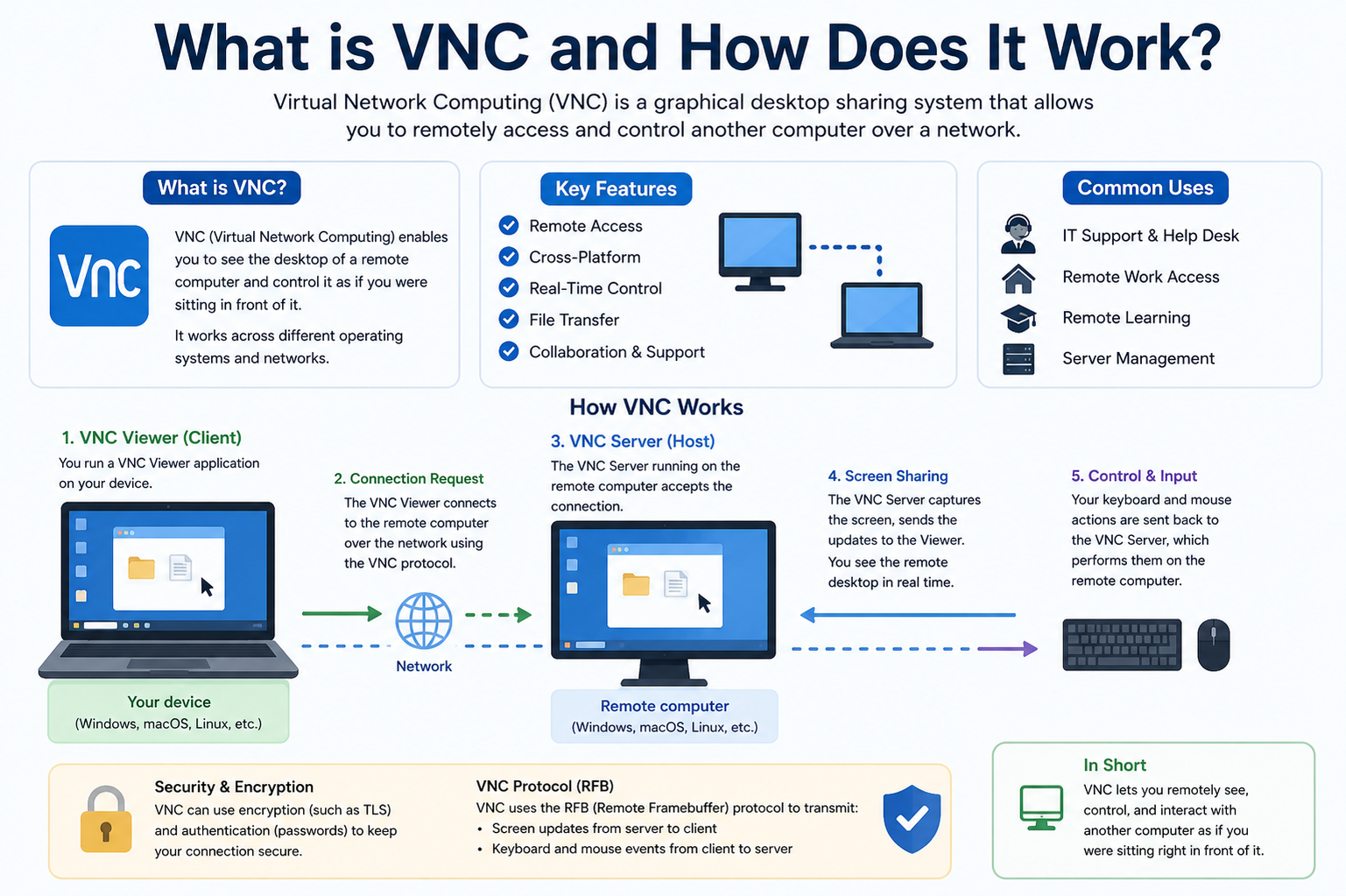
Virtual Network Computing (VNC) is a remote access technology designed to allow one computer to be controlled from another location through a network connection. It operates by transmitting the graphical desktop interface of a remote machine to a local device while simultaneously sending user inputs back to the remote system. This creates the experience of directly interacting with a distant computer as though it were physically present in front of the user. VNC is widely used in IT administration, remote technical support, cloud computing environments, and personal remote access scenarios because of its simplicity and cross-platform flexibility.
At its core, VNC is based on a graphical desktop sharing system that is independent of operating systems. This means a computer running one operating system can be accessed from another system running a completely different one. The system relies on a standard protocol that defines how screen updates and input events are transmitted between devices. This makes it highly adaptable and widely compatible across different computing environments.
Basic Architecture of VNC Systems
The architecture of VNC is built on a client-server model. In this structure, the server is installed on the machine that is being accessed remotely, and the client is installed on the device that is used to control it. The server is responsible for capturing the graphical output of the remote desktop, including windows, icons, cursor movements, and screen changes. The client receives this information and displays it to the user in real time.
In addition to screen sharing, the server also processes input signals sent by the client. These inputs include keyboard strokes, mouse movements, and clicks. Once received, the server applies these inputs to the operating system of the remote machine, effectively allowing the user to control it from a distance. This two-way communication ensures that interaction remains synchronized between both devices.
Core Components Involved in VNC Operation
A VNC system generally consists of several key components working together. The first is the VNC server, which runs on the remote computer and captures screen data. The second is the VNC client or viewer, which is used by the remote user to view and interact with the desktop. Between them lies the communication protocol, which defines how data is exchanged.
The server includes a screen capture mechanism that continuously monitors changes on the desktop. Instead of sending the entire screen repeatedly, it only transmits changes, which helps optimize network usage. The client interprets this data and reconstructs the visual interface for the user. Another important component is the input handler, which ensures that user actions are correctly translated into commands on the remote system.
How Virtual Network Computing Actually Works
When a VNC session begins, the client connects to the server over a network. This connection may occur over a local network or through the internet. Once the connection is established, the server begins sending graphical updates of the desktop to the client. These updates are broken into small data packets that represent screen changes rather than full images of the entire screen each time.
The client receives these updates and renders them on the user’s display. When the user moves the mouse, types on the keyboard, or performs any action, those inputs are sent back to the server. The server then applies these inputs to the remote machine, updating the desktop accordingly. This continuous loop of screen updates and input responses creates a real-time remote interaction experience.
Screen Encoding and Data Transmission Process
One of the most important aspects of VNC is how it handles screen data transmission. Since sending full-screen images continuously would require a large amount of bandwidth, VNC uses encoding techniques to reduce data size. It typically transmits only the parts of the screen that have changed.
Different encoding methods may be used depending on the system, such as raw encoding, compressed encoding, or more advanced techniques that optimize performance based on network speed. The goal is to balance image quality and transmission efficiency. This ensures that even on slower connections, users can still interact with the remote system, although with some potential delay or reduced image quality.
Role of the Remote Framebuffer Protocol
VNC is built on a protocol known as the Remote Framebuffer (RFB) protocol. This protocol defines how screen data, input events, and communication between client and server are structured. The framebuffer refers to the portion of memory that contains the graphical display output of a system.
The RFB protocol ensures that both client and server understand how to interpret screen updates and user actions. It also manages session initialization, authentication, and ongoing communication. Because of this standardized protocol, different VNC implementations can still communicate with each other effectively, as long as they follow the same rules.
Security Aspects in VNC Systems
Security plays an important role in VNC usage, especially when remote connections occur over the internet. Basic VNC connections may transmit data without strong encryption, which can expose sensitive information if not properly secured. To address this, many modern implementations include encryption layers or are used in combination with secure tunneling methods.
Authentication is also a critical part of VNC security. Before a connection is established, users must typically enter a password to gain access to the remote system. This helps prevent unauthorized access. However, security levels can vary depending on the configuration, so proper setup is important when using VNC in sensitive environments.
Performance Factors and Network Dependence
The performance of a VNC session depends heavily on network speed and latency. Since the system relies on continuous data transmission between client and server, slow networks can result in lag or delayed screen updates. High-speed networks provide a smoother and more responsive experience.
Another factor affecting performance is screen resolution and graphical complexity. Systems with high-resolution displays or rapidly changing visuals may require more bandwidth. VNC tries to manage this by optimizing screen updates, but limitations still exist depending on system resources and network conditions.
Common Use Cases of VNC Technology
VNC is widely used in various fields due to its flexibility and ease of use. In IT support, it allows technicians to remotely diagnose and fix problems on a user’s computer without being physically present. This reduces response time and improves efficiency.
In system administration, VNC enables administrators to manage servers and workstations remotely. This is especially useful in data centers or distributed environments where physical access may be limited.
It is also used in educational settings, where instructors can demonstrate software or guide students remotely. Additionally, individuals use VNC for personal access to their home or office computers while traveling or working remotely.
Advantages of Using VNC Systems
One of the main advantages of VNC is its platform independence. It can operate across different operating systems, making it highly versatile. Another advantage is its simplicity, as it does not require complex setup compared to some other remote access tools.
VNC also provides direct control of the remote desktop, allowing users to interact with applications exactly as they would locally. It is also useful in environments where graphical interface access is required rather than just command-line control.
Limitations and Challenges of VNC
Despite its advantages, VNC also has limitations. One of the main challenges is performance over slow networks, where lag can significantly affect usability. Another limitation is security, as improperly configured VNC systems may expose remote machines to unauthorized access.
Additionally, VNC may not be as efficient for high-performance tasks such as video streaming or gaming due to bandwidth constraints. It is primarily designed for administrative and support tasks rather than intensive graphical workloads.
Real-World Importance of VNC Technology
VNC continues to play an important role in modern computing environments. As remote work becomes more common, tools that allow secure and efficient remote access are increasingly valuable. VNC provides a straightforward solution for connecting to systems from different locations without requiring specialized hardware.
It is also widely used in enterprise environments where centralized management of multiple systems is required. By allowing administrators to access machines remotely, organizations can reduce downtime and improve operational efficiency.
Future Development of Remote Access Technologies Like VNC
As technology continues to evolve, remote access systems like VNC are also improving. Advances in compression techniques, encryption methods, and network optimization are making remote desktop connections faster and more secure.
Integration with cloud computing environments is also expanding the role of VNC, allowing users to access virtual machines and cloud-based desktops with ease. Future developments are likely to focus on improving performance, reducing latency, and enhancing security to meet growing demands for remote connectivity.
Advanced Working Mechanism of VNC Communication
In a deeper technical sense, Virtual Network Computing operates by continuously synchronizing the graphical state of a remote system with a local viewer. This synchronization is not based on transferring full video streams or static images repeatedly, but rather on tracking changes within the graphical interface. The server maintains a representation of the screen in memory, often referred to as a framebuffer, and monitors any modifications that occur within it. These modifications could include window movements, text updates, icon changes, or cursor activity.
Whenever a change is detected, the server calculates the affected region and encodes only that portion for transmission. This selective update mechanism is what makes VNC more efficient than naïve screen-sharing approaches. Instead of overwhelming the network with full-screen data, it focuses only on what has changed since the last update cycle. The client then reconstructs the updated screen by applying these incremental changes to its local display.
This continuous exchange of updates creates the illusion of a live connection to the remote desktop. However, what is actually happening is a stream of small graphical patches being sent back and forth between client and server, synchronized through a defined communication protocol.
Event Handling and User Interaction Flow
User interaction in a VNC session follows a structured event-processing pipeline. When a user moves the mouse, clicks a button, or presses a key, these actions are captured by the client software. Instead of being executed locally, they are packaged into event messages and transmitted to the remote server.
The server receives these input events and injects them into the operating system as if they originated from a physically connected input device. This means the remote system processes them in the same way it would handle direct user input. The result of these actions is immediately reflected in the graphical interface, which is then captured again and sent back to the client as updated screen data.
This loop of input capture, transmission, execution, and visual update continues repeatedly throughout the session. The speed of this loop determines how responsive the remote experience feels. Lower latency leads to smoother interaction, while higher latency can result in noticeable delays between action and response.
Data Compression and Optimization Techniques in VNC
Because VNC must transmit graphical data over a network, it relies heavily on compression techniques to reduce bandwidth usage. Different encoding strategies are used depending on the type of screen content and available network speed.
Simple regions with solid colors, such as background areas or static windows, can be compressed very efficiently. More complex regions, such as videos or animations, require more data and may use more advanced compression methods. Some VNC implementations dynamically adjust compression levels based on real-time network conditions, balancing performance and image quality.
Another optimization technique involves caching previously sent screen data. If a portion of the screen has not changed, it does not need to be retransmitted. Instead, the client reuses the existing image data already stored in memory. This significantly reduces unnecessary network traffic and improves overall efficiency.
Latency and Its Impact on Remote Desktop Experience
Latency is one of the most critical factors affecting VNC performance. It refers to the delay between a user’s action and the corresponding response on the remote system. Even small delays can become noticeable in remote desktop environments, especially during rapid interactions like typing or dragging windows.
Several factors contribute to latency, including network distance, congestion, bandwidth limitations, and processing speed on both client and server sides. Long-distance connections, such as those spanning different countries, naturally introduce higher latency due to the physical time required for data to travel across networks.
To mitigate latency effects, VNC systems attempt to predict and optimize screen updates. However, because VNC is inherently interactive, complete elimination of delay is not possible. The goal is to reduce it to a level where user interaction remains comfortable and functional.
Security Mechanisms and Authentication Layers
Security in VNC systems is implemented through multiple layers. The first layer is authentication, which ensures that only authorized users can access the remote system. This usually involves password verification before a session is established.
Beyond authentication, encryption plays a crucial role in protecting data during transmission. Without encryption, screen data and input events could potentially be intercepted by unauthorized parties. Many modern VNC systems incorporate secure communication channels to prevent such risks.
In more secure environments, VNC is often combined with tunneling technologies that create encrypted pathways between client and server. This ensures that even if data is intercepted, it cannot be easily interpreted. Security configuration is therefore a critical aspect of deploying VNC in professional or sensitive environments.
Differences Between VNC and Other Remote Access Methods
VNC differs from other remote access technologies in its approach to screen sharing and control. Some remote desktop solutions rely on protocol-level integration with the operating system, while VNC operates at the graphical framebuffer level. This makes VNC more universal but sometimes less optimized compared to native solutions.
Because it works at the display level, VNC can operate across different platforms without requiring deep system compatibility. However, this also means it may not take full advantage of system-specific optimizations that other technologies can use.
Another distinction is that VNC focuses purely on graphical desktop sharing, whereas some remote tools also provide file transfer, application streaming, or cloud-based virtualization features as integrated components.
Resource Consumption and System Load Considerations
Running a VNC server requires system resources, including CPU, memory, and network bandwidth. The server must continuously monitor screen changes, encode graphical data, and manage incoming input events. On heavily loaded systems, this can introduce additional overhead.
Similarly, the client must decode incoming data and render it in real time. While modern systems handle this efficiently, performance can still be affected when dealing with high-resolution displays or multiple simultaneous sessions.
Efficient configuration can help reduce system load. For example, limiting screen resolution or reducing color depth can significantly improve performance in low-bandwidth environments.
Use of VNC in Enterprise and Infrastructure Management
In large-scale IT environments, VNC is often used for centralized system management. Administrators can access multiple machines across a network without physically visiting each device. This is particularly useful in server farms, data centers, and distributed office environments.
VNC allows troubleshooting, software installation, configuration changes, and system monitoring to be performed remotely. This reduces operational costs and improves response times for technical issues. It also enables remote collaboration between teams located in different geographical regions.
However, in enterprise settings, VNC is usually implemented with strict security controls and network segmentation to ensure safe usage.
Evolution of VNC Technology Over Time
VNC has evolved significantly since its early development. Initial versions were relatively simple, focusing primarily on basic screen sharing. Over time, improvements in compression algorithms, encryption methods, and performance optimization have made VNC more practical for modern usage.
Modern implementations are more adaptive, capable of adjusting to different network conditions and system capabilities. Some versions integrate additional features such as clipboard sharing, file transfer support, and multi-session handling.
Despite these improvements, the fundamental principle of VNC remains unchanged: transmitting screen updates and user inputs between a client and server to enable remote desktop control.
Practical Limitations in Real-World Scenarios
While VNC is highly useful, it is not without practical limitations. High-resolution graphics, fast-moving content, and multimedia applications can strain network resources. This can result in reduced frame rates or visible lag.
Additionally, VNC may not perform well in environments with unstable or intermittent network connectivity. Since it relies on continuous communication, disruptions can temporarily freeze or disconnect sessions.
These limitations mean that VNC is best suited for administrative tasks, remote support, and general system control rather than high-performance multimedia or gaming applications.
Significance of VNC in Modern Computing Infrastructure
Despite its limitations, VNC remains an important tool in modern computing due to its simplicity, flexibility, and wide compatibility. It bridges the gap between physical and remote computing environments, allowing users to access systems from virtually anywhere.
Its continued relevance is driven by the increasing demand for remote work solutions, cloud-based computing, and distributed IT management. As technology continues to evolve, VNC remains a foundational concept in the broader field of remote desktop systems, influencing the design of newer and more advanced solutions.
Performance Optimization Strategies in VNC Systems
Improving performance in Virtual Network Computing environments involves a combination of network optimization, encoding efficiency, and system configuration adjustments. Since VNC depends heavily on real-time transmission of graphical data, even small improvements in optimization can significantly enhance user experience. One of the primary strategies is reducing the amount of data that needs to be transmitted. This is achieved by limiting screen resolution, decreasing color depth, or disabling unnecessary visual effects on the remote system.
Another important optimization approach is the use of adaptive encoding. In this method, the VNC server dynamically selects the most efficient encoding type based on current network conditions. When bandwidth is high, higher-quality encoding can be used to improve visual clarity. When bandwidth is limited, more aggressive compression is applied to reduce data size and maintain responsiveness.
Caching mechanisms also play a major role in optimization. Frequently used screen elements, such as static backgrounds or unchanged application windows, are stored temporarily so they do not need to be retransmitted repeatedly. This reduces redundant data transfer and helps maintain smoother interaction over time.
Bandwidth Usage and Network Efficiency in VNC
Bandwidth consumption is a critical factor in VNC performance because the system constantly transmits screen updates and input events. Unlike traditional file transfers, VNC requires continuous two-way communication, which can increase network load significantly. However, modern implementations are designed to minimize unnecessary usage through selective updates and compression techniques.
Only the portions of the screen that change are transmitted, rather than the entire display. This selective updating method significantly reduces bandwidth requirements, especially in environments where screen activity is low. For example, when a user is reading a static document or viewing an unchanged desktop, very little data is transmitted.
Network efficiency is further improved by prioritizing input responsiveness over visual fidelity when necessary. In low-bandwidth scenarios, VNC may reduce image quality slightly to ensure that user actions remain responsive and lag-free.
Graphical Rendering Process on the Client Side
On the client side, rendering is the process of reconstructing the remote desktop based on incoming data. The client receives encoded screen updates from the server and decodes them into visual elements that are displayed on the user’s screen. This process must occur in near real time to maintain the illusion of direct interaction with the remote machine.
The rendering engine continuously updates only the affected portions of the display, rather than redrawing the entire screen. This partial rendering approach reduces computational overhead and improves efficiency. Modern clients are optimized to handle high refresh rates, ensuring smoother visual transitions even during rapid screen changes.
Additionally, client-side buffering helps manage network jitter. By temporarily storing incoming updates, the client can smooth out minor delays and maintain a more stable visual experience.
Input Synchronization Between Client and Server
Input synchronization is a key element in maintaining consistency between the user’s actions and the remote system’s response. Every action performed by the user on the client device is captured as an event and transmitted to the server in a structured format.
These events include mouse movements, clicks, keyboard inputs, and sometimes more advanced interactions like clipboard operations. The server processes these events in the order they are received to ensure accurate execution. Once processed, the resulting changes in the system state are reflected in the screen updates sent back to the client.
Maintaining synchronization requires careful timing management. If input events are delayed or processed out of order, the user experience can become inconsistent or confusing. Therefore, VNC systems prioritize sequential processing of events to maintain accuracy.
Security Risks and Vulnerabilities in VNC Usage
Although VNC is widely used, it can present security risks if not properly configured. One of the main vulnerabilities arises from unencrypted connections, which can expose screen data and input events to interception. Without encryption, sensitive information displayed on the remote screen could potentially be captured by unauthorized parties.
Another risk involves weak authentication mechanisms. If passwords are not strong enough or if default credentials are used, attackers may gain unauthorized access to remote systems. This can lead to data exposure or system compromise.
To mitigate these risks, modern VNC deployments often use encrypted tunnels or secure authentication layers. Proper network configuration, firewall rules, and access control policies are also essential in maintaining a secure environment.
Role of Compression Algorithms in Reducing Latency
Compression algorithms are essential in minimizing latency in VNC systems. By reducing the size of transmitted data, compression allows screen updates to travel more quickly across the network. Different algorithms are used depending on the type of content being transmitted.
For example, static images or text-heavy screens can be compressed very efficiently using lossless techniques, while dynamic content may require more complex methods that balance speed and quality. Some systems even apply hybrid compression strategies that adapt in real time to changing screen conditions.
Effective compression reduces both bandwidth usage and transmission time, which directly improves responsiveness in remote sessions.
Multi-Session Handling and Concurrent Access
Some advanced VNC implementations support multiple simultaneous sessions, allowing more than one user to access or view a remote system at the same time. This feature is particularly useful in collaborative environments, technical training, and system monitoring scenarios.
In multi-session setups, the server must manage multiple input streams and ensure that actions from different users do not conflict. This requires careful session isolation or coordination depending on the system configuration.
Each session may have its own display view, input control permissions, or access restrictions. Proper management ensures that system stability and security are maintained even under concurrent usage.
Clipboard Sharing and Data Transfer Capabilities
Many VNC systems include clipboard synchronization features, allowing users to copy and paste text or data between the local and remote machines. This enhances productivity by simplifying data exchange during remote sessions.
When clipboard sharing is enabled, data copied on one system is transmitted to the other through the VNC connection. This process is handled securely and often includes format conversion to ensure compatibility between different operating systems.
Some implementations also support limited file transfer capabilities, although this is not a core function of basic VNC systems. These additional features extend the usefulness of VNC beyond simple screen sharing.
Impact of Display Resolution and Color Depth
Display resolution and color depth have a direct impact on VNC performance. Higher resolutions result in more screen data being processed and transmitted, which increases bandwidth usage and can affect responsiveness. Similarly, higher color depth improves visual quality but requires more data per update.
To optimize performance, VNC systems often allow users to adjust these settings based on their needs. Reducing resolution or color depth can significantly improve speed in low-bandwidth environments, while higher settings can be used when network conditions allow.
This flexibility allows users to balance performance and visual quality depending on the specific use case.
Real-Time Synchronization Challenges in Remote Environments
Maintaining real-time synchronization between client and server is one of the most challenging aspects of VNC. Network delays, packet loss, and processing bottlenecks can all disrupt the smooth flow of data.
When synchronization is affected, users may experience lag, screen flickering, or temporary freezing. To address this, VNC systems implement error correction mechanisms and data retransmission strategies. These help ensure that lost or corrupted data is recovered and the session remains stable.
Despite these mechanisms, perfect real-time performance is difficult to achieve over long distances or unstable networks.
Importance of VNC in Distributed Work Environments
VNC plays a significant role in modern distributed work environments where teams operate from multiple locations. It enables centralized access to systems, allowing employees and administrators to work remotely without needing physical proximity to hardware.
This capability is especially valuable in organizations with global infrastructure, where systems must be managed across different time zones and regions. VNC provides a simple and direct way to interact with these systems without requiring complex setup or specialized hardware.
Its ability to bridge geographical gaps makes it an important tool in modern digital workflows.
Long-Term Relevance of VNC in Evolving Technology Landscapes
Even as newer remote access technologies emerge, VNC continues to remain relevant due to its simplicity and broad compatibility. It serves as a foundational technology that has influenced many modern remote desktop solutions.
Its lightweight structure, platform independence, and ease of deployment ensure that it remains useful in a variety of scenarios. While more advanced systems may offer additional features or better performance, VNC’s core concept remains widely applicable and reliable.
As computing environments continue to shift toward cloud-based and hybrid models, VNC is likely to maintain its role as a fundamental tool for remote access and system management.
Troubleshooting Common Issues in VNC Connections
VNC systems, while generally stable, can sometimes experience technical issues that affect usability. One of the most common problems is connection failure, where the client is unable to reach the remote server. This can occur due to incorrect network configuration, blocked ports, or firewall restrictions preventing communication between devices. In such cases, verifying network accessibility and ensuring proper port forwarding is essential.
Another frequent issue is slow performance or high latency during a session. This is usually related to limited bandwidth, high network congestion, or excessive screen resolution on the remote system. Reducing graphical complexity or adjusting compression settings often helps improve responsiveness.
Screen display glitches, such as incomplete rendering or flickering, may occur when data packets are lost or arrive out of order. These issues are typically resolved through retransmission mechanisms built into the protocol, but unstable networks can still cause temporary visual inconsistencies.
Firewall and Network Configuration Considerations
Proper network configuration is essential for VNC to function correctly. Since VNC operates over specific communication ports, those ports must be open and accessible on both the client and server sides. Firewalls, whether on local systems or network gateways, can block these ports and prevent successful connections.
In secure environments, administrators often configure exceptions to allow VNC traffic while still maintaining overall network protection. This requires careful balancing between accessibility and security. Network address translation (NAT) settings can also affect connectivity, especially when accessing systems across different networks or the internet.
To ensure stable operation, consistent network routing and properly configured access rules are necessary. Without these, even a properly installed VNC system may fail to establish reliable connections.
Role of Authentication Protocols in Access Control
Authentication in VNC systems is responsible for verifying the identity of users before granting access to a remote machine. This process typically involves password-based verification, but more advanced systems may include multi-factor authentication or integration with centralized identity management systems.
Strong authentication mechanisms are essential to prevent unauthorized access. Weak or reused passwords significantly increase security risks, especially when systems are exposed over public or shared networks. Once authentication is successful, the session is established and encrypted communication may begin depending on configuration.
Access control policies may also restrict which users can connect to specific systems or what level of control they are granted during a session.
Encryption Methods Used in Modern VNC Implementations
Encryption is a critical component in modern VNC deployments, especially when remote access occurs over unsecured networks. Encryption ensures that screen data, input events, and session information are protected from interception or unauthorized viewing.
Data is typically encrypted during transmission between client and server, making it unreadable to third parties even if intercepted. This protects sensitive information such as passwords, documents, and system activity displayed on the remote screen.
Some VNC implementations rely on external encryption layers, such as secure tunneling protocols, while others integrate encryption directly into the communication protocol. The level of security depends on how the system is configured and the version being used.
Session Management and Connection Stability
Session management in VNC involves maintaining an active and stable connection between the client and server throughout the duration of use. If the connection is interrupted due to network instability, some systems allow reconnection without losing session state, while others may terminate the session entirely.
Persistent session support is particularly useful in environments where temporary network interruptions are common. It ensures that users can resume their work without losing progress. However, not all configurations support this feature, and its availability depends on the specific implementation.
Stability also depends on how efficiently the system handles data synchronization and error recovery. Robust session management improves reliability and reduces the impact of unexpected disconnections.
Graphical Performance Challenges in High-Resolution Environments
High-resolution displays present unique challenges for VNC systems. As resolution increases, the amount of graphical data that must be captured, encoded, and transmitted also increases. This can place significant strain on both network bandwidth and system processing resources.
Large screen areas require more frequent updates and larger data packets, which can slow down performance in limited network conditions. Similarly, high-resolution interfaces with complex graphics or animations require more intensive encoding and decoding processes.
To address this, VNC systems often allow resolution scaling or selective region updates, helping balance performance with visual clarity.
Impact of Real-Time Applications on VNC Efficiency
Real-time applications such as video playback, interactive graphics, or fast-moving interfaces can significantly affect VNC performance. These applications generate continuous screen changes, which require frequent updates from the server to the client.
Since VNC was primarily designed for desktop interaction rather than multimedia streaming, handling such content can lead to increased latency and reduced frame rates. The system may struggle to maintain smooth playback because it prioritizes input responsiveness and screen synchronization over high frame-rate rendering.
In such scenarios, performance depends heavily on network speed and system optimization. Even with advanced compression, real-time graphical workloads remain one of the most demanding use cases for VNC.
Clipboard Synchronization and Data Exchange Behavior
Clipboard synchronization is a useful feature in VNC that allows users to transfer text and simple data between local and remote systems. When a user copies content on one machine, it is transmitted through the VNC connection and becomes available on the other system.
This functionality improves productivity by enabling quick data exchange without requiring additional file transfer tools. However, clipboard synchronization may be limited to basic data types such as text or simple formatting. Larger or more complex data structures may not always be supported.
Security considerations are important here as well, since clipboard data may contain sensitive information. Proper encryption ensures that this data is protected during transmission.
Compatibility Across Operating Systems and Platforms
One of the strengths of VNC is its cross-platform compatibility. It can operate across different operating systems without requiring significant modifications. This is because it functions at the graphical display level rather than relying on system-specific features.
As a result, a system running one operating system can be accessed from a completely different one without compatibility issues. This makes VNC highly useful in heterogeneous computing environments where multiple platforms coexist.
However, minor differences in performance or behavior may still exist depending on how each operating system handles graphical rendering and input processing.
Resource Allocation and System Efficiency
Efficient resource allocation is important for maintaining smooth VNC performance. The server must manage CPU usage for screen capture and encoding, memory usage for buffering screen data, and network usage for transmission. If any of these resources become overloaded, performance may degrade.
Similarly, the client must allocate resources for decoding and rendering incoming data. Modern systems are generally capable of handling this efficiently, but performance can still vary depending on hardware specifications and system load.
Optimizing resource usage ensures that VNC sessions remain responsive even under demanding conditions.
Use of VNC in Remote Learning and Collaboration
VNC is widely used in educational and collaborative environments where remote access to shared systems is required. Instructors can demonstrate software applications, guide students through technical tasks, or provide real-time assistance from a distance.
Collaborative workflows also benefit from VNC by allowing multiple users to view or interact with the same system. This enables shared problem-solving and interactive training sessions without requiring physical presence in the same location.
Its simplicity and direct control model make it suitable for instructional purposes and hands-on learning environments.
Limitations in Multimedia and High-Performance Tasks
Despite its versatility, VNC is not optimized for high-performance multimedia tasks. Activities such as gaming, video editing, or high-frame-rate video streaming often exceed the capabilities of traditional VNC systems.
The primary limitation arises from continuous screen encoding and network transmission, which cannot match the efficiency of dedicated streaming technologies. As a result, users may experience lag, reduced frame rates, or visual artifacts during such tasks.
For this reason, VNC is generally recommended for administrative, educational, and support-related tasks rather than intensive graphical workloads.
Overall Role of VNC in Modern Remote Computing Ecosystems
VNC remains a foundational technology in remote computing due to its simplicity, flexibility, and broad compatibility. It provides a direct and straightforward method for accessing and controlling remote systems, making it valuable in both personal and professional contexts.
Even as more advanced remote access solutions emerge, the core principles of VNC continue to influence modern technologies. Its ability to operate across platforms and environments ensures that it remains a relevant tool in evolving digital infrastructures.
Conclusion
Virtual Network Computing is a practical and widely used technology that enables remote access and control of computers over a network by sharing the graphical desktop environment in real time. It works through a simple yet powerful client-server model where the server captures screen updates and the client displays them while sending back user inputs. This continuous exchange of visual data and control signals creates the experience of operating a distant system as if it were physically present.
Although VNC is not the most advanced remote desktop solution in terms of speed or multimedia performance, its strength lies in its simplicity, compatibility, and accessibility. It works across different operating systems and can function in a variety of network environments, making it useful for system administration, technical support, education, and remote work.
At the same time, VNC has limitations such as dependency on network quality, potential security risks if not properly configured, and reduced performance in high-graphics or real-time applications. However, with proper setup, including encryption, authentication, and optimization techniques, these challenges can be significantly reduced.
Overall, Virtual Network Computing remains an important and reliable tool in modern computing. It continues to support remote collaboration and system management needs while adapting to evolving technologies and network infrastructures.