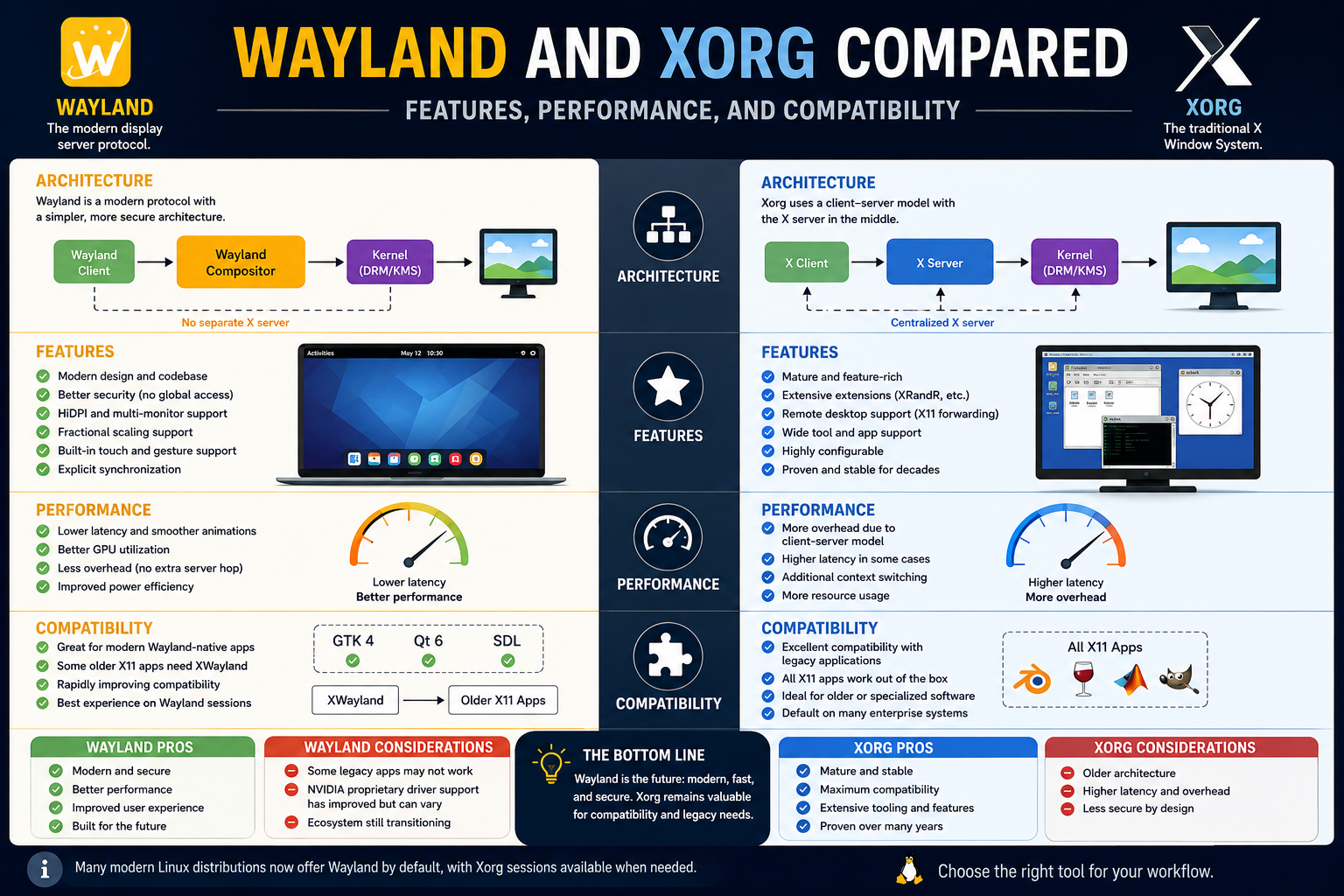
Every graphical interface on a Linux system depends on a display server working behind the scenes. Whenever a user opens an application, moves a window, types on a keyboard, watches a video, or plays a game, the display server helps coordinate those actions visually on the screen. Although many users never think about this layer of the operating system, it plays one of the most important roles in desktop computing.
For decades, Linux and Unix-like operating systems relied on the X Window System, commonly known as X11. The most widely used implementation of X11 became Xorg, which served as the standard graphical environment for Linux distributions across the world. Xorg allowed desktop environments, applications, and window managers to function together in a stable and flexible ecosystem.
As technology evolved, however, the limitations of Xorg became more visible. Modern computing requires smoother graphics, better security, improved gaming support, reduced latency, efficient multi-monitor handling, touchscreen compatibility, and advanced GPU acceleration. Developers began realizing that the original architecture of X11 was becoming increasingly difficult to adapt to modern requirements.
Wayland emerged as a response to these concerns. Instead of continuously patching an aging graphical system, developers created Wayland to provide a cleaner, simpler, and more efficient approach to graphical rendering on Linux systems. Over time, the discussion around Wayland and Xorg became one of the biggest debates in the Linux world.
Some users see Wayland as the future of Linux desktops, while others continue relying on Xorg because of its compatibility and maturity. Both technologies remain important today, and understanding their differences helps explain why Linux graphical systems continue evolving.
The Origins of the X Window System
To understand the Wayland versus Xorg debate, it is important to first understand how X11 became the standard graphical framework for Linux and Unix systems.
The X Window System was originally developed during the 1980s at a time when computing environments were very different from modern desktops. Networking and remote computing played a major role in system design. Many organizations operated large centralized computers that multiple users accessed remotely through terminals.
X11 was designed with this environment in mind. One of its most important features was network transparency. Applications could run on one computer while displaying their graphical interface on another machine across a network connection.
This architecture was revolutionary for its time because it separated applications from the display hardware. Instead of applications drawing directly to the screen, they communicated with a display server that managed rendering and user interaction.
As Unix and Linux systems became more popular, X11 gradually became the standard graphical foundation across countless distributions and desktop environments.
Over time, Xorg emerged as the leading open-source implementation of the X Window System. Most Linux users today associate X11 directly with Xorg because it became deeply integrated into Linux desktop computing for decades.
How Xorg Works
Xorg operates using a client-server model. In this architecture, applications act as clients while the X server manages communication between software and hardware.
When a user launches an application, the application sends graphical instructions to the X server. The server processes those instructions and coordinates how windows appear on the display. Keyboard input, mouse movements, and other interactions also pass through the X server before reaching applications.
This approach allows applications and graphical environments to remain separate from the hardware itself. Developers can create desktop environments and graphical software without needing direct access to the display hardware.
One of the reasons Xorg remained successful for so long was its flexibility. The system supported a wide range of hardware devices, desktop environments, and graphical applications.
As Linux desktops evolved, compositing window managers became increasingly common. Compositors introduced visual improvements such as shadows, transparency effects, animations, and smoother rendering.
Instead of directly drawing windows to the display, compositors used off-screen buffers to prepare graphical content before displaying it on the monitor. While this improved visual quality, it also introduced additional layers into the graphical pipeline.
Applications communicated with the X server.
The X server communicated with the compositor.
The compositor communicated with the display hardware.
Although functional, this workflow became increasingly complex over time.
Why Xorg Became the Linux Standard
Xorg dominated Linux desktop environments for many years because it offered stability, compatibility, and flexibility.
One of its biggest strengths was maturity. Developers spent decades improving Xorg and creating software designed specifically around X11 behavior. This created an enormous ecosystem of compatible applications and desktop environments.
Popular Linux desktop environments such as GNOME, KDE Plasma, XFCE, Cinnamon, and MATE were all originally built around Xorg.
Hardware compatibility also played a major role in Xorg’s success. Graphics vendors such as NVIDIA, AMD, and Intel focused heavily on supporting X11 because it was the industry standard across Linux systems.
For many years, Xorg also provided better support for gaming and graphically intensive applications. Professional software used for engineering, scientific computing, media production, and virtualization often relied on technologies deeply integrated into the X11 ecosystem.
Remote graphical sessions represented another major advantage.
Since X11 was designed with networking in mind, users could launch applications remotely while displaying them locally. This feature became especially useful in enterprise environments and server administration.
Another reason Xorg remained dominant involved user familiarity. Linux administrators and developers built workflows around X11 for decades. Stable systems running Xorg often continued functioning reliably without requiring major changes.
Replacing such a deeply established technology required significant effort and coordination across the Linux ecosystem.
The Growing Problems with Xorg
Despite its strengths, Xorg gradually began showing its age as desktop computing evolved.
One major issue involved architectural complexity. X11 was originally designed during an era when modern graphical computing features did not exist. Over time, developers repeatedly extended and modified the system to support new technologies.
This created an increasingly bloated codebase.
Modern Linux desktops require support for advanced graphical features including:
- High-resolution displays
- Mixed refresh rate monitors
- GPU acceleration
- Smooth animations
- Touchscreen support
- Advanced gaming technologies
- Multiple monitor configurations
- Modern power management features
Supporting all these technologies through Xorg became increasingly difficult.
Security also emerged as a major concern.
The X11 architecture assumes applications can generally trust one another. This design made sense decades ago but conflicts with modern security expectations.
Under Xorg, applications may potentially monitor or interfere with other applications running on the system. Malicious software could theoretically capture keyboard input, observe user actions, or access graphical information from other windows.
Modern operating systems increasingly prioritize application isolation and sandboxing, making Xorg’s permissive security model appear outdated.
Performance and latency became additional concerns.
Because graphical instructions pass through multiple layers before reaching the display, delays can occur during rendering. These delays become more noticeable in gaming, animation-heavy workloads, and high-refresh-rate environments.
Screen tearing also became a common issue for many Linux users running Xorg.
Without proper synchronization between rendering and display output, portions of multiple frames may appear simultaneously on the screen. Although compositors attempted to solve these problems, the fixes often added even more complexity to the graphical stack.
Developers eventually began questioning whether continuing to maintain Xorg indefinitely remained practical.
The Creation of Wayland
Wayland was introduced as a modern replacement for the X Window System.
Instead of attempting to continuously patch and extend X11, developers behind Wayland decided to redesign the Linux graphical stack from the ground up.
The primary goal of Wayland was simplification.
Developers wanted to eliminate unnecessary layers, reduce latency, improve security, and create a graphical architecture better suited for modern hardware and desktop environments.
Unlike Xorg, Wayland is not a traditional display server. Instead, it is a communication protocol that defines how compositors and applications interact.
In the Wayland model, the compositor handles many responsibilities traditionally managed separately under X11.
Applications render their own graphical content directly.
The compositor then combines those rendered windows into the final image displayed on the screen.
This removes several layers found in the traditional Xorg workflow.
Applications no longer need to communicate through a separate X server before reaching the compositor.
The result is a cleaner and more efficient rendering process.
How Wayland Changes the Rendering Process
One of the most important differences between Wayland and Xorg involves how graphical rendering works.
Under Xorg, applications send rendering requests to the X server. The X server processes those requests before passing information to the compositor.
Under Wayland, applications render their own content and send completed graphical buffers directly to the compositor.
This significantly reduces communication overhead.
Because applications already know what they need to display, they can render content more efficiently without relying on an intermediary server.
The compositor becomes the central component managing the display environment.
Wayland compositors often function as:
- Display servers
- Window managers
- Compositors
- Input managers
This consolidation simplifies the Linux graphical stack considerably.
The reduced complexity also improves synchronization between rendering and display refresh cycles, helping reduce screen tearing and improve animation smoothness.
Modern desktop environments increasingly benefit from these improvements, especially on systems with high refresh rates and advanced graphics hardware.
Security Improvements in Wayland
Security represents one of Wayland’s biggest advantages over Xorg.
Unlike X11, Wayland isolates applications more effectively.
Applications generally cannot observe input events or graphical content from other applications unless explicitly permitted. This significantly reduces opportunities for keylogging or unauthorized screen capture.
Modern Linux systems increasingly prioritize sandboxed applications through technologies such as Flatpak and containerized environments.
Wayland aligns naturally with these security goals because it limits unnecessary communication between applications.
This creates a safer desktop environment for users.
Screen sharing and remote desktop applications still work under Wayland, but they typically require explicit user permission through secure desktop portals.
Although this sometimes introduces compatibility challenges, it reflects modern security principles much better than the older X11 trust-based model.
Wayland’s Focus on Modern Hardware
Wayland was designed specifically for modern graphical computing environments.
Unlike Xorg, which evolved gradually over decades, Wayland was created with contemporary GPU acceleration and desktop requirements in mind from the beginning.
Modern Linux users expect:
- Smooth animations
- Efficient GPU rendering
- Responsive touchpad gestures
- Multi-touch support
- Variable refresh rate handling
- High-DPI scaling
- Better power efficiency
- Reduced graphical latency
Wayland aims to support these technologies more naturally than Xorg.
The simplified rendering pipeline reduces unnecessary overhead and helps improve overall responsiveness.
This is particularly noticeable on newer hardware with advanced GPUs and high-refresh-rate displays.
Desktop environments such as GNOME and KDE Plasma increasingly optimize their Wayland sessions because developers view Wayland as the long-term future of Linux graphical systems.
The Debate Between Wayland and Xorg
Despite Wayland’s advantages, the transition away from Xorg has been gradual.
Many Linux users continue relying on Xorg because of compatibility concerns.
Older applications, proprietary software, remote desktop tools, and specialized graphical utilities sometimes behave more reliably under X11. Some workflows built around Xorg also depend on features not yet fully replicated under Wayland.
Gaming represented another major challenge for many years.
Historically, NVIDIA’s Linux drivers worked much better with Xorg than with Wayland. Since many Linux gamers relied on NVIDIA hardware, this limited Wayland adoption.
Over time, however, NVIDIA significantly improved Wayland support through newer Linux drivers.
Modern Wayland gaming performance has improved dramatically, reducing one of the biggest barriers to adoption.
Still, some users continue preferring Xorg because of familiarity and stability.
Linux administrators who built workflows around X11 over many years may hesitate to switch unless Wayland offers clear practical benefits for their specific use cases.
This ongoing coexistence explains why many Linux distributions still provide both Wayland and Xorg sessions.
Wayland Performance Compared to Xorg
One of the biggest reasons Wayland gained attention within the Linux community is performance. Developers designed Wayland specifically to streamline the graphical rendering process and remove unnecessary complexity that existed within the traditional X11 architecture.
Under Xorg, applications communicate with the X server before graphical information reaches the compositor. This multi-layer workflow introduces additional overhead and increases the amount of communication required before content appears on the screen.
Wayland simplifies this process significantly.
Applications render their own graphical content and send completed buffers directly to the compositor. The compositor then combines those buffers into the final display image. Fewer steps mean fewer opportunities for latency and synchronization problems.
For many users, this results in a desktop environment that feels smoother and more responsive.
Animations often appear cleaner under Wayland. Window transitions may feel faster, scrolling can become more fluid, and touchpad gestures generally behave more naturally. Users running high-refresh-rate monitors frequently notice improvements because Wayland handles synchronization between rendering and display refresh cycles more effectively.
Screen tearing is another area where Wayland demonstrates advantages.
Under Xorg, tearing can occur when multiple frames appear on the display simultaneously due to synchronization issues. While compositors and additional configuration settings can reduce tearing under X11, Wayland addresses the problem more directly through its rendering model.
The result is often a smoother visual experience.
Performance differences become especially noticeable on systems using multiple monitors with different refresh rates. Xorg has historically struggled with mixed-refresh-rate environments because the entire display pipeline often synchronizes around a single refresh timing.
Wayland compositors generally handle mixed refresh rates more efficiently.
This allows users to run one monitor at a high refresh rate while another operates at a lower rate without introducing major synchronization problems.
Battery efficiency may also improve under Wayland on certain laptops. Reduced overhead and improved rendering efficiency can help lower unnecessary GPU usage, potentially improving power consumption.
However, performance comparisons are not always straightforward.
Different desktop environments, hardware configurations, graphics drivers, and workloads all influence real-world results. Some users may notice dramatic improvements under Wayland, while others experience only minor differences.
Gaming on Wayland vs. Xorg
Gaming has been one of the most heavily debated areas in the Wayland versus Xorg discussion.
For many years, Xorg remained the preferred choice for Linux gaming. Most game engines, graphics drivers, and Linux gaming tools were originally designed around X11 behavior. As a result, Xorg often provided better compatibility and more predictable performance for gamers.
One of the largest challenges facing Wayland involved NVIDIA graphics support.
Historically, NVIDIA’s Linux drivers integrated much more effectively with Xorg than with Wayland compositors. This created significant compatibility issues for users running NVIDIA GPUs.
Since a large portion of Linux gamers rely on NVIDIA hardware, this limited Wayland adoption considerably.
Games running under Wayland sometimes experienced:
- Stuttering
- Input lag
- Compatibility problems
- Frame pacing inconsistencies
- Display synchronization issues
Over time, however, NVIDIA improved Wayland support substantially.
Modern Linux drivers now work far better with Wayland compositors, and gaming performance under Wayland has improved dramatically across many Linux distributions.
Desktop environments such as GNOME and KDE Plasma continue optimizing their Wayland sessions specifically for gaming workloads.
Many modern games now perform similarly under both Xorg and Wayland.
In some situations, Wayland may even provide smoother frame delivery because of improved synchronization handling.
Gaming technologies such as Vulkan also align well with Wayland’s modern architecture. Since Vulkan gives applications more direct control over rendering behavior, it complements Wayland’s streamlined graphical model effectively.
Despite these improvements, some gamers still prefer Xorg.
Older games and legacy Linux gaming tools occasionally behave more consistently under X11. Certain overlays, capture utilities, or compatibility layers may still experience issues under Wayland depending on the desktop environment and compositor being used.
Competitive gamers sometimes remain cautious about switching because even small differences in latency or compatibility can influence their experience.
As Wayland development continues, however, gaming support improves steadily.
Wayland and Modern Desktop Environments
Wayland adoption accelerated significantly once major desktop environments began supporting it more aggressively.
GNOME became one of the earliest major desktop environments to fully embrace Wayland. Developers behind GNOME viewed Wayland as the future of Linux graphical systems and worked extensively to improve compatibility and stability.
Many Linux distributions eventually made Wayland the default session for GNOME desktops.
Fedora played a major role in this transition by adopting Wayland as the default graphical session several years ago. Because Fedora often acts as a testing ground for newer Linux technologies, its support helped accelerate Wayland development across the broader Linux ecosystem.
Ubuntu also shifted toward Wayland in later releases.
Although Ubuntu temporarily reverted to Xorg during earlier compatibility concerns, newer versions increasingly prioritize Wayland sessions by default.
KDE Plasma also made substantial progress with Wayland support.
Historically, KDE’s Wayland implementation lagged behind GNOME in terms of stability and maturity. Over time, however, KDE developers significantly improved Wayland functionality, making Plasma Wayland sessions increasingly viable for everyday use.
Today, many Linux users successfully run KDE Plasma on Wayland full time.
Other desktop environments continue making progress as well.
Compositors and window managers such as Sway, Hyprland, and Wayfire embrace Wayland natively and provide highly customizable experiences for advanced users.
These projects demonstrate how Wayland enables entirely new approaches to Linux desktop design.
Why Some Applications Still Prefer Xorg
Despite Wayland’s growth, many applications continue relying heavily on X11 compatibility.
This remains one of the biggest reasons Xorg still exists alongside Wayland today.
Older Linux software was often designed specifically around X11 behavior. Rewriting complex applications for Wayland compatibility requires significant development effort, especially for large legacy codebases.
Some applications depend on capabilities historically available under Xorg, including:
- Global input monitoring
- Window manipulation APIs
- Direct screen capture access
- Legacy remote display methods
- Advanced scripting integrations
Wayland intentionally restricts many of these behaviors for security and architectural reasons.
As a result, developers sometimes need entirely different approaches when adapting applications for Wayland environments.
Screen recording and screen sharing tools initially struggled under Wayland because applications could no longer capture display content freely without permission.
Modern desktop portal systems eventually improved this situation, but compatibility challenges still occasionally appear.
Remote desktop software also required significant adaptation.
Under X11, remote graphical sessions integrated naturally into the architecture because network transparency existed from the beginning. Wayland approaches remote access differently, often relying on newer protocols and compositor-specific implementations.
Some professional workflows continue relying on X11 because existing tools function reliably and administrators may not see immediate benefits from switching.
XWayland and Compatibility Layers
One of the most important technologies helping the Linux ecosystem transition toward Wayland is XWayland.
XWayland acts as a compatibility layer that allows traditional X11 applications to run within Wayland sessions.
Instead of requiring every application to immediately support Wayland natively, XWayland translates X11 behavior into a form compatible with Wayland compositors.
This solution greatly simplified the migration process.
Without XWayland, many Linux users would have faced severe compatibility issues during the transition away from Xorg.
Today, countless applications still run through XWayland even when users log into a Wayland session.
In many cases, users may not even realize an application is using XWayland behind the scenes.
Performance under XWayland is often quite good, although native Wayland applications generally provide better integration and smoother behavior.
Over time, more applications continue adding native Wayland support, reducing reliance on compatibility layers.
Even so, XWayland remains an essential bridge between older Linux software and the future of Wayland-based desktops.
Security Differences Between Wayland and Xorg
Security represents one of the strongest arguments in favor of Wayland.
The X11 security model was created during an era when desktop security threats looked very different from modern computing environments. As a result, Xorg generally assumes applications can trust one another.
This creates several security concerns.
Applications running under X11 may potentially observe user input events occurring in other applications. Malicious software could theoretically monitor keystrokes, capture screenshots, or interfere with graphical activity across the desktop environment.
Modern operating systems increasingly prioritize isolation between applications.
Wayland addresses this issue directly.
Applications running under Wayland generally cannot observe or interfere with other applications unless explicit permission is granted. Input events remain isolated, and screen capture functionality typically requires secure permission handling through desktop portals.
This creates a far more secure environment overall.
Wayland’s design aligns naturally with modern sandboxing technologies such as Flatpak containers.
As Linux distributions continue emphasizing application isolation and privacy protections, Wayland’s security advantages become increasingly important.
For many developers, improved security alone justifies transitioning away from Xorg.
Wayland and Multi-Monitor Support
Multi-monitor setups have become extremely common among modern Linux users.
Developers, content creators, gamers, and office users frequently rely on multiple displays with varying resolutions and refresh rates.
Historically, Xorg struggled with certain multi-monitor configurations.
Mixed-DPI environments could create scaling inconsistencies. Running monitors at different refresh rates sometimes caused synchronization problems. High-resolution displays occasionally introduced additional complexity.
Wayland improves many of these areas.
Because compositors have more direct control over rendering behavior, they can manage display scaling and synchronization more effectively.
Modern Wayland compositors often provide smoother experiences for:
- High-DPI displays
- Fractional scaling
- Mixed refresh rates
- Multi-monitor arrangements
- Dynamic display reconfiguration
This is particularly noticeable on laptops connected to external monitors.
Users frequently report smoother scaling behavior and fewer graphical glitches under Wayland compared to Xorg.
Wayland’s modern architecture also simplifies support for emerging display technologies, helping Linux desktop environments adapt more effectively to future hardware advancements.
Wayland and Touchscreen Support
Touchscreen devices became increasingly popular during the last decade, especially among laptop and tablet users.
The original X11 architecture was never designed specifically for touch-based interaction. While developers added support over time, integrating modern touch functionality into Xorg often felt complicated and inconsistent.
Wayland was designed during an era when touch input already mattered.
As a result, Wayland generally handles gestures, touchpads, and multi-touch interactions more naturally.
Desktop environments running under Wayland often provide smoother gesture support for:
- Workspace switching
- Window management
- Pinch-to-zoom functionality
- Multi-touch navigation
- Precision touchpad scrolling
This creates a more modern desktop experience, especially on laptops with advanced touchpad hardware.
Wayland’s improved input handling also reduces latency between user actions and visual feedback, helping interactions feel more responsive overall.
Why Enterprise Systems Still Use Xorg
Despite Wayland’s growth, many enterprise Linux environments continue relying on Xorg.
Enterprise systems prioritize stability, predictability, and long-term compatibility above all else.
Organizations often operate specialized software environments that depend heavily on existing X11 behavior. Replacing those workflows may require substantial testing, retraining, and infrastructure changes.
Remote graphical administration also remains important in enterprise computing.
X11’s original network-transparent design continues offering advantages in certain remote management scenarios. Although Wayland alternatives exist, some administrators still prefer the familiarity and reliability of Xorg-based workflows.
Certification and vendor support also influence enterprise adoption.
Large organizations frequently rely on certified software stacks validated against specific Linux environments. Since many enterprise systems standardized around X11 for decades, migration toward Wayland occurs more cautiously.
Even so, enterprise adoption of Wayland continues increasing gradually as compatibility improves and Linux vendors modernize their desktop offerings.
The Linux Community’s Divided Opinions
The Linux community remains divided regarding Wayland and Xorg.
Some users view Wayland as an essential modernization effort that finally addresses long-standing problems within Linux graphical systems.
Others believe Xorg still provides unmatched flexibility and compatibility for advanced workflows.
This division exists partly because Linux users often have highly specialized requirements.
Gamers, developers, enterprise administrators, content creators, researchers, and hobbyists all interact with Linux differently. A graphical system that works perfectly for one user may create problems for another.
As a result, both Wayland and Xorg continue coexisting across many Linux distributions.
This coexistence allows users to choose whichever environment best fits their needs while developers continue improving Wayland support across the ecosystem.
Fedora and the Shift Toward Wayland
Fedora became one of the first major Linux distributions to strongly embrace Wayland as the future of Linux graphical environments. Because Fedora often introduces modern technologies earlier than many other distributions, its adoption of Wayland played a significant role in encouraging broader acceptance throughout the Linux ecosystem.
Wayland became the default graphical session in Fedora several years ago, particularly for GNOME desktop environments. This move demonstrated confidence in Wayland’s stability and long-term potential.
Fedora developers viewed Wayland as an opportunity to modernize Linux desktop infrastructure while simplifying maintenance of the graphical stack. By adopting Wayland early, Fedora helped identify bugs, compatibility issues, and driver problems that developers could address before broader industry adoption.
Users running Fedora under Wayland often report smoother animations, improved touchpad gesture support, and better handling of modern display configurations. High-DPI scaling and mixed refresh-rate monitors generally perform more consistently under Wayland than under Xorg.
Screen tearing has also been less noticeable for many Fedora users running Wayland sessions.
Despite these improvements, Fedora still allows users to switch back to Xorg if necessary. This flexibility remains important because some applications and workflows continue depending on X11 compatibility.
Professional users relying on older graphical tools, legacy remote desktop software, or specialized hardware may still prefer Xorg sessions for stability reasons.
Even so, Fedora’s aggressive support for Wayland helped accelerate adoption across the Linux desktop world.
Ubuntu’s Transition from Xorg to Wayland
Ubuntu represents another major milestone in the Wayland adoption process.
As one of the most widely used Linux distributions globally, Ubuntu’s decisions heavily influence the broader Linux community. When Ubuntu began experimenting with Wayland sessions, many users saw it as an important sign that the Linux ecosystem was gradually moving toward a post-X11 future.
Ubuntu initially introduced Wayland support cautiously.
Early implementations encountered compatibility challenges, particularly involving graphics drivers, screen recording tools, and remote desktop applications. Some users experienced stability issues that made Xorg the safer option during the transition period.
Because Ubuntu prioritizes reliability for a massive user base, developers temporarily returned to Xorg as the default session during certain releases while Wayland support matured.
Over time, however, Wayland compatibility improved substantially.
Modern Ubuntu releases increasingly default to Wayland sessions on supported hardware, particularly when running GNOME desktop environments.
Many Ubuntu users now report that Wayland provides a smoother and more responsive desktop experience compared to Xorg. Gesture handling, animations, and display scaling frequently perform better under Wayland sessions.
Still, Ubuntu continues offering Xorg sessions for users who require older workflows or encounter compatibility concerns.
This hybrid approach reflects the broader Linux ecosystem’s gradual transition strategy rather than forcing immediate migration away from X11.
GNOME’s Role in Wayland Development
GNOME played one of the most important roles in Wayland’s growth and adoption.
As one of the largest and most influential Linux desktop environments, GNOME developers invested heavily in Wayland support early in the project’s development lifecycle.
Many of the improvements users associate with Wayland today were refined through GNOME testing and implementation efforts.
GNOME developers viewed Wayland as essential for modernizing Linux desktop infrastructure. The older X11 architecture created increasing maintenance burdens, particularly as hardware technology advanced.
By focusing heavily on Wayland integration, GNOME helped accelerate improvements involving:
- Touchpad gestures
- Multi-monitor support
- High-DPI scaling
- Animation smoothness
- Input responsiveness
- Security isolation
- GPU rendering efficiency
GNOME running under Wayland often feels highly polished because developers optimized many aspects of the desktop specifically for the Wayland rendering model.
Animations typically appear fluid and synchronized. Touchpad interactions behave naturally, and graphical transitions often feel more responsive compared to Xorg sessions.
However, GNOME under Wayland also revealed some challenges during the transition process.
Certain extensions originally designed for X11 required adaptation. Some legacy applications behaved inconsistently, and screen sharing initially presented compatibility difficulties.
Over time, however, GNOME developers resolved many of these issues through continuous refinement and ecosystem collaboration.
Today, GNOME stands as one of the strongest examples of a mature Wayland desktop environment.
KDE Plasma and Wayland Progress
While GNOME became an early Wayland adopter, KDE Plasma followed a different path.
Historically, KDE’s Wayland implementation lagged behind GNOME in terms of stability and polish. KDE Plasma contains extensive customization features, advanced window management capabilities, and highly flexible desktop behavior.
Supporting all these features under Wayland required substantial development effort.
For many years, KDE users often remained on Xorg because Wayland sessions lacked stability for daily use.
Over time, however, KDE developers made remarkable progress.
Modern versions of KDE Plasma running under Wayland now offer significantly improved performance, compatibility, and responsiveness.
Many users successfully run KDE Wayland sessions full time today.
Wayland support within KDE improved several important areas:
- Fractional scaling
- Multi-monitor synchronization
- Touchscreen support
- Gesture integration
- Animation smoothness
- GPU acceleration handling
KDE developers continue optimizing Wayland support aggressively because they view it as critical for the future of Plasma.
Even so, KDE still provides excellent Xorg support for users who require maximum compatibility or depend on workflows not yet fully optimized for Wayland.
This dual-support approach reflects the practical realities of Linux desktop adoption.
Wayland and NVIDIA Graphics Drivers
One of the biggest obstacles slowing Wayland adoption involved NVIDIA graphics drivers.
For many years, NVIDIA’s Linux driver ecosystem integrated far better with Xorg than with Wayland compositors. This created major challenges because a significant portion of Linux desktop users and gamers rely on NVIDIA GPUs.
Historically, Wayland sessions running on NVIDIA hardware experienced problems such as:
- Graphical glitches
- Poor frame pacing
- Display synchronization issues
- Screen flickering
- Input lag
- Inconsistent gaming performance
These issues discouraged many users from adopting Wayland even when they preferred its overall design philosophy.
The situation improved significantly once NVIDIA introduced newer Linux drivers with better Wayland support.
Modern NVIDIA drivers now function much more effectively with Wayland compositors, particularly under GNOME and KDE Plasma.
Gaming performance under Wayland improved substantially as a result.
This development represented a major turning point for Wayland adoption because it removed one of the largest compatibility barriers within the Linux ecosystem.
Although some edge cases and compositor-specific issues still exist, NVIDIA’s improved support dramatically increased confidence in Wayland’s long-term viability.
Wayland and Remote Desktop Technology
Remote desktop functionality represents one area where Xorg historically maintained clear advantages.
The X11 architecture was originally designed around network transparency. Applications could run remotely while displaying graphical interfaces locally with relatively little configuration.
This capability became deeply integrated into enterprise Linux workflows and server administration practices.
Wayland approaches remote desktop functionality differently.
Instead of allowing unrestricted graphical access by default, Wayland prioritizes security and application isolation. Screen capture and remote control functionality typically require explicit user permission through secure desktop portals.
While this approach improves security significantly, it also complicated compatibility for older remote desktop tools originally designed around X11 assumptions.
Developers needed to redesign many applications to work properly within Wayland’s security model.
Over time, remote desktop support under Wayland improved considerably.
Modern Linux desktop environments now provide increasingly stable support for:
- Screen sharing
- Remote assistance
- Video conferencing
- Desktop streaming
- Remote workstation access
Technologies such as PipeWire helped solve many of the early multimedia and screen-sharing challenges under Wayland environments.
Although Xorg still remains preferable in some enterprise remote-management scenarios, Wayland compatibility continues improving steadily.
Wayland and Linux Gaming’s Future
Gaming on Linux changed dramatically over the last several years.
Technologies such as Proton, Vulkan, and Steam Deck accelerated Linux gaming adoption and increased pressure on Linux graphical systems to modernize.
Wayland aligns well with many modern gaming technologies because its architecture emphasizes low latency, efficient rendering, and synchronization improvements.
Modern game engines increasingly support APIs such as Vulkan, which complement Wayland’s streamlined design philosophy.
Many Linux gamers now report excellent performance under Wayland, especially on newer hardware configurations.
The Steam Deck also influenced perceptions of Linux gaming significantly. Since Valve invested heavily in Linux graphics technologies and modern rendering pipelines, interest in Wayland compatibility increased across the gaming ecosystem.
Even so, gaming compatibility still varies depending on hardware, drivers, desktop environments, and specific games.
Certain older titles or Linux gaming tools may continue functioning more reliably under Xorg.
Competitive gamers also tend to prioritize maximum predictability and minimal latency, making some users cautious about switching entirely away from X11.
However, the overall trend clearly shows gaming support under Wayland improving rapidly.
Why Xorg Still Exists
Despite Wayland’s momentum, Xorg remains widely used today.
Several factors explain why the transition has taken so long.
First, Linux values compatibility and user choice.
Unlike proprietary operating systems that can force rapid platform transitions, Linux distributions often support older technologies for extended periods to avoid breaking user workflows.
Many users continue relying on specialized software environments built around X11 behavior.
Professional applications, legacy enterprise systems, custom scripts, accessibility tools, and advanced window-management workflows may still depend heavily on Xorg features.
Second, Linux users often prioritize customization and flexibility.
X11 provides extensive scripting and manipulation capabilities that some advanced users continue valuing highly. Wayland intentionally restricts certain behaviors for security and architectural reasons.
While these restrictions improve safety and consistency, some users view them as limitations.
Third, the Linux ecosystem itself is highly decentralized.
Different desktop environments, distributions, compositors, and hardware vendors all move at different speeds. This naturally slows ecosystem-wide transitions compared to centralized platforms.
As a result, Xorg continues existing alongside Wayland rather than disappearing immediately.
The Future of Linux Display Servers
The future of Linux graphical systems increasingly points toward Wayland.
Most major Linux desktop environments now invest heavily in Wayland development. GNOME and KDE Plasma continue improving Wayland support aggressively, while newer compositors are often designed specifically around Wayland from the beginning.
Linux hardware support also continues improving.
Graphics drivers from AMD, Intel, and NVIDIA now provide much better Wayland compatibility than in previous years. Multi-monitor support, gaming performance, high-DPI scaling, and gesture handling all continue advancing steadily.
Application developers are increasingly adding native Wayland support as well.
Although XWayland remains important for compatibility with older applications, the long-term goal across much of the Linux ecosystem involves reducing dependence on legacy X11 technologies over time.
This transition will likely continue gradually rather than suddenly.
Xorg may remain available for many years because some workflows still require it. However, the direction of Linux desktop development increasingly favors Wayland as the primary graphical protocol moving forward.
Will Wayland Completely Replace Xorg?
Whether Wayland will completely replace Xorg depends on how replacement is defined.
In terms of future development focus, Wayland already became the preferred direction for many Linux desktop projects. Major desktop environments, distributions, and graphics technologies increasingly optimize around Wayland rather than X11.
From that perspective, Wayland is clearly succeeding.
However, completely eliminating Xorg from Linux systems may take far longer.
Linux environments often preserve older technologies for compatibility reasons long after newer alternatives emerge. Some specialized workflows and legacy systems may continue depending on X11 behavior for years to come.
Rather than a sudden replacement, the Linux ecosystem appears to be experiencing a gradual transition period where both technologies coexist.
Newer systems increasingly default to Wayland.
Older workflows often remain on Xorg.
Over time, as application support improves and compatibility gaps disappear, Wayland will likely become even more dominant across Linux desktops.
Conclusion
The debate between Wayland and Xorg represents more than a simple comparison between two graphical technologies. It reflects the broader evolution of Linux desktop computing itself.
Xorg served Linux users faithfully for decades. Its flexibility, compatibility, and maturity helped establish the Linux desktop ecosystem and supported countless applications, workflows, and enterprise environments. Even today, Xorg remains reliable and useful for many users.
At the same time, modern computing demands exposed the limitations of the older X11 architecture. Security concerns, graphical complexity, synchronization challenges, and increasing maintenance burdens made modernization necessary.
Wayland emerged as that modernization effort.
By simplifying the graphical pipeline, improving security isolation, reducing latency, and embracing modern hardware design principles, Wayland addresses many long-standing issues associated with Xorg.
The transition has not been instantaneous because Linux values compatibility, flexibility, and user choice. Different users have different requirements, and some workflows continue benefiting from Xorg’s established ecosystem.
Nevertheless, industry trends strongly suggest that Wayland represents the future direction of Linux graphical environments. Major desktop environments, Linux distributions, graphics vendors, and application developers increasingly support and prioritize Wayland development.
Although Xorg may remain available for years to come, Wayland continues gaining momentum as the modern foundation for Linux desktop computing.