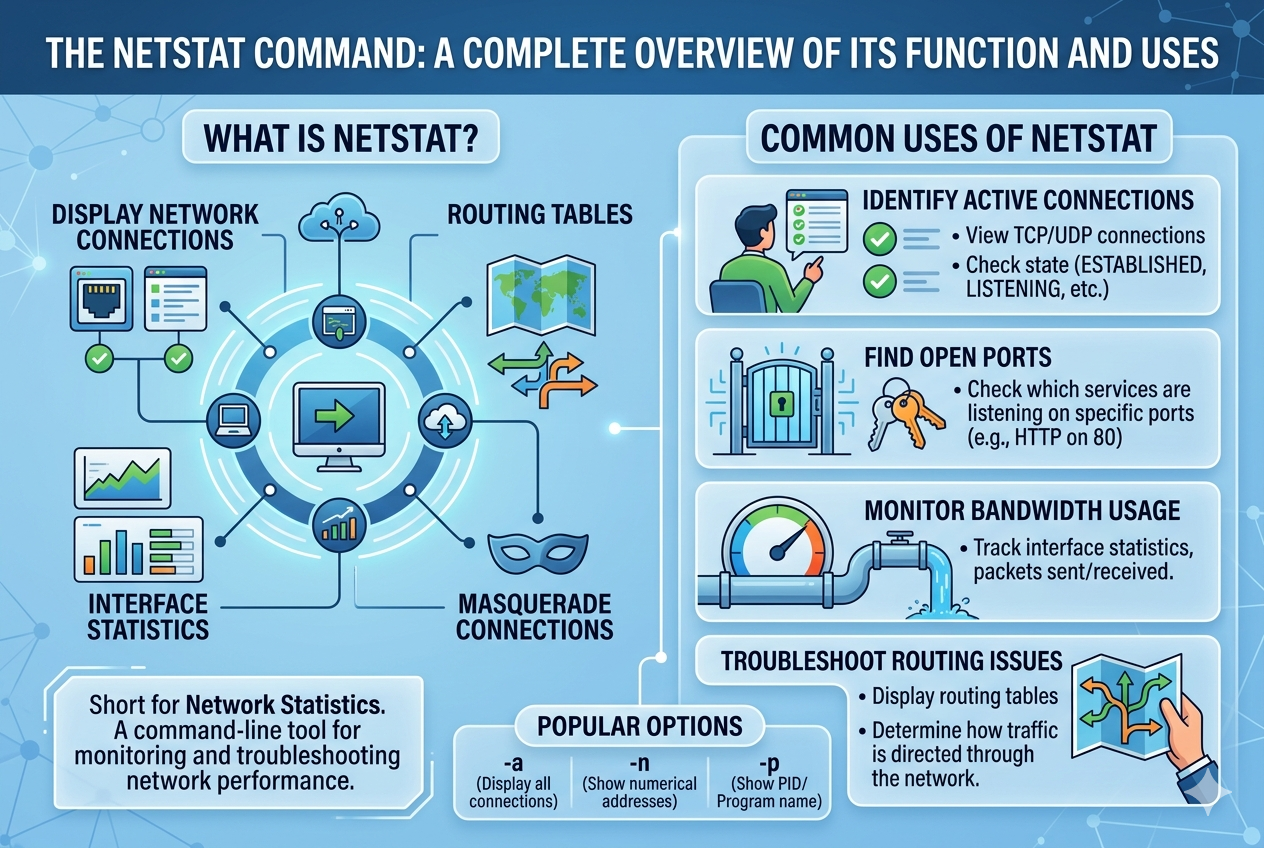
The netstat command is a powerful networking utility designed to display detailed information about network connections and system networking activity. It has long been used in both personal and professional computing environments to help users understand how their system communicates with other devices over a network. By providing a clear view of active connections, listening ports, and routing information, it plays a key role in network monitoring and diagnostics.
This tool is especially important in environments where multiple services and applications rely on network communication. It allows users to observe real-time data about how connections are established, maintained, and terminated. Because of its ability to present structured network information, it is widely used by system administrators, cybersecurity professionals, and developers.
Core Purpose and Working Mechanism
The main purpose of the netstat command is to gather and display network-related information from the operating system’s kernel. It reads system tables that store details about network sockets, routing paths, and interface statistics. Once executed, it presents this data in a readable format so that users can analyze current network behavior.
Netstat works by accessing the system’s network stack, which keeps track of all active and listening connections. Every connection between a local system and a remote host is recorded, including the protocol used, the state of the connection, and the associated ports. This makes it possible to identify which applications are communicating over the network at any given moment.
Understanding Network Connections
Network connections displayed by netstat typically fall into two main categories: established and listening. An established connection indicates that two systems are actively communicating with each other. This could be a web browser accessing a website or a file transfer taking place between two machines.
A listening connection, on the other hand, refers to a service waiting for incoming requests. For example, a web server listens on a specific port to accept incoming browser requests. Netstat helps users identify these open listening ports, which is important for both functionality and security.
TCP and UDP Protocol Monitoring
One of the key features of netstat is its ability to display connections based on different protocols, primarily TCP and UDP. TCP is a connection-oriented protocol, meaning it establishes a reliable connection before data transfer begins. This ensures that data is delivered accurately and in the correct order.
UDP, in contrast, is a connectionless protocol that allows data to be sent without establishing a formal connection. It is faster but less reliable than TCP. Netstat provides visibility into both types of communication, allowing users to analyze how different applications use network resources.
Displaying Active Ports and Services
Netstat is widely used to identify which ports are currently active on a system. Each network service typically uses a specific port number to communicate. For example, web services, file transfers, and email services all rely on different ports.
By displaying open ports, netstat helps users understand which services are running and potentially exposed to external access. This is particularly useful for system administrators who need to ensure that only authorized services are accessible over the network.
Routing Table Information
Another important function of netstat is displaying the routing table. The routing table contains information about how data packets are directed across networks. It defines the paths that data takes to reach its destination.
Netstat allows users to view this routing information, helping them understand how their system communicates with different networks. This is useful when diagnosing connectivity issues or verifying that network routes are correctly configured.
Network Interface Statistics
Netstat also provides statistical data related to network interfaces. This includes information such as the number of packets sent and received, errors encountered during transmission, and data loss rates.
These statistics are valuable for monitoring network performance. A high number of errors or dropped packets may indicate hardware issues, misconfigurations, or network congestion. By analyzing this data, users can identify and resolve performance-related problems more effectively.
Security and Monitoring Applications
One of the most important uses of netstat is in network security. By displaying all active connections, it helps users detect unusual or suspicious activity on a system. For example, if a system is connected to an unknown remote address, it could indicate unauthorized access or malware activity.
Security professionals often use netstat as a first step in investigating potential breaches. It provides a quick overview of all network interactions, making it easier to identify anomalies and take corrective action.
Troubleshooting Network Issues
Netstat is an essential tool for diagnosing network problems. When a service is not functioning correctly, netstat can be used to check whether the required port is open and whether the service is actively listening for connections.
It also helps identify conflicts where multiple services might be attempting to use the same port. By analyzing connection states and port usage, users can pinpoint the root cause of connectivity issues and resolve them efficiently.
Connection States and Their Meaning
Netstat displays various connection states that help users understand the lifecycle of network communication. For TCP connections, common states include listening, established, time waiting, and closed waiting.
Each state represents a specific stage in the communication process. For example, an established state means that data is actively being exchanged, while a time-wait state indicates that a connection has recently been closed but is still being monitored for remaining packets.
Understanding these states is crucial for diagnosing network behavior and ensuring smooth communication between systems.
Performance Monitoring and Optimization
Beyond troubleshooting, netstat is also useful for performance optimization. By analyzing network traffic patterns, administrators can identify bottlenecks and optimize resource usage.
For instance, if a particular service is consuming excessive network bandwidth, it can be detected through connection statistics. This allows administrators to balance network load more effectively and improve overall system performance.
Role in Server Management
In server environments, netstat is particularly valuable for managing multiple services simultaneously. Servers often handle numerous incoming and outgoing connections, and netstat helps keep track of all of them in real time.
It ensures that critical services remain operational and accessible while also helping detect unauthorized access attempts. This makes it an essential tool for maintaining server stability and reliability.
Limitations of the netstat Command
Although netstat is a powerful tool, it does have some limitations. It primarily provides a snapshot of network activity at the moment it is executed, meaning it does not continuously update in real time unless repeatedly run.
Additionally, in modern systems, some newer tools have replaced or supplemented netstat with more advanced features. However, netstat remains widely used due to its simplicity and reliability.
Interpreting Output Effectively
Understanding netstat output requires familiarity with networking concepts such as IP addresses, ports, and protocols. Each line of output typically includes the protocol, local address, foreign address, connection state, and sometimes process information.
By carefully analyzing this information, users can gain deep insights into system behavior and network activity. This makes netstat a valuable diagnostic tool for both beginners and experienced professionals.
Practical Use in Real-World Scenarios
In real-world applications, netstat is used in a variety of scenarios. Developers use it to test whether their applications are correctly binding to network ports. System administrators use it to monitor server health and connectivity. Security teams use it to detect unauthorized access or suspicious activity.
Its versatility makes it applicable in almost any environment where network communication is involved. Whether managing a small personal system or a large enterprise network, netstat provides essential visibility into network operations.
Advanced Features of the netstat Command
As network environments become more complex, the netstat command offers advanced options that allow users to filter, refine, and interpret network data more efficiently. These advanced features make it possible to focus on specific types of connections or behaviors rather than viewing all network activity at once. This level of control is especially useful in large systems where thousands of connections may be active simultaneously.
By using different options, users can narrow down results to specific protocols, ports, or connection states. This helps reduce noise in the output and makes analysis more precise. Instead of scanning through large amounts of data, administrators can quickly locate the exact information they need.
Filtering Network Information
One of the most useful capabilities of netstat is filtering network data based on specific criteria. Users can choose to display only TCP connections, only UDP connections, or only listening ports. This targeted approach simplifies troubleshooting and monitoring tasks.
For example, when diagnosing a web server issue, a user may only want to view connections related to HTTP or HTTPS traffic. Filtering allows them to isolate relevant data without distraction from unrelated network activity. This improves efficiency and speeds up problem resolution.
Process Identification with Network Connections
Another important feature of netstat is its ability to associate network connections with specific processes running on the system. This means users can identify which application is responsible for a particular connection or open port.
This functionality is extremely valuable in security investigations and system audits. If an unknown connection is detected, process identification helps determine whether it is legitimate or potentially malicious. It provides a direct link between network activity and running software.
Detecting Unauthorized Access
Netstat plays a significant role in identifying unauthorized access attempts. By reviewing active connections, administrators can spot unusual remote IP addresses or unexpected connection patterns.
If a system is communicating with unknown external sources, it may indicate a security breach or malware infection. Early detection through netstat allows administrators to take immediate action, such as blocking connections or shutting down compromised services.
Monitoring Server Load and Activity
In server environments, netstat is often used to monitor system load caused by network traffic. High numbers of active connections may indicate heavy usage or potential overload conditions.
By analyzing connection counts and traffic patterns, administrators can determine whether a server is operating within safe limits. If necessary, they can redistribute workloads or optimize configurations to maintain performance and stability.
Time-Wait and Connection Lifecycle Analysis
Netstat provides insight into the lifecycle of network connections, particularly through states such as time-wait. This state occurs after a connection has been closed but is still being monitored to ensure all packets have been properly transmitted.
Understanding these states helps administrators diagnose issues related to connection delays or resource usage. A large number of time-wait connections may indicate inefficient application behavior or excessive connection turnover.
Diagnosing Port Conflicts
Port conflicts occur when multiple applications attempt to use the same network port. This can prevent services from starting correctly or cause unexpected behavior.
Netstat helps identify these conflicts by showing which processes are bound to specific ports. Once detected, administrators can reconfigure applications or assign alternative ports to resolve the issue. This ensures smooth operation of network services.
Network Security Auditing
Security auditing is one of the most critical applications of netstat. It allows system administrators to perform routine checks on network activity and verify that all connections are legitimate.
During audits, netstat output is carefully reviewed to ensure that only authorized services are running and that no suspicious connections exist. This helps maintain compliance with security policies and reduces the risk of external threats.
Role in Malware Detection
Malware often establishes hidden network connections to communicate with external servers. These connections may not be easily visible through standard monitoring tools.
Netstat can help detect such behavior by revealing unexpected or persistent connections to unknown IP addresses. Security analysts often use this information as an early warning sign of infection and begin further investigation based on these findings.
Real-Time Network Analysis Limitations
Although netstat provides valuable information, it has limitations when it comes to real-time monitoring. It captures network data at the moment of execution rather than continuously streaming updates.
This means that rapidly changing connections may not always be fully captured unless the command is run repeatedly. For continuous monitoring, additional tools are often used alongside netstat.
Scalability Challenges in Large Systems
In large-scale environments with thousands of active connections, netstat output can become overwhelming. The sheer volume of data may make it difficult to quickly identify relevant information.
To address this, users rely on filtering options or combine netstat with other monitoring tools. While still useful, netstat alone may not be sufficient for enterprise-level continuous monitoring without additional support systems.
Comparison with Modern Network Tools
Over time, newer tools have been developed that offer enhanced features compared to netstat. These tools may provide real-time updates, improved filtering, and more detailed analytics.
However, netstat remains widely used due to its simplicity and availability across many systems. It serves as a foundational tool that helps users understand basic networking concepts before moving on to more advanced utilities.
Importance in Learning Networking Concepts
Netstat is often one of the first tools introduced to students learning networking. It provides a practical way to visualize abstract concepts such as ports, protocols, and connections.
By observing real system data, learners can better understand how network communication works in practice. This hands-on experience strengthens theoretical knowledge and builds a strong foundation in networking.
System Performance Diagnostics
Beyond security and troubleshooting, netstat is also used for performance diagnostics. By analyzing network traffic patterns, administrators can identify inefficiencies in application behavior.
For example, applications that repeatedly open and close connections may create unnecessary overhead. Netstat helps reveal these patterns, allowing developers to optimize their software for better performance.
Identifying Bandwidth Usage Patterns
Although netstat does not directly measure bandwidth usage, it provides indirect insights into network load. A high number of active connections or frequent communication with external servers may indicate heavy data transfer activity.
By combining netstat output with other monitoring tools, administrators can build a clearer picture of bandwidth consumption and identify which services are most resource-intensive.
Troubleshooting Connectivity Failures
When users experience connectivity issues, netstat is often one of the first tools used in diagnosis. It helps determine whether the problem lies in the local system or external network.
If no listening service is detected on a required port, the issue is likely local. If connections are established but data is not flowing, the problem may lie elsewhere in the network path. This makes netstat an essential part of the troubleshooting process.
Practical Administrative Workflows
In daily system administration tasks, netstat is frequently used as part of routine checks. Administrators may periodically review active connections, verify service status, and ensure that no unexpected changes have occurred.
This proactive approach helps maintain system stability and prevents potential issues from escalating. Netstat becomes a simple yet powerful tool in maintaining operational awareness.
Integration of netstat in Modern System Environments
In modern computing environments, the netstat command continues to play an important role despite the emergence of more advanced network monitoring tools. It is often integrated into system diagnostics workflows, scripts, and administrative routines where quick network inspection is required. Its lightweight nature makes it suitable for systems where installing additional software is not practical.
Many administrators still rely on it as a first-response tool when investigating network behavior. Even in complex infrastructures, it provides a fast and reliable snapshot of current connections, which helps guide deeper analysis using other specialized utilities.
Use in Automated Scripts and System Checks
Netstat is frequently incorporated into automated scripts used for system monitoring and health checks. These scripts may run at scheduled intervals to capture network activity and log it for later review.
By embedding netstat output into automation workflows, administrators can track changes in network behavior over time. This helps in identifying patterns such as sudden spikes in connections, repeated failed attempts, or unusual port activity. Automation enhances its usefulness beyond manual execution.
Logging and Historical Network Analysis
While netstat itself does not store historical data, its output can be redirected into log files for future analysis. This allows administrators to build a timeline of network activity and review past states of the system.
Historical analysis is useful in incident investigation, especially when diagnosing security breaches or performance issues that occurred earlier. By comparing logs over time, patterns and anomalies become easier to identify.
Role in Incident Response and Forensics
During security incidents, netstat becomes a critical forensic tool. It helps investigators understand what connections were active at the time of detection and whether any unauthorized communication occurred.
Although it does not provide deep packet inspection, it gives a high-level overview of network relationships. This information is often used as a starting point for deeper forensic analysis using specialized tools.
Understanding Foreign and Local Address Mapping
Netstat displays both local and foreign addresses for each connection. The local address represents the system itself, including its IP and port, while the foreign address represents the remote system it is communicating with.
This mapping is essential for understanding communication flows. It helps users identify where data is coming from and where it is going. In troubleshooting scenarios, this distinction is key to isolating issues in network communication.
Importance in Multi-User Systems
In multi-user environments such as servers or shared systems, netstat helps distinguish network activity generated by different users or applications. Since multiple processes may run simultaneously, understanding their network behavior is essential.
By identifying which process owns a connection, administrators can ensure fair resource usage and prevent conflicts between services. This becomes especially important in hosting environments and enterprise systems.
Network Stability and Reliability Monitoring
Netstat contributes to monitoring network stability by showing connection consistency and error patterns. Frequent connection resets or unstable states may indicate underlying network issues.
Administrators use this information to assess whether the network infrastructure is performing reliably. If instability is detected, further investigation into hardware, configuration, or external connectivity may be required.
Detecting Misconfigured Services
Misconfigured services often result in unexpected network behavior, such as services binding to incorrect ports or failing to accept connections. Netstat helps detect these issues by clearly displaying service-to-port mappings.
Once identified, administrators can correct configurations to ensure services operate as intended. This prevents downtime and improves system reliability.
Understanding Connection Flooding and Abuse
Connection flooding occurs when a system receives an unusually high number of connection requests, often due to malicious activity or misbehaving applications. Netstat can reveal such patterns by showing a large number of simultaneous connections.
This information helps administrators respond quickly to potential denial-of-service conditions or resource exhaustion problems. Early detection is critical in maintaining system availability.
Netstat in Development and Testing Environments
Developers often use netstat during application development to verify that their software is correctly handling network communication. It helps confirm whether applications are binding to the correct ports and establishing expected connections.
During testing phases, it also helps identify leaks where connections are not properly closed. This ensures applications are optimized before deployment into production environments.
Educational Importance in Networking Fundamentals
Netstat is widely used in educational environments to teach core networking concepts. Students can observe real-time data about ports, protocols, and connections, making abstract concepts more tangible.
By interacting with actual system output, learners develop a stronger understanding of how network communication functions in real-world systems. This hands-on exposure is valuable in building foundational networking skills.
Combining netstat with Other Diagnostic Tools
In practice, netstat is often used alongside other diagnostic utilities to gain a more complete picture of system performance. While netstat shows connection-level data, other tools may provide deeper insights into packet flow or bandwidth usage.
This combined approach allows administrators to move from high-level observation to detailed analysis when necessary. Netstat often serves as the entry point for more advanced troubleshooting.
Resource Utilization Insights
Network connections can indirectly affect system resource usage, including CPU and memory consumption. Netstat helps identify applications that maintain a large number of connections, which may lead to higher resource demands.
By analyzing this information, administrators can optimize system performance and reduce unnecessary load caused by inefficient network behavior.
Security Policy Enforcement
Organizations often enforce strict network policies regarding which services are allowed to run and which ports should remain open. Netstat assists in verifying compliance with these policies.
Regular checks ensure that no unauthorized services are running and that all active connections align with organizational security standards. This supports overall network governance and risk management.
Limitations in Deep Network Analysis
While netstat provides valuable insights, it does not offer detailed packet-level analysis or content inspection. It cannot reveal what data is being transmitted, only that a connection exists.
For deeper analysis, additional tools are required. However, netstat remains useful for quickly identifying where to focus further investigation efforts.
System Transparency and Visibility
One of the greatest strengths of netstat is the transparency it provides into system networking activity. It allows users to see behind the scenes of how applications interact with the network.
This visibility is crucial for maintaining control over system behavior, especially in environments where multiple services operate simultaneously.
Real-World Network Investigation with netstat
In real-world network investigation scenarios, netstat serves as a fast and practical starting point for understanding system behavior. When unusual network activity is suspected, administrators often begin by examining active connections to determine what processes are communicating externally. This helps narrow down the scope of investigation before using more advanced forensic tools.
Netstat is particularly useful when a system behaves unexpectedly, such as slow performance, unknown network traffic, or unexpected service interruptions. By reviewing connection states and remote addresses, investigators can quickly identify whether the issue is internal, external, or caused by a specific application.
Identifying Suspicious Remote Connections
One of the most important security uses of netstat is identifying suspicious remote connections. Every active connection shows both the local system and the remote endpoint it is communicating with. If an unfamiliar or unexpected remote address appears, it may indicate unauthorized communication.
Such findings are not automatically proof of malicious activity, but they serve as strong indicators that further investigation is needed. Administrators may then trace the associated process, examine system logs, or isolate the system for deeper analysis.
Monitoring Persistent Connections
Some applications maintain long-lived connections to remote servers. Netstat helps identify these persistent connections by showing which sessions remain in an established state for extended periods.
While persistent connections are normal for services like web servers or database systems, unexpected long-term connections from unknown processes can be a warning sign. Monitoring these connections helps maintain system transparency and control.
Network Configuration Validation
Netstat is often used to validate network configuration settings after system changes. When new services are installed or configurations are updated, administrators can use netstat to confirm that ports are correctly assigned and services are listening as expected.
This step is important because misconfigured network settings can lead to service downtime or security vulnerabilities. By checking active listening ports, administrators ensure that systems behave according to design specifications.
Diagnosing Application-Level Network Issues
Some network problems are not caused by infrastructure but by applications themselves. Netstat helps identify whether an application is successfully creating network connections or failing to do so.
If a service is running but not communicating properly, netstat may reveal that it is not binding to the correct port or that connections are stuck in abnormal states. This information is useful for developers debugging network-dependent applications.
Understanding Network Load Behavior
Netstat provides insight into how network load is distributed across different services. A system with many simultaneous connections may be under heavy usage, while one with few connections may be idle or underutilized.
This information helps administrators balance workloads and optimize system performance. In server environments, understanding connection distribution is essential for maintaining responsiveness and preventing overload.
Connection Reset and Failure States
Netstat also reveals abnormal connection states such as reset or failed connections. These states often indicate communication problems between systems, such as firewall restrictions, network interruptions, or service crashes.
By analyzing these states, administrators can pinpoint where communication is breaking down and take corrective action. This makes netstat a valuable tool for early detection of network instability.
Role in Firewall and Security Rule Verification
Firewalls control which network connections are allowed or blocked. Netstat helps verify whether firewall rules are working as intended by showing active and blocked connections.
If a service should be restricted but still appears in active connections, it may indicate a firewall misconfiguration. This allows administrators to adjust security rules and enforce proper access control.
Detecting Unusual Port Usage Patterns
Each application typically uses specific ports for communication. Netstat helps identify unusual port usage, such as services running on unexpected or high-numbered ports.
Such anomalies may indicate misconfigurations or malicious activity attempting to avoid detection. Monitoring port usage patterns is therefore an important part of maintaining system security.
System Health Overview Through Network Activity
Network activity often reflects overall system health. A stable system typically shows consistent and expected connection patterns, while a compromised or overloaded system may display irregular behavior.
Netstat provides a quick overview of this behavior, allowing administrators to assess system health from a networking perspective. It acts as a diagnostic window into how the system is functioning under real conditions.
Efficiency in Quick Diagnostics
One of the key strengths of netstat is its speed and simplicity. It does not require complex setup or configuration and can be executed instantly to provide immediate insights.
This makes it ideal for quick diagnostics, especially in time-sensitive situations where rapid assessment is needed. Administrators often rely on it as the first step before moving to deeper analysis tools.
Limitations in Modern High-Speed Networks
In modern high-speed and highly dynamic networks, connections can change rapidly, sometimes faster than netstat can capture them in a single snapshot. This limitation means that some transient connections may go unnoticed.
Despite this, netstat remains valuable for general monitoring and initial analysis, even if it is not sufficient for continuous real-time tracking in large-scale environments.
Complementary Role with Advanced Tools
Netstat is often used alongside more advanced network monitoring systems that provide continuous logging, packet capture, and deep analysis. While those tools offer detailed insights, netstat provides a simple and immediate overview.
This complementary relationship makes netstat an important foundational tool, even in modern environments with advanced monitoring capabilities.
Educational and Skill Development Value
From an educational perspective, netstat plays a crucial role in teaching networking fundamentals. It helps learners understand how applications communicate over networks, how ports function, and how connections are established.
By observing real system output, students gain practical knowledge that strengthens theoretical learning. This makes netstat a valuable training tool in networking education.
Best Practices for Using the netstat Command
To get the most accurate and useful results from the netstat command, it is important to follow certain best practices. One of the most important practices is to understand what type of information is needed before running the command. Since netstat can display a large amount of data, focusing on specific outputs such as active connections, listening ports, or protocol-based results helps improve clarity.
Another important practice is to interpret the results carefully. Network data can be complex, and misreading connection states or addresses may lead to incorrect conclusions. Taking time to understand each part of the output ensures more reliable analysis and reduces the risk of misdiagnosis.
Effective Use in Security Monitoring
When using netstat for security purposes, regular monitoring is essential. Instead of running the command only when a problem occurs, administrators often use it as part of routine system checks. This helps in early detection of unusual network behavior before it becomes a serious issue.
It is also important to compare current outputs with known baseline behavior. By understanding what normal network activity looks like for a system, it becomes easier to identify abnormal patterns or unexpected connections.
Optimizing System Troubleshooting Workflows
Netstat is most effective when used as part of a structured troubleshooting workflow. Instead of relying on it alone, it should be used alongside logs, system monitoring tools, and application diagnostics.
A typical approach involves first checking active connections, then identifying related processes, and finally analyzing logs for deeper insights. This step-by-step method helps isolate problems more efficiently and reduces guesswork.
Understanding Output Consistency Across Systems
Although netstat is widely available, its output may vary slightly depending on the operating system or version being used. Understanding these differences is important when working across multiple environments.
Despite variations, the core information remains consistent, including connection states, ports, and addresses. Learning how to interpret different formats ensures that users can apply netstat effectively in any system environment.
Importance of Accurate Interpretation
Accurate interpretation of netstat output is crucial for making correct decisions. For example, seeing multiple connections in a time-wait state is not necessarily a problem, as it can be a normal part of connection closing behavior.
Similarly, open ports do not always indicate security risks, as many legitimate services require them. Understanding context is essential before taking any action based on netstat results.
Role in System Hardening Practices
System hardening involves reducing vulnerabilities by minimizing unnecessary services and open ports. Netstat plays an important role in this process by helping identify which ports are actively in use.
By reviewing this information, administrators can disable unused services and close unnecessary ports, reducing the system’s attack surface and improving overall security.
Monitoring Changes Over Time
Tracking changes in netstat output over time can reveal important trends in system behavior. Sudden increases in connections or new unfamiliar services may indicate configuration changes, software updates, or potential security issues.
By periodically comparing results, administrators can maintain better control over system behavior and detect gradual changes that might otherwise go unnoticed.
Use in Network Performance Tuning
Netstat also contributes to network performance tuning by identifying inefficient connection patterns. Applications that frequently open and close connections may introduce unnecessary overhead.
By observing these patterns, developers and administrators can optimize application behavior to improve efficiency and reduce network strain. This leads to better overall system performance.
Understanding Connection Density
Connection density refers to the number of active connections a system handles at a given time. Netstat helps visualize this density by listing all current sessions.
High connection density may indicate heavy usage or potential stress on system resources. Monitoring this helps ensure that systems remain stable under load.
Integration with Security Policies
Many organizations have strict security policies governing network usage. Netstat helps enforce these policies by allowing administrators to verify that only approved services are active.
Regular checks ensure compliance and reduce the risk of unauthorized services running on critical systems. This contributes to a more secure and controlled network environment.
Detecting Hidden or Unexpected Services
Some services may run in the background without user awareness. Netstat helps reveal these hidden services by displaying all active listening ports and associated processes.
This visibility is important for detecting unwanted or unauthorized software that may be running silently on a system.
Common Misinterpretations and Mistakes
One common mistake when using netstat is assuming that all active connections are suspicious. In reality, many system processes naturally maintain multiple connections for normal operation.
Another mistake is ignoring process association, which is essential for understanding what is actually generating network activity. Proper analysis requires combining connection data with process information.
Importance in Legacy and Modern Systems
Netstat continues to be relevant in both legacy and modern systems. While newer tools offer more advanced features, netstat remains widely supported and easy to use.
Its presence across different operating systems ensures that users can rely on it in a variety of environments without needing additional software.
Training and Skill Development Applications
In training environments, netstat is often used to introduce learners to practical networking concepts. It helps bridge the gap between theory and real-world system behavior.
By practicing with real outputs, learners develop a stronger understanding of how network communication works in live systems.
Conclusion
The netstat command remains one of the most essential and widely used network utilities for monitoring, troubleshooting, and analyzing system connections. Its ability to display active connections, listening ports, routing information, and connection states makes it a powerful diagnostic tool in both simple and complex environments.
Despite the development of more advanced networking utilities, netstat continues to hold its relevance due to its speed, simplicity, and reliability. It is especially useful for quick diagnostics, security monitoring, and system validation tasks.
Ultimately, netstat serves as a foundational tool in networking, bridging the gap between basic system observation and advanced network analysis. Its continued use across operating systems and environments demonstrates its lasting importance in the field of system administration and network management.