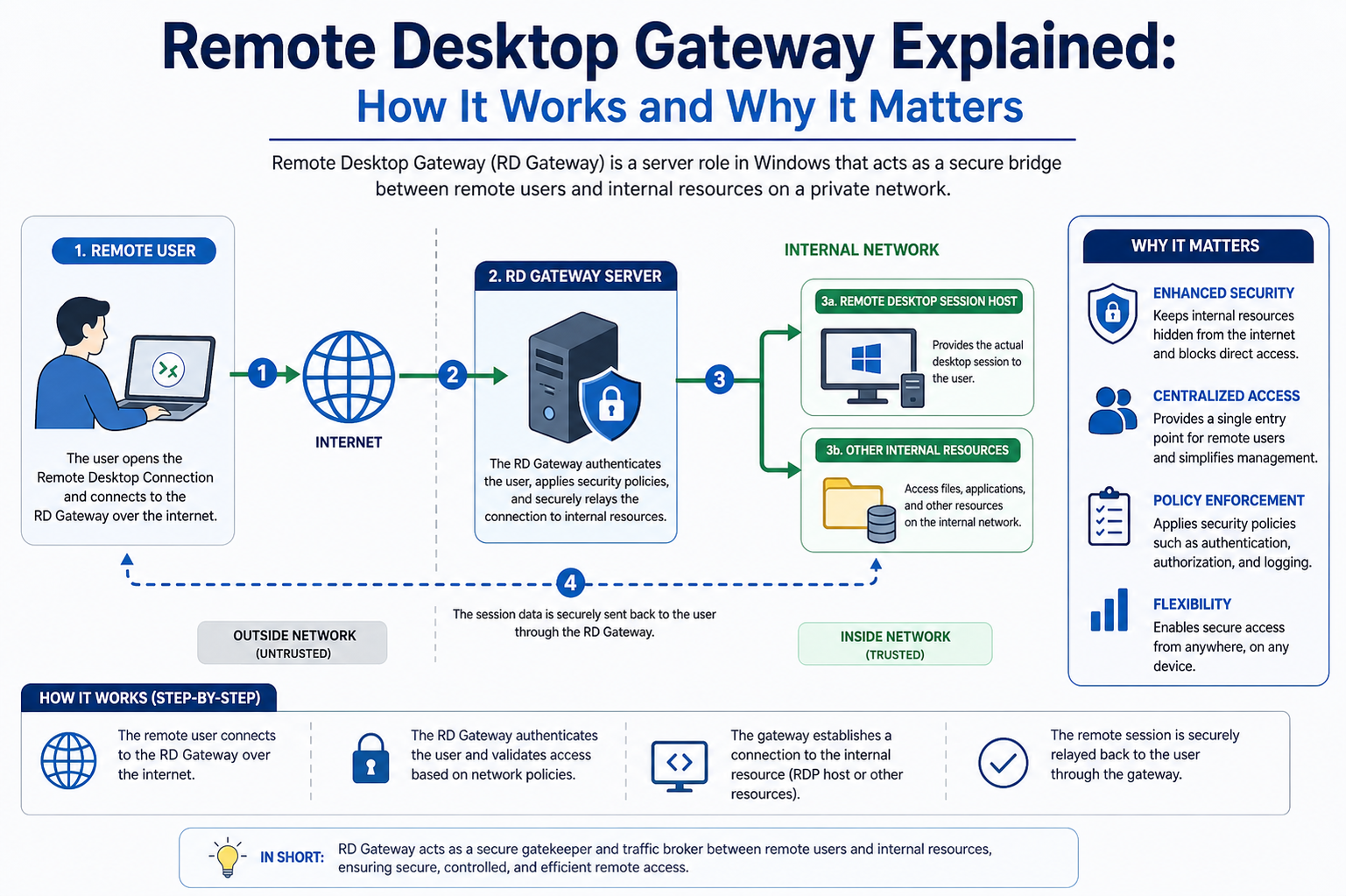
A Remote Desktop Gateway is a secure communication bridge that allows users to connect to internal computers and servers from external networks without exposing the internal infrastructure directly to the internet. Instead of requiring a direct connection to each machine, all remote traffic is routed through a single controlled entry point. This gateway ensures that only authorized users can reach internal resources, and every session is encrypted to prevent interception or unauthorized access. In modern IT environments, where remote work and distributed systems are common, this technology plays a critical role in maintaining both accessibility and security.
Architecture of Remote Desktop Gateway
The architecture of a Remote Desktop Gateway is designed to centralize and secure remote connections. At its core, it sits between the external user and the internal network. When a user initiates a connection, the request is first sent to the gateway server. The gateway then validates the request, checks authentication credentials, and applies organizational policies before allowing the connection to proceed.
Inside the network, the gateway communicates with Remote Desktop Session Hosts or individual machines that are part of the internal infrastructure. The communication is encapsulated within encrypted HTTPS traffic, which ensures that data remains protected even when transmitted over public networks. This layered structure reduces exposure and minimizes attack surfaces, making it significantly more secure than direct remote desktop access.
How Authentication Works in Remote Desktop Gateway
Authentication is one of the most important components of a Remote Desktop Gateway. Before any connection is established, the system verifies the identity of the user. This typically involves credentials such as usernames and passwords, but in more secure environments, multi-factor authentication may also be required. This additional verification step ensures that even if login details are compromised, unauthorized users cannot gain access easily.
Once authentication is successful, the gateway evaluates whether the user has permission to access the requested resource. These permissions are defined through policies managed by system administrators. If the user meets all conditions, the gateway establishes a secure tunnel between the user and the internal system.
Role of Encryption in Secure Remote Access
Encryption is fundamental to the operation of a Remote Desktop Gateway. All communication between the user and the internal network is encrypted using secure protocols, typically HTTPS with TLS encryption. This ensures that any data transmitted, including screen activity, keyboard input, and file transfers, cannot be intercepted or read by attackers.
This encryption layer protects sensitive business information and prevents common threats such as man-in-the-middle attacks. Even when users connect from public Wi-Fi networks or unsecured environments, the encrypted tunnel ensures that the session remains private and secure.
Connection Process in Remote Desktop Gateway
The connection process begins when a user attempts to access a remote computer through a client application. Instead of connecting directly to the target machine, the request is forwarded to the gateway. The gateway first checks whether the user is authenticated and authorized. If the credentials and policies are valid, the gateway creates a secure channel between the user and the internal resource.
Once the session is established, all data flows through this encrypted channel. The user interacts with the remote system as if they were physically present, while the gateway continues to manage and secure the session in the background. This indirect connection model ensures that internal systems are never directly exposed to external networks.
Security Benefits of Remote Desktop Gateway
One of the primary advantages of using a Remote Desktop Gateway is enhanced security. By eliminating direct access to internal machines, organizations significantly reduce the risk of external attacks. The gateway acts as a filter, allowing only verified and authorized connections to pass through.
It also provides centralized monitoring and logging of all remote sessions. This means administrators can track who accessed which system, when the access occurred, and what actions were performed. This level of visibility is crucial for detecting suspicious activity and maintaining compliance with security standards.
Additionally, the use of encryption and authentication policies ensures that even if attackers attempt to intercept traffic, the data remains protected and unusable.
Remote Desktop Gateway in Modern Work Environments
In today’s work environments, remote access is no longer optional. Employees often need to connect to corporate systems from home, travel locations, or branch offices. A Remote Desktop Gateway makes this possible without compromising security.
It supports flexible working models by allowing users to access their desktop environments, applications, and files from virtually anywhere. This improves productivity while ensuring that organizations maintain full control over their internal systems. It is especially useful for businesses with distributed teams or hybrid work structures.
Comparison Between Remote Desktop Gateway and VPN
Although both Remote Desktop Gateway and Virtual Private Networks provide remote access, they operate differently. A VPN creates a secure tunnel that connects an entire device to a network, often granting broad access to internal resources. This can sometimes expose more of the network than necessary.
In contrast, a Remote Desktop Gateway focuses specifically on remote desktop connections. Instead of granting full network access, it limits connections to authorized sessions and specific resources. This targeted approach enhances security by reducing unnecessary exposure.
Additionally, Remote Desktop Gateway uses web-based protocols like HTTPS, which are more firewall-friendly compared to traditional VPN protocols that may require additional configuration.
Deployment Considerations for Remote Desktop Gateway
Deploying a Remote Desktop Gateway requires careful planning to ensure optimal performance and security. The gateway server is typically placed in a secure network segment, often within a perimeter network or DMZ. This placement ensures that even if the gateway is targeted, the internal network remains protected.
Proper certificate configuration is also essential, as encryption relies on trusted certificates to establish secure connections. Organizations must also define clear access policies to determine who can connect and under what conditions.
Scalability is another important factor. In larger environments, multiple gateway servers may be deployed to handle increased traffic and ensure high availability.
Performance and Scalability Factors
The performance of a Remote Desktop Gateway depends on network bandwidth, server capacity, and the number of concurrent users. Since all remote traffic passes through the gateway, it must be capable of handling multiple encrypted sessions efficiently.
To improve scalability, load balancing techniques can be used to distribute traffic across multiple gateway servers. This ensures that no single server becomes a bottleneck and that users experience consistent performance even during peak usage times.
Proper resource allocation and monitoring also help maintain system stability and prevent performance degradation.
Common Use Cases of Remote Desktop Gateway
Remote Desktop Gateway is widely used across various industries. In corporate environments, it enables employees to access office desktops from home or while traveling. In IT support, technicians use it to remotely troubleshoot and manage systems without physically visiting the location.
Educational institutions use it to provide students and faculty with access to campus resources. Healthcare organizations rely on it to securely access patient records and internal applications while maintaining strict compliance with privacy regulations.
Its flexibility makes it suitable for any scenario where secure remote access is required.
Challenges and Limitations
Despite its advantages, Remote Desktop Gateway also has certain limitations. It requires proper configuration and maintenance to ensure security and performance. Misconfigured policies can lead to access issues or potential vulnerabilities.
Since all traffic passes through a central gateway, it can become a single point of failure if redundancy is not implemented. High traffic loads may also impact performance if the system is not properly scaled.
Additionally, setting up the infrastructure may require advanced technical knowledge, especially in large or complex environments.
Best Practices for Secure Implementation
To maximize security and efficiency, organizations should follow best practices when implementing a Remote Desktop Gateway. This includes using strong authentication methods, enabling multi-factor authentication, and regularly updating security certificates.
Access policies should be strictly defined to limit user permissions based on roles. Monitoring and logging should also be enabled to detect unusual activity and respond to potential threats quickly.
Regular updates and patches are essential to protect against newly discovered vulnerabilities. Network segmentation and redundancy planning further enhance system reliability.
Future of Remote Desktop Gateway Technology
As remote work continues to grow, Remote Desktop Gateway technology is expected to evolve further. Future improvements may include deeper integration with cloud platforms, enhanced automation for access control, and more advanced security features powered by artificial intelligence.
The demand for secure remote access solutions will continue to rise, making technologies like Remote Desktop Gateway a core component of modern IT infrastructure. Its ability to combine security, flexibility, and centralized control ensures its relevance in the future of digital work environments.
Advanced Security Mechanisms in Remote Desktop Gateway
Remote Desktop Gateway uses multiple layers of security mechanisms to protect both users and internal systems. Beyond basic encryption and authentication, it relies on policy-based access control, session validation, and secure tunneling techniques. Each connection request is evaluated against predefined rules before being allowed into the network. These rules can include user identity, device compliance, time-based restrictions, and even location-based conditions.
Another important security mechanism is session isolation. Even after a connection is established, the gateway continuously monitors the session for abnormal behavior. If suspicious activity is detected, the session can be terminated automatically. This proactive approach helps prevent unauthorized access even after initial authentication has been completed.
Policy Management and Access Control
Policy management is a key component of how Remote Desktop Gateway maintains secure operations. Administrators define policies that control who can access which resources and under what conditions. These policies are typically grouped into connection authorization policies and resource authorization policies.
Connection policies determine whether a user is allowed to establish a session through the gateway. Resource policies define which internal systems or applications that user can access after connecting. This separation of control ensures a granular level of security and prevents unnecessary access to sensitive systems.
Policies can also be customized based on organizational roles. For example, IT administrators may have broader access compared to standard employees, while contractors may have limited and time-restricted access.
Role of Certificates in Secure Communication
Digital certificates play a crucial role in securing Remote Desktop Gateway communication. These certificates verify the identity of the gateway server and establish trust between the client and server. Without valid certificates, encrypted communication cannot be properly established, leaving connections vulnerable.
Certificates are typically issued by trusted certificate authorities and installed on both the gateway server and client devices. When a user connects, the system checks the certificate validity before initiating a secure session. This prevents impersonation attacks and ensures that users are communicating with legitimate servers.
Proper certificate management, including timely renewal and secure storage, is essential for maintaining uninterrupted and secure access.
Network Traffic Flow Through the Gateway
When a remote user connects through a Remote Desktop Gateway, the network traffic follows a structured flow. First, the client sends a connection request to the gateway over an encrypted HTTPS channel. The gateway then performs authentication checks and policy evaluation.
If the request is approved, the gateway establishes a secure tunnel between the client and the internal destination system. All data packets are encapsulated within this tunnel, ensuring that internal IP addresses and system details are never exposed externally.
This indirect routing model not only enhances security but also simplifies network architecture by reducing the need for multiple direct remote access points.
High Availability and Redundancy Planning
In enterprise environments, high availability is critical for Remote Desktop Gateway deployment. Since the gateway serves as the entry point for all remote connections, any downtime can disrupt business operations.
To prevent this, organizations often deploy multiple gateway servers in a load-balanced configuration. This ensures that if one server fails, others can continue handling traffic without interruption. Redundancy can also be achieved through geographic distribution, where multiple gateways are deployed across different locations.
Failover mechanisms automatically redirect traffic to healthy servers, ensuring continuous availability even during hardware or network failures.
Integration with Active Directory and Identity Systems
Remote Desktop Gateway is often integrated with identity management systems such as Active Directory. This integration allows organizations to centrally manage user authentication and permissions. When a user attempts to connect, the gateway verifies credentials against the directory service.
This integration also enables features like group-based access control, where permissions are assigned to user groups rather than individual accounts. This simplifies administration and improves scalability in large organizations.
In addition, integration with identity providers enables single sign-on functionality, allowing users to authenticate once and access multiple resources without repeated logins.
Performance Optimization Techniques
To ensure smooth operation, Remote Desktop Gateway implementations often include performance optimization techniques. These may include connection throttling, caching of session data, and optimized encryption handling.
Hardware acceleration can also be used to improve encryption performance, especially in environments with high traffic volume. Additionally, proper sizing of gateway servers based on expected user load helps prevent performance bottlenecks.
Monitoring tools are often deployed alongside the gateway to track resource usage such as CPU, memory, and network bandwidth. This allows administrators to identify performance issues early and take corrective action.
Remote Desktop Gateway in Cloud Environments
With the rise of cloud computing, Remote Desktop Gateway technology has been adapted for cloud-based infrastructures. In these environments, the gateway can be deployed as a virtual machine or managed service within a cloud platform.
This allows organizations to provide secure remote access to cloud-hosted virtual desktops and applications. Cloud-based deployments also offer greater scalability and flexibility, as resources can be adjusted dynamically based on demand.
In hybrid environments, Remote Desktop Gateway can bridge on-premises systems with cloud services, creating a unified access layer for users.
Monitoring, Logging, and Auditing
Monitoring and logging are essential components of Remote Desktop Gateway management. Every connection attempt, whether successful or failed, is recorded in system logs. These logs provide valuable information for security audits and troubleshooting.
Administrators can review logs to identify unusual access patterns, repeated failed login attempts, or unauthorized connection attempts. This helps in early detection of potential security threats.
Audit trails also support compliance requirements in regulated industries, where organizations must demonstrate control over access to sensitive data and systems.
Common Security Risks and Mitigation Strategies
Although Remote Desktop Gateway significantly improves security, it is not immune to risks. Common threats include brute force attacks, credential theft, and misconfiguration vulnerabilities.
To mitigate these risks, organizations implement strong password policies, account lockout mechanisms, and multi-factor authentication. Regular security audits help identify misconfigurations that could expose the system to attacks.
Keeping the gateway software updated is also critical, as updates often include patches for newly discovered vulnerabilities. Network segmentation further reduces risk by isolating the gateway from core internal systems.
User Experience and Accessibility
One of the advantages of Remote Desktop Gateway is its seamless user experience. From the user’s perspective, connecting to a remote system feels similar to working directly on a local machine. Applications, files, and desktops are accessible with minimal latency when properly configured.
The use of standard web protocols also means that users can connect from a wide range of devices, including laptops, tablets, and thin clients. This flexibility makes it easier for organizations to support remote work and bring-your-own-device policies.
Despite the complexity behind the scenes, the user interface remains simple and intuitive, reducing the need for technical expertise during daily use.
Troubleshooting Common Issues
Remote Desktop Gateway environments may occasionally experience connectivity issues. Common problems include certificate mismatches, authentication failures, and network configuration errors.
Certificate-related issues often occur when certificates expire or are not properly installed on client devices. Authentication failures may result from incorrect credentials or misconfigured policies. Network issues can arise if firewall rules block necessary ports or traffic paths.
Systematic troubleshooting involves checking logs, verifying configurations, and testing connectivity at each layer of the connection process.
Scalability in Large Enterprise Environments
In large organizations, scalability is a major concern for Remote Desktop Gateway deployments. As the number of remote users increases, the system must be able to handle higher loads without performance degradation.
Scalability is achieved through horizontal scaling, where additional gateway servers are added to distribute traffic. Cloud-based deployments further enhance scalability by allowing resources to expand dynamically based on demand.
Proper architecture design ensures that even as the organization grows, remote access remains stable and efficient.
Future Trends and Evolution of Remote Access Technologies
Remote Desktop Gateway technology continues to evolve alongside changes in remote work and cybersecurity requirements. Future developments are likely to focus on deeper integration with zero-trust security models, where every connection is continuously verified rather than trusted by default.
Artificial intelligence may also play a role in detecting abnormal behavior and automating threat responses. Additionally, integration with modern identity platforms and cloud-native services will further enhance flexibility and scalability.
As organizations continue to adopt hybrid and remote work models, secure remote access solutions will remain a fundamental part of IT infrastructure.
Zero Trust and Modern Security Approach
Remote Desktop Gateway is increasingly being aligned with the zero trust security model, where no user or device is automatically trusted, even if they are inside the network perimeter. Every access request is continuously verified based on identity, device health, and contextual signals such as location and behavior patterns.
This approach strengthens security by ensuring that trust is never permanent. Instead, access is granted dynamically and only for the duration and scope required. In combination with Remote Desktop Gateway, this model significantly reduces the risk of lateral movement within a network if an attacker gains access.
Device Compliance and Endpoint Validation
Modern Remote Desktop Gateway implementations often include device compliance checks before allowing a connection. This means the gateway evaluates whether the connecting device meets organizational security standards. These standards may include updated antivirus software, operating system patches, encryption status, and firewall configuration.
If a device fails compliance checks, the gateway can block access or restrict it to limited resources. This ensures that only secure and trusted endpoints can interact with internal systems, reducing the risk of malware or compromised devices entering the network environment.
Role of Session Persistence and Reconnection Handling
Remote Desktop Gateway also manages session persistence, which ensures that users can maintain or reconnect to their sessions even if their connection is temporarily interrupted. This is especially important for users working over unstable networks or mobile connections.
When a disconnection occurs, the gateway retains session state information for a defined period. If the user reconnects within that window, they are reattached to the same session without losing progress. This improves productivity and provides a smoother remote working experience.
Bandwidth Optimization and Data Efficiency
Efficient bandwidth usage is another important aspect of Remote Desktop Gateway performance. Since remote desktop sessions can generate continuous screen updates, the system uses compression techniques to reduce data size before transmission.
Only changed screen elements are transmitted rather than the entire display, which significantly reduces network load. This optimization allows Remote Desktop Gateway to perform well even in low-bandwidth environments, making it suitable for remote regions or mobile networks.
Multi-Session Handling and User Density
Remote Desktop Gateway is designed to handle multiple simultaneous user sessions. Each session is isolated and managed independently, ensuring that users do not interfere with each other’s activities. The gateway allocates resources dynamically based on session demand.
In high-density environments, careful resource planning is required to ensure consistent performance. This includes balancing CPU usage, memory allocation, and network throughput across active sessions.
Administrative Control and Centralized Management
One of the strongest advantages of Remote Desktop Gateway is centralized administrative control. IT teams can manage all remote access policies from a single location. This eliminates the need to configure access rules on individual machines.
Centralized management also simplifies auditing, updates, and security enforcement. Administrators can quickly modify access rules, revoke permissions, or monitor usage patterns across the entire organization without accessing each system individually.
Logging Granularity and Security Auditing Depth
The logging capabilities of Remote Desktop Gateway provide deep visibility into remote access activities. Logs can capture detailed information such as login attempts, session duration, resource access, and authentication outcomes.
This level of granularity is essential for forensic investigations in case of security incidents. It also supports regulatory compliance requirements by providing a clear record of system access and user activity over time.
Advanced systems may integrate logs with security information and event management platforms to enable real-time threat detection and analysis.
Firewall Compatibility and Network Simplification
Remote Desktop Gateway is designed to work efficiently through firewalls without requiring extensive configuration changes. Since it uses standard HTTPS traffic, it can pass through most firewall environments without being blocked.
This simplifies network architecture by reducing the need for multiple open ports or complex routing rules. It also makes deployment easier in environments with strict network security policies.
Because of this compatibility, organizations can deploy Remote Desktop Gateway without significantly altering their existing network infrastructure.
Business Continuity and Disaster Recovery Support
Remote Desktop Gateway contributes to business continuity by enabling remote access during system outages or physical site disruptions. In disaster recovery scenarios, users can continue accessing critical systems from alternate locations.
When combined with redundant server deployments and backup systems, the gateway ensures that essential business operations remain available even during unexpected failures. This resilience is particularly important for organizations that rely heavily on continuous system availability.
Mobile and Cross-Platform Access Capabilities
Modern Remote Desktop Gateway solutions support a wide range of devices and operating systems. Users can connect using Windows, macOS, Linux, and even mobile platforms such as Android and iOS.
This cross-platform support ensures that users are not restricted to a specific device type. It also enables greater flexibility for remote workers who may switch between devices throughout the day.
The consistent user experience across platforms helps maintain productivity regardless of device or location.
Impact on IT Infrastructure Management
Remote Desktop Gateway significantly simplifies IT infrastructure management by centralizing remote access control. Instead of managing multiple remote access solutions, organizations can rely on a single gateway system.
This reduces administrative overhead and improves consistency in security enforcement. It also allows IT teams to focus on strategic tasks rather than maintaining fragmented access systems.
The centralized nature of the gateway makes it easier to scale infrastructure as organizational needs grow.
Security Incident Response and Threat Containment
In the event of a security incident, Remote Desktop Gateway plays an important role in threat containment. Administrators can quickly disable user sessions, revoke access, or block suspicious IP addresses directly through the gateway.
Because all traffic flows through a central point, identifying and isolating threats becomes more efficient. This reduces response time and limits potential damage from security breaches.
Integration with security monitoring tools further enhances incident response capabilities by providing real-time alerts and automated actions.
Customization and Configuration Flexibility
Remote Desktop Gateway offers a high degree of customization to meet different organizational needs. Administrators can configure authentication methods, access policies, encryption levels, and session timeouts based on security requirements.
This flexibility allows the system to be adapted for small businesses as well as large enterprises with complex infrastructure. Custom configurations ensure that security and usability are balanced according to operational priorities.
Long-Term Role in Enterprise IT Ecosystems
As enterprise IT environments continue to evolve, Remote Desktop Gateway remains a foundational component for secure remote access. Its ability to provide controlled, encrypted, and policy-driven connectivity makes it highly relevant in both traditional and cloud-based infrastructures.
With increasing reliance on distributed workforces and cloud services, the demand for secure access solutions will continue to grow. Remote Desktop Gateway is expected to remain a key technology supporting this shift.
Integration with Hybrid Work Environments
Remote Desktop Gateway has become a core component in supporting hybrid work models where employees split their time between office and remote locations. It allows seamless access to internal systems without requiring users to be physically present in the office network. This flexibility ensures that productivity is maintained regardless of where employees are working from.
In hybrid environments, organizations often combine on-premises infrastructure with cloud services. Remote Desktop Gateway acts as a bridge between these environments, enabling users to access both traditional internal systems and modern cloud-based resources through a unified access point. This reduces complexity for users while maintaining strict security control for IT teams.
Latency Management and User Experience Optimization
One of the challenges in remote desktop connectivity is latency, which can affect responsiveness and user experience. Remote Desktop Gateway helps mitigate this issue through optimized routing and efficient data transmission techniques. By reducing unnecessary network hops and compressing data streams, it ensures smoother interaction between the user and remote system.
Additionally, performance tuning on the gateway side, such as adjusting encryption overhead and session handling parameters, can further improve responsiveness. In well-configured environments, users often experience near real-time interaction even when accessing systems from geographically distant locations.
Security Layering with Multi-Factor Authentication
Multi-factor authentication is a critical enhancement when used with Remote Desktop Gateway. Instead of relying solely on passwords, users must verify their identity through additional methods such as mobile verification codes, authentication apps, or hardware tokens.
This layered approach significantly reduces the risk of unauthorized access, even if login credentials are compromised. It adds an extra checkpoint in the connection process, ensuring that only verified users can proceed beyond the gateway authentication stage.
Session Timeout and Idle Management Policies
To further enhance security, Remote Desktop Gateway supports session timeout and idle disconnection policies. These rules automatically terminate or lock sessions that remain inactive for a defined period. This prevents unauthorized access in situations where users forget to log out or leave their sessions unattended.
Idle session management also helps conserve system resources by freeing up connections that are no longer actively in use. Administrators can customize timeout values based on organizational security requirements and operational needs.
Resource Allocation and Load Distribution
Efficient resource allocation is essential in environments with multiple concurrent users. Remote Desktop Gateway dynamically manages connection loads to ensure balanced resource usage across available servers. This prevents system overload and ensures stable performance.
Load distribution techniques, such as round-robin or least-connection methods, are often used to distribute user sessions evenly. This ensures that no single server becomes a performance bottleneck, improving reliability and responsiveness for all users.
Encryption Standards and Protocol Evolution
Remote Desktop Gateway continues to evolve alongside advancements in encryption standards. Modern implementations rely on strong cryptographic protocols to secure data transmission between clients and internal systems. These protocols ensure that all session data remains confidential and tamper-proof.
As security standards improve over time, older encryption methods are phased out in favor of stronger algorithms. This continuous evolution ensures that Remote Desktop Gateway remains resilient against emerging cybersecurity threats.
Compatibility with Legacy and Modern Systems
One of the strengths of Remote Desktop Gateway is its ability to support both legacy systems and modern applications. Organizations with older infrastructure can still provide secure remote access without requiring a complete system overhaul.
At the same time, it integrates smoothly with modern virtualization platforms and cloud-based desktops. This dual compatibility makes it a practical solution for organizations undergoing digital transformation while still maintaining older systems.
Automation and Policy Enforcement Enhancements
Automation plays an increasingly important role in Remote Desktop Gateway management. Administrative tasks such as user provisioning, policy updates, and access revocation can be automated to reduce manual workload and minimize human error.
Automated policy enforcement ensures that security rules are consistently applied across all connections. This improves compliance and reduces the risk of misconfiguration, which is a common cause of security vulnerabilities in remote access systems.
Scalability for Global Organizations
Global organizations require remote access solutions that can scale across multiple regions and time zones. Remote Desktop Gateway supports distributed deployment models where multiple gateways are installed in different geographic locations.
This reduces latency for users by allowing them to connect to the nearest gateway instance. It also improves redundancy, ensuring that access remains available even if one regional gateway experiences downtime.
Data Protection and Privacy Compliance
Remote Desktop Gateway plays an important role in supporting data protection and privacy regulations. By centralizing access control and encrypting all communication, it helps organizations comply with strict regulatory frameworks.
Since data never travels unprotected across the internet, the risk of data leakage is significantly reduced. Audit logs and access records also support compliance reporting, making it easier for organizations to demonstrate adherence to security standards.
Cloud-Native Evolution of Remote Desktop Gateway
As cloud adoption continues to grow, Remote Desktop Gateway is increasingly being deployed in cloud-native environments. Instead of relying solely on physical servers, organizations can now run gateway services as scalable cloud instances.
This shift provides greater flexibility, faster deployment, and reduced infrastructure management overhead. Cloud-native gateways can also integrate with modern identity platforms and security tools for enhanced functionality.
Cost Efficiency and Infrastructure Optimization
Remote Desktop Gateway can help organizations reduce infrastructure costs by minimizing the need for multiple remote access solutions. Instead of maintaining separate VPN systems, direct access tools, and security layers, a single gateway can handle multiple functions.
This consolidation reduces hardware requirements and simplifies maintenance. Over time, it leads to lower operational costs while maintaining a high level of security and performance.
User Training and Adoption Considerations
Although Remote Desktop Gateway is designed to be user-friendly, proper training is still important for effective adoption. Users need to understand how to securely access systems, recognize authentication prompts, and follow security best practices.
Clear documentation and onboarding processes help ensure smooth adoption across organizations. When users are well-informed, the risk of accidental security breaches is significantly reduced.
Monitoring Trends in Remote Access Security
The landscape of remote access security is constantly evolving. Organizations are increasingly adopting behavior-based monitoring systems that analyze user activity patterns to detect anomalies.
Remote Desktop Gateway can integrate with these systems to provide deeper insights into user behavior. This allows for proactive threat detection, where suspicious activity is identified before it escalates into a security incident.
Final Perspective on Long-Term Relevance
Remote Desktop Gateway continues to remain highly relevant as remote work, cloud computing, and distributed systems become standard in modern IT environments. Its ability to provide secure, controlled, and scalable remote access ensures its continued importance in enterprise infrastructure.
As technology advances, it is expected to evolve further with stronger security models, deeper automation, and improved integration with cloud-native ecosystems. Its foundational role in secure connectivity will continue to support organizations in maintaining both flexibility and protection in an increasingly digital world.
Conclusion
Remote Desktop Gateway is a critical technology for enabling secure and controlled remote access to internal systems without exposing an organization’s network directly to the internet. It works as a secure intermediary that authenticates users, encrypts communication, and enforces strict access policies before allowing any connection to internal resources.
Throughout its operation, it combines multiple layers of security such as encryption, authentication, policy enforcement, and session monitoring. This layered approach ensures that only authorized users and compliant devices can access organizational systems, significantly reducing the risk of unauthorized access and cyber threats.
In modern IT environments where remote work, hybrid infrastructure, and cloud integration are increasingly common, Remote Desktop Gateway provides a reliable and scalable solution. It not only improves accessibility for users across different locations and devices but also maintains strong security standards required by enterprises.
By centralizing remote access control, simplifying network architecture, and supporting advanced security models like zero trust, Remote Desktop Gateway continues to play an essential role in enterprise security strategies. As technology evolves, its importance is expected to grow further, making it a foundational component of secure digital workplaces.