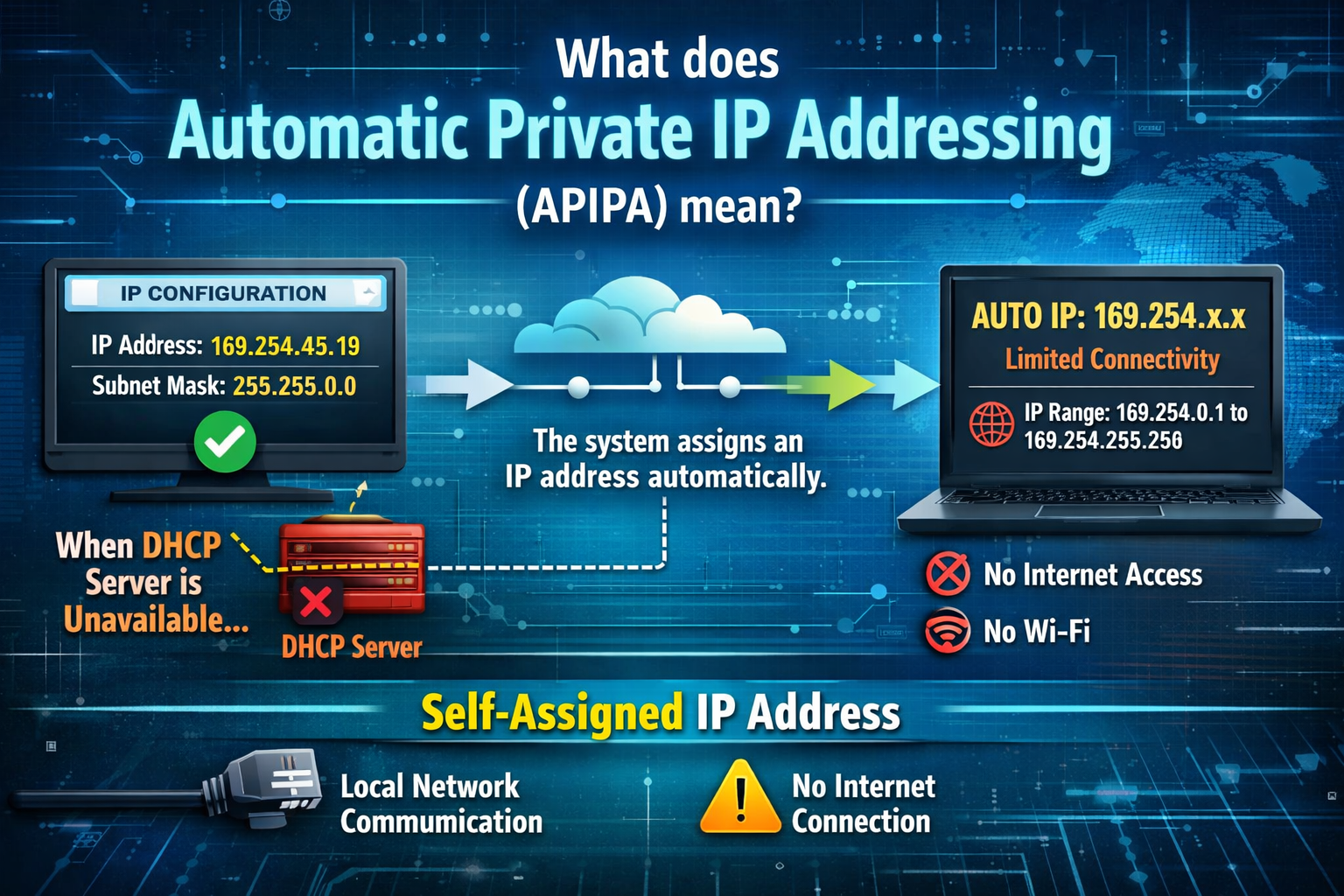
Automatic Private IP Addressing is a built-in networking feature designed to keep basic local communication possible when a device fails to obtain an IP address from a DHCP server. In modern computer networks, devices normally rely on DHCP (Dynamic Host Configuration Protocol) to automatically receive important network configuration details such as IP address, subnet mask, default gateway, and DNS information. However, when this process fails due to server issues, network misconfiguration, or connectivity problems, APIPA acts as a backup mechanism that automatically assigns a usable local IP address so that limited network communication can still continue.
APIPA is primarily found in systems that support automatic IP configuration. Its main purpose is not to provide full network connectivity or internet access, but to ensure that devices are not completely isolated when DHCP services are unavailable. This feature is especially useful in small office or home networks where temporary DHCP failures could otherwise disrupt basic device-to-device communication.
Purpose of APIPA in Networking Environments
The primary purpose of APIPA is to provide fault tolerance in IP configuration. In a typical network environment, devices depend heavily on DHCP servers to receive valid network settings. If the DHCP server becomes unavailable, devices would normally fail to connect to the network properly. APIPA prevents this situation by automatically assigning a fallback IP configuration.
This ensures that even during network failures, devices can still communicate with other devices on the same local subnet. For example, in a home network, two computers may still be able to share files or access shared printers even if the router’s DHCP service is temporarily down. APIPA helps maintain this minimal level of functionality without requiring manual configuration from users.
How Automatic Private IP Addressing Works
When a device is set to obtain an IP address automatically, it first sends a request to a DHCP server after connecting to a network. If the server responds, the device receives a valid IP address along with other configuration details. However, if the device does not receive a response after multiple attempts, it activates the APIPA process.
During this process, the system randomly selects an IP address from a reserved range specifically set aside for private use. Before assigning this address, the device performs a check to ensure that the selected IP is not already in use by another device on the same network. If a conflict is detected, another address is chosen until a free one is found.
Once a valid address is selected, the device assigns it to itself along with a default subnet mask. This allows limited communication within the local network but does not provide routing to external networks such as the internet.
APIPA Address Range and Configuration
Devices using APIPA automatically select IP addresses from a predefined reserved range. This range is 169.254.0.1 through 169.254.255.254. Any IP address within this range is considered link-local, meaning it is only valid within the local network segment and cannot be routed beyond it.
Along with the IP address, the device assigns itself a subnet mask of 255.255.0.0. This subnet mask ensures that the device can communicate with other devices that also have APIPA addresses within the same range.
However, APIPA does not assign a default gateway or DNS server. This is a key limitation, as it prevents access to external networks, websites, or services that require routing beyond the local subnet.
Role of APIPA in Network Failure Scenarios
APIPA becomes active mainly when there is a failure in the DHCP configuration process. This can occur for several reasons, such as a router being turned off, a DHCP server service crashing, network cable disconnections, or incorrect network settings.
When such a failure happens, the device does not stop functioning entirely. Instead, APIPA ensures that it can still participate in local communication. This can be particularly useful in environments where devices need to maintain some level of connectivity even when centralized network services are down.
For example, in a classroom or office environment, APIPA may allow computers to continue sharing files locally even if internet access is temporarily unavailable. This makes it a valuable fallback system for maintaining productivity during network disruptions.
Limitations of APIPA
Although APIPA provides an important fallback mechanism, it comes with several limitations. The most significant limitation is the lack of internet connectivity. Since APIPA does not assign a default gateway, devices cannot communicate outside the local network.
Another limitation is that APIPA addresses are only valid within the same network segment. Devices on different subnets or networks cannot communicate using APIPA alone. This restricts its use to very small or isolated networks.
Additionally, APIPA is not a permanent solution. It is designed only for temporary use until a proper DHCP server becomes available again. Once the DHCP service is restored, devices typically discard their APIPA address and request a valid network configuration.
APIPA in Modern Operating Systems
Most modern operating systems include APIPA support as a built-in feature. It is automatically enabled and does not require manual configuration. When DHCP fails, the operating system seamlessly switches to APIPA without user intervention.
This automatic behavior helps ensure that users do not need technical knowledge to maintain basic network functionality. It also reduces downtime caused by network configuration issues, especially in environments where IT support may not be immediately available.
In many systems, users can identify APIPA usage by checking the assigned IP address. If the address falls within the 169.254.x.x range, it indicates that the device was unable to obtain an IP address from a DHCP server and has fallen back to APIPA.
Communication Within APIPA Networks
Devices using APIPA can communicate with each other as long as they are on the same local network segment. This allows basic peer-to-peer networking functions such as file sharing, printer access, and local service discovery.
However, communication is limited strictly to devices using compatible APIPA addresses. If a device has a manually configured static IP or a DHCP-assigned IP outside the APIPA range, communication with APIPA devices may not always be possible without proper routing or configuration.
Because of this, APIPA is most effective in small, isolated environments where all devices are likely to fall back to the same addressing system during DHCP failure.
Difference Between APIPA and DHCP
APIPA and DHCP serve very different roles in networking. DHCP is a centralized system that dynamically assigns IP addresses and network configurations to devices. It is the primary method used in most modern networks.
APIPA, on the other hand, is a fallback mechanism used only when DHCP fails. While DHCP provides full network configuration including internet access, APIPA only provides local communication capabilities.
Another key difference is control. DHCP allows administrators to manage IP assignments and network structure, while APIPA operates automatically without any administrative control or customization.
Importance of APIPA in Network Stability
APIPA plays an important role in maintaining network stability by preventing complete communication breakdown during DHCP failures. Without APIPA, devices would lose all network connectivity when DHCP services are unavailable.
By providing automatic local addressing, APIPA ensures that at least minimal communication remains possible. This can be crucial in troubleshooting network issues, as it allows devices to stay partially connected while administrators diagnose and fix the problem.
It also improves user experience by reducing the impact of network interruptions. Instead of showing complete network failure, devices can still operate in a limited capacity.
Troubleshooting APIPA-Related Issues
When a device receives an APIPA address unexpectedly, it usually indicates a problem with the DHCP server or network configuration. Common troubleshooting steps include checking router status, verifying DHCP service functionality, inspecting physical network connections, and ensuring proper IP configuration settings.
If the DHCP server is restored, devices typically automatically switch back to normal IP addressing. However, in some cases, a manual network reset or reconnection may be required to refresh the IP assignment process.
APIPA Functionality
Automatic Private IP Addressing is an essential backup mechanism in modern networking systems. It ensures that devices can still communicate locally even when DHCP services fail. Although it does not provide full network functionality or internet access, it plays a crucial role in maintaining minimal connectivity and supporting troubleshooting processes.
By automatically assigning private IP addresses within a reserved range, APIPA helps reduce downtime and improves network resilience in both home and small business environments.
APIPA Address Selection Process
When Automatic Private IP Addressing is activated, the device follows a structured method to choose an IP address. It does not simply assign a random value without checks; instead, it carefully selects an address from the reserved APIPA range and verifies whether that address is already in use on the local network. This process helps reduce conflicts between devices.
The system typically uses a self-assignment mechanism that begins scanning the 169.254.0.0 range. After selecting a candidate address, the device performs a conflict detection check by sending test messages across the local network. If another device responds or if a duplicate is detected, the system discards that address and tries another one. This continues until a free address is found.
Once a suitable address is identified, the device locks it in for use until network conditions change. This ensures that each device maintains a unique identity within the local APIPA-based network segment, allowing communication without overlap or confusion.
Role of ARP in APIPA Functioning
The Address Resolution Protocol plays an important role in how APIPA ensures unique IP assignment. Before finalizing an address, the device uses ARP to broadcast a request asking whether any other device is already using the same IP.
If no response is received, the address is considered safe and assigned to the device. If a response is received, it means another device is already using that IP, and the system must choose a different one. This simple but effective mechanism prevents IP conflicts in a network that lacks centralized DHCP control.
ARP-based verification is essential because APIPA networks do not rely on a server to manage address distribution. Instead, each device independently ensures that it does not create conflicts with others.
Network Communication with APIPA Addresses
Devices that have been assigned APIPA addresses can communicate with each other directly within the same local network segment. This type of communication is known as link-local communication. It allows basic networking functions such as file sharing, printer sharing, and direct device interaction.
However, communication is limited strictly to devices that are also using APIPA within the same subnet. If one device has a valid DHCP-assigned IP address and another has an APIPA address, communication may not work properly unless specific network routing rules are configured.
This restriction is due to the fact that APIPA does not support routing beyond the local network. There is no default gateway assigned, meaning data cannot be forwarded outside the immediate network segment.
Behavior When DHCP Becomes Available Again
One important feature of APIPA is its temporary nature. It is designed to automatically deactivate once a valid DHCP server becomes available again. When this happens, the device stops using the self-assigned APIPA address and initiates a new request for a proper IP configuration.
This transition is usually seamless. The device releases the APIPA address and replaces it with a DHCP-assigned address without requiring user intervention. This ensures continuous connectivity without manual reconfiguration.
In some cases, a brief network interruption may occur during the transition, but modern systems are optimized to minimize disruption and maintain stable connectivity as much as possible.
APIPA in Small Networks
APIPA is especially useful in small networks such as home setups, small offices, or temporary networks where DHCP servers may not always be available. In such environments, it provides a simple fallback solution that does not require technical expertise.
For example, if a home router fails to provide DHCP services, connected devices may still be able to communicate with each other using APIPA addresses. This allows users to continue sharing files or using local resources even when internet access is unavailable.
Although it is not intended as a long-term networking solution, APIPA can be extremely helpful in maintaining basic functionality during temporary failures.
Security Considerations of APIPA
From a security perspective, APIPA does not include advanced protections or authentication mechanisms. Since it operates without centralized control, it relies entirely on local device behavior for address assignment.
This means that while it is safe for small trusted networks, it is not suitable for environments requiring strict security policies or controlled access management. There is no encryption or authentication built into the APIPA process itself.
However, because APIPA is limited to local communication only, it does not directly expose devices to external network threats. Its scope is naturally restricted, which reduces some security risks but also limits functionality.
APIPA and Network Troubleshooting
One of the most common uses of APIPA in practice is as an indicator of network problems. When a device shows an IP address in the 169.254.x.x range, it often signals that DHCP communication has failed.
Network administrators use this information to diagnose issues such as disconnected routers, misconfigured DHCP services, or faulty network cables. APIPA essentially acts as a diagnostic signal that something is wrong with the normal IP assignment process.
By checking whether devices are using APIPA addresses, technicians can quickly identify whether the problem lies with the DHCP server or with local device connectivity.
Limitations in Larger Network Environments
In large enterprise networks, APIPA is rarely relied upon for operational use. This is because large networks require centralized management, structured IP addressing, and reliable routing between multiple subnets.
APIPA cannot support these requirements because it does not offer routing, scalability, or administrative control. It is limited to a single local segment and cannot integrate into complex network architectures.
For this reason, enterprise environments depend almost entirely on DHCP servers and static IP configurations rather than fallback systems like APIPA.
Interaction Between APIPA and Static IP Addresses
APIPA operates independently of static IP configurations. If a device is manually assigned a static IP address, it will not use APIPA under normal circumstances. However, if the static configuration is incorrect or conflicts with network settings, communication problems may still occur.
In contrast, devices set to automatic configuration are the ones that rely on APIPA when DHCP fails. This distinction is important because it determines how a device behaves during network issues.
Understanding the difference between static IP assignment and APIPA fallback helps in diagnosing connectivity problems more effectively.
Transition Between Network States
A device using APIPA can move between different network states depending on availability. Initially, it attempts DHCP-based configuration. If that fails, it switches to APIPA. Later, when a valid network becomes available again, it transitions back to DHCP-assigned addressing.
This dynamic behavior allows devices to adapt automatically to changing network conditions without requiring manual intervention. It improves usability and ensures that devices remain functional even in unstable environments.
The ability to switch between these states is a key strength of modern networking systems.
Real-World Importance of APIPA
In practical terms, APIPA is not something users interact with directly, but it plays an important behind-the-scenes role. It ensures continuity, supports troubleshooting, and provides a fallback mechanism that keeps devices partially functional during network failures.
Without APIPA, DHCP failures would result in complete loss of local connectivity, making it much harder to diagnose or temporarily work around network problems. By maintaining a minimal level of communication, APIPA helps bridge the gap between failure and recovery.
APIPA Role in Networking
Automatic Private IP Addressing serves as a critical backup system in IP networking. It activates when DHCP fails, assigns a valid local IP address from a reserved range, and enables limited communication within a local network.
Although it does not support internet access or advanced networking features, its role in maintaining basic connectivity and supporting troubleshooting makes it an important component of modern operating systems.
APIPA and Network Layer Functionality
Automatic Private IP Addressing operates at the network layer, which is responsible for logical addressing and routing of data between devices. When DHCP fails, APIPA takes over this role in a limited form by assigning a temporary IP address that allows devices to communicate within the same local network segment. This ensures that even without centralized configuration, devices can still participate in basic networking activities.
However, APIPA does not perform routing beyond the local network. It does not interact with routers or external gateways, which means its functionality remains confined to link-local communication. This limitation is intentional, as APIPA is designed only as a fallback mechanism rather than a full networking solution.
Dependency on DHCP Failure Detection
The activation of APIPA depends entirely on the system’s ability to detect DHCP failure. When a device is configured to obtain an IP address automatically, it repeatedly sends DHCP discovery requests during startup. If no response is received within a specific time period, the system concludes that DHCP services are unavailable.
At this point, the APIPA process is triggered automatically. This decision-making process happens internally within the operating system, without user input. It ensures that devices do not remain in a non-functional state when DHCP is unreachable.
The timing and retry intervals may vary depending on the operating system, but the overall logic remains consistent across modern platforms.
Self-Configuration Mechanism in APIPA
One of the key characteristics of APIPA is its self-configuration capability. Unlike DHCP, which relies on a centralized server, APIPA allows each device to independently assign itself an IP address.
This self-configuration includes not only selecting an IP address but also assigning a default subnet mask. The subnet mask used is typically 255.255.0.0, which defines the local network boundary for APIPA communication.
Since there is no external authority controlling the assignment, each device must rely on internal checks and local network communication to avoid conflicts. This decentralized approach is what makes APIPA both simple and limited at the same time.
Address Conflict Handling in APIPA Networks
Although APIPA uses a random selection process within a reserved range, it still includes mechanisms to handle potential address conflicts. Before finalizing an IP address, the device checks whether the chosen address is already in use by sending network probes.
If another device responds, indicating that the address is already occupied, the system discards it and selects another one. This process continues until a unique address is found.
In rare cases where multiple devices start at the same time, temporary conflicts may still occur, but these are usually resolved quickly as devices retry and adjust their assigned addresses.
APIPA in Peer-to-Peer Communication
APIPA is particularly useful in peer-to-peer networking scenarios where devices communicate directly without relying on a central server. In such cases, APIPA allows devices to form a temporary local network automatically.
For example, two computers connected through a switch or direct connection may still share files or resources even if DHCP is not functioning. This makes APIPA a practical solution for temporary setups or emergency situations.
However, this communication remains limited to devices within the same subnet and does not extend to broader networks.
Limitations in Address Management
APIPA does not provide any centralized address management system. This means there is no way to reserve specific IP addresses for certain devices or enforce structured network planning.
In contrast, DHCP allows administrators to define address pools, assign static leases, and control network distribution. APIPA lacks all of these capabilities, making it unsuitable for organized or large-scale environments.
As a result, APIPA is only intended for temporary or fallback use rather than long-term network design.
Absence of Gateway and DNS Configuration
A major limitation of APIPA is that it does not assign a default gateway or DNS server. These components are essential for accessing external networks and resolving domain names.
Without a gateway, devices cannot route traffic outside the local network. Without DNS, even if external routing were possible, domain names could not be translated into IP addresses.
This clearly defines APIPA’s role as a strictly local communication tool rather than a complete networking solution.
Impact on Internet Connectivity
When a device is using an APIPA address, internet connectivity is automatically unavailable. This is because internet access requires proper routing through a gateway, which APIPA does not provide.
Users often notice this issue when their device displays an IP address in the 169.254.x.x range and shows limited or no connectivity status. This is a direct indication that DHCP has failed and APIPA has taken over.
Restoring internet access requires restoring DHCP functionality or manually configuring valid network settings.
Behavior in Mixed Network Environments
In networks where some devices have valid DHCP addresses and others have APIPA addresses, communication between the two groups may not always work. This depends on network configuration and routing rules.
Since APIPA devices operate in a separate link-local range, they may be isolated from devices using standard private IP ranges such as 192.168.x.x or 10.x.x.x.
This separation can lead to partial network fragmentation if DHCP issues occur across multiple devices.
APIPA Address Lifetime and Stability
APIPA addresses remain active as long as DHCP services remain unavailable. There is no strict expiration time like DHCP leases. Instead, the address remains in use until the device either restarts, reconnects, or successfully obtains a DHCP address.
This makes APIPA relatively stable during short-term network outages, allowing devices to maintain limited connectivity without frequent changes in configuration.
However, this stability is only temporary and depends entirely on continued DHCP failure.
Role in Network Diagnostics
APIPA is widely used as a diagnostic indicator in network troubleshooting. When multiple devices begin using APIPA addresses unexpectedly, it often signals a systemic DHCP failure.
Network administrators can quickly identify whether the issue lies with the DHCP server, network infrastructure, or local device configuration by observing APIPA usage patterns.
This makes APIPA an indirect but valuable diagnostic tool in maintaining network health.
Comparison with Link-Local Addressing Concepts
APIPA is a form of link-local addressing, meaning it is designed for communication within a single network segment. Other networking systems also use link-local addressing for similar purposes, but APIPA is specifically associated with automatic fallback in IP networking.
This concept ensures that even without external configuration, devices can still establish minimal communication channels.
However, unlike more advanced networking protocols, APIPA does not support advanced routing or hierarchical network structures.
System Independence and Automation
APIPA operates entirely automatically within the operating system. Users do not need to configure or enable it manually. Once network conditions trigger its activation, it functions independently until normal network services are restored.
This automation reduces the need for user intervention and ensures that devices remain operational even when network administrators are not available.
It is designed to be transparent, meaning most users are unaware of its operation unless a network issue occurs.
APIPA Functionality and Behavior
Automatic Private IP Addressing serves as a reliable fallback mechanism that maintains basic network functionality when DHCP services fail. It enables devices to assign themselves temporary IP addresses within a reserved range, ensuring local communication remains possible.
Although it lacks routing, internet access, and administrative control, its simplicity and automation make it an essential component of modern networking systems. APIPA plays a crucial role in maintaining continuity, supporting troubleshooting, and ensuring that devices remain partially functional during network disruptions.
APIPA in Operating System Design
Automatic Private IP Addressing is deeply integrated into the networking stack of modern operating systems. It is not an external service or optional add-on, but a built-in fallback mechanism within the TCP/IP configuration system. This integration ensures that whenever a device is configured for automatic IP assignment, APIPA is always available as a backup option.
The operating system continuously manages the transition between DHCP-based configuration and APIPA without requiring user interaction. This design choice improves reliability and ensures that even non-technical users can maintain basic network connectivity during failures.
Because it is embedded at the system level, APIPA functions consistently across different applications and network interfaces without needing separate configuration for each program or service.
Interaction with Network Interfaces
Each network interface on a device, such as Ethernet or Wi-Fi, can independently use APIPA if DHCP fails. This means a computer with multiple network adapters may have different IP assignment states on each interface.
For example, a Wi-Fi adapter might receive a valid DHCP address while an Ethernet adapter falls back to APIPA if the wired network is disconnected or malfunctioning. This separation allows each interface to operate independently based on its own network conditions.
However, communication between interfaces is still governed by routing rules, and APIPA does not bridge these interfaces or create cross-interface communication paths.
Automatic Transition Between States
One of the most important features of APIPA is its ability to transition automatically between network states. The system continuously monitors DHCP availability in the background. When a valid DHCP server becomes reachable again, the device automatically begins the process of obtaining a proper IP configuration.
Once successful, the APIPA address is released and replaced with a DHCP-assigned address. This transition happens dynamically and ensures minimal disruption to network activity.
If DHCP becomes unavailable again, the system can revert back to APIPA, maintaining a cycle of adaptability depending on network conditions.
Temporary Nature of APIPA Usage
APIPA is not designed for long-term use. Its temporary nature is one of its defining characteristics. It exists only to bridge the gap between DHCP failure and recovery.
Because of this, it does not store permanent network configurations or maintain persistent routing information. Once normal network services are restored, APIPA is discarded and no longer used.
This temporary design ensures that APIPA does not interfere with standard network operations or replace proper network configuration systems.
Impact on Network Performance
APIPA itself does not significantly affect network performance because it is only activated during DHCP failure scenarios. However, when active, it limits performance by restricting communication to local devices only.
Since there is no access to external networks, users may experience reduced functionality, especially in environments where internet connectivity is required for daily operations.
Despite these limitations, APIPA ensures that internal communication remains stable, which can still be valuable in certain scenarios such as local file transfers or device configuration tasks.
Role in Network Recovery Processes
APIPA plays an indirect but important role in network recovery. When administrators troubleshoot DHCP issues, the presence of APIPA addresses confirms that devices are attempting to obtain network configuration but failing.
This information helps narrow down the cause of the issue, whether it is a server failure, misconfiguration, or physical connectivity problem.
Once the underlying issue is resolved, devices automatically recover by switching back from APIPA to DHCP-based addressing without requiring manual reconfiguration.
Behavior During Network Changes
In dynamic network environments, APIPA helps devices adapt to sudden changes in connectivity. If a network cable is unplugged or a wireless connection is lost, the system may temporarily switch to APIPA if no valid configuration is available.
When the connection is restored, the system attempts DHCP again and replaces the APIPA address with a valid one if successful.
This behavior ensures continuous adaptability, even in unstable or frequently changing network conditions.
APIPA and Multicast Communication
Although APIPA is limited in scope, it can still support certain types of local network communication such as multicast traffic within the same subnet. This allows limited discovery of services or devices that are also operating within the APIPA range.
However, this functionality is still restricted and does not extend beyond the local network segment. It is primarily useful for basic device interaction rather than advanced networking tasks.
Limitations in Network Scalability
APIPA is not scalable and cannot support expanding or complex network structures. It is limited to a single broadcast domain, meaning all devices must exist within the same local segment.
As network size increases, APIPA becomes less useful because it cannot support hierarchical addressing, routing between subnets, or centralized management.
For this reason, it is strictly used as a fallback mechanism rather than a foundation for network design.
Security Behavior in APIPA Networks
From a security perspective, APIPA networks are relatively isolated because they do not connect to external networks. This isolation reduces exposure to external threats but does not provide internal security protections.
There is no encryption, authentication, or access control built into APIPA itself. Security depends entirely on the local network environment and external security tools.
This makes APIPA suitable for trusted environments but not appropriate for controlled or enterprise-level security systems.
Diagnostic Value in Network Monitoring
Network monitoring tools often flag APIPA usage as a warning sign. When multiple devices display APIPA addresses, it indicates a shared network issue rather than individual device problems.
This makes APIPA an important signal for identifying widespread connectivity failures. Administrators can use this information to quickly determine whether DHCP services are down or if there is a broader infrastructure issue.
Its predictable behavior makes it useful for rapid diagnosis and system health assessment.
Interaction with Routing Tables
Devices using APIPA still maintain internal routing tables, but these tables are limited in scope. Since there is no default gateway, all routes remain local to the 169.254.0.0 network range.
This prevents traffic from being forwarded beyond the local subnet and ensures strict isolation from external networks.
Even if routing entries exist for other networks, they remain inactive while APIPA is in use due to the absence of valid gateway information.
Behavior in Virtual Environments
In virtual machines and containerized environments, APIPA can also appear when virtual network adapters fail to obtain DHCP configuration. This is common in misconfigured virtual networks or disconnected virtual switches.
In such environments, APIPA serves the same purpose as in physical systems by allowing limited internal communication between virtual instances on the same host or network segment.
Importance in Legacy and Modern Systems
APIPA has remained relevant across both legacy and modern operating systems due to its simplicity and reliability. Even as networking technologies have evolved, the need for a fallback IP assignment mechanism has not disappeared.
Modern systems continue to use APIPA because it requires no external infrastructure and provides immediate local connectivity during failures.
This long-term relevance highlights its importance as a foundational networking feature.
Final Understanding of APIPA Role
Automatic Private IP Addressing functions as a safety mechanism within IP networking systems. It ensures that devices are never completely isolated when DHCP services fail, allowing limited but essential communication to continue.
Although it does not replace proper network configuration systems, it plays a crucial supporting role in maintaining stability, aiding troubleshooting, and ensuring basic functionality during unexpected network disruptions.
Conclusion
Automatic Private IP Addressing is an essential fallback mechanism in modern networking that ensures devices can still maintain basic local communication when DHCP services fail or become unreachable. It works by automatically assigning an IP address from a reserved range, allowing devices to stay connected within the same local network segment without requiring manual configuration.
Although APIPA does not support internet access, routing, or advanced network management, its role is still highly important. It acts as a safety net that prevents complete network isolation and helps users continue basic tasks such as local file sharing and device communication during temporary network issues.
Another important aspect of APIPA is its automatic behavior. It requires no user intervention and activates only when needed, making it highly efficient for environments where network reliability is critical. Once normal DHCP services are restored, it seamlessly switches back to standard IP configuration, ensuring smooth recovery.
In practical terms, APIPA is not meant to replace proper network setup but to support it when failures occur. Its simplicity, automatic operation, and reliability make it a valuable component in both small and large networking systems.