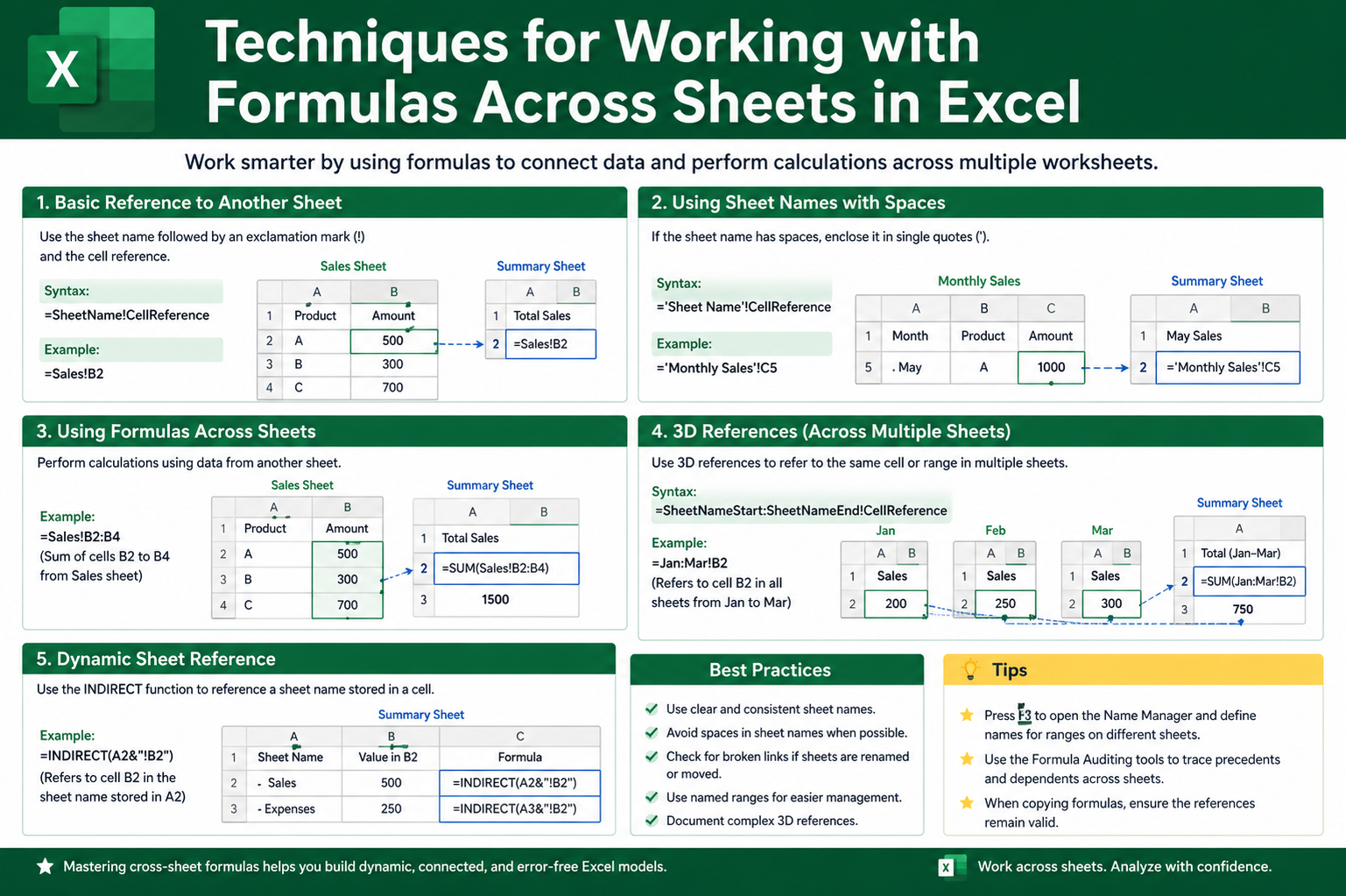
Working across multiple sheets becomes significantly more powerful when you understand how advanced referencing techniques expand what simple formulas can achieve. Instead of treating each sheet as an isolated space, Excel allows you to build interconnected systems where data flows smoothly between different areas of a workbook. This improves both efficiency and accuracy, especially when handling large datasets that require frequent updates.
Using Direct Sheet References in Complex Calculations
One of the foundational methods for working across sheets is direct referencing, where a formula pulls data from another sheet using structured syntax. This technique allows you to combine values from different locations into a single calculation. As your workbook grows, this approach ensures that data remains centralized while still being usable across multiple analytical views. It is especially useful in financial models, inventory tracking, and performance reports where the same values must be analyzed from different perspectives.
Applying 3D References for Range-Based Calculations
3D referencing becomes extremely useful when multiple sheets follow the same structure. Instead of referencing each sheet individually, you can perform calculations across a continuous range of sheets. This method is commonly used when aggregating monthly or departmental data that is formatted consistently. It reduces formula complexity and ensures that new sheets added within the range are automatically included in calculations, saving both time and effort.
Using INDIRECT Function for Dynamic Sheet Selection
The INDIRECT function allows for dynamic referencing by converting text strings into valid cell references. This becomes powerful when you want to switch between sheets based on user input or changing conditions. Instead of manually updating formulas, INDIRECT enables flexibility by letting formulas adapt automatically. This is particularly helpful in dashboards where users may select different datasets or time periods, and the displayed results need to adjust instantly without rewriting formulas.
Combining SUM with Cross-Sheet Data Aggregation
Summing values across multiple sheets is one of the most common requirements in structured Excel workbooks. Instead of manually adding each sheet reference, Excel allows streamlined approaches that combine multiple ranges efficiently. This is especially useful when tracking cumulative totals such as yearly expenses, sales performance, or project milestones. By structuring sheets consistently, these formulas become scalable and easier to maintain over time.
Using Logical Functions Across Multiple Sheets
Logical functions such as IF, AND, and OR become more powerful when applied across sheets. These functions allow decision-making based on values stored in different locations. For example, a formula can evaluate performance data from one sheet and return results based on conditions defined in another sheet. This creates dynamic workflows where outputs change automatically depending on underlying data conditions, improving automation within spreadsheets.
Retrieving Data with Lookup Functions Across Sheets
Lookup functions are essential for extracting specific information from other sheets. When working with structured datasets, these functions help match values across different tables and return corresponding results. This technique is commonly used in database-style Excel workbooks where one sheet stores identifiers and another contains detailed information. By linking them, users can quickly retrieve relevant data without manually searching through sheets.
Improving Efficiency with Named References Across Sheets
Named references simplify complex formulas by replacing cell addresses with meaningful labels. When working across multiple sheets, this becomes even more useful because it reduces confusion and improves readability. Instead of remembering exact cell positions, users can refer to named ranges that clearly describe the data they represent. This makes formulas easier to understand, maintain, and audit, especially in collaborative environments.
Error Prevention in Multi-Sheet Formulas
When formulas span across multiple sheets, the risk of errors increases due to missing references, renamed sheets, or inconsistent data structures. Implementing error-handling techniques ensures that formulas remain stable even when unexpected issues occur. This is essential in professional spreadsheets where reliability is critical. Proper error management prevents incorrect outputs and helps maintain trust in the data being analyzed.
Dynamic Data Consolidation from Multiple Sheets
Consolidating data from several sheets into a single summary view is a common requirement in advanced Excel usage. Instead of copying data manually, formulas can be designed to automatically gather and summarize information. This approach is widely used in reporting systems where data from different departments or time periods must be combined into one unified view. It ensures consistency and reduces manual workload significantly.
Cross-Sheet Conditional Calculations for Smarter Analysis
Conditional calculations allow formulas to respond differently based on values located in other sheets. This creates a more intelligent spreadsheet system where outputs are not static but adapt to changing inputs. For example, performance metrics can be evaluated across different sheets and categorized based on predefined thresholds. This technique enhances analytical depth and helps users make more informed decisions based on interconnected data.
Using Structured Workbook Design for Better Formula Control
A well-structured workbook plays a crucial role in managing formulas across multiple sheets. When sheets follow a logical arrangement and consistent naming pattern, it becomes easier to build and maintain cross-sheet formulas. Organized structure reduces confusion and ensures that formulas remain functional even as the workbook evolves over time. This is especially important in large-scale projects where multiple users interact with the same file.
Linking Reports Across Sheets for Real-Time Updates
One of the most powerful aspects of cross-sheet formulas is the ability to create real-time connections between reports. When data is updated in one sheet, all linked sheets automatically reflect those changes. This ensures that reports remain current without requiring manual updates. It is particularly valuable in environments where timely information is critical for decision-making.
Using Multi-Sheet Arrays for Advanced Calculations
Array-based formulas can operate across multiple sheets to perform complex calculations in a single step. These formulas are designed to process ranges of data simultaneously, making them ideal for large datasets. By combining arrays with cross-sheet references, users can perform advanced analysis without breaking calculations into multiple steps. This improves both efficiency and accuracy in data processing.
Maintaining Scalability in Cross-Sheet Systems
As spreadsheets grow, maintaining scalability becomes essential. Cross-sheet formulas should be designed in a way that allows new data to be added without breaking existing calculations. This involves using flexible references, structured design, and dynamic functions that adjust automatically. A scalable system ensures long-term usability and reduces the need for frequent formula restructuring.
Improving Readability in Complex Cross-Sheet Formulas
When multiple sheets are involved, formulas can become difficult to read and interpret. Improving readability through structured naming, consistent formatting, and simplified logic helps users understand how data flows across the workbook. Clear formulas reduce the likelihood of errors and make troubleshooting easier when issues arise.
Building Interactive Models Using Cross-Sheet Logic
Cross-sheet formulas can be used to build interactive models where user inputs affect outputs across multiple sheets. This creates dynamic systems that respond to changes in real time. Such models are widely used in forecasting, budgeting, and scenario analysis, where different assumptions need to be tested quickly and efficiently.
Ensuring Data Consistency Across Connected Sheets
Consistency is key when working with formulas that span multiple sheets. Any variation in structure or formatting can lead to incorrect results. Maintaining uniform data entry practices ensures that formulas behave as expected and produce reliable outputs. This consistency is essential for maintaining the integrity of interconnected spreadsheets.
Optimizing Performance in Large Multi-Sheet Workbooks
As the number of cross-sheet formulas increases, workbook performance can be affected. Optimizing formulas by reducing unnecessary calculations and using efficient referencing techniques helps maintain speed and responsiveness. This ensures that even complex spreadsheets remain functional and responsive during heavy usage.
Advanced Cross-Sheet Formula Techniques
Mastering formulas across multiple sheets in Excel transforms a simple spreadsheet into a powerful data management system. By using structured referencing, dynamic functions, and logical design principles, users can create highly efficient and scalable models. These techniques not only improve accuracy but also enhance automation, making it easier to manage large and complex datasets with confidence.
Advanced Data Integration Across Multiple Sheets in Excel
As Excel workbooks grow in complexity, the need for seamless data integration across multiple sheets becomes more important. Advanced integration techniques allow users to connect datasets in a structured way so that information flows naturally between different sections of a workbook. This reduces duplication of effort and ensures that all calculations remain aligned with the latest data updates.
Creating Structured Dependencies Between Sheets
Structured dependencies occur when one sheet relies on data from another in a controlled and predictable way. This technique ensures that changes in source data automatically reflect in dependent sheets without manual intervention. By carefully designing these relationships, users can build robust systems where each sheet plays a specific role in the overall data model. This approach is commonly used in reporting frameworks and analytical dashboards.
Using Multi-Sheet Reference Chains for Complex Models
In advanced spreadsheet design, data often flows through multiple layers of sheets. A reference chain allows one sheet to pull data from another, which may itself be referencing a third sheet. When properly structured, these chains create powerful analytical systems that break complex calculations into manageable components. This improves clarity and makes it easier to troubleshoot individual sections of a model.
Optimizing Calculation Flow Across Sheets
Efficient calculation flow is essential when working with interconnected sheets. Excel processes formulas based on dependencies, so poorly structured references can slow down performance. Organizing calculations in a logical sequence ensures that Excel can process updates quickly and accurately. This is particularly important in large workbooks with hundreds or thousands of formulas distributed across multiple sheets.
Building Centralized Data Input Sheets
A common best practice in advanced Excel design is to use centralized input sheets. These sheets act as the primary source of raw data, which is then referenced by other sheets for analysis and reporting. This structure ensures that data is entered only once, reducing errors and maintaining consistency. It also simplifies updates since changes in one location automatically propagate throughout the workbook.
Dynamic Cross-Sheet Filtering Techniques
Dynamic filtering allows users to display specific subsets of data based on conditions defined across different sheets. This technique is useful when working with large datasets where only certain records are relevant at a given time. By combining cross-sheet references with logical conditions, users can create flexible systems that adjust automatically based on selected criteria.
Using Conditional Aggregation Across Sheets
Conditional aggregation involves summarizing data across multiple sheets based on specific rules or criteria. Instead of simply adding values, formulas can be designed to include only data that meets certain conditions. This allows for more meaningful analysis and helps users focus on relevant insights rather than raw totals. It is widely used in financial reporting and performance tracking systems.
Linking Time-Based Data Across Sheets
Time-based data structures often require consistent tracking across multiple sheets representing different periods. By linking these sheets together, users can create continuous datasets that support trend analysis and forecasting. This approach ensures that historical, current, and future data remain connected in a meaningful way, enabling better decision-making based on long-term patterns.
Reducing Formula Redundancy in Multi-Sheet Workbooks
Redundant formulas can make a workbook difficult to manage and slow to update. By designing shared references and reusable logic across sheets, users can significantly reduce duplication. This not only improves performance but also simplifies maintenance, as updates need to be made in fewer locations. Cleaner structure leads to more reliable and scalable spreadsheet systems.
Enhancing Formula Transparency Across Sheets
Transparency is important when multiple sheets are interconnected through complex formulas. Clear labeling, consistent structure, and simplified logic help users understand how data is being processed. When formulas are easy to interpret, it becomes simpler to audit results and identify potential issues. This is especially important in collaborative environments where multiple users interact with the same workbook.
Using Cross-Sheet Validation Techniques
Data validation ensures that inputs across different sheets remain consistent and accurate. By applying validation rules that reference other sheets, users can prevent incorrect or incompatible data entries. This helps maintain the integrity of the entire workbook and reduces the likelihood of errors spreading across connected formulas.
Automating Updates Through Linked Sheet Structures
Automation is one of the biggest advantages of cross-sheet formulas. Once properly configured, linked sheets update automatically whenever source data changes. This eliminates the need for manual recalculations and ensures that all reports remain current. Automated systems are especially useful in environments where data changes frequently and timely updates are critical.
Managing Large Datasets Across Multiple Sheets
When dealing with large datasets, distributing information across multiple sheets helps improve organization and performance. Each sheet can represent a specific category, time period, or data type. Cross-sheet formulas then bring this distributed data together for analysis. This approach keeps workbooks structured and prevents any single sheet from becoming overloaded.
Using Cross-Sheet Array Logic for Advanced Processing
Array logic allows multiple values to be processed simultaneously across different sheets. This technique is useful for performing complex calculations that involve large ranges of data. By combining array operations with cross-sheet references, users can build highly efficient models that reduce the need for repetitive formulas.
Improving Accuracy with Structured Formula Auditing
Auditing formulas across multiple sheets helps ensure accuracy and consistency. By reviewing how data flows between sheets, users can identify broken links, incorrect references, or logical errors. Regular auditing is essential in maintaining the reliability of complex spreadsheets, especially those used for financial or operational decision-making.
Creating Modular Spreadsheet Systems
Modular design involves breaking a workbook into separate functional sections, each represented by different sheets. These modules interact through structured formulas, allowing each part of the workbook to operate independently while still contributing to the overall system. This approach improves organization and makes large spreadsheets easier to manage and expand.
Enhancing Flexibility with Switchable Data Sources
Switchable data sources allow users to change inputs without modifying formulas. By designing sheets that can reference alternative datasets dynamically, users gain flexibility in how information is analyzed. This is particularly useful in scenario modeling where different assumptions need to be tested quickly.
Improving Workbook Stability in Complex Environments
As cross-sheet dependencies increase, workbook stability becomes a key concern. Proper design techniques, such as limiting circular references and organizing dependencies logically, help maintain stability. A well-structured workbook is less likely to break when changes are made, ensuring long-term reliability.
Integrating Cross-Sheet Logic with Business Processes
Advanced Excel models often reflect real-world business processes. Cross-sheet formulas allow these processes to be modeled accurately by linking different stages of data handling. This creates a digital representation of workflows, making it easier to analyze and optimize business operations.
Advanced Cross-Sheet Techniques
Working with formulas across multiple sheets in Excel is not just about connecting data, but about building structured, intelligent systems. When properly designed, these systems allow information to move seamlessly, calculations to remain accurate, and analysis to become more powerful. Mastering these techniques leads to more efficient workflows, better data organization, and highly reliable spreadsheet models capable of handling complex analytical tasks.
Advanced Formula Optimization Across Multiple Sheets in Excel
As Excel workbooks become more sophisticated, optimizing formulas that span across multiple sheets becomes essential for maintaining performance and clarity. Efficient optimization ensures that calculations run smoothly even when dealing with large datasets, multiple dependencies, and complex logical structures. The goal is to reduce unnecessary recalculations while maintaining accuracy and flexibility across the entire workbook.
Reducing Volatile Function Usage in Cross-Sheet Formulas
Volatile functions recalculate every time any change is made in the workbook, which can significantly slow down performance when used across multiple sheets. Limiting their usage and replacing them with more stable alternatives helps improve efficiency. In cross-sheet environments, this becomes especially important because even a small number of volatile formulas can trigger widespread recalculations across connected sheets.
Streamlining Multi-Sheet Calculation Dependencies
When multiple sheets depend on each other, calculation chains can become complex and difficult to manage. Streamlining these dependencies involves organizing formulas in a logical hierarchy where data flows in one direction rather than looping back. This reduces processing overhead and helps prevent unintended calculation delays or circular logic issues that can disrupt workbook performance.
Using Helper Sheets for Complex Formula Breakdown
Helper sheets act as intermediate calculation layers that simplify complex formulas spread across multiple sheets. Instead of embedding long formulas in multiple locations, calculations can be broken into smaller, manageable steps. These intermediate results can then be referenced by other sheets, improving readability and reducing the risk of errors in deeply nested formulas.
Minimizing Cross-Sheet Reference Overhead
Excessive cross-sheet referencing can slow down workbook performance because Excel must constantly track dependencies between sheets. Reducing unnecessary references and consolidating related data within fewer sheets helps improve efficiency. When cross-sheet references are necessary, structuring them logically ensures that Excel processes them more effectively.
Improving Calculation Speed with Structured Data Layouts
Well-structured data layouts contribute significantly to faster formula execution across sheets. When data is organized in consistent formats, Excel can process calculations more efficiently. This includes aligning columns, maintaining uniform ranges, and ensuring that similar datasets follow the same structural rules across all sheets.
Using Efficient Lookup Strategies Across Sheets
Lookup operations are common in multi-sheet workbooks, but inefficient lookup structures can slow performance. Optimizing lookup strategies involves selecting methods that reduce unnecessary scanning of large ranges. When properly structured, lookup formulas can retrieve data quickly even when working across multiple sheets with large datasets.
Balancing Formula Complexity and Workbook Responsiveness
Highly complex formulas may offer advanced functionality, but they can also reduce responsiveness when used extensively across sheets. Balancing complexity involves breaking down formulas into simpler components and distributing calculations strategically. This ensures that the workbook remains responsive while still delivering advanced analytical capabilities.
Optimizing Array-Based Cross-Sheet Calculations
Array-based formulas can process large datasets efficiently, but they must be carefully structured when used across multiple sheets. Poorly designed arrays can increase calculation time and memory usage. Optimizing array logic ensures that calculations remain efficient while still enabling advanced data analysis across interconnected sheets.
Reducing Recalculation Triggers in Multi-Sheet Models
Recalculation triggers occur when Excel detects changes that affect dependent formulas. In multi-sheet models, these triggers can become frequent and slow down performance. Reducing unnecessary triggers involves controlling how data is updated and minimizing volatile dependencies between sheets. This leads to more stable and predictable calculation behavior.
Structuring Workbooks for Predictable Calculation Paths
A predictable calculation path ensures that Excel processes formulas in an organized sequence. When sheets are structured logically, Excel can follow a clear path from input to output without unnecessary backtracking. This improves both performance and reliability, especially in large analytical models with multiple interdependent sheets.
Improving Cross-Sheet Formula Debugging Efficiency
Debugging formulas that span multiple sheets can be challenging without proper structure. Improving debugging efficiency involves maintaining clear formula logic, consistent naming conventions, and organized dependencies. When issues arise, structured models make it easier to trace errors back to their source sheet or formula.
Using Conditional Efficiency Techniques in Cross-Sheet Logic
Conditional efficiency focuses on designing formulas that only execute calculations when necessary. In cross-sheet environments, this prevents unnecessary processing and improves performance. By applying logical conditions strategically, formulas can skip irrelevant calculations and focus only on required data.
Enhancing Data Flow Control Between Sheets
Data flow control ensures that information moves smoothly between sheets without redundancy or conflict. Proper flow design prevents data duplication and ensures that each sheet serves a clear purpose within the workbook. This leads to more organized structures and reduces the likelihood of inconsistent results.
Reducing Workbook Size Impact from Cross-Sheet Formulas
Large workbooks with extensive cross-sheet formulas can become heavy and slow. Reducing workbook size involves optimizing formulas, removing unnecessary references, and simplifying data structures. Lighter workbooks perform better and are easier to manage, especially when shared across multiple users.
Using Efficient Aggregation Methods Across Sheets
Aggregation across sheets should be designed for both accuracy and performance. Efficient aggregation methods minimize redundant calculations and ensure that only relevant data is processed. This improves speed and reduces computational load, especially in summary sheets that collect data from multiple sources.
Improving Stability in Multi-Sheet Formula Systems
Stability is essential in workbooks with interconnected sheets. A stable system maintains consistent results even when data changes or expands. This is achieved through structured design, controlled dependencies, and careful management of formula interactions across sheets.
Preventing Circular Logic in Cross-Sheet Calculations
Circular logic occurs when formulas indirectly reference themselves through multiple sheets. This can cause calculation errors or instability. Preventing circular logic involves carefully designing data flow paths and ensuring that dependencies move in a single direction without looping back.
Enhancing Scalability in Cross-Sheet Analytical Models
Scalability ensures that a workbook can grow without requiring major structural changes. Cross-sheet formulas should be designed to accommodate additional data, new sheets, and expanded datasets without breaking existing logic. This allows models to evolve over time while maintaining performance and reliability.
Improving User Experience in Complex Multi-Sheet Workbooks
A well-designed workbook improves user experience by making navigation, interpretation, and interaction easier. Clear structure, consistent logic, and predictable formula behavior help users understand how data flows across sheets. This reduces confusion and enhances usability, especially in collaborative environments.
Advanced Optimization Across Sheets
Optimizing formulas across multiple sheets in Excel is a critical step in building efficient, scalable, and reliable spreadsheet systems. By focusing on performance, structure, and logical design, users can create powerful analytical tools that handle complex datasets with ease. Proper optimization not only improves speed but also enhances clarity, stability, and long-term maintainability of Excel workbooks.
Advanced Troubleshooting Techniques for Cross-Sheet Formulas in Excel
When working with formulas across multiple sheets, errors and inconsistencies are almost inevitable in complex workbooks. Advanced troubleshooting techniques help identify, isolate, and resolve these issues efficiently. A structured approach to debugging ensures that interconnected formulas remain reliable even as the workbook grows in size and complexity.
Identifying Broken Cross-Sheet References
One of the most common issues in multi-sheet workbooks is broken references caused by renamed, moved, or deleted sheets. These errors often appear silently and can distort results without immediate visibility. Systematically checking dependent formulas and ensuring that all referenced sheets exist and are correctly named helps maintain accuracy across the workbook.
Tracing Precedents and Dependents Across Sheets
Tracing relationships between formulas is essential for understanding how data flows across sheets. Precedents show where a formula is sourcing its data, while dependents show where its output is being used. In cross-sheet environments, tracing these relationships helps uncover hidden dependencies and ensures that changes in one sheet do not unintentionally disrupt others.
Using Step-by-Step Evaluation for Complex Formulas
Complex formulas that span multiple sheets can be broken down using step-by-step evaluation techniques. This process allows each part of a formula to be examined individually to verify correctness. By isolating segments of logic, users can quickly identify where errors originate and correct them without affecting the rest of the system.
Detecting Circular References in Multi-Sheet Models
Circular references occur when formulas indirectly refer back to themselves through other sheets. These loops can cause incorrect results or calculation failures. Detecting them requires careful mapping of dependencies across sheets to ensure that data flows in a single direction. Eliminating circular logic improves both stability and performance.
Resolving Inconsistent Data Types Across Sheets
Inconsistent data types can lead to unexpected formula behavior when working across multiple sheets. For example, numbers stored as text or mismatched date formats can break calculations. Standardizing data formats across all sheets ensures that formulas behave consistently and produce accurate results.
Fixing Misaligned Cell Structures in Cross-Sheet Formulas
Cross-sheet formulas often rely on consistent cell positioning. If one sheet has a different structure, formulas referencing it may return incorrect results. Ensuring that all related sheets follow the same layout is essential for maintaining formula accuracy and preventing misalignment issues.
Managing Hidden Errors in Linked Sheet Calculations
Some errors in cross-sheet formulas do not appear immediately but still affect results. These hidden issues often arise from empty cells, incorrect logic paths, or outdated references. Regularly auditing formulas and verifying outputs helps detect these subtle inconsistencies before they impact decision-making.
Improving Error Visibility Using Structured Feedback Techniques
Enhancing error visibility makes troubleshooting much easier in complex workbooks. Instead of allowing formulas to fail silently, structured feedback techniques can be used to display meaningful messages or indicators. This helps users quickly identify where issues are occurring and why they are happening.
Auditing Data Flow Between Interconnected Sheets
Auditing data flow involves examining how information moves from one sheet to another. This process helps ensure that inputs, transformations, and outputs are logically aligned. By reviewing these pathways, users can detect inefficiencies, redundancies, or incorrect dependencies that may affect overall performance.
Correcting Broken Named References Across Sheets
Named references can simplify formulas but may also introduce errors if not managed properly. If a named range is modified or deleted, all dependent formulas across sheets may fail. Regularly reviewing and updating named references ensures that they remain valid and consistent throughout the workbook.
Resolving Performance Bottlenecks in Cross-Sheet Calculations
Performance bottlenecks often occur when too many complex formulas interact across multiple sheets. Identifying these slow points requires analyzing calculation load and dependency structure. Simplifying formulas and reducing unnecessary cross-sheet interactions helps restore speed and responsiveness.
Handling Missing Data in Multi-Sheet Environments
Missing data can disrupt cross-sheet calculations and lead to incomplete results. Implementing strategies to handle missing values ensures that formulas remain stable even when data is unavailable. This improves reliability and prevents calculation breakdowns in dynamic datasets.
Correcting Lookup Failures Across Sheets
Lookup errors are common when working with structured data spread across multiple sheets. These failures often occur due to mismatched values or incorrect reference ranges. Ensuring consistent data formatting and properly defined lookup structures helps resolve these issues effectively.
Managing Version Conflicts in Shared Workbooks
When multiple users work on interconnected sheets, version conflicts can arise. These conflicts may lead to overwritten formulas or inconsistent data states. Establishing clear update procedures and maintaining structured versions of the workbook helps prevent such issues.
Restoring Integrity in Corrupted Cross-Sheet Links
In some cases, cross-sheet links may become corrupted due to file changes or external disruptions. Restoring these links requires careful re-establishment of references and validation of all dependent formulas. Ensuring backup versions are available can significantly reduce recovery time.
Improving Formula Consistency During Workbook Expansion
As workbooks expand, maintaining formula consistency becomes increasingly important. New sheets must follow the same structure and logic as existing ones to avoid breaking cross-sheet dependencies. Consistency ensures that scaling the workbook does not introduce unexpected errors.
Simplifying Complex Inter-Sheet Dependencies
Overly complex dependencies can make troubleshooting difficult and increase the risk of errors. Simplifying these relationships by reducing unnecessary layers of references improves clarity and maintainability. A cleaner structure makes it easier to understand and manage how data flows across sheets.
Enhancing Stability Through Controlled Calculation Design
Controlled calculation design involves structuring formulas in a way that limits unpredictable behavior. By carefully managing dependencies and calculation order, users can ensure that cross-sheet formulas remain stable even when data changes frequently.
Preventing Data Loss in Multi-Sheet Systems
Data loss can occur when formulas overwrite or misinterpret values across sheets. Implementing protective structures, such as locked reference areas and controlled input zones, helps prevent accidental data corruption and ensures long-term reliability.
Troubleshooting Cross-Sheet Formulas
Troubleshooting formulas across multiple sheets requires a combination of structured analysis, systematic debugging, and strong workbook design principles. By understanding how data flows between sheets and addressing issues methodically, users can maintain accurate, efficient, and stable Excel systems. Strong troubleshooting practices ensure that even the most complex multi-sheet workbooks remain dependable and easy to manage over time.
Best Practices for Maintaining Large Multi-Sheet Excel Models
When Excel workbooks grow into large systems with many interconnected sheets, maintaining structure becomes just as important as building formulas. Best practices help ensure that the model remains understandable, efficient, and easy to update over time. Without clear discipline in design, even well-built cross-sheet formulas can become difficult to manage as complexity increases.
Establishing a Clear Sheet Hierarchy
A clear hierarchy between sheets helps define how data flows throughout the workbook. Typically, raw data sheets should feed into calculation sheets, which then feed into summary or reporting sheets. This layered structure prevents confusion and ensures that each sheet has a clear purpose. It also reduces the risk of accidental overwriting or misinterpretation of data.
Maintaining Consistent Naming Conventions
Consistent naming conventions for sheets, ranges, and formulas improve readability and reduce errors. When sheet names follow a predictable pattern, it becomes easier to reference them correctly in formulas. This is especially important in cross-sheet formulas where even small naming inconsistencies can lead to broken references or incorrect outputs.
Separating Input, Processing, and Output Layers
Dividing a workbook into input, processing, and output layers improves clarity and organization. Input sheets handle raw data entry, processing sheets perform calculations, and output sheets present final results. This separation ensures that users know exactly where to enter data and where to view results, reducing confusion and improving workflow efficiency.
Documenting Cross-Sheet Logic for Future Use
Documentation plays a crucial role in maintaining complex Excel systems. Clearly explaining how sheets are connected and how formulas interact helps future users understand the structure. This is especially useful in collaborative environments where multiple people may work on the same workbook over time.
Optimizing Collaboration in Shared Workbooks
When multiple users work on the same multi-sheet Excel file, coordination becomes essential. Proper structuring ensures that users do not overwrite each other’s work or disrupt existing formulas. Controlled editing areas and clear responsibility for specific sheets help maintain stability in collaborative environments.
Using Cross-Sheet Models for Business Reporting Systems
Cross-sheet formulas are widely used in business reporting systems where data from different departments must be consolidated. Each department may maintain its own sheet, while a central reporting sheet gathers and analyzes the information. This structure allows organizations to maintain decentralized data entry while still producing unified reports.
Applying Financial Modeling Techniques Across Sheets
Financial models often rely heavily on cross-sheet formulas to separate assumptions, calculations, and outputs. This separation allows analysts to adjust inputs without disturbing core calculations. It also makes financial models more transparent, as each component of the model is clearly organized into different sheets.
Enhancing Forecasting Accuracy with Multi-Sheet Data Structures
Forecasting models benefit from cross-sheet structures because they allow historical data, assumptions, and projections to be stored separately. By linking these sheets, forecasts can automatically update when new data is added. This improves accuracy and allows for more flexible scenario analysis.
Managing Large-Scale Data Integration Projects
In large-scale Excel systems, cross-sheet formulas often serve as the backbone of data integration. Multiple data sources are organized into separate sheets and then combined through formulas into unified outputs. This approach is commonly used in operational dashboards and performance tracking systems where multiple data streams must be synchronized.
Improving Auditability in Multi-Sheet Workbooks
Auditability refers to how easily a workbook can be reviewed and verified for accuracy. Cross-sheet formulas improve auditability when they are well-structured and transparent. Clear dependencies and organized data flow make it easier to trace results back to their original sources, which is critical in financial and regulatory environments.
Designing Scalable Spreadsheet Architectures
Scalability ensures that a workbook can grow without requiring major restructuring. Cross-sheet formulas should be designed with future expansion in mind, allowing new data sheets or categories to be added without breaking existing logic. A scalable architecture supports long-term use and reduces maintenance effort.
Improving Data Integrity Across Connected Sheets
Data integrity ensures that information remains accurate and consistent across all sheets. Cross-sheet formulas help enforce this by linking related data points together. When properly designed, changes in one sheet automatically propagate to others, reducing the risk of inconsistencies.
Reducing Human Error in Multi-Sheet Systems
Human error is one of the most common challenges in Excel workbooks. Cross-sheet formulas reduce manual data entry and repetitive tasks, which in turn lowers the chance of mistakes. However, proper structure is still necessary to ensure that formulas behave as intended and do not produce misleading results.
Using Scenario Analysis with Cross-Sheet Logic
Scenario analysis allows users to test different assumptions by changing input values across sheets. Cross-sheet formulas make this process efficient by automatically updating all related calculations. This enables quick comparison of different outcomes without rebuilding the model each time.
Building Interactive Dashboards Using Linked Sheets
Interactive dashboards often rely on cross-sheet formulas to pull data from multiple sources into a single visual interface. Each sheet may represent a different dataset, while the dashboard sheet consolidates and displays key metrics. This structure allows users to explore data dynamically without modifying underlying calculations.
Ensuring Version Control in Evolving Workbooks
As Excel models evolve, maintaining version control becomes important. Cross-sheet systems should be updated carefully to avoid breaking existing dependencies. Keeping structured versions of the workbook helps track changes and ensures that earlier versions can be restored if needed.
Improving Efficiency Through Modular Design
Modular design divides a workbook into independent sections that interact through formulas. Each module handles a specific function, such as data collection, processing, or reporting. This reduces complexity and makes the system easier to update or expand without affecting unrelated parts of the workbook.
Enhancing Decision-Making Through Structured Data Flow
Cross-sheet formulas improve decision-making by ensuring that data flows logically from input to output. This structured flow allows users to trust the results generated by the workbook, as all calculations are based on clearly defined relationships between sheets.
Supporting Automation in Excel-Based Systems
Automation is a major benefit of cross-sheet formulas. Once relationships are established, updates happen automatically without manual intervention. This allows Excel to function as a semi-automated system for reporting, analysis, and monitoring tasks.
Reducing Maintenance Effort in Long-Term Excel Projects
Long-term Excel projects can become difficult to maintain without proper structure. Cross-sheet formulas reduce maintenance effort by centralizing logic and minimizing repetition. When designed correctly, updates can be made in a single location and reflected throughout the entire workbook.
Conclusion
Working with formulas across multiple sheets in Excel transforms a simple spreadsheet into a structured and interconnected data system. Instead of treating each sheet separately, cross-sheet formulas allow information to move dynamically between different areas of a workbook, making analysis faster, more organized, and far more efficient. This approach is especially valuable when handling large datasets where manual calculations would be time-consuming and prone to errors.
A well-designed multi-sheet structure improves clarity by separating data into logical sections while still keeping everything connected through formulas. This balance between separation and integration ensures that workbooks remain both readable and powerful. When formulas are applied correctly across sheets, updates in one location automatically reflect throughout the entire system, reducing manual effort and improving accuracy.
However, the effectiveness of cross-sheet formulas depends heavily on structure and discipline. Consistent layouts, clear referencing methods, and properly managed dependencies are essential for avoiding errors and maintaining performance. Without proper design, interconnected sheets can become difficult to manage and may lead to broken references or slow calculations.
Advanced techniques such as structured referencing, dynamic linking, aggregation across sheets, and error handling further enhance the strength of Excel models. These methods allow users to build scalable systems that can grow with data demands while remaining stable and efficient. Over time, such techniques enable the creation of professional-grade spreadsheets capable of supporting complex analysis and decision-making processes.
Ultimately, mastering formulas across multiple sheets is not just about technical skill but about designing logical, maintainable systems. When applied thoughtfully, these techniques turn Excel into a powerful tool for automation, reporting, and data analysis, helping users work smarter and achieve more reliable results across all types of projects.