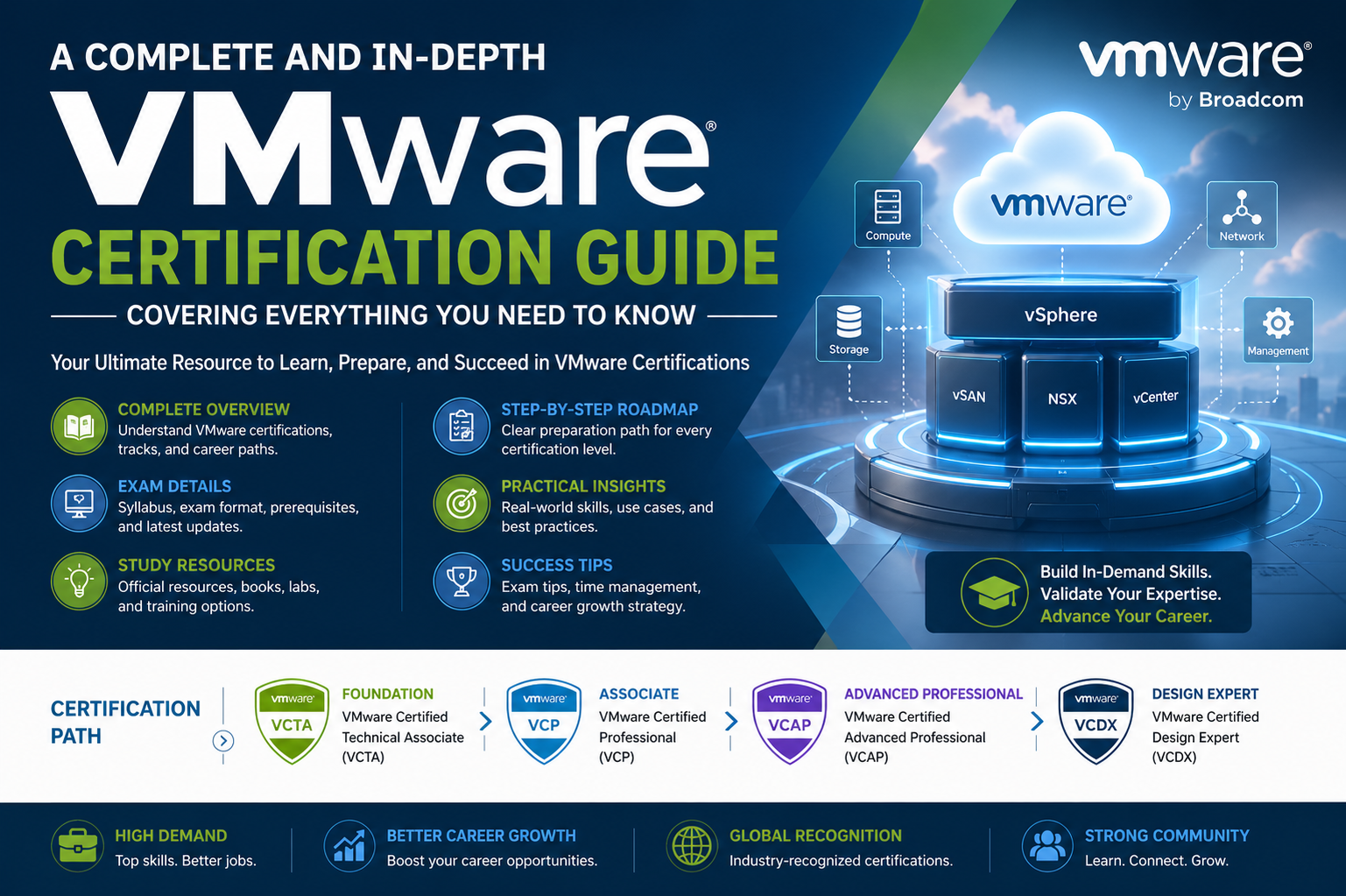
VMware certifications hold a significant place in the modern IT industry because virtualization has become the backbone of enterprise computing. Most organizations today rely on virtualized environments to reduce hardware costs, improve scalability, and enhance system efficiency. VMware technologies are widely used to create and manage these environments, which is why certified professionals are in high demand across different sectors including cloud computing, data centers, cybersecurity, and enterprise IT management.
These certifications are designed not only to validate technical skills but also to ensure that professionals understand how virtual infrastructure behaves in real-world conditions. The value of VMware certifications lies in their practical relevance, as they focus on operational knowledge rather than purely theoretical concepts. This makes them highly respected among employers who seek candidates capable of managing complex systems effectively.
Foundational Understanding of Virtualization Concepts
Before diving into VMware certification preparation, it is essential to understand the core concept of virtualization itself. Virtualization is the process of creating virtual versions of physical computing resources such as servers, storage devices, and networks. This is achieved through a software layer called a hypervisor, which allows multiple virtual machines to run on a single physical system.
Each virtual machine operates independently, with its own operating system and applications, while sharing underlying physical hardware resources. This approach improves efficiency and resource utilization while reducing infrastructure costs. VMware provides advanced tools that enhance this process by offering better management, performance optimization, and scalability features.
Understanding how resources like CPU, memory, storage, and networking are allocated in a virtual environment is critical. These concepts form the foundation of all VMware certification levels and are essential for building more advanced skills later.
Structure of VMware Certification Path
The VMware certification path is structured in a progressive manner, allowing professionals to build skills step by step. It typically begins with entry-level certifications that introduce virtualization concepts and basic administration tasks. These early stages focus on understanding system architecture, basic configuration, and essential management functions.
As learners advance, they move into more technical certifications that require deeper knowledge of system deployment, troubleshooting, and optimization. At this stage, candidates are expected to handle real-world scenarios involving virtual machine management, resource allocation, and performance tuning.
Advanced certifications focus on architectural design and enterprise-level solutions. Professionals at this level are expected to design large-scale virtual infrastructures, integrate cloud environments, and implement high-availability systems. These certifications require strong analytical thinking and extensive practical experience.
Core Technical Areas Covered in VMware Certifications
VMware certifications cover a wide range of technical domains that are essential for managing virtual environments. One of the most important areas is computing infrastructure, which involves understanding how virtual machines are created, configured, and managed. This includes knowledge of hypervisors, virtual machine lifecycle management, and system resource allocation.
Networking is another critical area, as virtual environments rely heavily on properly configured networks. Professionals must understand virtual switches, network segmentation, load balancing, and traffic management. These concepts ensure smooth communication between virtual machines and external systems.
Storage management is also a key component, involving the use of shared storage systems, storage virtualization, and performance optimization techniques. Proper storage configuration ensures data reliability, speed, and scalability within virtual environments.
Security is an increasingly important aspect of VMware environments. Candidates must understand access control mechanisms, data protection strategies, and secure configuration practices to safeguard virtual infrastructures from potential threats.
Importance of Practical Lab Experience
One of the most important aspects of preparing for VMware certification is gaining hands-on experience. Theoretical knowledge alone is not sufficient to succeed in exams or real-world environments. Practical lab work allows candidates to apply concepts in a controlled setting and develop problem-solving skills.
Setting up virtual labs helps learners understand how different components interact within a VMware environment. It also allows them to experiment with configurations, test scenarios, and troubleshoot issues without risking production systems. This type of experience builds confidence and improves technical accuracy.
Working with simulated enterprise environments is especially valuable, as it prepares candidates for real job responsibilities. These environments replicate common challenges faced in IT infrastructure management, helping learners develop practical solutions.
Study Approach and Learning Strategy
A structured study approach is essential for effective VMware certification preparation. The first step involves understanding the exam objectives in detail. This helps candidates identify key topics and prioritize their study efforts accordingly.
Breaking down complex topics into smaller sections makes learning more manageable. Regular revision is important to reinforce understanding and retain information over time. Consistent practice helps improve familiarity with exam-style questions and scenario-based problems.
Time management plays a crucial role during preparation. Allocating specific time slots for theory, practice, and revision ensures balanced learning. Practice exams are particularly useful for assessing readiness and identifying weak areas that require further improvement.
It is also important to stay updated with the latest VMware technologies and features. The IT industry evolves rapidly, and certification exams are updated accordingly. Keeping up with these changes ensures that candidates remain relevant and well-prepared.
Role of VMware in Modern Cloud and Data Center Environments
VMware plays a major role in modern cloud computing and data center management. Many organizations use VMware solutions to build hybrid and private cloud infrastructures. These systems allow businesses to scale resources dynamically based on demand while maintaining control over their environments.
Data centers rely heavily on virtualization to maximize hardware utilization and reduce operational costs. VMware technologies enable efficient workload distribution, high availability, and disaster recovery solutions. This makes them a critical part of enterprise IT strategies.
The integration of VMware with cloud platforms has further expanded its importance. Organizations can now extend their on-premises infrastructure into cloud environments seamlessly, creating flexible and scalable systems.
Career Growth Through VMware Certification
Obtaining VMware certification can significantly enhance career opportunities in the IT industry. Certified professionals are often considered for roles such as system administrators, cloud engineers, virtualization specialists, and infrastructure architects.
These roles involve managing complex IT environments, ensuring system performance, and implementing scalable solutions. VMware certification demonstrates that an individual possesses the technical expertise required for these responsibilities.
In addition to job opportunities, certification can also lead to higher salary potential. Employers value certified professionals because they bring validated skills and practical knowledge to the organization.
Career advancement is another key benefit. As professionals gain experience and pursue higher-level certifications, they can move into senior technical or architectural roles, where they are responsible for designing and managing enterprise-level systems.
Challenges in VMware Certification Preparation
While VMware certifications offer many benefits, the preparation process can be challenging. The technical depth of the subject requires consistent effort and strong understanding of multiple IT domains. Beginners may find it difficult to grasp advanced concepts without proper guidance.
Another challenge is the need for hands-on experience. Without practical exposure, it can be difficult to fully understand how virtual environments operate. Setting up labs and practicing regularly is essential but may require additional time and resources.
The evolving nature of VMware technologies also adds complexity. Candidates must continuously update their knowledge to stay aligned with new developments and exam updates.
Building Long-Term Expertise in VMware Technologies
Achieving certification is only the beginning of a long-term learning journey. True expertise in VMware technologies comes from continuous practice, real-world experience, and ongoing education. Professionals are encouraged to work on diverse projects that expose them to different aspects of virtualization and cloud infrastructure.
Engaging with complex environments helps deepen understanding and improves problem-solving abilities. Over time, this experience builds the confidence required to handle large-scale enterprise systems.
Staying engaged with industry trends and technological advancements ensures that skills remain relevant. As virtualization continues to evolve, professionals who commit to continuous learning will remain competitive and valuable in the job market.
VMware Certification Levels and Professional Progression
VMware certification structure is designed to create a clear professional growth path for IT specialists working in virtualization and cloud infrastructure. Each level represents a deeper understanding of VMware technologies and an increased ability to manage complex environments. The progression typically moves from foundational knowledge to associate-level expertise, then to professional-level skills, and finally to expert-level architectural mastery.
At the foundational stage, individuals are introduced to basic virtualization concepts, system navigation, and essential administrative tasks. This stage is critical for beginners because it builds the mental model required to understand how virtual environments function. Without this foundation, advanced topics can feel overwhelming.
As professionals move forward, associate-level certifications focus on practical administration and operational tasks. These include managing virtual machines, configuring basic networking, and handling storage systems. The emphasis is on building confidence in real-world system handling rather than theoretical understanding alone.
The professional level represents a significant step forward, where candidates are expected to manage enterprise-grade environments. This includes advanced configuration, performance optimization, troubleshooting complex issues, and ensuring system stability. At this stage, practical experience becomes extremely important because exam scenarios often simulate real production challenges.
At the expert level, professionals are expected to design complete virtual infrastructures from scratch. This involves architectural planning, scalability considerations, disaster recovery strategies, and integration with cloud platforms. Experts are often responsible for guiding organizations in implementing large-scale virtualization solutions.
Core VMware Technologies You Must Understand
VMware certifications are built around a set of core technologies that form the backbone of virtualization environments. One of the most important components is the hypervisor, specifically ESXi, which allows multiple virtual machines to run on a single physical server. Understanding how ESXi manages resources is essential for all certification levels.
Another critical component is vCenter Server, which acts as a centralized management platform. It allows administrators to control multiple ESXi hosts, monitor performance, and automate tasks. vCenter plays a key role in enterprise environments where managing individual servers manually would be inefficient.
vSphere is another major technology that combines ESXi and vCenter into a complete virtualization suite. It provides features such as high availability, load balancing, and resource optimization. A strong understanding of vSphere architecture is essential for both exams and real-world administration.
Storage virtualization technologies are also a key part of VMware environments. These systems allow physical storage resources to be abstracted and managed more efficiently. Understanding datastore configuration, storage policies, and performance tuning is crucial for maintaining stable systems.
Networking within VMware environments is equally important. Virtual switches, distributed switches, and network segmentation ensure communication between virtual machines and external systems. Misconfiguration in this area can lead to performance issues or connectivity failures, making it a critical study area.
Deep Dive into Virtual Machine Management
Virtual machines are the core building blocks of VMware environments. A virtual machine behaves like a physical computer but operates within a software-defined environment. Each virtual machine contains its own operating system, applications, and allocated resources such as CPU, memory, and storage.
Managing virtual machines involves several key tasks, including creation, configuration, monitoring, and maintenance. Administrators must ensure that each virtual machine is properly allocated resources based on workload requirements. Over-allocation or under-allocation can lead to performance issues or wasted resources.
Snapshots are another important feature used in virtual machine management. They allow administrators to capture the state of a virtual machine at a specific point in time. This is useful for testing, updates, and recovery scenarios. However, improper use of snapshots can lead to storage inefficiencies.
Cloning virtual machines is also a common practice, especially in development and testing environments. It allows administrators to quickly replicate systems without manually configuring each one. Understanding when and how to use cloning effectively is important for certification success.
Understanding VMware Networking Architecture
Networking is one of the most complex and important areas in VMware environments. It involves connecting virtual machines, physical servers, and external networks in a seamless and efficient manner. Virtual networking is achieved through virtual switches, which function similarly to physical network switches.
Standard virtual switches are used to connect virtual machines within a single host, while distributed switches provide centralized management across multiple hosts. Distributed switches offer advanced features such as load balancing, network monitoring, and traffic shaping.
Network segmentation is another critical concept. It allows administrators to isolate different types of traffic, improving security and performance. VLANs are commonly used to achieve segmentation within VMware environments.
Understanding how virtual machines communicate with each other and with external systems is essential for troubleshooting network issues. Misconfigured networking can lead to connectivity problems that affect entire infrastructures.
Storage Concepts in VMware Environments
Storage plays a vital role in virtualization performance and reliability. VMware environments rely on shared storage systems to ensure that virtual machines can be moved, replicated, and managed efficiently.
Datastores are logical storage containers used by VMware to store virtual machine files. These can be based on different storage technologies such as SAN, NAS, or local storage. Understanding how datastores are configured and managed is essential for certification exams.
Storage policies help define how data is stored, replicated, and protected. These policies ensure that critical workloads receive the appropriate level of performance and redundancy.
Performance optimization is another key aspect of storage management. Administrators must monitor latency, throughput, and IOPS to ensure that storage systems meet application demands. Poor storage performance can significantly impact overall system efficiency.
High Availability and Fault Tolerance Concepts
One of the most powerful features of VMware environments is high availability. This ensures that virtual machines remain operational even in the event of hardware failures. When a physical host fails, virtual machines are automatically restarted on another host within the cluster.
Fault tolerance takes this concept further by providing continuous availability. It creates a live shadow instance of a virtual machine that runs in parallel with the primary instance. If the primary fails, the secondary takes over instantly without downtime.
These features are critical for enterprise environments where system downtime can result in financial loss or operational disruption. Understanding how to configure and manage these features is essential for advanced certification levels.
Role of Automation and Scripting in VMware
Automation is becoming increasingly important in modern VMware environments. It allows administrators to reduce manual tasks, improve efficiency, and minimize human error. VMware provides tools and APIs that enable automation of various tasks.
Scripting languages such as PowerShell and Python are commonly used to automate VMware operations. These scripts can be used for tasks such as provisioning virtual machines, managing resources, and monitoring system health.
Automation also plays a key role in large-scale environments where manual management would be impractical. Understanding automation concepts can significantly enhance a professional’s skill set and career opportunities.
Common Challenges Faced During Certification Preparation
Many candidates face challenges when preparing for VMware certifications. One of the most common issues is the complexity of technical concepts. Virtualization involves multiple interconnected systems, which can be difficult to understand without practical experience.
Another challenge is time management. Balancing study time with work or other responsibilities can make preparation difficult. Consistent scheduling and disciplined study habits are required to overcome this challenge.
Lack of hands-on experience is also a major obstacle. Without practical exposure, it is difficult to fully understand system behavior and troubleshooting techniques. Setting up lab environments is essential for overcoming this limitation.
Effective Study Techniques for VMware Exams
Successful candidates often follow structured study techniques to prepare for VMware exams. One effective approach is breaking down topics into smaller sections and focusing on one area at a time. This makes complex subjects easier to understand.
Repetition and revision are also important for long-term retention. Regular review of previously studied topics helps reinforce knowledge and improve recall during exams.
Practice exams are highly beneficial because they simulate real exam conditions. They help candidates understand question formats, improve time management, and identify weak areas that need improvement.
Active learning techniques such as hands-on labs and scenario-based practice are more effective than passive reading. Engaging directly with systems helps build deeper understanding and practical skills.
Career Roles After VMware Certification
VMware certification opens the door to a wide range of career opportunities in the IT industry. Entry-level professionals often start as system administrators or support engineers, where they manage basic virtualization tasks.
With experience and advanced certifications, professionals can move into roles such as virtualization engineers, cloud engineers, and infrastructure specialists. These roles involve more complex responsibilities and higher technical expertise.
At senior levels, professionals may become solution architects or infrastructure designers. These roles involve planning and designing entire IT environments for organizations.
Each level of certification contributes to career growth by validating skills and increasing professional credibility in the industry.
Advanced VMware Infrastructure Concepts and Enterprise Design
As VMware environments scale beyond small deployments, infrastructure design becomes significantly more complex and strategic. Enterprise virtualization is not just about running virtual machines but about designing resilient, scalable, and highly efficient systems that can support critical business operations. At this level, understanding architecture patterns becomes essential, as every design decision directly affects performance, availability, and cost efficiency.
Large-scale VMware infrastructures are typically built using clustered environments where multiple physical hosts work together to provide compute resources. These clusters enable features such as load balancing, failover protection, and dynamic resource allocation. Proper cluster design ensures that workloads remain stable even during hardware failures or maintenance activities.
Resource management is another key aspect of enterprise design. VMware provides advanced scheduling mechanisms that distribute CPU and memory resources intelligently across virtual machines. Understanding how resource pools, reservations, limits, and shares work is critical for maintaining performance consistency in busy environments.
Designing infrastructure also involves planning for scalability. As organizations grow, their virtual environments must be able to expand without disrupting existing workloads. This requires careful planning of storage capacity, network bandwidth, and compute expansion strategies.
Performance Optimization in VMware Environments
Performance optimization is a crucial skill for VMware professionals, especially in production environments where multiple workloads compete for limited resources. Identifying performance bottlenecks requires a deep understanding of how virtual machines consume CPU, memory, storage, and network resources.
CPU optimization involves ensuring that virtual machines are not over-allocated or underutilized. Overcommitting CPU resources can lead to contention, while underutilization results in wasted capacity. Proper balancing ensures efficient system performance.
Memory management is equally important. VMware uses techniques such as memory sharing, ballooning, and swapping to optimize memory usage across virtual machines. Understanding how these mechanisms work helps administrators fine-tune system performance.
Storage performance is often one of the most critical factors in virtualization environments. High latency or slow I/O operations can significantly impact application performance. Administrators must monitor storage metrics closely and optimize datastore placement and configuration.
Network performance also plays a major role in overall system efficiency. Misconfigured virtual switches or insufficient bandwidth allocation can lead to communication delays between virtual machines and external systems.
Disaster Recovery and Business Continuity Planning
One of the most important aspects of VMware enterprise environments is disaster recovery planning. Organizations rely on virtualization to ensure that critical systems remain available even in the event of hardware failure, natural disasters, or system corruption.
Disaster recovery strategies involve replicating virtual machines and data to secondary locations. This ensures that systems can be restored quickly in case of failure. VMware provides tools that support automated replication and failover processes, reducing downtime and recovery time.
Business continuity planning goes beyond disaster recovery by ensuring that operations can continue even during disruptions. This includes designing redundant systems, implementing backup strategies, and ensuring that critical workloads are always accessible.
Testing disaster recovery plans is essential. Without regular testing, there is no guarantee that systems will function correctly during an actual failure. VMware environments allow simulation of failover scenarios to validate recovery procedures.
Security Practices in VMware Environments
Security is a critical concern in virtualized infrastructures, especially in enterprise environments where sensitive data is processed and stored. VMware provides multiple layers of security features to protect virtual machines, hosts, and networks.
Access control is one of the fundamental security mechanisms. It ensures that only authorized users can perform administrative actions within the environment. Role-based access control allows organizations to assign specific permissions based on job responsibilities.
Network security is another important area. Virtual networks must be properly segmented to prevent unauthorized access between different workloads. Firewalls, VLANs, and distributed security policies are commonly used to enforce isolation.
Data encryption is also widely used in VMware environments to protect sensitive information. This includes encrypting virtual machine files, storage data, and network traffic. Encryption ensures that even if data is intercepted, it cannot be read without authorization.
Regular patching and updates are essential for maintaining security. Vulnerabilities in virtualization software can expose entire infrastructures to risk, making timely updates a critical part of system administration.
Cloud Integration with VMware Technologies
Modern IT environments increasingly rely on hybrid and multi-cloud strategies. VMware plays a key role in enabling seamless integration between on-premises infrastructure and cloud platforms. This allows organizations to extend their data centers into cloud environments without redesigning their entire architecture.
Cloud integration enables workload mobility, allowing virtual machines to be moved between on-premises and cloud environments as needed. This provides flexibility and scalability while maintaining control over critical systems.
Hybrid cloud environments combine private infrastructure with public cloud resources. VMware solutions help manage these environments by providing unified management tools that simplify operations across different platforms.
Cloud automation is another important concept. It allows organizations to dynamically provision resources based on demand, reducing operational overhead and improving efficiency.
Troubleshooting VMware Environments
Troubleshooting is a core skill for any VMware professional. In complex virtual environments, issues can arise from multiple sources including configuration errors, resource limitations, or hardware failures.
Effective troubleshooting begins with identifying the scope of the problem. This involves determining whether the issue affects a single virtual machine, a host, or the entire cluster.
Performance monitoring tools are essential for diagnosing issues. These tools provide insights into CPU usage, memory consumption, storage latency, and network traffic. Analyzing these metrics helps pinpoint the root cause of problems.
Log analysis is another important troubleshooting technique. VMware systems generate detailed logs that record system events, errors, and warnings. Reviewing these logs helps administrators understand system behavior and identify anomalies.
Isolation testing is often used to narrow down issues. By disabling or modifying specific components, administrators can determine which part of the system is causing the problem.
Automation and Orchestration in Modern VMware Environments
Automation has become a defining feature of modern virtualization environments. It reduces manual workload, improves consistency, and enhances operational efficiency. VMware provides multiple tools and frameworks that support automation at different levels.
Orchestration refers to the coordination of multiple automated tasks to achieve complex workflows. For example, deploying a complete virtual environment may involve provisioning servers, configuring networks, and assigning storage resources automatically.
Automation tools allow administrators to create scripts that perform repetitive tasks without human intervention. This includes tasks such as virtual machine provisioning, backups, and system monitoring.
Infrastructure as code is an advanced concept where infrastructure configurations are defined using code-based templates. This allows environments to be created, modified, and replicated consistently across different systems.
Automation is especially valuable in large-scale environments where manual management would be inefficient and error-prone.
Real-World Applications of VMware Technologies
VMware technologies are widely used across industries for various purposes. In enterprise IT, they are used to manage data centers and support business applications. In cloud computing, they enable hybrid and multi-cloud deployments.
In software development environments, virtualization is used to create isolated testing environments. This allows developers to test applications without affecting production systems.
Educational institutions use VMware to provide virtual labs for students, allowing them to learn IT concepts without requiring physical hardware.
Healthcare organizations rely on virtualization to manage sensitive patient data securely while ensuring system availability and reliability.
Financial institutions use VMware to support high-performance applications that require strong security and reliability guarantees.
Importance of Continuous Skill Development
The field of virtualization is constantly evolving, and professionals must continuously update their skills to remain relevant. New features, tools, and best practices are regularly introduced, making ongoing learning essential.
Hands-on experience remains one of the most effective ways to build expertise. Working with real systems helps professionals understand how theoretical concepts apply in practical scenarios.
Engaging with complex environments and solving real-world problems helps deepen technical understanding and improves decision-making abilities.
Staying updated with industry trends ensures that professionals can adapt to new technologies and maintain their competitive edge in the job market.
Long-Term Value of VMware Certification
VMware certification provides long-term value by establishing a strong foundation in virtualization technologies. It enhances professional credibility and opens doors to advanced career opportunities.
Certified professionals are often trusted with critical infrastructure responsibilities due to their validated skills and knowledge. This trust leads to greater career stability and growth potential.
Over time, VMware certification can serve as a stepping stone toward specialized roles in cloud architecture, infrastructure design, and enterprise IT leadership.
The skills gained through certification remain relevant across multiple technology domains, making it a valuable investment for long-term career development.
Advanced Troubleshooting Methodologies in VMware Environments
Troubleshooting in VMware infrastructures requires a structured and analytical mindset because issues often originate from multiple interconnected layers. Unlike traditional physical systems, virtualization environments involve abstraction layers that include virtual machines, hypervisors, virtual networks, and storage systems. Each layer can contribute to performance degradation or system failure, making systematic diagnosis essential.
A common approach to troubleshooting begins with isolating the problem domain. Administrators first determine whether the issue is related to compute resources, storage systems, networking configuration, or application-level behavior. This classification helps reduce complexity and guides the investigation process in a logical direction.
Performance-related issues often require detailed monitoring of system metrics over time. Sudden spikes in CPU usage, memory contention, or storage latency can indicate underlying configuration problems or resource mismanagement. Identifying patterns rather than isolated incidents is key to understanding root causes.
Log analysis plays a crucial role in diagnosing VMware issues. System logs provide detailed records of events, warnings, and errors that occur within the environment. Interpreting these logs correctly helps administrators trace the sequence of events leading to a failure or performance issue.
Another important technique is comparative analysis. By comparing healthy systems with problematic ones, administrators can identify configuration differences or resource imbalances. This method is particularly effective in large-scale environments where multiple similar systems are deployed.
VMware Lifecycle Management and Operational Efficiency
Lifecycle management refers to the complete process of deploying, maintaining, updating, and retiring virtual machines and infrastructure components. In VMware environments, lifecycle management is essential for maintaining system stability and ensuring optimal resource utilization.
The process begins with provisioning, where virtual machines are created based on predefined templates or configurations. Standardization at this stage ensures consistency across the environment and reduces configuration errors.
Once deployed, virtual machines enter the operational phase where they are monitored, updated, and optimized. Regular patching and updates are necessary to maintain security and performance. Failure to keep systems updated can lead to vulnerabilities and compatibility issues.
Resource optimization is an ongoing process throughout the lifecycle. Administrators must continuously evaluate whether virtual machines are using resources efficiently and make adjustments when necessary. This includes resizing virtual machines, migrating workloads, or adjusting resource allocation policies.
Decommissioning is the final stage of the lifecycle. When virtual machines are no longer required, they must be properly removed to free up resources and maintain system hygiene. Improper decommissioning can lead to wasted storage and management overhead.
Role of VMware in Hybrid Cloud Ecosystems
Modern IT infrastructures increasingly rely on hybrid cloud models that combine on-premises systems with public cloud services. VMware plays a central role in enabling this integration by providing consistent virtualization technologies across both environments.
Hybrid cloud environments allow organizations to maintain sensitive workloads on private infrastructure while leveraging public cloud resources for scalability and flexibility. This approach balances control, performance, and cost efficiency.
Workload mobility is one of the key advantages of VMware-based hybrid systems. Virtual machines can be moved between environments with minimal disruption, allowing organizations to respond dynamically to changing business demands.
Unified management platforms simplify the complexity of hybrid environments by providing centralized control over distributed systems. This reduces administrative overhead and ensures consistent policy enforcement across all environments.
Hybrid cloud strategies also support disaster recovery and business continuity by enabling replication of workloads across geographically distributed data centers and cloud platforms.
VMware Ecosystem Integration and Third-Party Tools
VMware environments do not operate in isolation. They are often integrated with a wide range of third-party tools and enterprise systems to enhance functionality and performance. These integrations expand the capabilities of virtualization platforms and allow organizations to build comprehensive IT ecosystems.
Monitoring tools are commonly integrated to provide advanced visibility into system performance. These tools collect real-time data on resource usage, application performance, and system health, enabling proactive management.
Backup and recovery solutions are another important integration area. These tools ensure that virtual machines and data can be restored quickly in the event of system failure or data loss. Integration with VMware APIs allows for automated backup processes.
Security tools also integrate with VMware environments to provide enhanced threat detection and response capabilities. These tools monitor network traffic, detect anomalies, and enforce security policies across virtual infrastructures.
Automation platforms are widely used to streamline operational tasks. These platforms interact with VMware systems through APIs, enabling automated provisioning, configuration, and monitoring processes.
Real-World Implementation Challenges in VMware Deployments
While VMware provides powerful tools for virtualization, real-world implementations often present challenges that require careful planning and expertise. One of the most common challenges is resource planning. Improper allocation of CPU, memory, or storage resources can lead to performance degradation or system instability.
Scalability is another challenge in growing environments. As organizations expand, their virtual infrastructure must scale accordingly without disrupting existing workloads. This requires careful architectural planning and capacity forecasting.
Compatibility issues can also arise when integrating VMware with existing systems or third-party tools. Ensuring compatibility between different software versions and hardware configurations is essential for stable operations.
Network complexity increases significantly in large virtual environments. Misconfigurations in virtual switches, routing, or segmentation can lead to communication failures that are difficult to diagnose.
Security management becomes more challenging as environments grow. Maintaining consistent security policies across multiple systems and ensuring proper access control requires continuous monitoring and enforcement.
Strategic Importance of VMware Certifications in IT Careers
VMware certifications provide a structured pathway for career development in the IT industry. They validate technical expertise and demonstrate the ability to manage complex virtual environments effectively.
For entry-level professionals, these certifications provide foundational knowledge that helps them transition into virtualization roles. This includes understanding system architecture, basic administration, and operational tasks.
For experienced professionals, advanced certifications open opportunities in specialized roles such as cloud architecture, infrastructure design, and enterprise system management. These roles require deeper technical knowledge and strategic thinking abilities.
Organizations often prefer certified professionals because they reduce operational risk and improve system reliability. Certification serves as an assurance of skill level and practical competence.
Over time, VMware certification can lead to leadership positions where professionals are responsible for designing and managing entire IT infrastructures. This includes decision-making responsibilities and long-term strategic planning.
Continuous Evolution of VMware Technologies
VMware technologies continue to evolve in response to changing industry demands. New features are regularly introduced to improve performance, security, and scalability. Professionals must stay updated with these developments to remain effective in their roles.
The integration of artificial intelligence and machine learning into infrastructure management is becoming increasingly common. These technologies help automate decision-making processes and improve system optimization.
Edge computing is another emerging area where VMware solutions are being applied. This involves processing data closer to its source rather than relying solely on centralized data centers.
The shift toward containerized environments and microservices architecture is also influencing VMware development. Modern virtualization platforms are adapting to support these new computing models.
Continuous innovation ensures that VMware remains relevant in the rapidly changing IT landscape, making ongoing learning essential for professionals.
Conclusion
VMware certification represents more than just a professional credential; it is a comprehensive learning journey that builds deep expertise in virtualization and cloud infrastructure. It equips IT professionals with the knowledge and practical skills needed to design, manage, and optimize complex virtual environments.
From foundational concepts to advanced enterprise architecture, VMware training covers a wide spectrum of technical domains including computing, networking, storage, security, and automation. Each stage of certification builds upon the previous one, creating a structured pathway for continuous professional growth.
The practical nature of VMware technologies ensures that certified professionals are well-prepared for real-world challenges. Whether managing small virtual environments or designing large-scale enterprise systems, the skills gained through certification remain highly relevant across industries.
As organizations continue to adopt cloud computing and hybrid infrastructure models, the demand for VMware-skilled professionals is expected to grow. This makes certification not only a technical achievement but also a strategic career investment.
Ultimately, VMware certification empowers professionals to contribute meaningfully to modern IT ecosystems, supporting innovation, efficiency, and digital transformation across industries.