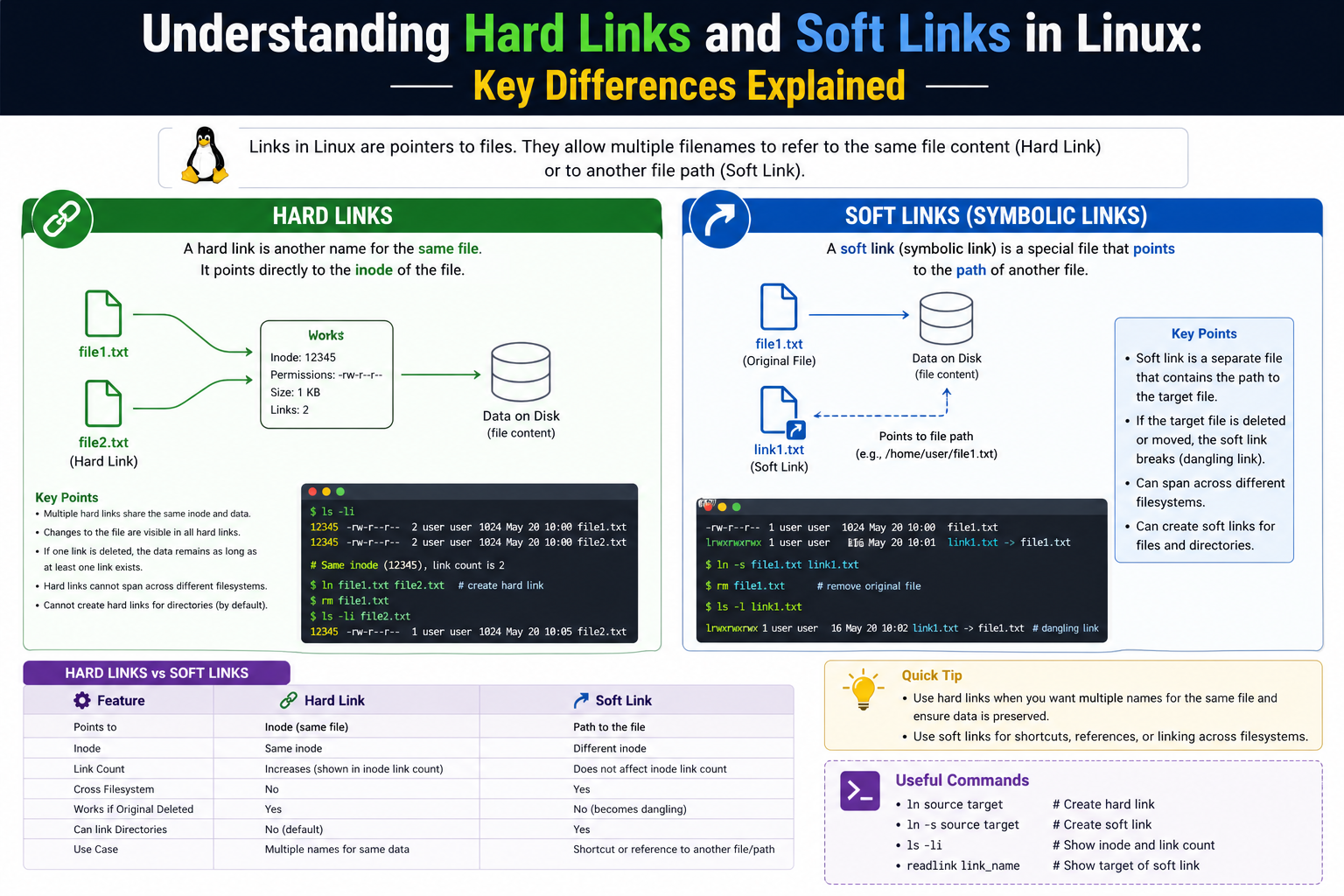
In Linux, everything is treated as a file, and file management is deeply tied to how the system references and organizes data on disk. Instead of copying files repeatedly, Linux provides a mechanism called linking, which allows multiple references to the same file or to a file path. This concept is essential for efficient storage usage, system organization, and flexibility in managing files across directories.
Links are not separate files in the traditional sense; they are pointers that help the operating system locate the actual data. This means a single file can appear in multiple places or be accessed through different names without duplicating its content. The two primary types of links used in Linux are hard links and soft links, each designed for different use cases and behaving differently under various system operations.
Understanding how these links work requires a basic knowledge of how Linux stores files internally, especially through inodes, which play a critical role in file identification and storage.
Understanding Inodes and File Structure
To understand links properly, it is important to understand inodes. In Linux, every file is associated with an inode, which is a data structure that stores metadata about the file. This includes permissions, ownership, file size, timestamps, and most importantly, the location of the file’s data on disk.
The file name itself is not stored inside the inode. Instead, file names are stored in directories, and they map to inodes. This separation allows Linux to support multiple file names pointing to the same inode, which is the foundation of hard links.
When a file is created, it gets an inode and at least one directory entry (file name). A hard link creates another directory entry that points to the same inode. A soft link, however, creates a new inode that stores a path reference to another file name.
This difference in structure is what makes hard and soft links behave differently in practice.
What is a Hard Link in Linux
A hard link is a direct reference to the inode of a file. When a hard link is created, it does not duplicate the file data. Instead, it creates another directory entry pointing to the same inode as the original file. This means both file names are equal in terms of data access.
If you modify the content through one hard link, the changes are reflected in all other hard links because they all point to the same underlying data. There is no concept of “original” and “copy” when it comes to hard links; all are equal references.
One important characteristic of hard links is that the file data remains on disk until all hard links pointing to that inode are removed. Only when the last hard link is deleted does the system free the storage space.
However, hard links have limitations. They cannot span across different file systems because inodes are unique within a single file system only. They also cannot be used for directories in most cases, as allowing directory hard links could create circular references that break the file system hierarchy.
What is a Soft Link in Linux
A soft link, also known as a symbolic link, is fundamentally different from a hard link. Instead of pointing directly to an inode, a soft link points to a file path. It acts like a shortcut in modern operating systems.
When a soft link is created, it gets its own inode and stores the path of the target file as its data. If the target file is moved or deleted, the soft link no longer works because the path it references is invalid. This is why soft links are often referred to as “broken” when their target is missing.
Soft links are very flexible. They can cross file system boundaries and can also link to directories, which makes them extremely useful for system configuration, shortcuts, and organizing complex directory structures.
Unlike hard links, soft links do not share the same inode as the original file. They are independent entities that simply point to another location.
Behavior Differences Between Hard and Soft Links
The most important difference lies in how they behave when changes occur in the system. Hard links always remain valid as long as at least one link to the inode exists. Even if the original file name is deleted, the data remains accessible through other hard links.
Soft links depend entirely on the path they reference. If the original file is moved or deleted, the soft link becomes invalid and cannot access the data anymore.
Another major difference is performance. Hard links are slightly faster because they directly access the inode. Soft links require an additional step of resolving the file path before accessing the data.
Hard links also maintain consistent data across all references since they point to the same storage location. Soft links, on the other hand, can easily become outdated if file paths change.
Creation and Management of Links
In Linux, links are typically created using command-line utilities. A hard link is created by linking directly to an existing file name, while a soft link is created using a symbolic option that specifies a path reference.
When managing links, it is important to track where files are referenced to avoid confusion. A file with multiple hard links can exist in multiple locations without duplication, which may make tracking file usage more complex.
Soft links are easier to identify visually in directory listings because they are marked differently and show the path they point to.
Use Cases of Hard Links
Hard links are commonly used when data integrity and persistence are important. For example, backup systems may use hard links to create snapshots of data without duplicating large files. This allows efficient storage usage while maintaining multiple references to the same data state.
They are also useful in scenarios where multiple applications or processes need access to the same file data without creating separate copies.
Because hard links ensure that data remains available as long as at least one reference exists, they are reliable for maintaining critical data relationships within a single file system.
Use Cases of Soft Links
Soft links are widely used for flexibility and convenience. System administrators often use them to create shortcuts to frequently accessed files or directories. They are also used in software environments where configuration files need to be referenced from multiple locations.
Soft links are especially useful when file locations may change over time, as the link can simply be updated or recreated without modifying the original structure.
They are also helpful in organizing software libraries, shared resources, and system paths without duplicating files.
Limitations of Hard Links
Despite their advantages, hard links have several limitations. They cannot be used across different file systems, which restricts their usage in multi-disk environments. They also cannot link directories in most cases, limiting their structural flexibility.
Another limitation is that they can sometimes make file tracking difficult because multiple file names refer to the same data, which may confuse users when managing or deleting files.
Limitations of Soft Links
Soft links depend on file paths, which makes them vulnerable to breaking if the target file is moved or renamed. This can lead to broken links that no longer serve their purpose.
They also introduce a small performance overhead because the system must resolve the path before accessing the file data.
Additionally, soft links can create confusion if not managed properly, especially in large systems where many symbolic links exist.
Security and System Behavior Considerations
From a security perspective, links can sometimes be misused if not properly managed. Hard links can make it difficult to track file ownership or deletion in shared environments. Soft links can be exploited if they point to sensitive system files and are not properly controlled.
System administrators must carefully manage permissions and link usage to ensure system integrity and avoid unintended access or data loss.
File Linking in Linux
Hard links and soft links are both essential components of Linux file management, but they serve very different purposes. Hard links focus on direct data sharing and persistence within the same file system, while soft links emphasize flexibility and path-based referencing.
Understanding the differences between them helps in making better decisions when managing files, optimizing storage, and designing system structures. Both types of links, when used correctly, greatly enhance the efficiency and organization of the Linux environment.
How Linux Tracks Links Using Reference Counts
In Linux, every file is associated with a reference count that tracks how many directory entries point to the same inode. In the case of hard links, this reference count increases each time a new hard link is created. This means a single file’s data is not deleted until its reference count drops to zero.
When a file is removed using a delete operation, Linux does not immediately erase the data from disk. Instead, it simply removes one directory entry and decreases the reference count. If other hard links still exist, the inode and data remain intact. Only when the last reference is removed does the system free the allocated space.
This mechanism is one of the reasons hard links are efficient and reliable. It ensures that data is not accidentally lost due to a single file deletion. However, it also means that users may not always realize that multiple names are pointing to the same data.
Soft links do not affect reference counts because they do not point directly to inodes. They only store a path string, so deleting a soft link does not impact the original file in any way.
How File Deletion Works with Links
When dealing with hard links, file deletion behaves differently compared to normal expectations. If a file has multiple hard links, deleting one of them simply removes that name from the directory structure. The actual file content remains accessible through other hard links.
This behavior can sometimes confuse users who expect a file to disappear completely after deletion. In reality, Linux treats the file as existing as long as at least one link remains.
In contrast, soft links behave independently. If a soft link is deleted, only the link itself is removed, and the target file remains unaffected. However, if the target file is deleted first, the soft link becomes broken and points to a non-existent path.
This distinction is critical in system management, especially in environments where files are frequently moved or reorganized.
Detecting Hard Links and Soft Links in the System
Linux provides ways to identify whether a file is a hard link or a soft link. Hard links appear as regular files with no obvious distinction from the original file. The only indicator is that multiple files share the same inode number.
Soft links, on the other hand, are easily recognizable because they display the path of the target file. They are marked differently in directory listings and clearly show that they are symbolic references.
System administrators often rely on inode comparison to detect hard links. If two files share the same inode number, they are hard links pointing to the same data.
Soft links can be identified by their special file type indicator and the arrow notation showing their target path.
Common Problems with Hard Links
One of the main challenges with hard links is tracking file relationships. Since multiple file names can point to the same data, it becomes difficult to determine which file is the “main” one. This can lead to accidental data modification when users are unaware that they are working on shared content.
Another issue is the inability to span across file systems. If data is spread across multiple partitions or drives, hard links cannot be used to connect them. This limits their usefulness in large distributed storage setups.
Hard links also cannot be used for directories in most Linux systems. This restriction exists to prevent circular references that could break directory traversal algorithms.
Additionally, backup systems must handle hard links carefully. If not configured properly, backups may duplicate data or lose link relationships, leading to inconsistencies.
Common Problems with Soft Links
Soft links introduce a different set of challenges. The most common issue is broken links. If the target file is moved, renamed, or deleted, the soft link loses its reference and becomes invalid.
This can lead to system errors, missing files, or application failures if the link was used in configuration paths.
Another issue is dependency on file paths. Since soft links rely on string-based paths, even a small change in directory structure can break multiple links at once.
Soft links can also create recursive loops if misconfigured. For example, if a symbolic link points to a directory that eventually points back to itself, it can cause infinite loops in file traversal operations.
This is particularly dangerous in automated scripts or backup systems that recursively scan directories.
Performance Considerations of Links
Hard links have minimal performance overhead because they directly point to the inode. File access is immediate, and no additional resolution is needed. This makes them slightly more efficient in high-performance environments.
Soft links introduce a small delay because the system must resolve the path before accessing the target file. While this delay is usually negligible, it can become noticeable in systems with deeply nested symbolic links or high-frequency file access.
In most practical scenarios, the performance difference is not significant enough to be a deciding factor. However, in systems where performance is critical, hard links may be preferred when applicable.
Real-World Use of Hard Links in Backup Systems
Hard links are widely used in backup systems to create snapshots of file states without duplicating data. Instead of copying entire files, the system creates hard links pointing to existing data blocks.
This allows multiple snapshots to exist while consuming minimal additional storage space. Only changed files require new storage, while unchanged files are shared across snapshots.
This approach is highly efficient for systems that require frequent backups, such as servers and databases.
However, managing such systems requires careful planning to ensure that deletion or modification of files does not unintentionally affect multiple snapshots.
Real-World Use of Soft Links in System Configuration
Soft links are commonly used in system configuration and software management. Many Linux distributions use symbolic links to manage versioned software directories, allowing easy switching between versions.
They are also used to create standardized paths for applications, ensuring that software can locate dependencies regardless of their actual installation location.
For example, libraries or configuration files may be linked from a central location to multiple applications using symbolic links.
This makes system maintenance easier and more flexible, especially in environments where software is frequently updated or relocated.
Security Implications of Symbolic Links
Soft links can introduce security vulnerabilities if not properly controlled. One known issue is symbolic link attacks, where malicious users create links that point to sensitive system files.
If a program incorrectly follows these links without proper validation, it may accidentally expose or modify critical system data.
To prevent this, modern systems implement strict permissions and safeguards when dealing with symbolic links, especially in temporary directories and shared environments.
Hard links are less commonly associated with security risks, but they can still create confusion in multi-user systems where file ownership and access rights need to be carefully managed.
Filesystem Behavior and Compatibility
Different Linux file systems handle links with slight variations, but the fundamental principles remain the same. Most modern file systems support both hard and soft links, but restrictions still apply to hard links across partitions.
Soft links are universally supported because they operate at the file path level rather than the file system structure level.
Journaling file systems add an additional layer of reliability by ensuring that link changes are recorded safely in case of system crashes or power failures.
This helps prevent corruption of link structures and ensures consistency across system restarts.
Debugging Link-Related Issues
When troubleshooting file system problems, links are often a key area of investigation. Broken symbolic links can cause application failures, missing configuration errors, or incomplete file access.
Administrators typically scan systems for invalid symbolic links and repair or remove them as needed.
Hard link issues are more subtle and usually involve unexpected data sharing or accidental modification of shared content.
Proper understanding of inode relationships is essential when debugging such issues, as it helps identify whether files are truly separate or simply multiple references to the same data.
Best Practices for Using Links in Linux
Effective use of links requires understanding their behavior and limitations. Hard links should be used when data integrity and storage efficiency are priorities within a single file system. Soft links should be used when flexibility, portability, and ease of reference are more important.
It is also important to document link usage in complex systems to avoid confusion during maintenance or upgrades.
Regular system checks for broken symbolic links and unexpected hard link relationships can help maintain system stability and prevent errors.
Advanced Link Usage
Hard links and soft links are powerful tools in Linux that extend far beyond simple file referencing. They play a critical role in storage efficiency, system organization, and operational flexibility.
Hard links provide stability and shared data access at the inode level, while soft links offer dynamic path-based referencing that adapts easily to system changes.
Understanding their internal behavior, limitations, and real-world applications allows for more effective system management and better control over file structures in Linux environments.
Link Behavior in Complex Directory Structures
In real Linux environments, file systems are rarely simple. They often contain deeply nested directories, shared resources, and multiple applications accessing the same files. In such structures, links play a crucial role in reducing redundancy and improving organization.
Hard links maintain a flat relationship with data because they all point to the same inode regardless of where they appear in the directory tree. This means a file can exist in multiple directories without actually being duplicated. From the system’s perspective, there is no hierarchy between these references; all are equal.
Soft links behave differently because they depend entirely on file paths. In a deeply nested directory structure, a symbolic link must correctly reflect the full path to the target file. If any part of that structure changes, the link may break. This makes soft links more sensitive in complex environments but also more adaptable when paths are stable and well managed.
In large systems, administrators often combine both types of links to balance stability and flexibility.
Impact of Links on File System Integrity
File system integrity is closely tied to how links are used and maintained. Hard links contribute to stability because they ensure data persistence until all references are removed. This prevents accidental data loss in shared environments.
However, hard links can also introduce hidden dependencies. Since multiple file names point to the same inode, modifying one reference affects all others. If not tracked properly, this can lead to unexpected changes in critical files.
Soft links, while more transparent in structure, can lead to integrity issues when broken. A missing or moved target file can disrupt workflows, scripts, or services that depend on the link.
In system design, maintaining integrity involves careful planning of link usage, ensuring that dependencies are well documented and monitored.
Role of Links in Software Deployment and Package Management
In Linux software ecosystems, links are heavily used in package management and deployment systems. Many applications are installed in versioned directories, and symbolic links are used to point to the active version.
This allows seamless upgrades and rollbacks without changing application configurations. Instead of modifying every reference manually, the system simply updates the symbolic link to point to a new version.
Hard links are less commonly used in software deployment because versioning requires flexibility. However, they are sometimes used in package caching systems where identical files across packages are linked to save disk space.
This approach improves efficiency by avoiding duplication of shared binaries and libraries.
Understanding Link Loops and Recursive Risks
One of the more complex issues with soft links is the possibility of creating loops. A loop occurs when a symbolic link indirectly or directly points back to itself through a chain of references.
For example, a directory may contain a symbolic link pointing to its parent directory or to another directory that eventually links back to it. This can cause infinite recursion when traversing file systems.
Such loops can severely impact system utilities, backup tools, and search operations, leading to performance degradation or system errors.
Hard links do not create loops in the same way because they do not reference paths. Instead, they directly reference inodes, and directory structure rules prevent circular references at the inode level.
Storage Efficiency and Disk Utilization
Hard links are extremely efficient in terms of storage because they do not duplicate file data. Multiple file names can exist while consuming the same disk space. This makes them useful in environments where storage optimization is important.
Soft links, on the other hand, consume a small amount of space to store the path information. While this is minimal compared to file data, it still represents additional overhead.
In large-scale systems, the cumulative effect of many symbolic links can become noticeable, especially in metadata-heavy environments.
Despite this, soft links are often preferred for their flexibility, even at the cost of slight storage inefficiency.
System Recovery and Link Stability
During system recovery or backup restoration, links play an important role in maintaining structure. Hard links ensure that data relationships remain intact as long as inode references are preserved.
However, restoring hard links correctly requires special handling. If not restored properly, duplicate data may be created or link relationships may be lost.
Soft links are easier to restore because they are simple path references. However, they are also more fragile because if directory structures change during restoration, links may break.
This makes recovery planning an important aspect of system design, especially in environments with heavy link usage.
Permissions and Access Control with Links
File permissions in Linux are tied to inodes, not file names. This means hard links share the same permissions because they reference the same inode. Any permission change affects all hard links simultaneously.
Soft links, however, do not have independent permissions in the same way. Access control is determined by the target file, not the link itself. This means a symbolic link can exist even if the user does not have direct permission to access the target, but actual access will still be governed by the target file’s permissions.
This behavior is important in security-sensitive environments where access control must be carefully managed.
Behavior in Multi-User Environments
In multi-user systems, links can both simplify and complicate file management. Hard links allow shared access to files without duplication, making collaboration efficient.
However, they can also create confusion if users are unaware that multiple references point to the same data. One user modifying a file through one link affects all other users accessing the same inode.
Soft links are easier to understand in multi-user environments because they act as pointers. Users can see where the link leads, making it clearer that they are accessing shared resources.
Still, broken links can create confusion if files are moved or deleted without updating references.
Kernel-Level Handling of Links
At the kernel level, hard links are managed through inode tables and directory entries. The kernel tracks reference counts and ensures that data is only deleted when no references remain.
Soft links are handled as special file types containing path strings. When accessed, the kernel resolves the path and redirects the operation to the target file.
This resolution process adds a layer of abstraction but also increases flexibility. The kernel must constantly ensure that symbolic links are valid and handle cases where targets are missing.
This distinction in kernel behavior is fundamental to how Linux maintains file system consistency.
Performance in Large File Systems
In large file systems with millions of files, link behavior can significantly impact performance. Hard links offer consistent performance because inode access is direct and does not require path resolution.
Soft links introduce additional overhead due to path lookup operations. While modern systems optimize this process, deeply nested symbolic links can still slow down file access.
In environments like cloud storage or distributed systems, this difference can become more noticeable, especially under heavy load.
However, the flexibility of soft links often outweighs the minor performance cost.
Administrative Strategies for Link Management
System administrators often adopt specific strategies for managing links effectively. Hard links are typically used in controlled environments where file structures are stable and predictable.
Soft links are used in dynamic environments where paths may change frequently, such as development systems, software environments, and shared storage setups.
Regular auditing of links is essential to prevent broken references and hidden dependencies. Tools that scan for invalid symbolic links are commonly used in maintenance routines.
Proper documentation of link relationships also helps reduce confusion and system errors.
Long-Term System Scalability Considerations
As systems grow, link management becomes more complex. Hard links scale well within a single file system but become limited when multiple file systems are involved.
Soft links scale better across distributed environments because they are not restricted by file system boundaries.
In large-scale infrastructure, a combination of both types is often used to achieve optimal balance between performance, flexibility, and maintainability.
Designing scalable systems requires careful consideration of how links will behave as data grows and changes over time.
Linux Linking Mechanisms
Hard links and soft links represent two fundamentally different approaches to file referencing in Linux. One focuses on direct data association, while the other emphasizes flexible path-based referencing.
Understanding their internal mechanisms, practical applications, and limitations is essential for effective system administration. Both types of links are deeply integrated into Linux architecture and influence everything from file storage to application deployment.
When used correctly, they significantly enhance system efficiency, reduce redundancy, and improve organizational structure across both small and large-scale environments.
Advanced Integration of Links in Modern Linux Systems
In modern Linux environments, hard links and soft links are not just basic file system features but foundational components used in advanced system design. Large infrastructures such as servers, cloud platforms, and containerized environments rely heavily on linking mechanisms to maintain efficiency and flexibility.
Hard links are often used in controlled storage systems where data consistency and duplication avoidance are critical. For example, backup systems and snapshot tools frequently depend on hard links to represent unchanged files across multiple backup versions. This allows systems to store multiple states of data without consuming additional disk space for identical content.
Soft links, on the other hand, are widely used in dynamic system environments. Container systems, development frameworks, and application deployment pipelines use symbolic links to manage changing file paths, version control, and configuration flexibility. This makes it easier to update software components without modifying dependent configurations.
Link Behavior in System Migration and Upgrades
During system migration or upgrades, links play a critical role in maintaining continuity. Hard links remain stable as long as they are within the same file system, ensuring that data remains intact during internal restructuring. However, if data is moved across partitions or drives, hard links cannot be preserved directly, which limits their portability.
Soft links are more adaptable during migrations because they point to file paths rather than physical storage locations. When systems are moved, administrators can often recreate or adjust symbolic links to match new directory structures. However, if paths change significantly, manual intervention may be required to restore link integrity.
This difference makes soft links more suitable for evolving environments, while hard links are better suited for stable, long-term storage structures.
Troubleshooting Common Link Issues
One of the most common issues in Linux systems is broken symbolic links. These occur when the target file is moved, deleted, or renamed without updating the link. Broken links can lead to application errors, missing resources, or failed scripts.
To troubleshoot such issues, administrators typically scan the file system for invalid symbolic references and either update or remove them. Identifying broken links early is important to prevent cascading failures in dependent applications.
Hard link issues are less visible but can be more complex. Since multiple file names refer to the same data, unintended modifications can propagate across all references. This can make debugging difficult, especially in systems where file relationships are not well documented.
Understanding inode relationships is essential when diagnosing hard link-related issues, as it helps determine whether files are truly separate or shared references.
Security Considerations in Link Usage
Security is an important aspect of link management. Soft links can introduce vulnerabilities if they are misused or improperly validated by applications. For example, attackers may create symbolic links pointing to sensitive system files in temporary directories, exploiting programs that follow links without proper checks.
To mitigate such risks, modern Linux systems enforce stricter permissions and safe link handling practices. Applications are designed to validate target paths before accessing them, reducing the risk of unauthorized access.
Hard links are generally safer in terms of path manipulation because they do not rely on file names. However, they can still pose risks in multi-user environments where shared access to data must be carefully controlled.
Proper permission management and system auditing are essential to maintaining security when using either type of link.
Performance Optimization Using Links
From a performance perspective, hard links provide slightly better efficiency because they eliminate the need for path resolution. Direct inode access ensures faster file retrieval, especially in systems with high-frequency file operations.
Soft links introduce minimal overhead due to path resolution, but this is generally negligible in most modern systems. However, in environments with deeply nested symbolic links or high I/O workloads, performance differences can become more noticeable.
Optimizing link usage involves balancing performance needs with flexibility requirements. In many cases, the difference is small enough that design considerations take priority over raw performance.
Role of Links in Distributed and Cloud Systems
In distributed systems and cloud environments, links are used to maintain logical file organization across different storage nodes. Soft links are particularly useful in such systems because they can reference files across different locations and even different machines in some networked file systems.
Hard links are more limited in distributed environments because they cannot cross file system boundaries. This makes them less suitable for cloud-native architectures, where data is often spread across multiple storage layers.
Despite this limitation, hard links still play a role in optimizing storage within individual nodes or containers, especially when deduplication is required.
Administrative Best Practices for Link Management
Effective link management requires consistent monitoring and documentation. Administrators should regularly check for broken symbolic links and remove or update them as needed. Automated tools are often used to scan file systems for invalid references.
Hard links should be used carefully, especially in shared environments. Clear documentation of file relationships helps prevent accidental modifications and data confusion.
It is also recommended to avoid excessive use of symbolic links in deeply nested structures, as this can complicate debugging and increase system overhead.
A balanced approach, using hard links for stability and soft links for flexibility, often results in the most efficient system design.
Conclusion
Hard links and soft links are fundamental concepts in Linux file system architecture, each serving distinct and important roles. Hard links provide a direct and efficient way to reference data at the inode level, ensuring that files remain accessible as long as at least one reference exists. This makes them ideal for storage optimization and data persistence within a single file system.
Soft links offer a more flexible approach by referencing file paths instead of physical data. This allows them to span across file systems, link directories, and adapt easily to changing environments. However, this flexibility comes with the risk of broken links if file structures change unexpectedly.
The key difference between the two lies in their level of abstraction. Hard links operate at a low-level data reference system, while soft links operate at a higher-level path reference system. This distinction determines how they behave during file operations, system changes, and administrative tasks.
In practical use, both types of links complement each other. Hard links are preferred when stability, efficiency, and data consistency are required, while soft links are preferred when flexibility, portability, and ease of management are needed.
Understanding these mechanisms is essential for anyone working with Linux systems, as they directly impact file organization, system performance, and data integrity. Proper use of links can significantly improve storage efficiency and simplify complex system structures, while misuse can lead to confusion, broken references, or unintended data relationships.
Ultimately, mastering hard and soft links is not just about knowing their definitions but about understanding how they interact with the Linux file system as a whole.