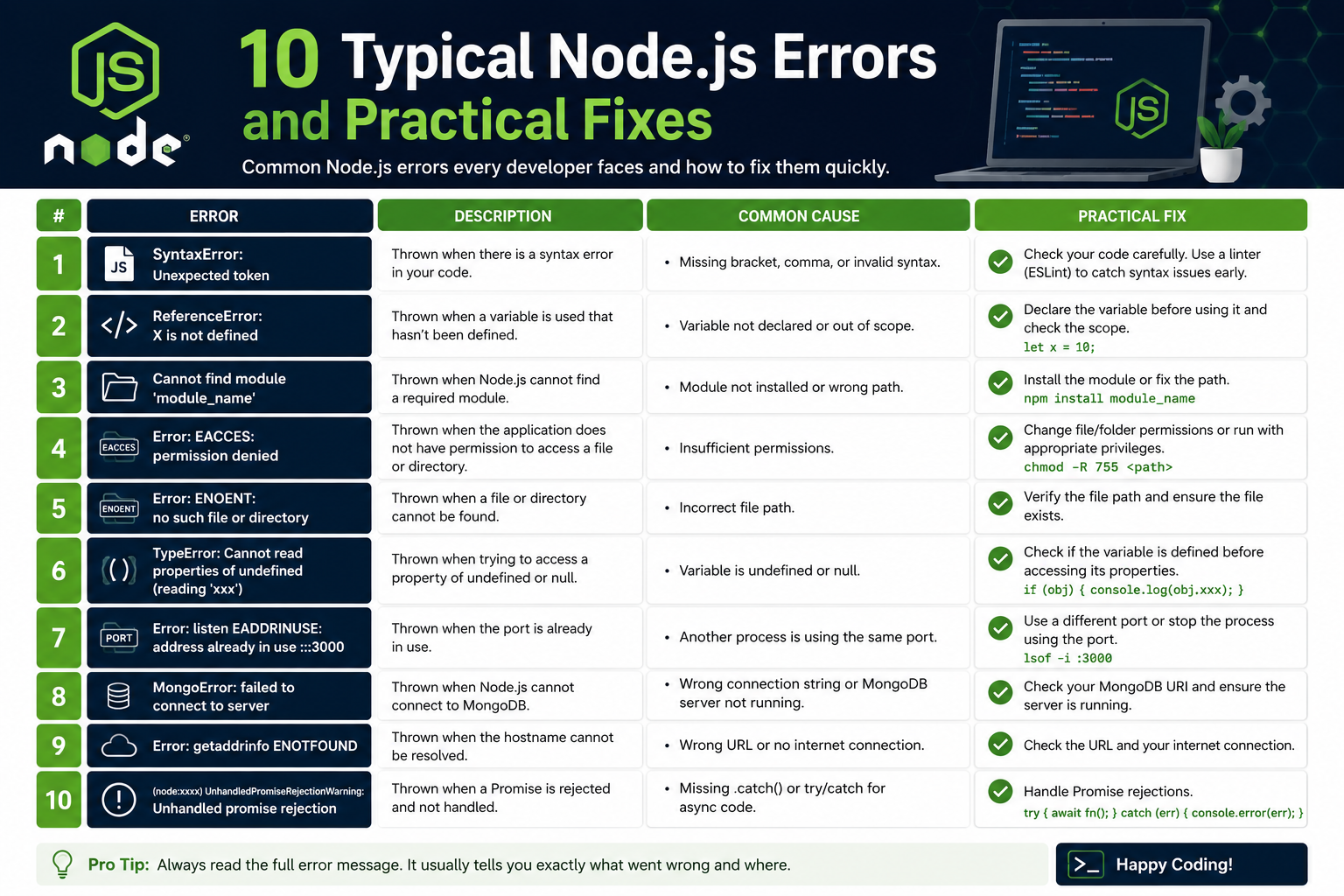
Node.js has become one of the most widely used technologies for backend development because it allows developers to build fast, scalable, and efficient applications using JavaScript. From APIs and real-time chat systems to enterprise-grade applications, Node.js powers many modern platforms. However, despite its popularity and flexibility, developers often encounter various errors while working with it.
Errors are a normal part of software development. Even experienced programmers spend a large amount of time debugging applications and fixing unexpected issues. In Node.js, errors can occur because of incorrect syntax, invalid references, asynchronous problems, dependency conflicts, memory management issues, or network failures. Understanding these errors is essential because debugging skills directly impact the quality, stability, and performance of an application.
Many beginners panic when applications suddenly crash or display confusing terminal messages. However, Node.js usually provides detailed error information, including the file name, line number, stack trace, and error type. Learning how to read and interpret these messages is one of the most valuable skills for developers.
Another important aspect of handling errors is prevention. Clean coding practices, proper project organization, automated testing, linting tools, and dependency management can significantly reduce the number of runtime issues. Developers who follow best practices typically spend less time troubleshooting and more time building features.
This guide explores some of the most common Node.js errors developers face during development. It explains why these issues happen, how to identify them, and practical ways to fix them. By understanding these concepts, developers can create more stable applications and improve their confidence when working with Node.js environments.
Understanding Syntax Errors in Node.js
Syntax errors are among the earliest and most common issues developers encounter when writing Node.js applications. These errors happen when JavaScript code violates the language rules and cannot be parsed correctly by the runtime engine. Since Node.js checks syntax before executing a script, the application immediately stops if it detects invalid structure.
A syntax error may seem small, but even a missing character can completely break an application. Common causes include missing brackets, incorrect punctuation, unmatched quotation marks, incomplete statements, and misspelled keywords. Because JavaScript depends heavily on proper formatting and structure, attention to detail becomes extremely important.
For example, forgetting to close a parenthesis during a function call can prevent the entire file from running. Similarly, leaving out curly braces in loops or conditionals often produces parser errors. These mistakes are especially common during rapid coding sessions or when developers copy and modify existing code.
One helpful aspect of Node.js is that syntax errors are usually easy to locate. The terminal displays the file name, line number, and approximate position where parsing failed. Although the actual problem may occasionally exist slightly above the reported line, the error message still provides an excellent starting point for debugging.
Reading the terminal output carefully is essential. Many developers waste time searching through large sections of code without paying attention to the exact error details. Understanding what the parser expects often leads directly to the solution.
Modern development tools dramatically reduce syntax-related mistakes. Code editors such as Visual Studio Code provide syntax highlighting, automatic indentation, and bracket matching. These features visually expose missing symbols and formatting problems before the code is executed.
Linters are another powerful tool for preventing syntax issues. ESLint, for instance, scans JavaScript files and identifies invalid patterns, inconsistent formatting, and possible mistakes. Developers can configure linting rules according to project requirements and coding standards.
Consistent formatting also improves readability and debugging efficiency. Proper indentation helps developers understand the structure of nested blocks, loops, and functions. Messy formatting often hides missing braces and misplaced statements that would otherwise be obvious.
Frequent testing is another effective strategy for reducing syntax issues. Instead of writing hundreds of lines before running the program, developers should execute code regularly after small modifications. This practice makes it easier to isolate errors quickly.
Developers should also become comfortable with JavaScript fundamentals. Understanding how functions, arrays, objects, and conditionals work reduces the likelihood of structural mistakes. Strong foundational knowledge improves coding speed and accuracy over time.
Syntax errors are unavoidable during development, but they are generally straightforward to resolve. With careful attention, proper tooling, and clean coding habits, developers can minimize their impact significantly.
Reference Errors and Variable Scope Problems
Reference errors occur when Node.js attempts to access a variable or function that does not exist in the current scope. Unlike syntax errors, these problems happen during runtime after the application has already started executing.
One of the most common causes is using variables before declaring them. If a developer references a variable named username without defining it first, Node.js throws a ReferenceError because the runtime cannot locate that identifier.
Typos frequently contribute to reference issues as well. JavaScript is case-sensitive, meaning userName and username are treated as completely different variables. Even a minor spelling inconsistency can lead to application failure.
Scope management is another major factor. Variables declared inside functions or blocks are only accessible within those areas. Attempting to access them outside their intended scope results in undefined references.
Modern JavaScript introduced let and const, which are block-scoped variables. While these keywords improve code reliability compared to var, they can also create confusion for beginners unfamiliar with scope boundaries.
Understanding variable scope is critical for writing reliable Node.js applications. Developers should clearly distinguish between global scope, function scope, and block scope. Poor scope management often leads to unpredictable behavior and debugging challenges.
To fix reference errors, developers should first inspect the terminal message carefully. Node.js usually identifies the missing variable or function along with the exact location where the issue occurred.
The next step involves confirming that the variable was declared properly before use. Developers should verify spelling, capitalization, and accessibility within the relevant scope.
Consistent naming conventions greatly reduce the likelihood of reference mistakes. Descriptive variable names improve readability while minimizing accidental mismatches.
Autocomplete functionality in modern editors also helps prevent undefined references. Since editors suggest existing variables and functions automatically, developers are less likely to mistype identifiers.
Avoiding excessive use of global variables is another important practice. Global variables increase the risk of naming conflicts and make applications harder to maintain. Localized variables are generally safer and easier to manage.
Strict mode improves error detection by enforcing stricter JavaScript rules. Enabling strict mode helps identify unsafe coding practices and accidental global variable creation.
TypeScript has become increasingly popular because it catches many reference-related issues during development through static analysis. By enforcing type definitions and declarations, TypeScript reduces runtime surprises significantly.
Testing also plays a crucial role in identifying scope-related problems. Unit tests help ensure variables and functions behave correctly under different conditions and execution paths.
Reference errors may initially appear simple, but in larger applications they can become difficult to trace. Organized project structure, modular code design, and disciplined naming practices help developers avoid many of these runtime issues.
Type Errors and Incorrect Data Handling
Type errors occur when developers attempt operations on incompatible data types. Because JavaScript is dynamically typed, variables can store different kinds of values throughout execution. While this flexibility is convenient, it also creates opportunities for runtime problems.
A common example involves calling something that is not actually a function. If a property contains a string but the code treats it like a function, Node.js throws a TypeError.
Another frequent issue happens when developers attempt to access properties on undefined or null values. Trying to read user.name when user does not exist immediately causes an application crash.
Arithmetic operations can also produce type-related issues. Performing calculations on strings, objects, or invalid numeric values often creates unexpected results.
Array methods are another common source of confusion. Functions such as map, filter, and reduce only work on arrays. Calling them on non-array objects triggers runtime exceptions.
Debugging type errors requires careful inspection of variable values during execution. Developers often use console logging, debugging tools, or runtime inspection to understand the actual data structure being processed.
JavaScript utilities such as typeof and Array.isArray are extremely useful for verifying data types before performing operations. Defensive programming practices reduce the likelihood of invalid operations causing failures.
Optional chaining has become one of the most valuable modern JavaScript features for preventing crashes. It allows developers to safely access nested properties without triggering errors when intermediate values are undefined.
Input validation is equally important. Applications should never assume external data is always valid. User input, API responses, and database results may contain unexpected values that require verification before processing.
TypeScript provides additional protection by introducing static typing into JavaScript projects. Developers can define expected data structures, allowing many issues to be detected before runtime.
Clear documentation also helps teams avoid type-related misunderstandings. Functions should clearly specify what type of input they expect and what output they return.
Error handling mechanisms such as try-catch blocks improve application resilience when unexpected type issues occur. Instead of crashing completely, applications can display meaningful messages or fallback behaviors.
Comprehensive testing is essential for identifying hidden type problems. Developers should test applications using valid, invalid, and edge-case inputs to ensure consistent behavior.
Although JavaScript’s flexibility is one of its strengths, it requires discipline and careful validation to avoid type-related runtime failures.
Module Not Found Errors in Node.js
The MODULE_NOT_FOUND error appears when Node.js cannot locate a required file or dependency. Since modern applications rely heavily on external packages, this issue is extremely common during development.
One frequent cause is forgetting to install a package before importing it. Developers may write require or import statements for libraries that are missing from the project dependencies.
Incorrect file paths also trigger module errors. Relative paths must be written carefully because Node.js resolves files based on directory structure.
Case sensitivity becomes especially important on Linux-based systems. A file named Config.js differs from config.js, and incorrect capitalization can prevent successful imports.
Corrupted dependencies sometimes contribute to module issues as well. Incomplete installations or damaged node_modules directories may cause packages to become inaccessible.
The first troubleshooting step involves verifying whether the required package exists. Developers should inspect dependency lists and confirm installation status.
Reinstalling dependencies often resolves corrupted package problems. Removing node_modules and reinstalling packages creates a clean environment.
Package.json files should also be reviewed carefully. Missing or outdated dependency entries can create compatibility issues across environments.
Version conflicts occasionally trigger unexpected module behavior. Some libraries depend on specific Node.js versions or other package versions to function correctly.
Using package-lock files helps maintain consistent dependency versions across development environments. Teams should include these files in version control systems to reduce installation inconsistencies.
Clear project organization improves maintainability and simplifies module resolution. Developers should use logical directory structures and meaningful file naming conventions.
Containerized development environments further reduce dependency inconsistencies by standardizing runtime conditions across machines.
Understanding how Node.js resolves modules is valuable for debugging. The runtime searches local directories, parent folders, and installed packages systematically until it either finds the requested module or throws an error.
Although module errors are common, organized dependency management and careful project structure significantly reduce their occurrence in professional applications.
Asynchronous Errors in Node.js
Asynchronous programming is one of the core strengths of Node.js. It allows applications to handle multiple tasks simultaneously without blocking execution. This makes Node.js highly efficient for APIs, real-time applications, streaming services, and network-based systems. However, asynchronous operations can also introduce some of the most confusing and difficult errors developers encounter.
Unlike synchronous code, asynchronous code does not execute line by line in a predictable sequence. Operations such as database queries, API requests, file handling, and timers often complete later while the rest of the application continues running. Because of this behavior, developers may face issues related to timing, promise handling, callbacks, or execution order.
One common asynchronous problem involves callback errors. Earlier Node.js applications relied heavily on nested callbacks to handle asynchronous operations. While functional, deeply nested callbacks often produced code that was difficult to read and maintain. This pattern became widely known as callback hell.
Callback hell makes debugging extremely challenging because errors can originate from deeply nested functions spread across multiple levels. Maintaining such code becomes increasingly difficult as projects grow larger.
Promises were introduced to improve asynchronous flow management. They simplified handling success and failure conditions, making applications easier to understand. However, promises introduced new categories of errors, especially unhandled promise rejections.
An unhandled promise rejection occurs when a promise fails but no catch handler processes the error. In modern Node.js versions, unhandled rejections can terminate applications entirely if left unresolved.
Developers frequently encounter these issues when they forget to attach catch blocks or improperly chain asynchronous operations. A failed API request, database query, or network call can suddenly crash the application if errors are ignored.
Async and await syntax improved asynchronous readability even further by making asynchronous code resemble synchronous logic. While this approach is cleaner and easier to follow, developers still make mistakes when forgetting to use try-catch blocks around awaited operations.
For example, if an awaited API request fails and no error handling exists, the application may throw an exception that interrupts execution unexpectedly.
Proper error handling is essential when working with asynchronous systems. Every promise chain should include catch handlers, and every async function should use try-catch blocks where failures are possible.
Logging also plays a critical role in debugging asynchronous problems. Since asynchronous tasks execute at different times, developers need detailed logs to understand the sequence of events leading to failures.
Timeout handling is another important consideration. Network requests or database operations may take too long to respond. Applications should define appropriate timeout durations and fallback behaviors to prevent hanging processes.
Race conditions can also occur in asynchronous environments. These issues happen when multiple asynchronous tasks attempt to modify the same data simultaneously, producing unpredictable results.
Developers can reduce race conditions through proper synchronization strategies, database transactions, or controlled execution flows.
Testing asynchronous code requires additional attention compared to synchronous logic. Unit tests should verify successful execution paths as well as failure scenarios, delayed responses, and timeout conditions.
Monitoring tools help identify asynchronous bottlenecks and failures in production environments. Performance metrics, request tracing, and centralized logging systems provide valuable insights into runtime behavior.
Modern Node.js frameworks and libraries often include utilities that simplify asynchronous programming. Even so, developers must still understand underlying concepts to avoid hidden bugs and unpredictable application behavior.
Asynchronous programming is one of the reasons Node.js excels at handling large-scale applications, but it requires disciplined error handling and careful architecture to maintain reliability.
Memory Leaks and Resource Management
Memory leaks are among the most dangerous issues in Node.js applications because they gradually consume system resources over time. Unlike immediate crashes, memory leaks often develop slowly, making them difficult to detect during early testing stages.
A memory leak occurs when allocated memory is no longer needed but remains inaccessible to the garbage collector. As unused objects accumulate, the application consumes more RAM, eventually leading to severe performance degradation or complete crashes.
Long-running applications such as APIs, servers, and real-time systems are especially vulnerable to memory leaks because they operate continuously for extended periods.
One common cause of memory leaks is the accidental retention of references. If objects remain referenced somewhere in the application, the garbage collector cannot free them even when they are no longer useful.
Global variables frequently contribute to memory problems because they persist throughout the application lifecycle. Developers who store unnecessary data globally may unintentionally prevent memory cleanup.
Event listeners are another major source of leaks. If listeners are attached repeatedly but never removed, applications gradually consume increasing amounts of memory.
Timers and intervals can also create issues when developers forget to clear them properly. Unused timers continue running in the background, consuming resources unnecessarily.
Caching systems improve performance by storing frequently accessed data in memory, but poorly managed caches may grow indefinitely if limits are not enforced.
Large data processing tasks also increase memory consumption significantly. Loading massive files or datasets entirely into memory can overwhelm Node.js heap allocation limits.
Monitoring memory usage is critical for identifying leaks early. Node.js provides built-in tools that allow developers to inspect heap usage and analyze memory allocation patterns.
Chrome DevTools integration enables detailed memory profiling for Node.js applications. Developers can capture heap snapshots and compare memory states over time to locate leaks.
Logging memory statistics periodically is another useful practice. Sudden increases in heap usage often indicate problematic resource management.
Efficient application architecture helps reduce memory risks. Developers should avoid retaining unnecessary data and ensure temporary objects become eligible for garbage collection quickly.
Streams are particularly valuable when processing large files or datasets. Instead of loading everything into memory at once, streams handle data incrementally, reducing resource consumption.
Weak references provide another advanced optimization strategy. These references allow objects to be garbage collected when no longer required, preventing accidental retention.
Database connections and external resources should always be closed properly after use. Unreleased resources contribute to both memory leaks and system instability.
Automated monitoring systems are extremely important in production environments. Memory metrics, alerting systems, and performance dashboards help identify leaks before they impact users significantly.
Stress testing also plays a major role in detecting resource issues. Applications should be tested under heavy workloads to observe memory behavior over extended periods.
Memory leaks are often overlooked during development because they do not always produce immediate failures. However, unmanaged memory growth eventually affects scalability, performance, and reliability.
Developers who prioritize efficient resource management create applications that remain stable and responsive even under high traffic conditions.
Port Already in Use Errors
The EADDRINUSE error occurs when a Node.js application attempts to bind to a network port that is already occupied by another process. Since servers require exclusive access to ports, only one application can usually use a specific port at a time.
This issue commonly appears during development when developers accidentally leave previous server instances running in the background. Attempting to restart the application on the same port immediately produces a conflict.
For example, if a server is already running on port 3000 and another instance tries to use the same port, Node.js throws an address-in-use error and prevents startup.
Port conflicts may also happen because of unrelated applications using the same port. Databases, web servers, virtualization tools, or background services sometimes occupy commonly used ports unexpectedly.
Developers often encounter this issue after application crashes. In some cases, processes continue running even though the terminal session appears closed.
The first step in resolving port conflicts involves identifying the process currently using the port. Operating system utilities can display active network connections and associated process identifiers.
Once the conflicting process is identified, developers can terminate it manually or restart the system if necessary.
Another simple solution involves changing the application’s port number temporarily. During development, applications often support configurable environment variables for port assignment.
Using environment variables improves flexibility because applications can adapt to different environments without modifying source code directly.
Containerized environments also help reduce port conflicts by isolating services within dedicated containers. Each container manages its own networking configuration independently.
Developers should implement graceful shutdown procedures to release ports properly when applications terminate. Abrupt shutdowns sometimes leave lingering processes that continue occupying network resources.
Automatic restart tools such as nodemon improve development efficiency but may occasionally create duplicate processes if configured incorrectly.
Monitoring active processes regularly helps developers identify unnecessary services consuming system resources or blocking important ports.
Microservice architectures increase the importance of careful port management because multiple services often run simultaneously on the same machine.
Reverse proxies and load balancers can simplify networking by routing multiple services through centralized entry points instead of exposing numerous ports directly.
Cloud platforms frequently assign dynamic ports automatically, reducing manual configuration requirements. Developers must still ensure applications handle dynamic environments correctly.
Port conflicts are common during development, but proper process management and flexible configuration practices minimize disruptions significantly.
Out of Memory Errors in Node.js
Out of memory errors occur when Node.js applications exceed the available heap allocation limit. Since Node.js operates within a managed memory environment, excessive allocation eventually causes runtime failure.
Large-scale data processing is one of the most common causes of memory exhaustion. Applications that load huge datasets entirely into memory may quickly surpass available limits.
Infinite loops and recursive functions can also consume memory uncontrollably if termination conditions are missing or incorrect.
Memory-intensive caching strategies occasionally create problems as well. Storing excessive amounts of data in memory without cleanup policies leads to uncontrolled growth.
Inefficient algorithms contribute heavily to memory pressure. Poorly optimized data structures or repeated object creation can dramatically increase resource consumption.
The Node.js runtime imposes default heap limits to protect system stability. While developers can increase these limits manually, doing so without addressing underlying inefficiencies only postpones problems temporarily.
Applications experiencing memory exhaustion often become increasingly slow before crashing completely. High garbage collection activity and delayed response times usually appear first.
Developers should analyze heap usage carefully when diagnosing memory-related issues. Profiling tools help identify which objects consume the largest portions of memory.
Breaking large tasks into smaller chunks significantly reduces memory pressure. Instead of processing entire datasets simultaneously, applications should handle data incrementally whenever possible.
Streams provide one of the best solutions for large file processing. They allow applications to process data piece by piece rather than loading everything into memory.
Pagination strategies improve efficiency for database-heavy applications. Retrieving smaller result sets reduces both memory usage and response times.
Garbage collection tuning can also improve performance in some scenarios. However, optimization should focus primarily on reducing unnecessary allocations rather than relying solely on runtime configuration changes.
Monitoring systems are essential for identifying gradual memory growth patterns before applications fail completely.
Load testing helps developers understand how applications behave under heavy traffic conditions and whether memory usage scales efficiently.
Efficient coding practices, proper resource cleanup, and scalable architecture design are essential for preventing out of memory errors in production environments.
Memory optimization is not only about preventing crashes. Applications with efficient memory usage generally perform faster, scale better, and provide more reliable user experiences.
Permission Denied Errors in Node.js
Permission denied errors are common in Node.js applications, especially when working with files, directories, servers, or system-level operations. These errors usually appear with codes such as EACCES or EPERM, indicating that the application does not have the required permissions to complete a task.
Node.js applications often interact with the operating system to read files, write logs, create directories, or open network ports. If the current user account lacks sufficient privileges, the operation fails immediately.
One of the most common scenarios involves attempting to read or modify files located in restricted directories. Operating systems protect certain areas to prevent unauthorized changes, and applications without proper access cannot interact with them.
For example, if a Node.js script attempts to write data into a protected system folder, the runtime throws a permission-related error. Similarly, trying to access files owned by another user account may also fail.
Port permissions can create additional issues. On many operating systems, ports below 1024 require elevated privileges. Attempting to run a server on restricted ports without administrative access results in permission errors.
Developers also encounter permission problems while installing global packages. Package managers may try to write files into protected directories where standard users do not have write access.
File ownership mismatches frequently contribute to these issues as well. If files are created under one account but modified under another, permission conflicts become likely.
To troubleshoot permission errors, developers should first read the full error message carefully. Node.js typically identifies the affected file, directory, or operation, making it easier to locate the problem source.
Checking file and directory permissions is an important next step. Operating systems provide commands and graphical tools for inspecting access rights and ownership settings.
In many cases, adjusting file permissions resolves the issue. However, developers should avoid assigning overly broad permissions because doing so may create security vulnerabilities.
Running applications with administrative privileges may solve immediate problems, but it is generally not recommended for production systems. Applications running with excessive permissions increase security risks significantly.
Instead, developers should follow the principle of least privilege. Applications should only receive the minimum permissions required to perform their intended tasks.
Containerized deployment environments help isolate applications and simplify permission management. Containers provide controlled execution environments where permissions can be configured consistently.
Environment configuration also plays a role in avoiding permission issues. Applications should store logs, uploads, and temporary files in directories specifically designed for application data rather than restricted system locations.
Automated deployment pipelines help reduce human error related to permissions. Properly configured pipelines ensure applications receive the correct ownership and access settings during deployment.
Cloud platforms often abstract many low-level permission concerns, but developers must still configure storage access, environment variables, and service accounts correctly.
Permission-related errors are not always caused by application bugs. Sometimes they reflect operating system protections functioning exactly as intended. Understanding these security mechanisms helps developers design safer and more reliable systems.
Careful permission management improves both application stability and system security, making it an essential aspect of professional Node.js development.
Network Errors and Connectivity Problems
Node.js applications frequently communicate with external services such as APIs, databases, authentication providers, and cloud platforms. Because of this, network-related errors are extremely common in modern development environments.
Network errors occur when applications fail to establish, maintain, or complete communication with another system. These problems can arise from connectivity failures, DNS issues, server outages, timeout conditions, or firewall restrictions.
One common network error is ECONNREFUSED. This happens when an application attempts to connect to a server that is either offline or rejecting incoming requests. For example, if a database server is not running, connection attempts immediately fail.
Timeout errors are another major category of network problems. These occur when a request takes too long to complete. Slow internet connections, overloaded servers, or large data transfers often contribute to timeout failures.
DNS resolution errors also affect Node.js applications regularly. If the system cannot translate a domain name into an IP address, network requests cannot proceed.
Intermittent connectivity problems are particularly difficult to diagnose because they may occur unpredictably under specific conditions. Temporary outages, unstable networks, or overloaded infrastructure can produce inconsistent behavior.
Firewall and security settings occasionally block outbound or inbound connections as well. Corporate environments and cloud platforms often impose networking restrictions that developers must configure properly.
To troubleshoot network issues effectively, developers should first verify whether the target service is operational. Testing endpoints manually using browsers, terminal utilities, or API tools helps confirm availability.
Checking internet connectivity is equally important. Local network failures can prevent applications from reaching external services entirely.
Logs provide valuable insights into network behavior. Detailed request logging helps identify connection patterns, failed endpoints, and timing issues.
Applications should always implement retry mechanisms for temporary failures. Network interruptions are inevitable, and automatic retries improve resilience significantly.
Timeout handling is another critical practice. Applications should define reasonable timeout durations instead of waiting indefinitely for responses.
Circuit breaker patterns improve stability in distributed systems. When repeated failures occur, circuit breakers temporarily stop requests to unstable services, preventing cascading failures.
Load balancing and redundancy also help reduce network-related disruptions. Distributing traffic across multiple servers improves reliability and fault tolerance.
Monitoring systems are essential for identifying connectivity problems in production environments. Real-time alerts and performance metrics allow teams to respond quickly when services become unavailable.
API rate limits create additional networking challenges. Applications sending too many requests within short periods may receive rejection responses from external services.
Caching strategies can reduce dependency on external services by storing frequently accessed data locally. This improves both performance and reliability during temporary outages.
Security configurations such as SSL certificates and HTTPS enforcement may also cause connectivity issues if configured incorrectly.
Testing network behavior under different conditions is crucial for building robust applications. Developers should simulate slow connections, outages, and high traffic scenarios to evaluate application resilience.
Modern applications depend heavily on reliable communication between systems. Developers who understand network behavior and implement defensive strategies create more stable and scalable Node.js services.
Debugging Strategies for Node.js Applications
Debugging is one of the most valuable skills for Node.js developers because even well-written applications encounter unexpected issues. Efficient debugging techniques reduce downtime, improve productivity, and help developers understand application behavior more deeply.
Many beginners rely entirely on console logging when troubleshooting problems. While logging is useful, professional debugging often requires more advanced approaches.
Understanding stack traces is one of the first essential debugging skills. Node.js error messages typically include detailed stack information showing where an error occurred and how execution reached that point.
Reading stack traces carefully helps developers identify not only the immediate failure but also the chain of function calls leading to the issue.
Logging remains an important debugging method when used strategically. Meaningful log messages provide visibility into application flow, variable values, and system behavior.
However, excessive logging can create noise that makes troubleshooting harder. Developers should focus on logging relevant events, errors, and state changes.
Structured logging improves readability significantly. Instead of random console messages, developers should use consistent formats that include timestamps, severity levels, and contextual information.
Debugging tools built into Node.js provide far more powerful capabilities than basic logging. Developers can inspect variables, pause execution, step through functions, and analyze runtime behavior interactively.
Integrated development environments often include graphical debugging interfaces that simplify inspection and breakpoint management.
Breakpoints allow developers to pause execution at specific lines of code. This makes it possible to inspect application state in real time before problems occur.
Profiling tools help analyze performance bottlenecks and resource usage. CPU profiling identifies expensive operations, while memory profiling exposes leaks and inefficient allocation patterns.
Monitoring production environments requires additional strategies because debugging live systems differs from local development.
Centralized logging platforms aggregate logs from multiple servers, making it easier to detect patterns and investigate incidents.
Application performance monitoring tools provide visibility into response times, error rates, and infrastructure health.
Distributed tracing becomes especially valuable in microservice architectures where requests pass through multiple services before completion.
Developers should also create reproducible test cases whenever possible. Reproducing bugs consistently makes debugging significantly easier.
Version control systems help isolate problematic changes by tracking code history and enabling comparison between working and broken versions.
Automated testing reduces debugging effort by catching regressions before deployment. Unit tests, integration tests, and end-to-end tests collectively improve reliability.
Code reviews contribute to debugging prevention as well. Reviewing code collaboratively helps identify potential problems before they reach production environments.
Debugging should not be viewed as a sign of failure. It is a normal and essential part of software engineering that improves both technical understanding and application quality.
Developers who invest time in learning debugging tools and strategies become more efficient problem solvers and produce more reliable systems.
Best Practices for Preventing Node.js Errors
While fixing errors is important, preventing them from occurring in the first place is even more valuable. Professional Node.js development focuses heavily on reliability, maintainability, and proactive error prevention.
One of the most important practices is writing clean and organized code. Readable code reduces confusion, simplifies debugging, and makes applications easier to maintain over time.
Consistent coding standards improve collaboration within development teams. Style guides help ensure all contributors follow similar formatting and structural conventions.
Linting tools automatically detect potential issues before execution. ESLint is widely used in Node.js projects to identify syntax problems, inconsistent patterns, and unsafe practices.
Using TypeScript adds another layer of reliability by introducing static type checking. Many runtime errors can be detected during development when type definitions are enforced.
Modular architecture improves maintainability and reduces complexity. Breaking applications into smaller, reusable components makes debugging and testing easier.
Input validation is essential for application stability. Developers should never trust external data blindly. User input, API responses, and database values should always be verified before processing.
Proper error handling is another critical practice. Applications should handle failures gracefully rather than crashing unexpectedly.
Try-catch blocks, promise rejection handlers, and centralized error middleware help maintain stability during runtime failures.
Logging systems should capture meaningful information about application behavior and errors. Well-designed logs improve troubleshooting efficiency significantly.
Automated testing is one of the most effective prevention strategies available. Unit tests verify individual functions, integration tests validate system interactions, and end-to-end tests simulate real user workflows.
Continuous integration pipelines improve code quality by running automated tests and validation checks before deployment.
Dependency management is equally important. Developers should keep packages updated while monitoring for compatibility and security issues.
Environment variables should store sensitive configuration details instead of hardcoding them directly into source files.
Monitoring and alerting systems help teams detect problems before users experience major disruptions. Real-time visibility into application health improves operational reliability.
Performance optimization also contributes to error prevention. Efficient resource usage reduces the likelihood of memory exhaustion, timeout conditions, and scalability problems.
Security practices are closely connected to application stability as well. Vulnerabilities can lead to unexpected crashes, unauthorized access, or service disruption.
Documentation improves long-term maintainability by helping developers understand architecture, configuration, and expected behavior.
Code reviews encourage knowledge sharing while identifying potential issues early in the development process.
Scalability planning is another important consideration. Applications designed for growth handle increased traffic and resource demands more effectively.
Developers should also maintain backup and recovery strategies. Reliable backup systems reduce downtime and protect against data loss during critical failures.
Error prevention requires continuous improvement rather than one-time fixes. Successful Node.js applications evolve through careful monitoring, testing, optimization, and collaboration.
Conclusion
Node.js is a powerful platform for building fast and scalable applications, but like any technology, it comes with its own set of challenges. Developers frequently encounter syntax issues, reference problems, asynchronous failures, memory leaks, network disruptions, permission conflicts, and performance bottlenecks during development.
Understanding these common errors is essential for building reliable applications. More importantly, learning how to diagnose, debug, and prevent these issues helps developers grow into stronger and more confident engineers.
Every error message provides valuable information. Developers who learn to interpret logs, stack traces, and runtime behavior effectively can solve problems faster and improve application quality significantly.
Modern development tools, testing frameworks, monitoring systems, and coding best practices all contribute to reducing application failures. Clean architecture, proper error handling, efficient resource management, and proactive monitoring create systems that remain stable under real-world conditions.
Errors should never be viewed purely as obstacles. They are opportunities to understand how applications behave internally and how systems interact under different conditions. Each debugging experience improves technical skills and strengthens problem-solving abilities.
As Node.js applications continue to grow in complexity and scale, disciplined development practices become increasingly important. Developers who prioritize maintainability, testing, security, and observability create applications that are easier to manage and more resilient in production environments.
Mastering Node.js is not only about writing features quickly. It is also about understanding failures, designing reliable systems, and building applications capable of handling real-world demands efficiently and securely.