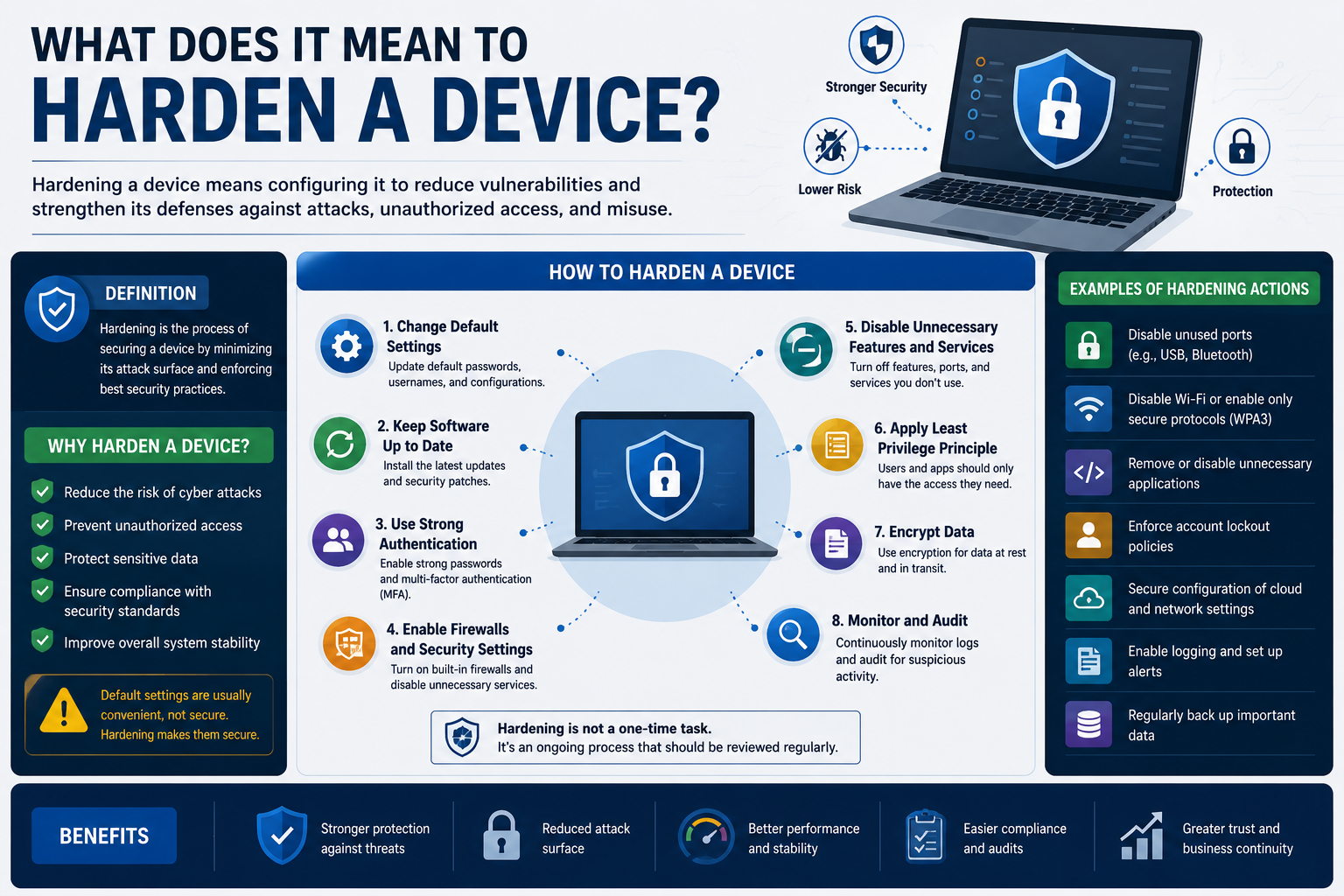
Device hardening is one of the most important concepts in cybersecurity because it focuses on reducing the weaknesses that attackers can exploit. Every computer, smartphone, server, tablet, or network appliance connected to the internet becomes a potential target for cybercriminals. Hardening is the process of strengthening those devices so they become more difficult to compromise.
Cybersecurity professionals often describe hardening as building a defensive wall around systems and data. The stronger the wall becomes, the harder it is for attackers to break through. Device hardening does not make systems invincible, but it dramatically lowers the chances of successful attacks.
There is a well-known saying in information security that the only perfectly secure computer is one that is turned off. This statement highlights an important reality about cybersecurity. No matter how advanced a security system becomes, there is always some level of risk. Attackers constantly search for vulnerabilities, and new weaknesses are discovered regularly.
The purpose of hardening is not to create perfect security. Instead, the goal is to make systems difficult enough to attack that cybercriminals decide to move on to easier targets. Organizations that invest in strong security practices reduce the return on investment for attackers. If hacking a company requires significant time, resources, and effort, many threat actors will search for weaker victims instead.
Hardening involves multiple security practices working together. Organizations may disable unnecessary services, remove unused applications, restrict user privileges, encrypt data, apply security updates, configure firewalls, and strengthen authentication methods. Every improvement reduces opportunities for attackers to gain unauthorized access.
Modern businesses depend heavily on technology. Companies store customer information, financial data, employee records, and confidential communications on digital systems. As organizations become more connected, cybersecurity risks continue to increase. Attackers now target businesses of every size because even small organizations may store valuable information.
Cybercriminals use many attack methods, including ransomware, phishing, credential theft, malware infections, social engineering, and remote exploitation. Weak devices often become entry points into larger networks. Once attackers gain access to one vulnerable system, they may move laterally across the environment to compromise additional systems.
Organizations that fail to harden their devices properly face serious consequences. Data breaches can lead to financial loss, downtime, reputational damage, legal issues, and regulatory penalties. Some businesses never recover fully after major cyber incidents.
Strong security begins with preparation and planning. Many organizations make the mistake of focusing only on advanced security technologies while ignoring basic protections. Installing expensive security software means little if systems still use weak passwords or outdated operating systems.
Hardening is most effective when organizations start with a strong foundation. Instead of reacting randomly to every new cyber threat, businesses should first establish consistent security standards across all systems. This structured approach improves overall protection and simplifies long-term security management.
Another important aspect of hardening is understanding that cybersecurity is not a one-time project. Threats evolve continuously, and attackers constantly adapt their techniques. Security measures that were effective a few years ago may no longer provide adequate protection today.
Businesses must therefore treat hardening as an ongoing process. Devices should be reviewed, updated, audited, and monitored regularly. Cybersecurity requires continuous improvement rather than temporary fixes.
Why Attackers Target Weak Devices
Cybercriminals prefer easy targets because they want to maximize profits while minimizing effort and risk. Weak devices provide opportunities for attackers to gain access quickly without triggering security alerts or requiring advanced hacking techniques.
Many successful cyberattacks occur because organizations neglect basic cybersecurity practices. Common weaknesses include:
- Weak passwords
- Unpatched software
- Open network ports
- Unsecured remote access
- Disabled firewalls
- Misconfigured permissions
- Outdated operating systems
- Unencrypted data
- Default administrator credentials
Attackers actively scan the internet searching for vulnerable systems. Automated tools can identify weak devices within minutes. Once vulnerabilities are discovered, attackers may attempt to exploit them immediately.
For example, ransomware groups frequently target businesses using outdated software with known security flaws. Once attackers gain access, they may encrypt files, disrupt operations, and demand large ransom payments.
Credential theft is another common attack strategy. Weak passwords or reused credentials make it easier for attackers to compromise accounts. If users fail to enable multi-factor authentication, stolen passwords alone may provide complete access to sensitive systems.
Attackers also exploit human mistakes. Employees may unknowingly click malicious links, download infected attachments, or reveal credentials through phishing scams. Even strong technical defenses can fail if users are not properly trained.
Hardening reduces these risks by limiting opportunities for exploitation. Removing unnecessary software reduces the number of vulnerabilities available to attackers. Restricting user permissions prevents malware from gaining administrative control. Encryption protects sensitive information even if devices are stolen.
Organizations that harden systems effectively force attackers to spend more time and resources attempting to compromise devices. Many cybercriminals avoid highly secured targets because easier victims are available elsewhere.
Cybersecurity is ultimately about risk reduction. No organization can eliminate risk entirely, but strong hardening practices significantly improve resilience against attacks.
The Importance of a Security Baseline
One of the first steps in device hardening is creating a security baseline. A security baseline is a standardized set of minimum security configurations and policies that every device must follow.
Without a baseline, devices may be configured inconsistently. Some computers may receive updates regularly, while others remain outdated. Certain systems may use strong passwords, while others rely on weak authentication. Inconsistent security creates gaps that attackers can exploit.
A baseline establishes predictable and manageable security standards across an organization. IT administrators can use baselines as checklists to ensure systems meet minimum protection requirements.
Common baseline controls include:
- Password complexity requirements
- Firewall configuration
- Automatic updates
- Restricted administrative privileges
- Disabled guest accounts
- Antivirus protection
- Multi-factor authentication
- Encryption settings
- Logging and monitoring
Even basic protections dramatically reduce exposure to common cyber threats.
Strong baselines also simplify management. Instead of configuring every device manually, organizations can deploy standardized settings automatically using centralized management tools.
Security baselines are especially important in large organizations with hundreds or thousands of devices. Maintaining consistent protections becomes extremely difficult without standardized configurations.
Businesses operating in regulated industries often face strict cybersecurity requirements. Healthcare providers, financial institutions, government agencies, and defense contractors must comply with laws and standards designed to protect sensitive data.
Failure to meet compliance requirements may result in significant penalties, lawsuits, audits, and reputational damage. Strong security baselines help organizations maintain compliance while improving overall security.
Creating a baseline requires careful planning. Organizations must evaluate:
- Types of devices in use
- Operating systems
- Business applications
- User roles
- Remote access requirements
- Cloud services
- Compliance obligations
- Data sensitivity
A small office environment may only require a few baseline policies, while large enterprises often maintain multiple baselines for different device categories.
For example, servers may require stricter controls than employee laptops. Executive devices handling sensitive information may receive additional protections. Public-facing systems often need stronger monitoring and segmentation.
Security baselines should never remain static. Cybersecurity threats evolve constantly, and attackers continuously discover new techniques. Organizations must review and update baselines regularly to address emerging risks.
Routine auditing is equally important. Over time, systems may drift away from approved configurations because of software changes, user activity, or administrative errors. Regular audits help identify noncompliant devices before vulnerabilities become major problems.
Automated compliance tools can simplify this process by continuously monitoring systems and reporting deviations from approved baselines.
The Expanding Complexity of IT Environments
Modern technology environments are far more complex than they were in the past. Organizations no longer rely solely on office desktops and internal servers. Today’s businesses operate across highly distributed infrastructures that include cloud platforms, remote workers, mobile devices, and internet-connected systems.
Organizations now manage:
- Laptops
- Smartphones
- Tablets
- Virtual machines
- Cloud applications
- Collaboration tools
- Wireless networks
- Internet of Things devices
- Remote endpoints
- Web services
Every technology introduces additional security challenges.
Remote work has changed cybersecurity significantly. Employees frequently access corporate systems from homes, airports, hotels, cafes, and public networks. These environments are often less secure than traditional office networks.
Attackers frequently exploit weak remote access configurations. Poorly secured VPNs, exposed remote desktop services, and weak passwords create major vulnerabilities.
Home networks themselves may also introduce risks. Many users fail to update home routers or secure wireless networks properly. Attackers sometimes compromise poorly configured home devices to target remote workers.
Cloud computing has also transformed cybersecurity practices. Businesses increasingly depend on cloud services for storage, communication, infrastructure, and productivity applications.
Cloud platforms offer flexibility and scalability, but they also create new security responsibilities. While cloud providers secure the underlying infrastructure, customers remain responsible for configuring access controls, permissions, and data protection settings correctly.
Misconfigured cloud environments are a leading cause of data breaches. Sensitive information may become publicly accessible if administrators fail to apply proper restrictions.
Hardening cloud systems often includes:
- Identity management
- Access restrictions
- Encryption
- Monitoring
- Backup strategies
- Network segmentation
- API security
- Privileged access controls
Organizations must also secure communication between cloud systems and on-premises infrastructure. Hybrid environments increase complexity because administrators must protect multiple interconnected platforms simultaneously.
The growing number of connected devices further complicates cybersecurity. Internet of Things devices such as smart cameras, printers, sensors, and industrial systems often receive limited security attention despite being connected to networks.
Many IoT devices ship with weak default credentials or outdated software. Attackers frequently target these systems because organizations fail to harden them properly.
Cybersecurity teams must therefore maintain visibility across all connected assets. Unknown or unmanaged devices can create hidden vulnerabilities within networks.
The Role of Human Behavior in Cybersecurity
Technology alone cannot stop every cyberattack. Human behavior plays a major role in organizational security.
Employees often become targets because manipulating people can be easier than bypassing technical defenses. Cybercriminals use phishing emails, fake websites, phone scams, and social engineering tactics to trick users into revealing sensitive information.
Phishing remains one of the most common attack methods. Attackers may impersonate trusted companies, coworkers, or executives to convince users to click malicious links or download infected files.
Even experienced users sometimes fall victim to sophisticated phishing campaigns. Attackers carefully design messages to appear legitimate and create urgency.
Common phishing tactics include:
- Fake password reset notices
- Fraudulent invoices
- Delivery notifications
- Security alerts
- Executive impersonation
- Account verification requests
If users provide credentials through fake login pages, attackers may gain immediate access to corporate systems.
Hardening devices must therefore include user education and awareness training. Employees should understand how to identify suspicious messages and report potential threats.
Security awareness programs often teach employees about:
- Phishing scams
- Password security
- Social engineering
- Safe browsing practices
- Secure file sharing
- Mobile device safety
- Data protection responsibilities
Organizations should encourage employees to report suspicious activity without fear of punishment. Early reporting can help security teams contain threats before they spread.
Strong password practices are especially important. Weak or reused passwords remain a major cybersecurity problem. Attackers frequently use automated tools to guess passwords or test stolen credentials across multiple systems.
Multi-factor authentication provides an additional layer of protection by requiring users to verify identity through secondary methods such as mobile apps or security tokens.
Even if attackers steal passwords, multi-factor authentication may prevent unauthorized access.
Cybersecurity culture matters just as much as technology. Organizations that prioritize security awareness and accountability often experience fewer successful attacks.
Employees should understand that cybersecurity is everyone’s responsibility rather than solely the job of IT departments.
Vendor Security Recommendations and Best Practices
Technology vendors invest heavily in cybersecurity research and testing. Most major software and hardware providers publish detailed guidance explaining how to secure their products properly.
Ignoring vendor recommendations is a common mistake. Many businesses deploy systems using default settings without reviewing security documentation. Default configurations often prioritize usability and compatibility rather than maximum security.
Operating system vendors regularly publish:
- Security advisories
- Patch information
- Hardening guides
- Configuration templates
- Vulnerability alerts
- Best practice recommendations
These resources help organizations avoid common security mistakes.
Network equipment manufacturers also provide guidance for securing routers, switches, firewalls, and wireless infrastructure. Recommended protections may include:
- Disabling unnecessary services
- Restricting management access
- Configuring encryption
- Updating firmware
- Enabling authentication
- Monitoring logs
Following vendor guidance significantly improves security posture.
Patch management is another essential component of hardening. Attackers frequently exploit known vulnerabilities in outdated software. Security patches close these weaknesses before attackers can use them against organizations.
Unfortunately, many businesses delay updates because they fear downtime or compatibility issues. While testing updates is important, ignoring patches for long periods creates serious risks.
Cybercriminals often exploit vulnerabilities within days of public disclosure. Organizations that fail to update systems quickly may become easy targets.
Effective patch management involves:
- Monitoring for updates
- Testing patches
- Prioritizing critical vulnerabilities
- Scheduling deployments
- Verifying installations
- Maintaining documentation
Strong patch management reduces exposure to known threats and improves overall system stability.
Hardening devices requires consistent effort, planning, and continuous improvement. Organizations that prioritize cybersecurity foundations create stronger defenses against evolving threats while reducing operational and financial risk.
Using Government and Industry Security Resources
Organizations do not have to build cybersecurity strategies entirely on their own. Many government agencies, security organizations, and technology vendors provide extensive guidance that helps businesses improve their defenses and harden devices more effectively.
Cybersecurity is an enormous field that changes constantly. New vulnerabilities, attack methods, and malware variants appear every day. Because of this, security professionals rely heavily on trusted resources that provide current information about threats and defensive practices.
Government cybersecurity agencies perform large-scale research into vulnerabilities, cybercrime trends, and emerging attack techniques. These agencies often publish free recommendations that businesses can use to strengthen security programs.
Industry security frameworks also help organizations develop structured approaches to cybersecurity. Instead of applying random protections inconsistently, businesses can follow established standards designed to reduce risk systematically.
Security resources commonly provide guidance related to:
- Risk management
- Vulnerability management
- Access controls
- Data protection
- Incident response
- Network security
- Endpoint protection
- Logging and monitoring
- Backup strategies
- Recovery planning
These frameworks help organizations build stronger security foundations while improving consistency across environments.
Threat intelligence is especially valuable because cybercriminals move quickly. Organizations that fail to monitor emerging threats may remain vulnerable long after attackers begin exploiting weaknesses.
Cybersecurity alerts and advisories allow businesses to respond before attacks become widespread. Security teams can prioritize patches, implement temporary mitigations, and monitor suspicious activity related to newly discovered vulnerabilities.
Vulnerability databases also play an important role in modern cybersecurity. These databases catalog known security flaws affecting software, hardware, operating systems, and applications. Security professionals use them to determine whether systems may be exposed to active threats.
Threat monitoring has become essential because attackers frequently automate their operations. Once a vulnerability becomes public, cybercriminals often begin scanning the internet immediately for vulnerable devices.
Organizations that stay informed about emerging risks gain a major advantage. Early awareness allows security teams to react proactively instead of waiting until attacks occur.
Many businesses subscribe to cybersecurity newsletters and alerts to receive timely information regarding:
- Zero-day vulnerabilities
- Ransomware campaigns
- Malware outbreaks
- Data breaches
- Phishing threats
- Exploitation techniques
- Security patches
Continuous awareness improves an organization’s ability to defend against evolving cyber threats.
Why Security Documentation Matters
Security documentation is often overlooked, yet it is one of the most valuable resources available to IT administrators and cybersecurity teams.
Technology vendors spend enormous amounts of money researching vulnerabilities and securing products. Most vendors publish extensive documentation explaining how to configure systems securely and reduce exposure to threats.
Unfortunately, many organizations fail to use these resources effectively. Devices are frequently deployed using default settings because administrators prioritize convenience, speed, or ease of use over security.
Default configurations are rarely optimized for maximum protection. Many services are enabled automatically to improve compatibility and simplify setup. While convenient, unnecessary features may introduce vulnerabilities that attackers can exploit.
Security documentation helps administrators identify and disable unnecessary functionality. Hardening guides often explain:
- Which services should be disabled
- Recommended firewall settings
- Authentication best practices
- Secure remote access configurations
- Encryption recommendations
- Logging settings
- Access control strategies
- Monitoring procedures
Following vendor guidance significantly improves overall security posture.
Security documentation also reduces human error. Without standardized guidance, administrators may configure systems inconsistently or overlook critical settings. Structured documentation helps maintain reliable and repeatable security practices.
Large organizations especially benefit from standardized procedures because they often manage thousands of devices across multiple locations.
Consistent documentation ensures that systems are configured according to approved security standards regardless of who performs installations or maintenance.
Documentation is equally important during troubleshooting and incident response. Security teams must understand how systems are configured to investigate suspicious activity effectively.
Poor documentation often delays incident investigations because administrators struggle to identify configuration changes, user permissions, or system dependencies.
Organizations that maintain strong documentation improve both operational efficiency and cybersecurity resilience.
The Importance of Continuous Auditing
Hardening devices is not a one-time task. Even well-secured systems can become vulnerable over time if organizations fail to monitor and maintain them properly.
Continuous auditing is necessary because environments constantly change. Software updates, user activity, new applications, configuration changes, and administrative mistakes may gradually weaken security controls.
Security audits help organizations identify weaknesses before attackers exploit them.
Auditing involves reviewing systems to verify compliance with security policies and baselines. Administrators may examine:
- User accounts
- Password policies
- Installed software
- Firewall rules
- Network configurations
- Access permissions
- Security logs
- Patch levels
- Encryption settings
- Remote access controls
Audits reveal systems that no longer meet approved standards.
For example, an employee may accidentally disable antivirus protection or install unauthorized software. Without auditing, these changes may go unnoticed for long periods.
Cybersecurity teams often use automated tools to simplify auditing processes. These tools continuously monitor systems and generate alerts when devices drift away from approved configurations.
Automated auditing improves visibility and allows organizations to respond more quickly to security issues.
Vulnerability scanning is another important auditing practice. Vulnerability scanners analyze systems for known weaknesses such as outdated software, missing patches, insecure services, and misconfigurations.
Regular vulnerability scanning helps organizations prioritize remediation efforts based on risk severity.
Penetration testing provides an even deeper level of assessment. During penetration tests, security professionals simulate real-world attacks to identify exploitable weaknesses.
Penetration testing helps organizations evaluate whether existing defenses can withstand realistic attack scenarios.
Many compliance frameworks require regular auditing and testing because security controls become ineffective if they are not maintained properly.
Organizations that audit continuously improve their ability to detect problems early and maintain stronger long-term security.
Understanding the Risks of Mobile Devices
Mobile devices create unique cybersecurity challenges because they are portable, frequently connected to public networks, and difficult to monitor continuously.
Laptops, smartphones, and tablets often contain sensitive information such as:
- Emails
- Customer records
- Financial data
- Passwords
- Authentication tokens
- Corporate documents
- Business communications
In many cases, the information stored on a mobile device is far more valuable than the hardware itself.
Physical theft remains one of the biggest mobile security risks. Unlike desktop systems located in secured offices, mobile devices travel constantly between homes, workplaces, hotels, airports, and public spaces.
A stolen device may provide attackers with direct access to sensitive business data.
Cybercriminals frequently target unattended devices because physical access can bypass certain security protections. Attackers may attempt to:
- Guess passwords
- Remove storage drives
- Boot devices from external media
- Extract encryption keys
- Install malicious software
Hardening mobile devices reduces the likelihood of successful compromise even if hardware is stolen.
One important protection involves disabling unnecessary accounts and restricting administrative privileges. Attackers often attempt to exploit unused accounts or poorly managed permissions.
Organizations should also enforce strong authentication policies on mobile devices. Weak passwords remain a major security problem because attackers can often guess or crack them using automated tools.
Multi-factor authentication provides additional protection by requiring secondary verification methods beyond passwords alone.
Remote management capabilities are another important security feature. Mobile device management platforms allow organizations to:
- Enforce security policies
- Track devices
- Restrict applications
- Push updates
- Monitor compliance
- Remotely wipe stolen devices
Remote wipe functionality can erase sensitive information if devices are lost or stolen.
Public wireless networks create additional risks for mobile users. Attackers may intercept traffic or create fake hotspots to capture credentials and sensitive information.
Employees should avoid transmitting confidential data over unsecured public networks whenever possible.
Virtual private networks help secure internet traffic by encrypting communications between devices and remote systems.
Organizations with remote workers should ensure that employees understand the risks associated with public networks and unsafe browsing habits.
The Role of Encryption in Device Hardening
Encryption is one of the most effective protections for sensitive information stored on devices.
Encryption converts readable data into scrambled information that cannot be understood without the correct decryption key. Even if attackers steal devices or intercept files, encrypted data remains inaccessible without proper authorization.
Encryption is especially important for mobile devices because they face higher risks of loss and theft.
Modern organizations use encryption to protect:
- Hard drives
- File systems
- Emails
- Cloud storage
- Network traffic
- Databases
- Backup files
- Portable storage devices
Strong encryption significantly reduces the likelihood of unauthorized data exposure.
Without encryption, attackers may gain immediate access to sensitive files simply by removing storage drives from stolen devices.
Encryption algorithms use complex mathematical processes to secure data. Authorized users can decrypt information using passwords, keys, or authentication credentials.
Organizations handling regulated or confidential information often require encryption as part of compliance obligations.
Healthcare providers, financial institutions, and government agencies commonly encrypt sensitive data to reduce risks associated with theft or breaches.
Encryption is not limited to storage devices. Secure communication protocols also rely heavily on encryption to protect information transmitted across networks.
Websites using HTTPS encrypt internet traffic between users and servers. Virtual private networks encrypt remote connections to protect data traveling across public networks.
Strong encryption improves confidentiality and reduces the impact of device theft or interception.
Understanding Self-Encrypting Drives
Some storage devices include built-in encryption functionality known as self-encrypting drives.
These drives automatically encrypt data as it is written to storage without requiring users to manage encryption manually.
Self-encrypting drives simplify security because encryption occurs automatically in hardware. Users generally do not need to encrypt individual files or folders manually.
Many self-encrypting drives use specialized hardware security features to protect encryption keys. Hardware-based encryption often improves performance compared to software-based encryption methods.
Because encryption occurs directly within the storage device, system performance impacts are usually minimal.
Self-encrypting drives are commonly used in enterprise environments where protecting sensitive data is a high priority.
Organizations benefit from automatic encryption because it reduces the risk of human error. Employees cannot accidentally forget to encrypt sensitive files if encryption occurs automatically at the device level.
Self-encrypting drives also simplify compliance efforts because organizations can demonstrate that stored data remains protected even if devices are stolen.
Although self-encrypting drives improve security significantly, organizations must still manage authentication carefully. Weak passwords or poor access controls can undermine encryption protections.
Strong security always requires multiple layers working together rather than relying on a single technology alone.
Whole Disk Encryption and Its Benefits
Whole disk encryption protects all information stored on a drive, including operating system files, applications, temporary files, and user documents.
Unlike file-level encryption, which only secures selected files or folders, whole disk encryption protects the entire storage device.
When whole disk encryption is enabled, users typically authenticate during startup before the operating system loads. Until authentication succeeds, the drive remains inaccessible.
This approach provides strong protection against physical theft because attackers cannot simply remove the drive and access files using another system.
Whole disk encryption is widely used on laptops and mobile devices because these systems face higher theft risks.
One of the most important advantages of whole disk encryption is transparency. Once authenticated, users can continue working normally without manually encrypting or decrypting files.
Encryption operates automatically in the background.
Modern operating systems often include built-in encryption tools that simplify deployment and management. Organizations can centrally manage encryption policies across large device fleets.
Whole disk encryption greatly reduces the likelihood of data exposure during device theft incidents.
However, encryption is not a perfect solution. Once a user unlocks a system successfully, decrypted data becomes accessible to applications and processes running on the device.
Malware operating on an unlocked system may still steal sensitive information.
Organizations should therefore combine encryption with other protections such as:
- Endpoint security software
- Access controls
- Monitoring systems
- Security awareness training
- Network segmentation
- Backup strategies
Encryption also introduces certain operational considerations. Forgotten passwords or damaged encryption keys may prevent legitimate users from accessing important data.
Organizations must maintain secure recovery processes to avoid permanent data loss.
Performance impacts associated with encryption are generally minimal on modern hardware, although older systems may experience reduced speed.
Despite these considerations, encryption remains one of the most effective methods for protecting sensitive information against physical theft and unauthorized access.
How Hardening Improves Organizational Security
Device hardening strengthens cybersecurity by reducing the number of opportunities attackers have to compromise systems.
Weak devices often become entry points into larger networks. Once attackers gain access to one vulnerable system, they may move laterally to compromise additional systems and steal valuable information.
Hardening interrupts this process by limiting vulnerabilities and restricting attacker movement.
Organizations that implement strong hardening practices benefit from:
- Reduced attack surfaces
- Better compliance
- Improved system stability
- Lower breach risks
- Stronger access controls
- Faster threat detection
- Greater resilience against attacks
Hardening also improves operational reliability. Systems configured according to security best practices often experience fewer crashes, unauthorized changes, and malware infections.
Security and operational stability frequently support one another.
Cybersecurity is no longer optional for modern organizations. Businesses of every size face increasing threats from ransomware groups, criminal organizations, and sophisticated attackers.
Companies that ignore hardening expose themselves to unnecessary risk.
Strong device hardening requires planning, consistency, monitoring, and continuous improvement. Organizations that invest in these practices create safer environments for employees, customers, and critical business operations.
The Importance of Access Control in Device Hardening
Access control is one of the most important parts of cybersecurity because it determines who can interact with systems, applications, and sensitive information. Even the strongest devices can become vulnerable if organizations fail to manage permissions correctly.
The goal of access control is simple. Users should only have access to the systems and information necessary to perform their jobs. This concept is commonly called the principle of least privilege.
When users have unnecessary permissions, attackers gain more opportunities to compromise systems. For example, if every employee has administrative rights on company computers, malware that infects one account may gain complete control of the device immediately.
Restricting privileges limits the damage attackers can cause after compromising an account. A user with limited permissions cannot easily install unauthorized software, disable security tools, or access confidential files outside their role.
Organizations should separate user accounts based on responsibilities. Standard users should operate with minimal privileges, while administrative accounts should only be used for maintenance and management tasks.
Administrative accounts are particularly valuable targets for cybercriminals. Attackers who gain administrative access may control systems, modify security settings, create hidden accounts, and move laterally across networks.
To reduce these risks, organizations often implement privileged access management strategies that include:
- Separate administrator accounts
- Multi-factor authentication
- Session monitoring
- Password rotation
- Time-limited privileges
- Access approval workflows
Strong password policies are also critical for access control. Weak passwords remain one of the most common cybersecurity problems because attackers can guess or crack them using automated tools.
Organizations should require passwords that are:
- Long
- Complex
- Unique
- Difficult to predict
Users should avoid reusing passwords across multiple accounts because stolen credentials are often tested against many systems.
Multi-factor authentication adds another layer of protection by requiring users to verify their identity using additional methods such as mobile applications, security tokens, or biometric verification.
Even if attackers steal passwords successfully, multi-factor authentication may prevent unauthorized access.
Access reviews are equally important. Employees change roles, leave organizations, or no longer require certain permissions over time. Without regular reviews, unnecessary accounts and privileges may remain active indefinitely.
Dormant accounts create major security risks because attackers frequently target forgotten credentials.
Organizations should therefore disable or remove accounts that are no longer needed and review permissions regularly to ensure compliance with security policies.
Network Security and Device Hardening
Devices rarely operate in isolation. Most systems communicate continuously with other devices, servers, cloud platforms, and internet services. Because of this, network security plays a major role in device hardening.
Attackers often use networks to spread malware, steal data, and move between compromised systems. Weak network configurations may allow cybercriminals to access sensitive resources with little resistance.
One important security practice is network segmentation. Segmentation divides networks into smaller sections to limit communication between systems.
Without segmentation, attackers who compromise one device may gain unrestricted access to an entire environment. Segmentation helps contain breaches and restricts attacker movement.
For example, organizations may separate:
- Employee workstations
- Financial systems
- Guest networks
- Development environments
- Production servers
- Internet of Things devices
By isolating systems based on purpose and sensitivity, businesses reduce the likelihood of widespread compromise.
Firewalls are another essential network security tool. Firewalls monitor and control traffic entering and leaving systems based on predefined security rules.
Properly configured firewalls help block unauthorized access attempts and reduce exposure to malicious traffic.
Organizations should avoid leaving unnecessary network ports open because attackers actively scan for exposed services.
Remote access services require special attention. Virtual private networks and remote desktop tools became increasingly important as remote work expanded, but poorly secured remote access systems remain common attack targets.
Organizations should protect remote access by:
- Requiring multi-factor authentication
- Restricting access by role
- Monitoring login attempts
- Applying updates regularly
- Disabling unused services
- Using encrypted connections
Wireless networks also require strong security controls. Weak wireless passwords or outdated encryption protocols may allow attackers to intercept communications or gain unauthorized network access.
Businesses should secure wireless networks using modern encryption standards and strong authentication practices.
Network monitoring further improves cybersecurity visibility. Monitoring tools analyze traffic patterns and identify suspicious activity such as:
- Unusual login attempts
- Large data transfers
- Malware communication
- Unauthorized scanning
- Privilege escalation
- Command-and-control traffic
Early detection allows organizations to respond before incidents become more severe.
Strong network security works together with device hardening to create layered protection against cyber threats.
The Role of Endpoint Protection
Endpoint protection refers to security measures designed to protect individual devices such as laptops, desktops, smartphones, and servers.
Endpoints are frequent attack targets because they interact directly with users, emails, websites, and applications.
Traditional antivirus software remains important, but modern endpoint security has evolved significantly. Today’s endpoint protection platforms often include advanced features such as:
- Behavioral analysis
- Threat detection
- Real-time monitoring
- Malware prevention
- Ransomware protection
- Device isolation
- Automated response capabilities
Behavioral analysis helps identify suspicious activity even when malware signatures are unknown. Instead of relying only on known malware definitions, advanced security tools monitor behavior patterns associated with attacks.
For example, endpoint protection software may detect ransomware attempting to encrypt large numbers of files rapidly.
Endpoint detection and response tools provide deeper visibility into device activity. These platforms help security teams investigate incidents and respond more effectively to threats.
Modern cyberattacks often involve multiple stages. Attackers may establish persistence, steal credentials, disable security controls, and move laterally across networks over time.
Endpoint monitoring helps organizations detect these activities earlier.
Application control is another valuable endpoint protection strategy. Organizations can restrict which applications users are allowed to install or execute.
Unauthorized applications may introduce malware or vulnerabilities into environments. Restricting software installations reduces these risks significantly.
Organizations should also remove unused applications and unnecessary services from devices. Every installed application represents potential attack surface.
Old software is particularly dangerous because unsupported applications may no longer receive security updates.
Hardening endpoints requires continuous maintenance, monitoring, and updates. Devices should never be treated as permanently secure because threats evolve constantly.
Why Software Updates Are Critical
Software vulnerabilities are one of the most common causes of cyberattacks. Attackers frequently exploit weaknesses in operating systems, applications, browsers, and firmware.
Software vendors regularly release security patches to fix these vulnerabilities. Organizations that fail to install updates promptly leave systems exposed to known threats.
Cybercriminals actively monitor newly published vulnerabilities. Once security flaws become public, attackers often develop exploits quickly and begin scanning for vulnerable systems.
Ransomware groups especially target organizations running outdated software.
Patch management is therefore one of the most important aspects of device hardening.
A strong patch management process usually includes:
- Monitoring for updates
- Testing patches
- Prioritizing vulnerabilities
- Scheduling deployments
- Verifying installation success
- Maintaining documentation
Critical vulnerabilities should receive immediate attention because attackers may exploit them rapidly.
Organizations sometimes delay updates because they worry about compatibility problems or operational downtime. While testing is important, ignoring security patches for long periods creates serious risks.
Legacy systems create additional challenges. Some organizations continue operating outdated hardware or software because replacing systems can be expensive or complicated.
Unfortunately, unsupported systems often become major security liabilities because vendors no longer provide updates or security fixes.
When replacement is not immediately possible, organizations should implement compensating controls such as:
- Network isolation
- Restricted access
- Increased monitoring
- Application whitelisting
- Virtual patching
Firmware updates are equally important. Devices such as routers, printers, cameras, and Internet of Things systems often contain vulnerabilities in embedded software.
Attackers frequently target outdated firmware because organizations sometimes overlook these devices during patch management efforts.
Effective hardening requires visibility across all connected assets, not just traditional computers and servers.
Social Engineering and Human Risk
Cybersecurity involves more than technology. Human behavior remains one of the biggest vulnerabilities within organizations.
Attackers often target employees because manipulating people can be easier than bypassing technical defenses.
Social engineering attacks rely on deception, trust, fear, urgency, or curiosity to trick individuals into revealing sensitive information or performing unsafe actions.
Phishing emails remain one of the most common attack methods. Attackers may impersonate:
- Banks
- Coworkers
- Vendors
- Delivery companies
- Government agencies
- Executives
- Technical support teams
These messages often contain malicious links, infected attachments, or fake login pages designed to steal credentials.
Modern phishing attacks can appear extremely convincing. Some attackers research organizations carefully before launching campaigns.
Spear phishing attacks specifically target individuals using personalized information gathered from social media, websites, or previous breaches.
Organizations should educate employees about common attack tactics and encourage cautious behavior online.
Security awareness programs typically cover:
- Phishing recognition
- Password safety
- Safe browsing
- Social engineering
- Device security
- Data handling procedures
- Reporting suspicious activity
Employees should understand that cybersecurity is everyone’s responsibility rather than solely the job of IT departments.
Organizations that foster strong security cultures often experience fewer successful attacks because users become more cautious and proactive.
Simulated phishing exercises are also commonly used to measure employee awareness and identify areas requiring additional training.
The goal of security awareness is not perfection. Even experienced professionals can occasionally make mistakes. Instead, organizations aim to reduce risk and improve response capabilities.
Quick reporting of suspicious emails or unusual activity may prevent small issues from becoming major incidents.
Backup Strategies and Recovery Planning
No security strategy is complete without reliable backup and recovery capabilities.
Even well-hardened systems may eventually experience incidents such as:
- Ransomware attacks
- Hardware failures
- Accidental deletion
- Insider threats
- Natural disasters
- Software corruption
Backups help organizations recover data and restore operations after disruptions.
Cybercriminals increasingly target backups during ransomware attacks because destroying recovery options increases pressure on victims to pay ransoms.
Organizations should therefore protect backups carefully.
Strong backup strategies often include:
- Multiple backup copies
- Offline storage
- Immutable backups
- Geographic redundancy
- Encryption
- Regular testing
Offline or isolated backups are especially important because they cannot easily be encrypted or deleted by attackers.
Backup testing is equally critical. Organizations sometimes discover during emergencies that backups are incomplete, corrupted, or unusable.
Recovery testing ensures that systems and data can actually be restored successfully.
Businesses should also develop incident response and disaster recovery plans outlining how they will respond to cyber incidents.
These plans may include:
- Communication procedures
- Escalation processes
- Containment strategies
- Recovery priorities
- Legal considerations
- Customer notifications
- Media response plans
Prepared organizations generally recover more quickly and experience less operational disruption during incidents.
Cybersecurity resilience depends not only on prevention but also on recovery capabilities.
The Future of Device Hardening
Cybersecurity threats continue evolving rapidly. Attackers constantly develop new techniques, malware variants, and exploitation methods.
Emerging technologies such as artificial intelligence, cloud computing, edge computing, and Internet of Things devices are transforming both business operations and cybersecurity challenges.
Organizations must adapt continuously to remain secure.
Future hardening strategies will likely place even greater emphasis on:
- Automation
- Threat intelligence
- Zero trust architecture
- Behavioral analytics
- Identity security
- Cloud-native protection
- Artificial intelligence
- Real-time monitoring
Zero trust security models are becoming increasingly popular because they assume no user or device should be trusted automatically.
Instead of relying solely on network location, zero trust environments continuously verify identity, device health, and access permissions.
Artificial intelligence is also influencing cybersecurity significantly. Security tools increasingly use machine learning to identify suspicious behavior and detect attacks more quickly.
At the same time, attackers are beginning to use artificial intelligence to automate phishing campaigns, malware development, and reconnaissance.
This ongoing evolution means cybersecurity professionals must continue learning and adapting throughout their careers.
Organizations that remain proactive and flexible will be better prepared to handle future threats.
Conclusion
Device hardening is one of the most important foundations of modern cybersecurity. Every connected device creates potential opportunities for attackers, and weak systems often become entry points for data breaches, ransomware attacks, and other security incidents.
Hardening reduces these risks by strengthening devices, limiting vulnerabilities, and improving overall resilience against cyber threats.
Strong device hardening involves many layers working together, including:
- Access control
- Encryption
- Network security
- Endpoint protection
- Patch management
- Monitoring
- Employee awareness
- Backup strategies
No single security tool or policy can stop every attack. Effective cybersecurity depends on consistent effort, continuous improvement, and careful planning.
Organizations must also recognize that cybersecurity is never finished. Threats evolve constantly, and attackers continuously search for new weaknesses to exploit.
Businesses that prioritize hardening create stronger defenses, protect sensitive information more effectively, and reduce operational and financial risks.
In today’s digital world, hardening devices is no longer optional. It is an essential part of protecting systems, employees, customers, and business operations from increasingly sophisticated cyber threats.