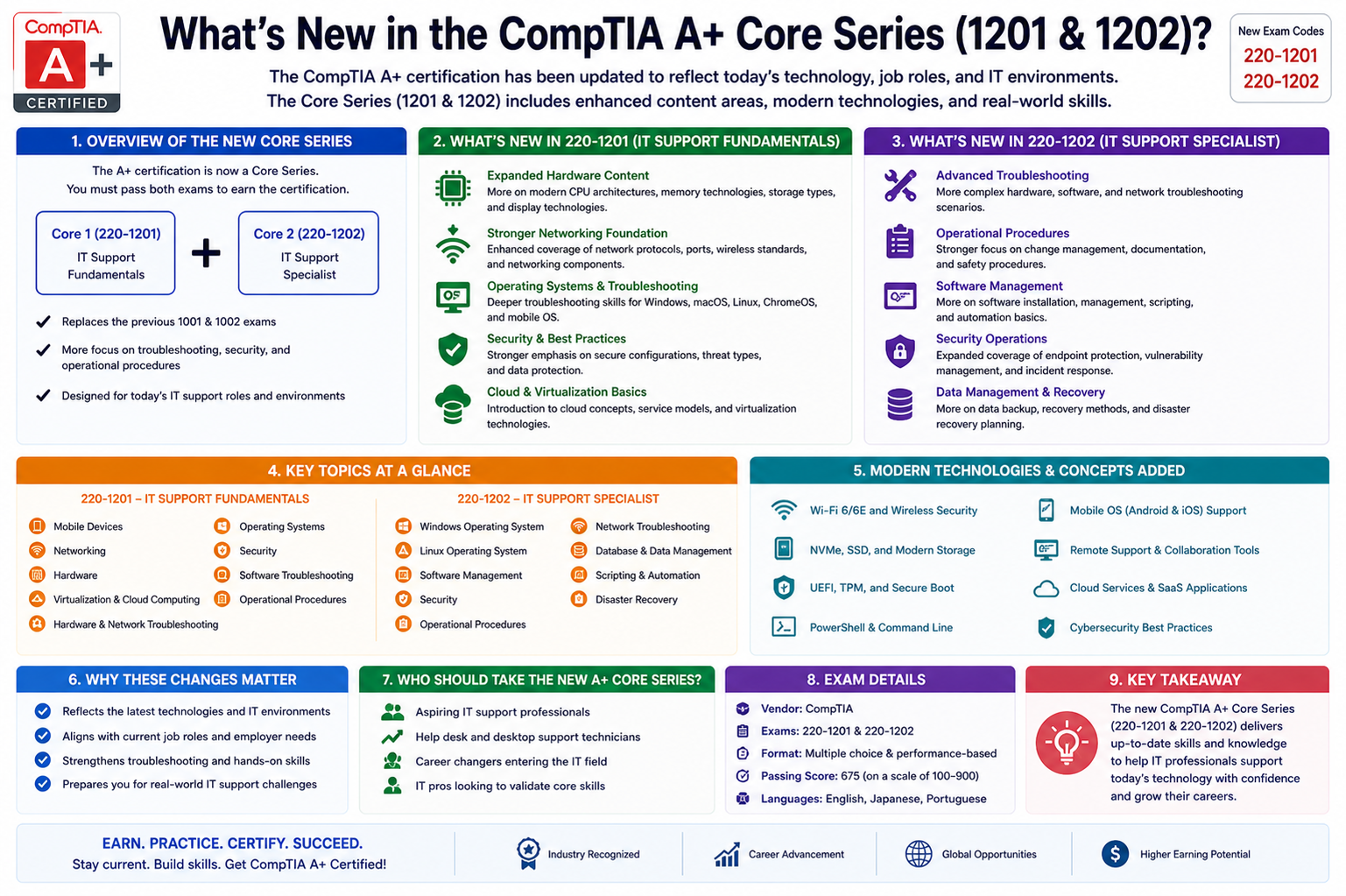
The updated CompTIA A+ Core exam is designed to reflect the current realities of IT support roles in modern organizations. Instead of focusing heavily on outdated hardware or legacy systems, it now emphasizes the skills that technicians are expected to use on a daily basis. The goal is to prepare candidates for environments where technology changes rapidly and support professionals must adapt quickly. This shift ensures that learners are not just memorizing concepts but are actually building a foundation for real-world technical problem solving.
The certification continues to serve as an entry point into IT careers, but its expectations have become more aligned with industry needs. Employers today look for candidates who can handle cloud tools, mobile devices, hybrid networks, and security concerns with confidence. The updated exam reflects this demand by broadening its scope while also increasing the depth of practical knowledge required.
Shift Toward Real-World IT Skills
One of the most noticeable changes in the updated exam is the stronger emphasis on real-world scenarios. Instead of simple definition-based questions, candidates are more likely to encounter problem-solving situations that mirror workplace challenges. This includes diagnosing hardware failures, resolving connectivity issues, and assisting users with software and operating system problems.
This approach helps bridge the gap between theoretical knowledge and practical application. IT support professionals are often required to think critically under pressure, especially when dealing with system outages or user disruptions. The updated certification aims to develop that mindset early, ensuring that learners are better prepared for on-the-job responsibilities.
The exam also encourages a deeper understanding of how different technologies interact. For example, a network issue might not be purely about connectivity but could involve security settings, driver conflicts, or misconfigured software. This layered thinking is a key part of modern IT support roles.
Expanded Coverage of Security Concepts
Security has become one of the most important areas in the updated certification. With increasing cyber threats targeting individuals and organizations, IT support professionals are expected to understand basic security principles and apply them in everyday tasks. The exam now integrates security topics throughout both sections rather than treating them as isolated concepts.
Candidates are expected to recognize common threats such as phishing, malware, ransomware, and social engineering attacks. In addition, they must understand how to prevent these threats through secure configurations, user education, and proper system maintenance. This includes working with antivirus tools, firewalls, and secure authentication methods.
Another important aspect is device security. Technicians must know how to secure laptops, mobile devices, and desktops in both office and remote environments. This includes enforcing password policies, enabling encryption, and ensuring that systems are updated regularly to patch vulnerabilities.
Increased Focus on Cloud Computing Fundamentals
Cloud computing has become a core part of modern IT infrastructure, and the updated exam reflects this reality. Candidates are expected to understand basic cloud concepts, including different service models and deployment types. This knowledge is essential because many organizations now rely on cloud-based tools for storage, communication, and application hosting.
The exam focuses on practical understanding rather than deep technical configuration. For example, candidates should know how cloud storage differs from local storage, how virtualization supports cloud environments, and how users interact with cloud-based applications.
This section also introduces basic troubleshooting scenarios related to cloud services. For instance, understanding why a user might not be able to access a cloud application or how synchronization issues can occur between devices and cloud storage platforms. These skills are increasingly relevant in hybrid work environments where employees rely heavily on remote access.
Modern Operating System Support
Another significant update is the broader coverage of operating systems. The exam now includes a more balanced focus on Windows, macOS, Linux, Android, and iOS. This reflects the diversity of devices used in workplaces today, where technicians must support multiple platforms simultaneously.
Instead of focusing solely on one operating system, candidates are expected to understand common functions across all major platforms. This includes installation processes, configuration settings, user management, and basic troubleshooting techniques. The ability to switch between different systems is a valuable skill in real-world IT support roles.
Mobile operating systems are also given more attention. Smartphones and tablets are widely used in business environments, and technicians must be able to assist with connectivity issues, application errors, and security configurations on these devices.
Strengthened Hardware and Device Troubleshooting Skills
Hardware troubleshooting remains a core component of the certification, but the updated exam places more emphasis on practical diagnostics. Candidates are expected to identify issues based on symptoms and apply logical steps to resolve them.
This includes understanding components such as processors, memory, storage devices, power supplies, and peripherals. However, instead of simply identifying parts, candidates must understand how these components interact and what happens when they fail.
For example, a performance issue may not always be caused by hardware failure alone. It could result from software conflicts, insufficient resources, or misconfigured settings. The exam encourages a holistic approach to troubleshooting, where multiple possible causes are considered before arriving at a solution.
Networking and Connectivity in Modern Environments
Networking remains a foundational topic, but its focus has evolved to match current technologies. The updated exam includes more emphasis on wireless connectivity, mobile networks, and hybrid environments where users connect from multiple locations.
Candidates are expected to understand basic networking concepts such as IP addressing, DNS, DHCP, and common network protocols. However, they must also be able to troubleshoot real-world connectivity issues, such as weak Wi-Fi signals, network congestion, or misconfigured routers.
With remote work becoming more common, understanding secure remote access methods is also important. This includes basic awareness of VPNs and how they help protect data when users connect from outside the office network.
Growing Importance of Remote Support Tools
Remote support has become a standard part of IT operations, and the updated exam reflects this shift. Technicians are often required to assist users without being physically present, using remote access tools to diagnose and fix issues.
Candidates are expected to understand how these tools work and when to use them effectively. This includes troubleshooting systems, guiding users through solutions, and ensuring secure remote connections. Communication skills also play an important role here, as clear instructions are necessary when assisting users who may not be technically experienced.
The ability to provide support in a remote environment is now considered a core skill rather than an optional one, reflecting the global shift toward distributed workforces.
Software and Application Troubleshooting
Software troubleshooting is another key area of focus. The updated exam includes more realistic scenarios involving application errors, compatibility issues, and system performance problems.
Candidates must understand how to diagnose software-related issues across different operating systems. This includes identifying corrupted files, resolving installation errors, and managing updates. They must also be familiar with basic configuration settings that can impact software performance.
In addition, understanding how applications interact with system resources is important. Many issues arise due to insufficient memory, background processes, or conflicting software. The exam encourages a methodical approach to identifying and resolving these problems.
Advanced Security Awareness in Practice
Security knowledge in the updated CompTIA A+ exam goes beyond recognizing basic threats and focuses more on how those threats appear in real workplace situations. Technicians are expected to understand how attacks target users through deception, weak configurations, and outdated systems. The exam emphasizes recognizing suspicious behavior in emails, links, downloads, and login attempts, as these are common entry points for security breaches.
Another important area is device hardening. This includes configuring systems to reduce vulnerabilities by disabling unnecessary services, applying updates, and enforcing secure authentication methods. Candidates are expected to understand why these steps matter rather than just memorizing definitions. The goal is to develop a security-first mindset where every technical action considers potential risks.
Data protection is also a key focus. This involves understanding how sensitive information should be stored, transferred, and accessed. Technicians must be aware of encryption basics and how improper handling of data can lead to breaches or compliance issues. Even at an entry level, awareness of these principles is essential in modern IT environments.
Identity and Access Management Fundamentals
Identity and access management concepts have become more relevant in the updated exam due to increasing reliance on cloud systems and shared networks. Candidates are expected to understand how user permissions work and why restricting access is important for maintaining security.
This includes knowledge of authentication methods such as passwords, multi-factor authentication, and biometric verification. The exam focuses on how these methods help prevent unauthorized access to systems and data. It also emphasizes the importance of strong password policies and regular credential updates.
Technicians are also expected to understand basic account management tasks such as creating, modifying, and disabling user accounts. In real-world scenarios, these tasks are often part of daily IT support responsibilities, especially in organizations with frequent staff changes or remote users.
Cloud Service Usage in Everyday IT Support
Cloud services are now deeply integrated into business operations, and the updated certification reflects this shift by expanding cloud-related knowledge requirements. Candidates are expected to understand how cloud platforms support storage, communication, and application delivery.
Rather than focusing on advanced cloud engineering, the exam emphasizes practical understanding from a support perspective. This includes helping users access cloud-based files, resolving synchronization issues, and understanding service availability problems.
A key concept is shared responsibility, where both the service provider and the user organization have roles in maintaining security and performance. Technicians must understand what responsibilities fall under their control and what is managed by external providers. This helps in correctly diagnosing issues and escalating problems when necessary.
Virtualization in Modern Work Environments
Virtualization is another important topic that reflects how IT infrastructure is evolving. The exam introduces candidates to the concept of running multiple virtual systems on a single physical machine. This technology is widely used for testing, development, and resource optimization.
Technicians are expected to understand the purpose of virtual machines and how they differ from physical systems. They should also be aware of basic use cases, such as running different operating systems on one device or isolating applications for security purposes.
In support roles, virtualization knowledge helps when troubleshooting performance issues or assisting users who work in virtual environments. Understanding how virtual resources are allocated can help identify bottlenecks and configuration problems.
Mobile Device Management and Support
Mobile devices have become essential tools in both personal and professional settings, and the updated exam reflects their importance. Candidates are expected to understand how to support smartphones and tablets across different operating systems.
This includes troubleshooting connectivity issues, application errors, and synchronization problems with cloud services. Technicians must also understand how mobile devices integrate with enterprise systems, especially in organizations that use bring-your-own-device policies.
Security is a major concern in mobile environments. The exam highlights the importance of device encryption, screen locks, remote wipe capabilities, and secure application usage. These features help protect sensitive data in case a device is lost or compromised.
Enhanced Networking Troubleshooting Skills
Networking remains a central component of IT support, but the updated exam places more emphasis on practical troubleshooting. Candidates are expected to diagnose issues based on symptoms rather than theoretical knowledge alone.
This includes identifying problems with wireless networks, router configurations, and internet connectivity. Technicians must understand how to interpret basic network information such as IP addresses, subnet masks, and gateway settings.
In addition, modern networks often involve multiple devices and connection types, making troubleshooting more complex. The exam encourages a structured approach, where candidates isolate the problem step by step instead of making random changes.
Understanding network performance issues is also important. Slow connections, intermittent access, and high latency are common problems that technicians must be able to analyze and resolve effectively.
Hardware Maintenance and Lifecycle Awareness
The updated exam also reinforces the importance of hardware maintenance throughout its lifecycle. Candidates are expected to understand not only how to repair or replace components but also how to maintain system health over time.
This includes cleaning devices, checking for hardware wear, and monitoring system performance indicators. Preventive maintenance is emphasized as a way to reduce downtime and extend the life of equipment.
Technicians must also understand when hardware should be upgraded or replaced. In modern IT environments, performance requirements change quickly, and outdated systems can impact productivity and security. Recognizing these situations is an important skill for support professionals.
Operating System Configuration and User Environment Control
Operating system management continues to be a major focus, but the updated exam places more attention on user environments and configuration control. Candidates are expected to understand how system settings impact usability and performance.
This includes managing user profiles, configuring accessibility options, and adjusting system preferences based on user needs. Technicians must also be able to troubleshoot issues caused by incorrect configurations or corrupted user settings.
Software installation and updates are also important areas. Candidates should understand how updates improve system stability and security, and how improper installation can lead to system conflicts.
Printer and Peripheral Device Troubleshooting
Peripheral devices remain part of the exam, but the focus is now more practical and scenario-based. Candidates are expected to troubleshoot issues with printers, scanners, and external devices commonly used in office environments.
This includes identifying connectivity problems, driver issues, and configuration errors. Technicians must understand how different types of printers operate and how to resolve common printing issues such as paper jams, poor print quality, or network printing failures.
Peripheral troubleshooting also extends to input devices like keyboards, mice, and external storage devices. These components may seem simple, but they often cause user productivity issues when they fail or malfunction.
Emerging Technologies in IT Support
The updated CompTIA A+ content places noticeable attention on emerging technologies that are becoming part of everyday IT environments. Instead of treating technology as static, the exam reflects how quickly tools, platforms, and systems evolve. Candidates are expected to have a working awareness of newer concepts that influence modern IT support roles.
This includes familiarity with automation tools and how they reduce repetitive tasks in system administration. While entry-level technicians are not expected to build automation frameworks, they should understand how automated processes like updates, backups, and system monitoring improve efficiency and reduce human error.
Another important area is the growing use of artificial intelligence in IT operations. This does not involve advanced AI development, but rather understanding how AI-driven tools assist in troubleshooting, security monitoring, and user support. Many organizations now use intelligent systems to detect anomalies, predict failures, and streamline help desk operations.
Internet-connected devices also play a significant role in modern environments. The exam introduces awareness of smart devices and how they integrate into business networks. Technicians must understand basic connectivity, security concerns, and support challenges related to these devices.
System Monitoring and Performance Optimization
System performance monitoring is a key skill emphasized in the updated certification. Technicians are expected to understand how to identify performance issues before they become major problems. This involves recognizing early warning signs such as slow system response, high resource usage, or frequent application crashes.
Candidates must be familiar with basic monitoring tools that track CPU usage, memory consumption, disk activity, and network performance. These tools help technicians diagnose bottlenecks and determine whether issues are caused by hardware limitations or software conflicts.
Performance optimization also involves making practical adjustments to improve system efficiency. This may include managing startup programs, freeing up storage space, updating drivers, or adjusting system settings. The focus is on maintaining stable and responsive systems in everyday use.
Understanding performance trends over time is also important. Instead of reacting only when problems occur, technicians are encouraged to observe patterns that may indicate underlying issues. This proactive approach helps reduce downtime and improves user satisfaction.
Data Storage and Management Concepts
Data storage has become more complex due to the combination of local storage, network storage, and cloud-based solutions. The updated exam reflects this reality by expanding the understanding of how data is stored, accessed, and protected.
Candidates are expected to understand different types of storage devices, including traditional hard drives, solid-state drives, and external storage solutions. Each type has its own advantages and limitations in terms of speed, reliability, and cost.
The exam also introduces basic concepts of data redundancy and backup strategies. Technicians must understand why backups are important and how different backup methods help protect against data loss. This includes awareness of scheduled backups, incremental backups, and cloud-based backup systems.
Data organization is another key area. Proper file management, storage allocation, and access control help ensure that systems run efficiently and securely. Technicians are often responsible for assisting users with storage-related issues, making this knowledge essential.
Scripting and Basic Automation Awareness
While the exam does not require advanced programming skills, it introduces basic scripting awareness as part of modern IT workflows. Candidates are expected to understand how simple scripts can automate routine tasks and improve efficiency.
This includes recognizing common scripting languages used in IT environments and understanding their general purpose. Scripts are often used for tasks such as system configuration, file management, and software deployment.
The focus is not on writing complex code but on understanding how automation reduces manual effort. Technicians should be able to identify when automation is being used and how it affects system behavior.
This knowledge is increasingly relevant as organizations adopt more automated IT processes to improve consistency and reduce human error.
Help Desk and Customer Support Skills
Technical knowledge alone is not enough for IT support roles, which is why the updated exam places strong emphasis on communication and customer service skills. Technicians are often the first point of contact for users experiencing technical issues.
Candidates are expected to understand how to communicate clearly with non-technical users. This includes explaining problems in simple terms, providing step-by-step instructions, and maintaining a professional and patient attitude.
Active listening is also important. Technicians must be able to gather accurate information from users to properly diagnose issues. Miscommunication can lead to incorrect troubleshooting steps and longer resolution times.
The exam also highlights the importance of documentation. Recording issues, solutions, and troubleshooting steps helps create a knowledge base that can be used for future reference. This improves efficiency and consistency in support operations.
Incident Response Basics for Technicians
Incident response is introduced at a basic level to help technicians understand how organizations handle security and system issues. When a problem occurs, there is usually a structured process for identifying, containing, and resolving it.
Candidates are expected to understand the general flow of incident handling. This includes recognizing the issue, reporting it, taking initial steps to contain the problem, and escalating it when necessary.
While advanced incident management is handled by specialized teams, entry-level technicians play a role in early detection and response. This makes awareness of proper procedures important for minimizing damage and restoring normal operations quickly.
Understanding escalation paths is also part of this topic. Technicians must know when a problem exceeds their level of responsibility and should be passed on to higher-level support teams.
Environmental and Physical Safety Considerations
The updated exam also includes awareness of environmental and physical safety in IT workspaces. Technicians must understand how to handle equipment safely and maintain safe working conditions.
This includes proper handling of electronic components, avoiding static damage, and ensuring safe power usage. Safety practices help prevent both equipment damage and personal injury.
Environmental factors such as temperature, humidity, and ventilation can also affect system performance. Technicians should be aware of how physical conditions impact hardware reliability and system stability.
Proper disposal of electronic waste is another important topic. Organizations must follow guidelines for disposing of outdated or damaged equipment in a responsible and environmentally friendly manner.
Documentation and Professional Practices
Documentation is a critical part of IT support work, and the updated exam reinforces its importance. Technicians are expected to maintain accurate records of issues, configurations, and solutions.
Good documentation helps ensure consistency across support teams and makes it easier to resolve recurring problems. It also supports training and knowledge sharing within organizations.
Professional behavior is also emphasized. This includes maintaining confidentiality, following organizational policies, and acting ethically when handling sensitive information.
Technicians are often trusted with access to critical systems and data, so professionalism and responsibility are essential qualities in IT roles.
Future-Ready IT Skills and Career Readiness
The updated CompTIA A+ content is designed not only to assess current technical knowledge but also to prepare candidates for long-term career growth in the IT industry. The structure of the exam reflects how entry-level roles have evolved into more dynamic positions that require adaptability and continuous learning. Technicians are expected to work across different systems, support diverse users, and respond to rapidly changing technologies.
A key part of this future readiness is adaptability. Instead of focusing on a fixed set of tools or platforms, the exam encourages understanding underlying principles that apply across technologies. This includes troubleshooting logic, security awareness, and system interaction concepts. These foundational skills remain relevant even as specific tools change over time.
The certification also reflects the increasing integration of IT with business operations. Technicians are no longer isolated support staff but active contributors to organizational productivity. Their ability to resolve issues quickly, communicate effectively, and maintain system stability directly impacts business performance.
Integration of Hybrid Work Environments
Modern workplaces are no longer confined to a single physical location, and the updated exam reflects this reality by emphasizing hybrid work environments. Technicians must understand how to support users who may be working from home, office locations, or mobile setups.
This includes troubleshooting connectivity issues that occur outside traditional networks. Remote access tools, VPN configurations, and cloud-based applications are now standard components of IT support. Technicians must be able to ensure that users can securely access resources from any location.
Device synchronization is another important aspect. Users often switch between multiple devices during their workflow, and ensuring data consistency across platforms is essential. Technicians must understand how cloud services and synchronization tools maintain seamless access to files and applications.
Increased Emphasis on User Experience
User experience has become an important consideration in IT support, and the updated certification reflects this shift. Technicians are expected to not only fix technical problems but also ensure that systems remain user-friendly and efficient.
This includes minimizing downtime, reducing complexity in solutions, and ensuring that users can continue their work with minimal disruption. A strong focus is placed on understanding user impact rather than just technical resolution.
Technicians must also be aware of how system changes affect productivity. Even minor configuration adjustments can influence how users interact with their devices. The ability to balance technical fixes with user convenience is an important skill in modern IT environments.
Continuous Learning and Skill Development
The IT field changes rapidly, and the updated exam encourages a mindset of continuous learning. Candidates are expected to recognize that certification is only the beginning of their technical journey.
Technicians must stay updated with new technologies, security threats, and system updates. This includes learning how to use new tools and adapting to evolving workplace requirements. The exam indirectly promotes self-development by focusing on core principles that support lifelong learning.
Understanding how to learn new systems quickly is itself a valuable skill. Rather than memorizing specific procedures, candidates are encouraged to develop problem-solving strategies that can be applied across different environments.
Role of IT Support in Organizational Security
Security is no longer a separate responsibility but a shared duty across all IT roles. The updated exam highlights the importance of technicians in maintaining secure systems at every level of support.
Technicians often serve as the first line of defense against security threats. Their ability to identify suspicious activity, apply security patches, and educate users plays a critical role in protecting organizational data.
They are also responsible for ensuring that systems comply with security policies. This includes enforcing password rules, monitoring access permissions, and ensuring that devices are properly configured. Even basic actions taken by support staff can significantly reduce security risks.
Importance of Structured Problem Solving
One of the core skills reinforced throughout the updated certification is structured problem solving. Instead of guessing solutions, technicians are trained to follow logical steps when diagnosing issues.
This includes identifying the problem, gathering information, isolating potential causes, testing solutions, and verifying results. This structured approach ensures efficiency and reduces the likelihood of repeated issues.
Problem solving also involves critical thinking. Technicians must analyze symptoms, consider multiple possible causes, and prioritize solutions based on impact and urgency. This skill is essential in fast-paced IT environments where quick and accurate resolutions are required.
Professional Growth Opportunities in IT Careers
The updated certification serves as a foundation for various career paths in the IT industry. It prepares candidates for roles such as technical support specialist, help desk technician, field service technician, and junior systems administrator.
Each of these roles builds on the foundational skills covered in the exam. As technicians gain experience, they can move into more advanced areas such as network administration, cybersecurity, cloud engineering, and systems management.
The certification also helps individuals develop confidence in handling technical environments. By mastering foundational concepts, candidates are better prepared to specialize in areas that align with their interests and career goals.
Evolving Role of IT Support Professionals
The modern IT support role has evolved far beyond basic troubleshooting and hardware repair. In today’s environment, technicians are expected to act as problem solvers, system facilitators, and first responders for a wide range of technical issues. The updated CompTIA A+ content reflects this evolution by emphasizing versatility and adaptability across multiple domains of technology.
Support professionals now interact with complex ecosystems that include cloud platforms, mobile devices, virtual systems, and interconnected networks. Because of this, they must understand how these components work together rather than treating each one as an isolated system. The ability to see the bigger picture is what separates a basic technician from an effective IT support professional.
Another important aspect of this evolving role is time sensitivity. Businesses rely heavily on technology for daily operations, meaning even small disruptions can have significant consequences. Technicians must therefore develop efficiency in diagnosing and resolving issues without compromising accuracy or security.
Importance of Analytical Thinking in Troubleshooting
Analytical thinking is one of the most critical skills reinforced in the updated exam content. Rather than relying on memorized solutions, technicians are encouraged to break down problems into smaller, manageable components.
When an issue occurs, it is rarely caused by a single factor. For example, a network failure might involve hardware issues, configuration errors, software conflicts, or external service disruptions. The ability to analyze symptoms logically helps technicians identify root causes more effectively.
This approach also reduces unnecessary changes to systems. Instead of randomly applying fixes, structured analysis ensures that each step is intentional and based on evidence. This improves both efficiency and system stability.
Analytical thinking also supports long-term problem prevention. By understanding why an issue occurred, technicians can implement solutions that reduce the likelihood of recurrence.
Understanding System Interdependencies
Modern IT environments are highly interconnected, and the updated certification emphasizes the importance of understanding system interdependencies. A single change in one area can impact multiple other systems.
For example, updating an operating system may affect application compatibility, network settings, or security configurations. Similarly, changes in cloud services can influence local device behavior and user access.
Technicians must therefore understand how systems interact with each other. This knowledge helps prevent unintended consequences during troubleshooting or system maintenance.
It also improves decision-making when implementing changes. By anticipating potential impacts, technicians can plan updates and modifications more safely and effectively.
Role of Communication in Technical Support
Communication is a core skill that runs throughout the updated exam content. Technical knowledge alone is not sufficient for success in IT support roles. Technicians must also be able to communicate clearly with users, colleagues, and higher-level support teams.
One of the biggest challenges in IT support is explaining technical issues in simple terms. Users often do not have technical backgrounds, so instructions must be clear, concise, and easy to follow.
Active listening is equally important. Technicians must gather accurate information from users to properly understand issues. Miscommunication can lead to incorrect troubleshooting steps, wasting time and resources.
Professional tone and patience are also essential. Users may be frustrated when experiencing technical problems, and maintaining a calm and helpful approach improves overall support quality.
Standardization and Best Practices in IT Operations
The updated certification emphasizes the importance of following standardized procedures and best practices in IT environments. Standardization ensures consistency, reliability, and efficiency across technical operations.
This includes using documented procedures for troubleshooting, system configuration, and maintenance tasks. Following established processes reduces errors and ensures that all technicians follow the same guidelines.
Best practices also include security measures, such as regular updates, strong authentication methods, and proper access control. These practices help protect systems from vulnerabilities and unauthorized access.
Standardization also improves collaboration within IT teams. When everyone follows the same procedures, it becomes easier to share knowledge, transfer responsibilities, and maintain system continuity.
Awareness of Business Impact in IT Decisions
Modern IT technicians must understand that their decisions can directly affect business operations. The updated exam encourages awareness of how technical issues and solutions impact productivity, revenue, and user satisfaction.
For example, downtime in critical systems can disrupt workflows, delay projects, and reduce efficiency. Technicians must therefore prioritize issues based on business impact as well as technical severity.
This perspective helps technicians make better decisions when managing multiple issues at the same time. It also encourages more thoughtful planning when implementing changes or updates.
Understanding business impact also improves communication with non-technical stakeholders. Technicians can explain issues in terms of operational effects rather than technical details, making it easier for decision-makers to understand priorities.
Foundation for Advanced IT Certifications
The CompTIA A+ certification serves as a foundation for more advanced IT certifications and career paths. The updated content is designed to build strong core skills that can be expanded into specialized areas.
Once foundational knowledge is established, candidates can move into networking, cybersecurity, cloud computing, and systems administration. Each of these fields builds on the principles introduced in the A+ certification.
The structured learning approach ensures that candidates develop a solid understanding of IT fundamentals before moving into more complex topics. This reduces knowledge gaps and improves long-term career success.
The certification also helps build confidence. By mastering entry-level concepts, learners are better prepared to take on more challenging roles in the IT industry.
Conclusion
The updated CompTIA A+ Core certification represents a complete modernization of entry-level IT training. It moves beyond traditional technical memorization and focuses on practical, real-world skills that reflect today’s workplace demands. With expanded coverage of security, cloud computing, virtualization, networking, and user support, it prepares candidates for the complexities of modern IT environments.
Across all sections, the emphasis is placed on applied knowledge, structured troubleshooting, and professional communication. Technicians are expected to think critically, adapt quickly, and support users across a wide range of technologies and environments.
Ultimately, this updated certification builds a strong foundation for anyone entering the IT field. It not only prepares candidates for the exam itself but also equips them with the essential skills needed for long-term success in a rapidly evolving technology landscape.