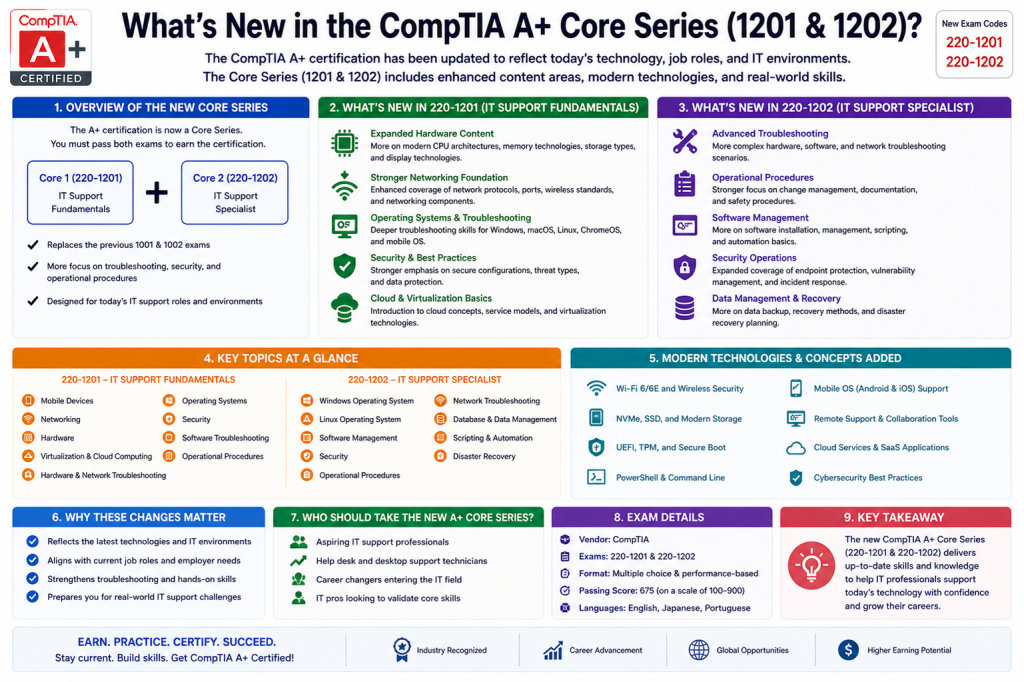
CompTIA updated its A+ certification to the V15 Core 1 (220-1201) and Core 2 (220-1202) exams in 2025. These supersede the older 220-1101/220-1102 generation. The practical change is an updated representation of technical support work that includes modern devices, operating systems, security, cloud services and problem solving.
CompTIA’s A+ launch announcement discusses the increased emphasis on cybersecurity and cloud computing. Candidates should choose the current objective documents by exact code, rather than mix old and new exam materials or assume that a retired-version pass creates a current two-exam combination.
Understand the new examination pair
CompTIA A+ Core 1 (220-1201) examines devices, networking, hardware, virtualization/cloud basics and hardware or network troubleshooting. CompTIA A+ Core 2 (220-1202) addresses operating systems, security, software troubleshooting and operational procedures. Both belong to the same current V15 A+ credential.
The distinction matters because a learner confident with laptop components may still need extensive work on account controls, security procedures or software failures. Assess gaps against the live domain objectives, not which half sounds easier.
Cloud and remote support appear in ordinary tickets
A user working from home may depend on Wi-Fi, DNS, a VPN or browser session, cloud identity and an application service. The support professional must identify which layer failed before changing settings. Simply knowing a cloud service’s name is not enough.
Practice a permitted scenario involving a remote workstation and a shared cloud application. Test local network reachability, name resolution, sign-in and application permission separately. Document which measurements distinguish a local fault from a provider-side incident.
Security is part of routine support
Security is not reserved for a separate security department. Updating devices, recognizing suspicious requests, applying least privilege and protecting user data are ordinary responsibilities. The newer A+ coverage reflects the need to make safe choices during routine assistance.
Create a scenario where an employee asks for elevated rights to install an unapproved tool. Compare the request with organizational policy, identify an approved alternative and document escalation. A technician should not treat the fastest workaround as the best answer.
Compare old materials without discarding fundamentals
Historical A+ material can still explain storage, cabling, IP configuration and troubleshooting methods. What it cannot do is guarantee coverage of the current V15 objective set, supported platforms or examination policies.
CompTIA A+ preparation should connect updated objectives to the customer-facing judgment expected in CompTIA A+ entry-level IT support roles: isolating a fault, documenting evidence and knowing when to escalate. Compare V14 and V15 objectives to identify reusable skills, new topics requiring practice, and product features that need a current lab test.
Choose practice that mirrors today’s work
Build short cases spanning a failed wireless connection, denied file access, broken application update and a responsible service-desk handoff. Predict the problem, gather evidence and verify both recovery and safety.
The current exam codes tell you what to study; they do not make a person’s troubleshooting judgment automatic. Keep clear notes, use supported vendor instructions and avoid claims that one newly added technology guarantees employment or a particular salary.