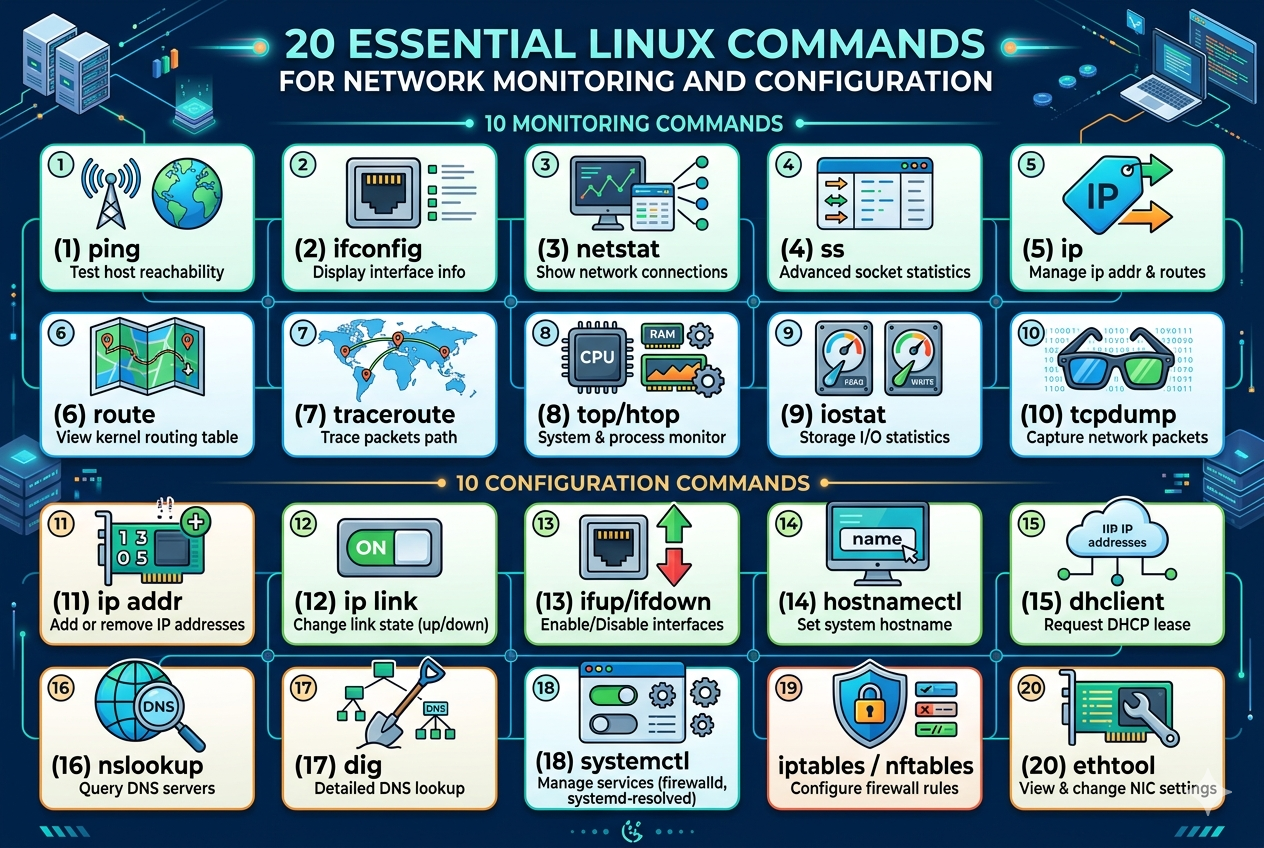
iptables is a firewall management utility used to define rules for controlling incoming and outgoing network traffic. It helps administrators filter packets based on IP address, port, and protocol. This command is widely used to secure Linux systems by blocking unwanted traffic and allowing only trusted connections.
nft command
nft is a modern replacement for iptables and provides a more efficient framework for packet filtering and network address translation. It simplifies rule management and improves performance by using a unified syntax for firewall configurations. It is commonly used in advanced network security setups.
tcping command
tcping is used to test connectivity to a specific port over TCP instead of ICMP. It helps verify whether a service is reachable on a remote host. This is especially useful when traditional ping is blocked by firewalls but service-level testing is still required.
route add command
The route add command is used to manually add routes to the system routing table. It defines specific paths that network traffic should follow. This is useful in complex network environments where multiple gateways or subnets are involved.
route del command
The route del command removes existing routes from the routing table. It helps in correcting misconfigured paths or updating network routing rules dynamically without rebooting the system.
hostnamectl command
hostnamectl is used to view and manage the system hostname in modern Linux distributions. It provides a structured way to change static, transient, or pretty hostnames and ensures proper identification of machines in a network.
resolvectl command
resolvectl is used for managing DNS resolution on systems using systemd-resolved. It helps in diagnosing name resolution issues, checking DNS servers, and flushing DNS caches for troubleshooting network problems.
systemctl command
systemctl is used to manage system services and network-related daemons. It allows starting, stopping, enabling, or disabling services that control networking functionality. It is essential for managing network services in modern Linux systems.
journalctl command
journalctl is used to view system logs, including network service logs. It helps in diagnosing connectivity issues by providing detailed information about system events, service failures, and network errors.
ethtool statistics command
ethtool statistics mode provides detailed insights into Ethernet device performance. It shows packet transmission errors, dropped packets, and link status, which is helpful for diagnosing hardware or driver-related network issues.
ip link command
ip link is used to display and modify network interfaces at the link layer. It helps bring interfaces up or down and view hardware addresses. This command is essential for managing physical and virtual network devices.
ip addr command
ip addr is used to display and configure IP addresses assigned to network interfaces. It provides detailed information about IPv4 and IPv6 addresses, making it a core tool for network configuration tasks.
ss -tuln command
This variation of the ss command is used to display listening TCP and UDP ports. It helps identify active services on a system and is useful for security auditing and troubleshooting network applications.
nmcli device command
nmcli device is used to manage and monitor network devices through NetworkManager. It provides information about device status, connectivity, and allows enabling or disabling interfaces through the command line.
nmcli connection command
nmcli connection manages network connection profiles. It allows creating, modifying, activating, and deleting network configurations. This is useful for maintaining multiple network setups on a single system.
iw command
The iw command is used for advanced wireless configuration and monitoring. It provides detailed information about wireless interfaces, signal quality, and scanning nearby networks for diagnostics and configuration.
iwlist command
iwlist is used to scan wireless networks and display available access points. It helps users view signal strength, encryption types, and channel information, which is useful for wireless troubleshooting.
brctl command
brctl is used to manage Ethernet bridge configurations. It allows creating and monitoring network bridges, which are commonly used in virtualization and container networking environments.
tcpdump -i command
This variation of tcpdump is used to capture packets on a specific network interface. It helps isolate traffic issues on particular interfaces and provides detailed packet-level analysis for troubleshooting.
nload command
nload is a command-line tool used to monitor incoming and outgoing traffic in real time. It provides a visual representation of bandwidth usage, helping identify network congestion and usage patterns.
bmon command
bmon is a bandwidth monitoring tool that provides detailed statistics about network interfaces. It displays real-time graphs and usage data, making it useful for performance analysis.
ip rule command
ip rule is used to manage policy-based routing in Linux. It allows defining rules that determine how packets are routed based on source address, destination, or other criteria, enabling advanced network control.
arping command
arping is used to send ARP requests to a specific IP address to determine if it is reachable on a local network. It helps in diagnosing IP conflicts and verifying local network connectivity.
tracepath command
tracepath is similar to traceroute but does not require root privileges. It helps identify the path to a destination and detects maximum transmission unit (MTU) issues along the route.
mii-tool command
mii-tool is used to check and configure network interface media settings. It provides information about link status and speed, helping diagnose physical layer network issues.
bridge command
bridge is a modern replacement for brctl and is used to configure network bridges. It provides more advanced features and is commonly used in container and virtualization networking setups.
sshd service monitoring
Monitoring sshd service using system tools helps ensure secure remote network access is functioning properly. It allows administrators to verify active connections, detect unauthorized access attempts, and maintain secure communication channels.
sar command
sar command is used for system activity reporting and is extremely useful for monitoring network performance over time. It collects and displays statistics related to CPU usage, memory, and network interfaces. In network monitoring, it helps track bandwidth usage trends and detect unusual traffic patterns.
ifstat command
ifstat is a simple tool used to monitor network interface bandwidth in real time. It shows incoming and outgoing traffic rates for each interface, making it useful for quickly identifying network load without complex configuration.
vnstat command
vnstat is a network traffic monitor that records bandwidth usage over time. It stores data persistently, allowing users to analyze daily, weekly, and monthly network usage patterns. It is commonly used for long-term network monitoring.
nstat command
nstat is used to display network statistics collected from the kernel. It provides detailed information about TCP, UDP, and IP layer activity. This command is helpful for diagnosing protocol-level issues in network communication.
ip neigh command
ip neigh is used to manage and display the neighbor table, which includes ARP entries for IPv4 and NDP entries for IPv6. It helps in diagnosing connectivity issues between local network devices.
ip route show command
ip route show displays the system’s routing table in detail. It helps administrators understand how packets are routed through different gateways and interfaces in complex networks.
iptables-save command
iptables-save is used to export the current firewall rules into a readable format. This allows administrators to back up or transfer firewall configurations across systems for consistent security policies.
iptables-restore command
iptables-restore is used to load previously saved firewall rules back into the system. It ensures quick restoration of security configurations after system reboot or migration.
ss -s command
ss -s provides a summary of socket statistics. It shows the number of active connections, TCP states, and overall socket usage, helping in quick network health assessment.
ss -p command
ss -p displays the process using each network connection. It helps identify which applications are responsible for network activity, making troubleshooting more efficient.
tcpdump port filtering
tcpdump with port filtering allows capturing network traffic for specific ports. This helps isolate service-level communication such as web, SSH, or database traffic for deeper analysis.
tcpdump host filtering
tcpdump host filtering is used to capture packets related to a specific IP address. It is useful for tracking communication between a single machine and the rest of the network.
ethtool speed command
ethtool speed command is used to check and configure the speed of a network interface. It helps ensure that network adapters are operating at optimal performance levels.
ethtool duplex command
ethtool duplex command is used to verify and set duplex mode on Ethernet interfaces. It ensures proper data transmission by matching settings between connected devices.
nmcli wifi command
nmcli wifi command is used to scan and manage wireless networks. It helps users view available Wi-Fi networks and connect to them directly from the terminal.
nmcli radio command
nmcli radio command is used to enable or disable Wi-Fi and networking radios. It provides quick control over wireless connectivity for troubleshooting or power saving.
iw dev command
iw dev command is used to display detailed information about wireless interfaces. It helps in checking signal strength, connected networks, and interface configuration.
iw scan command
iw scan command is used to scan nearby wireless networks. It provides information about SSIDs, signal quality, and security settings, which is useful for wireless diagnostics.
bridge link command
bridge link command is used to show and manage network bridge ports. It is commonly used in virtualized environments where multiple network interfaces are bridged together.
bridge vlan command
bridge vlan command is used to configure VLAN settings on network bridges. It helps in segmenting network traffic for better performance and security.
tracepath6 command
tracepath6 is used for tracing IPv6 network routes. It helps identify the path packets take in IPv6 networks and diagnose routing issues.
ping6 command
ping6 is used to test IPv6 connectivity between systems. It functions similarly to ping but is specifically designed for IPv6-based networks.
curl -I command
curl -I command is used to fetch only HTTP headers from a server. It helps verify server responses, status codes, and connectivity without downloading full content.
curl -v command
curl -v command enables verbose mode, showing detailed connection information. It is useful for debugging network requests and understanding request-response cycles.
wget -c command
wget -c command allows resuming interrupted downloads. It is useful for large file transfers over unstable network connections.
wget -r command
wget -r command enables recursive downloading of websites or directories. It helps in mirroring content for offline analysis or backup purposes.
ethtool ring command
ethtool ring command is used to view and adjust buffer sizes for network interfaces. It helps optimize performance for high-traffic networks.
ip monitor command
ip monitor command continuously watches for changes in network interfaces, routes, and addresses. It is useful for real-time network debugging.
watch command with network tools
watch command combined with network utilities allows continuous monitoring of network statistics. It refreshes output at intervals, helping observe live changes in network behavior.
lsof -i command
lsof -i command lists open network connections and the processes using them. It is useful for identifying which applications are communicating over the network.
fping command
fping is used to ping multiple hosts simultaneously. It is faster than traditional ping and is useful for scanning large networks for active devices.
hping3 command
hping3 is a network tool used for sending custom TCP/IP packets. It is widely used for firewall testing, network security analysis, and advanced troubleshooting.
bmon command
bmon (Bandwidth Monitor) is used to visualize real-time network usage in a detailed and graphical terminal-based format. It provides per-interface statistics and helps identify traffic spikes, congestion, and throughput behavior. It is especially useful for performance tuning and capacity planning in network environments.
nload command
nload is a simple but effective tool for monitoring incoming and outgoing network traffic in real time. It displays bandwidth usage separately for upload and download, allowing quick detection of unusual network activity or heavy usage on a system.
iperf command
iperf is a widely used network testing tool that measures bandwidth between two systems. It helps evaluate maximum TCP and UDP performance, making it essential for network benchmarking, performance testing, and diagnosing slow connections.
iperf3 command
iperf3 is an improved version of iperf with better accuracy and more advanced testing features. It provides detailed throughput reports and is commonly used in modern network performance testing environments for precise bandwidth measurement.
mtr command
mtr combines the functionality of ping and traceroute into a single tool. It continuously tracks the route packets take and shows real-time latency and packet loss statistics, making it highly effective for diagnosing unstable network paths.
tracepath command
tracepath is used to discover the path packets take to a destination without requiring administrative privileges. It also detects MTU (Maximum Transmission Unit) issues, which helps in resolving fragmentation-related network problems.
ethtool -S command
ethtool -S is used to display detailed statistics for network interfaces, including packet errors, drops, and hardware-specific counters. It is essential for diagnosing low-level network hardware issues and performance bottlenecks.
ethtool -i command
ethtool -i provides driver and firmware information for network interfaces. It helps administrators verify compatibility, update drivers, and troubleshoot hardware-related networking issues.
nmcli general status
nmcli general status is used to check the overall status of NetworkManager. It provides quick information about whether the network is connected, disconnected, or in a limited state.
nmcli networking on/off
nmcli networking on or off is used to enable or disable all networking on a system. It is useful for troubleshooting or resetting network services without rebooting the system.
iwlist scan command
iwlist scan is used to scan available wireless networks and display detailed information about access points. It helps in analyzing signal strength, encryption methods, and channel usage.
iw dev wlan0 link command
This command is used to display the current connection status of a wireless interface. It shows signal strength, bitrate, and connected access point details, which helps in wireless diagnostics.
brctl show command
brctl show is used to display current network bridges and their connected interfaces. It is useful in virtualized environments where multiple interfaces are combined for traffic forwarding.
bridge fdb show command
bridge fdb show displays the forwarding database of a network bridge. It shows MAC addresses learned by the bridge and helps in troubleshooting switching and forwarding issues.
tcpdump -nn command
tcpdump -nn disables hostname and port name resolution, showing raw IP addresses and port numbers. This makes packet analysis faster and more precise during troubleshooting.
tcpdump -c command
tcpdump -c limits the number of captured packets. It is useful when only a small sample of traffic is needed for analysis without overwhelming the system with continuous capture.
tcpdump -w command
tcpdump -w is used to write captured packets to a file for later analysis. This allows offline inspection of network traffic using tools like Wireshark or similar analyzers.
tcpdump -r command
tcpdump -r is used to read previously saved packet capture files. It helps analyze network traffic without requiring live capture, making debugging more flexible.
ss -t state established
This variation of the ss command filters and shows only established TCP connections. It is useful for identifying active communication sessions between systems and monitoring ongoing network activity.
ss -u command
ss -u displays UDP socket information. It helps in monitoring connectionless traffic, which is important for services like DNS, streaming, and VoIP applications.
ip link set up/down
ip link set up or down is used to enable or disable network interfaces. It is commonly used when restarting network connections or applying configuration changes.
ip addr add command
ip addr add is used to assign a new IP address to a network interface. It allows manual configuration of static IP addresses in Linux systems.
ip addr del command
ip addr del removes an IP address from a network interface. It is useful when reconfiguring network settings or resolving IP conflicts.
ip route add default via command
This command is used to set a default gateway for network traffic. It defines where packets should be sent when no specific route is available.
ip route del command
ip route del is used to remove routing entries from the system. It helps in correcting routing mistakes or updating network paths dynamically.
arp -n command
arp -n displays the ARP table without resolving hostnames. It shows IP-to-MAC address mappings, which is useful for diagnosing local network communication issues.
arp -d command
arp -d deletes entries from the ARP cache. It is used to clear outdated mappings and resolve connectivity issues caused by incorrect ARP entries.
hostname -I command
hostname -I displays all IP addresses assigned to the system. It provides a quick overview of network interfaces and their configured addresses.
dig +short command
dig +short provides a simplified DNS lookup result. It is useful for quickly resolving domain names to IP addresses without detailed output.
nslookup set type command
nslookup set type is used to specify the type of DNS record being queried, such as A, MX, or TXT. It helps in detailed DNS troubleshooting.
curl -o command
curl -o is used to download a file and save it with a specific name. It is useful for retrieving network resources in a controlled manner.
wget -O command
wget -O allows saving downloaded files with a custom filename. It helps organize downloads and manage file naming during network transfers.
ping -c command
ping -c limits the number of ping requests sent to a destination. It helps in controlled connectivity testing without continuous packet transmission.
fping -a command
fping -a is used to display only reachable hosts in a network scan. It helps quickly identify active systems in large network ranges.
hping3 -S command
hping3 -S is used to send TCP SYN packets for testing firewall rules and port availability. It is commonly used in security testing and network diagnostics.
watch -n command
watch -n runs a command repeatedly at specified intervals. It is useful for continuously monitoring network statistics and system behavior in real time.
netcat command
netcat is a versatile networking utility used for reading and writing data across network connections using TCP or UDP protocols. It is often used for debugging network services, testing open ports, transferring files, and creating simple client-server communication setups. Because of its flexibility, it is considered a powerful “network Swiss army knife.”
socat command
socat is an advanced version of netcat that can establish bidirectional data transfers between different types of communication channels. It supports TCP, UDP, serial ports, pipes, and even SSL connections. It is widely used for complex networking scenarios, port forwarding, and secure tunneling.
ssh command
ssh is used for securely accessing remote systems over a network. It encrypts communication between client and server, ensuring secure remote login and command execution. It is essential for system administration, remote troubleshooting, and secure file transfers.
scp command
scp (secure copy) is used to transfer files between local and remote systems over SSH. It ensures encrypted file transfer, making it safe for moving sensitive data across networks. It is commonly used for backups and system migrations.
rsync command
rsync is a powerful tool for synchronizing files and directories between systems. It transfers only the differences between source and destination, making it highly efficient. It is widely used for backups, mirroring, and remote file synchronization over networks.
curl command advanced usage
curl is a flexible tool for transferring data using various protocols such as HTTP, HTTPS, FTP, and more. It is commonly used for testing APIs, downloading files, and debugging network services by simulating requests and inspecting responses.
wget recursive mode
wget in recursive mode is used to download entire websites or directory structures. It is useful for offline backups and bulk downloading of web content while preserving directory hierarchy and links.
resolvectl command
resolvectl is used to manage DNS resolution in systems using systemd-resolved. It allows querying DNS servers, checking domain resolution status, and flushing DNS caches for troubleshooting name resolution issues.
systemd-resolve command
systemd-resolve is another tool used for DNS resolution and debugging. It helps in verifying DNS settings, checking resolved domains, and diagnosing issues related to name resolution services.
conntrack command
conntrack is used to monitor and manage the Linux kernel’s connection tracking system. It displays active network connections and helps in firewall debugging and analyzing NAT (Network Address Translation) behavior.
dstat command
dstat is a versatile system resource monitoring tool that provides real-time statistics about CPU, disk, memory, and network usage. It is useful for identifying system performance bottlenecks affecting network performance.
nethogs command
nethogs is used to monitor bandwidth usage per process. It helps identify which applications are consuming network resources, making it useful for diagnosing unexpected network slowdowns.
bwm-ng command
bwm-ng (Bandwidth Monitor Next Generation) is used to display real-time network throughput. It supports multiple data sources and provides a continuous view of interface-level traffic.
iptraf-ng command
iptraf-ng is a network monitoring tool that provides detailed traffic statistics, including TCP connections, UDP traffic, and interface-level data. It is useful for real-time network diagnostics in terminal environments.
iftop command advanced usage
iftop displays bandwidth usage on a per-connection basis in real time. It helps administrators identify which remote hosts are consuming the most network resources and is especially useful for monitoring live traffic patterns.
nmap command advanced usage
nmap is a powerful network scanning tool used for discovering hosts, open ports, services, and operating systems. It is widely used for security auditing, penetration testing, and network inventory management.
nc -z command
nc -z is used to scan for open ports without sending data. It helps quickly identify which ports are open on a target system, making it useful for lightweight port scanning and service detection.
nc -v command
nc -v enables verbose mode in netcat, providing detailed output of connection attempts. It is useful for debugging connection issues and verifying network communication.
telnet command
telnet is used to test connectivity to remote services over a specific port. Although not secure, it is still useful for checking whether services like web servers or mail servers are reachable.
ip neigh show command
ip neigh show displays the neighbor table containing IP-to-MAC address mappings. It helps diagnose local network issues and verify correct device communication within a subnet.
ip monitor all command
ip monitor all continuously tracks changes in network interfaces, routing tables, and addresses. It is useful for real-time debugging of dynamic network environments.
ss -l command
ss -l displays all listening sockets on the system. It helps identify which services are actively waiting for incoming connections on various ports.
ss -ltunp command
ss -ltunp combines multiple options to show listening TCP and UDP sockets along with process information. It is widely used for detailed service and port analysis.
iptables -L command
iptables -L lists all current firewall rules. It provides visibility into how traffic is being filtered and helps in diagnosing network access issues.
iptables -A command
iptables -A is used to append new rules to the firewall chain. It helps define how incoming or outgoing packets should be handled based on conditions like port, IP, or protocol.
nft list ruleset command
nft list ruleset displays the full set of firewall rules managed by nftables. It provides a structured view of modern Linux firewall configurations.
nmcli device status command
nmcli device status shows the current status of all network devices. It helps quickly identify whether interfaces are connected, disconnected, or unmanaged.
nmcli connection show command
nmcli connection show lists all saved network profiles. It helps manage multiple network configurations and troubleshoot connectivity issues.
iw phy command
iw phy displays detailed information about wireless hardware capabilities. It helps understand supported frequencies, channels, and wireless standards.
iw reg get command
iw reg get shows the current regulatory domain settings for wireless devices. It helps ensure compliance with regional wireless regulations and proper network configuration.
bridge vlan show command
bridge vlan show displays VLAN configuration on network bridges. It is useful for managing segmented networks in virtualization and container environments.
bridge monitor command
bridge monitor continuously tracks changes in bridge configurations. It helps administrators observe dynamic network changes in real time.
tcpdump -A command
tcpdump -A displays packet contents in ASCII format. It is useful for inspecting readable data such as HTTP requests and responses during network analysis.
tcpdump -X command
tcpdump -X shows packet contents in both hexadecimal and ASCII formats. It provides deeper insight into packet structure for advanced troubleshooting.
tcpdump host port combination
Using tcpdump with both host and port filters allows precise traffic capture between specific systems and services. It is essential for isolating targeted network communication.
ping -i command
ping -i sets the interval between ICMP packets. It helps control traffic flow during continuous network testing and monitoring.
ping -t command
ping -t allows continuous pinging until manually stopped. It is useful for long-term connectivity monitoring and detecting intermittent network issues.
tracepath6 advanced usage
tracepath6 is used for IPv6 route tracing and MTU discovery. It helps diagnose packet fragmentation and routing issues in IPv6 networks.
ethtool -p command
ethtool -p is used to locate a network interface by blinking its LED light. It is helpful in physical server environments for identifying specific ports.
ip maddr command
ip maddr is used to manage multicast addresses on network interfaces. It is important for applications that rely on group communication such as streaming or routing protocols.
ip tunnel command
ip tunnel is used to configure tunneling between networks. It helps create virtual network links over existing infrastructure for VPNs and secure communication.
iptables NAT rules command
iptables NAT rules are used for network address translation, allowing private networks to access external networks. It is essential for routing and firewall configurations.
watch ss command
watch ss continuously monitors socket statistics in real time. It helps track active connections and network changes dynamically without manual refresh.
whois command
whois is used to retrieve registration information about domain names and IP addresses. It provides details such as ownership, registration dates, and contact information. In network troubleshooting, it helps identify the source or administrator of a domain.
host command
host is a simple DNS lookup utility used to convert domain names into IP addresses and vice versa. It is faster and more straightforward than advanced DNS tools, making it useful for quick checks of name resolution.
ethtool -k command
ethtool -k is used to view and manage offloading features of network interfaces. It helps optimize performance by enabling or disabling hardware-based processing of network traffic.
ip netns command
ip netns is used to manage network namespaces in Linux. It allows isolation of network environments for containers and virtual machines, making it essential in modern cloud and container networking.
ip vrf command
ip vrf is used to configure Virtual Routing and Forwarding instances. It enables multiple routing tables on a single system, allowing network segmentation and improved traffic isolation.
bridge link set command
bridge link set is used to modify bridge port settings. It helps control forwarding behavior and manage how interfaces participate in a network bridge.
tc command
tc (traffic control) is used to manage network bandwidth, latency, and packet prioritization. It is widely used for shaping traffic, controlling congestion, and optimizing network performance.
ss -m command
ss -m displays memory usage of sockets. It helps analyze how network connections consume system resources, which is useful for performance tuning.
ip rule add command
ip rule add is used to define policy-based routing rules. It allows traffic to be routed based on conditions like source IP, making it powerful for complex networking setups.
ip route flush command
ip route flush is used to clear routing tables. It helps reset network configurations and resolve routing conflicts during troubleshooting.
arping -I command
arping -I is used to send ARP requests through a specific network interface. It helps test connectivity on multi-interface systems and diagnose local network issues.
ping -s command
ping -s is used to specify packet size in ICMP requests. It helps test how networks handle different payload sizes and detect MTU-related issues.
curl –resolve command
curl –resolve is used to test domain resolution by forcing a specific IP address for a hostname. It is useful for debugging DNS or testing server configurations before DNS propagation.
wget –limit-rate command
wget –limit-rate is used to control download speed. It helps prevent network congestion by limiting bandwidth usage during file transfers.
nmap -sP command
nmap -sP is used to perform a simple host discovery scan. It identifies active devices on a network without scanning ports, making it useful for quick network mapping.
nmap -O command
nmap -O is used for operating system detection. It helps identify the OS running on remote systems, which is important for network auditing and security analysis.
tcpdump -vv command
tcpdump -vv increases verbosity level, showing more detailed packet information. It is useful for in-depth traffic analysis and debugging complex network issues.
tcpdump -i any command
tcpdump -i any captures traffic on all available interfaces. It is useful for monitoring overall system network activity in real time.
ss -n command
ss -n disables hostname resolution and displays numeric addresses. It improves performance and clarity during socket analysis.
nmcli networking connectivity command
nmcli networking connectivity checks the current network state. It helps determine whether the system is fully connected, partially connected, or disconnected.
iw dev scan command
iw dev scan is used to scan wireless networks from a specific interface. It provides detailed information about nearby Wi-Fi networks for diagnostics.
bridge fdb flush command
bridge fdb flush is used to clear forwarding database entries. It helps resolve MAC address learning issues in bridged networks.
ip link show up command
ip link show up displays only active network interfaces. It helps quickly identify which interfaces are currently operational.
tracepath -n command
tracepath -n disables hostname resolution during route tracing. It speeds up output and improves clarity during troubleshooting.
conntrack -L command
conntrack -L lists all active tracked connections in the kernel. It is essential for firewall debugging and NAT inspection.
watch -d command
watch -d highlights differences between successive outputs. It is useful for monitoring network statistics and quickly spotting changes.
bwm-ng -u command
bwm-ng -u shows bandwidth usage in a user-friendly format. It helps visualize network traffic more clearly during monitoring.
nethogs -d command
nethogs -d sets refresh delay for per-process network monitoring. It helps track application-level bandwidth usage in real time.
ip addr flush command
ip addr flush removes all IP addresses from an interface. It is used for resetting network configurations during troubleshooting.
iptables -F command
iptables -F flushes all firewall rules. It resets packet filtering rules and is useful when reconfiguring firewall settings.
nft flush ruleset command
nft flush ruleset clears all nftables rules. It provides a clean slate for rebuilding firewall configurations.
ss -o command
ss -o displays timer information for sockets. It helps analyze connection timeouts and retransmission behavior.
ip monitor route command
ip monitor route tracks changes in routing tables in real time. It is useful for observing dynamic routing updates.
tcpdump -s command
tcpdump -s sets snapshot length for packet capture. It ensures full packet data is captured for accurate analysis.
tcpdump expressions command
tcpdump expressions allow filtering traffic based on complex conditions. It helps isolate specific network flows for detailed inspection.
Final Conclusion
Linux network monitoring and configuration commands form the backbone of system administration and network troubleshooting. These tools provide deep visibility into connectivity, performance, routing, and security aspects of a system. From simple connectivity checks like ping to advanced packet analysis with tcpdump and nmap, each command plays a unique role in understanding how data moves across networks.
Modern networking environments require continuous monitoring, and tools like ss, ip, nmcli, and ethtool help administrators maintain stability and performance. At the same time, diagnostic utilities such as traceroute, mtr, and dig allow precise identification of network issues at different layers.
Firewall and traffic control tools like iptables, nft, and tc ensure security and efficient bandwidth usage, while monitoring utilities such as vnstat, iftop, and bmon provide real-time and historical insights into network behavior.
Together, these commands create a complete ecosystem for managing Linux networks effectively. Mastering them enables better troubleshooting, improved performance tuning, and stronger security control across any system or infrastructure.