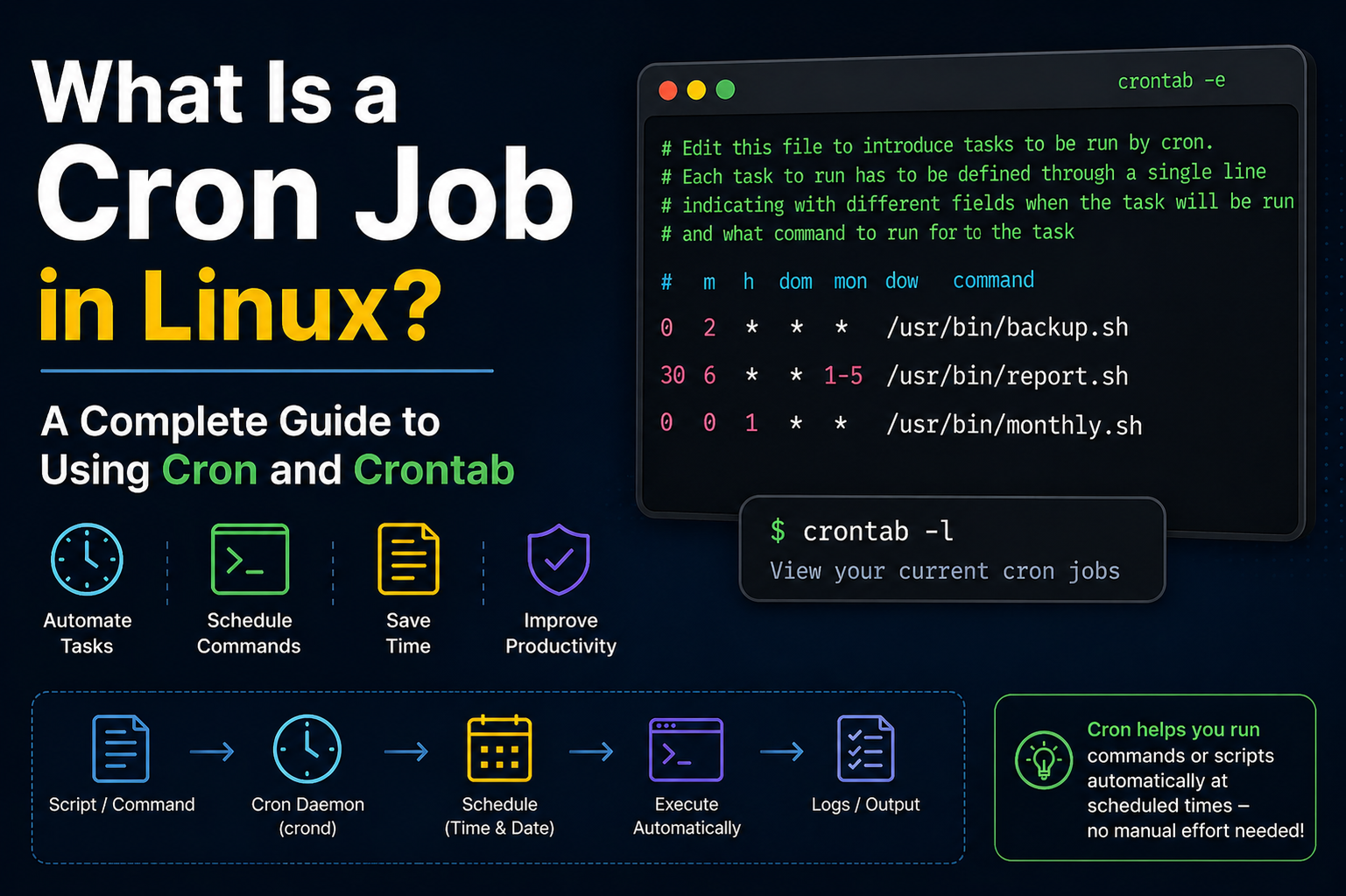
Cron works by using a background process known as the cron daemon. A daemon in Linux is a service that runs silently in the background and performs tasks without direct user interaction. The cron daemon is responsible for reading scheduled task definitions and executing commands at the correct time. It starts automatically when the system boots and continues running as long as the system remains active.
Time Checking Mechanism
The cron daemon checks the system time every minute. It compares the current time with the schedules listed in the crontab files. If a match is found, it immediately runs the corresponding command. This minute-by-minute checking system is what makes cron reliable for regular task execution. Whether the task needs to run every minute, every day, or once a month, cron handles it efficiently.
No Need for User Login
One important thing to understand is that cron does not require a user to stay logged in. Once a cron job is scheduled and saved in the crontab file, it runs automatically even if the user is offline. This makes cron extremely useful for server environments where tasks must continue running without interruption.
Logging and Monitoring
The cron daemon usually logs its activity in system log files. These logs help administrators verify whether a job was executed successfully or if there was an error. In many Linux distributions, cron logs can be found in files related to system logs or journal services. Reviewing these logs is helpful when troubleshooting failed cron jobs.
Different Cron Implementations
Different Linux distributions may use slightly different cron implementations, but the basic concept remains the same. Most systems rely on the traditional cron service, while some modern systems may use alternatives that still maintain compatibility with standard crontab syntax. Regardless of the version, the purpose remains task scheduling and automation.
Managing Cron Service
The cron service can be managed using system service commands. Administrators can start, stop, restart, or check the status of the cron daemon depending on system requirements. If cron is not running, scheduled tasks will not execute, so ensuring the service is active is an important part of system maintenance.
Multi-User Support
Another useful feature of cron is that it supports multiple users. Every user can create personal cron jobs without interfering with others. For example, one user may schedule database backups while another schedules report generation scripts. This separation helps maintain security and organization within multi-user Linux environments.
Root User Privileges
Root users have additional privileges and can manage cron jobs for all users. They can edit another user’s crontab and create system-wide scheduled tasks. This is especially useful in enterprise servers where administrators need centralized control over maintenance operations.
Using Shell Scripts with Cron
Cron is often used with shell scripts because scripts allow multiple commands to be grouped into one file. Instead of writing a long command directly inside the crontab, users can simply call the script file. This improves readability, makes troubleshooting easier, and keeps cron configurations cleaner.
Environment Variables in Cron
Environment variables also affect how cron works. Since cron runs in a limited shell environment, it may not have access to the same variables available in a normal terminal session. For example, commands that work manually may fail in cron because the PATH variable is missing required directories. This is why specifying full command paths is strongly recommended.
Defining Variables in Crontab
Users can define environment variables directly inside the crontab file if needed. This helps provide the necessary execution environment for scripts and commands. Variables such as PATH, MAILTO, and SHELL are commonly configured for better control over cron job behavior.
MAILTO Feature for Notifications
The MAILTO variable is particularly useful because it allows cron to send command output or error messages to a specific email address. If configured properly, administrators can receive automatic notifications whenever a scheduled task runs or fails. This adds an extra layer of monitoring for critical automation tasks.
Performance Considerations
Cron jobs should be planned carefully to avoid conflicts with system performance. For example, running large backups during peak business hours may slow down server performance for active users. Scheduling such tasks during late-night or low-traffic hours improves efficiency and reduces disruption.
Avoiding Resource Overload
Similarly, multiple heavy cron jobs should not be scheduled at the exact same time unless necessary. If too many resource-intensive tasks start together, they may overload CPU, memory, or disk usage. Spreading tasks across different times helps maintain system stability.
Scheduling by Days and Weeks
Cron also supports scheduling based on weekdays or weekends. This is useful for business-related automation such as sending weekly reports only on Monday mornings or cleaning temporary files every Sunday night. This flexibility makes cron suitable for both personal and enterprise-level operations.
Limitations of Cron Timing
For tasks that need second-level precision, cron may not be the best option because it works on a minute-based schedule. In such cases, other scheduling tools or custom scripts may be required. However, for most standard administrative tasks, minute-level scheduling is more than sufficient.
Cron vs At Command
Some users confuse cron with at jobs. While both are scheduling tools in Linux, they serve different purposes. Cron is mainly used for recurring tasks that repeat on a schedule, while the at command is used for one-time task execution at a specific future time. Understanding this difference helps users choose the right tool for the job.
Security Best Practices
Security is another important consideration when using cron. Scripts scheduled with cron should be stored securely and protected with correct file permissions. Sensitive commands such as database exports, password operations, or system cleanup scripts should only be accessible to authorized users.
Avoiding Hardcoded Passwords
It is also wise to avoid placing passwords directly inside cron commands. Instead, secure authentication methods such as SSH keys, protected configuration files, or secure credential management should be used. This prevents accidental exposure of sensitive information.
Backup Verification Tasks
Backup verification is another practical example of cron usage. Instead of only scheduling backups, administrators often create cron jobs that verify backup integrity and send status reports. This ensures backups are not only created but are also usable when needed.
Website Monitoring Automation
Website monitoring is another common use case. A cron job can regularly check if a website is online and restart services if a failure is detected. This kind of automation improves uptime and reduces the need for constant manual supervision.
Database Maintenance Tasks
Database maintenance tasks such as clearing temporary records, optimizing tables, and exporting daily backups are often handled through cron. These tasks are repetitive and benefit greatly from automation because they improve consistency and reduce manual workload.
Log Management and Cleanup
Log rotation is another area where cron is frequently used. Servers generate large log files over time, and if they are not cleaned or archived, they can consume significant disk space. Cron helps automate this cleanup process and keeps storage under control.
Application-Level Automation
Developers also use cron for application-level automation. Scheduled emails, data synchronization, API polling, and cache clearing are common examples. Many web applications depend on cron jobs to perform background operations that are not triggered directly by users.
Cloud and Server Environments
In cloud environments, cron remains useful even when additional automation tools are available. Virtual servers, containers, and cloud-hosted applications often rely on cron for lightweight scheduling tasks because of its simplicity and reliability.
Importance of Learning Cron
Learning cron is an essential skill for Linux administrators because automation is a major part of system management. Even small tasks like deleting old files or restarting a stuck service can save hours of manual work when handled automatically through cron.
Power of Simple Syntax
The simplicity of cron syntax combined with its powerful scheduling capabilities makes it one of the most practical tools in Linux. Once users understand how the daemon, crontab files, and scheduling expressions work together, managing automated tasks becomes much easier.
Behind the Scenes Automation
Because cron executes tasks silently, users sometimes forget that it is working behind the scenes. Yet many important server functions depend on it every day. From system health to business operations, cron quietly supports stability and efficiency across countless Linux systems.
A well-managed cron setup improves productivity, reduces human error, and ensures important operations happen consistently. This is why cron remains one of the most trusted and widely used scheduling systems in Linux administration.
What is Crontab
Crontab stands for “cron table” and is a file that contains scheduled cron jobs for a user. It defines what tasks should run, when they should run, and how frequently they should be executed. Each user in a Linux system can have their own crontab file, which allows them to schedule personal automation tasks independently.
Structure of a Crontab File
A crontab file is made up of multiple lines, where each line represents a separate scheduled task. Each line contains time-related fields followed by the command that needs to be executed. These fields define the minute, hour, day of the month, month, and day of the week. After these values, the system command or script path is written.
Understanding Time Fields
The time fields in crontab are the core of scheduling. The first field represents minutes, the second represents hours, the third represents the day of the month, the fourth represents the month, and the fifth represents the day of the week. Together, these fields determine exactly when a job will run. By adjusting these values, users can create highly specific schedules.
Special Symbols in Crontab
Crontab supports special symbols that make scheduling flexible. The asterisk symbol means “every possible value” in that field. A comma allows multiple values, a hyphen defines a range, and a slash is used for intervals. These symbols help users define complex schedules without writing multiple separate entries.
Editing Crontab File
To create or modify cron jobs, users use a crontab editing command. This opens the crontab file in a text editor where new jobs can be added or existing ones can be modified. Once saved, the cron service automatically applies the changes without requiring a system restart.
Viewing Existing Cron Jobs
Users can also view their current scheduled tasks by listing their crontab entries. This is useful for reviewing automation setup or checking if a specific job is already scheduled. It helps prevent duplicate entries and ensures proper task management.
Removing Cron Jobs
If a scheduled task is no longer needed, it can be removed from the crontab file. Users can either delete a single line or clear the entire crontab. Once saved, the cron daemon immediately stops executing the removed task.
System Crontab vs User Crontab
There are two main types of crontab files: user crontabs and system crontabs. User crontabs are managed by individual users, while system crontabs are used for system-wide tasks. System crontabs are typically used for maintenance operations, updates, and automated system services.
Location of Crontab Files
User crontab files are stored in system directories managed by the cron service and are not meant to be edited directly. Instead, users interact with them through commands. System-wide crontab files are stored in specific configuration directories accessible to administrators.
Cron Job Output Handling
When a cron job runs, it generates output or error messages. By default, this output is sent to the user via email if mail services are configured. Alternatively, output can be redirected to a file for logging and debugging purposes. This helps in tracking job execution status.
Redirecting Output to Files
It is common practice to redirect cron job output to log files. This allows users to store execution results, error messages, and system responses for later review. Proper logging helps in troubleshooting failed jobs and analyzing system behavior.
Using Absolute Paths in Crontab
Cron jobs require absolute paths for commands and scripts because the environment is limited. Unlike a normal terminal session, cron does not always recognize system paths. Using full file paths ensures that commands execute correctly without errors.
Common Crontab Examples
Crontab can be used for many automation tasks such as running backups, cleaning temporary files, sending emails, updating databases, or restarting services. These tasks are usually repetitive and benefit greatly from automation through scheduling.
Running Jobs Every Minute
A job can be scheduled to run every minute by setting all time fields to a wildcard symbol. This is useful for tasks that require continuous monitoring or frequent updates, such as system health checks or live data processing.
Running Jobs Hourly or Daily
Jobs can also be scheduled to run hourly or daily by setting appropriate values in the time fields. For example, setting a specific hour ensures the job runs once every day at that time. This is commonly used for backups or daily reports.
Weekly and Monthly Jobs
Crontab also supports weekly and monthly scheduling. This is useful for tasks that do not need frequent execution, such as system cleanup, report generation, or performance analysis. These schedules help reduce unnecessary system load.
Environment Limitations in Crontab
Crontab runs in a minimal environment, which means it may not load user profiles or environment variables. This can cause scripts to fail if they depend on missing variables. To avoid this, users often define required variables directly in the crontab file.
Debugging Cron Jobs
If a cron job fails, debugging is necessary. Checking logs, verifying paths, and testing commands manually are common troubleshooting steps. Many issues occur due to incorrect paths, missing permissions, or environment differences.
Permissions for Cron Jobs
Scripts used in cron jobs must have proper execution permissions. Without correct permissions, the cron daemon will not be able to execute the script. Ensuring correct ownership and permissions is an important part of setup.
Security in Crontab Usage
Security plays a key role in cron job management. Sensitive tasks should be protected, and access to crontab should be limited. Avoid storing sensitive data directly in cron files to reduce security risks.
Crontab for Automation
Crontab is widely used for automation in Linux systems. It reduces manual workload and ensures tasks are executed consistently. From simple file cleanup to complex system operations, crontab plays an important role in system automation.
System Maintenance with Crontab
System administrators rely heavily on crontab for maintenance tasks. These include disk cleanup, service monitoring, system updates, and log rotation. Automating these tasks ensures system stability and performance.
Application Scheduling with Crontab
Developers also use crontab for application-level scheduling. Tasks such as sending notifications, updating databases, and processing background jobs are commonly automated using cron jobs.
Cloud and Server Usage
In modern cloud environments, crontab is still widely used. Even with advanced automation tools available, cron remains popular due to its simplicity, reliability, and low resource usage.
Importance of Crontab Knowledge
Understanding crontab is essential for anyone working with Linux systems. It helps users automate tasks efficiently and manage system operations effectively. It is a fundamental skill for system administrators and developers.
Using Multiple Time Values
Cron allows multiple values in a single time field using commas. This means a job can run at several specific times without writing multiple separate cron entries. For example, a task can be scheduled to run at different hours of the day by listing those hours together. This approach reduces repetition and keeps the crontab file clean and organized.
Using Ranges in Scheduling
Ranges are used when a job needs to run within a continuous block of time. Instead of listing each value individually, a hyphen is used to define a start and end point. This is useful for tasks that must run during specific periods, such as working hours or maintenance windows. It simplifies scheduling and improves readability.
Using Interval Execution
Intervals allow cron jobs to run repeatedly after a fixed amount of time. This is done using a slash symbol. For example, a task can be set to run every few minutes or every few hours depending on system requirements. This is especially useful for monitoring scripts and frequent background checks.
Combining Multiple Scheduling Methods
Cron also allows combining ranges, intervals, and lists in a single expression. This gives users a high level of flexibility when defining schedules. Complex automation tasks can be achieved without needing multiple separate entries, making the system efficient and scalable.
Special Cron Strings
Some predefined shortcuts simplify common scheduling patterns. These include expressions for running a job every minute, every hour, every day, every week, and every month. These shortcuts reduce complexity and are often used for simple automation tasks.
Running Jobs at System Reboot
Cron supports a special scheduling option that allows jobs to run whenever the system starts. This is useful for initializing services, starting background scripts, or restoring system states after a reboot. It ensures important processes resume automatically without manual intervention.
Cron Job Execution Order
When multiple cron jobs are scheduled at the same time, the execution order is not strictly guaranteed. This means tasks may run in parallel depending on system resources. Because of this, heavy tasks should be carefully scheduled to avoid conflicts.
Handling Job Overlaps
Sometimes a cron job may take longer than its next scheduled run. This can lead to overlapping executions. To prevent this, locking mechanisms or checks are often added inside scripts to ensure only one instance runs at a time. This improves stability and prevents resource conflicts.
Logging Best Practices
Proper logging is essential for managing cron jobs effectively. Logs should include timestamps, success messages, and error details. This helps administrators track job behavior and identify issues quickly. Without proper logging, debugging becomes difficult.
Error Handling in Cron Jobs
Scripts used in cron should include error handling mechanisms. This ensures that unexpected failures do not go unnoticed. Proper error handling improves reliability and helps maintain system stability during automated operations.
Testing Cron Jobs Manually
Before scheduling a job, it is important to test it manually in the terminal. This ensures the command works correctly outside the cron environment. Testing reduces the risk of silent failures once the job is scheduled.
Common Cron Mistakes
One of the most common mistakes is using relative paths instead of absolute paths. Another common issue is forgetting that cron runs in a limited environment. These mistakes often lead to job failures and confusion during troubleshooting.
Permission Issues in Cron
File permissions play a critical role in cron execution. If a script does not have execution permission, it will fail silently. Ensuring correct permissions and ownership is essential for successful automation.
Cron Environment Differences
The cron environment is minimal compared to a normal user shell. It does not load profile settings or aliases. Because of this, commands that work in the terminal may not work in cron unless properly configured.
Using Shell Specification
Cron allows specifying which shell should be used to execute commands. This can be helpful when scripts depend on specific shell features. Defining the shell ensures consistent execution behavior.
Redirecting Both Output and Errors
It is common practice to redirect both standard output and error output to log files. This ensures complete visibility into job execution results. Without redirection, important error messages may be lost.
Disabling Email Notifications
By default, cron may send email notifications for job output. In systems where email is not needed, this feature can be disabled. This helps reduce unnecessary system messages and keeps logs cleaner.
Using Cron for System Automation
Cron plays a key role in automating system-level tasks such as updates, cleanup operations, and monitoring processes. It reduces manual workload and ensures consistency in system maintenance.
Cron in Development Workflows
Developers use cron to automate repetitive development tasks such as running scripts, generating reports, or syncing data. This improves productivity and reduces manual intervention in routine processes.
Cron for Monitoring Systems
Monitoring scripts often rely on cron to check system health, disk usage, CPU load, or service availability. These checks help maintain system reliability and detect issues early.
Backup Automation Strategies
Automated backups are one of the most important uses of cron. Regular backup schedules ensure data safety and reduce the risk of data loss. Verification scripts can also be scheduled alongside backups for added reliability.
Performance Optimization with Cron
Proper scheduling helps optimize system performance. By distributing tasks across different times, system load is balanced and performance bottlenecks are avoided.
Security Considerations in Advanced Use
Advanced cron setups require careful security planning. Sensitive scripts should be protected, and access should be restricted. Secure configurations reduce the risk of unauthorized modifications.
Scaling Cron in Large Systems
In large server environments, multiple cron jobs may run across different systems. Proper coordination and documentation are important to prevent conflicts and ensure smooth operation.
Alternatives to Cron
While cron is widely used, modern systems sometimes use alternative scheduling tools. These may offer more advanced features, but cron remains popular due to its simplicity and reliability.
Why Cron Still Matters Today
Despite newer automation tools, cron continues to be widely used in Linux systems. Its lightweight nature, stability, and ease of use make it a preferred choice for many administrators.
Understanding Cron Environment Behavior
The cron environment is different from a normal Linux terminal session. It runs with a minimal set of environment variables and does not load user profile settings automatically. Because of this, commands that work perfectly in a terminal may fail in cron if dependencies like PATH or custom variables are missing. Proper configuration of environment variables inside crontab helps avoid such issues.
Importance of Absolute Paths
One of the most important rules in cron usage is always using absolute paths for commands, scripts, and files. Cron does not always recognize shorthand commands because it operates in a limited environment. Using full paths ensures that the system can locate and execute the required files without errors.
Scheduling Reboot-Based Tasks
Cron supports running tasks automatically when the system starts. This is useful for initializing services, starting monitoring scripts, or restoring system configurations after a reboot. These tasks ensure that important processes resume without manual intervention after system restarts.
Preventing Duplicate Job Execution
Sometimes a cron job may run longer than its next scheduled time, leading to multiple instances running simultaneously. This can cause performance issues or data corruption. To avoid this, developers often implement locking mechanisms inside scripts so that only one instance runs at a time.
Handling Long Running Tasks
Long-running cron jobs require careful planning. If a task takes too much time, it may overlap with other scheduled jobs or consume excessive system resources. Splitting tasks into smaller chunks or adjusting schedules helps maintain system stability and efficiency.
Using Lock Files for Safety
Lock files are commonly used to prevent multiple executions of the same cron job. When a job starts, it creates a lock file. If the job runs again and detects the lock file, it skips execution. This simple method improves reliability in automation systems.
Logging Strategies for Cron Jobs
Effective logging is essential for tracking cron job behavior. Logs should include execution time, success or failure status, and error messages. Storing logs in organized files helps in debugging and system monitoring. Without logs, identifying issues becomes difficult.
Redirecting Output Properly
Cron jobs should always redirect output to either log files or discard it if not needed. Without proper redirection, important messages may be lost or sent to system mail unnecessarily. Proper output handling ensures better control over automation results.
Using Cron for System Health Checks
Cron is widely used for system monitoring tasks such as checking CPU usage, memory consumption, disk space, and running services. These automated checks help detect system issues early and improve overall reliability.
Automating Security Tasks
Security-related automation is another important use of cron. Tasks like scanning logs for suspicious activity, checking unauthorized access attempts, or updating firewall rules can be scheduled to run automatically. This strengthens system security without manual effort.
Database Maintenance Automation
Databases require regular maintenance to perform efficiently. Cron jobs are often used to clean temporary data, optimize tables, and run scheduled backups. These automated tasks help maintain performance and reduce database corruption risks.
File System Cleanup Tasks
Over time, systems accumulate temporary files, logs, and cache data. Cron helps automate cleanup processes to free up storage space. Regular cleanup ensures the system runs smoothly and avoids unnecessary disk usage.
Application-Level Scheduling
Modern applications rely heavily on cron for background processing. Tasks such as sending emails, updating records, processing queued jobs, and syncing data with external services are commonly handled using cron-based scheduling.
Cron in Web Server Management
Web servers often use cron to manage routine tasks such as renewing certificates, clearing cache, and restarting services. These automated operations help maintain uptime and improve website performance.
Cloud System Automation
In cloud environments, cron is still widely used for lightweight automation tasks. Even though advanced orchestration tools exist, cron remains popular due to its simplicity, low resource usage, and reliability.
Combining Cron with Scripts
Shell scripts are commonly used with cron to handle complex operations. Instead of writing long commands in crontab, scripts allow grouping multiple commands together, making automation cleaner and easier to manage.
Error Handling in Automation
Proper error handling ensures that cron jobs do not fail silently. Scripts should check for errors and handle unexpected conditions. This improves system reliability and reduces maintenance issues.
Monitoring Cron Job Success
Monitoring is essential for ensuring cron jobs are running correctly. Administrators often set up logging systems or notifications to track job execution status and detect failures quickly.
Optimizing Cron Performance
Poorly scheduled cron jobs can overload system resources. Optimizing execution times, avoiding overlapping tasks, and distributing workloads help maintain system performance and prevent bottlenecks.
Security Best Practices in Cron
Security is critical when using cron for automation. Scripts should have restricted permissions, sensitive data should not be hardcoded, and access to crontab should be limited to trusted users only.
Using Cron in Multi-Server Environments
In large systems, multiple servers may run cron jobs simultaneously. Proper coordination is required to avoid duplicate tasks or conflicts. Centralized logging and scheduling strategies help manage these environments effectively.
Limitations of Cron System
Cron is powerful but has limitations. It does not support second-level precision, real-time event handling, or complex dependency management. Understanding these limitations helps in choosing the right tool for specific tasks.
Modern Alternatives to Cron
Some modern systems use advanced scheduling tools that offer better integration and more features. However, cron remains widely used due to its simplicity, stability, and long-standing support across Linux systems.
Importance of Mastering Cron Skills
Understanding cron deeply is essential for system administrators and developers. It enables efficient automation, reduces manual workload, and improves system reliability. Cron remains a core skill in Linux environments.
System Maintenance Automation
Cron is widely used for automating system maintenance tasks in Linux environments. These tasks include cleaning temporary files, updating packages, managing logs, and restarting services when needed. Automation ensures that the system stays healthy without requiring constant manual intervention from administrators.
Server Monitoring and Alerts
Many servers rely on cron jobs to monitor system performance. Scripts can be scheduled to check CPU usage, memory consumption, disk space, and service availability. If any issue is detected, alerts or logs can be generated automatically to notify administrators.
Automated Backup Systems
One of the most important uses of cron is scheduled backups. Critical data, databases, and configuration files can be backed up automatically at specific times. This reduces the risk of data loss and ensures recovery options are always available in case of system failure.
Web Application Background Tasks
Web applications often depend on cron jobs for background processing. Tasks like sending emails, processing user data, clearing cache, or updating records are handled in the background without affecting user experience. This improves performance and responsiveness of applications.
Database Operations and Optimization
Databases require regular maintenance to perform efficiently. Cron jobs are used to optimize tables, clean old records, run scheduled queries, and create backups. These automated tasks help maintain database speed and reliability over time.
Log Management and Rotation
System logs can grow very large if not managed properly. Cron helps automate log rotation, compression, and deletion of old logs. This prevents storage issues and keeps the system organized while preserving important historical data.
Security Monitoring Tasks
Cron can be used to enhance system security by running scripts that detect unusual activity, failed login attempts, or unauthorized access attempts. These checks help administrators respond quickly to potential security threats.
Software Updates and Patch Management
Some systems use cron to schedule regular updates and security patches. This ensures that software stays up to date and reduces vulnerabilities. Automated updates are especially useful for large server environments.
Cloud Infrastructure Automation
Even in modern cloud systems, cron is still used for lightweight automation tasks. It helps manage small but important operations such as instance checks, configuration updates, and periodic maintenance jobs.
Development and Testing Workflows
Developers use cron to automate testing, build processes, and deployment tasks. This improves efficiency by reducing manual effort and ensuring consistency in development workflows.
Advantages of Using Cron Jobs
Simplicity and Ease of Use
Cron is simple to understand and easy to implement. Its straightforward syntax allows users to quickly schedule tasks without complex configurations. This makes it suitable for both beginners and advanced users.
High Reliability
Cron is a stable and reliable system that has been used in Linux for many years. Once configured properly, it executes tasks consistently without failure, making it ideal for critical operations.
Automation and Time Saving
By automating repetitive tasks, cron saves a significant amount of time and effort. Users do not need to manually run commands or scripts, which improves productivity and reduces human error.
Flexibility in Scheduling
Cron provides flexible scheduling options, allowing tasks to run at specific times, intervals, or dates. This flexibility makes it suitable for a wide range of use cases across different systems.
Low Resource Usage
Cron runs as a lightweight background service and consumes minimal system resources. It does not affect system performance significantly, even when multiple jobs are scheduled.
Limitations of Cron Jobs
No Real-Time Execution
Cron operates on a time-based schedule and does not support real-time event triggers. This means it cannot respond immediately to system changes or events as they happen.
Limited to Minute-Level Precision
Cron cannot execute tasks with second-level precision. It only works at minute intervals, which can be a limitation for tasks requiring high-frequency execution.
Lack of Dependency Handling
Cron does not manage task dependencies automatically. If one job depends on another, users must handle this logic manually within scripts.
Silent Failures Without Monitoring
If logging or notifications are not properly configured, cron jobs may fail silently. This makes monitoring and debugging important for maintaining reliability.
Best Practices for Using Cron Jobs
Always Use Full Paths
Using absolute paths for commands and files ensures that cron jobs execute correctly in all environments. This avoids errors caused by missing system paths.
Test Scripts Before Scheduling
Scripts should always be tested manually before being added to cron. This ensures they work correctly and reduces the risk of failures during automated execution.
Keep Logs for Troubleshooting
Maintaining logs helps track execution history and identify errors quickly. Proper logging is essential for debugging and system monitoring.
Avoid Overloading the System
Heavy tasks should be scheduled carefully to avoid running at the same time. Distributing workloads improves system performance and stability.
Secure Cron Configurations
Sensitive data should never be hardcoded in cron jobs. Proper file permissions and secure storage methods should be used to protect important information.
Use Comments for Clarity
Adding comments inside crontab files helps document the purpose of each job. This improves readability and makes future maintenance easier.
Conclusion
Cron is one of the most powerful and essential tools in Linux for task scheduling and automation. It allows users to run commands automatically at specified times, reducing manual effort and improving system efficiency. From simple file cleanup tasks to complex server maintenance operations, cron plays a critical role in system administration.
Its simplicity, reliability, and flexibility make it a widely used solution in both small and large environments. Despite its limitations, cron remains highly effective for time-based automation tasks. When used correctly with proper configuration, logging, and security practices, it becomes a dependable backbone for system automation.
Understanding cron and crontab is an important skill for anyone working with Linux systems. It helps improve productivity, ensures consistent task execution, and reduces the chances of human error. Overall, cron continues to be a fundamental tool for efficient and automated system management.