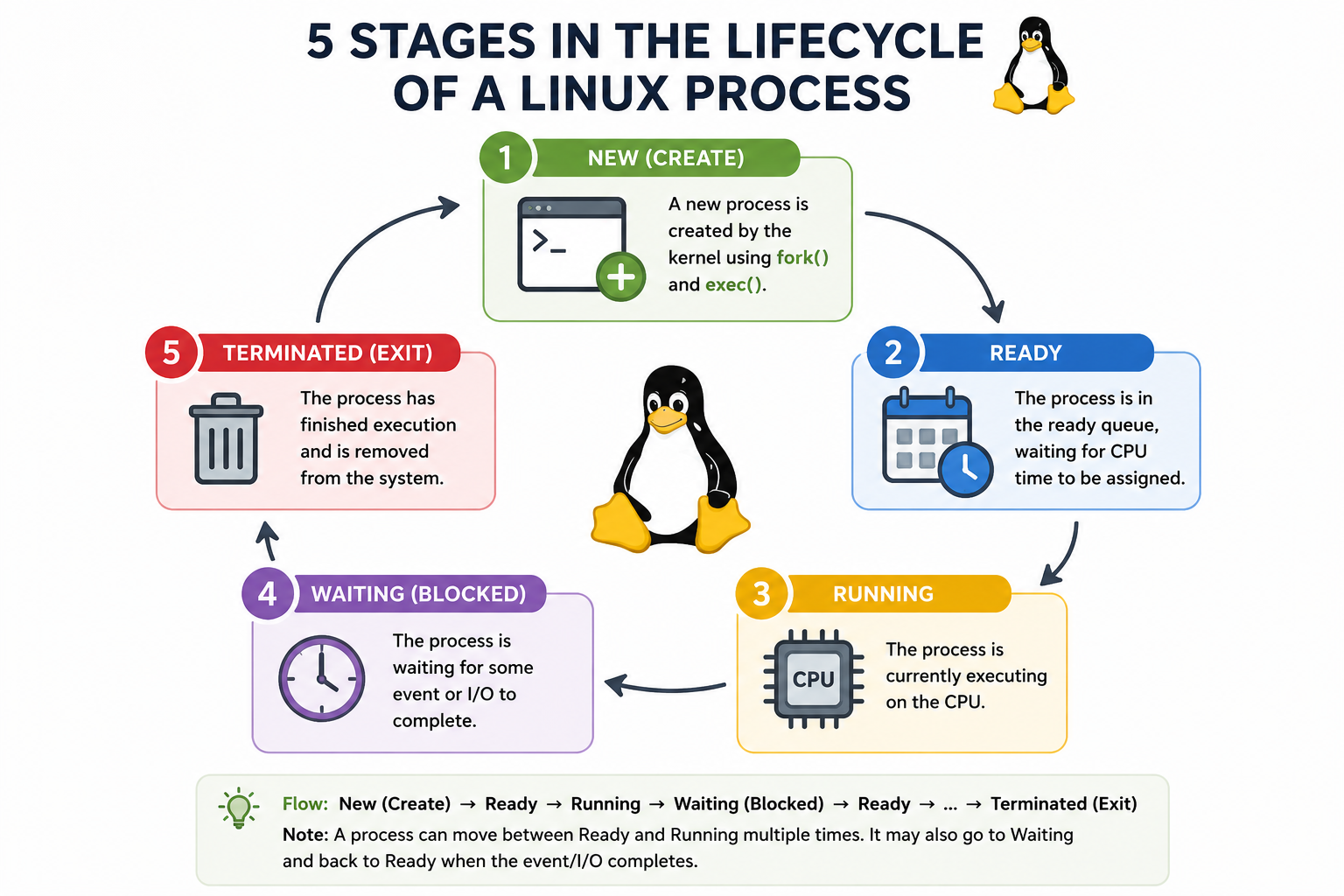
A Linux operating system is designed to manage multiple tasks efficiently by handling processes in a structured and controlled manner. A process is simply a program in execution, and during its lifetime, it moves through several well-defined stages. These stages help the operating system track what the process is doing, whether it is ready to run, currently executing, waiting for resources, or has finished execution. Understanding these stages is essential for anyone studying operating systems because they form the foundation of process management, scheduling, and CPU utilization.
In Linux, a process does not remain static. Instead, it transitions between different states depending on system conditions, resource availability, and scheduling decisions made by the kernel. While different texts may describe process states with slight variations, the most commonly discussed lifecycle includes five main stages: New, Ready, Running, Waiting (or Blocked), and Terminated. Each of these states plays a crucial role in ensuring smooth multitasking and efficient system performance.
New Process State
The lifecycle of a process begins in the New state. This is the stage where a process is being created but has not yet been admitted into the pool of executable processes. When a user starts a program or when the system initializes a service, the operating system begins by allocating the necessary resources for that process. These resources may include memory space, process identifiers, and initial data structures required for execution.
At this stage, the process exists in a preliminary form. It has not yet been scheduled for execution by the CPU. The Linux kernel performs several setup operations such as loading the program into memory, initializing the process control block, and assigning a unique process ID. The process control block is especially important because it stores all essential information about the process, including its state, CPU registers, memory limits, and scheduling information.
Once initialization is complete, the process is ready to move to the next stage. However, it does not directly begin execution. Instead, it transitions into the Ready state, where it waits for CPU allocation. The New state is therefore a preparatory phase, ensuring that the process is properly structured before it enters the scheduling system.
Ready Process State
After the creation phase, the process enters the Ready state. In this stage, the process is fully prepared to execute but is waiting for CPU time. The operating system maintains a queue of such ready processes, and the scheduler determines which one should be executed next based on scheduling algorithms.
The Ready state is crucial in a multitasking environment because multiple processes may be competing for CPU time simultaneously. Even though a process is ready and capable of running, it must wait its turn. The Linux scheduler uses various policies such as priority-based scheduling or time-sharing mechanisms to decide which process gets executed.
During this stage, the process resides in main memory and is not blocked by any external event. It has all the required resources except the CPU. The transition from Ready to Running happens when the scheduler assigns CPU time to the process. This transition is frequent and dynamic, especially in systems running many applications simultaneously.
The efficiency of the Ready state management directly impacts system performance. A well-balanced scheduler ensures that no process waits too long, thereby maintaining fairness and responsiveness across the system.
Running Process State
When a process is selected by the scheduler, it enters the Running state. This is the phase where actual execution occurs. The CPU starts executing the instructions of the process one by one. In a single-core system, only one process can be in the Running state at any given time, whereas in multi-core systems, multiple processes can run simultaneously on different cores.
During execution, the process may perform calculations, access memory, interact with hardware, or execute system calls. The Linux kernel continuously monitors the process to ensure proper execution and to handle context switching when necessary. Context switching is the process of storing the current state of a process and loading the state of another process so that multiple processes can share the CPU efficiently.
A process in the Running state does not necessarily stay there until completion. It may be interrupted by the scheduler, moved to the Ready state if its time slice expires, or shifted to the Waiting state if it requires input/output operations. This dynamic movement ensures that the CPU is utilized efficiently and no single process monopolizes system resources.
The Running state is the most active phase in the process lifecycle, as it represents actual execution and computation.
Waiting or Blocked Process State
Not all processes can continue executing without interruption. In many cases, a process may need to wait for external resources such as input from a user, data from a disk, or completion of a network request. When this happens, the process enters the Waiting or Blocked state.
In this state, the process cannot proceed with execution because it is dependent on an event or resource. For example, if a process requests data from a file system, it must wait until the data is retrieved. Similarly, if a process is waiting for keyboard input, it remains blocked until the input is provided.
The Linux operating system efficiently manages blocked processes by freeing up the CPU for other ready processes. This ensures that system resources are not wasted. Once the required event occurs or the resource becomes available, the process is moved back to the Ready state, where it waits for CPU scheduling again.
This state is essential for handling asynchronous operations and maintaining system responsiveness. Without it, the CPU would remain idle during I/O operations, leading to poor performance.
Terminated Process State
The final stage in the process lifecycle is the Terminated state. A process enters this state when it has completed its execution or has been explicitly killed by the system or a user. Once a process reaches termination, it releases all resources it was using, including memory, file handles, and system allocations.
In Linux, termination can occur normally when a program finishes its task or abnormally due to errors such as segmentation faults or invalid operations. After termination, the process control block is removed, and the process no longer participates in scheduling.
However, in some cases, a process may briefly exist as a zombie process after termination. This happens when the process has completed execution but still has an entry in the process table until the parent process retrieves its exit status. Eventually, the system fully cleans up the process.
The Terminated state ensures that system resources are properly freed, preventing memory leaks and maintaining system stability.
Conclusion
The lifecycle of a Linux process is a structured flow that ensures efficient management of system resources and smooth execution of multiple tasks. Starting from the New state, where a process is created, it moves into the Ready state, waiting for CPU allocation. Once scheduled, it enters the Running state, where actual execution takes place. If the process requires external resources, it transitions into the Waiting or Blocked state, and finally, after completing its execution, it reaches the Terminated state.
Each of these stages plays a vital role in maintaining system performance, multitasking efficiency, and resource optimization. The Linux kernel carefully manages these transitions through scheduling algorithms and process control mechanisms. Understanding these states provides deep insight into how modern operating systems handle complexity while delivering stable and efficient performance.