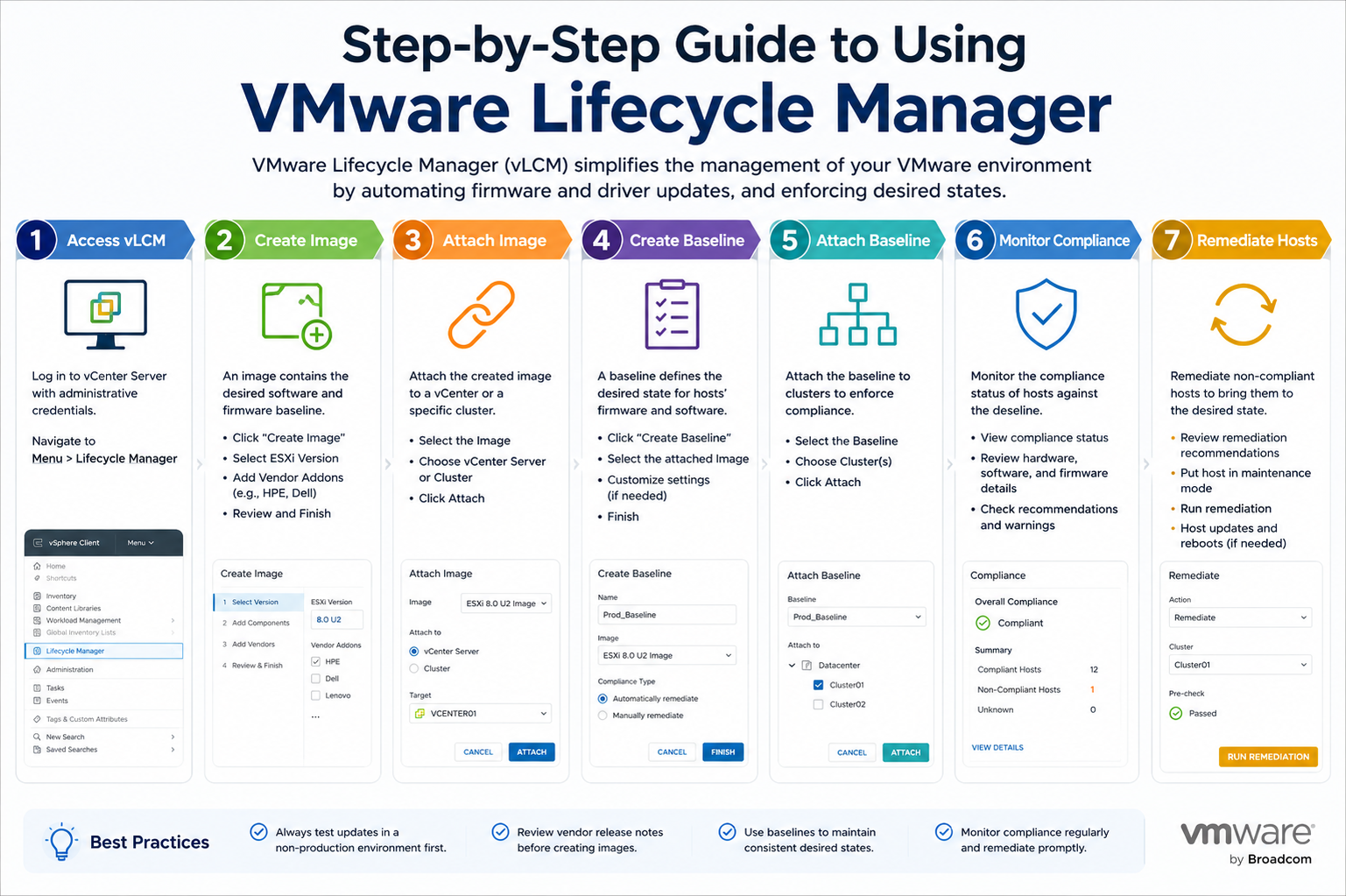
VMware Lifecycle Manager is a centralized lifecycle management framework designed to streamline how ESXi hosts are updated, patched, and maintained within a vSphere environment. It replaces fragmented manual processes with a structured and automated approach that ensures consistency across all hosts in a cluster. The main idea behind this tool is to define a desired state for your infrastructure and then continuously enforce that state across all physical hosts.
Instead of treating each ESXi host as an independent system requiring individual updates, Lifecycle Manager treats the cluster as a unified entity. This shift significantly reduces administrative overhead and minimizes configuration drift, which is one of the most common causes of inconsistency and performance issues in virtualized environments.
Lifecycle Manager is especially useful in large-scale infrastructures where hundreds or even thousands of hosts must remain synchronized. By centralizing lifecycle operations, it allows administrators to focus more on strategic tasks rather than repetitive maintenance activities.
Core Architecture and Working Model
The architecture of VMware Lifecycle Manager is tightly integrated with vCenter Server, which acts as the central management plane. All lifecycle operations are orchestrated through vCenter, which communicates with ESXi hosts to evaluate compliance and execute updates.
At the heart of the system is the concept of an image or baseline. In modern deployments, image-based management is preferred because it defines a complete software stack for ESXi hosts. This includes the ESXi version, vendor-specific add-ons, drivers, and firmware components when supported.
Once an image is defined, Lifecycle Manager continuously compares the current state of each host with the desired state. If discrepancies are detected, the system flags them as non-compliant. Administrators can then initiate remediation to bring those hosts back into alignment.
This architecture ensures that lifecycle management is not a one-time activity but an ongoing process of validation and correction.
Image-Based Lifecycle Management Approach
Image-based lifecycle management is one of the most powerful features of VMware Lifecycle Manager. Instead of dealing with multiple patches, baselines, and incremental updates, administrators define a single image that represents the ideal configuration of an ESXi host.
This image includes everything required for consistent operation, such as the ESXi version and any additional vendor extensions. When a cluster is associated with this image, all hosts within the cluster are expected to match it exactly.
If a host deviates from this image, it is immediately marked as non-compliant. This allows administrators to quickly identify inconsistencies without manually checking each system.
The biggest advantage of this approach is simplicity. It reduces the complexity of lifecycle operations and ensures that all hosts are running identical software stacks, which improves stability and predictability.
Baseline-Based Lifecycle Management Approach
Although image-based management is the modern standard, VMware Lifecycle Manager still supports baseline-based management for compatibility with older environments. In this approach, updates are grouped into baselines, which can include patches, extensions, or upgrades.
These baselines are then attached to hosts or clusters, and compliance is checked against them. While this method is flexible, it is also more fragmented compared to image-based management.
One of the challenges of baseline-based management is the possibility of partial updates or mismatched configurations. Since updates are applied in groups rather than as a unified image, there is a higher chance of inconsistency across hosts.
For this reason, many organizations are gradually transitioning from baselines to images to achieve better standardization.
Defining a Desired State for Clusters
A critical step in using Lifecycle Manager effectively is defining the desired state of each cluster. The desired state represents the exact configuration that all hosts should follow.
This includes selecting the ESXi version, integrating vendor add-ons, and ensuring compatibility with hardware components. Once this state is defined, it becomes the reference point for all compliance checks.
Defining a clear desired state is essential because it eliminates ambiguity in system configuration. Without it, administrators may end up with inconsistent environments where different hosts run different software versions.
A well-defined desired state also simplifies troubleshooting because any deviation can be quickly identified and corrected.
Compliance Monitoring and Continuous Validation
One of the most powerful capabilities of Lifecycle Manager is continuous compliance monitoring. Instead of relying on manual checks, the system automatically evaluates each host against the desired state.
This process runs in the background and provides real-time visibility into the health of the cluster. If a host becomes non-compliant due to missing patches or configuration changes, it is immediately flagged.
Compliance reports provide detailed insights into which components are out of date or misaligned. This allows administrators to take corrective action before issues impact production workloads.
Continuous validation ensures that the environment remains stable and consistent over time, reducing the risk of unexpected failures.
Lifecycle Manager Workflow in Practice
The operational workflow of Lifecycle Manager follows a structured sequence. It begins with accessing the vCenter interface, where administrators define or select a cluster image.
Once the image is configured, the system performs a compatibility check to ensure that all components are valid for the selected hardware. This step is crucial for preventing update failures.
After validation, a compliance scan is initiated. This scan compares all hosts in the cluster against the desired image and identifies any mismatches.
If non-compliant hosts are detected, administrators can initiate remediation. During remediation, hosts are placed into maintenance mode, and updates are applied. Virtual machines running on those hosts are automatically migrated to other available hosts to maintain service continuity.
Once remediation is complete, another compliance check is performed to confirm that all hosts now match the desired state.
Firmware and Driver Lifecycle Integration
One of the advanced capabilities of Lifecycle Manager is its ability to manage firmware and driver updates alongside ESXi updates. This is particularly important in modern data centers where hardware and software must work closely together.
By integrating firmware updates into the lifecycle process, administrators can ensure that all layers of the infrastructure remain compatible. This reduces the risk of performance issues caused by outdated drivers or firmware mismatches.
This unified approach also simplifies maintenance because administrators no longer need to manage firmware separately from ESXi updates.
Automation and Remediation Process
Automation is a key strength of Lifecycle Manager. Once policies and images are defined, much of the lifecycle process can be automated.
When non-compliance is detected, the system can automatically trigger remediation workflows. These workflows handle tasks such as placing hosts into maintenance mode, applying updates, and rebooting systems if necessary.
Automation reduces the need for manual intervention and ensures that updates are applied consistently across all hosts. It also reduces the likelihood of human error, which is a common cause of configuration issues.
Handling Upgrade Scenarios
Upgrading ESXi hosts using Lifecycle Manager follows a structured process. First, a new image is defined that includes the target ESXi version and required components.
Next, compatibility checks are performed to ensure that the upgrade path is valid. Once confirmed, remediation is initiated.
During the upgrade process, workloads are automatically migrated to other hosts in the cluster using resource management features. This ensures minimal disruption to services.
After the upgrade is complete, hosts are re-evaluated for compliance and added back into the cluster once they meet the required standards.
Troubleshooting Lifecycle Operations
Although Lifecycle Manager is designed to be reliable, issues can still occur during updates or compliance checks. Common problems include compatibility errors, failed remediation tasks, or communication issues between vCenter and ESXi hosts.
Troubleshooting typically begins with reviewing compliance reports and task logs. These logs provide detailed information about what went wrong during the lifecycle operation.
In many cases, issues are related to incompatible drivers or unsupported firmware versions. Resolving these issues usually involves updating the image definition or adjusting the cluster configuration.
Network connectivity issues can also disrupt lifecycle operations, so ensuring stable communication between components is essential.
Security and Stability Considerations
Lifecycle Manager also plays an important role in maintaining security across the infrastructure. By ensuring that all hosts are regularly updated, it helps protect against known vulnerabilities.
Consistent patching reduces the attack surface and ensures that security updates are applied in a timely manner.
Stability is also improved because all hosts run standardized configurations. This reduces unpredictable behavior caused by version mismatches or outdated components.
Best Practices for Effective Use
To get the most value from Lifecycle Manager, it is important to follow best practices. One key practice is to standardize images across clusters whenever possible. This reduces complexity and makes management easier.
Another important practice is to test updates in a controlled environment before deploying them to production. This helps identify potential issues early.
Regular monitoring of compliance status is also essential. This ensures that any deviations are quickly detected and resolved.
Maintaining proper documentation of lifecycle policies and update schedules further enhances operational efficiency.
Real-World Operational Scenario
In a typical enterprise environment, Lifecycle Manager is used to maintain hundreds of ESXi hosts across multiple clusters. Administrators define a standardized image for each cluster based on workload requirements.
When a new patch is released, it is first evaluated and tested. Once approved, it is added to the cluster image. Lifecycle Manager then automatically identifies non-compliant hosts and schedules remediation.
During remediation, workloads are seamlessly migrated to other hosts, ensuring zero downtime for critical applications. After updates are applied, hosts are returned to the cluster in a fully compliant state.
This process ensures that the entire infrastructure remains secure, consistent, and up to date without requiring manual intervention for each host.
Conclusion
VMware Lifecycle Manager provides a powerful and unified approach to managing the entire lifecycle of ESXi hosts in modern virtualized environments. By shifting from manual, fragmented update processes to a centralized, image-driven model, it significantly improves consistency, reliability, and operational efficiency.
Through continuous compliance monitoring, automated remediation, and integrated firmware management, it ensures that infrastructure remains aligned with defined standards at all times. The ability to automate complex lifecycle tasks reduces administrative overhead and minimizes the risk of human error.
When properly implemented and managed, Lifecycle Manager becomes a critical component of a stable and scalable virtual infrastructure. It not only simplifies maintenance but also strengthens security and ensures long-term operational consistency across the entire environment.