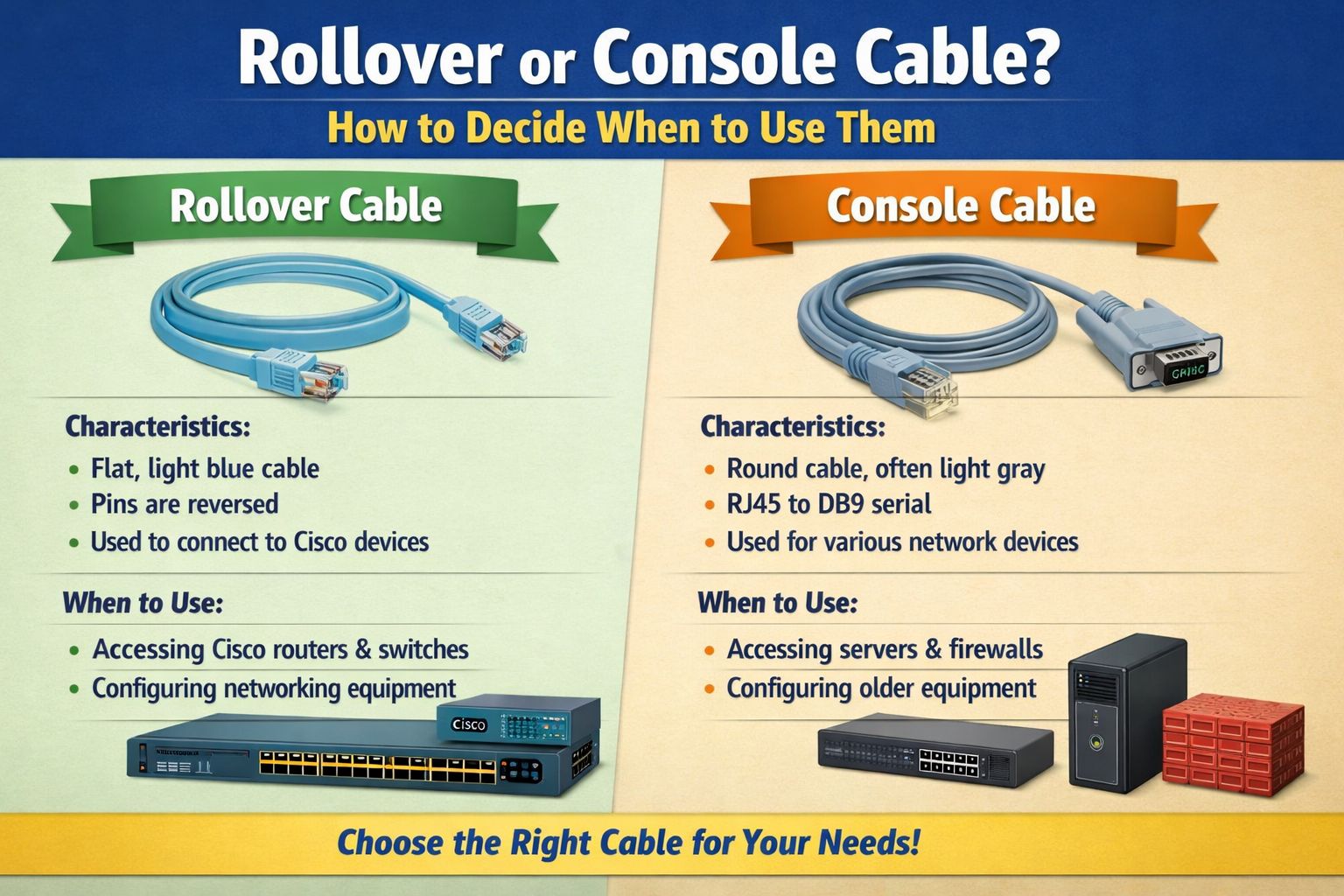
In networking environments, managing devices such as routers, switches, and firewalls requires a direct method of communication that does not depend on an active network connection. This is where console access becomes essential. A console cable or rollover cable is used to establish this direct link between a computer and a networking device, allowing administrators to configure, troubleshoot, and recover systems even when network services are unavailable. The primary idea behind this type of connection is reliability and independence from network status, making it one of the most fundamental tools in network administration.
Console access is especially important during initial device setup, as many networking devices do not have pre-configured IP addresses or enabled remote access features when first powered on. Without console connectivity, configuring these devices would be significantly more difficult or even impossible in certain situations.
What Makes a Console Cable Different in Function
A console cable is specifically designed to connect a computer’s serial or USB interface to the console port of a networking device. The purpose is not to transfer regular network data but to establish a management session. Through this connection, administrators can access the device’s command-line interface and perform configuration tasks.
Unlike Ethernet cables used for data transmission between devices on a network, console cables operate at a much simpler communication level. They are not concerned with routing traffic or maintaining network performance. Instead, they serve as a direct communication bridge for administrative control.
The console cable is often associated with serial communication standards such as RS-232, which has been widely used in computing and telecommunications for decades. Even though modern computers may not always include dedicated serial ports, adapters and USB-based console connections have replaced traditional interfaces in many environments.
Understanding the Rollover Cable and Its Structure
A rollover cable is a specific type of wiring arrangement used primarily in console connections. The defining characteristic of a rollover cable is that the pin order on one end is completely reversed on the other end. This means that the first pin on one connector corresponds to the last pin on the opposite connector, and so on.
This reversal allows proper communication between a computer and a networking device through the console port. Without this flipped wiring structure, the signals sent from one device would not align correctly with the receiving pins on the other device, resulting in communication failure.
Although the term “rollover cable” is more technical, in practical networking environments, it is often used interchangeably with “console cable.” This is because many traditional console cables are built using rollover wiring standards.
Why Pin Reversal Matters in Communication
The concept of reversing pins may seem simple, but it plays an important role in ensuring accurate serial communication. In serial communication, data is transmitted one bit at a time through specific transmit and receive lines. If the wiring is not properly aligned, the transmitting signal from one device could end up connecting to another transmitting line instead of a receiving line, causing complete communication breakdown.
By rolling over the pins, the cable ensures that the transmit pin on one side connects to the receive pin on the other side, and vice versa. This alignment is essential for establishing a functional serial link between a computer and a networking device.
Practical Use in Networking Environments
In real-world networking scenarios, console or rollover cables are widely used during device setup and maintenance. When a network engineer installs a new switch or router, the first step often involves connecting a laptop directly to the device using a console connection. This allows access to the device’s initial configuration interface.
The same method is used when recovering devices that are misconfigured or inaccessible through the network. If a router loses its IP configuration or a firewall blocks remote access, console connectivity becomes the only reliable method to regain control.
Network labs and training environments also rely heavily on console cables. Students and professionals use them to practice configuration commands, understand routing protocols, and simulate real-world network scenarios without needing full network infrastructure.
How Console Sessions Work
Once a console cable is connected between a computer and a networking device, a terminal emulator application is used to establish communication. This software interprets the serial data and presents it in a readable command-line format.
After the connection is established, the user can interact with the device’s operating system directly. This includes tasks such as assigning IP addresses, configuring interfaces, setting security parameters, and performing system diagnostics.
The console session operates at a very low level compared to network-based management tools. This makes it extremely powerful for troubleshooting, as it bypasses all network layers and communicates directly with the device firmware or operating system.
When to Use a Console Cable Instead of Network Access
A console cable should be used whenever network access is unavailable or not yet configured. This includes situations such as initial device setup, password recovery, system recovery after a configuration error, or troubleshooting network failures.
It is also preferred in secure environments where network-based management access is restricted. By using a console connection, administrators can ensure that only physically present personnel can access the device configuration.
In contrast, remote management tools like SSH or web interfaces depend on a functioning network connection. If the network is down or improperly configured, these methods become unusable, making console access the only viable option.
Modern Evolution of Console Connections
While traditional console cables used serial ports and rollover wiring, modern networking equipment has evolved to include USB console ports. These ports eliminate the need for serial adapters and simplify connectivity by allowing direct USB connections from a computer to the device.
Despite these advancements, the underlying concept remains the same. The goal is still to provide direct, out-of-band access to network devices for configuration and troubleshooting. The rollover cable concept still exists in many legacy systems and training environments, making it important to understand even in modern contexts.
Some environments also use console servers, which allow multiple devices to be accessed remotely through a centralized system. However, even these systems often rely on console cable connections at the physical device level.
Common Mistakes When Using Console and Rollover Cables
One common mistake is assuming that any Ethernet cable can be used as a console cable. This is incorrect because Ethernet cables follow a different wiring standard and are designed for network traffic, not serial communication.
Another mistake is connecting the cable to the wrong port. Networking devices often have multiple ports, and only the console port is intended for this type of connection. Plugging into a regular Ethernet port will not provide console access.
Incorrect terminal settings are also a frequent issue. Console connections require specific settings such as baud rate, data bits, parity, and stop bits. If these settings do not match the device configuration, communication will fail even if the cable is correctly connected.
Troubleshooting Console Connection Issues
When a console connection does not work, the first step is to check the physical cable and ensure it is properly connected. Loose or damaged connectors can easily interrupt communication.
The next step is to verify that the correct communication port is selected on the computer. Modern systems may have multiple USB ports or virtual COM ports that can cause confusion.
If the physical connection is correct, the terminal settings should be reviewed. Matching the correct speed and communication parameters is essential for establishing a successful session.
In some cases, driver issues or missing USB-to-serial drivers can also prevent console access. Ensuring that the necessary drivers are installed can resolve these problems.
Best Practices for Using Console and Rollover Cables
It is recommended to label and organize console cables properly in networking environments to avoid confusion. Since multiple devices may require console access, keeping cables clearly identified helps improve efficiency.
Using high-quality cables reduces the risk of communication errors caused by physical damage or poor construction. In professional environments, reliable hardware is essential for consistent performance.
Administrators should also become familiar with terminal emulator tools and their configuration settings. Understanding how to properly set up a console session can significantly reduce troubleshooting time during critical situations.
Why Understanding These Cables Still Matters Today
Even with modern networking technologies, understanding console and rollover cables remains important. They represent the foundation of network device management and are often the only method available during system failures or initial configurations.
Many certification programs and professional networking roles still require knowledge of console access because it reflects a fundamental understanding of how network devices operate at a low level.
In environments where reliability and control are critical, console access continues to play a vital role. It ensures that administrators always have a direct path to manage and recover network infrastructure regardless of network conditions.
Understanding of Usage Decision
The decision between using a rollover cable and a console cable is less about choosing between two different tools and more about understanding that they often refer to the same function in networking practice. What matters most is ensuring that the correct physical connection and communication settings are used to access the device successfully.
In practical terms, whenever direct device management is required without relying on network connectivity, a console connection using a rollover-style cable structure is the appropriate choice.
Differences in Modern Networking Hardware
Modern networking devices have significantly changed the way console access is implemented, but the core purpose remains the same. Older equipment typically relies on traditional serial ports, where rollover cables are used to establish communication. Newer devices, however, increasingly feature USB-based console ports, which simplify the connection process and reduce dependency on legacy serial interfaces.
Despite this shift, many enterprise environments still operate a mix of old and new hardware. As a result, understanding both traditional rollover cable setups and modern console connection methods is still necessary. In mixed environments, technicians may encounter devices that require different types of console access depending on their generation and manufacturer design.
The transition to USB console ports has improved convenience, but it has not eliminated the need for understanding rollover cable principles. Many networking fundamentals remain tied to legacy systems, especially in large infrastructures where equipment upgrades occur gradually rather than all at once.
Role of Terminal Emulation in Console Access
Console connectivity is not only about the physical cable but also about the software used to interpret the data. Terminal emulation software plays a crucial role in establishing communication between the computer and the network device.
Once a console or rollover cable is connected, the terminal emulator translates serial signals into readable text-based commands. This allows the user to interact with the device’s operating system through a command-line interface. Without this software layer, the raw data transmitted through the cable would not be usable.
The terminal session behaves like a direct conversation with the device. Every command entered is sent through the cable, processed by the device, and the response is returned in real time. This simplicity is what makes console access so powerful during troubleshooting and configuration tasks.
Importance in Device Recovery Scenarios
One of the most critical uses of console or rollover cables is during device recovery. When a networking device fails to boot correctly, loses configuration, or becomes inaccessible through normal network methods, console access often becomes the only available option.
Through the console connection, administrators can interrupt the boot process, access recovery modes, and restore factory settings or backup configurations. This level of access is essential in situations where remote management tools are unavailable due to system failure.
In some cases, incorrect configuration changes can lock administrators out of devices completely. Console access allows direct intervention at the system level, bypassing all network-related restrictions. This makes it a vital tool for maintaining network reliability and uptime.
Understanding Signal Flow in Console Communication
The way data flows through a console or rollover cable is fundamentally different from standard Ethernet communication. Instead of complex packet-based transmission, console communication uses simple serial data streams.
Each device has a transmit (TX) and receive (RX) line. The rollover cable ensures that the TX line on one device connects to the RX line on the other, allowing proper two-way communication. Without this correct alignment, signals would not be interpreted correctly.
This direct mapping of signals is what enables stable and predictable communication during configuration sessions. It eliminates the complexities of routing and switching, focusing purely on device-level interaction.
Why Naming Confusion Exists Between Rollover and Console Cables
The terms “rollover cable” and “console cable” are often used interchangeably, which can create confusion. The distinction is mainly technical rather than practical. A rollover cable refers specifically to the wiring pattern, where pins are reversed from one end to the other. A console cable refers to the purpose of the cable, which is to provide access to a device’s console port.
In many real-world cases, a console cable is physically built using rollover wiring, which is why the two terms overlap so frequently. However, not all console cables are rollover cables in modern environments, especially when USB or specialized adapters are used.
Understanding this distinction helps clarify documentation and equipment labeling, which may vary depending on manufacturer or industry practices.
Security Aspects of Console Access
Console access is considered a secure method of managing networking devices because it requires physical presence. Unlike remote access methods that rely on network connectivity and authentication protocols, console connections cannot be accessed remotely without physical access to the device.
This makes console or rollover cables particularly useful in environments where security is a priority. Even if network credentials are compromised, attackers cannot gain access through the console port unless they are physically present.
However, this also means that physical security of networking equipment is critical. Unauthorized access to console ports can lead to complete control over a device, so proper access control and secure placement of equipment are essential.
Troubleshooting Advanced Console Issues
In more complex scenarios, console connectivity issues may not be immediately obvious. Even if the cable is correctly connected, misconfigured terminal settings can prevent communication. Matching parameters such as baud rate, parity, and stop bits is essential for successful communication.
Another common issue involves driver incompatibility, especially when using USB-to-serial adapters. If the operating system does not recognize the adapter, the console session cannot be established. Installing the correct drivers resolves this issue in most cases.
Electrical interference or damaged cables can also cause intermittent communication problems. Since console communication is sensitive to signal integrity, even minor physical damage can affect performance.
Role in Network Learning and Certification
Console and rollover cables play an important role in networking education and certification programs. Students are often required to use console connections in lab environments to learn device configuration from the ground up.
This hands-on experience helps build a strong understanding of how network devices operate without relying on graphical interfaces or automated tools. It reinforces fundamental concepts such as command-line configuration, system boot processes, and device recovery techniques.
Even in modern training environments, console access remains a core skill because it reflects real-world troubleshooting scenarios that professionals are likely to encounter in enterprise networks.
Practical Deployment in Enterprise Networks
In large-scale enterprise environments, console access is often integrated into structured management systems. Network engineers may use console servers to connect to multiple devices from a single location.
Even in these advanced setups, the underlying principle remains the same. The physical connection between the device and the management system often relies on serial communication principles similar to those used with rollover cables.
This centralized approach improves efficiency, allowing administrators to manage large infrastructures without physically moving between devices. However, initial setup and hardware-level troubleshooting still require direct console connections.
Transition Toward Modern Management Methods
While console and rollover cables remain important, modern networking increasingly relies on remote management protocols such as SSH, SNMP, and web-based interfaces. These tools allow administrators to manage devices without physical access.
However, these methods depend on a functioning network. When the network fails, console access becomes the fallback method. This is why console connectivity is still considered an essential skill in networking.
The combination of modern remote management tools and traditional console access ensures that administrators always have multiple layers of control over network infrastructure.
Advanced Role in Network Diagnostics
Console access using rollover or console cables is not only useful for basic configuration but also plays a major role in deep network diagnostics. When a network device behaves unexpectedly, such as dropping packets, failing to route traffic, or rebooting repeatedly, administrators often need to observe system-level behavior that is not visible through remote tools.
Through a console session, real-time system messages can be monitored during boot-up or operation. These messages provide detailed insights into hardware status, firmware loading, configuration errors, and system alerts. This level of visibility is essential when diagnosing problems that cannot be identified through standard network monitoring tools.
Because console access operates independently of network configuration, it remains reliable even when the device is partially functional or completely isolated from the network. This makes it one of the most dependable troubleshooting methods in complex environments.
Understanding Boot Process Interaction
One of the most powerful aspects of console access is the ability to interact with a device during its boot process. When a networking device powers on, it goes through several stages including hardware checks, firmware loading, and configuration initialization.
By using a console connection, administrators can interrupt this process if needed. This is particularly useful when recovering devices from failed updates, corrupted configurations, or incorrect startup settings. Without console access, such recovery would often require hardware replacement or factory reset procedures.
The ability to intervene during boot gives administrators full control over system recovery, allowing them to load backup configurations, enter safe modes, or reinstall firmware when necessary.
Differences in Cable Construction Quality
Although rollover and console cables may appear simple, the quality of their construction can significantly affect performance. Poorly made cables may introduce signal noise or inconsistent connectivity, leading to failed or unstable console sessions.
High-quality cables ensure proper shielding and accurate pin alignment, which is critical for stable serial communication. Even slight misalignment in wiring can cause intermittent connection issues that are difficult to diagnose.
In professional environments, reliable hardware is preferred to reduce downtime and avoid troubleshooting complications caused by faulty physical components.
Impact of Cable Length and Signal Stability
Cable length also plays an important role in console communication. Since serial communication is sensitive to signal degradation, excessively long cables can lead to reduced signal quality or data corruption.
In most practical environments, console cables are kept relatively short to maintain stable communication. This ensures that signals remain clear and timing between transmitted and received data is preserved.
Using appropriate cable lengths helps maintain consistent performance, especially in environments where multiple devices are being configured or managed simultaneously.
Console Access in Virtualized and Cloud Environments
Even though cloud computing and virtualization have transformed modern IT infrastructure, console access remains relevant. Virtual machines and cloud-based network devices often provide virtual console interfaces that mimic physical console connections.
These virtual consoles allow administrators to access system logs, recovery environments, and configuration interfaces even when remote network access is unavailable. While no physical cable is involved in these cases, the concept is directly derived from traditional console cable usage.
This demonstrates how the principle of console access has evolved rather than disappeared, adapting to modern computing environments while maintaining its core purpose.
Importance in Emergency Recovery Situations
In emergency scenarios such as network outages, misconfigurations, or security incidents, console access becomes a critical recovery tool. When remote access systems fail or are disabled, console connections often remain the only way to regain control of infrastructure.
For example, if a misconfigured firewall blocks all incoming management traffic, administrators cannot connect through SSH or web interfaces. In such cases, console access allows direct correction of configuration errors.
This makes console or rollover cables essential tools for disaster recovery planning in enterprise networks.
Physical Layer Independence Advantage
One of the key advantages of console communication is its independence from network layers. Unlike Ethernet communication, which depends on multiple protocol layers such as IP addressing, routing, and switching, console access operates at a much lower level.
This physical layer independence ensures that communication is unaffected by network misconfigurations, IP conflicts, or routing issues. It provides a direct hardware-level connection that bypasses all network dependencies.
This is why console access is often described as “out-of-band” management, meaning it exists outside the normal data network.
Role in Device Configuration Standardization
In enterprise environments, console access is often used to standardize device configuration. When deploying multiple devices, administrators can connect to each one via console to apply consistent baseline settings.
This ensures that all devices follow the same configuration structure before being integrated into the live network. It reduces configuration errors and improves overall network consistency.
Automated deployment systems may also use console access during initial setup phases to push configurations before enabling network-based management tools.
Limitations of Console and Rollover Cables
Despite their importance, console and rollover cables have certain limitations. They require physical access to the device, which may not always be convenient in large or geographically distributed environments.
They also operate at relatively low communication speeds compared to modern network interfaces. This makes them unsuitable for transferring large amounts of data or performing continuous management tasks.
Additionally, they are primarily designed for configuration and troubleshooting rather than everyday network administration.
Transition to Integrated Management Systems
Modern networking increasingly integrates console functionality into centralized management platforms. Network management systems can now combine remote access, monitoring, and configuration tools into a single interface.
Even so, these systems still rely on console access during initial setup or recovery situations. This ensures that even advanced automation tools have a fallback method when network connectivity fails.
The integration of traditional console access with modern management systems provides a balanced approach to reliability and efficiency.
Why Console Skills Remain Essential
Despite technological advancements, understanding console and rollover cable usage remains a fundamental skill for networking professionals. Many certification exams and job roles still require hands-on knowledge of console-based configuration and troubleshooting.
This is because console access represents the most direct interaction with network devices, offering insight into system behavior that cannot be obtained through higher-level tools.
Professionals who understand console operations are better equipped to handle unexpected network failures and complex configuration issues.
Practical Decision-Making in Real Scenarios
When deciding between using a rollover or console cable, the practical approach is to focus on the task rather than the terminology. If direct device access is required and network-based management is unavailable or unreliable, console access is the correct method.
In most cases, a rollover cable serves as the physical implementation of a console connection, especially in traditional networking environments. Modern alternatives may use USB or virtual interfaces, but the underlying principle remains the same.
Understanding this helps eliminate confusion and ensures proper tool selection in real-world situations.
Rollover and console cables are deeply connected concepts in networking, representing both the physical wiring method and the functional purpose of direct device management. While technology continues to evolve, the need for reliable, low-level access to networking equipment remains constant.
Whether used in legacy systems, modern hardware, or virtual environments, console access continues to provide a dependable way to configure, troubleshoot, and recover network devices under all conditions.
Integration with Network Infrastructure Lifecycle
Console access through rollover or console cables plays an important role throughout the entire lifecycle of network infrastructure. From initial deployment to decommissioning, these cables provide a consistent method for direct device interaction. During the early stages of deployment, engineers rely on console access to perform first-time configurations before any network connectivity is established.
As the network grows and becomes operational, console access continues to serve as a fallback mechanism for maintenance and troubleshooting. Even in mature environments where most management tasks are handled remotely, console connections remain essential for handling unexpected failures or configuration errors that disable network access.
At the end of a device’s lifecycle, console access is often used to securely wipe configurations, verify hardware status, or prepare equipment for replacement. This ensures that sensitive information is properly cleared before disposal or reuse.
Understanding Compatibility Across Vendors
Different networking vendors may implement console ports in slightly different ways, but the underlying principle remains consistent. Most devices still rely on serial communication standards, even if the physical connector type varies. Some use RJ-45 style console ports, while others use USB or micro-USB interfaces.
Despite these differences, rollover wiring principles are often still applied in legacy or adapter-based systems. This is why understanding the concept of pin reversal remains useful even when working with modern equipment.
Compatibility is usually managed through adapters or vendor-specific cables, but the goal is always the same: establishing a stable communication link between a management station and a networking device.
Role in Firmware Updates and System Maintenance
Console access is especially important during firmware updates and system maintenance operations. When updating critical network devices, there is always a risk of failure due to power loss, corrupted files, or interrupted processes.
If a firmware update fails, the device may become inaccessible through standard network methods. In such cases, console access provides a recovery pathway to restore functionality. Administrators can use console sessions to reattempt firmware installation, load backup images, or revert to stable versions.
This makes console or rollover cables a key component of risk management strategies in enterprise networking environments.
Behavior During System Crashes and Failures
When a network device crashes or enters an unstable state, console access often remains the only communication channel available. Unlike network interfaces that may fail due to software or configuration errors, console ports operate at a hardware level and are less likely to be affected by system instability.
Through console logs, administrators can observe crash reports, error messages, and diagnostic outputs that help identify the root cause of failure. This information is critical for resolving complex issues that cannot be diagnosed through external monitoring systems.
In many cases, console output is the first and most reliable source of information during system failure investigations.
Importance in Configuration Rollback Scenarios
Configuration errors are one of the most common causes of network issues. A single incorrect command can disrupt routing, disable interfaces, or block management access. When this happens, console access becomes the primary method for rolling back changes.
Through a console session, administrators can manually revert configurations, restore previous settings, or reload saved backups. This ensures that mistakes made during configuration do not permanently affect network stability.
Without console access, recovering from such errors would often require physical replacement or factory reset procedures, both of which are more time-consuming and disruptive.
Security Considerations in Physical Access Control
Because console access requires physical connectivity, securing access to networking hardware becomes extremely important. Unauthorized physical access to console ports can allow attackers to bypass network security measures entirely.
In secure environments, networking equipment is often placed in locked cabinets or restricted rooms to prevent unauthorized access. Additionally, console ports may be disabled or protected when not in use.
Physical security policies complement digital security measures, ensuring that both network and hardware access points are properly controlled.
Role in Redundant Network Architectures
In redundant network architectures, console access serves as a reliable backup management channel. Even when primary and secondary network paths fail, console connections remain unaffected because they do not depend on network routing.
This makes console access a critical component in high-availability environments, where system uptime and reliability are essential. Administrators can use console connections to manually switch configurations, troubleshoot redundancy protocols, or restore failed systems.
Redundancy planning often includes console access as part of disaster recovery strategies to ensure continuous operational control.
Practical Differences in Field Operations
In field operations, technicians often encounter environments where network infrastructure is partially or completely offline. In such situations, console or rollover cables are used to bring devices online for configuration and testing.
Field engineers rely heavily on portable console setups, often using laptops equipped with terminal software and appropriate adapters. This allows them to perform full device configuration without needing external network access.
The portability and reliability of console access make it an essential tool in on-site network deployment and maintenance.
Evolution Toward Hybrid Access Models
Modern networking environments are increasingly adopting hybrid access models that combine traditional console access with remote management technologies. These systems allow administrators to switch between network-based access and console-level access depending on the situation.
For example, a device may be managed remotely under normal conditions, but automatically switch to console mode during failures or maintenance events. This hybrid approach improves flexibility and ensures continuous control over network infrastructure.
Even in these advanced systems, the foundational principles of console communication remain unchanged.
Impact of Automation and Remote Management Tools
Automation tools have reduced the frequency of manual console access in many environments, but they have not eliminated its importance. Automated configuration systems can deploy settings across multiple devices simultaneously, but they still rely on console access during initial setup or recovery scenarios.
Remote management tools provide convenience and scalability, but they depend on network stability. Console access remains the most reliable fallback when automation systems fail or when devices are not yet integrated into the network.
This balance between automation and manual control ensures operational resilience.
Training and Skill Development Importance
Learning how to use console and rollover cables is a fundamental part of networking education. It teaches essential skills such as device interaction, configuration management, and troubleshooting without relying on graphical interfaces.
Hands-on experience with console sessions helps build a deeper understanding of how networking devices operate internally. It also prepares professionals for real-world scenarios where remote tools are unavailable.
This foundational knowledge is widely valued in technical certifications and professional development programs.
Final Practical Perspective on Usage Decision
Deciding when to use a rollover or console cable ultimately comes down to understanding the situation rather than the terminology. If a device requires direct access without relying on a network connection, console access is the correct approach.
In many cases, the rollover cable is simply the physical method used to achieve that console connection, especially in legacy systems. Modern alternatives may use USB or virtual interfaces, but the purpose remains unchanged.
The key takeaway is that console access provides a direct, reliable, and independent method of interacting with network devices, making it an essential tool in both traditional and modern networking environments.
Conclusion
Rollover and console cables ultimately serve the same essential purpose in networking: providing direct access to network devices for configuration, troubleshooting, and recovery. While the term “rollover cable” refers to the specific reversed pin wiring and “console cable” refers to its functional use, in practice both are commonly used interchangeably in many environments.
Their importance lies in situations where network-based management is unavailable or unreliable. Whether setting up a new device, fixing configuration errors, or recovering from system failures, console access ensures that administrators always have a dependable way to communicate with networking equipment.
Even as modern technologies introduce USB console ports and remote management systems, the fundamental role of console connectivity remains unchanged. It continues to be a critical backup method and a foundational skill for anyone working in networking.
Understanding when and how to use these cables ensures smoother device management, faster troubleshooting, and greater control over network infrastructure in both traditional and modern environments.