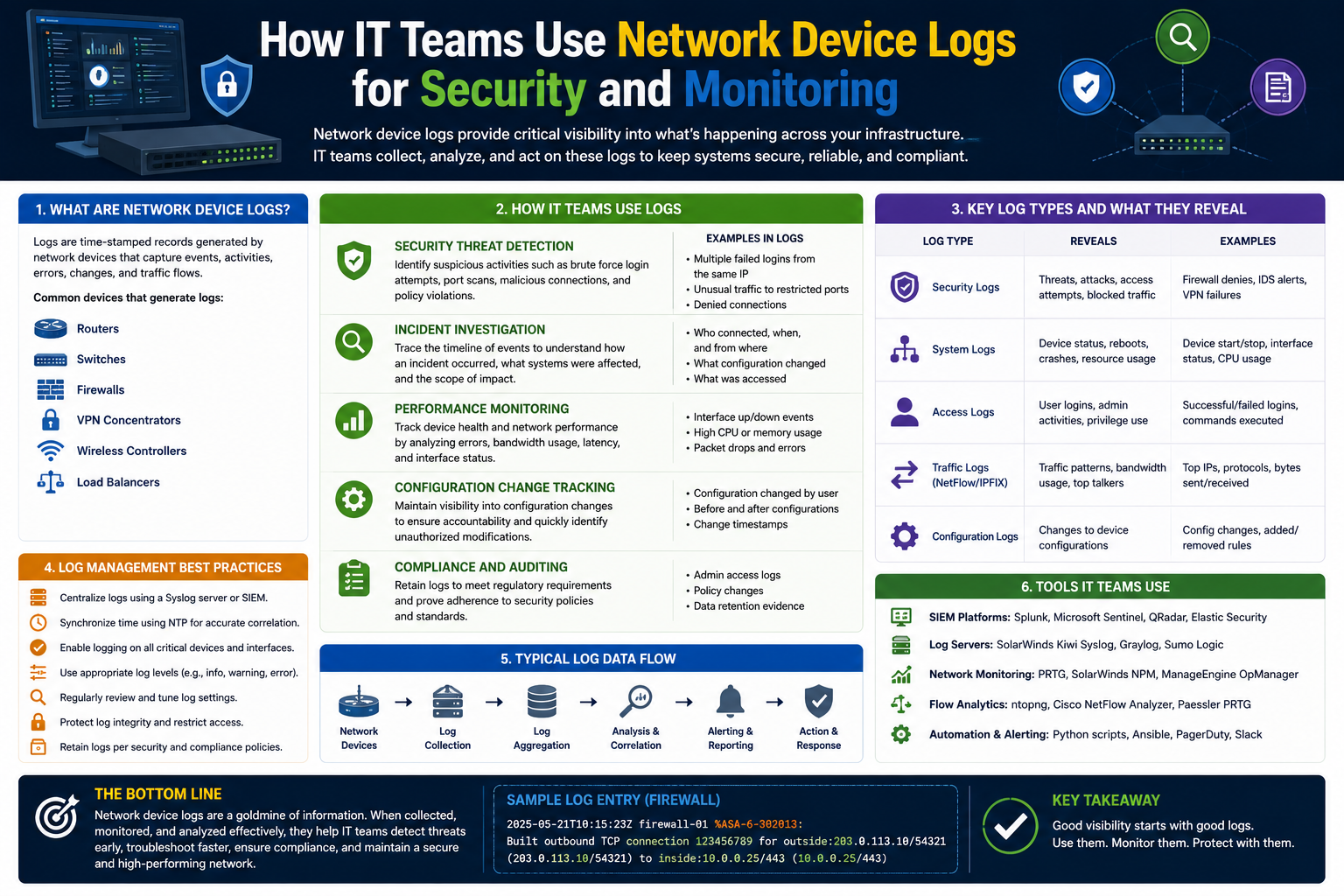
Modern networks generate enormous amounts of information every second. Every connection request, login attempt, file transfer, configuration change, and application event leaves behind a digital trail. These trails are recorded in the form of logs, which serve as one of the most valuable resources for IT professionals, network administrators, and cybersecurity analysts. Without logs, diagnosing network failures, investigating cyberattacks, or identifying performance issues would become significantly more difficult.
Network device logs provide detailed records of activities occurring within network infrastructure and connected systems. Routers, switches, firewalls, servers, operating systems, cloud platforms, and applications all generate logs automatically as part of their normal operation. These logs contain information about traffic flows, user actions, hardware events, authentication attempts, software behavior, and security incidents.
Organizations rely heavily on logging systems to maintain operational visibility. Logs help teams understand how devices communicate, how systems behave under different conditions, and how users interact with services. They also play a major role in compliance audits, incident response, and digital forensics.
As modern IT environments continue to expand across cloud services, remote work infrastructure, and hybrid networks, effective log management has become more important than ever. A single organization may generate millions of log entries daily, making proper collection, storage, analysis, and monitoring essential for maintaining security and performance.
This article explores the fundamentals of network device logs, their purpose, the types of logs commonly used, and how organizations use them to improve troubleshooting, monitoring, and cybersecurity operations.
What Are Network Device Logs?
Network device logs are records generated by hardware devices, operating systems, applications, and network services that document events and activities occurring within a system or network. These logs act as historical records, providing administrators with detailed insight into operational behavior.
Every network-connected device produces logs in some form. Examples include:
- Routers recording traffic routing information
- Firewalls tracking blocked and allowed connections
- Servers documenting authentication attempts
- Applications recording user activities
- Switches logging interface status changes
- Security tools generating alerts about suspicious activity
Whenever an event occurs, the device creates a log entry containing specific information related to that activity. Depending on the system, logs may include timestamps, IP addresses, usernames, event descriptions, error codes, severity levels, and other details.
Logs are typically stored locally on devices, but many organizations forward them to centralized systems for long-term storage and analysis.
The main purpose of logging is visibility. Logs allow administrators and analysts to understand exactly what happened within a network environment and when it happened.
Why Network Device Logs Matter
Network device logs are essential because they provide transparency into systems and network operations. Without logs, organizations would struggle to investigate problems, detect security threats, or understand network behavior.
Logs help organizations perform several critical functions.
Troubleshooting Technical Problems
When systems fail or users experience connectivity issues, logs provide clues about the root cause. Administrators can review events leading up to the issue and identify abnormal behavior or error messages.
For example, logs can reveal:
- Failed DNS lookups
- Server crashes
- Routing problems
- Hardware failures
- Authentication errors
- Firewall blocks
This information significantly reduces troubleshooting time and improves operational efficiency.
Improving Network Performance
Logs help administrators identify performance bottlenecks and optimize network resources. By analyzing traffic patterns and device activity, organizations can better understand how systems are being used.
Performance-related insights may include:
- High bandwidth consumption
- Congested network segments
- Excessive latency
- Overloaded servers
- Frequent application failures
These insights allow IT teams to make informed decisions regarding infrastructure improvements.
Supporting Cybersecurity Operations
Cybersecurity teams rely heavily on logs to detect malicious activity and investigate incidents. Attackers often leave traces within logs even when they attempt to hide their actions.
Security analysts monitor logs for indicators such as:
- Multiple failed login attempts
- Unusual outbound connections
- Unexpected privilege changes
- Malware communication attempts
- Unauthorized configuration modifications
Logs often provide the first indication that a system has been compromised.
Maintaining Compliance
Many industries require organizations to maintain logs for compliance purposes. Regulatory standards frequently mandate logging practices to ensure accountability and security.
Logs help organizations demonstrate that they:
- Monitor access to sensitive data
- Enforce security policies
- Maintain audit trails
- Investigate incidents properly
- Retain historical records
Industries such as healthcare, finance, government, and retail commonly depend on detailed logging systems for compliance requirements.
Supporting Digital Forensics
During incident investigations, logs provide valuable evidence about attacker behavior and system activity. Analysts use logs to reconstruct timelines and determine how incidents occurred.
Logs can help answer important questions such as:
- When did the attack begin?
- Which systems were affected?
- What accounts were used?
- What actions were performed?
- Was data accessed or stolen?
Digital forensic investigations depend heavily on accurate and complete log data.
How Logging Works
Logging occurs automatically within most systems and devices. Whenever an event takes place, the device generates a record describing that event.
Each log entry usually contains multiple components.
Common log elements include:
- Timestamp
- Hostname
- Source address
- Destination address
- Event ID
- Severity level
- User account
- Event description
For example, if a user logs into a server successfully, the system may generate a log entry showing:
- Username
- Login time
- Source IP address
- Authentication method
- Success status
Similarly, if a firewall blocks malicious traffic, the log may include:
- Source IP
- Destination IP
- Port number
- Protocol
- Action taken
- Threat classification
These records create a timeline of system activity that administrators can analyze later.
Local Logging vs Centralized Logging
Devices often store logs locally by default. However, relying only on local storage creates several risks and limitations.
If a device crashes or becomes compromised, locally stored logs may be lost or altered. Additionally, manually reviewing logs across dozens or hundreds of devices becomes extremely inefficient.
To solve this problem, organizations commonly use centralized logging systems.
Centralized logging involves forwarding logs from multiple devices to a dedicated server or monitoring platform. This approach provides several benefits.
Advantages include:
- Centralized visibility
- Easier searching and filtering
- Long-term retention
- Improved incident response
- Better security monitoring
- Simplified compliance reporting
Centralized logging platforms allow analysts to review activity across the entire network from a single location.
Understanding Traffic Logs
Traffic logs are among the most important types of network logs. These logs focus on communications between systems and devices.
Traffic logs record information such as:
- Connection attempts
- Session durations
- Source and destination addresses
- Port numbers
- Protocols used
- Data transfer volumes
Every time one device communicates with another, traffic logs capture details about the interaction.
Traffic logs help organizations understand how data moves throughout the network.
How Traffic Logs Support Troubleshooting
Traffic logs are extremely useful when diagnosing connectivity and performance issues.
For example, if users cannot access a website or application, traffic logs may reveal:
- Blocked traffic
- Failed connection attempts
- Routing errors
- Packet loss
- Excessive latency
Administrators can trace communication paths and determine where problems occur.
Traffic logs also help identify intermittent issues that may be difficult to reproduce manually.
Traffic Logs and Security Monitoring
Security analysts use traffic logs to detect suspicious behavior and identify potential threats.
Some common indicators of malicious activity include:
- Connections to suspicious destinations
- Traffic spikes during unusual hours
- Repeated connection attempts
- Large outbound data transfers
- Unexpected protocol usage
For example, malware often communicates with external command-and-control servers. Traffic logs may reveal these outbound connections before significant damage occurs.
Similarly, unauthorized data exfiltration attempts frequently appear as abnormal outbound traffic patterns.
Monitoring traffic logs is a critical component of modern threat detection strategies.
Analyzing Traffic Patterns
Traffic logs provide valuable insight into long-term network behavior.
Organizations analyze traffic patterns to identify:
- Peak usage periods
- Common communication paths
- Bandwidth-heavy applications
- Frequently accessed services
- Unusual network activity
Trend analysis helps organizations optimize performance and improve capacity planning.
For instance, administrators may discover that video conferencing applications consume most bandwidth during business hours, allowing them to adjust network priorities accordingly.
Behavioral analysis also improves anomaly detection because analysts become familiar with normal network activity.
Organizing Traffic Log Data
Large environments generate enormous amounts of traffic data. Proper organization is necessary to ensure logs remain useful.
Organizations commonly categorize logs using metadata such as:
- Event type
- Timestamp
- Source device
- Destination device
- Application name
- Severity level
- User account
Tagging and indexing logs improve search efficiency during investigations and troubleshooting.
Without proper organization, analysts may struggle to locate important information within massive datasets.
What Are Audit Logs?
Audit logs focus on recording user activities and application-level events. These logs help organizations track actions performed within systems.
Examples of activities captured in audit logs include:
- User logins
- Password changes
- File access
- Permission changes
- Software installations
- Administrative actions
- Configuration updates
Audit logs provide accountability by documenting who performed specific actions and when those actions occurred.
They are especially valuable in environments where multiple users share access to systems and applications.
Authentication Logging
Authentication logs are one of the most common forms of audit logging.
Whenever users attempt to access systems, authentication events are recorded.
These logs typically include:
- Username
- Timestamp
- Source IP address
- Success or failure status
- Authentication method
Authentication logs help organizations identify unauthorized access attempts and compromised accounts.
For example, repeated failed login attempts followed by a successful login may indicate a brute-force attack.
Similarly, successful logins from unfamiliar geographic locations may suggest credential theft.
Authentication monitoring is a foundational element of cybersecurity defense.
Tracking Administrative Activity
Audit logs also track administrative actions performed within systems and network devices.
Examples include:
- Configuration modifications
- User account creation
- Permission changes
- Security policy updates
- Software deployments
These logs help organizations maintain accountability and troubleshoot operational issues.
If a network outage occurs after a configuration change, audit logs can identify exactly who made the change and when it happened.
This visibility improves both operational management and security oversight.
Audit Logs and Compliance Requirements
Compliance regulations often require organizations to maintain detailed audit trails.
Audit logs help organizations prove that they:
- Restrict unauthorized access
- Monitor sensitive systems
- Enforce security policies
- Maintain accountability
- Retain historical records
Auditors frequently review logs during compliance assessments.
Failure to maintain proper audit logging may result in penalties, legal consequences, or failed security audits.
Correlation Between Different Log Types
Traffic logs and audit logs become significantly more powerful when analyzed together.
For example, suppose analysts detect suspicious outbound traffic from a workstation late at night.
Traffic logs identify the communication, but audit logs may reveal:
- Which user logged into the device
- What applications were launched
- Whether files were downloaded
- Whether administrative privileges were used
Combining multiple log sources allows investigators to reconstruct the full sequence of events.
This process is known as log correlation.
Log correlation improves incident response because it provides context across systems, applications, and network devices.
Rather than reviewing isolated events individually, analysts can view relationships between activities occurring throughout the environment.
Understanding the Importance of Centralized Logging
As organizations grow, the number of devices connected to their networks increases dramatically. A modern environment may contain hundreds or even thousands of endpoints, servers, routers, switches, cloud systems, applications, and security tools. Every one of these systems generates logs continuously throughout the day.
Managing logs individually on each device quickly becomes impractical. Administrators would need to access every system separately whenever troubleshooting an issue or investigating suspicious activity. This process consumes time, increases complexity, and raises the likelihood of missing critical information.
Centralized logging solves this problem by collecting logs from multiple devices and storing them in a single platform. Instead of reviewing logs across separate systems, administrators and analysts can search, analyze, and monitor everything from one centralized interface.
Centralized logging improves visibility across the organization. Security teams gain a broader understanding of how systems interact, while IT administrators can identify operational problems more efficiently.
Organizations use centralized logging for several important reasons:
- Faster troubleshooting
- Better threat detection
- Long-term log retention
- Improved compliance reporting
- Simplified investigations
- Efficient monitoring
- Enhanced operational awareness
Centralized logging also supports automation and alerting capabilities that would be difficult to implement across isolated systems.
What Is Syslog?
Syslog is one of the most widely used protocols for log collection and forwarding. It provides a standardized method for devices and applications to send log messages to a centralized logging server.
Many network devices support syslog natively, including:
- Routers
- Switches
- Firewalls
- Linux servers
- Security appliances
- Monitoring systems
- Applications
Syslog allows organizations to collect logs from different vendors and technologies into a unified environment.
Before syslog became widely adopted, devices often stored logs locally using inconsistent formats. Administrators struggled to manage logs efficiently because each device handled logging differently.
Syslog introduced standardization and simplified centralized log collection.
How Syslog Works
Syslog operates by transmitting log messages from client devices to a logging server.
The process typically follows these steps:
- An event occurs on a device.
- The device generates a log message.
- The message is formatted according to syslog standards.
- The log is transmitted to a syslog server.
- The server stores and indexes the message.
This process occurs continuously across the network.
For example, if a firewall blocks suspicious traffic, it may immediately send a syslog message containing details about the event to the centralized logging system.
Administrators can then review the event in real time.
Components of a Syslog Message
A syslog message typically contains several important components that help analysts understand the event being reported.
These components commonly include:
- Timestamp
- Hostname
- Application name
- Severity level
- Event code
- Message description
Each field provides useful context during troubleshooting or investigations.
The timestamp identifies when the event occurred. The hostname shows which device generated the message. Severity levels indicate how serious the event may be.
The message section usually contains descriptive information explaining the event itself.
An example syslog entry may resemble:
- Timestamp
- Device identifier
- Severity classification
- Event details
This structure allows centralized systems to parse, organize, and search log data efficiently.
Syslog Severity Levels
Syslog messages are often categorized using severity levels that indicate the urgency or importance of the event.
Common severity categories include:
- Emergency
- Alert
- Critical
- Error
- Warning
- Notice
- Informational
- Debug
These levels help organizations prioritize events appropriately.
For example:
- Critical messages may indicate major system failures.
- Warning messages may signal potential issues.
- Informational logs may simply document routine activity.
Administrators can configure alerts based on severity thresholds to reduce unnecessary notifications.
Proper severity classification is important because excessive alerting can overwhelm analysts and contribute to alert fatigue.
Benefits of Centralized Syslog Management
Centralized syslog management provides several operational and security advantages.
One major benefit is improved visibility. Administrators can review logs from multiple systems in a single dashboard rather than checking devices individually.
Another major advantage is faster incident response. Security teams can detect suspicious activity more quickly because logs from different sources are correlated automatically.
Centralized logging also improves data retention. Instead of relying on limited device storage, organizations can archive logs for extended periods.
Additional benefits include:
- Easier searching and filtering
- Simplified compliance reporting
- Real-time alerting
- Automated analysis
- Better scalability
- Improved forensic investigations
Centralized logging systems also reduce the risk of losing logs if devices fail or become compromised.
Security Information and Event Management Systems
Many organizations use SIEM platforms to manage centralized logging and security monitoring.
SIEM stands for Security Information and Event Management.
These platforms collect logs from multiple sources and provide tools for:
- Log aggregation
- Correlation analysis
- Threat detection
- Alerting
- Visualization
- Reporting
- Incident investigation
SIEM systems help organizations identify suspicious activity across large and complex environments.
Instead of reviewing raw logs manually, analysts can use dashboards, search tools, and automated detection rules to identify important events more efficiently.
Popular SIEM solutions often support integration with:
- Firewalls
- Endpoint security tools
- Cloud platforms
- Authentication systems
- Servers
- Applications
- Network devices
This integration creates a unified view of organizational activity.
How SIEM Platforms Improve Security
SIEM platforms improve security operations by correlating events from multiple systems.
For example, consider the following sequence:
- Multiple failed login attempts occur on a server.
- A successful login follows shortly afterward.
- Large outbound data transfers begin.
- Suspicious external traffic is detected.
Individually, these events may not appear highly suspicious. However, when correlated together, they may indicate account compromise and data exfiltration.
SIEM systems automatically identify relationships between events and generate alerts when suspicious patterns emerge.
This capability significantly improves threat detection efficiency.
Real-Time Monitoring and Alerting
One of the most important features of centralized logging systems is real-time monitoring.
Organizations configure monitoring rules to identify specific events or behaviors.
Examples include:
- Repeated failed logins
- Malware detections
- Unauthorized configuration changes
- Privilege escalation attempts
- Connections to malicious IP addresses
- Excessive bandwidth usage
When suspicious activity occurs, the system generates alerts for analysts to investigate.
Real-time monitoring helps organizations respond quickly before incidents escalate.
For example, detecting ransomware activity early may allow administrators to isolate infected systems before widespread damage occurs.
Cloud Logging and Modern Infrastructure
As organizations adopt cloud technologies, logging practices continue evolving.
Cloud environments generate logs from:
- Virtual machines
- Containers
- Cloud applications
- Identity services
- Storage platforms
- Cloud networking systems
Major cloud providers offer built-in logging and monitoring services that integrate with broader security operations.
Cloud logging introduces additional challenges because environments may scale dynamically and generate extremely large volumes of data.
Organizations must ensure their logging strategies cover both on-premises and cloud-based infrastructure consistently.
Hybrid environments require centralized visibility across all systems regardless of location.
The Role of Log Retention
Log retention refers to how long organizations store log data.
Retention policies vary depending on:
- Compliance requirements
- Organizational policies
- Storage capacity
- Security needs
- Operational requirements
Some logs may only need short-term retention for troubleshooting purposes, while others may require long-term archival for legal or regulatory reasons.
For example:
- Security logs may be retained for several years.
- Debugging logs may only be stored temporarily.
- Audit logs often require extended retention periods.
Proper retention planning is essential because storing excessive data increases costs, while insufficient retention may limit investigative capabilities.
Challenges of Large-Scale Logging
Modern organizations generate massive amounts of log data daily.
Large enterprises may produce:
- Millions of log entries per hour
- Terabytes of data per day
- Continuous real-time event streams
Managing this volume introduces several challenges.
Storage Requirements
Log storage consumes significant resources. Organizations must ensure they have sufficient infrastructure to retain logs effectively.
Storage considerations include:
- Capacity planning
- Data redundancy
- Archival strategies
- Backup systems
Cloud-based storage solutions have become increasingly popular because they offer scalability and flexibility.
Performance Impact
Detailed logging can impact system performance if not configured carefully.
Excessive logging may consume:
- CPU resources
- Memory
- Disk space
- Network bandwidth
Organizations must balance visibility with operational efficiency.
Too much logging may degrade performance, while too little logging reduces visibility.
Data Overload
Large log volumes can overwhelm analysts.
Reviewing every log entry manually is impossible in most environments. Organizations therefore rely heavily on:
- Automation
- Filtering
- Correlation
- Artificial intelligence
- Machine learning
These technologies help identify meaningful events within massive datasets.
False Positives and Alert Fatigue
Poorly configured monitoring systems may generate excessive alerts.
This creates alert fatigue, where analysts become overwhelmed by large numbers of low-priority notifications.
Alert fatigue increases the risk of overlooking genuine threats.
Organizations must continuously fine-tune monitoring rules to reduce false positives while maintaining effective detection capabilities.
The Importance of Log Reviews
Automated monitoring is valuable, but manual log reviews remain important.
Organizations periodically review logs to:
- Validate alert accuracy
- Detect missed threats
- Identify unusual behavior
- Verify system health
- Confirm compliance
Security teams often conduct proactive threat hunting exercises using logs.
Threat hunting involves searching for indicators of compromise that automated systems may not detect.
Examples of suspicious indicators include:
- Unusual PowerShell activity
- Unauthorized administrative actions
- Strange outbound traffic
- Lateral movement attempts
- Abnormal authentication patterns
Manual reviews provide additional context and improve overall security awareness.
Threat Hunting and Proactive Defense
Threat hunting has become an increasingly important cybersecurity practice.
Instead of waiting for alerts, analysts actively search logs for signs of hidden threats.
Threat hunters often investigate:
- Emerging attack techniques
- Indicators associated with recent breaches
- Vulnerability exploitation attempts
- Advanced persistent threats
This proactive approach improves organizational resilience against sophisticated attacks.
Logs serve as the primary data source during threat hunting activities.
Without detailed logs, proactive investigations become far more difficult.
Indicators of Compromise in Logs
Indicators of compromise are signs suggesting a system may be compromised.
Common indicators visible within logs include:
- Multiple failed authentication attempts
- Suspicious PowerShell commands
- Unexpected administrative activity
- Connections to known malicious domains
- Data transfers outside business hours
- Unauthorized software installations
Security teams continuously search for these indicators to detect threats early.
The sooner suspicious activity is identified, the faster organizations can respond.
Logging Levels and Granularity
Most systems allow administrators to configure logging levels.
Logging granularity determines how much detail the system records.
Common logging levels include:
- Minimal logging
- Standard operational logging
- Verbose logging
- Debug logging
More detailed logs provide greater visibility but also generate larger amounts of data.
Organizations must carefully choose appropriate logging levels based on operational and security needs.
Debug logging may be useful during troubleshooting but impractical for continuous long-term use.
Excessive logging increases storage requirements and processing overhead.
Balancing Visibility and Efficiency
Effective log management requires balance.
Organizations need sufficient visibility to detect threats and troubleshoot problems while avoiding unnecessary complexity and resource consumption.
Too few logs create blind spots that attackers may exploit.
Too many logs create operational challenges and increase alert fatigue.
Successful logging strategies focus on collecting meaningful information while minimizing noise.
This balance evolves continuously as environments, technologies, and threats change over time.
The Growing Importance of Log Management
Modern organizations depend heavily on digital infrastructure to support communication, operations, security, and customer services. As networks continue expanding across cloud platforms, remote work environments, mobile devices, and interconnected applications, the amount of generated log data has increased dramatically. Every interaction between systems produces valuable information that organizations can use to improve visibility and maintain control over their environments.
Log management is no longer optional for businesses operating in today’s technology-driven world. Organizations that fail to monitor and manage logs effectively often struggle with troubleshooting, security monitoring, compliance reporting, and incident response. Without proper visibility into network and system activity, detecting malicious behavior becomes significantly more difficult.
Logs provide the foundation for understanding how systems behave. They reveal patterns of activity, expose operational problems, and help organizations identify vulnerabilities before attackers exploit them. Because of this, strong log management practices are considered essential components of modern IT and cybersecurity operations.
However, collecting logs alone is not enough. Organizations must also establish processes for storing, organizing, analyzing, protecting, and reviewing the enormous amount of information generated daily. Effective log management requires careful planning, proper tools, clearly defined policies, and continuous improvement.
Establishing a Log Management Policy
One of the first steps toward effective log management is creating a formal logging policy. A logging policy defines how logs are collected, stored, monitored, and protected throughout the organization.
Without standardized procedures, logging practices become inconsistent. Different teams may collect different types of information, retain logs for varying periods, or apply different monitoring standards. These inconsistencies create visibility gaps that weaken operational oversight and security defenses.
A strong logging policy typically outlines:
- Which systems must generate logs
- What information should be logged
- How long logs should be retained
- Who can access logs
- How logs should be protected
- How incidents should be escalated
- Which events require alerts
- How logs should be reviewed
Policies help ensure that all departments follow consistent procedures and understand their responsibilities.
Organizations should review logging policies regularly to ensure they remain aligned with business objectives, regulatory requirements, and evolving threats.
Identifying Critical Log Sources
Not every system generates equally valuable log data. Organizations must identify which devices, applications, and services are most critical for monitoring and security purposes.
Common high-priority log sources include:
- Firewalls
- Routers
- Switches
- Authentication servers
- Domain controllers
- Endpoint security tools
- Cloud platforms
- VPN systems
- Critical business applications
- Database servers
These systems often provide the most useful information during troubleshooting and incident investigations.
For example, authentication systems can reveal suspicious login attempts, while firewall logs may expose unauthorized network connections.
Organizations should prioritize collecting logs from systems that handle sensitive data or perform critical operational functions.
Determining What Should Be Logged
Choosing what information to log is one of the most important aspects of log management.
Too little logging reduces visibility and increases the likelihood of missing threats or operational issues. Too much logging creates excessive storage requirements, performance impacts, and alert fatigue.
Organizations should focus on collecting information that provides meaningful operational or security value.
Examples of useful log data include:
- Authentication events
- Administrative actions
- Configuration changes
- Security alerts
- Network traffic metadata
- Application errors
- File access events
- Privilege escalations
- Malware detections
Logging should capture enough detail to support investigations while avoiding unnecessary data overload.
Careful planning helps organizations balance visibility with efficiency.
The Importance of Accurate Time Synchronization
Accurate timestamps are essential for effective log analysis.
If devices use inconsistent system times, investigators may struggle to reconstruct timelines during troubleshooting or incident response.
For example, if one server’s clock is five minutes ahead of another system, event sequences may appear out of order. This confusion can complicate investigations and delay response efforts.
Organizations commonly use Network Time Protocol servers to synchronize device clocks across the environment.
Consistent timestamps improve:
- Event correlation
- Incident reconstruction
- Troubleshooting accuracy
- Compliance reporting
- Threat investigations
Time synchronization is a simple but critical aspect of reliable logging.
Securing Log Data
Logs often contain sensitive information that attackers may attempt to access or manipulate.
Examples of sensitive log content include:
- Usernames
- IP addresses
- Authentication attempts
- System configurations
- Internal network details
- Application activity
Because logs may reveal operational and security information, organizations must protect them carefully.
Security measures commonly include:
- Access controls
- Encryption
- Integrity monitoring
- Backup systems
- Role-based permissions
Only authorized personnel should have access to centralized logging systems.
Organizations should also monitor for attempts to alter or delete logs, as attackers frequently target logging systems to hide evidence of their activities.
Protecting logs is just as important as collecting them.
The Role of Automation in Log Management
Modern environments generate enormous amounts of log data that cannot realistically be reviewed manually.
Automation helps organizations process and analyze logs more efficiently.
Automated systems can:
- Collect logs continuously
- Filter irrelevant events
- Correlate related activities
- Generate alerts
- Detect suspicious patterns
- Produce reports
- Trigger incident response workflows
Automation significantly reduces the workload placed on administrators and security analysts.
For example, automated detection rules may identify:
- Multiple failed login attempts
- Malware infections
- Unauthorized administrative actions
- Data exfiltration attempts
- Network scanning activity
Without automation, identifying these events within millions of log entries would be nearly impossible.
Using Artificial Intelligence and Machine Learning
Artificial intelligence and machine learning technologies are becoming increasingly important in log analysis.
Traditional monitoring systems rely heavily on predefined rules. While effective for known threats, rule-based systems may struggle to detect new or sophisticated attacks.
Machine learning improves detection by identifying abnormal behavior patterns automatically.
Examples include:
- Unusual login behavior
- Unexpected network traffic
- Abnormal user activity
- Rare administrative actions
- Deviations from baseline behavior
These technologies help organizations identify subtle threats that may evade traditional detection methods.
AI-driven systems also improve operational efficiency by prioritizing high-risk events and reducing false positives.
Reducing False Positives
False positives occur when monitoring systems incorrectly identify normal activity as suspicious.
Excessive false positives create several problems:
- Analyst fatigue
- Wasted investigation time
- Delayed responses
- Missed genuine threats
Organizations must continuously fine-tune alerting systems to improve accuracy.
Reducing false positives often involves:
- Adjusting detection thresholds
- Refining monitoring rules
- Improving baseline behavior models
- Filtering low-priority events
- Correlating multiple indicators
Effective tuning ensures analysts focus on meaningful threats rather than unnecessary noise.
Understanding Alert Fatigue
Alert fatigue occurs when analysts become overwhelmed by large numbers of alerts.
Modern environments may generate thousands of alerts daily. If too many low-priority notifications are produced, analysts may begin ignoring or overlooking important warnings.
Alert fatigue increases security risk because genuine threats may be missed among excessive notifications.
Organizations combat alert fatigue by:
- Prioritizing high-severity alerts
- Using intelligent filtering
- Implementing automation
- Improving correlation analysis
- Removing redundant notifications
Well-designed monitoring systems focus attention on the most critical events.
Threat Hunting and Continuous Monitoring
Many organizations perform proactive threat hunting using centralized logs.
Threat hunting involves actively searching for signs of malicious activity rather than waiting for automated alerts.
Threat hunters analyze logs for indicators such as:
- Lateral movement
- Credential misuse
- Suspicious command execution
- Unusual network traffic
- Unauthorized software installations
- Data access anomalies
This proactive approach improves the likelihood of detecting advanced threats that evade automated systems.
Continuous monitoring also helps organizations identify operational issues before they escalate into larger problems.
Incident Response and Logs
Logs are critical during cybersecurity incident response.
When a breach occurs, investigators rely heavily on logs to determine:
- How attackers gained access
- Which systems were affected
- What actions occurred
- Whether data was stolen
- How long the attack remained active
Logs provide the evidence needed to reconstruct attack timelines accurately.
Without sufficient logging, incident investigations become significantly more difficult.
Organizations with mature logging practices typically respond to incidents faster and more effectively than those with limited visibility.
Digital Forensics and Evidence Preservation
Logs often serve as forensic evidence during investigations.
Digital forensic analysts use logs to identify attacker behavior, trace compromised accounts, and understand system activity.
To maintain evidentiary integrity, organizations should ensure logs are:
- Protected from modification
- Retained securely
- Backed up regularly
- Properly timestamped
- Access controlled
Chain-of-custody procedures may also be necessary during legal investigations.
Proper evidence preservation strengthens both internal investigations and potential legal proceedings.
Cloud Environments and Modern Logging Challenges
Cloud computing has introduced new complexities to log management.
Cloud environments generate logs from:
- Virtual machines
- Containers
- Serverless applications
- Identity systems
- Cloud networking services
- Storage platforms
Unlike traditional infrastructure, cloud environments may scale dynamically and change rapidly.
Organizations must ensure they maintain visibility across both on-premises and cloud-based systems.
Hybrid environments require centralized monitoring strategies capable of handling diverse technologies and distributed architectures.
Cloud-native logging tools help organizations manage visibility within these evolving environments.
Retention Policies and Long-Term Storage
Organizations must determine how long logs should be retained.
Retention requirements vary depending on:
- Compliance standards
- Security needs
- Business objectives
- Legal obligations
- Storage limitations
Some logs may require only short-term storage, while others must be retained for years.
Examples include:
- Security logs for investigations
- Audit logs for compliance
- Operational logs for troubleshooting
- Archived forensic records
Long-term retention improves investigative capabilities but increases storage costs.
Organizations must balance accessibility, compliance, and cost-effectiveness carefully.
The Importance of Regular Log Reviews
Even with advanced automation, regular manual log reviews remain important.
Periodic reviews help organizations:
- Validate alerting accuracy
- Identify overlooked threats
- Detect unusual behavior
- Verify system performance
- Improve monitoring configurations
Manual analysis often provides contextual understanding that automated systems may miss.
Security teams frequently conduct scheduled reviews as part of ongoing operational and security practices.
Consistent review processes strengthen organizational awareness and improve threat detection capabilities.
Training and Staff Awareness
Effective log management depends not only on technology but also on skilled personnel.
Administrators and analysts must understand:
- Logging technologies
- Detection strategies
- Threat indicators
- Incident response procedures
- Monitoring tools
- Compliance requirements
Organizations should provide regular training to ensure staff remain current with evolving threats and technologies.
Well-trained teams are better equipped to interpret logs accurately and respond effectively to suspicious activity.
Building a Mature Logging Strategy
Log management is an evolving process rather than a one-time implementation.
As networks grow and threats evolve, organizations must continuously improve their logging strategies.
Mature logging programs typically include:
- Centralized visibility
- Automated monitoring
- Threat detection capabilities
- Proactive threat hunting
- Strong retention policies
- Continuous tuning
- Cross-team collaboration
Security analysts, administrators, compliance teams, and leadership all play important roles in maintaining effective logging operations.
Organizations that invest in mature logging practices improve both operational resilience and cybersecurity readiness.
Conclusion
Network device logs provide essential visibility into the activities occurring across modern IT environments. Every router, firewall, server, application, and cloud platform continuously generates valuable information that organizations can use to improve troubleshooting, monitor performance, investigate incidents, and strengthen security defenses.
Effective log management goes far beyond simply collecting data. Organizations must carefully determine what to log, how to protect it, how long to retain it, and how to analyze it efficiently. Centralized logging platforms, SIEM systems, automation, machine learning, and proactive threat hunting all contribute to stronger visibility and faster incident response.
As networks continue evolving, the importance of logging will only increase. Cyber threats grow more sophisticated every year, and organizations must maintain strong monitoring capabilities to protect sensitive systems and data. Proper logging practices help organizations identify problems early, respond to incidents quickly, maintain compliance, and improve overall operational reliability.
In today’s digital world, logs are one of the most valuable sources of information available to IT and cybersecurity teams. Organizations that prioritize strong log management practices position themselves to operate more securely, efficiently, and confidently in an increasingly complex technological landscape.