Technology has become the foundation of modern business operations. Organizations depend on servers, databases, cloud applications, and digital communication systems to serve customers, manage operations, process transactions, and store valuable information. Because of this dependence, even a short outage can create serious problems. Lost revenue, damaged reputation, interrupted workflows, and customer dissatisfaction are just a few of the consequences that can result from downtime.
Disaster recovery exists to minimize these risks. A disaster recovery strategy is a structured plan that helps organizations restore systems, applications, and data after a disruption occurs. These disruptions may come from hardware failures, cyberattacks, natural disasters, power outages, software corruption, or accidental human errors.
Cloud computing has significantly improved the way organizations approach disaster recovery. In traditional environments, companies often relied on expensive secondary data centers and tape backups. These methods required extensive maintenance and long recovery times. Cloud platforms such as Amazon Web Services provide a more flexible and scalable alternative.
AWS offers organizations the ability to replicate workloads, automate failover procedures, back up data, and rapidly restore systems when outages occur. Instead of purchasing large amounts of physical hardware, companies can use AWS services on demand and scale them according to business requirements.
AWS disaster recovery solutions are designed to support businesses of all sizes. A small startup can use inexpensive backup storage solutions, while a large global enterprise can maintain real-time synchronized environments across multiple regions. The flexibility of AWS makes it possible for organizations to choose a recovery strategy that matches both their technical needs and their budget.
Before selecting a disaster recovery model, organizations must understand the key metrics used to evaluate recovery performance. Two of the most important measurements are Recovery Time Objective and Recovery Point Objective.
Understanding Recovery Time Objective
Recovery Time Objective, commonly abbreviated as RTO, refers to the amount of time an organization can tolerate an application or system being unavailable after a disaster occurs.
In simpler terms, RTO answers the question: how quickly must systems be restored?
Every organization has different tolerance levels for downtime. Some systems are extremely critical and must be restored almost immediately, while others can remain offline for several hours without causing major problems.
For example, consider an online banking platform. Customers expect access to financial services at all times. If the platform becomes unavailable for several hours, the bank could face financial losses, regulatory scrutiny, and customer dissatisfaction. Because of this, the organization may establish an RTO of only a few minutes.
Now consider a company archive system that stores older documents rarely accessed by employees. If that system experiences downtime for several hours, the operational impact may be relatively small. In this case, the organization may accept a much longer RTO.
RTO directly affects infrastructure design. Shorter recovery times require more sophisticated architectures, additional redundancy, automated failover mechanisms, and continuously running resources. These improvements increase operational costs but reduce downtime.
Longer RTOs generally allow organizations to use less expensive disaster recovery solutions because systems do not need to be restored instantly.
When designing AWS disaster recovery architectures, organizations must define realistic RTO targets based on operational priorities and financial considerations.
Understanding Recovery Point Objective
Recovery Point Objective, commonly called RPO, measures how much data loss an organization can tolerate after a disruption.
RPO answers the question: how current must recovered data be?
If backups occur once every 24 hours and a system fails just before the next backup cycle, the organization could potentially lose an entire day of data. Some businesses may consider this acceptable, while others may view it as catastrophic.
For instance, a media archive storing older content might tolerate several hours of data loss because updates occur infrequently. In contrast, a stock trading platform handling thousands of transactions per second may require near-zero data loss.
An RPO of one hour means the organization can tolerate losing up to one hour of recently created data. An RPO of five minutes means the recovery environment must contain data no older than five minutes before the incident occurred.
Achieving lower RPO values typically requires continuous replication technologies, real-time synchronization, or frequent snapshot creation. These features increase infrastructure complexity and cost.
Organizations must carefully evaluate the importance of their data when establishing RPO targets. The more valuable and time-sensitive the data becomes, the lower the acceptable RPO generally is.
The Relationship Between RTO and RPO
Although RTO and RPO measure different aspects of disaster recovery, they are closely related.
RTO focuses on service availability and downtime duration, while RPO focuses on data recoverability and acceptable data loss.
A company may require systems to return online within fifteen minutes while tolerating one hour of data loss. Another organization may accept four hours of downtime but require near real-time data replication.
Both metrics influence the design of disaster recovery systems.
As RTO and RPO targets become smaller, disaster recovery environments become more expensive and technically advanced. Maintaining continuously synchronized systems across multiple regions requires substantial infrastructure investment.
Organizations therefore need to strike a balance between resilience and affordability.
The goal is not necessarily to eliminate all downtime and data loss. Instead, the goal is to implement a solution that aligns with business priorities and acceptable risk levels.
Why Business Impact Analysis Matters
Before implementing a disaster recovery solution, organizations often conduct a Business Impact Analysis.
A Business Impact Analysis identifies critical systems and evaluates the consequences of downtime across different business operations.
This process helps organizations determine:
- Which applications are mission-critical
- How outages affect revenue
- Which systems require the fastest recovery
- What level of data loss is acceptable
- How downtime impacts customers and employees
- Which systems require additional investment
A Business Impact Analysis also helps prevent unnecessary spending. Some organizations mistakenly apply expensive high-availability architectures to systems that do not truly require them.
For example, an internal testing application may not justify a costly multi-region deployment. On the other hand, a customer payment platform may absolutely require near-continuous availability.
Proper analysis allows organizations to prioritize resources effectively and build disaster recovery solutions that match actual operational requirements.
AWS Disaster Recovery Approaches
AWS generally categorizes disaster recovery strategies into four primary approaches:
- Backup and Restore
- Pilot Light
- Warm Standby
- Multi-Site or Hot Standby
Each approach offers different levels of resilience, automation, complexity, and operational cost.
Backup and Restore represents the simplest and least expensive option. Multi-Site represents the most advanced and costly approach. Pilot Light and Warm Standby exist between these two extremes.
Choosing the right strategy depends on business requirements, recovery objectives, and budget limitations.
In many cases, organizations use different strategies for different workloads. Critical systems may use Warm Standby or Multi-Site architectures, while less important applications may rely on Backup and Restore.
Introduction to Backup and Restore
Backup and Restore is one of the most common disaster recovery approaches because it is straightforward and cost-effective.
This method focuses primarily on protecting data rather than maintaining continuously running infrastructure.
Applications, databases, and files are backed up to AWS storage services at scheduled intervals. If a disaster occurs, administrators restore the backups and rebuild the environment.
Because systems are not actively running in a secondary environment, this approach generally results in longer recovery times. However, it significantly reduces operational expenses.
Backup and Restore is particularly useful for organizations that can tolerate longer outages and moderate levels of data loss.
Many companies transitioning from traditional on-premises infrastructure to cloud environments begin with this strategy because it requires minimal always-on resources.
Using Amazon S3 for Backup Storage
Amazon Simple Storage Service, commonly called Amazon S3, is one of the most widely used AWS services for disaster recovery backups.
S3 provides highly durable object storage capable of storing enormous amounts of data reliably. AWS distributes stored objects across multiple facilities within a region to improve durability and fault tolerance.
Organizations commonly store:
- Database backups
- Application files
- System images
- Configuration files
- User content
- Logs and archives
S3 also supports lifecycle policies that automatically move older data into lower-cost storage tiers.
This flexibility allows organizations to balance storage costs and retention requirements effectively.
One major advantage of S3 is scalability. Companies can increase storage capacity without purchasing physical hardware or redesigning infrastructure.
Long-Term Archiving with Amazon Glacier
Amazon Glacier is designed for long-term archival storage.
Compared to standard S3 storage, Glacier offers significantly lower costs but slower retrieval speeds. Because of this, Glacier is ideal for data that rarely requires immediate access.
Organizations often use Glacier for:
- Compliance archives
- Historical backups
- Legal records
- Long-term retention policies
- Older database snapshots
Although restoration times are slower, Glacier provides an affordable method for protecting important historical information.
Many businesses combine S3 and Glacier within the same disaster recovery strategy. Frequently accessed backups remain in S3, while older backups transition automatically into Glacier.
This approach helps organizations reduce storage expenses while maintaining recoverable data copies.
How Recovery Works in Backup and Restore
When a failure occurs in a Backup and Restore model, administrators begin rebuilding the affected environment.
Recovery tasks may include:
- Launching new EC2 instances
- Restoring database snapshots
- Reinstalling applications
- Recovering configuration settings
- Recreating networking infrastructure
- Testing restored services
Depending on environment complexity, recovery may take several hours or longer.
Unlike more advanced disaster recovery models, Backup and Restore does not maintain continuously running standby infrastructure. Everything must be restored after the outage occurs.
For this reason, Backup and Restore generally produces higher RTO values compared to Pilot Light, Warm Standby, or Multi-Site architectures.
Still, the method remains highly effective for workloads where immediate recovery is unnecessary.
The Role of Automation in Recovery
Automation plays an important role even in basic disaster recovery environments.
Manual recovery procedures can be time-consuming and error-prone, especially during stressful outage situations. AWS provides numerous automation tools that simplify restoration processes.
Organizations often automate:
- Backup scheduling
- Snapshot creation
- Infrastructure deployment
- System monitoring
- Scaling procedures
- Notification workflows
AWS CloudFormation is particularly valuable because it allows administrators to define infrastructure using code templates. Instead of rebuilding environments manually, organizations can automatically deploy standardized configurations.
Automation improves consistency, reduces recovery time, and minimizes human error.
As disaster recovery environments grow more complex, automation becomes increasingly important.
Hybrid Cloud Recovery with AWS Storage Gateway
Many organizations continue operating hybrid environments that combine on-premises infrastructure with cloud services.
AWS Storage Gateway helps connect local systems with AWS storage resources.
Storage Gateway enables on-premises applications and servers to interact with cloud storage as if it were part of the local environment. Files stored locally can automatically synchronize with AWS cloud storage.
This capability offers several advantages:
- Simplified backup management
- Reduced dependence on physical tape systems
- Improved offsite redundancy
- Easier cloud migration
- Better disaster recovery readiness
If local infrastructure becomes unavailable, cloud-based copies remain accessible for restoration.
Storage Gateway is particularly useful for organizations gradually transitioning toward cloud adoption while maintaining existing on-premises operations.
Large Data Migration with AWS Snowball
Moving large volumes of data into AWS over internet connections can be difficult and time-consuming.
AWS Snowball addresses this challenge through physical data transfer devices.
Organizations load data onto secure Snowball appliances locally. The devices are then shipped to AWS facilities, where the data is imported directly into AWS storage services.
Snowball is especially useful for:
- Initial backup seeding
- Large-scale migrations
- Archival transfers
- Disaster recovery preparation
Instead of spending weeks transferring data across network connections, organizations can move massive datasets more efficiently through physical transport.
Once the initial transfer is complete, ongoing synchronization typically occurs through standard network replication.
Advantages of Backup and Restore
Backup and Restore offers several important benefits that make it attractive for many organizations.
Key advantages include:
- Low operational costs
- Simplicity of implementation
- Scalable cloud storage
- Reliable archival protection
- Minimal continuously running infrastructure
- Easy integration with existing environments
Organizations with relaxed recovery requirements often find this strategy sufficient for their needs.
It also provides an excellent starting point for businesses beginning their cloud journey.
Limitations of Backup and Restore
Despite its advantages, Backup and Restore also has important limitations.
Recovery times can be lengthy because infrastructure must be rebuilt after a disaster occurs. Data loss may also be greater compared to continuously replicated environments.
Some additional challenges include:
- Longer downtime during recovery
- Manual restoration dependencies
- Higher RPO values
- Slower failover procedures
- Increased operational complexity during large outages
For highly critical workloads requiring near-instant recovery, more advanced disaster recovery strategies may be necessary.
However, for many applications, Backup and Restore remains an effective and economical solution that provides strong data protection without excessive infrastructure costs.
Introduction to Advanced Disaster Recovery Models
As organizations become more dependent on cloud-based services and digital infrastructure, the importance of minimizing downtime continues to grow. While Backup and Restore provides a reliable and affordable method for protecting data, many businesses require faster recovery times and lower data loss objectives. In these situations, organizations often move toward more advanced disaster recovery architectures.
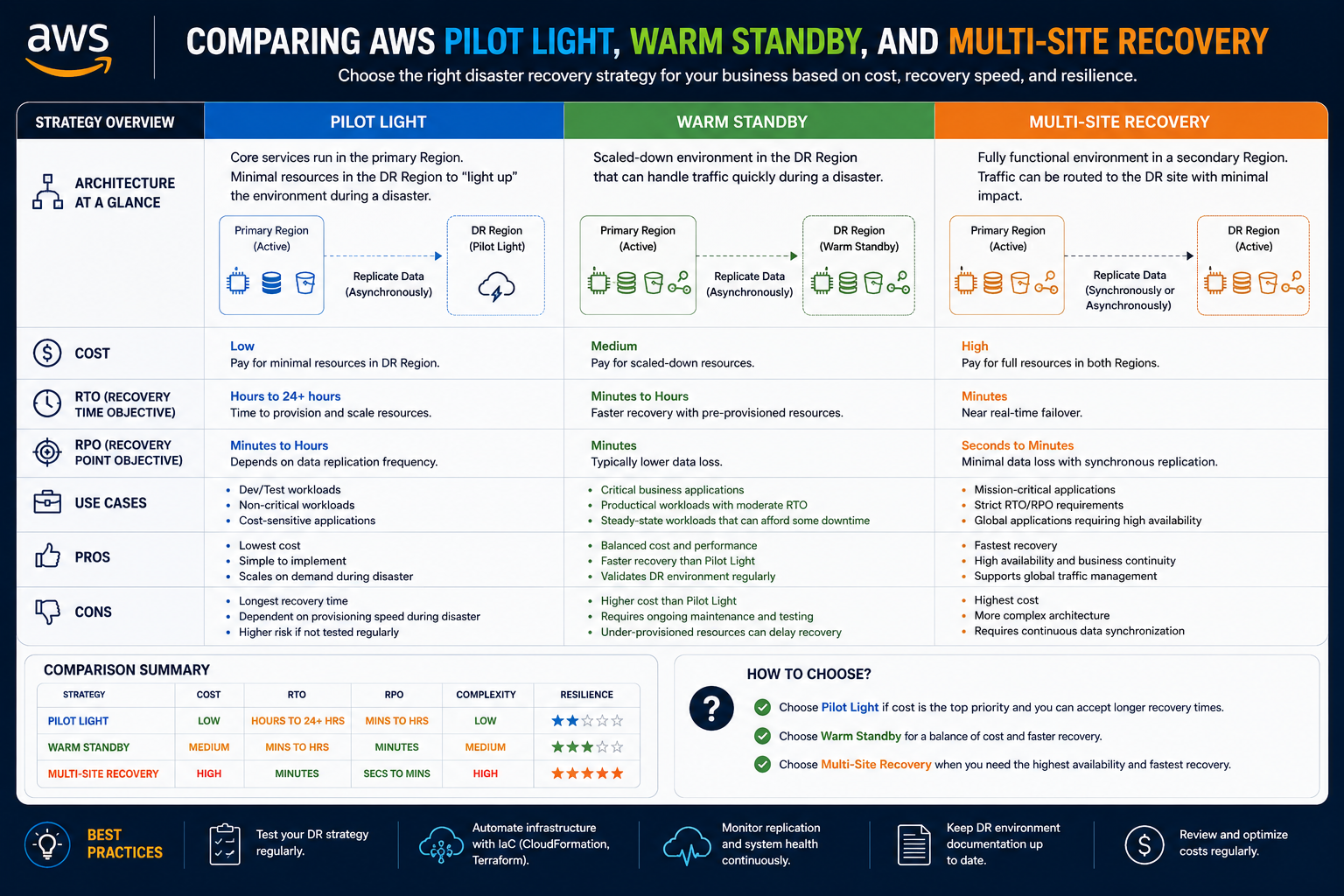
AWS offers several disaster recovery models that balance cost, automation, availability, and operational complexity. Among the most widely used approaches are Pilot Light and Warm Standby. These strategies provide significantly faster recovery than traditional backup-based methods while remaining more cost-effective than fully active multi-site environments.
Pilot Light and Warm Standby are designed to maintain some level of continuously available infrastructure in AWS. Rather than restoring everything from scratch after a disaster occurs, these strategies keep essential components ready for rapid activation.
The primary difference between these models lies in how much infrastructure remains operational before a failure happens. Pilot Light focuses on maintaining core services in a minimal state, while Warm Standby maintains a scaled-down but fully functional version of the production environment.
Both approaches are widely used because they strike a practical balance between affordability and resilience.
Understanding the Evolution Beyond Backup and Restore
Backup and Restore works well for systems that can tolerate extended downtime. However, many organizations eventually outgrow this model as applications become more business-critical.
Several challenges often drive this transition:
- Increasing customer expectations
- Higher revenue dependence on digital services
- Greater operational reliance on applications
- Stricter compliance requirements
- Competitive pressure for continuous availability
- Reduced tolerance for downtime
When organizations begin requiring recovery within minutes rather than hours, they need disaster recovery solutions capable of faster failover and reduced manual intervention.
This is where Pilot Light and Warm Standby become valuable.
These strategies maintain preconfigured infrastructure components in AWS so recovery can occur quickly without rebuilding environments entirely from backups.
What Is the Pilot Light Strategy
The Pilot Light strategy is named after the small flame that remains continuously lit in older gas-powered appliances. Although the main system is not fully active, a minimal ignition source remains available and ready to activate the larger environment when needed.
In AWS disaster recovery, Pilot Light follows a similar concept.
Critical core infrastructure components remain continuously running in the cloud, while the remainder of the environment stays inactive or minimally configured until a disaster occurs.
The goal is to maintain enough infrastructure to enable rapid scaling and restoration while reducing operational costs compared to a fully active environment.
Instead of keeping the entire production architecture online at all times, Pilot Light keeps only the most essential components operating continuously.
Core Components Maintained in Pilot Light
A Pilot Light environment usually includes:
- Replicated databases
- Core networking configurations
- Machine images
- Minimal compute resources
- Essential application services
- Infrastructure templates
The exact configuration depends on organizational requirements, but the central idea remains the same: preserve the foundation needed for rapid recovery.
For example, a company may continuously replicate its production database to AWS while keeping application servers powered off or minimally provisioned. If a disaster occurs, the remaining infrastructure can quickly scale up and connect to the replicated database.
This significantly reduces recovery time compared to rebuilding everything from backups.
Database Replication in Pilot Light
Databases are often the most critical component in Pilot Light architectures because they contain essential operational data.
AWS provides several replication technologies that support disaster recovery objectives.
Organizations commonly use:
- Amazon RDS Read Replicas
- Cross-region database replication
- DynamoDB Global Tables
- Continuous snapshot replication
- Database migration services
By continuously synchronizing production data to AWS, organizations ensure that current information remains available during recovery operations.
When a disaster occurs, applications can reconnect to the replicated database and resume operations much faster than traditional restoration methods would allow.
Continuous replication also helps reduce Recovery Point Objectives because the backup environment contains recent data updates.
Using Amazon EC2 in Pilot Light Environments
Amazon EC2 instances play an important role in Pilot Light strategies.
Organizations often maintain preconfigured Amazon Machine Images containing required operating systems, applications, middleware, and configurations.
These machine images allow rapid deployment of production-ready servers during failover events.
Instead of manually installing software after a disaster occurs, administrators can launch instances immediately from stored templates.
Some Pilot Light environments maintain stopped EC2 instances that can be powered on during recovery. Others maintain only machine images and automated deployment templates.
This approach reduces infrastructure costs because compute resources are not continuously consuming full production-level capacity.
Infrastructure as Code in Pilot Light Architectures
Infrastructure as Code has become a foundational component of modern disaster recovery planning.
AWS CloudFormation and similar automation tools allow organizations to define infrastructure using reusable templates.
These templates describe:
- Virtual networks
- Security groups
- Load balancers
- EC2 instances
- Storage configurations
- IAM permissions
- Application dependencies
In Pilot Light environments, infrastructure templates enable rapid deployment of missing components during failover events.
Instead of manually rebuilding systems under pressure, administrators can launch standardized environments automatically.
This improves consistency, reduces recovery time, and minimizes operational errors.
Infrastructure as Code also simplifies testing because environments can be recreated repeatedly in predictable ways.
Automation and Recovery Orchestration
Automation is one of the greatest advantages of AWS disaster recovery solutions.
Pilot Light architectures often use automated workflows to detect failures and initiate recovery procedures.
AWS services commonly involved include:
- Amazon Route 53
- AWS Lambda
- Amazon CloudWatch
- Amazon SNS
- AWS Systems Manager
For example, CloudWatch health checks can monitor application availability continuously. If a failure is detected, notifications can trigger Lambda functions that automatically launch EC2 instances, update DNS records, and activate additional infrastructure components.
This level of automation dramatically reduces recovery time compared to manual disaster response procedures.
Automation also helps organizations achieve more predictable and repeatable recovery outcomes.
Benefits of the Pilot Light Strategy
Pilot Light offers several important advantages that make it attractive for many organizations.
Key benefits include:
- Lower operational costs compared to fully active environments
- Faster recovery than Backup and Restore
- Reduced infrastructure complexity
- Continuous data replication
- Scalable recovery capabilities
- Improved automation opportunities
Pilot Light provides an excellent balance between resilience and affordability.
Organizations that require moderate recovery speeds but cannot justify the expense of continuously running full-scale duplicate environments often choose this model.
The strategy is especially useful for businesses transitioning toward more advanced cloud-native disaster recovery practices.
Limitations of the Pilot Light Strategy
Despite its advantages, Pilot Light also has limitations.
Recovery still requires activation and scaling of infrastructure components after the disaster occurs. Because of this, failover is not instantaneous.
Potential challenges include:
- Additional recovery time compared to Warm Standby
- Dependence on automation workflows
- Ongoing maintenance of templates and machine images
- Complexity in synchronization management
- Potential scaling delays during failover
Organizations must regularly test Pilot Light procedures to ensure recovery mechanisms function properly during actual emergencies.
Without testing, configuration drift and outdated images may cause unexpected failures.
Recovery Time and Recovery Point Expectations
Pilot Light generally supports Recovery Time Objectives measured in tens of minutes rather than hours.
Recovery Point Objectives also improve significantly because databases and critical systems are continuously replicated.
Actual performance depends on factors such as:
- Automation maturity
- Application complexity
- Scaling requirements
- Replication frequency
- Network performance
For many organizations, Pilot Light provides sufficient resilience without the substantial expense associated with fully active environments.
Transitioning from Pilot Light to Warm Standby
As business requirements continue to grow, some organizations eventually require even faster recovery capabilities.
In these situations, Warm Standby often becomes the next logical step.
Warm Standby builds upon the Pilot Light concept but maintains a larger portion of the environment continuously operational.
Instead of activating most infrastructure after a failure occurs, Warm Standby keeps nearly the entire environment running in a scaled-down state.
This significantly reduces failover time while still controlling costs.
Understanding the Warm Standby Strategy
Warm Standby maintains a fully functional but smaller version of the production environment in AWS.
All critical infrastructure components remain online continuously, including:
- Application servers
- Databases
- Load balancers
- Networking components
- Authentication systems
- Monitoring services
- Security controls
Unlike Pilot Light, which maintains only core foundational services, Warm Standby keeps the complete architecture operational at reduced capacity.
The standby environment is capable of handling limited traffic even before failover occurs.
When disaster strikes, the environment simply scales up to support full production workloads.
How Warm Standby Operates
In a Warm Standby model, traffic normally flows through the primary production environment. Meanwhile, the standby environment operates in the background with smaller instance sizes or fewer resources.
For example:
- Production may use ten application servers while standby uses two
- Production databases may use large instances while standby uses smaller replicas
- Auto Scaling groups remain configured but inactive until needed
- Load balancers remain operational and ready to accept traffic
If the primary environment fails, AWS automation rapidly scales the standby environment to full production capacity.
Because systems are already online, failover occurs much faster than in Pilot Light architectures.
The Role of Auto Scaling in Warm Standby
Auto Scaling is a critical component of Warm Standby environments.
AWS Auto Scaling allows infrastructure to expand automatically based on demand, health metrics, or failover events.
During normal operations, the standby environment runs at minimal capacity to reduce costs. When failover occurs, Auto Scaling launches additional instances automatically.
This approach provides several advantages:
- Reduced operational expense
- Rapid scalability
- Flexible resource management
- Improved recovery speed
- Automated infrastructure growth
Organizations can configure scaling policies according to CPU usage, network traffic, request volume, or custom CloudWatch metrics.
This ensures the standby environment can rapidly adapt to production-level demand during recovery.
Networking and Traffic Management
Traffic management plays a major role in Warm Standby architectures.
Amazon Route 53 is commonly used to manage DNS failover between production and standby environments.
Health checks continuously monitor application availability. If the primary environment becomes unavailable, Route 53 redirects traffic automatically to the standby infrastructure.
Elastic Load Balancers distribute traffic across standby servers while maintaining application availability.
Because the standby environment is already operational, users may experience only minimal disruption during failover events.
This level of responsiveness makes Warm Standby highly attractive for business-critical applications.
Continuous Synchronization in Warm Standby
Warm Standby environments rely heavily on continuous synchronization between production and standby systems.
Synchronization may involve:
- Database replication
- File synchronization
- Configuration management
- Security policy updates
- Application deployment pipelines
Maintaining consistency between environments is essential. If standby systems fall out of sync, failover may introduce errors or outdated information.
Organizations therefore implement automated deployment and configuration management processes to maintain alignment between environments.
Continuous integration and continuous deployment pipelines often support these synchronization efforts.
Advantages of Warm Standby
Warm Standby offers several major benefits.
Key advantages include:
- Faster recovery than Pilot Light
- Lower downtime during failover
- Reduced operational disruption
- Fully functional standby environments
- Improved testing capabilities
- Better user experience during outages
Because the standby environment remains continuously operational, organizations can test disaster recovery procedures more effectively without major disruptions.
Warm Standby also supports shorter Recovery Time Objectives and lower Recovery Point Objectives compared to Backup and Restore or Pilot Light.
Limitations of Warm Standby
Despite its strengths, Warm Standby has some disadvantages.
The most significant limitation is cost.
Because nearly all infrastructure components remain active continuously, operational expenses increase substantially compared to Pilot Light environments.
Additional challenges include:
- Higher AWS consumption costs
- Increased operational complexity
- Greater synchronization requirements
- More demanding monitoring responsibilities
- Additional maintenance overhead
Organizations must carefully evaluate whether the improved recovery speed justifies the additional expense.
For many business-critical applications, however, the benefits outweigh the costs.
Testing Disaster Recovery Procedures
Testing is essential for all disaster recovery strategies, especially Warm Standby and Pilot Light architectures.
Without regular testing, organizations cannot confidently verify that failover mechanisms will operate correctly during real emergencies.
Disaster recovery testing may include:
- Simulated failovers
- Database recovery validation
- Infrastructure deployment exercises
- Application functionality testing
- Security verification
- Performance benchmarking
AWS automation tools make testing easier because environments can be launched, validated, and terminated programmatically.
Testing also helps organizations identify:
- Configuration drift
- Replication failures
- Security gaps
- Performance bottlenecks
- Outdated machine images
Continuous testing improves confidence and operational readiness.
Choosing Between Pilot Light and Warm Standby
Selecting the right disaster recovery strategy depends on business requirements, technical complexity, and financial constraints.
Pilot Light is often appropriate when:
- Moderate downtime is acceptable
- Budget constraints exist
- Workloads are less time-sensitive
- Organizations seek lower operational costs
Warm Standby is often preferable when:
- Faster recovery is required
- Applications are business-critical
- Downtime must remain minimal
- User experience is highly important
Many organizations implement both strategies across different workloads depending on system criticality.
The flexibility of AWS allows businesses to customize disaster recovery architectures according to operational priorities and risk tolerance.
Introduction to High-Availability Disaster Recovery
As organizations continue expanding their digital operations, the cost of downtime becomes increasingly severe. Businesses now depend on uninterrupted access to applications, databases, cloud services, and communication platforms. In many industries, even a few minutes of disruption can lead to financial losses, compliance issues, operational paralysis, and damage to customer trust.
While Backup and Restore, Pilot Light, and Warm Standby provide varying levels of protection, some organizations require even greater resilience. These businesses cannot tolerate significant downtime or major data loss under any circumstances. For them, AWS offers the most advanced disaster recovery approach: Multi-Site architecture, also known as Hot Standby or Active-Active disaster recovery.
This strategy involves maintaining multiple fully operational environments simultaneously. Instead of activating backup infrastructure after a disaster occurs, the backup environment is already online, synchronized, and capable of immediately handling production workloads.
Although Multi-Site architecture is the most expensive disaster recovery model, it provides the highest level of availability and fault tolerance. It is commonly used by organizations where service interruption could have catastrophic operational or financial consequences.
Understanding how Multi-Site disaster recovery works is essential for businesses seeking near-continuous availability in the cloud.
What Is Multi-Site Disaster Recovery
Multi-Site disaster recovery involves running multiple production-ready environments at the same time across separate AWS regions or availability zones.
Unlike Warm Standby, where the secondary environment operates at reduced capacity, Multi-Site environments are fully active and capable of supporting production traffic continuously.
In many implementations, traffic is distributed between environments during normal operations. If one environment experiences an outage, traffic automatically shifts to the remaining healthy environment without requiring major recovery procedures.
This architecture is often referred to as Active-Active because multiple sites actively participate in serving users simultaneously.
Some organizations also implement Active-Passive variations, where the secondary site remains fully operational but receives little or no traffic until failover occurs.
The core objective of Multi-Site architecture is simple: eliminate downtime as much as possible while maintaining continuous data synchronization.
Why Organizations Choose Multi-Site Architectures
Organizations adopt Multi-Site disaster recovery when outages become unacceptable from a business perspective.
Industries commonly using this strategy include:
- Banking and financial services
- Healthcare systems
- E-commerce platforms
- Telecommunications providers
- Government agencies
- Global SaaS providers
- Media streaming platforms
- Large enterprise operations
These organizations often face requirements such as:
- Continuous customer access
- Regulatory compliance obligations
- Global user availability
- Real-time transaction processing
- Extremely low downtime tolerance
- Near-zero data loss expectations
For example, a financial trading platform processing transactions worldwide cannot easily tolerate prolonged downtime. Even brief interruptions may lead to enormous financial losses and legal consequences.
Similarly, healthcare systems supporting emergency medical operations may require uninterrupted access to patient records and clinical applications.
In these scenarios, the cost of downtime far exceeds the expense of maintaining duplicate infrastructure.
Core Principles of Multi-Site Recovery
Multi-Site architectures rely on several foundational principles:
- Geographic redundancy
- Real-time synchronization
- Automated failover
- Continuous monitoring
- Distributed traffic management
- Infrastructure consistency
Each environment contains the complete application stack required to support production operations.
This includes:
- Compute infrastructure
- Databases
- Networking components
- Security controls
- Monitoring systems
- Application services
- Storage resources
- Load balancing mechanisms
Because all components remain continuously operational, failover can occur almost instantly.
AWS Regions and Availability Zones
AWS global infrastructure provides the foundation for Multi-Site disaster recovery.
AWS divides infrastructure into regions, and each region contains multiple availability zones.
Availability zones are isolated data centers designed to minimize the impact of localized failures. Regions provide geographic separation that protects against larger-scale disasters.
Organizations implementing Multi-Site recovery often deploy environments across multiple regions.
For example:
- One environment may operate in North America
- Another may operate in Europe
- A third may operate in Asia-Pacific
This geographic separation improves resilience against:
- Natural disasters
- Power outages
- Regional infrastructure failures
- Network disruptions
- Large-scale cyber incidents
If one region becomes unavailable, workloads continue operating in another region.
Real-Time Data Replication
Data replication is one of the most important components of Multi-Site architecture.
Because both environments remain active, data must stay synchronized continuously to prevent inconsistencies.
AWS offers multiple replication technologies, including:
- Amazon RDS cross-region replication
- DynamoDB Global Tables
- Amazon S3 replication
- Elastic File System replication
- Database clustering technologies
- Continuous streaming replication
Real-time replication ensures that transactions, updates, and user interactions remain consistent across environments.
This supports extremely low Recovery Point Objectives because replicated systems contain nearly identical data at all times.
Organizations must carefully design replication architectures to balance consistency, performance, and latency.
Challenges of Real-Time Synchronization
Although real-time synchronization provides major benefits, it also introduces complexity.
Potential challenges include:
- Network latency
- Replication conflicts
- Data consistency issues
- Increased operational overhead
- Higher bandwidth usage
- Application synchronization errors
Applications designed for single-region deployments may require modification to support distributed architectures effectively.
Organizations must carefully evaluate how applications handle:
- Simultaneous updates
- Distributed transactions
- Session persistence
- Database consistency
- Network interruptions
Without proper design, synchronization problems can impact application reliability.
Traffic Distribution in Multi-Site Environments
Traffic management plays a critical role in Multi-Site disaster recovery.
AWS Route 53 commonly manages traffic distribution across regions.
Traffic routing strategies may include:
- Latency-based routing
- Geolocation routing
- Weighted routing
- Health-check-based failover
- Multi-value answer routing
During normal operations, users may connect to the nearest healthy region automatically.
If one environment fails, Route 53 redirects traffic to available regions without requiring manual intervention.
This automated failover capability helps minimize service interruptions.
Elastic Load Balancers within each environment further distribute traffic across healthy application instances.
The Role of Auto Scaling in Multi-Site Recovery
Even though Multi-Site environments remain fully active, Auto Scaling still plays an important role.
Traffic volumes can fluctuate significantly during failover events. If one region becomes unavailable, remaining environments must absorb the additional load.
AWS Auto Scaling automatically adjusts infrastructure capacity according to demand.
Scaling policies may respond to:
- CPU utilization
- Memory consumption
- Request volume
- Network throughput
- Queue depth
- Custom application metrics
This elasticity allows organizations to maintain performance during unexpected traffic surges.
Without Auto Scaling, failover events could overwhelm surviving infrastructure.
Infrastructure as Code and Environment Consistency
Maintaining consistency across multiple production environments is essential.
Infrastructure as Code tools such as AWS CloudFormation help organizations deploy identical configurations repeatedly.
Infrastructure templates define:
- Virtual private clouds
- Security groups
- IAM policies
- Application servers
- Database configurations
- Monitoring systems
- Load balancers
- Storage resources
Using Infrastructure as Code provides several advantages:
- Consistent deployments
- Faster environment provisioning
- Reduced human error
- Easier disaster recovery testing
- Simplified change management
As environments grow larger and more complex, automation becomes increasingly necessary.
Manual configuration management across multiple regions is difficult and error-prone.
Security Considerations in Multi-Site Architectures
Security remains a critical consideration in disaster recovery planning.
Multi-Site environments introduce additional complexity because multiple active regions must remain synchronized securely.
Organizations must secure:
- Data replication channels
- Identity management systems
- Encryption keys
- Access controls
- Monitoring systems
- API communications
AWS provides numerous security services that support disaster recovery architectures, including:
- AWS Identity and Access Management
- AWS Key Management Service
- AWS Shield
- AWS WAF
- Amazon GuardDuty
- AWS Security Hub
Security policies must remain consistent across all environments.
If one environment uses outdated security configurations, failover could expose vulnerabilities during emergencies.
Continuous auditing and automated compliance validation are therefore extremely important.
Monitoring and Observability
Continuous monitoring is essential for maintaining reliable Multi-Site environments.
Organizations must monitor:
- Infrastructure health
- Replication status
- Application performance
- Database synchronization
- Security events
- Traffic patterns
- Latency metrics
- Resource utilization
AWS CloudWatch provides centralized monitoring capabilities across distributed environments.
Alarms and notifications help administrators detect issues before they become major failures.
Observability tools also support incident response by providing visibility into system behavior during outages.
Comprehensive logging and metrics collection are particularly important in distributed architectures because troubleshooting becomes more complex across multiple regions.
Disaster Recovery Testing and Simulation
Testing is one of the most critical aspects of any disaster recovery strategy.
Even highly sophisticated Multi-Site architectures can fail unexpectedly if recovery procedures are never validated.
Organizations should regularly perform:
- Failover simulations
- Traffic redirection tests
- Replication validation exercises
- Infrastructure deployment testing
- Security audits
- Performance benchmarking
Testing helps identify:
- Configuration drift
- Replication delays
- Scaling limitations
- Automation failures
- Application incompatibilities
- Security weaknesses
AWS environments make testing easier because organizations can automate infrastructure deployment and teardown processes.
Regular testing also improves operational confidence and ensures staff understand emergency procedures.
Cost Considerations in Multi-Site Recovery
Cost is one of the primary reasons many organizations hesitate to adopt Multi-Site architectures.
Maintaining duplicate production environments requires significant investment.
Expenses may include:
- Compute resources
- Database replication
- Storage consumption
- Network bandwidth
- Monitoring infrastructure
- Security services
- Operational staffing
- Continuous testing activities
Because environments remain fully active continuously, organizations pay for infrastructure even when no disaster occurs.
However, businesses must compare these costs against the financial consequences of downtime.
For organizations where outages could result in millions of dollars in losses, Multi-Site recovery often becomes financially justified.
AWS elasticity can help optimize costs somewhat through Auto Scaling and dynamic resource management.
Even so, Multi-Site remains the most expensive disaster recovery approach.
Comparing All AWS Disaster Recovery Strategies
AWS disaster recovery strategies exist along a spectrum of cost and resilience.
Backup and Restore provides inexpensive protection but longer recovery times.
Pilot Light improves recovery speed by maintaining core infrastructure continuously.
Warm Standby further reduces downtime by operating a scaled-down version of the full environment.
Multi-Site provides the highest availability through continuously active duplicate environments.
Organizations should select strategies based on:
- Business priorities
- Budget limitations
- Application criticality
- Compliance requirements
- Customer expectations
- Operational risk tolerance
Many enterprises combine multiple strategies across different systems.
For example:
- Critical payment systems may use Multi-Site
- Customer applications may use Warm Standby
- Internal tools may use Pilot Light
- Archival systems may use Backup and Restore
This layered approach helps optimize both resilience and cost efficiency.
Operational Complexity in Disaster Recovery
As disaster recovery architectures become more advanced, operational complexity increases significantly.
Organizations must manage:
- Replication pipelines
- Distributed databases
- Infrastructure automation
- Security synchronization
- Monitoring systems
- Deployment pipelines
- Compliance requirements
- Incident response procedures
Without proper governance, complexity can become difficult to control.
Strong operational processes are essential for maintaining reliable disaster recovery environments.
Many organizations establish dedicated Site Reliability Engineering or Cloud Operations teams specifically to manage high-availability systems.
Documentation, automation, testing, and change management all become increasingly important as environments scale.
The Importance of Continuous Improvement
Disaster recovery planning should never remain static.
Business requirements evolve over time, applications change, infrastructure grows, and new security threats emerge continuously.
Organizations should regularly reassess:
- RTO requirements
- RPO objectives
- Infrastructure costs
- Application dependencies
- Compliance obligations
- Security posture
- Recovery procedures
Continuous improvement ensures disaster recovery strategies remain aligned with organizational goals.
AWS frequently introduces new services and capabilities that may improve resilience or reduce costs.
Staying current with cloud innovations helps organizations maintain effective disaster recovery architectures.
Building a Disaster Recovery Culture
Technology alone does not guarantee successful disaster recovery.
Organizations must also develop a culture of preparedness.
Employees should understand:
- Incident response procedures
- Escalation processes
- Communication plans
- Recovery responsibilities
- Testing expectations
Leadership support is equally important.
Disaster recovery initiatives often require ongoing investment, operational discipline, and executive sponsorship.
Without organizational commitment, even technically advanced recovery architectures may fail during real emergencies.
Preparedness must become part of the organization’s operational mindset.
Conclusion
AWS provides organizations with a powerful range of disaster recovery solutions capable of supporting nearly every operational requirement and budget level. From simple Backup and Restore environments to highly sophisticated Multi-Site architectures, businesses can design cloud recovery strategies that align with their tolerance for downtime and data loss.
Backup and Restore offers affordability and simplicity for less critical workloads. Pilot Light introduces faster recovery through continuously replicated core infrastructure. Warm Standby further improves resilience by maintaining fully functional scaled-down environments. Multi-Site architectures deliver near-continuous availability through fully active duplicate environments operating across multiple regions.
Selecting the correct strategy depends on careful analysis of Recovery Time Objectives, Recovery Point Objectives, business priorities, compliance obligations, and financial considerations. No single solution fits every workload.
Organizations must also remember that disaster recovery is not simply about infrastructure. Successful recovery depends on automation, monitoring, testing, security, operational readiness, and continuous improvement.
As businesses become increasingly dependent on digital services, disaster recovery planning will continue growing in importance. AWS enables organizations to build resilient, scalable, and highly available systems capable of withstanding failures while minimizing disruption.
Ultimately, the goal of disaster recovery is not merely restoring systems after an outage. The real objective is ensuring business continuity, protecting customer trust, and maintaining operational stability even when unexpected events occur.