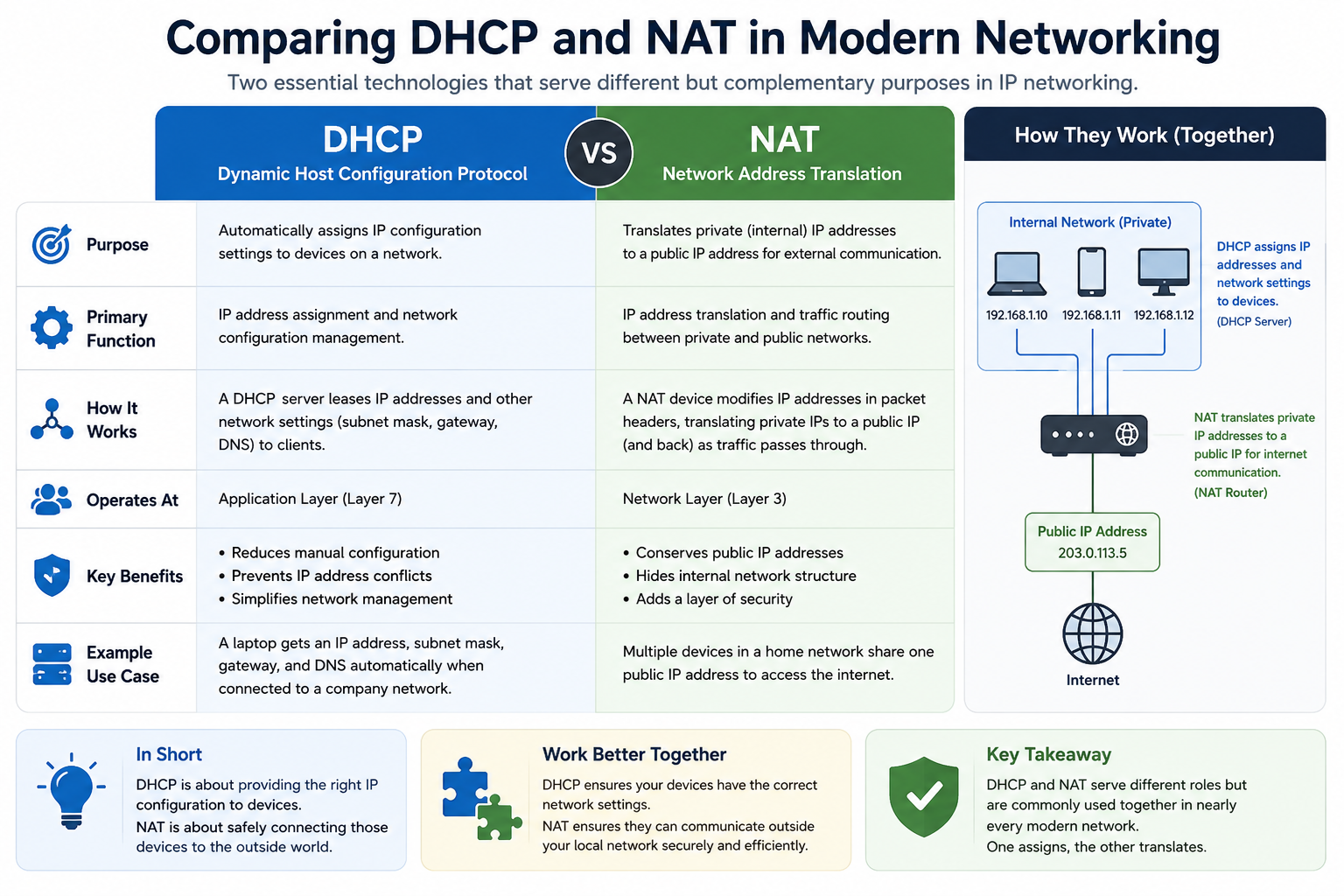
Modern computer networks rely on several technologies working together to ensure devices can communicate efficiently and securely. Two of the most important technologies in networking are Dynamic Host Configuration Protocol, commonly known as DHCP, and Network Address Translation, commonly known as NAT. These technologies are used in nearly every network environment, including homes, offices, schools, cloud environments, and enterprise infrastructures.
Although DHCP and NAT are both associated with IP addressing, they serve entirely different purposes. DHCP is responsible for assigning IP addresses and network settings to devices joining a network. NAT is responsible for translating private IP addresses into public addresses so devices can communicate over the internet. One technology focuses on internal network organization, while the other manages communication between internal devices and external networks.
Many people new to networking mistakenly believe DHCP and NAT perform similar functions because both interact with internet protocol addresses. However, network administrators understand that each technology addresses a separate networking challenge. DHCP simplifies address management inside a network, while NAT helps conserve public IP addresses and improve network security.
Understanding these technologies is essential for anyone interested in networking, cybersecurity, systems administration, cloud computing, or IT support. They form the foundation of how modern internet communication works. Whether someone is configuring a small home router or managing a global enterprise infrastructure, DHCP and NAT remain central to reliable network operations.
The Role of IP Addresses in Networking
To understand DHCP and NAT fully, it is important first to understand the role of IP addresses within a network. Every device connected to a network requires a unique identifier so information can be sent and received correctly. This identifier is called an IP address.
An IP address works similarly to a mailing address in the physical world. Just as a postal service uses a street address to deliver packages to the correct location, networks use IP addresses to ensure data reaches the intended device.
Whenever users browse websites, stream videos, send emails, participate in online meetings, or use cloud applications, devices exchange information using IP addresses. Routers and networking equipment depend on these addresses to direct traffic correctly across local networks and the internet.
Without unique IP addresses, devices would not know where to send or receive information. Communication would become impossible because network traffic would lack proper destinations.
There are two primary types of IP addresses commonly used today: IPv4 and IPv6. IPv4 remains the most widely deployed version and uses 32-bit addressing. This format creates addresses such as 192.168.1.1. IPv6 uses 128-bit addressing and was developed to solve the shortage of available IPv4 addresses.
Despite the growth of IPv6 adoption, IPv4 continues to dominate many networking environments. Technologies such as NAT were created partly to help extend the lifespan of IPv4 by reducing the number of public addresses required.
What Is Dynamic Host Configuration Protocol
Dynamic Host Configuration Protocol is a network management protocol designed to automate the assignment of IP addresses and network configuration settings. DHCP eliminates the need for administrators to manually configure devices every time they connect to a network.
Before DHCP became common, network administrators had to assign IP addresses manually to every computer, printer, server, and networking device. In small environments this process was manageable, but as organizations expanded, manual configuration became inefficient and error-prone.
Imagine a company with thousands of employees, hundreds of conference rooms, wireless devices, printers, servers, and remote offices. Manually assigning and tracking IP addresses for every device would require enormous administrative effort. Mistakes such as duplicate addresses or incorrect configurations would cause connectivity problems and disrupt business operations.
DHCP solved this challenge by automating the entire process. When devices join a network, DHCP automatically provides the required settings so communication can begin immediately.
This automation transformed network management and became a standard component of modern networking.
How DHCP Was Developed
DHCP originated in the early 1990s as networks rapidly expanded in size and complexity. It evolved from an earlier protocol called Bootstrap Protocol, or BOOTP, which allowed devices to retrieve configuration information during startup.
As networking environments became larger and more dynamic, administrators needed a more flexible solution capable of automatically assigning addresses and managing changing device connections. DHCP was designed to meet these requirements.
The protocol was officially standardized in 1993 and quickly gained widespread adoption. Its ability to reduce manual configuration work made it essential for enterprise environments and later for home networking equipment.
Today nearly every router includes DHCP functionality by default. Corporate networks often use dedicated DHCP servers to handle address management for thousands of devices simultaneously.
Why Manual IP Addressing Creates Problems
Manually assigning IP addresses may seem simple at first, but it introduces several serious challenges as networks grow.
One major problem is address conflicts. If two devices accidentally receive the same IP address, network communication fails because routers cannot distinguish between them properly.
Another issue involves administrative overhead. Tracking every assigned address manually becomes increasingly difficult as more devices connect to the network. Changes in staffing, office layouts, hardware upgrades, and remote connectivity create additional complexity.
Manual configuration also increases the likelihood of human error. Incorrect subnet masks, gateway settings, or DNS configurations can prevent devices from communicating properly.
Troubleshooting manually configured networks often consumes significant time because administrators must verify each device individually.
DHCP eliminates many of these problems through centralized automation and dynamic address management.
The Basic DHCP Communication Process
DHCP communication occurs between a client device and a DHCP server. This interaction typically follows four primary stages.
The process begins when a device connects to a network and broadcasts a discovery message. Since the device does not yet possess a valid IP address, it sends this request to all systems within the local network segment.
The DHCP server receives the request and responds with an offer containing an available IP address and other network settings.
The client device then sends a request message indicating acceptance of the offered configuration.
Finally, the DHCP server sends an acknowledgment confirming the assignment.
This sequence usually happens within seconds and requires no user involvement. Once complete, the device gains full access to network resources.
The automation provided by DHCP significantly simplifies user experiences. Most users connect devices to a network without ever realizing these background processes are occurring continuously.
Understanding DHCP Address Pools
A DHCP server manages a collection of addresses known as a scope or address pool. This pool contains all available addresses that can be distributed to client devices.
For example, a home router may provide addresses ranging from 192.168.0.2 through 192.168.0.254. When devices connect, the router selects an unused address from this range.
The DHCP server maintains records showing which addresses are currently assigned and which remain available. This tracking prevents duplicate assignments and ensures proper network operation.
In enterprise environments, administrators may create multiple scopes for different departments, floors, buildings, or geographic locations. Each scope may include unique settings tailored to specific operational requirements.
Careful address pool design improves scalability, simplifies troubleshooting, and enhances network organization.
DHCP Lease Times Explained
DHCP addresses are generally assigned temporarily rather than permanently. The temporary assignment period is known as a lease.
Lease durations vary depending on network requirements. In a home environment, leases may remain active for several days because devices typically remain connected consistently.
In environments with frequent user turnover, such as airports, hotels, universities, or conference centers, lease durations are often shorter. Shorter leases allow addresses to return to the available pool more quickly after devices disconnect.
Before a lease expires, the client device attempts to renew it automatically. If the DHCP server approves the renewal, the device keeps the same address without interrupting connectivity.
If the device disconnects permanently or fails to renew the lease, the address becomes available for reassignment.
This leasing system allows networks to use address space efficiently while supporting large numbers of temporary connections.
Additional Network Settings Provided by DHCP
Although DHCP is best known for assigning IP addresses, it also provides several other essential configuration settings.
One important setting is the subnet mask. The subnet mask determines which portion of an IP address identifies the network and which portion identifies the individual device.
Devices use subnet masks to determine whether communication should remain within the local network or be forwarded through a router.
Another critical setting is the default gateway. The gateway acts as the path used to reach external networks such as the internet. Without a valid gateway configuration, devices may communicate locally but fail to access outside resources.
DHCP also distributes Domain Name System server addresses. DNS servers translate human-readable domain names into machine-readable IP addresses. Without DNS, users would need to memorize numerical addresses for every website or online service.
Additional DHCP options may include network time servers, voice-over-IP settings, boot configurations, and specialized enterprise configurations.
Centralizing these settings through DHCP improves consistency and simplifies administration.
DHCP in Home Networks
Most home users interact with DHCP every day without realizing it. Home routers typically include built-in DHCP services that automatically assign addresses to smartphones, laptops, gaming consoles, televisions, printers, and smart home devices.
When a new device connects to the home Wi-Fi network, the router automatically provides the required configuration settings. Users usually do not need to enter IP addresses manually.
This convenience makes modern home networking simple and accessible even for non-technical users.
As smart homes continue expanding with connected cameras, thermostats, lighting systems, and appliances, DHCP becomes increasingly important for managing growing numbers of devices efficiently.
DHCP in Enterprise Networks
Enterprise environments rely heavily on DHCP due to their scale and complexity.
Large organizations may support tens of thousands of devices across multiple offices and geographic regions. Managing these devices manually would be impractical.
Enterprise DHCP servers often include advanced features such as redundancy, failover support, centralized monitoring, logging, and integration with directory services.
Administrators can create separate scopes for departments, apply custom configurations, and reserve specific addresses for critical systems.
Automation reduces operational costs while improving reliability and scalability.
Many enterprises also integrate DHCP with security systems to track connected devices and monitor network activity more effectively.
Benefits of DHCP Automation
One of DHCP’s greatest strengths is automation. Automated address assignment reduces administrative workload significantly and minimizes human error.
Scalability is another major advantage. Networks can expand rapidly without requiring manual reconfiguration of every device.
Consistency also improves because devices receive standardized settings from a centralized source.
Mobility becomes easier as users move devices between locations and automatically receive appropriate configurations for each environment.
DHCP additionally simplifies troubleshooting because administrators can manage configurations centrally rather than checking individual devices manually.
For organizations supporting remote work, wireless networking, and mobile connectivity, DHCP provides essential flexibility and operational efficiency.
Potential Risks and Limitations of DHCP
Although DHCP offers many advantages, it also introduces certain risks.
One concern involves rogue DHCP servers. Unauthorized systems connected to the network may begin distributing incorrect configurations, potentially disrupting connectivity or redirecting traffic maliciously.
Enterprise networks often implement DHCP snooping features to prevent unauthorized DHCP activity.
Another issue involves lease exhaustion. If the address pool becomes depleted because too many devices request connections simultaneously, new devices may fail to obtain addresses.
Improper lease durations can also create inefficiencies. Extremely short leases generate excessive network traffic, while excessively long leases may waste address space.
DHCP dependence may additionally become problematic if the DHCP server fails. Without a functioning server, new devices cannot obtain network configurations automatically.
To prevent outages, many organizations deploy redundant DHCP servers with failover capabilities.
How DHCP Supports Modern Networking
Modern networking environments depend heavily on flexibility, scalability, and automation. DHCP supports these requirements by allowing devices to connect dynamically without manual intervention.
Wireless networks, remote work environments, cloud infrastructures, and mobile devices all rely extensively on automatic configuration services.
As organizations adopt virtualization, cloud computing, and software-defined networking, DHCP continues evolving to support increasingly complex infrastructures.
Even though users rarely notice DHCP operating in the background, it remains one of the foundational technologies enabling modern digital communication.
Without DHCP, managing today’s large-scale networks would be dramatically more difficult, time-consuming, and error-prone.
Introduction to Network Address Translation
As computer networks expanded across homes, businesses, governments, and cloud environments, the demand for internet connectivity increased dramatically. Every smartphone, laptop, server, gaming console, printer, and smart device required a method to communicate with systems outside the local network. This explosive growth created a major challenge for internet infrastructure because the number of available public IPv4 addresses was limited.
To solve this problem, Network Address Translation, commonly known as NAT, became one of the most important technologies in modern networking. NAT allows multiple devices within a private network to share a smaller number of public IP addresses when accessing the internet.
Without NAT, the growth of the internet would have been severely restricted. Organizations and households would require a unique public IP address for every connected device, quickly exhausting the available address space. NAT provided a practical solution that allowed internet usage to scale globally.
In addition to conserving public IP addresses, NAT also introduced important security and traffic management advantages. Today it remains a central component of nearly every router and enterprise firewall.
Understanding how NAT works is essential for anyone studying networking, cybersecurity, cloud computing, systems administration, or internet infrastructure. NAT operates continuously behind the scenes, translating addresses and managing communication between private networks and external systems.
The Difference Between Private and Public IP Addresses
To understand NAT fully, it is necessary to understand the distinction between private and public IP addresses.
Public IP addresses are globally unique identifiers used across the internet. Devices using public addresses can communicate directly with systems outside their local networks. Internet service providers assign these addresses to customers so they can access online resources.
Private IP addresses are different. They are reserved specifically for internal network use and are not routable across the public internet. Devices inside homes, offices, and corporate environments commonly use private addresses for internal communication.
Several address ranges are reserved for private networking purposes. These include address ranges beginning with 10.x.x.x, 172.16.x.x through 172.31.x.x, and 192.168.x.x.
Most home routers assign addresses such as 192.168.1.x to connected devices. These addresses function perfectly within the local network but cannot communicate directly across the internet without translation.
This separation between private and public addressing forms the foundation of NAT operations.
Why IPv4 Address Exhaustion Became a Problem
The original IPv4 addressing system was developed long before the internet became a global necessity. At the time, approximately 4.3 billion unique addresses appeared more than sufficient.
However, the rapid growth of internet-connected devices changed everything.
Computers were no longer limited to universities and government institutions. Businesses, households, schools, hospitals, and eventually mobile devices all required internet connectivity. Later, smart televisions, gaming consoles, cameras, watches, appliances, and industrial equipment joined the internet ecosystem as well.
As billions of devices connected globally, available public IPv4 addresses began running out.
Without NAT, every internet-connected device would require its own unique public address. The available IPv4 pool would have been exhausted far earlier than it actually was.
NAT became essential because it allowed large numbers of private devices to share single public addresses efficiently.
This innovation extended the lifespan of IPv4 for decades and enabled continued internet growth while newer technologies such as IPv6 developed gradually.
The Core Purpose of NAT
The primary purpose of NAT is to translate private internal addresses into public external addresses when devices communicate outside their local network.
When a device inside a private network sends information to the internet, routers performing NAT replace the device’s private source address with the router’s public address.
The router keeps track of which internal device initiated the communication using translation tables and port mappings.
When response traffic returns from the internet, the router consults these records and forwards the data to the correct internal device.
This process allows multiple devices to share one public address while maintaining separate communication sessions simultaneously.
From the perspective of external internet servers, all traffic appears to originate from the router’s public address rather than individual internal devices.
NAT therefore acts as an intermediary between private networks and the public internet.
How NAT Functions Step by Step
To understand NAT more clearly, consider a typical home network containing several connected devices.
A laptop, smartphone, gaming console, and smart television all possess private addresses assigned by the home router through DHCP.
When the laptop opens a website, it sends a request packet toward the router. The packet contains the laptop’s private IP address as the source address.
The router intercepts this packet before forwarding it to the internet. NAT replaces the laptop’s private source address with the router’s public address assigned by the internet service provider.
The router also records the connection details internally so it knows which device initiated the communication.
The website server responds to the router’s public address because that is the address it received in the request.
When the response reaches the router, NAT examines the translation table, identifies the original internal device, and forwards the data back to the laptop.
This process happens continuously and extremely quickly, usually without users realizing address translation is occurring.
The NAT Translation Table
One of the most important components of NAT functionality is the translation table.
The translation table stores mappings between private internal addresses and public external communication sessions.
Each entry typically includes the internal IP address, external public address, protocol information, and port numbers associated with the connection.
When response traffic arrives, the router uses this table to determine where the data belongs internally.
Without translation tables, routers would not know which internal device should receive returning traffic.
These tables constantly update as devices initiate and terminate communication sessions.
Efficient translation table management is essential for high-performance networking environments handling large numbers of simultaneous connections.
Static NAT Explained
Static NAT creates a permanent one-to-one mapping between a private address and a public address.
Whenever traffic from a particular internal device exits the network, the router always translates it to the same public address.
This type of NAT is commonly used when external systems must reliably reach specific internal devices.
For example, organizations hosting public web servers, mail servers, or remote access systems may use static NAT to maintain consistent accessibility.
Because the mapping never changes, administrators can configure external services and DNS records more easily.
However, static NAT consumes one public address per mapped device. For this reason, it is less efficient for conserving address space compared to other NAT methods.
Static NAT is therefore typically reserved for systems requiring predictable and permanent external accessibility.
Dynamic NAT Explained
Dynamic NAT differs from static NAT because it uses a pool of available public addresses instead of fixed one-to-one mappings.
When internal devices initiate internet communication, the router temporarily assigns an available public address from the pool.
Once the communication session ends, the public address returns to the pool for reuse.
Dynamic NAT provides greater flexibility and better public address utilization than static NAT.
However, organizations still require multiple public addresses to support simultaneous sessions because each internal device receives a temporary external address during communication.
Although dynamic NAT improves efficiency, it does not conserve address space as effectively as Port Address Translation.
Understanding Port Address Translation
Port Address Translation, often abbreviated as PAT, is the most common form of NAT used today.
PAT allows many internal devices to share a single public IP address simultaneously by distinguishing communication sessions using port numbers.
Each communication session receives a unique port mapping, allowing routers to identify which internal device initiated each request.
For example, one device may communicate using port 40001 while another uses port 40002. Even though both devices share the same public IP address, the router differentiates their traffic through port assignments.
PAT dramatically improves address conservation because thousands of devices can share a single public address at the same time.
Most home routers use PAT automatically.
Enterprise firewalls and internet gateways also rely heavily on PAT due to its scalability and efficiency.
Why PAT Became So Important
PAT became essential because it maximized the usefulness of limited IPv4 address space.
Without PAT, households and businesses would require large numbers of public addresses to support modern connectivity demands.
Instead, a single public address can support dozens or even hundreds of simultaneous devices.
This capability became increasingly important as smartphones, tablets, gaming consoles, streaming devices, and smart appliances multiplied rapidly worldwide.
PAT allowed internet service providers to continue supporting growing customer bases without exhausting public address allocations immediately.
Even today, PAT remains critical for IPv4 sustainability.
NAT and Internet Security
Although NAT was originally developed for address conservation, it also introduced valuable security benefits.
Because internal private addresses are hidden from external networks, outside systems cannot directly communicate with internal devices unless specific rules permit it.
This indirect protection reduces exposure to certain types of attacks and unauthorized inbound traffic.
In many home networks, unsolicited incoming requests are automatically blocked because the router lacks matching entries in the NAT translation table.
This behavior creates a basic security barrier between private devices and the public internet.
However, NAT itself should not be considered a complete security solution. Dedicated firewalls, intrusion prevention systems, endpoint security tools, and proper access controls remain essential.
NAT improves privacy and reduces exposure, but comprehensive cybersecurity requires multiple layers of protection.
Limitations of NAT
Despite its advantages, NAT also introduces certain limitations and challenges.
One issue involves application compatibility. Some applications embed IP address information directly within data packets. NAT may interfere with these applications unless special handling mechanisms are implemented.
Voice-over-IP systems, online gaming services, video conferencing platforms, and peer-to-peer applications sometimes experience connectivity problems because NAT complicates direct communication paths.
Another challenge involves troubleshooting complexity. Since multiple devices share one public address, identifying specific communication sessions may require detailed translation logs.
NAT can also complicate end-to-end connectivity principles originally envisioned for the internet.
Certain advanced networking services require port forwarding or manual NAT configuration to allow external systems to access internal resources properly.
While these limitations are manageable, they add administrative complexity in larger environments.
Port Forwarding and NAT
Port forwarding is commonly used alongside NAT to allow external systems to access specific internal devices.
Normally, NAT blocks unsolicited inbound traffic because the router lacks translation entries for unknown sessions.
Port forwarding creates predefined rules instructing the router to send incoming traffic on specific ports to designated internal devices.
For example, a gaming server, security camera, or remote desktop system may require inbound accessibility from the internet.
Administrators configure the router to forward traffic arriving on certain ports to the appropriate internal address.
While port forwarding enables important services, it must be configured carefully because improperly exposed systems can introduce security risks.
Cybersecurity best practices recommend limiting forwarded ports whenever possible and securing exposed services appropriately.
Carrier-Grade NAT
As IPv4 exhaustion intensified, internet service providers began implementing Carrier-Grade NAT.
Carrier-Grade NAT allows entire groups of customers to share public IP addresses at the provider level.
Instead of assigning unique public addresses directly to customers, providers place customers behind additional NAT layers.
This approach conserves public addresses significantly but introduces additional complexity.
Some applications experience difficulties under Carrier-Grade NAT because multiple layers of translation interfere with direct connectivity.
Online gaming, remote access solutions, and peer-to-peer communication may require additional configuration or experience reduced performance.
Despite these challenges, Carrier-Grade NAT remains widely used due to ongoing IPv4 shortages.
IPv6 and the Future of NAT
IPv6 was developed partly to eliminate the need for widespread NAT usage.
Unlike IPv4, IPv6 provides an enormous address space capable of supporting virtually unlimited unique device addresses.
With IPv6, every internet-connected device can theoretically possess its own globally unique address without requiring translation.
This restores direct end-to-end connectivity principles while reducing complexity associated with NAT.
However, IPv6 adoption has been gradual. Many organizations continue relying heavily on IPv4 infrastructure due to compatibility requirements, legacy systems, and transition costs.
As a result, NAT remains critically important even today.
Over time, increasing IPv6 deployment may reduce dependence on NAT, but complete replacement will likely take many years.
NAT in Home Networks
Most home users interact with NAT every day without realizing it.
Home routers typically perform both DHCP and NAT simultaneously. DHCP assigns private addresses internally, while NAT translates those addresses for internet communication.
When users browse websites, stream movies, join online games, or participate in video calls, NAT continuously manages address translation behind the scenes.
This process allows entire households filled with connected devices to share one internet connection efficiently.
Without NAT, modern home networking would require vastly different internet infrastructure and significantly more public address resources.
NAT in Enterprise Environments
Enterprise organizations use NAT extensively for scalability, security, and operational flexibility.
Large companies may support thousands of internal devices while using relatively small pools of public addresses.
Enterprises often implement complex NAT policies involving multiple internet connections, cloud services, remote offices, and hybrid infrastructure environments.
Advanced firewalls and security appliances frequently integrate NAT functionality with traffic inspection, access control, and monitoring capabilities.
Administrators carefully design NAT architectures to balance scalability, performance, security, and application compatibility requirements.
As organizations continue expanding digital operations, NAT remains a central component of enterprise networking strategies.
Understanding the Relationship Between DHCP and NAT
Dynamic Host Configuration Protocol and Network Address Translation are two of the most important technologies used in networking today. Although they perform different functions, they are commonly deployed together in nearly every modern network environment. Homes, offices, schools, cloud infrastructures, and enterprise data centers all depend on DHCP and NAT to maintain efficient and reliable communication.
DHCP focuses on automatically assigning IP addresses and network settings to devices connected to a network. NAT focuses on translating private addresses into public addresses so devices can communicate with external systems across the internet. One manages internal configuration, while the other handles external communication.
These technologies complement each other perfectly. DHCP ensures every device receives proper configuration information, while NAT ensures those devices can share internet connectivity efficiently.
In most modern networks, users never notice these technologies operating in the background. Devices connect automatically, websites load instantly, and applications communicate seamlessly because DHCP and NAT continuously coordinate network operations behind the scenes.
Understanding how these technologies work together provides valuable insight into how modern networking infrastructure functions at both small and large scales.
How Home Routers Use DHCP and NAT Together
The best example of DHCP and NAT working together can be found in a typical home network.
When a user purchases a wireless router and connects it to the internet, the router usually performs several networking services automatically. Two of the most important services enabled by default are DHCP and NAT.
The router receives a public IP address from the internet service provider. This public address allows the household to communicate with the internet.
Inside the home network, however, the router assigns private IP addresses to devices such as smartphones, laptops, tablets, gaming consoles, printers, televisions, and smart appliances.
The router’s DHCP service handles these assignments automatically. Every time a new device connects to the wireless network, the DHCP server inside the router provides an available private address along with other network settings.
Once the device has its private address, it can communicate within the local network. However, private addresses cannot communicate directly across the public internet.
This is where NAT becomes essential.
When a device sends internet traffic, NAT translates the private address into the router’s public address before forwarding the communication externally. When response traffic returns, NAT identifies the correct internal device and delivers the information appropriately.
This combination allows multiple household devices to share one internet connection efficiently.
The Importance of Automation in Networking
Automation is one of the most significant advantages provided by DHCP and NAT together.
Without DHCP, users would need to manually configure IP addresses, subnet masks, gateways, and DNS settings for every device joining the network. This process would be time-consuming and confusing for many users.
Without NAT, internet service providers would need to assign unique public IP addresses to every connected device, dramatically increasing address consumption and infrastructure complexity.
By automating address assignment and translation, DHCP and NAT simplify connectivity for users while reducing operational demands for administrators and service providers.
Automation also improves reliability. Devices receive consistent configurations automatically, reducing the likelihood of human error and misconfiguration.
In modern environments where users expect immediate connectivity, automation has become essential.
Why Businesses Depend on DHCP and NAT
Enterprise organizations rely heavily on DHCP and NAT because of the scale and complexity of modern corporate networks.
Large businesses may support thousands or even hundreds of thousands of devices distributed across multiple offices, remote locations, cloud environments, and data centers.
Managing IP addresses manually in such environments would be nearly impossible.
DHCP allows centralized address management and automated configuration distribution. Administrators can create address scopes for different departments, locations, or device categories while maintaining consistent policies across the organization.
NAT allows businesses to conserve public IP addresses and maintain security boundaries between internal systems and external networks.
Many organizations use private internal addressing throughout their infrastructure while exposing only limited public-facing services to the internet.
This approach improves scalability, simplifies internal architecture, and reduces exposure to external threats.
Together, DHCP and NAT enable organizations to support large, dynamic, and secure networking environments efficiently.
The Role of Routers in DHCP and NAT Operations
Routers play a central role in how DHCP and NAT function within networks.
A router connects separate networks together and directs traffic between them. In most environments, routers connect private internal networks to external internet connections.
When DHCP is enabled on a router, the router acts as a DHCP server for internal devices. It maintains address pools, distributes configuration information, and tracks lease assignments.
At the same time, the router performs NAT by translating outgoing private addresses into public addresses.
This dual functionality makes routers critical components of modern network infrastructure.
Enterprise environments may separate these responsibilities across dedicated systems. Specialized DHCP servers may manage address assignments while enterprise firewalls or edge routers handle NAT functions.
However, the fundamental concepts remain the same regardless of network size.
How DHCP and NAT Improve Scalability
Scalability refers to a network’s ability to grow efficiently without major redesign or operational disruption.
DHCP improves scalability by automating address management. As new devices join the network, they automatically receive valid configurations without requiring manual intervention.
This capability becomes increasingly important as organizations expand wireless networks, support remote work, adopt mobile devices, and deploy Internet of Things technologies.
NAT improves scalability by reducing public address requirements. Instead of requiring one public address per device, organizations can support thousands of internal systems using relatively small public address allocations.
Together, these technologies allow networks to grow rapidly while maintaining operational efficiency.
Without DHCP and NAT, managing modern large-scale networks would require significantly more administrative effort and internet infrastructure resources.
The Growth of Internet-Connected Devices
The number of connected devices worldwide has increased dramatically over the past two decades.
Computers are no longer the only systems requiring connectivity. Smartphones, tablets, smart televisions, wearable devices, security cameras, industrial sensors, home automation systems, medical devices, and cloud-connected appliances now communicate constantly across networks.
This rapid growth created enormous pressure on networking infrastructure.
DHCP became increasingly important because administrators needed automated ways to configure massive numbers of devices efficiently.
NAT became essential because the available IPv4 public address space could not support unique public addressing for every connected system.
These technologies enabled the internet ecosystem to expand rapidly without exhausting available infrastructure resources immediately.
As Internet of Things adoption continues growing, DHCP and NAT remain critical for supporting device scalability and connectivity management.
The Role of DHCP in Wireless Networking
Wireless networking environments depend heavily on DHCP because devices connect and disconnect frequently.
In offices, schools, airports, hotels, cafes, and public venues, users constantly join wireless networks using smartphones, laptops, and tablets.
Manually configuring every wireless device would be unrealistic.
DHCP allows devices to connect instantly and receive appropriate settings automatically.
Lease durations can also be adjusted based on usage patterns. Public wireless networks often use shorter leases to recycle addresses efficiently as users come and go.
Wireless access points and enterprise wireless controllers frequently integrate closely with DHCP infrastructure to support seamless roaming and mobility.
As wireless networking continues expanding globally, DHCP remains foundational to user convenience and operational flexibility.
The Role of NAT in Remote Connectivity
Modern organizations increasingly support remote work, cloud computing, and distributed operations.
NAT plays an important role in enabling secure remote connectivity while protecting internal infrastructure.
Virtual private networks often operate alongside NAT to allow remote users to access internal systems securely across the internet.
Firewalls performing NAT can hide internal addressing structures while controlling external communication paths carefully.
Cloud environments also use NAT extensively. Cloud providers frequently deploy NAT gateways allowing internal cloud resources to access the internet without exposing private systems directly.
These capabilities support secure and scalable modern networking architectures.
Security Benefits of DHCP and NAT
Although DHCP and NAT were not designed primarily as security technologies, they provide several security-related benefits.
DHCP improves centralized visibility into connected devices. Administrators can monitor address assignments, track device activity, and identify unauthorized systems more effectively.
DHCP reservations also allow organizations to maintain consistent addressing for critical infrastructure systems while retaining centralized management.
NAT provides indirect security advantages by hiding private internal addresses from external networks.
Since outside systems typically cannot communicate directly with internal devices without explicit configuration rules, NAT reduces exposure to certain threats.
However, neither DHCP nor NAT should replace dedicated cybersecurity measures.
Firewalls, endpoint protection, intrusion detection systems, multifactor authentication, network segmentation, and security monitoring remain essential components of comprehensive defense strategies.
Potential Security Risks Associated with DHCP
Despite its advantages, DHCP introduces certain security concerns if not managed properly.
One major risk involves rogue DHCP servers. Unauthorized systems connected to a network may begin distributing incorrect configuration information.
A malicious DHCP server could redirect users to fraudulent gateways, malicious DNS servers, or unauthorized monitoring systems.
Enterprise switches often implement DHCP snooping to prevent unauthorized devices from distributing DHCP responses.
Another risk involves address exhaustion attacks. Attackers may repeatedly request addresses until the DHCP pool becomes depleted, preventing legitimate users from obtaining configurations.
Proper network security controls and monitoring help reduce these risks significantly.
Potential Security Risks Associated with NAT
NAT also introduces certain security and operational concerns.
Although NAT hides internal addressing structures, it can create a false sense of security if organizations rely on it too heavily.
Attackers may still exploit vulnerabilities in exposed services, improperly configured port forwarding rules, or compromised internal systems.
NAT can also complicate logging and forensic investigations because multiple users share the same public IP address.
Application compatibility issues sometimes arise as well. Certain protocols and applications require special handling when NAT modifies address information.
Administrators must balance NAT benefits with operational requirements carefully.
DHCP Reservations and Static Assignments
Although DHCP dynamically assigns addresses automatically, administrators sometimes require predictable addressing for certain systems.
DHCP reservations allow administrators to associate specific devices with fixed addresses based on hardware identifiers called MAC addresses.
When reserved devices connect to the network, DHCP always assigns the same address automatically.
This approach combines automation with predictability.
Servers, printers, network appliances, surveillance systems, and infrastructure equipment commonly use reserved addresses.
Some environments also use static addressing, where administrators manually configure devices permanently.
However, DHCP reservations are often preferred because they centralize management while reducing manual configuration requirements.
NAT Traversal Challenges
Certain applications struggle with NAT because they require direct inbound communication paths.
Online gaming, peer-to-peer services, voice-over-IP systems, and video conferencing applications sometimes encounter connectivity problems due to NAT restrictions.
To address these issues, technologies such as Universal Plug and Play, Session Traversal Utilities for NAT, and Interactive Connectivity Establishment were developed.
These mechanisms help applications establish communication paths through NAT environments.
Although modern networking equipment handles many of these processes automatically, NAT traversal remains an important topic in advanced networking and cybersecurity.
Cloud Computing and Modern Networking
Cloud computing transformed how organizations deploy infrastructure and applications.
DHCP and NAT continue playing essential roles within cloud environments.
Cloud providers use DHCP extensively to automate virtual machine configuration and network assignment.
NAT gateways allow internal cloud resources to access external services securely without exposing private infrastructure directly.
Hybrid environments connecting on-premises networks with cloud platforms frequently rely on complex DHCP and NAT configurations to maintain seamless connectivity.
As organizations increasingly adopt multi-cloud and hybrid architectures, understanding these technologies becomes even more important.
IPv6 and the Evolution of Networking
IPv6 was developed partly to solve the limitations associated with IPv4 exhaustion.
Unlike IPv4, IPv6 provides an enormous address space capable of supporting virtually unlimited globally unique addresses.
This abundance reduces dependence on NAT because every device can theoretically possess its own public address.
However, IPv6 adoption has progressed gradually due to compatibility challenges, infrastructure upgrades, and operational considerations.
Many organizations continue using IPv4 and NAT extensively while transitioning slowly toward IPv6.
DHCP also evolved alongside IPv6 through technologies such as DHCPv6, which provides automated configuration for IPv6 environments.
For the foreseeable future, both IPv4 and IPv6 technologies will continue operating together across many networking environments.
How Networking Professionals Use DHCP and NAT Knowledge
Understanding DHCP and NAT is essential for networking professionals, cybersecurity analysts, cloud engineers, systems administrators, and IT support specialists.
These technologies appear constantly during troubleshooting, infrastructure deployment, security analysis, and performance optimization.
Professionals must understand how devices receive addresses, how traffic flows through networks, how translation tables operate, and how connectivity issues develop.
Knowledge of DHCP and NAT also supports more advanced topics such as firewall configuration, VPN deployment, cloud networking, wireless infrastructure, and network security architecture.
For students entering technology careers, mastering these concepts provides a strong foundation for future specialization.
Conclusion
Dynamic Host Configuration Protocol and Network Address Translation remain two of the most important technologies in modern networking. Although they serve different purposes, they work together continuously to provide reliable, scalable, and efficient connectivity for billions of devices worldwide.
DHCP simplifies network management by automatically assigning IP addresses and essential configuration settings to connected devices. NAT conserves public IP addresses and enables private networks to communicate securely with external systems across the internet.
Together, these technologies support home networks, enterprise infrastructures, cloud environments, wireless systems, and global internet communication. They allow users to connect devices instantly, share internet resources efficiently, and maintain scalable networking operations across increasingly complex environments.
As networking technology continues evolving through cloud computing, mobile connectivity, Internet of Things expansion, and IPv6 adoption, DHCP and NAT will remain foundational concepts for IT professionals and organizations alike.
Understanding how these technologies function individually and together provides valuable insight into the infrastructure powering modern digital communication every day.