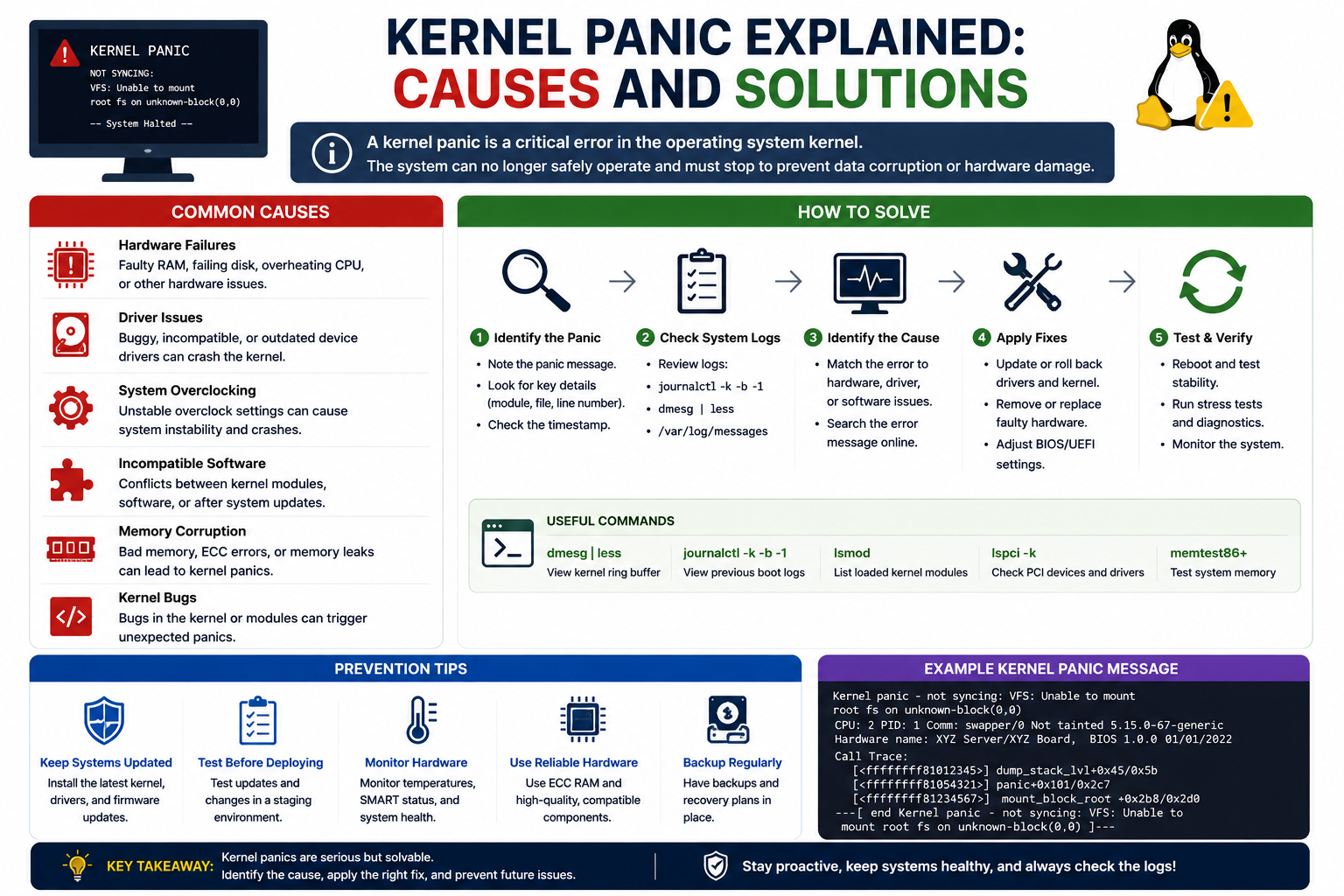
For many Linux users, the first encounter with a kernel panic is unforgettable. One moment the system appears to be functioning normally, and the next moment the screen fills with diagnostic text while the operating system becomes completely unresponsive. The experience can be alarming, especially for administrators responsible for servers, production systems, or critical infrastructure. Even experienced professionals may feel pressure when a machine suddenly refuses to boot.
Despite the dramatic wording, a kernel panic does not always mean the Linux kernel itself is permanently damaged. In reality, the panic is a protective response triggered when the operating system encounters a condition so severe that continuing to operate could lead to corruption, instability, or hardware communication failures. The kernel essentially shuts everything down to avoid making the problem worse.
Kernel panics are important because they occur at the core of the operating system. Unlike an application crash that affects a single program, a panic affects the entire machine. Since the kernel controls memory management, storage access, hardware drivers, CPU scheduling, process handling, and communication between software and hardware, a failure at this level impacts every running service and application.
For system administrators, developers, DevOps engineers, and IT professionals, understanding kernel panics is essential. Linux powers web servers, cloud infrastructure, enterprise environments, virtualization platforms, networking devices, embedded systems, and supercomputers. Any environment running Linux can potentially encounter kernel panic scenarios.
The good news is that most kernel panics are recoverable. Some are caused by simple configuration errors or incomplete updates, while others result from failing hardware or corrupted filesystems. The key to resolving them lies in understanding how Linux boots, how the kernel interacts with the system during startup, and what types of failures commonly interrupt that process.
Before learning how to fix a kernel panic, it is necessary to understand what the Linux kernel actually does and why the boot process depends so heavily on it.
What the Linux Kernel Actually Does
The Linux kernel is the central component of the operating system. It acts as the bridge between software applications and the physical hardware of the computer. Without the kernel, applications would have no standardized method for accessing memory, storage devices, processors, networking hardware, or input and output devices.
Every major operation performed by the operating system passes through the kernel in some form. When an application reads a file, allocates memory, opens a network connection, or interacts with hardware, the kernel manages those operations behind the scenes.
The kernel handles several major responsibilities. One of the most important is process management. Every application running on a Linux system operates as a process. The kernel schedules CPU time, prioritizes workloads, and ensures applications do not interfere with one another.
Memory management is another core responsibility. The kernel allocates RAM to processes, tracks memory usage, protects memory regions from unauthorized access, and handles virtual memory operations. If memory handling becomes unstable or corrupted, the system may panic because the kernel can no longer safely manage resources.
Device management is equally important. Linux communicates with hardware using drivers and kernel modules. These components allow the operating system to interact with storage devices, graphics cards, USB controllers, network adapters, audio devices, and countless other hardware components.
The kernel also manages filesystems. Reading and writing data requires the kernel to communicate with storage hardware while maintaining filesystem consistency and integrity. If the kernel loses access to the root filesystem during operation or startup, the operating system cannot continue functioning properly.
Security and permissions are also enforced by the kernel. User privileges, process isolation, access controls, and resource protections all rely on kernel functionality.
Because the kernel sits at the center of so many operations, any unrecoverable failure inside the kernel environment becomes critical. Rather than continuing in an unstable state, Linux triggers a kernel panic and halts the system.
Why the Name “Kernel Panic” Sounds Misleading
The phrase “kernel panic” can sound strange to people unfamiliar with Linux internals. Computers do not experience emotions, so the terminology may appear humorous or overly dramatic. In reality, the term simply describes a fatal condition detected by the operating system kernel.
The panic mechanism is actually a safety feature. When the kernel encounters a situation from which it cannot safely recover, it stops the system intentionally. Continuing operation after severe corruption or hardware failure could damage filesystems, overwrite important data, or produce unpredictable behavior.
The wording dates back to early Unix operating systems. Unix developers used the word “panic” to describe situations where the operating system encountered an impossible or unsafe state. Linux inherited much of its design philosophy and terminology from Unix systems.
Today, the term remains widely used across Linux distributions and Unix-like operating systems.
Although the name sounds intimidating, many kernel panics result from relatively ordinary issues such as broken updates, incorrect boot parameters, damaged filesystems, or incompatible drivers.
How the Linux Boot Process Begins
Understanding the Linux boot process is essential for diagnosing kernel panics because most panic scenarios occur during startup.
When a computer first powers on, the CPU begins executing firmware instructions stored on the motherboard. Traditionally this firmware was called BIOS, but most modern systems use UEFI firmware instead.
The firmware performs hardware initialization tasks during a stage commonly known as POST, or Power-On Self-Test. During this phase, the firmware checks memory, processors, storage controllers, keyboards, graphics hardware, and other components to ensure basic functionality.
Once the hardware initialization process completes successfully, the firmware searches for a bootable device according to the configured boot order. This device could be an SSD, hard drive, USB drive, optical disc, or even a network boot target.
After locating a bootable device, the firmware transfers control to the bootloader.
On older BIOS systems, the firmware typically loads the Master Boot Record located at the beginning of the disk. The MBR contains a small amount of executable boot code along with partition information.
The MBR is extremely limited in size, which means it cannot hold a complete modern bootloader. Instead, it contains enough information to locate additional bootloader components stored elsewhere on the disk.
On UEFI systems, the process differs slightly. UEFI firmware reads executable boot files stored in a dedicated EFI System Partition. These boot files directly launch the operating system bootloader.
In either case, the next stage involves the Linux bootloader.
Understanding the Role of GRUB2
The most common Linux bootloader today is GRUB2. Most major Linux distributions rely on GRUB2 because it supports multiple operating systems, diverse hardware platforms, advanced filesystem compatibility, and flexible configuration options.
GRUB2 acts as the intermediary between firmware and the Linux kernel. Its responsibilities include locating installed operating systems, presenting boot menus, loading kernel images, and passing startup parameters to the kernel.
When GRUB2 starts, it reads configuration files that define available operating systems and kernel entries. Users can often select recovery modes, alternate kernels, or advanced boot options directly from the GRUB menu.
One particularly important feature of GRUB2 is its ability to preserve older kernel versions during updates. If a new kernel causes problems, administrators can often boot into a previous kernel version and restore system functionality.
GRUB2 itself is modular and flexible. It supports multiple filesystems including ext4, XFS, Btrfs, FAT32, and others. It can also boot systems from RAID arrays, encrypted partitions, logical volumes, and network environments.
After the desired kernel entry is selected, GRUB2 loads two critical components into memory. The first is the Linux kernel image. The second is the initramfs image.
These two components are central to the remainder of the boot process and are involved in many kernel panic scenarios.
What Initramfs Does During Startup
The initramfs, sometimes called initrd on older systems, is a temporary filesystem loaded into RAM during early boot.
Its purpose is to provide the Linux kernel with the tools and drivers necessary to access the real root filesystem. This is necessary because the kernel often cannot directly access storage devices immediately after loading.
Modern Linux environments frequently use advanced storage technologies such as encrypted disks, software RAID arrays, NVMe drives, logical volume management, and network-mounted storage. Accessing these systems requires additional drivers and initialization steps.
The initramfs environment contains storage drivers, filesystem utilities, device discovery scripts, and hardware initialization logic needed during this transitional stage.
Once the initramfs environment successfully locates and mounts the real root filesystem, control transfers to the main operating system initialization process.
At that point, Linux begins loading services, mounting additional filesystems, initializing networking, and starting user-space processes.
If initramfs fails to locate or mount the root filesystem, the kernel cannot continue booting properly. This failure often results in a kernel panic.
Why Kernel Panics Commonly Happen During Boot
The boot process involves many interconnected components. A failure in any of them can interrupt startup and produce a panic.
One of the most common causes involves inaccessible root filesystems. If the kernel cannot mount the root partition, it has nowhere to continue loading the operating system from. The system halts because it cannot proceed safely.
This issue may occur because of corrupted filesystems, incorrect partition identifiers, broken storage drivers, or damaged initramfs images.
Kernel updates are another frequent source of problems. Updating the Linux kernel typically involves multiple synchronized components including kernel images, bootloader entries, initramfs images, and driver modules.
If one component updates successfully while another does not, inconsistencies can appear during boot. For example, the bootloader may attempt to load a kernel that no longer matches the installed modules.
Hardware failures also play a major role. Failing drives may become unreadable during startup. Faulty RAM can corrupt memory operations. Overheating processors may produce instability. Storage controllers can fail unexpectedly.
Third-party drivers sometimes introduce compatibility problems as well. Proprietary graphics drivers and virtualization modules occasionally conflict with newer kernel versions.
Configuration changes can also trigger boot failures. Moving disks between systems, changing SATA controller modes, modifying RAID arrays, or reordering partitions may invalidate old boot references.
Because the boot process depends on precise coordination between firmware, bootloaders, kernels, initramfs images, and filesystems, even small inconsistencies can produce major failures.
How Linux Protects Itself During a Panic
A kernel panic is not simply a crash. It is a deliberate shutdown mechanism designed to protect the operating system and stored data.
When the kernel detects unrecoverable corruption or instability, continuing operation could make the situation worse. Filesystems might become corrupted, memory structures could become inconsistent, or hardware communication might become unsafe.
By halting the system immediately, Linux minimizes additional damage.
In some environments, the kernel automatically reboots after a panic. Enterprise systems sometimes enable automatic restart policies to reduce downtime. However, automatic reboots can make troubleshooting harder because the panic message disappears quickly.
Many administrators disable automatic reboot temporarily during troubleshooting so they can study the panic output more carefully.
Some Linux systems also support crash dump mechanisms that save diagnostic information during a panic. These memory dumps allow advanced debugging and forensic analysis.
Although most administrators never need low-level kernel debugging tools, enterprise support teams often rely on them for identifying recurring stability problems.
Reading Kernel Panic Messages
Kernel panic screens can look intimidating because they often contain technical information intended for developers and system engineers.
Messages may include memory addresses, processor states, driver references, stack traces, filesystem errors, and module names.
Despite their complexity, panic messages frequently contain valuable clues about the source of the problem.
For example, a message stating “unable to mount root filesystem” strongly suggests storage or initramfs problems.
A panic referencing a specific driver module may indicate compatibility issues with recently installed hardware or software.
Memory-related panic messages sometimes point toward faulty RAM or unstable overclocking configurations.
Administrators should carefully document panic messages before rebooting. Taking photographs with a phone is often the easiest method.
Even partial panic output can significantly improve troubleshooting efficiency later.
The Importance of Older Kernel Entries
One of the most useful recovery features in Linux is the preservation of older kernels.
Most Linux distributions keep previous kernel versions installed even after updates. GRUB2 typically creates separate boot entries for each kernel version.
If a newly installed kernel triggers a panic, administrators can often select an older kernel from the GRUB menu and boot successfully.
This approach provides immediate access to the operating system for further troubleshooting.
Once booted into a working kernel, administrators can rebuild initramfs images, reinstall drivers, regenerate GRUB configuration files, or remove problematic updates.
Many kernel panic situations are resolved simply by reverting temporarily to a stable kernel version and repairing the failed update process.
Why Troubleshooting Requires Patience
Kernel panics can feel stressful because they prevent systems from operating normally. However, panic troubleshooting is most effective when approached methodically.
Randomly changing configurations or reinstalling components without understanding the underlying issue may worsen the situation.
Effective troubleshooting begins by identifying recent changes. Administrators should ask several important questions.
Were updates installed recently?
Was new hardware added?
Did the system lose power unexpectedly?
Were storage configurations modified?
Did filesystem warnings appear previously?
Does the problem happen consistently or intermittently?
Gathering this information helps narrow the range of possible causes.
Boot rescue media is also essential. Most Linux installation images include live recovery environments capable of mounting filesystems and repairing boot configurations.
Understanding the Linux boot sequence transforms kernel panic recovery from a frightening mystery into a structured diagnostic process. Once administrators understand where failures occur and how components interact, even severe boot issues become manageable.
Recognizing the Early Warning Signs of a Kernel Panic
Kernel panics sometimes appear without warning, but in many cases Linux systems show symptoms before a complete failure occurs. Learning to recognize these signs can help administrators prevent a catastrophic outage or at least prepare for recovery before the system becomes unusable.
One of the most common warning signs is filesystem instability. Systems may suddenly report input and output errors, files may become inaccessible, or applications may freeze while attempting to read or write data. These problems often indicate storage device issues or filesystem corruption that could eventually trigger a panic during boot.
Unexpected reboots are another common indicator. A system that restarts randomly under heavy load may be suffering from overheating, memory instability, or power supply problems. These issues can escalate into full kernel panics over time.
Frequent application crashes can also point toward deeper system instability. Although user-space applications normally operate independently from the kernel, widespread crashing across unrelated applications may indicate memory corruption or hardware problems affecting the entire operating system.
Hardware detection failures should also be taken seriously. If storage devices occasionally disappear from the operating system or network interfaces fail unpredictably, the kernel may eventually lose communication with critical hardware entirely.
Kernel log warnings provide another valuable source of early diagnostic information. Linux records system messages in log files such as dmesg, syslog, or journal logs depending on the distribution. Repeated driver warnings, storage timeouts, memory errors, or filesystem inconsistencies often appear long before a panic occurs.
Performance degradation can also signal problems. A system experiencing failing hardware may become unusually slow, especially during disk operations. Delayed response times, freezing during boot, or long pauses while accessing files may indicate storage or controller failures.
Administrators should never ignore unusual behavior on Linux systems. Even seemingly minor instability can develop into full kernel panic scenarios if left unresolved.
Why Filesystem Corruption Causes Kernel Panics
Filesystems are fundamental to Linux operation because the operating system relies on them to access configuration files, libraries, applications, drivers, and system data. If the kernel loses access to essential filesystems during boot, it cannot continue operating safely.
Filesystem corruption can occur for many reasons. Sudden power loss is one of the most common causes. If the system loses power while writing critical filesystem metadata, structures may become inconsistent.
Improper shutdowns can create similar problems. Forcing systems off without cleanly unmounting filesystems increases the risk of corruption.
Failing storage hardware is another major cause. Bad sectors, controller failures, or unstable SSD firmware can damage filesystem structures over time.
Software bugs occasionally contribute as well. Although modern Linux filesystems are highly reliable, driver problems or interrupted update processes can still create inconsistencies.
When Linux boots, the kernel must mount the root filesystem before continuing startup. If the filesystem is severely corrupted, mounting may fail completely.
In some situations the kernel may enter emergency mode or a recovery shell instead of panicking immediately. In more severe cases the boot process stops entirely with a panic message indicating the root filesystem cannot be mounted.
Modern journaling filesystems such as ext4, XFS, and Btrfs reduce corruption risks significantly by tracking filesystem operations before committing them fully. However, journaling is not perfect protection against severe hardware failure or interrupted writes.
Routine filesystem checks remain important even on reliable systems.
Understanding Root Filesystem Mount Failures
One of the most common kernel panic messages involves failure to mount the root filesystem. This issue occurs when Linux cannot locate or access the partition containing the operating system.
The root filesystem is central to Linux operation. It contains system binaries, libraries, configuration files, services, drivers, and user data. Without it, Linux has nowhere to continue loading the operating system from.
Root filesystem failures can happen for several reasons.
Sometimes the filesystem itself is damaged. Corrupted metadata or damaged partitions may prevent mounting entirely.
Other times the issue involves missing drivers. The kernel may not have the required storage controller modules loaded during early boot.
Partition identifiers can also change unexpectedly. Linux often references partitions using UUIDs rather than simple device names. If partitions are recreated, cloned, or modified, UUID mismatches may occur.
Changes to storage hardware may also confuse the boot process. Moving drives between SATA ports, replacing controllers, or modifying RAID arrays can alter device detection order.
Encrypted systems introduce additional complexity. If encryption modules fail to load or passwords cannot be processed correctly, the root partition remains inaccessible.
Logical Volume Management environments may also encounter mount problems if volume groups fail to activate properly during startup.
Because so many boot stages depend on successful root filesystem access, these failures commonly trigger kernel panics.
How Kernel Modules Influence System Stability
Linux relies heavily on modular architecture. Instead of building every hardware driver directly into the kernel, Linux loads many drivers dynamically as kernel modules.
This design improves flexibility and efficiency. Systems only load the drivers they actually need, reducing memory usage and kernel complexity.
However, modular design also introduces potential compatibility problems.
Kernel modules must match the kernel version exactly. If modules compiled for one kernel attempt to load into another incompatible kernel version, failures may occur.
During updates, Linux typically installs new kernel images alongside updated modules and initramfs images. If any component becomes mismatched, boot problems may result.
Third-party drivers are especially risky. Proprietary graphics drivers, virtualization software, wireless adapters, and custom hardware drivers sometimes fail after kernel updates.
For example, an administrator may update the Linux kernel successfully while forgetting to rebuild a third-party virtualization module. During boot, the incompatible module crashes and destabilizes the kernel.
In some cases Linux can continue booting despite module errors. In more severe situations the kernel panics because essential functionality becomes unavailable.
Storage drivers are particularly critical. If the kernel cannot communicate with storage controllers during boot, mounting the root filesystem becomes impossible.
Understanding module dependencies is important for maintaining Linux stability.
Why Hardware Failures Trigger Kernel Panics
Although software configuration problems receive significant attention, hardware failures are responsible for many kernel panics.
Storage devices are among the most common hardware culprits. Traditional hard drives contain moving parts that wear out over time. SSDs, while more durable in some ways, can still fail due to controller problems or flash memory degradation.
Failing drives often produce subtle symptoms initially. Systems may freeze briefly during disk operations, applications may hang unexpectedly, or files may become corrupted.
Eventually the kernel may lose access to critical storage areas entirely, triggering panic conditions.
Memory problems are equally dangerous. Defective RAM can corrupt kernel data structures, damage filesystem caches, or produce invalid instructions during execution.
Memory corruption often leads to unpredictable behavior. Systems may panic randomly under heavy load, crash during updates, or fail inconsistently during boot.
CPU overheating can also destabilize Linux systems. Excessive heat may cause processing errors or unexpected shutdowns. Dust buildup, failing fans, and inadequate cooling are common contributors.
Power supply instability creates additional risks. Inconsistent voltage delivery can corrupt storage writes or cause random reboots that damage filesystems.
Motherboard failures, controller malfunctions, and faulty expansion cards can all contribute to panic scenarios as well.
Hardware-related panics are sometimes difficult to diagnose because symptoms appear inconsistent. Unlike software configuration errors that usually fail predictably, hardware instability may trigger intermittent crashes.
Stress testing and hardware diagnostics are often necessary when troubleshooting recurring unexplained panics.
The Role of GRUB Configuration in Kernel Panics
GRUB2 is responsible for loading the Linux kernel and passing critical boot parameters during startup. Problems within GRUB configuration files can easily prevent successful booting.
One common issue involves incorrect root partition references. GRUB must know where the Linux root filesystem resides so it can pass accurate information to the kernel.
If storage layouts change or partitions are recreated, outdated references may remain in configuration files.
Kernel image mismatches can also occur. GRUB entries may reference deleted or incomplete kernel files after failed updates.
Incorrect boot parameters sometimes create instability as well. Parameters controlling storage drivers, graphics initialization, encryption handling, or filesystem behavior may interfere with startup if configured improperly.
Manual GRUB modifications increase risk further. While GRUB is highly customizable, incorrect edits can break the boot process entirely.
Fortunately, GRUB itself often remains repairable through rescue environments or live Linux media.
Rebuilding GRUB configuration files is a common recovery step after kernel panics caused by failed updates or storage modifications.
How Linux Rescue Environments Help Recovery
Most Linux installation media includes rescue or live environments designed specifically for troubleshooting failed systems.
These environments allow administrators to boot Linux independently from the installed operating system. Even if the main system cannot boot normally, rescue media can still access storage devices and perform repairs.
Live environments provide tools for mounting filesystems, checking storage health, repairing bootloaders, rebuilding initramfs images, and recovering important files.
One of the first steps during recovery is usually mounting the root filesystem manually. This allows administrators to inspect system files and verify partition integrity.
Filesystem repair tools such as fsck are commonly used to correct corruption problems.
Administrators may also reinstall GRUB from within the rescue environment. This process rebuilds bootloader files and restores startup functionality.
Kernel and initramfs regeneration tools are equally important. Rebuilding these components ensures the kernel, drivers, and boot environment remain synchronized.
Rescue environments are essential because many panic scenarios prevent access to the normal operating system entirely.
Every Linux administrator should be comfortable using live recovery media before encountering critical production failures.
Why Kernel Updates Sometimes Fail
Kernel updates are necessary for security, performance improvements, hardware support, and bug fixes. However, they also introduce some risk because they modify core operating system components.
Most Linux distributions handle updates reliably through package management systems. Still, failures can occur.
Interrupted updates are one major problem. If power loss or system crashes occur during installation, boot components may become partially updated.
Third-party drivers are another common issue. External modules may not support newly installed kernels immediately.
Initramfs generation failures can also occur. If required drivers are missing from the updated initramfs image, the root filesystem may become inaccessible during startup.
Storage configuration complexity increases risk further. Systems using RAID, encryption, or advanced volume management depend heavily on correct module loading during boot.
Some administrators also remove older kernels too aggressively. Keeping at least one known-good fallback kernel installed greatly improves recovery options.
Testing updates before deploying them widely is especially important in enterprise environments.
Using Older Kernels for Recovery
One of Linux’s strongest recovery features is the ability to boot older kernels from the GRUB menu.
When distributions install new kernels, they usually preserve previous versions automatically. This provides a fallback option if the latest kernel fails.
Booting an older kernel often restores immediate access to the system. Administrators can then investigate update failures, rebuild modules, or repair boot configurations.
Once logged into a working environment, several repair tasks become possible.
The administrator may regenerate initramfs images to ensure required drivers are included.
GRUB configuration files can be rebuilt to correct broken boot entries.
Problematic packages may be downgraded or removed entirely.
Third-party modules can be recompiled against the updated kernel.
This recovery process is far simpler than attempting repairs from emergency shells or rescue environments.
Because of this, removing older kernels immediately after updates is generally discouraged unless storage space is extremely limited.
Why Documentation Matters During Troubleshooting
One mistake many administrators make during panic recovery is failing to document symptoms carefully.
Kernel panic messages contain valuable clues. Even small details may identify the root cause.
Administrators should record exact error messages, timestamps, hardware changes, recent updates, and recovery attempts.
Photographs are especially useful because panic messages may disappear after rebooting.
Maintaining change records also improves troubleshooting efficiency. Knowing precisely which updates or configuration changes occurred before the panic can narrow possible causes dramatically.
Documentation becomes even more important in enterprise environments where multiple administrators manage shared infrastructure.
Well-documented troubleshooting prevents repeated mistakes and speeds future recovery efforts.
Avoiding Panic During a Kernel Panic
The term “kernel panic” often causes emotional panic among administrators, especially newer Linux users. However, successful troubleshooting requires calm and methodical thinking.
Most kernel panics are recoverable. Linux provides numerous tools for repairing filesystems, rebuilding bootloaders, recovering kernels, and restoring startup functionality.
Approaching the problem systematically is far more effective than making random changes under pressure.
Administrators should begin by identifying recent modifications, checking hardware health, examining panic messages, and testing recovery options one step at a time.
Rushing into reinstallation without understanding the root cause may destroy valuable diagnostic information or risk data loss unnecessarily.
With patience and structured troubleshooting, even severe Linux boot failures can often be resolved successfully.
Beginning the Recovery Process After a Kernel Panic
When a Linux system encounters a kernel panic, the first instinct many administrators have is to reboot immediately and hope the problem disappears. While restarting may occasionally work for temporary issues, repeated reboots without investigation can worsen filesystem corruption or destroy important diagnostic information.
The recovery process should begin with observation and information gathering. The messages displayed during the panic often contain the most valuable clues about the root cause. Administrators should carefully read the screen output and document as much information as possible before restarting the system.
Sometimes the panic message directly identifies the issue. Messages mentioning inability to mount the root filesystem usually point toward storage or initramfs problems. Errors involving kernel modules often indicate compatibility issues after updates. Memory-related panics may suggest defective RAM or hardware instability.
Photographing the panic screen is one of the easiest ways to preserve information. Since panic messages may disappear after rebooting, visual documentation can help during later analysis.
Administrators should also think carefully about what changed before the panic occurred. Recent updates, new hardware installations, driver changes, power outages, filesystem modifications, or storage migrations are all important clues.
Once basic information has been collected, the recovery process can begin systematically.
Trying an Older Kernel First
One of the simplest and most effective recovery techniques involves booting into an older kernel version.
Most Linux distributions automatically preserve previous kernels during updates. GRUB2 usually creates boot entries for multiple installed kernels, allowing administrators to select an older version during startup.
If a kernel panic began immediately after installing updates, the newest kernel may be incompatible with existing drivers, modules, or hardware configurations.
Booting into an older kernel bypasses the problematic update temporarily and restores access to the operating system.
To attempt this recovery method, administrators can access the GRUB menu during startup. Depending on the distribution, this may require pressing Shift, Escape, or another key while the system boots.
Inside the GRUB menu, advanced options typically display older installed kernels. Selecting a previous version often allows the system to boot successfully.
Once logged in, administrators can begin investigating the failed update. They may rebuild initramfs images, reinstall drivers, regenerate GRUB configuration files, or remove problematic packages.
This recovery method is especially valuable because it restores access to the normal operating system environment without requiring external rescue media.
Many kernel panic situations caused by failed updates are resolved entirely through this approach.
Using Live Linux Environments for Recovery
If older kernels fail to boot successfully, administrators usually need to use a live Linux environment.
Most Linux installation media includes live or rescue modes that allow systems to boot independently from the installed operating system. These environments run directly from USB drives, DVDs, or network boot images.
Live environments are extremely useful because they provide access to system recovery tools even when the installed operating system is completely unusable.
After booting into the rescue environment, administrators can inspect disks, mount partitions, check filesystems, repair bootloaders, and recover important files.
Using the same Linux distribution as the installed operating system is generally recommended because tool compatibility tends to be better.
Once inside the live environment, one of the first tasks is identifying storage devices and partitions.
Commands such as lsblk, blkid, or fdisk help administrators locate root partitions, boot partitions, swap areas, and EFI system partitions.
Correctly identifying partitions is critical before attempting repairs.
Mounting the Root Filesystem Manually
After identifying the correct partitions, administrators usually mount the root filesystem manually.
Manual mounting allows direct access to installed system files. This step is necessary for repairing configurations, rebuilding bootloaders, or checking filesystem integrity.
If the filesystem mounts successfully, that is often a positive sign indicating the storage device remains accessible.
However, mounting failures may indicate severe corruption or hardware problems.
Administrators should pay close attention to error messages during mounting attempts. Filesystem inconsistencies, read-only states, or input and output errors provide valuable diagnostic clues.
When encrypted storage is involved, additional steps may be required before mounting becomes possible. Encrypted partitions typically need to be unlocked first using tools such as cryptsetup.
Logical Volume Management systems may also require activation before logical volumes appear.
Once the root filesystem becomes accessible, administrators can begin deeper investigation.
Checking Filesystem Integrity
Filesystem corruption is one of the most common causes of kernel panics. For this reason, filesystem checks are often a major part of the recovery process.
Linux provides several filesystem repair tools depending on the filesystem type in use.
For ext4 filesystems, fsck is commonly used to detect and repair corruption.
XFS systems typically rely on xfs_repair.
Btrfs environments include specialized integrity and recovery tools as well.
Before running repair operations, administrators should ensure the affected filesystem is unmounted whenever possible. Repairing mounted filesystems can create additional damage.
Filesystem checks examine metadata structures, directory indexes, allocation tables, journal entries, and other critical components.
Minor corruption may be repaired automatically. Severe corruption may require manual intervention or data recovery procedures.
If corruption repeatedly returns after repairs, underlying hardware problems may exist.
Filesystem repairs should always be followed by backup verification and hardware diagnostics to prevent recurring issues.
Diagnosing Storage Hardware Problems
Storage failures are responsible for many persistent kernel panics. Even if filesystems appear repairable initially, unstable drives may continue causing corruption until replaced.
Administrators should inspect storage device health carefully during recovery.
Modern drives provide SMART diagnostic information that helps identify hardware issues.
SMART data may reveal reallocated sectors, read errors, controller failures, temperature problems, or wear-level concerns.
Drives showing increasing error counts should be considered unreliable.
Traditional hard drives may also produce unusual sounds such as clicking, grinding, or repeated spin-up attempts. These symptoms often indicate mechanical failure.
SSDs can fail more silently but still exhibit warning signs through SMART data or intermittent detection issues.
If drive failure is suspected, administrators should prioritize data backup immediately before attempting extensive repairs.
In some situations, cloning the failing drive to healthy storage may provide the best recovery path.
Continuing to operate unstable storage hardware risks permanent data loss and repeated kernel panics.
Rebuilding the Initramfs Environment
Because initramfs plays such an important role during boot, rebuilding it is a common recovery step after kernel panics.
The initramfs image contains drivers and tools required for early boot initialization. If essential modules are missing or corrupted, the root filesystem may remain inaccessible during startup.
Kernel updates occasionally generate incomplete initramfs images due to interrupted installations or configuration issues.
Administrators can regenerate initramfs images using distribution-specific tools.
Debian-based systems often use update-initramfs.
Red Hat-based distributions commonly use dracut.
Rebuilding initramfs ensures the boot environment includes the correct storage drivers, filesystem modules, encryption support, and hardware initialization scripts.
After regeneration, administrators should verify the new initramfs image exists properly within the boot partition.
In many cases, rebuilding initramfs resolves boot failures immediately.
Repairing the GRUB Bootloader
Bootloader corruption can also trigger kernel panic scenarios indirectly.
If GRUB cannot locate the correct kernel, initramfs image, or root partition, Linux may fail during startup.
Repairing GRUB usually involves reinstalling bootloader files and rebuilding configuration entries.
From a live environment, administrators often mount the root filesystem and boot partition before entering a chroot environment.
A chroot session temporarily treats the mounted system as the active root environment, allowing administrators to execute repair commands as though they had booted normally.
Once inside chroot, GRUB can be reinstalled onto the appropriate storage device.
After reinstalling GRUB, configuration files are regenerated to detect installed kernels and operating systems automatically.
Administrators should verify partition references carefully during this process, especially on systems using UEFI, RAID, or encryption.
Incorrect GRUB installation targets can create additional boot problems.
Successfully rebuilding GRUB often restores normal startup functionality after failed updates or storage configuration changes.
Handling Kernel Module Conflicts
Third-party modules and proprietary drivers are common sources of instability after kernel updates.
Graphics drivers are especially problematic because they interact closely with hardware and kernel internals.
Virtualization platforms, wireless adapters, and specialized hardware controllers may also rely on external modules incompatible with newly installed kernels.
If a panic began after installing updates, module conflicts should be investigated carefully.
Booting with an older kernel often confirms this diagnosis because the older environment may still support the existing modules correctly.
Administrators may need to rebuild modules manually against the updated kernel.
In some cases, removing problematic drivers entirely is the best solution until compatible versions become available.
Open-source drivers are often more stable across kernel updates because they integrate directly with Linux development processes.
Maintaining awareness of driver compatibility is especially important in enterprise environments where uptime matters significantly.
Testing Memory and System Stability
Memory instability can create unpredictable kernel panics that are difficult to diagnose.
Defective RAM may corrupt kernel structures, filesystem caches, or driver operations randomly.
Symptoms vary widely. Systems may panic under heavy load, freeze intermittently, or fail only during certain workloads.
Memory testing tools such as MemTest86 help identify defective RAM modules.
Administrators should run extended memory diagnostics whenever panic causes remain unclear after software troubleshooting.
Overclocked systems deserve special attention. Aggressive memory timings or CPU overclocks may appear stable under light usage but fail during intensive workloads.
Returning hardware to stock settings often improves stability significantly.
Thermal conditions should also be inspected carefully. Overheating CPUs, chipsets, or storage devices can produce intermittent crashes that resemble software problems.
Cleaning dust buildup, replacing failing fans, and improving airflow may eliminate recurring panics entirely.
Why Backups Matter Before Recovery Attempts
One of the biggest mistakes administrators make is performing aggressive repair operations without verifying backups first.
Filesystem repair tools, bootloader modifications, partition changes, and hardware replacements all carry some level of risk.
Before making major changes, important data should always be backed up whenever possible.
Even if the operating system cannot boot normally, live environments often allow files to be copied to external storage.
Enterprise environments typically rely on automated backup systems, but administrators should still verify backup integrity before proceeding.
Recovery operations become far less stressful when reliable backups exist.
Without backups, administrators may face difficult decisions between risky repair attempts and potential data loss.
Strong backup practices are among the most important protections against catastrophic kernel panic scenarios.
Preventing Future Kernel Panics
Although not every kernel panic can be prevented, many are avoidable through good system administration practices.
Regular updates remain important for security and stability, but updates should be applied carefully. Testing updates in non-production environments helps identify compatibility problems before widespread deployment.
Maintaining multiple installed kernels provides safer rollback options after failed updates.
Monitoring hardware health proactively is equally important. SMART diagnostics, temperature monitoring, and memory testing can identify failing components before major outages occur.
Reliable power protection also matters significantly. Sudden outages frequently contribute to filesystem corruption and incomplete updates.
Using uninterruptible power supplies reduces this risk considerably.
Administrators should also avoid unnecessary manual bootloader modifications unless absolutely required.
Careful documentation improves long-term stability as well. Recording system changes, hardware upgrades, and configuration modifications simplifies troubleshooting when issues arise.
Preventive maintenance is always easier than emergency recovery.
Learning From Kernel Panic Incidents
Every kernel panic provides an opportunity to improve operational practices and technical understanding.
Experienced administrators often become more skilled precisely because they have encountered and resolved difficult failures previously.
Post-incident analysis is valuable after recovery. Administrators should identify what caused the panic, how recovery was performed, and what changes could prevent recurrence.
Organizations often develop standardized recovery procedures based on lessons learned from previous incidents.
Training and preparation are also important. Practicing recovery techniques in test environments improves confidence during real emergencies.
Kernel panics may feel intimidating initially, but familiarity reduces stress dramatically over time.
Linux provides powerful recovery tools and extensive diagnostic capabilities for administrators willing to learn them.
Conclusion
Kernel panics are among the most serious issues Linux administrators encounter, but they are rarely hopeless situations. Although the sudden appearance of a frozen system and diagnostic messages can feel overwhelming, most kernel panics stem from identifiable and recoverable problems such as corrupted filesystems, failed updates, incompatible modules, storage issues, or hardware instability.
Understanding how Linux boots is the foundation for effective troubleshooting. The interaction between firmware, GRUB2, initramfs, kernel modules, storage drivers, and the root filesystem determines whether the operating system can start successfully. When one part of that chain fails, Linux halts operation to protect the system from further damage.
Successful recovery depends on patience, careful observation, and a structured troubleshooting process. Booting older kernels, using live rescue environments, checking filesystem integrity, rebuilding initramfs images, repairing GRUB, testing hardware, and verifying backups are all essential skills for Linux administrators.
Equally important is prevention. Maintaining healthy hardware, testing updates carefully, preserving fallback kernels, monitoring storage devices, and keeping reliable backups dramatically reduce the risk of catastrophic failures.
A kernel panic may interrupt operations temporarily, but it also provides valuable insight into how Linux works internally. Administrators who learn to diagnose and recover from these failures gain deeper technical knowledge and greater confidence managing Linux systems in real-world environments.