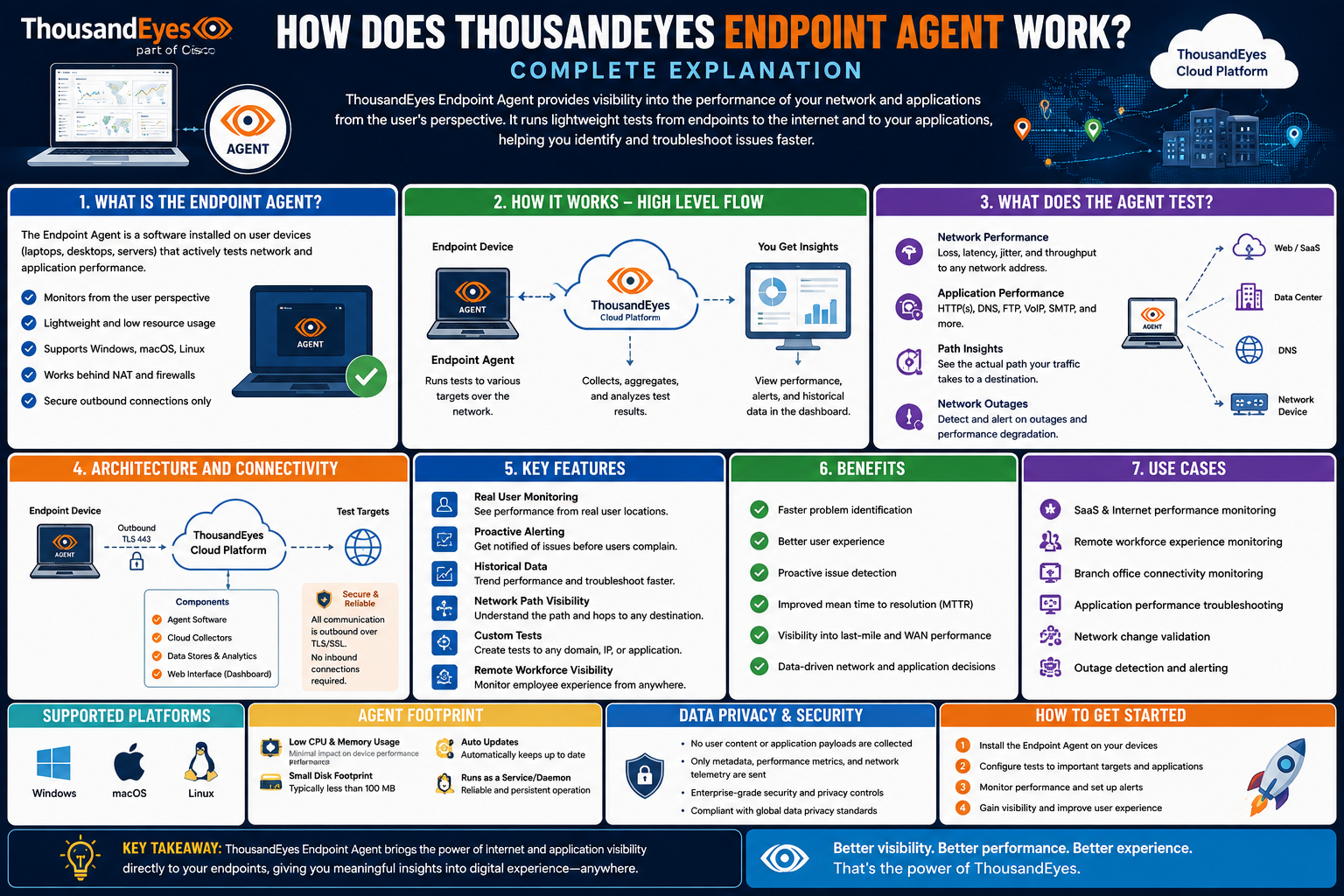
The ThousandEyes Endpoint Agent is a modern network visibility tool designed to help organizations understand how users experience applications and services across complex digital environments. In today’s world, where employees rely heavily on cloud platforms, remote access, and web-based tools, traditional network monitoring is often not enough to identify the root cause of performance issues. The Endpoint Agent solves this gap by observing network behavior directly from the user’s device. Instead of only monitoring servers or infrastructure, it focuses on real user conditions such as latency, packet loss, and application responsiveness. This makes it especially valuable for diagnosing problems that occur outside the internal network, including ISP issues, routing problems, and internet outages.
Overview of the ThousandEyes Endpoint Agent
The Endpoint Agent is installed directly on user devices such as laptops and desktops running Windows or macOS. Once installed, it runs silently in the background and continuously gathers performance-related data. This includes network metrics like delay, jitter, and packet loss, as well as application-level performance indicators such as page load times and responsiveness of web applications. The agent is designed to provide a real-time, user-centric view of network performance.
Unlike traditional monitoring systems that focus on infrastructure components like routers and servers, this tool shifts the perspective to the end user. This allows IT teams to see exactly what employees or customers experience when using applications, whether those applications are hosted locally, in the cloud, or delivered through third-party services.
How the Endpoint Agent Collects Data
The core function of the Endpoint Agent is data collection from the user’s environment. Once active, it continuously monitors network traffic and application interactions. It gathers key metrics such as bandwidth availability, connection stability, and response times from different services.
This data is then transmitted securely to a centralized platform for analysis. By combining multiple data points from different users and locations, the system builds a comprehensive view of network health. This helps IT teams identify whether performance issues are isolated to a single user, a specific region, or an entire network segment.
The agent also evaluates the network path between the user and the destination service. This means it can identify where delays or failures are occurring, whether inside the corporate network, at the ISP level, or further along the internet route.
Network Path Visibility and Analysis
One of the most powerful capabilities of the Endpoint Agent is its ability to visualize network paths. It maps the route that data takes from the user’s device to the target application or service. This includes every hop along the way, such as routers, data centers, and external networks.
By analyzing these paths, IT teams can quickly pinpoint where performance degradation is happening. For example, if users in a specific region are experiencing slow access to a cloud application, the agent can show whether the issue is caused by local network congestion, an ISP routing problem, or a cloud provider outage.
This level of visibility significantly reduces the time required to diagnose and resolve connectivity problems.
Synthetic and Real User Monitoring Capabilities
The Endpoint Agent supports both synthetic and real user monitoring techniques. Synthetic monitoring involves running controlled tests that simulate user interactions with applications. These tests help identify potential performance issues before they affect actual users.
Real user monitoring, on the other hand, collects data from actual user sessions. This provides insight into how real people are experiencing applications in real time. By combining both approaches, organizations gain a complete understanding of application performance under different conditions.
Synthetic monitoring is especially useful for proactive detection, while real user monitoring ensures accuracy in reflecting actual user experiences.
Application and Network Layer Insights
The agent collects data from both the network layer and application layer. At the network level, it focuses on connectivity metrics such as latency, jitter, packet loss, and routing efficiency. At the application level, it tracks how quickly web pages load, how responsive applications are, and whether services are accessible.
By combining these two layers of analysis, the Endpoint Agent helps identify whether performance issues are caused by network infrastructure or application design. This separation is important because it allows IT teams to apply the correct solution more quickly, rather than guessing the source of the problem.
Real-Time Alerts and Monitoring
The Endpoint Agent includes a monitoring system that can trigger alerts when performance thresholds are exceeded. For example, if packet loss increases beyond an acceptable level or if application response times slow down significantly, the system generates an alert.
These alerts enable IT teams to respond quickly before issues affect a large number of users. Instead of waiting for users to report problems, administrators can proactively address issues as soon as they appear.
The alerting system can also be customized based on organizational needs, allowing different thresholds for different applications or user groups.
Integration with Broader Network Systems
The Endpoint Agent is designed to work as part of a larger network monitoring ecosystem. It integrates with other tools used for infrastructure management, incident response, and workflow automation.
This integration allows data from the agent to be combined with other sources of network intelligence. As a result, IT teams can build a unified view of their entire digital environment, from internal systems to external cloud services.
It also helps streamline troubleshooting workflows by automatically routing detected issues to the appropriate teams or systems for resolution.
Deployment and Implementation Process
Installing the Endpoint Agent is relatively simple and can be done across multiple devices in an organization. It can be deployed on both office and remote devices, making it suitable for hybrid work environments.
Once installed, the agent begins collecting data automatically without requiring user interaction. IT administrators can manage deployment centrally, controlling configuration settings, updates, and monitoring through a single management interface.
Because the agent operates independently of the user’s actions, it does not disrupt normal workflows. It runs quietly in the background while continuously collecting performance data.
Benefits of Using the Endpoint Agent
The Endpoint Agent provides several key benefits for organizations. One of the most important is improved visibility into user experience. Instead of relying on indirect metrics from servers or network equipment, IT teams can see exactly how users are affected by performance issues.
This direct insight helps identify problems faster and with greater accuracy, reducing the time needed for troubleshooting. It also allows organizations to distinguish between local device issues, network congestion, and external internet failures. By understanding the full user journey, IT teams can make better decisions to optimize performance, improve reliability, and ensure a smoother experience for employees and customers across all digital services.
Another major benefit is faster problem resolution. Because the agent can pinpoint the exact location and cause of network issues, troubleshooting becomes more efficient. This reduces downtime and improves productivity across the organization.
The tool also enhances proactive monitoring. Instead of reacting to user complaints, IT teams can identify and fix issues before they escalate.
Additionally, it supports better decision-making by providing detailed performance analytics that can be used to optimize network infrastructure and application delivery.
Common Use Cases in Organizations
The Endpoint Agent is widely used in organizations that rely heavily on cloud applications and remote work environments. It is especially useful in industries such as education, finance, healthcare, and technology.
For example, in a large enterprise with employees spread across different regions, the agent helps identify whether slow application performance is caused by local network conditions or global internet issues.
It is also useful for monitoring third-party services. Many organizations depend on external providers for critical applications, and the agent helps ensure these services are performing as expected.
In remote work environments, it helps IT teams support employees who are connecting from home networks with varying levels of quality and reliability.
Security and Privacy Considerations
Security and privacy are important aspects of the Endpoint Agent’s design. All data collected by the agent is encrypted during transmission and storage to protect it from unauthorized access.
Organizations can also configure what type of data is collected and how long it is retained. This ensures compliance with internal policies and external regulations.
The agent is designed to focus on network performance rather than user behavior. It does not track personal activity but instead collects technical performance metrics related to connectivity and application usage.
Despite this, organizations are encouraged to maintain transparency with users about what data is collected and how it is used. This helps build trust and ensures ethical use of monitoring tools.
Conclusion
The ThousandEyes Endpoint Agent is a powerful tool for understanding and improving digital performance from the user’s perspective. By collecting detailed data directly from user devices, it provides unmatched visibility into network and application behavior.
Its ability to monitor real user experiences, analyze network paths, and integrate with broader systems makes it an essential solution for modern IT environments. Organizations benefit from faster troubleshooting, improved performance visibility, and better overall user experience.
As digital environments continue to grow in complexity, tools like the Endpoint Agent play a crucial role in ensuring reliable and efficient connectivity across global networks.