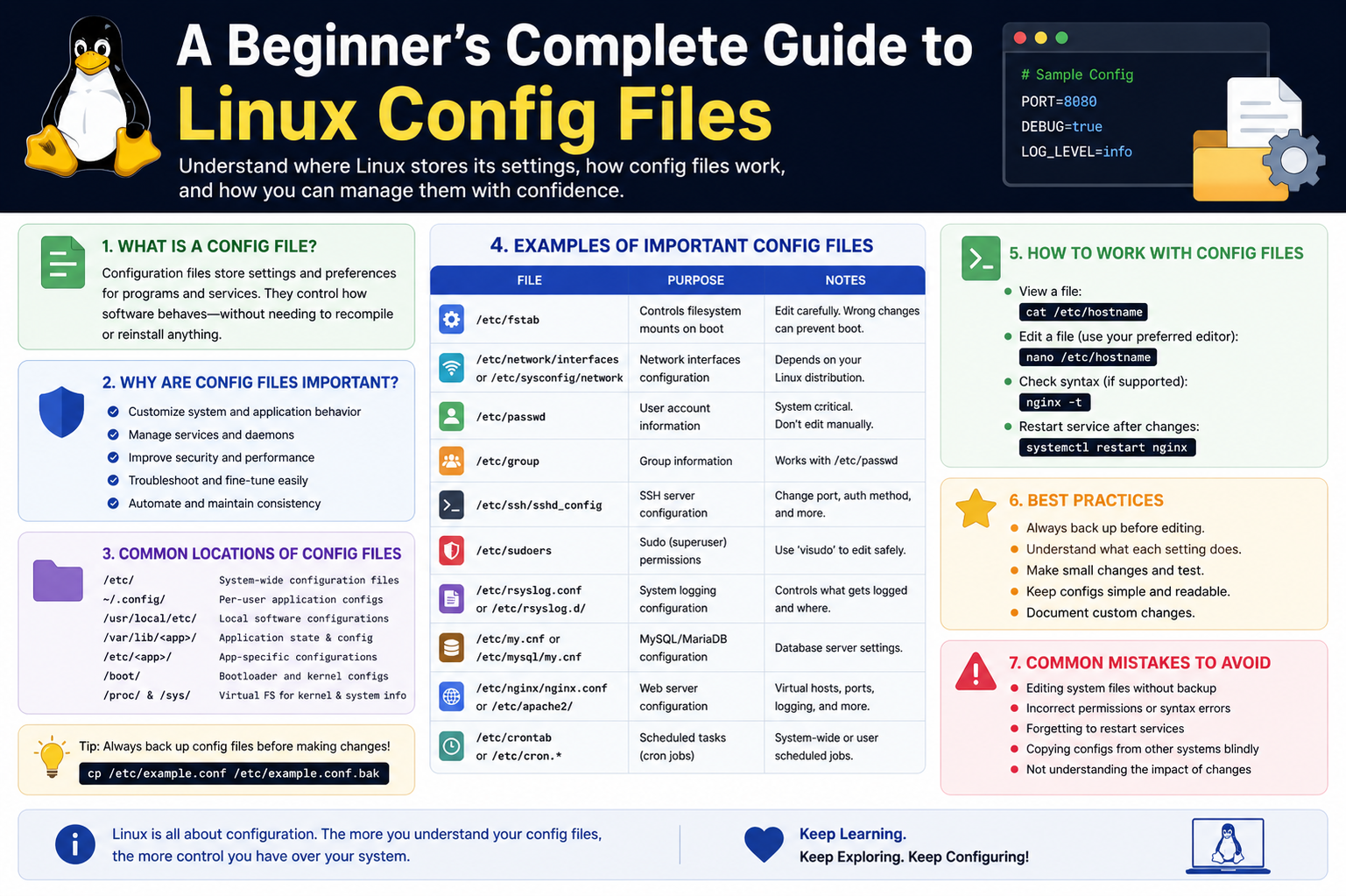
Editing configuration files requires attention and caution because even a small mistake can cause a program or system service to stop functioning correctly. Before making changes, it is always wise to create a backup copy of the original file. This provides a safe fallback if something goes wrong. Most Linux users edit configuration files with terminal-based text editors because they are lightweight and available on nearly every distribution. Understanding how to save changes correctly and exit an editor without damaging file formatting is an important first step for beginners.
Configuration files should always be edited with proper permissions. Many system-level files require administrative privileges because they control essential system behavior. Attempting to edit these files without the necessary access rights will either fail or result in changes not being saved. Administrative access should be used carefully, as it grants full control over critical system settings. Beginners should develop the habit of double-checking every modification before saving to avoid introducing errors that may affect system stability.
When making changes, it is often best to edit one setting at a time rather than modifying several options at once. This approach makes troubleshooting easier because if a problem appears, the source can be identified quickly. Testing the system or service after each change helps confirm that the modification works as expected. This careful and methodical approach builds confidence while reducing the risk of unintended issues.
Reading Configuration Files Effectively
Reading configuration files is a skill that improves with practice. At first glance, these files may appear overwhelming because they often contain technical terminology, symbols, and structured formatting. However, most configuration files are designed to be readable. Comments within the file usually explain what specific settings do, making them valuable learning tools for beginners.
A good strategy is to begin by identifying active settings and distinguishing them from commented lines. Commented lines usually provide examples or explanations but are not currently applied by the system. By comparing active lines with commented examples, users can better understand how different options influence behavior. This process helps build familiarity with configuration syntax and teaches how specific values affect system performance.
Documentation provided by installed software often offers additional explanations for configuration options. Learning to consult official documentation when reading configuration files is an essential habit. It prevents guesswork and ensures changes are based on accurate information. Over time, this practice develops stronger technical understanding and makes system management far more efficient.
The Role of Permissions in Configuration Management
Permissions are a fundamental concept in Linux and directly affect how configuration files are managed. Every file has ownership and permission settings that determine who can read, write, or execute it. This security model protects critical system files from accidental or unauthorized modification.
System-wide configuration files are typically owned by the root user, meaning only administrative users can modify them. This prevents regular users from making changes that could compromise system stability. User-level configuration files, on the other hand, are usually owned by individual users and can be modified without administrative privileges.
Understanding permissions helps prevent common errors. For example, if a configuration file cannot be edited, the issue is often related to insufficient access rights rather than a software problem. Learning how permissions work provides a stronger foundation for working confidently with Linux systems and ensures safer configuration practices.
Common Categories of Linux Configuration Files
Linux configuration files generally fall into several major categories. System configuration files control operating system behavior, startup processes, hardware management, and service initialization. These files define how the system behaves from the moment it boots.
Application configuration files control software-specific settings. These files determine how individual programs behave, including interface preferences, feature activation, and operational parameters. They allow users to customize applications according to personal workflow requirements.
Network configuration files manage internet connectivity, interface settings, routing rules, and hostname definitions. These files are essential for ensuring proper communication between the system and external networks.
Security-related configuration files define authentication methods, user access policies, and firewall settings. These files play a critical role in protecting the system from unauthorized access and ensuring secure operation.
Each category serves a distinct purpose, and understanding their differences helps users approach system management in a more organized and effective way.
Hidden Configuration Files in User Directories
Many Linux applications store personal settings in hidden files within a user’s home directory. These files often begin with a period, making them invisible in standard directory listings unless hidden files are specifically shown.
Hidden configuration files store preferences for shells, text editors, development tools, and desktop environments. They allow each user to maintain personalized settings independent of system-wide defaults. This separation is especially useful on multi-user systems where different users may require different configurations.
For beginners, exploring hidden configuration files offers valuable insight into how Linux personalizes user environments. Examining these files helps reveal how shells are customized, aliases are defined, and software preferences are stored. This knowledge encourages experimentation and deeper understanding of system personalization.
Understanding Configuration Syntax
Configuration syntax varies depending on the software being configured. Some files use straightforward key-value pairs where a parameter is assigned a specific value. Others organize settings into sections to group related options. Some advanced configuration files use scripting-like structures that allow conditional logic and command execution.
Whitespace and formatting often matter. Incorrect indentation, misplaced symbols, or missing punctuation can render a configuration file invalid. This is why careful editing is so important.
Comments within configuration files provide guidance and are an excellent source of learning. These comments often explain the purpose of settings, acceptable values, and examples of proper usage. Beginners should pay close attention to these notes because they often answer common questions directly within the file itself.
As users gain experience, recognizing configuration patterns becomes easier. This familiarity reduces the learning curve when working with new software and builds confidence in handling more complex system settings.
Testing Configuration Changes
After editing a configuration file, changes often need to be tested to ensure they function correctly. Some applications automatically detect changes, while others require a restart or manual reload. Understanding how a specific program applies configuration updates is important for successful system management.
Testing should be done carefully and systematically. If multiple settings are changed at once, identifying the source of an issue becomes more difficult. Testing one modification at a time allows for precise troubleshooting.
Log files are valuable during testing because they often provide error messages when configuration problems occur. Reading logs helps identify syntax mistakes, invalid values, or permission issues. Learning to interpret these messages is an essential skill that speeds up troubleshooting and strengthens technical understanding.
Successful testing confirms that configuration changes are working as intended and reinforces confidence in editing system files responsibly.
Avoiding Common Beginner Mistakes
Beginners often make a few predictable mistakes when working with configuration files. One common error is editing files without creating backups first. Without a backup, restoring the original state becomes difficult if something goes wrong.
Another frequent mistake is misunderstanding syntax requirements. Even a missing character can prevent a service from starting correctly. Careful attention to formatting helps avoid these issues.
Changing multiple settings simultaneously is another common pitfall. This makes troubleshooting unnecessarily complex because it becomes difficult to identify which change caused a problem.
Ignoring documentation is also a major mistake. Configuration files often include explanations, and official documentation provides essential context for understanding available options. Relying on guesswork can lead to incorrect configurations and system instability.
Learning from these common mistakes helps build disciplined habits that improve both confidence and technical accuracy.
Why Linux Uses Text-Based Configuration
Text-based configuration remains central to Linux because it offers flexibility, transparency, and portability. Unlike graphical settings interfaces, text files can be easily copied, version-controlled, and edited remotely. This makes them ideal for servers, scripting, and automation.
Text-based files also provide complete visibility into system behavior. Users can inspect exactly how settings are defined without relying on hidden abstractions. This transparency supports learning and gives users direct control over their environment.
Portability is another major advantage. Configuration files can often be transferred between systems, allowing users to replicate settings quickly. This is particularly valuable in professional environments where consistency across multiple machines is essential.
Understanding why Linux favors this approach helps beginners appreciate the system’s philosophy of openness and control.
Developing Confidence Through Practice
Working with configuration files may feel intimidating at first, but confidence grows through consistent practice. Starting with simple user-level files is often the best approach because mistakes are easier to recover from and carry less risk.
Experimentation is one of the most effective ways to learn. Making small changes, observing results, and reversing them if necessary builds familiarity with system behavior. This hands-on process develops intuition that cannot be gained through theory alone.
Patience is essential. Linux configuration is a skill developed over time through repeated exposure to different file structures, syntax styles, and troubleshooting scenarios. Each successful modification strengthens technical understanding and encourages further exploration.
The more users practice reading and editing configuration files, the more comfortable they become navigating Linux systems. Over time, tasks that once seemed complex become routine, opening the door to deeper customization and more advanced system administration skills.
Working with Different Types of Configuration Files
As you continue exploring Linux, you will encounter a wide variety of configuration files, each designed for a specific purpose. Some files control how the system boots, others define how services run in the background, and many are dedicated to individual applications. Understanding that not all configuration files behave the same way is important for building confidence. Each file follows its own logic and structure, and learning to adapt to these differences is part of becoming comfortable with Linux.
Some configuration files are minimal and only contain a few active settings, while others are extensive and include hundreds of lines with detailed options. Beginners should not feel overwhelmed by large files. Instead, focusing on relevant sections and gradually expanding knowledge is a more effective approach. Over time, patterns begin to emerge, making it easier to navigate even the most complex configurations.
System Startup and Service Configuration
A key area where configuration files play an important role is system startup and service management. When a Linux system boots, it reads a series of configuration files that determine which services should start automatically. These services may include networking, logging, scheduling tools, and other background processes essential for system operation.
Service configuration files define how these background processes behave. They can specify startup conditions, dependencies, restart behavior, and execution parameters. Understanding these files allows users to control which services run, optimize system performance, and troubleshoot startup issues.
Managing services through configuration files gives deeper control compared to graphical tools. It also allows automation and consistency, especially in environments where multiple systems need identical setups. Beginners who learn this area gain valuable insight into how Linux operates behind the scenes.
Application-Specific Configuration
Each application installed on a Linux system typically comes with its own configuration file or set of files. These files determine how the application behaves, what features are enabled, and how it interacts with the system. For example, a text editor may store preferences such as themes and shortcuts, while a server application may define connection limits, access rules, and performance settings.
Application configuration files are often easier to experiment with than system-level files because they usually affect only one program. This makes them ideal for beginners to practice editing and testing changes. By modifying these files, users can customize software to better suit their workflow and preferences.
Understanding application-specific configuration also helps when troubleshooting. If a program is not behaving as expected, its configuration file is often the first place to check. Learning to read and interpret these files makes problem-solving much more efficient.
Environment Variables and Their Configuration
Environment variables are another important aspect of Linux configuration. These variables store information that affects how processes run, such as paths to executable files, language settings, and system preferences. They can be defined globally for all users or individually within a user’s environment.
Configuration files related to environment variables often control how the shell behaves. They can define shortcuts, default commands, and custom settings that improve productivity. For example, users can create aliases to simplify long commands or adjust paths to include custom software locations.
Understanding environment variables helps users streamline their workflow and customize their working environment. It also provides insight into how the system locates and executes programs, which is essential knowledge for effective system use.
Using Version Control for Configuration Files
As configuration changes become more frequent, keeping track of modifications becomes important. Version control systems provide a structured way to manage changes over time. By saving different versions of configuration files, users can easily revert to previous states if something breaks.
Using version control encourages careful documentation of changes. Each modification can include a note explaining why it was made, making it easier to understand the evolution of system settings. This approach is especially useful in collaborative environments where multiple users manage the same system.
Even for beginners, adopting version control practices can be beneficial. It reduces the risk of losing important configurations and provides a clear history of system adjustments. This habit becomes increasingly valuable as systems grow more complex.
Automating Configuration Management
Automation is one of the strengths of Linux, and configuration files play a central role in this process. Instead of manually editing files on each system, users can create scripts that apply configurations automatically. This ensures consistency and saves time, especially when managing multiple machines.
Automation tools can handle tasks such as installing software, updating configuration files, and restarting services. These tools rely on predefined configuration settings, making them powerful for large-scale deployments. While beginners may not use advanced automation immediately, understanding the concept is important for future growth.
Learning basic scripting alongside configuration management allows users to combine commands and file edits into repeatable processes. This not only improves efficiency but also reduces the likelihood of human error.
Troubleshooting Configuration Issues
At some point, configuration changes will lead to unexpected behavior. Troubleshooting is a natural part of working with Linux and an essential skill to develop. When a problem occurs, the first step is to identify what changed. Reviewing recent edits helps narrow down the cause.
Error messages and log files are critical tools for troubleshooting. They often point directly to the issue, whether it is a syntax error, invalid value, or permission problem. Carefully reading these messages can save significant time and effort.
Reverting to a backup configuration file is sometimes the quickest way to restore functionality. This is why creating backups before editing is so important. Once the system is stable again, changes can be reintroduced gradually to identify the exact problem.
Troubleshooting builds problem-solving skills and deepens understanding of how configuration files interact with the system. Each issue resolved adds to experience and confidence.
Security Considerations in Configuration Files
Security is an important aspect of managing configuration files. Some files contain sensitive information such as authentication settings, access controls, and system policies. Protecting these files from unauthorized access is essential for maintaining system integrity.
Permissions should always be set appropriately to ensure that only authorized users can modify critical configuration files. Misconfigured permissions can expose the system to risks or allow unintended changes.
It is also important to avoid storing sensitive data in plain text whenever possible. Many systems provide secure methods for handling credentials and secrets. Understanding these practices helps maintain a secure environment and prevents potential vulnerabilities.
Regularly reviewing configuration files for security issues is a good habit. It ensures that outdated settings are updated and that the system remains protected against evolving threats.
Performance Tuning Through Configuration
Configuration files provide powerful ways to optimize system performance. By adjusting specific settings, users can improve resource usage, reduce startup time, and enhance overall efficiency. Performance tuning is especially important for systems running demanding applications or handling large workloads.
Small changes in configuration can have significant effects. For example, adjusting memory usage limits or enabling caching features can improve application responsiveness. However, performance tuning should be approached carefully, as incorrect settings may have the opposite effect.
Monitoring system performance before and after changes helps determine whether adjustments are beneficial. This data-driven approach ensures that optimizations are effective and avoids unnecessary modifications.
Over time, learning how different configuration options affect performance allows users to tailor systems to specific needs, whether for personal use or professional environments.
Building Long-Term Skills with Configuration Files
Working with Linux configuration files is not just about making changes; it is about developing a deeper understanding of how systems operate. Each file edited and each issue resolved contributes to a growing skill set that extends beyond basic usage.
As experience increases, users become more comfortable exploring new configurations, experimenting with advanced settings, and managing complex systems. This progression leads to greater independence and the ability to handle a wide range of technical challenges.
Consistency in practice is key. Regularly reading configuration files, testing changes, and learning from mistakes builds strong foundational knowledge. Over time, what once seemed complicated becomes intuitive.
By continuing to explore and refine these skills, users gain the ability to fully control and customize their Linux environment, unlocking the true potential of the system.
Advanced Understanding of Linux Configuration Structure
As your familiarity with Linux configuration files grows, you begin to notice that many systems follow similar design principles even if the syntax differs. Configuration files are rarely random; they are structured in a way that reflects the hierarchy and logic of the system itself. This structure allows the operating system to interpret settings in a predictable order, ensuring that services and applications behave consistently.
In many cases, configuration files are processed from top to bottom, meaning that later entries can override earlier ones. This simple rule is extremely important because it explains why some settings do not work as expected when duplicated or misplaced. Understanding this flow helps avoid confusion and gives users more control when fine-tuning system behavior.
Some systems also support modular configuration, where a main file includes additional files from specific directories. This design allows configurations to be split into smaller, manageable parts instead of one large file. For beginners, this may initially seem fragmented, but it actually improves organization and makes large systems easier to maintain.
Importance of Configuration Hierarchy
Linux systems often use a hierarchy of configuration sources. This means that settings can come from multiple levels, such as system-wide files, user-specific files, and application-level overrides. When conflicts occur, the system follows a defined priority order to determine which setting applies.
System-wide configuration usually provides default behavior for all users. These settings are stored in central locations and are managed by administrators. User-level configuration allows individuals to customize their environment without affecting others. Application-level settings define behavior specific to a single program instance.
This layered structure is one of the reasons Linux is so flexible. It allows global consistency while still giving users freedom to personalize their environment. Understanding this hierarchy helps prevent confusion when a change does not seem to take effect, as another configuration layer may be overriding it.
Dynamic vs Static Configuration
Configuration files in Linux can be broadly categorized into static and dynamic types. Static configuration files are manually edited and remain unchanged until a user modifies them. These files are common for system settings, service definitions, and application preferences.
Dynamic configuration, on the other hand, is generated or updated automatically by the system or applications. These files may change based on system state, user actions, or running services. While users can sometimes edit them, changes may not persist because the system can regenerate them.
Recognizing the difference between static and dynamic configuration is important. Editing a dynamic file without understanding its behavior may lead to temporary changes that disappear after reboot or service restart. Beginners should always check whether a file is meant to be manually edited or system-generated.
Configuration File Dependencies
Many configuration files depend on other files or system components. A single change in one file can influence multiple services or applications. This dependency relationship is especially common in network, system initialization, and service management configurations.
For example, a service configuration file may depend on environment settings defined elsewhere. If those dependencies are incorrect or missing, the service may fail to start. Understanding these relationships helps users diagnose problems more effectively.
Learning to trace dependencies is an important skill. Instead of viewing configuration files in isolation, users should think of them as part of a connected system. This perspective makes troubleshooting more logical and less overwhelming.
Logging and Configuration Feedback
Linux systems often provide feedback about configuration behavior through log files. These logs record system events, errors, warnings, and operational messages. When configuration changes are made, logs can reveal whether those changes were applied successfully or caused issues.
Reading logs is an essential skill for anyone working with configuration files. Error messages often include file names, line numbers, and descriptions of what went wrong. This information helps pinpoint problems quickly.
Some applications also provide real-time feedback when launched from the terminal. This output can show configuration parsing errors or missing values immediately. Using these tools together makes debugging much more efficient.
Over time, users develop the ability to interpret logs naturally, turning troubleshooting into a structured and predictable process rather than guesswork.
Best Practices for Organizing Configuration Files
As systems grow, organization becomes increasingly important. Well-organized configuration files are easier to understand, modify, and troubleshoot. One common practice is to keep related settings grouped together logically within the file. This makes it easier to locate specific options later.
Another good practice is to use comments effectively. Comments should explain why a change was made rather than simply restating what the line does. This context is extremely helpful when revisiting files after a long time.
Maintaining consistent formatting also improves readability. Even though Linux does not enforce strict formatting rules for all configuration files, keeping a clean and structured layout reduces the chance of mistakes.
Beginners who develop good organizational habits early will find it much easier to manage complex systems in the future.
Remote Configuration Management
In many real-world environments, Linux systems are managed remotely. This means configuration files are edited over a network connection rather than directly on the machine. Remote configuration is common in server environments where physical access is limited or unnecessary.
Secure remote access tools allow administrators to connect to systems and modify configuration files as if they were working locally. This makes it possible to manage multiple systems from a single location.
Remote configuration requires extra caution because mistakes can affect systems that are not immediately accessible. For this reason, backups and careful testing become even more important in remote environments.
Understanding remote management prepares users for professional system administration tasks and large-scale infrastructure management.
Configuration Drift and System Consistency
Over time, configuration files can change unintentionally across different systems, leading to what is known as configuration drift. This occurs when systems that are supposed to be identical gradually become inconsistent due to manual edits or updates.
Configuration drift can cause unpredictable behavior, especially in environments where multiple systems perform the same role. Preventing drift requires careful tracking of changes and maintaining consistent configuration standards.
Automated tools are often used to enforce consistency, but even manual users should be aware of this concept. Regular comparison of configuration files across systems helps identify differences early before they become serious problems.
Maintaining consistency ensures stability and reliability, especially in larger environments.
Recovering from Configuration Failures
Despite careful editing, configuration mistakes can still cause system issues. Recovery is an important skill that ensures systems can be restored quickly. The most common recovery method is restoring a backup configuration file.
In more complex cases, systems may need to be started in a safe or recovery mode. This allows users to access and fix configuration files without fully loading the system. Understanding these recovery options is essential for minimizing downtime.
Another recovery technique involves gradually disabling or isolating configuration sections to identify the source of the problem. This method is especially useful when dealing with large or complex files.
Recovery skills become more important as systems grow in complexity, making them a key part of Linux expertise.
Developing a Deeper System Perspective
As you work more with configuration files, your understanding of Linux begins to shift from isolated commands to a connected system view. Instead of seeing individual files as separate elements, you start to recognize how they interact to form a complete environment.
This perspective allows for better decision-making when configuring systems. Changes are no longer made blindly; they are made with an understanding of how different components influence each other.
This deeper awareness is what separates basic users from advanced ones. It leads to more efficient troubleshooting, better system design, and greater confidence when managing complex environments.
Continuing the Learning Journey
Mastering Linux configuration files is an ongoing process rather than a one-time achievement. Every system, application, and environment introduces new patterns and challenges. Continued practice strengthens understanding and builds adaptability.
Exploring different distributions, experimenting with new services, and reading configuration examples all contribute to long-term growth. Over time, the structure of configuration files becomes intuitive, and managing them becomes second nature.
With consistent learning and practical experience, users gradually move from basic understanding to confident system control, unlocking the full potential of Linux environments.
Working with System Services and Configuration Behavior
System services in Linux rely heavily on configuration files to define how they start, operate, and interact with other components. These services run in the background and perform essential tasks such as handling networks, managing storage, and supporting applications. Each service has its own configuration rules that determine its behavior, and understanding these rules is an important step in gaining deeper control over a Linux system.
Service configuration often includes instructions about when a service should start, what dependencies it requires, and how it should respond to failures. These settings ensure that services run in the correct order and remain stable during system operation. If a dependency is missing or incorrectly defined, the service may fail to start or behave unexpectedly.
Beginners should focus on understanding how services relate to one another rather than memorizing individual configuration options. Once the dependency relationships become clear, managing services becomes much more intuitive and predictable.
Understanding Boot-Time Configuration Flow
When a Linux system starts, it follows a structured boot process that reads configuration files step by step. Each stage of the boot process depends on the successful completion of the previous one. This structured flow ensures that essential system components are loaded in the correct order.
Boot-time configuration includes settings for hardware initialization, file system mounting, service activation, and user environment setup. These configurations are critical because they determine whether the system starts successfully or encounters errors during startup.
If something goes wrong during boot, it is often due to a misconfigured file or a missing dependency in one of the startup stages. Understanding the boot flow helps users identify where the issue might be occurring and simplifies troubleshooting.
Role of Shell Configuration Files
Shell configuration files are among the most commonly used configuration files in Linux environments. These files define how the command-line interface behaves and how users interact with the system through the terminal.
Shell configurations can include environment variables, command aliases, prompt customization, and startup scripts. These settings help personalize the terminal experience and improve efficiency. For example, users can create shortcuts for frequently used commands or modify the appearance of the command prompt to display useful information.
Shell configuration files are usually loaded every time a new terminal session starts. This makes them an important part of daily Linux usage. Learning how to modify these files effectively can significantly improve productivity and workflow.
Understanding File Parsing and Execution Order
When a configuration file is read by the system or an application, it goes through a process called parsing. During parsing, the system interprets each line of the file and applies the settings in a specific order. The order of execution is important because later instructions may override earlier ones.
If a configuration file contains conflicting settings, the system typically follows a rule-based approach to determine which value to use. This behavior makes it important to understand how ordering affects final outcomes.
Incorrect ordering is a common source of configuration errors. Beginners should pay attention to how files are structured and ensure that related settings are placed logically. This reduces confusion and helps avoid unexpected behavior.
Working with Templates and Default Configurations
Many Linux applications provide default configuration templates. These templates serve as starting points that define standard behavior for the system or application. Users can modify these templates to suit their specific needs.
Default configurations are designed to work in most environments without modification, but they may not always be optimal for specialized use cases. Adjusting these settings allows users to fine-tune performance, security, and functionality.
Understanding how default configurations work helps beginners avoid unnecessary changes. Instead of rewriting entire configuration files, users can focus only on the sections that need adjustment. This approach reduces complexity and lowers the risk of errors.
Configuration File Validation and Error Checking
Before a configuration file is applied, many systems perform validation checks to ensure the file is correctly formatted. These checks help detect syntax errors, invalid values, and missing parameters.
If an error is found during validation, the system may refuse to apply the configuration or revert to a previous stable state. This behavior protects the system from breaking due to incorrect settings.
Beginners should learn to interpret validation messages carefully. These messages often provide clues about the exact location and nature of the problem. Understanding these messages makes troubleshooting faster and more efficient.
Some applications also offer manual validation tools that allow users to test configuration files before applying them. Using these tools is a good practice that helps prevent system downtime.
Modular Configuration and Include Directives
Modern Linux systems often support modular configuration, where a main configuration file includes additional files stored in separate directories. This approach improves organization and allows configurations to be broken into smaller, manageable parts.
Include directives tell the system to load additional configuration files from specified locations. These included files are processed as part of the main configuration, allowing settings to be distributed across multiple files.
This structure is especially useful for large systems where a single configuration file would be too complex to manage. It also allows administrators to separate system-wide settings from custom or application-specific configurations.
Understanding modular configuration helps users navigate complex systems more effectively and reduces the difficulty of managing large configuration sets.
Impact of Updates on Configuration Files
System updates and software upgrades can sometimes affect configuration files. In some cases, updates may introduce new configuration options or modify existing defaults. This can lead to changes in system behavior after an update is applied.
In certain situations, updated software may also replace or rename configuration files. This is why it is important to review configuration changes after system updates.
Beginners should develop the habit of checking configuration files after updates to ensure that settings remain consistent. Comparing old and new configurations can help identify changes that may require adjustment.
Understanding how updates interact with configuration files helps prevent unexpected behavior and ensures system stability over time.
Configuration Debugging Techniques
Debugging configuration issues involves a structured approach to identifying and resolving problems. One common method is to isolate the problematic section of a configuration file by temporarily disabling parts of it.
Another technique involves simplifying the configuration to a minimal working state and gradually reintroducing settings. This helps identify which specific change is causing the issue.
Using diagnostic tools and reading system logs are also essential parts of debugging. These tools provide detailed information about what the system is doing and where it is encountering problems.
Debugging requires patience and logical thinking. Each step brings the system closer to a stable state, and over time, users develop strong problem-solving skills.
Understanding Configuration Portability
One of the advantages of Linux configuration files is their portability. In many cases, configuration files can be copied from one system to another, allowing users to replicate environments easily.
However, portability is not always guaranteed. Differences in system versions, software packages, and hardware configurations can affect how a file behaves. Because of this, configuration files may need adjustments when moved between systems.
Understanding portability helps users avoid blindly copying configurations without testing. It also encourages careful documentation of changes to ensure compatibility across environments.
Developing Confidence in Advanced Configuration Work
As users gain experience, working with configuration files becomes more intuitive. What once required careful reading and hesitation eventually becomes a natural process of adjusting and refining system behavior.
Confidence comes from repeated exposure to different types of configuration scenarios. Each successful modification strengthens understanding and builds trust in one’s ability to manage systems effectively.
Advanced configuration work is not about memorizing every option but about understanding how systems respond to changes. This mindset allows users to adapt quickly to new environments and challenges.
Over time, configuration management becomes less about difficulty and more about precision and control, marking a significant step in Linux mastery.
Conclusion
Linux configuration files form the foundation of how a Linux system operates, behaves, and adapts to different needs. From system-wide settings to individual user preferences, these files give full control over nearly every aspect of the environment. Understanding them is not just a technical skill but a practical way of gaining deeper control over the system.
For beginners, the key idea is that configuration files are not meant to be feared or avoided. They are simply structured text files that define how things should work. With careful reading, small changes, and consistent practice, they become easier to understand and manage. Over time, what once looked complex turns into a familiar and predictable system.
The most important habits to develop are patience, attention to detail, and the practice of always making backups before changes. These simple steps prevent most common mistakes and make learning much safer. As experience grows, users begin to recognize patterns, understand dependencies, and troubleshoot issues more confidently.
Eventually, working with configuration files becomes a natural part of using Linux. It allows users to customize their environment, improve performance, and solve problems directly without relying on external tools. This level of control is one of the reasons Linux is so powerful and widely used in both personal and professional environments.
By continuing to explore, experiment, and learn from each configuration change, anyone can build strong skills that lead from basic usage to advanced system understanding.