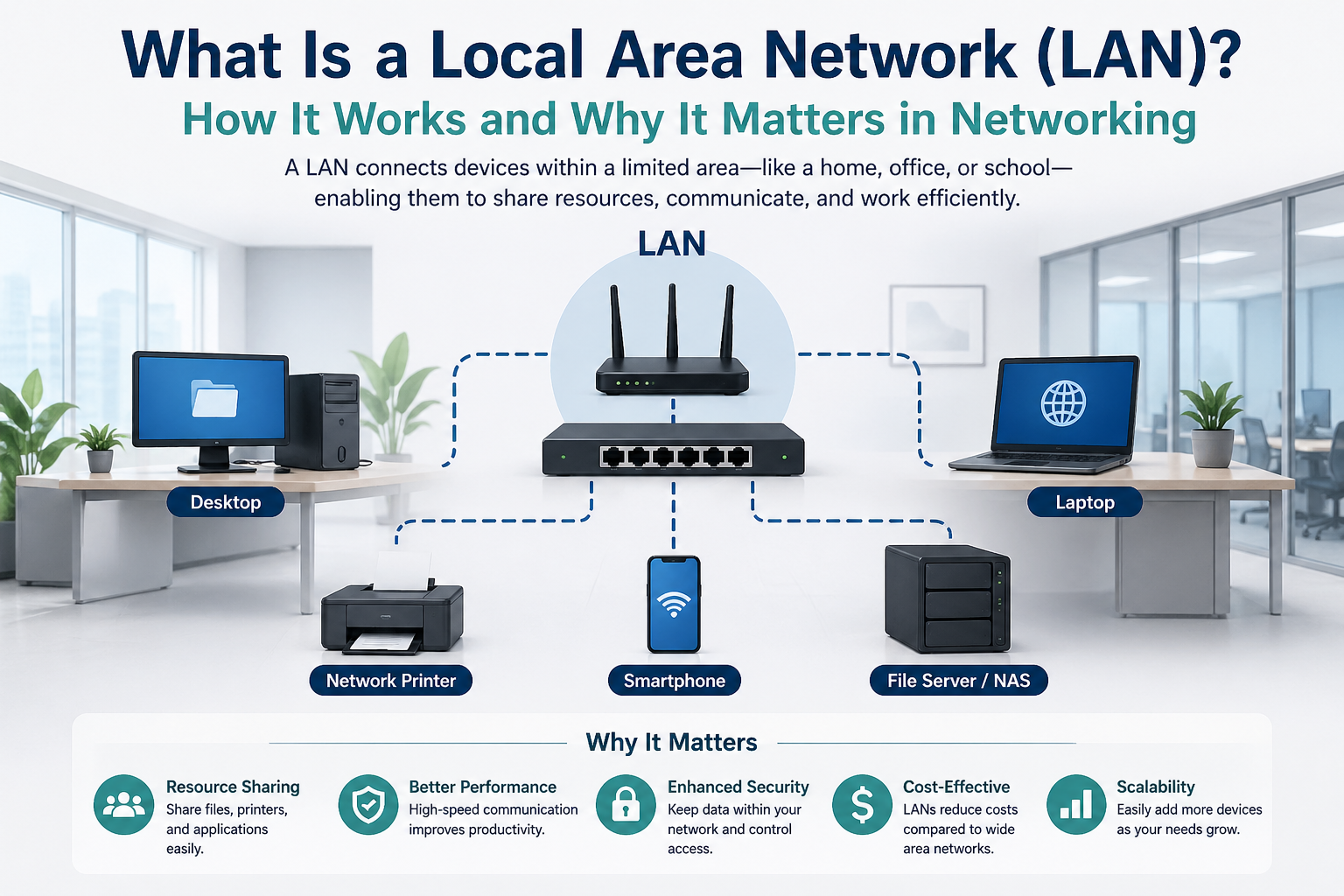
Local Area Networks can be created in different forms depending on the environment and the needs of users. The most common type is the wired LAN, where devices are connected using Ethernet cables. This type is widely used in offices and schools because it provides stable connections, high speed, and strong security. Wired LAN is preferred when reliable performance is required for tasks such as large file transfers, video conferencing, and server access.
Wireless LAN, often called WLAN, uses Wi-Fi technology instead of physical cables. It allows laptops, smartphones, tablets, and other wireless devices to connect easily within the network range. Wireless LAN is highly popular in homes, cafes, educational institutions, and modern workplaces because it offers flexibility and mobility. Users can move freely while staying connected to the network without being limited by cable length.
There is also a client-server LAN, where one or more central servers manage network resources, security, and user access. This setup is common in businesses because it provides better control over data and users. Another type is peer-to-peer LAN, where devices communicate directly with each other without a dedicated server. This type is often used in small homes or small offices where network management is simple and does not require advanced control.
LAN vs Other Types of Networks
LAN is often compared with other types of networks such as WAN, MAN, and PAN. A Wide Area Network (WAN) covers a much larger geographic area, such as cities, countries, or even continents. The internet itself is the biggest example of a WAN. While LAN focuses on local communication, WAN connects multiple LANs across long distances. WAN is slower and more expensive to maintain because it requires more infrastructure and service providers.
A Metropolitan Area Network (MAN) is larger than a LAN but smaller than a WAN. It usually covers a city or a large campus. Universities and large organizations may use MAN to connect multiple buildings within the same city. A Personal Area Network (PAN) is even smaller than a LAN and is designed for personal devices such as smartphones, smartwatches, and wireless earphones. Bluetooth is a common example of PAN technology.
LAN stands out because it offers the best balance of speed, affordability, and control within a limited area. It is the most practical choice for everyday networking needs in homes and workplaces.
Common Uses of LAN in Homes
In modern homes, LAN is used more than many people realize. When family members connect laptops, smart TVs, gaming consoles, mobile phones, and printers to the same Wi-Fi network, they are using a LAN. It allows multiple devices to share the same internet connection while also enabling communication between devices.
For example, a user can print documents from a laptop using a wireless printer connected to the same network. Smart TVs can stream content from media servers or computers within the home. Gaming consoles can connect with other devices for online and local multiplayer gaming. Home security cameras and smart home systems such as lights, thermostats, and voice assistants also depend on LAN for communication.
LAN makes daily digital life easier by connecting everything into one organized and efficient system.
Common Uses of LAN in Businesses
Businesses rely heavily on LAN for smooth operations. In offices, employees use LAN to share files, access printers, communicate through internal systems, and connect to company servers. It improves teamwork because staff members can quickly exchange information without depending on external services.
Banks use LAN to connect computers securely for transaction processing. Schools and colleges use it to connect computer labs, libraries, administrative departments, and classrooms. Hospitals use LAN to manage patient records, appointments, medical devices, and internal communication systems. Retail stores use LAN for billing systems, inventory management, and customer service operations.
In every business environment, LAN supports productivity, security, and centralized management, making it an essential part of professional networking.
Role of IP Addresses in LAN
Every device connected to a LAN needs an IP address to communicate properly. An IP address works like a digital home address that helps identify where data should be sent. Without IP addresses, devices would not know how to locate each other on the network.
There are two main ways devices receive IP addresses. One method is static IP addressing, where the address is assigned manually and remains fixed. This is useful for servers, printers, and important systems that need a permanent address. The second method is dynamic IP addressing, where addresses are assigned automatically by a DHCP server, usually managed by the router. This method is common for regular devices such as laptops and smartphones.
Proper IP management helps maintain smooth communication, prevents address conflicts, and improves network organization.
Importance of Switches in LAN
A switch is one of the most important devices in a LAN. It connects multiple devices and ensures data is delivered to the correct destination. Unlike older networking devices such as hubs, switches are smarter because they send information only to the intended device rather than broadcasting it to everyone.
For example, if one employee sends a file to another employee in the same office, the switch identifies the correct device and transfers the data directly. This improves speed and reduces unnecessary traffic on the network.
Switches also help expand the network by allowing more devices to connect. In larger organizations, multiple switches can work together to support hundreds or even thousands of connected systems efficiently.
Role of Routers in LAN
While switches manage communication inside the local network, routers handle communication between the LAN and external networks like the internet. A router directs data traffic and ensures information travels to the correct destination beyond the local environment.
For example, when a user opens a website, the router sends the request from the local network to the internet and then brings the response back to the correct device. Routers also provide security features such as firewalls and parental controls. They help manage bandwidth and prevent unauthorized access.
In home networks, the router is usually the central device that combines internet access, Wi-Fi connectivity, and network management in one system.
LAN Security and Protection
Security is a major concern in any network, including LAN. Since important personal and business data travels across the network, protection is necessary to prevent unauthorized access and cyber threats. A secure LAN protects information from hackers, malware, and internal misuse.
Passwords for Wi-Fi networks should be strong and updated regularly. Firewalls help block suspicious traffic and prevent attacks from outside sources. Antivirus software protects connected devices from harmful programs. Access control ensures only authorized users can use sensitive resources such as servers and confidential files.
Businesses often use advanced security measures such as network monitoring, encryption, and user authentication systems. Regular software updates and employee awareness also play an important role in maintaining network safety.
A secure LAN improves trust, protects data, and ensures smooth daily operations without interruptions caused by security issues.
LAN Speed and Performance
One of the biggest advantages of LAN is its high speed. Because devices are located close together, data can travel quickly with very little delay. This makes LAN ideal for activities such as file sharing, video meetings, cloud access, and software management.
Wired LAN connections using Ethernet cables usually provide faster and more stable speeds compared to wireless connections. They are less affected by walls, interference, or distance. Wireless LAN is more convenient but may experience slower speeds if many devices are connected at the same time or if the signal is weak.
Performance also depends on the quality of networking devices, cable standards, internet bandwidth, and network design. Proper planning helps maintain fast and reliable communication across the entire LAN.
Troubleshooting Common LAN Problems
Even well-designed LAN systems can face technical issues. Common problems include slow internet speed, connection loss, printer access failure, IP conflicts, and weak wireless signals. Understanding basic troubleshooting helps solve these issues quickly.
Restarting the router or switch often fixes temporary problems. Checking cables can identify loose or damaged connections in wired networks. Verifying Wi-Fi passwords and signal strength helps solve wireless issues. IP conflicts can be resolved by renewing addresses or restarting DHCP services.
In business environments, network administrators use monitoring tools to detect performance issues, unauthorized access, and device failures. Quick troubleshooting reduces downtime and keeps operations running smoothly.
Regular maintenance and updates help prevent problems before they become serious.
Future of LAN in Modern Networking
LAN continues to evolve as technology advances. Faster Ethernet standards, stronger Wi-Fi technology, and smarter network management systems are making LAN more powerful than ever. With the rise of remote work, cloud computing, and smart devices, LAN remains a critical foundation for digital communication.
Modern offices now use advanced wireless systems that support large numbers of connected devices without losing performance. Smart homes rely on LAN to connect security systems, appliances, entertainment devices, and automation tools. Educational institutions use LAN for digital classrooms and online learning platforms.
The growth of the Internet of Things (IoT) has made LAN even more important because more devices need secure and reliable local connections. From smart refrigerators to industrial sensors, these systems depend on LAN for communication and control.
As technology becomes more connected, LAN will continue to be one of the most essential parts of networking infrastructure.
Why Understanding LAN Is Important
Learning about LAN is important for students, IT professionals, business owners, and even regular home users. It helps people understand how devices communicate, how internet access is managed, and how digital systems stay connected.
For students studying computer science or networking, LAN is a basic concept that builds the foundation for understanding advanced networking topics. For business owners, knowing how LAN works helps in making better decisions about security, performance, and office productivity. For home users, it improves the ability to manage Wi-Fi networks, troubleshoot connection problems, and use smart devices effectively.
In today’s digital world, networking knowledge is no longer limited to technical experts. Understanding LAN helps everyone use technology more efficiently and securely.
Advantages of Local Area Network
A Local Area Network offers many advantages that make it one of the most widely used networking systems in homes, schools, and businesses. One of the biggest benefits is resource sharing. Multiple users can access the same printer, scanner, internet connection, and storage devices without needing separate equipment for each person. This reduces costs and improves efficiency.
Another major advantage is fast communication. Since devices are connected within a small geographical area, data transfer speeds are much higher compared to larger network types. Employees in an office can quickly share files, students in a computer lab can access learning materials instantly, and family members at home can stream content smoothly without delays.
Centralized data management is also an important benefit. In business environments, files and applications can be stored on a central server, making it easier to manage backups, updates, and security. This improves productivity and reduces the risk of data loss.
LAN also provides better security compared to broader networks because access is limited to a specific location. Administrators can control who joins the network, what resources they can use, and how data is protected. This creates a safer digital environment for both personal and professional use.
Maintenance is simpler because the network covers a smaller area. Problems can be identified and fixed more quickly, and upgrades can be managed without major complications.
Disadvantages of Local Area Network
Although LAN provides many benefits, it also has some disadvantages that should be considered. One of the main challenges is the initial setup cost. Installing switches, routers, cables, servers, and security systems can be expensive, especially for larger offices or institutions.
Another issue is the need for regular maintenance. Networks require monitoring, updates, and troubleshooting to keep them working properly. In business settings, skilled IT staff may be needed to manage the system, which adds to operational costs.
Security risks can still exist if the network is not protected properly. Viruses, malware, and unauthorized access can spread quickly within a LAN because devices are closely connected. A single infected computer can affect the entire network if strong security measures are not in place.
Wired LAN systems can also limit mobility because devices depend on physical cable connections. While wireless LAN solves this problem, it may face signal interference, weaker performance, and reduced speed in crowded environments.
Another disadvantage is limited coverage. LAN is designed only for a small area, so it cannot connect users across large distances without combining with larger network systems like WAN.
Despite these limitations, LAN remains highly effective when planned and managed correctly.
Difference Between Wired LAN and Wireless LAN
Wired LAN and Wireless LAN are the two main ways of creating a local network, and each has its own strengths. Wired LAN uses Ethernet cables to connect devices directly to switches and routers. This type of connection is known for high speed, strong stability, and reliable performance. It is ideal for offices, gaming systems, and tasks that require constant high-speed access.
Wireless LAN uses Wi-Fi signals instead of cables, allowing devices to connect without physical wires. This provides flexibility and convenience because users can move around freely while staying connected. Wireless LAN is commonly used in homes, cafes, universities, and modern workplaces.
Wired LAN is generally more secure because physical access is required to connect. It is also less affected by interference from walls or other devices. However, installation can be more difficult because cables must be placed properly throughout the building.
Wireless LAN is easier to install and expand, but it may experience slower speeds if too many users connect at once. Signal strength can also be affected by distance and physical obstacles.
Choosing between wired and wireless LAN depends on the needs of the environment. Many organizations use both together for the best balance of speed and flexibility.
LAN Topologies and Their Importance
Network topology refers to the physical or logical arrangement of devices within a LAN. It defines how computers, switches, and other devices are connected and how data moves through the network. Understanding topology is important because it affects performance, maintenance, and reliability.
The most common topology in modern LAN systems is the star topology. In this setup, all devices are connected to a central switch or hub. If one device fails, the rest of the network continues working normally. This makes troubleshooting easier and improves overall reliability.
Bus topology was more common in older systems. In this design, all devices share a single communication line. It is simple and inexpensive, but if the main cable fails, the entire network can stop working. It also becomes slower when too many devices are connected.
Ring topology connects devices in a circular path where data travels from one device to the next. It can work efficiently, but if one connection breaks, it may affect the entire network unless backup systems exist.
Mesh topology provides multiple connections between devices for maximum reliability. It is mostly used in advanced systems where uninterrupted communication is critical, but it is more expensive and complex.
Star topology remains the most popular choice for LAN because it offers a good balance of performance, cost, and easy management.
LAN in Educational Institutions
Schools, colleges, and universities depend heavily on LAN for academic and administrative work. Computer labs use LAN to connect multiple systems so students can access software, study materials, and shared printers easily. Teachers can distribute assignments and manage classroom activities more efficiently through connected systems.
Libraries use LAN to manage digital catalogs, book databases, and student records. Administrative offices rely on it for admissions, attendance tracking, payroll, and communication between departments. Online learning platforms and digital classrooms also function better with strong local network support.
Universities often use LAN to connect research labs, lecture halls, faculty offices, and hostel facilities. Students can access internet services, submit assignments, and communicate with academic departments through the network.
LAN improves collaboration, saves time, and supports modern educational methods. It has become an essential part of digital learning environments across the world.
LAN in Healthcare Systems
Hospitals and clinics use LAN to manage important medical operations quickly and securely. Patient records, appointment schedules, billing systems, laboratory reports, and medical imaging all depend on reliable network access.
Doctors and nurses can access patient information instantly from different departments without delays. This improves treatment speed and reduces errors caused by missing or outdated records. Laboratories can send test results directly to doctors through the network, helping patients receive faster diagnoses.
Medical devices such as monitoring systems, digital scanners, and hospital management software also rely on LAN for communication. Emergency departments benefit greatly from fast access to information, where even small delays can affect patient care.
Security is especially important in healthcare networks because patient data must remain private and protected. LAN helps provide controlled access and secure communication within the hospital environment.
Healthcare services become more accurate, organized, and efficient with a properly managed LAN system.
LAN and File Sharing
One of the most practical uses of LAN is file sharing. Users can send documents, images, videos, and software files between connected devices without using external storage devices like USB drives. This saves time and improves workflow.
In offices, employees can work on shared folders stored on a server. Team members can access reports, presentations, and project files from different computers while keeping everything organized in one place. This supports collaboration and reduces duplication of work.
In homes, users can share movies, photos, and documents between laptops, phones, and smart TVs through the same network. Students can print assignments from different rooms using shared network printers.
File sharing also improves backup management because important data can be stored centrally rather than on individual devices. This reduces the risk of losing valuable information due to hardware failure.
Efficient file sharing is one of the reasons LAN remains so important in both personal and professional environments.
LAN and Internet Sharing
Internet sharing is another major reason people use LAN. Instead of buying separate internet connections for every device, multiple users can share a single broadband connection through a router. This reduces costs and simplifies network management.
In homes, family members can use smartphones, laptops, gaming consoles, and smart TVs at the same time through one Wi-Fi connection. In offices, employees can access cloud applications, emails, and communication tools without needing separate internet services.
Routers manage internet traffic and distribute bandwidth across connected devices. Some systems also allow administrators to prioritize important tasks such as video meetings or business software over entertainment traffic.
This shared access creates a more organized and affordable digital environment while maintaining convenience for all users.
Role of Network Interface Card in LAN
A Network Interface Card, commonly known as NIC, is a hardware component that allows a device to connect to a network. Without a NIC, a computer cannot communicate with other devices in a LAN.
NIC can be built into the motherboard or installed separately. In wired LAN systems, it provides an Ethernet port for cable connections. In wireless LAN systems, it supports Wi-Fi communication through wireless signals.
Each NIC has a unique MAC address, which helps identify the device on the network. This address is important for communication between switches and connected systems.
Modern laptops, desktops, and even smart devices come with built-in network interfaces because connectivity is now a basic requirement. The NIC acts as the bridge between the device and the network, making it a fundamental part of LAN communication.
Without this component, local networking would not be possible.
LAN Administration and Network Management
Managing a Local Area Network requires proper planning, monitoring, and maintenance to ensure everything runs smoothly. Network administration involves controlling devices, users, security settings, and overall performance. In small home networks, this may simply involve setting up a Wi-Fi router and managing connected devices. In large organizations, dedicated network administrators handle complex tasks every day.
Administrators monitor network traffic to make sure data flows efficiently and no device is causing unnecessary congestion. They manage user permissions so that only authorized people can access sensitive files, printers, or servers. Software updates, password policies, and security patches are also part of daily network management.
Regular backups are essential in LAN administration because they protect important business or personal data from accidental loss. Administrators also keep records of connected devices, IP addresses, and network performance to quickly solve problems when they appear.
Strong network management improves speed, security, and reliability, ensuring users can work without interruption.
LAN Cables and Their Importance
In wired LAN systems, network cables are the physical path through which data travels. These cables connect computers, switches, routers, and servers to create stable communication. Ethernet cables are the most commonly used cables in LAN environments because they provide fast and reliable performance.
Different categories of Ethernet cables are used depending on speed requirements. For example, Cat5e, Cat6, and Cat6a cables support different levels of speed and bandwidth. Higher category cables provide better performance and are often used in offices where large amounts of data are transferred daily.
Good quality cables reduce signal loss and improve network stability. Poor installation or damaged cables can cause slow speeds, connection drops, and communication errors. This is why cable management is an important part of professional networking.
Although wireless networks are growing rapidly, wired connections still remain essential for servers, office systems, and situations where strong and uninterrupted connectivity is required.
Servers in a LAN Environment
A server is a powerful computer that provides services and resources to other devices in a LAN. It plays a central role in many business networks by storing files, managing users, running applications, and controlling security.
For example, a file server stores documents and shared folders that employees can access from their computers. A print server manages multiple printers connected to the network. A database server handles company records, customer information, and business transactions.
Authentication servers control login access and help ensure only approved users can enter the system. Email servers may also operate within a LAN for internal communication.
Using servers creates better organization because data is stored in one central place instead of being scattered across individual devices. It also improves backup management and security control.
In small networks, a dedicated server may not be necessary, but in medium and large businesses, servers are a key part of efficient LAN operations.
LAN and Cloud Integration
Modern LAN systems often work together with cloud technology. While LAN handles local communication inside a building, cloud services allow access to data and applications from anywhere through the internet. Combining both creates a powerful and flexible working environment.
For example, employees may use the office LAN to access printers and local servers while also using cloud storage for remote collaboration. Students in schools may connect to local networks for classroom systems while using cloud-based learning platforms for assignments and lectures.
Cloud integration improves flexibility because users can work from home, travel locations, or branch offices while staying connected to important files and services. At the same time, LAN provides the speed and control needed for local operations.
This combination supports modern business models such as remote work, hybrid offices, and online education, making networking more efficient and scalable.
LAN in Smart Homes
Smart homes depend heavily on LAN technology to connect everyday devices and create automated living environments. Smart TVs, voice assistants, home security cameras, door locks, lights, thermostats, refrigerators, and entertainment systems all communicate through the local network.
For example, a user can control lights from a smartphone, receive camera alerts remotely, or ask a voice assistant to play music through connected speakers. These actions happen because devices are linked through the home LAN.
Wireless LAN is especially important in smart homes because most devices use Wi-Fi instead of cables. A strong and secure router becomes the center of the system, managing communication between all connected devices.
As more households adopt smart technology, understanding LAN becomes more important for setup, troubleshooting, and security. A reliable home network creates comfort, convenience, and better control over daily life.
LAN and the Internet of Things (IoT)
The Internet of Things, commonly called IoT, refers to physical devices that connect to the internet and communicate with each other. These include smart watches, sensors, security systems, industrial machines, and home appliances. LAN provides the local communication foundation for many IoT systems.
In factories, machines use LAN to send performance data to monitoring systems. In hospitals, smart medical devices report patient conditions through the local network. In homes, smart appliances connect through Wi-Fi to support automation and remote control.
Because IoT increases the number of connected devices, network performance and security become even more important. A weak or poorly managed LAN can create delays, failures, or security risks.
As IoT continues to grow across industries, LAN remains a critical part of supporting connected technology and efficient automation.
LAN Performance Optimization
Improving LAN performance is important for maintaining fast and reliable communication. Even a good network can become slow if too many devices compete for bandwidth or if equipment is outdated.
One common method of optimization is upgrading switches, routers, and cables to support higher speeds. Replacing old devices with modern equipment improves efficiency and reduces delays. In wireless networks, placing routers in better locations helps strengthen signal coverage.
Bandwidth management is also important. Businesses often prioritize important services such as video conferencing, cloud software, and database access over less important traffic like entertainment streaming.
Reducing unnecessary network traffic, updating firmware, and using strong security tools also improve performance. Regular monitoring helps identify weak points before they cause serious problems.
Optimization ensures that LAN continues to support growing demands without affecting productivity.
LAN and Remote Work Support
Remote work has changed how businesses use networking. Even when employees work from different locations, the office LAN remains an important part of company operations. It supports internal servers, secure file access, and communication systems that remote staff still depend on.
Virtual Private Networks (VPNs) allow remote employees to connect safely to the office LAN from home or while traveling. This creates secure access to company resources without exposing sensitive information to public networks.
For example, an accountant working from home may access office financial software through secure network access. A customer support team may connect to internal databases while serving clients remotely.
LAN combined with secure remote access creates flexibility for modern businesses while maintaining strong control over operations and security.
This has made LAN more valuable than ever in supporting hybrid work environments.
LAN Backup and Disaster Recovery
Data protection is a major responsibility in any network system. LAN supports backup and disaster recovery by allowing important files and systems to be stored safely in central locations.
Businesses often use backup servers or network-attached storage devices to protect documents, financial records, and customer information. If a computer fails, data can be restored quickly without major business interruption.
Disaster recovery planning also includes protection against cyberattacks, hardware failure, power outages, and accidental deletion. Regular backups reduce risk and improve business continuity.
In homes, users may back up photos, videos, and personal documents to shared storage connected through the LAN. This prevents permanent loss of valuable files.
A strong backup strategy ensures that both businesses and individuals can recover quickly from unexpected problems.
LAN Monitoring Tools
Network monitoring tools help administrators track the health and performance of a LAN. These tools show which devices are connected, how much bandwidth is being used, and whether any security threats or technical problems are present.
For example, if one computer is using too much bandwidth or if a printer suddenly disconnects, monitoring software can quickly identify the issue. In businesses, this helps reduce downtime and improve productivity.
Some tools also send alerts when unusual activity appears, such as unauthorized login attempts or suspicious data transfers. This strengthens network security and allows faster responses to threats.
Monitoring tools are especially useful in large offices where hundreds of devices may be connected at the same time. They help administrators maintain control and ensure the network remains stable and efficient.
Without proper monitoring, problems may remain hidden until they become serious and expensive to fix.
Future Trends in LAN Technology
LAN technology continues to improve as digital demands increase. Faster Ethernet standards and advanced Wi-Fi systems are making local networks stronger and more efficient. Wi-Fi 6 and newer wireless technologies provide better speed, support more devices, and reduce network congestion.
Artificial intelligence is also beginning to assist network management by automatically detecting problems and improving performance. Smart security systems can identify threats faster and reduce human error.
Businesses are moving toward software-defined networking, where administrators manage networks through software instead of manual hardware configuration. This improves flexibility and simplifies large-scale network operations.
Green networking is another growing trend, where energy-efficient devices reduce power consumption and support environmentally friendly operations.
As homes and businesses become more connected, LAN will continue evolving to support new technologies, stronger security, and higher performance standards.
Its importance will only grow as digital communication becomes even more central to everyday life.
Conclusion
A Local Area Network is one of the most important foundations of modern networking because it connects devices within a limited area and allows them to communicate quickly, securely, and efficiently. Whether in homes, schools, offices, hospitals, or large organizations, LAN supports daily operations by enabling file sharing, internet access, printer sharing, centralized data management, and smooth communication between users and systems.
From switches, routers, servers, and network interface cards to wired and wireless connections, every component of a LAN works together to create a stable and reliable network environment. Its ability to provide high-speed communication, strong security, and easy resource sharing makes it an essential part of both personal and professional life.
LAN also plays a major role in supporting modern technologies such as cloud computing, smart homes, remote work, and the Internet of Things. As digital systems continue to expand, the need for secure and efficient local networking becomes even more important. Businesses depend on LAN for productivity and data protection, while individuals rely on it for convenience and seamless connectivity in everyday life.
Understanding how LAN works helps users make better decisions about network setup, security, and performance. It is not only a technical concept for IT professionals but also a practical part of the digital world that affects everyone. As technology continues to advance, LAN will remain a powerful and necessary system that supports communication, collaboration, and innovation across every sector.