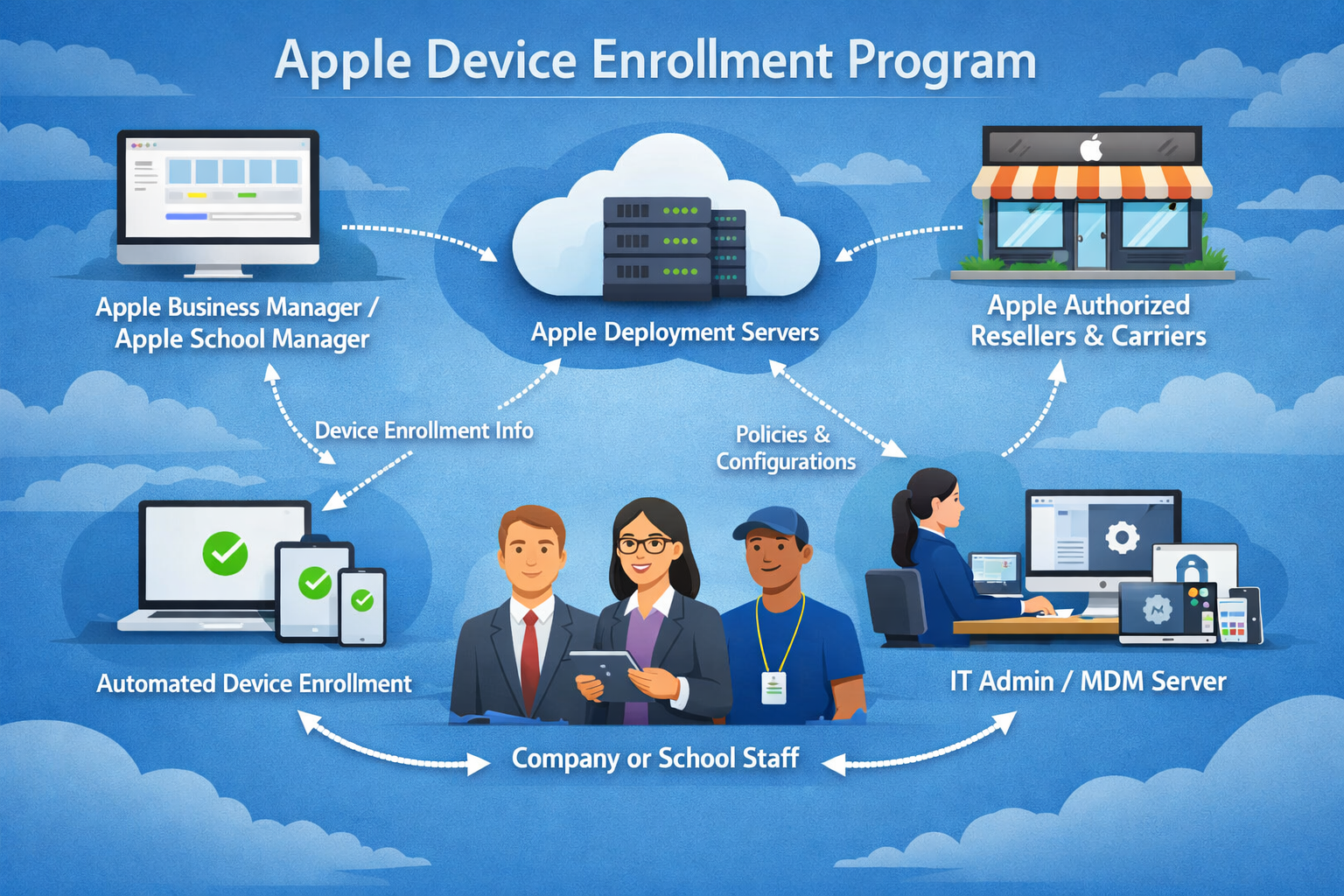
The Apple Device Enrollment Program is a structured approach designed to simplify how organizations deploy and manage Apple devices at scale. It is built for environments where large numbers of iPhones, iPads, Macs, or other Apple devices need to be configured consistently and securely before being distributed to end users. Instead of relying on manual setup for each device, this program enables automated configuration that begins the moment a device is activated.
This approach is particularly valuable for businesses, schools, and institutions that depend on technology as part of their daily operations. Without such a system, IT departments would spend a significant amount of time preparing each device individually. The Device Enrollment Program eliminates this inefficiency by linking devices directly to organizational management systems at the point of activation.
What makes this system especially powerful is that it ensures consistency. Every device enrolled under an organization follows the same configuration rules, security policies, and application setups. This reduces errors, enhances security, and ensures that all users have a uniform experience from the start.
Core Purpose and Functionality
The primary purpose of the Device Enrollment Program is to automate the onboarding of Apple devices into an organization’s management system. When a device is purchased through authorized channels, it can be assigned to an organization even before it reaches the user. Once the device is turned on and connected to the internet, it automatically checks with Apple’s activation servers to determine whether it belongs to a managed organization.
If the device is recognized, it immediately begins the enrollment process. This includes applying configuration profiles, installing required applications, and enforcing security policies defined by the organization. The user is guided through a setup process that reflects the organization’s requirements rather than a generic device setup experience.
This automation removes the need for manual configuration, which is especially important when dealing with hundreds or thousands of devices. It also reduces the likelihood of misconfiguration, which can lead to security vulnerabilities or inconsistent user experiences.
Device Activation and Enrollment Process
When a device is first powered on, it begins the standard Apple setup process. However, devices enrolled in the program behave differently during activation. After connecting to Wi-Fi, the device communicates with Apple’s servers to determine its enrollment status. If it is assigned to an organization, the setup assistant displays a message indicating that the device is managed.
At this stage, the device retrieves its configuration profile from the organization’s mobile device management system. This profile defines how the device should behave, what restrictions apply, and which applications need to be installed. The process is largely automated, requiring minimal input from the user.
Once setup is complete, the device becomes fully managed. IT administrators can then control various aspects of the device remotely, including app distribution, security enforcement, and system updates. This ensures that the device remains compliant with organizational policies throughout its lifecycle.
Role of Mobile Device Management Systems
The Device Enrollment Program does not operate independently. It works in close coordination with mobile device management systems, which serve as the central platform for controlling enrolled devices. These systems allow IT administrators to define policies, distribute applications, and monitor device compliance in real time.
Through mobile device management, organizations can enforce restrictions such as disabling unauthorized app installations, requiring strong passcodes, and limiting access to certain features. These controls help ensure that devices remain secure and aligned with organizational standards.
Additionally, mobile device management enables remote actions. If a device is lost or compromised, it can be locked or erased remotely. Administrators can also push updates or reconfigure settings without needing physical access to the device. This level of control is essential for maintaining security in large-scale deployments.
Benefits for Large-Scale Deployment
One of the most significant advantages of the Device Enrollment Program is its ability to support large-scale deployments efficiently. Organizations that need to deploy hundreds or thousands of devices can do so without manually configuring each one. This saves time, reduces labor costs, and ensures consistency across all devices.
Another important benefit is speed. Devices can be shipped directly to end users without requiring IT intervention. As soon as the user turns on the device, it automatically configures itself according to organizational policies. This allows employees or students to start using their devices immediately.
Consistency is also a major advantage. Every device follows the same configuration rules, which reduces the likelihood of errors or security gaps. This uniformity simplifies support and troubleshooting, as all devices behave in predictable ways.
Security Enhancements Through Automated Control
Security is a central focus of the Device Enrollment Program. By integrating device enrollment with mobile device management, organizations gain the ability to enforce security policies from the moment a device is activated.
Encryption can be enforced automatically, ensuring that all data stored on the device is protected. Passcode requirements can be standardized, and devices can be configured to lock after periods of inactivity. These measures significantly reduce the risk of unauthorized access.
Remote management capabilities also enhance security. If a device is lost or stolen, administrators can immediately lock or erase it. This prevents sensitive data from being accessed by unauthorized users. Additionally, compliance monitoring ensures that devices remain up to date with security requirements.
These security features are especially important in industries that handle sensitive information, such as finance, healthcare, and education. The program helps organizations meet regulatory requirements by ensuring consistent enforcement of security policies.
User Experience and Setup Transparency
Although the Device Enrollment Program gives organizations significant control, it is designed to maintain a smooth user experience. During setup, users are informed that their device is managed by an organization. This transparency helps set expectations from the beginning.
Despite the management controls, users are still able to perform most standard functions without disruption. They can access apps, use productivity tools, and connect to services as needed. The restrictions imposed by the organization are generally focused on security and compliance rather than limiting usability.
In many cases, users benefit from the program because their devices are preconfigured with all necessary applications and settings. This reduces setup time and eliminates the need for manual installation or configuration.
Device Lifecycle Management
The Device Enrollment Program supports the entire lifecycle of a device, from initial setup to retirement. Once a device is enrolled, it remains under organizational management for its entire operational life. This ensures that security policies and configurations remain consistent over time.
As devices age, they can be updated or reconfigured remotely. When a device is no longer needed, it can be removed from the management system and prepared for reassignment or disposal. This lifecycle approach helps organizations maintain control over their device inventory.
Lifecycle management also improves asset tracking. Organizations can monitor which devices are in use, which are inactive, and which need replacement. This helps with budgeting and planning for future device purchases.
Scalability and Organizational Efficiency
Scalability is one of the strongest advantages of the Device Enrollment Program. It is designed to handle deployments of any size, from small teams to global enterprises. As organizations grow, the system can scale with them without requiring changes to the underlying process.
Efficiency is improved not only during deployment but also throughout ongoing management. IT teams spend less time on manual configuration and more time on strategic tasks such as improving security policies and optimizing device usage.
This efficiency translates into cost savings. By reducing manual labor and minimizing configuration errors, organizations can lower operational costs while maintaining high levels of control and security.
Integration with Organizational Systems
The Device Enrollment Program integrates seamlessly with existing organizational infrastructure. It works alongside identity management systems, email services, and application deployment platforms. This integration allows organizations to create a unified digital environment.
For example, when a user logs into a device for the first time, their credentials can automatically connect them to corporate services. Email accounts, calendars, and cloud storage can be configured without manual input. This creates a smooth onboarding experience.
Integration also ensures that devices remain aligned with organizational policies. As policies change, updates can be pushed automatically to all enrolled devices. This ensures that the entire device fleet remains consistent and up to date.
Conclusion
The Apple Device Enrollment Program represents a modern approach to managing large-scale device deployments. It combines automation, security, and centralized control to simplify the process of configuring and maintaining Apple devices in organizational environments. By linking devices directly to management systems from the moment of activation, it eliminates the need for manual setup and ensures consistent policy enforcement across all devices.
Its integration with mobile device management systems enhances its capabilities, allowing organizations to enforce security policies, distribute applications, and manage devices remotely. This makes it an essential tool for businesses, schools, and institutions that rely on Apple devices for daily operations.
Beyond efficiency, the program provides strong security benefits by ensuring that every device is protected from the moment it is activated. It also improves user experience by reducing setup complexity and providing preconfigured devices that are ready for immediate use.
Overall, the Device Enrollment Program is not just a technical solution but a strategic framework for managing digital ecosystems at scale. It supports organizational growth, enhances operational efficiency, and ensures that devices remain secure and compliant throughout their entire lifecycle.