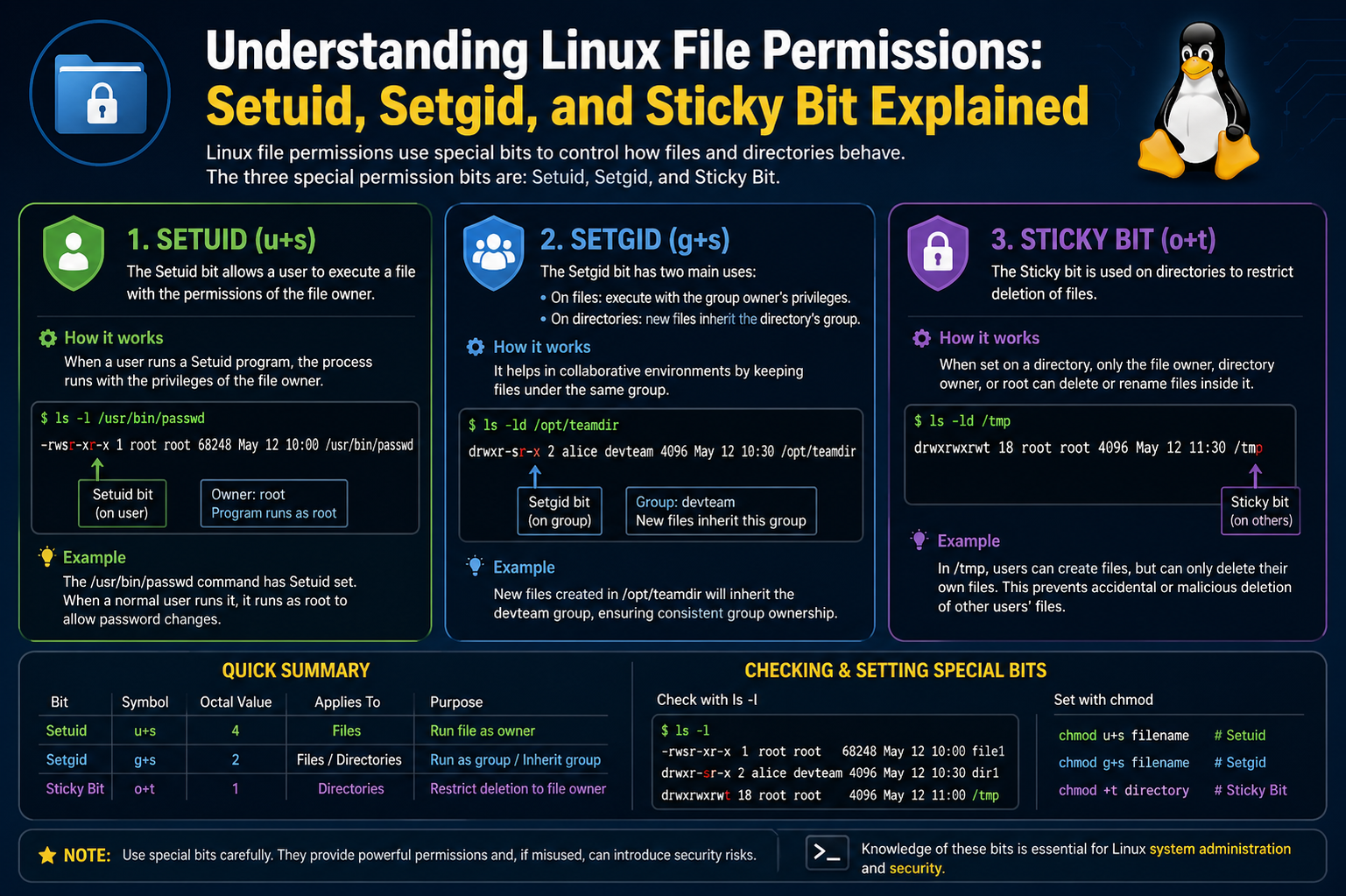
Linux systems are built on a strict and structured permission model that governs how files and directories are accessed, modified, and executed. This model is one of the core reasons Linux is considered secure and stable in multi-user environments. Every file and directory in Linux is associated with an owner, a group, and a set of permission rules that define what different users can do with it. These permissions are not arbitrary; they are carefully designed to enforce isolation, protect system integrity, and allow controlled collaboration.
At the most basic level, Linux permissions revolve around three actions: reading, writing, and executing. Reading allows a user to view the contents of a file, writing allows modification of that content, and executing allows the file to be run as a program. These permissions are assigned separately for three categories: the file owner, the group associated with the file, and all other users on the system. This structure ensures that access can be finely controlled depending on user roles and responsibilities.
However, basic permissions alone are not always enough. In real-world systems, there are situations where programs need temporary elevated privileges or where collaborative environments require shared control over files. This is where special permissions such as Setuid, Setgid, and the Sticky Bit become essential.
Understanding Ownership and Basic Permission Structure
Before exploring advanced permissions, it is important to understand how Linux assigns ownership. Every file is tied to a user and a group. The user is typically the creator of the file, while the group represents a set of users who may share access rights. This ownership structure forms the foundation for all permission decisions.
Permissions are usually represented in a symbolic format that reflects the access level for each category. For example, a file may show different rights for the owner compared to the group or others. This separation ensures that even if multiple users are working on the same system, their access remains controlled and predictable.
Behind the scenes, Linux also stores these permissions in a numeric format, which is commonly used when modifying permissions. Although this numeric system is efficient, it is still based on the same principle of read, write, and execute access.
Introduction to Special Permissions
Special permissions extend the basic permission model by introducing additional behavior when files are executed or accessed within directories. Unlike standard permissions, these do not simply allow or deny access; they change how the system behaves during execution or interaction with files.
There are three primary special permissions in Linux. Setuid modifies how executable files run by temporarily granting the privileges of the file owner. Setgid alters group behavior for both files and directories, and Sticky Bit restricts file deletion in shared directories. Each of these plays a unique role in maintaining system security and usability.
Setuid: Executing with Owner Privileges
Setuid is one of the most powerful special permissions in Linux. When applied to an executable file, it allows users to run that file with the privileges of the file’s owner rather than their own. This is particularly important for system utilities that require administrative access to function properly.
For example, certain system commands need to access sensitive configuration files or perform operations that require elevated permissions. Instead of giving all users full administrative rights, Setuid allows only specific programs to temporarily gain those rights during execution. Once the program finishes running, the privileges revert back to normal.
This mechanism is crucial for maintaining security. Without Setuid, users would either be unable to perform necessary tasks or would need excessive system-wide privileges, which increases risk. However, because Setuid grants elevated access, it must be used carefully. If applied incorrectly or to insecure programs, it can create serious vulnerabilities.
Setuid is visually represented in permission settings by a special marker in the execute field. When present, it indicates that the file will execute with the owner’s privileges rather than the user’s.
Security Considerations of Setuid
While Setuid is extremely useful, it also introduces potential risks. Programs that run with elevated privileges can be exploited if they contain vulnerabilities. Attackers may use such weaknesses to gain unauthorized access to the system.
For this reason, system administrators carefully control which programs are allowed to use Setuid. Only trusted and well-maintained executables are typically assigned this permission. Regular audits are often performed to ensure that no unnecessary Setuid programs exist on the system.
The key principle behind Setuid security is minimal privilege usage. Programs should only have elevated access when absolutely necessary and should relinquish it as soon as possible.
Setgid: Group-Based Execution and Collaboration
Setgid is similar in concept to Setuid but focuses on group permissions instead of user permissions. When applied to an executable file, Setgid ensures that the program runs with the privileges of the file’s group rather than the user’s primary group.
This is especially useful in environments where multiple users belong to a shared project group. It allows programs to interact with shared resources consistently, regardless of which user is executing them.
When Setgid is applied to a directory, it behaves differently. In this case, any new files or subdirectories created within that directory automatically inherit the group ownership of the parent directory. This ensures consistent group collaboration without requiring manual adjustments.
This behavior is particularly valuable in team-based environments where multiple users are contributing to the same set of files. It prevents permission mismatches and simplifies collaboration.
Practical Importance of Setgid in Shared Systems
In collaborative systems, maintaining consistent group ownership is essential. Without Setgid, newly created files might belong to different groups depending on the user who created them, leading to access issues and confusion.
By enforcing group inheritance, Setgid ensures that all team members can access shared resources without additional configuration. This makes file management more predictable and reduces administrative overhead.
However, like Setuid, Setgid must also be managed carefully. Incorrect application can lead to unintended access patterns, especially in sensitive directories.
Sticky Bit: Protecting Shared Directories
The Sticky Bit serves a different purpose from Setuid and Setgid. It is primarily used on directories to control file deletion behavior in shared environments. When the Sticky Bit is enabled on a directory, users can create and modify files freely, but they cannot delete or rename files owned by other users.
This is particularly useful in shared directories where multiple users have write access. Without the Sticky Bit, any user with write permission could delete or modify any file, which could lead to accidental or malicious data loss.
With the Sticky Bit enabled, file ownership becomes the deciding factor for deletion rights. Only the file owner, the directory owner, or the root user can remove or rename files. This adds an important layer of protection in collaborative spaces.
A common example of Sticky Bit usage is in temporary shared directories used by multiple users. These environments require flexibility for file creation but strict control over deletion.
Why Sticky Bit Matters in Multi-User Systems
In systems with many users, shared directories are common. Without proper restrictions, these directories can become chaotic or insecure. The Sticky Bit solves this by allowing collaboration while still protecting individual files.
It ensures that users cannot interfere with each other’s work, even if they share write access to the same directory. This balance between openness and control is essential in environments such as educational systems, shared servers, and development platforms.
Interaction Between Special Permissions and Standard Permissions
Special permissions do not replace standard permissions; instead, they modify their behavior. A file still has its basic read, write, and execute settings, but Setuid, Setgid, and Sticky Bit introduce additional rules that affect how those permissions are applied.
This layered structure allows Linux to maintain flexibility while enforcing strict control where necessary. It is this combination of simplicity and depth that makes the Linux permission model both powerful and reliable.
Risks and Misconfigurations
Although these special permissions are useful, incorrect configuration can lead to serious security issues. For example, unnecessary Setuid permissions can expose the system to privilege escalation attacks. Similarly, improper use of Setgid can lead to unintended data sharing between groups.
Even the Sticky Bit, if misunderstood, can create confusion in file management. Therefore, system administrators must understand not only how these permissions work but also when to apply them.
Regular monitoring and careful assignment of permissions are essential practices in maintaining system security.
Understanding How Special Permissions Are Represented in Linux
Special permissions in Linux are not separate from the normal permission system; instead, they are embedded within it. They are represented using both symbolic notation and numeric (octal) values. Understanding these representations is important because most system administration tasks involving permissions rely on them.
In symbolic form, Setuid is represented by adding an “s” in the user execute field, Setgid appears as an “s” in the group execute field, and the Sticky Bit appears as a “t” in the others execute field. These symbols replace the usual “x” when the special permission is active. If the execute bit is not set but the special permission is applied, the symbol may appear as uppercase “S” or “T”, indicating a misconfiguration or inactive execution context.
In numeric representation, special permissions are expressed as an additional digit placed before the standard three permission digits. Setuid is represented by 4, Setgid by 2, and Sticky Bit by 1. These values are added together when multiple special permissions are applied simultaneously. For example, a permission value of 4755 indicates Setuid combined with standard read, write, and execute permissions.
Modifying Special Permissions Using chmod
The chmod command is the primary tool used to modify file permissions in Linux, including special permissions. It can be used in both symbolic and numeric modes, depending on preference and clarity.
In symbolic mode, Setuid is applied using “u+s”, Setgid using “g+s”, and Sticky Bit using “+t”. These commands modify the existing permission structure without changing unrelated bits. For example, applying Setgid to a directory ensures that all new files inherit the group ownership automatically.
In numeric mode, special permissions are added as a prefix to the standard permission set. This method is often preferred in scripts or system configurations because it is concise and precise. However, it requires a solid understanding of how permission values are calculated.
Care must be taken when applying chmod with special permissions, especially in system directories. Incorrect usage can lead to unexpected privilege escalation or access restrictions.
Practical Examples of Setuid in System Programs
Setuid is commonly used in system utilities that require temporary root access. One of the most well-known examples is the passwd command, which allows users to change their passwords. Password information is stored in protected system files that regular users cannot modify directly.
When a user runs the passwd command, Setuid allows the program to execute with root privileges temporarily. This enables the program to update system files securely without granting full administrative access to the user.
Another example includes certain network configuration tools and system monitoring utilities that need access to restricted system resources. Without Setuid, these tools would be unable to function correctly for standard users.
Despite its usefulness, modern Linux distributions have reduced reliance on Setuid wherever possible by replacing it with more secure mechanisms like capabilities and controlled privilege escalation.
Real-World Use of Setgid in Collaborative Environments
Setgid is particularly valuable in shared work environments such as development teams, educational labs, and server hosting environments. When multiple users collaborate on the same project, maintaining consistent group ownership is essential.
For example, a shared project directory can be configured with Setgid so that all files created within it automatically belong to the project group. This eliminates the need for manual permission adjustments and ensures that all team members have consistent access.
Without Setgid, files created by different users may end up with inconsistent group assignments, leading to access issues and workflow interruptions. Setgid solves this by enforcing group inheritance at the directory level.
In executable form, Setgid ensures that programs operate under the correct group context, which is useful in environments where group-level resource access is tightly controlled.
Sticky Bit in Temporary and Shared Directories
The Sticky Bit is most commonly used in directories like /tmp, which are shared by all users on a system. These directories require open write access so that all users can create temporary files, but unrestricted deletion rights would create serious risks.
By enabling the Sticky Bit, Linux ensures that users can only delete files they own, even if they have write access to the directory itself. This prevents accidental or malicious deletion of other users’ files.
This behavior is critical in multi-user systems where temporary file storage is necessary but must remain protected from interference. The Sticky Bit strikes a balance between openness and security.
Without it, shared directories would become vulnerable to disruption, as any user could remove or rename files belonging to others.
Identifying Special Permissions in File Listings
The ls -l command is commonly used to view file permissions in Linux. Special permissions are visible in the permission string output. Setuid appears as an “s” in the user execute field, Setgid as an “s” in the group execute field, and Sticky Bit as a “t” in the others execute field.
If the execute permission is missing but the special bit is set, the symbol appears in uppercase form. This distinction helps administrators quickly identify potential configuration issues.
Understanding these indicators is important for system auditing and troubleshooting permission-related problems.
Security Risks Associated with Special Permissions
While special permissions are powerful, they can introduce security risks if misused. Setuid, in particular, is a common target for attackers because it allows programs to execute with elevated privileges.
If a Setuid program contains vulnerabilities, it may be exploited to gain unauthorized root access. This is why system administrators carefully limit the number of Setuid programs on a system and regularly audit them.
Setgid can also introduce risks if group permissions are not properly managed. Improper group inheritance may expose sensitive files to unintended users.
The Sticky Bit is generally safer, but incorrect assumptions about its behavior can still lead to administrative mistakes in shared environments.
Best Practices for Managing Special Permissions
Effective management of special permissions requires careful planning and regular monitoring. Only essential programs should be granted Setuid or Setgid permissions. These permissions should never be applied broadly or without a clear purpose.
Directories using the Sticky Bit should be reviewed to ensure they are correctly configured for shared use cases. System administrators should also document all special permission assignments for future auditing.
Another important practice is minimizing privilege escalation. Instead of relying heavily on Setuid, modern systems often use more granular privilege control mechanisms to reduce risk.
Regular system audits help detect unnecessary or misconfigured special permissions before they become security issues.
Troubleshooting Permission Issues
Permission-related issues in Linux often arise from incorrect application of special permissions. For example, a program may fail to execute if Setuid is missing or incorrectly configured. Similarly, files in shared directories may become inaccessible if Setgid is not properly set.
Troubleshooting usually begins with inspecting file permissions using ls -l and verifying ownership and group settings. If special permissions appear in uppercase, it may indicate a missing execute bit, which needs correction.
Understanding the intended behavior of Setuid, Setgid, and Sticky Bit is essential for diagnosing these issues effectively.
Evolution of Special Permissions in Modern Linux Systems
Over time, Linux has evolved its approach to privilege management. While Setuid and Setgid remain important, newer security models such as capabilities provide more granular control over privileges.
Capabilities allow specific actions to be granted to processes without giving full root access, reducing reliance on Setuid binaries. Despite this evolution, Setuid and Setgid remain widely used due to their simplicity and compatibility.
The Sticky Bit continues to play a vital role in shared directory management and remains unchanged in modern systems.
Conclusion of Advanced Understanding
Setuid, Setgid, and Sticky Bit are essential components of the Linux permission system that extend its functionality beyond basic access control. They enable controlled privilege escalation, structured collaboration, and secure shared environments.
Understanding how to configure, interpret, and manage these permissions is crucial for anyone working with Linux systems. When used correctly, they enhance both usability and security. When misused, they can introduce significant risks.
A strong grasp of these concepts allows administrators and users to maintain efficient, secure, and well-organized systems in both personal and enterprise environments.
Common Misunderstandings About Special Permissions
Special permissions in Linux are often misunderstood, especially by beginners who are learning file systems for the first time. One of the most common misconceptions is that Setuid, Setgid, and Sticky Bit behave like regular read, write, and execute permissions. In reality, they do not grant direct access on their own. Instead, they modify how existing permissions behave during execution or file management.
Another frequent misunderstanding is that Setuid automatically gives users permanent root access. This is incorrect. Setuid only applies while a specific program is running, and only if that program is owned by a privileged user such as root. Once the program finishes execution, the elevated privileges disappear immediately.
Similarly, Setgid is sometimes mistaken as a general group access shortcut. In reality, it does not simply expand group permissions. It changes the execution context of a program or enforces group inheritance in directories. Without proper understanding, users may assume it behaves like a global permission switch, which it does not.
The Sticky Bit is also commonly misunderstood. Many believe it restricts access to a directory itself, but it actually only affects deletion and renaming of files within that directory. Users can still read and write files depending on their permissions; they are only restricted from removing files they do not own.
How Special Permissions Affect System Behavior
Special permissions influence system behavior in subtle but important ways. Setuid affects process execution by temporarily changing the effective user ID of a running program. This means the system treats the process as if it were owned by the file’s owner instead of the user who launched it.
Setgid works in a similar way but affects the group context. When a Setgid program runs, it operates under the group identity of the file rather than the user’s primary group. This ensures consistent group-level access during execution.
When applied to directories, Setgid changes how new files are created. Instead of inheriting the user’s default group, files inherit the group ownership of the directory. This creates consistency in collaborative environments and reduces permission conflicts.
The Sticky Bit affects file operations at the directory level. It modifies deletion behavior by restricting file removal to the file owner, directory owner, or root user. This does not prevent editing of files; it only controls who can delete or rename them.
Importance of Special Permissions in Multi-User Systems
Linux is designed as a multi-user operating system, and special permissions are essential for maintaining order in such environments. Without them, managing shared resources would be extremely difficult and insecure.
Setuid allows controlled privilege escalation for specific tasks without exposing the entire system to elevated user access. This ensures that users can perform necessary administrative functions without compromising system security.
Setgid supports structured collaboration by ensuring that group ownership remains consistent across files and directories. This is particularly important in environments where multiple users contribute to shared projects.
The Sticky Bit ensures fairness in shared directories by preventing users from interfering with each other’s files. This is especially important in environments like shared servers, educational labs, and temporary storage directories.
Together, these permissions allow Linux to support both strict security and flexible collaboration.
Real-Life Scenarios Where Special Permissions Are Essential
In real-world systems, special permissions are used in many critical scenarios. System utilities often rely on Setuid to perform administrative tasks safely. For example, password management tools need access to secure system files that are not normally writable by standard users.
In enterprise environments, Setgid is commonly used in shared project directories where multiple teams collaborate. It ensures that all files remain accessible to the correct group without manual intervention.
The Sticky Bit is heavily used in temporary directories where multiple users create files. Without it, users could accidentally delete each other’s files, leading to data loss and system instability.
These real-world applications show that special permissions are not theoretical concepts but practical tools that keep systems functional and secure.
Risks of Improper Configuration
Incorrect configuration of special permissions can lead to serious security vulnerabilities. Setuid programs are particularly sensitive because they execute with elevated privileges. If such a program is compromised, it can be exploited to gain unauthorized system access.
Misconfigured Setgid settings can expose sensitive data to unintended groups. For example, if a directory inherits the wrong group, files may become accessible to users who should not have access.
Even the Sticky Bit, if not properly understood, can lead to confusion in file management. Users may assume they cannot modify files when in reality they only lack deletion rights.
Because of these risks, system administrators must carefully review all special permission settings. Regular audits help ensure that only necessary permissions are active.
Best Practices for Secure Usage
Secure use of special permissions requires discipline and awareness. Only trusted programs should ever be assigned Setuid or Setgid permissions. These programs should also be regularly updated to prevent exploitation of vulnerabilities.
Directories using the Sticky Bit should be clearly designated for shared use. This ensures users understand why certain restrictions exist and how file management is structured.
Administrators should avoid unnecessary privilege escalation and prefer more modern security mechanisms when available. Limiting the number of special permission-enabled files reduces the system’s attack surface.
Documentation is also important. Keeping records of why and where special permissions are applied helps maintain long-term system stability and simplifies troubleshooting.
Debugging Permission Problems in Practice
When permission issues occur, special permissions are often involved. A program that suddenly stops working may be missing Setuid or Setgid configuration. Similarly, unexpected file access behavior may be caused by incorrect group inheritance.
Administrators typically begin debugging by inspecting file permissions and ownership. If special permission symbols appear incorrect, it may indicate missing execute bits or misconfigured settings.
Understanding expected behavior is key to resolving these issues efficiently. Without knowledge of how Setuid, Setgid, and Sticky Bit work, troubleshooting becomes significantly more difficult.
Evolution of Permission Management in Linux
Over time, Linux has introduced more advanced mechanisms for privilege control. Modern systems often use capabilities, which allow fine-grained control over specific administrative actions without granting full root access.
Despite this evolution, Setuid and Setgid remain widely used because of their simplicity and compatibility with existing software. The Sticky Bit also continues to play an important role in shared directory management.
Rather than replacing these features entirely, modern Linux systems often combine them with newer security models to create layered protection.
Final Understanding of Special Permissions
Setuid, Setgid, and Sticky Bit are fundamental extensions of the Linux permission system. They enhance the basic read, write, and execute model by introducing controlled privilege escalation, structured collaboration, and secure shared environments.
Setuid allows programs to run with owner privileges temporarily, enabling safe execution of administrative tasks. Setgid ensures consistent group behavior across files and directories, making collaboration more efficient. The Sticky Bit protects shared directories by restricting file deletion to authorized users.
Together, these mechanisms form a powerful system that balances flexibility and security. When properly understood and carefully managed, they allow Linux systems to operate efficiently in both small-scale and enterprise environments while maintaining strong protection against misuse and errors.
Advanced Behavior of Setuid in Modern Linux Systems
Setuid is one of the most sensitive and historically significant permission mechanisms in Linux, and its behavior becomes even more important when examined in modern system environments. At its core, Setuid changes the effective user identity of a running process, allowing it to execute with the privileges of the file owner. However, modern Linux distributions have introduced additional security layers that influence how Setuid behaves in practice.
In older systems, Setuid was widely used for many system utilities, but today its usage is more restricted due to security concerns. The kernel now enforces stricter rules about how Setuid binaries interact with memory, environment variables, and process execution. For example, certain environment variables are automatically ignored or sanitized when executing Setuid programs to prevent exploitation.
Another important modern behavior is that Setuid does not always guarantee full root privileges. Instead, the system distinguishes between real user ID, effective user ID, and saved set-user-ID. This multi-layered identity system ensures that privileges can be temporarily elevated but also safely dropped when necessary during program execution. This design significantly reduces the risk of privilege abuse.
Developers now often replace Setuid-based designs with more granular privilege separation models. However, understanding Setuid remains essential because many legacy systems and core utilities still depend on it.
Deep Understanding of Setgid Group Inheritance Logic
Setgid, when applied to directories, introduces one of the most useful collaboration features in Linux file systems. However, its internal behavior is more nuanced than simple inheritance. When a file is created inside a Setgid-enabled directory, the system automatically assigns the directory’s group ownership to the new file, regardless of the user’s primary group.
This behavior is enforced at the kernel level during file creation, not after the file is created. This distinction is important because it ensures consistency even in high-concurrency environments where multiple users are creating files simultaneously.
Setgid also interacts with umask settings, which define default permission masks for new files. Even if group inheritance is enforced, the final permissions of a file are still influenced by the user’s umask value. This means that Setgid controls ownership, while umask controls access rights.
In large collaborative systems, this combination ensures both structural consistency and flexible access control. Without Setgid, administrators would need to manually correct group assignments, which would be inefficient and error-prone.
Sticky Bit Internal Mechanics and Directory Security
The Sticky Bit operates at the directory level by modifying how the kernel evaluates file deletion requests. When a user attempts to delete a file, the system checks not only write permissions on the directory but also ownership of the file itself.
If the Sticky Bit is enabled, the kernel enforces an additional rule: only the file owner, directory owner, or root user can remove or rename the file. This check happens during the unlink system call, which is responsible for file deletion operations.
This mechanism is particularly important in shared memory spaces and temporary file directories. It prevents users from interfering with each other’s data while still allowing full collaboration in file creation and modification.
Unlike Setuid and Setgid, the Sticky Bit does not influence execution or ownership. Its role is purely protective, focusing on file lifecycle management rather than privilege escalation.
Interaction Between Special Permissions and File System Structure
Special permissions do not exist in isolation; they interact closely with the underlying file system structure. Linux file systems such as ext4 maintain metadata that stores ownership, permission bits, and special flags for each file and directory.
When a file system operation occurs, the kernel evaluates this metadata in a specific order. First, ownership is checked, then basic permissions, and finally special permissions are applied as modifiers. This layered evaluation ensures predictable behavior.
In distributed or network file systems, special permissions may behave differently depending on configuration. Some file systems may ignore Setuid or Setgid for security reasons, while others may emulate them differently to maintain compatibility.
Understanding these interactions is crucial for system administrators managing multi-server environments or network-mounted storage systems.
Relationship Between Special Permissions and Process Execution Model
Linux process execution is tightly connected to permissions. When a program is executed, the kernel assigns it a process identity that includes user ID, group ID, and supplementary groups. Special permissions directly modify this identity.
Setuid modifies the effective user ID, Setgid modifies the effective group ID, and Sticky Bit indirectly influences file system interactions during process operations in shared directories.
This process-based view is important because permissions are not static; they are dynamic during execution. A single program may temporarily operate with elevated privileges and then revert back to normal access levels.
This dynamic behavior is what makes Linux both powerful and potentially risky if not properly controlled.
Security Hardening and Reduction of Setuid Usage
Modern Linux security practices emphasize minimizing the use of Setuid programs. This approach is part of a broader principle known as least privilege, which ensures that programs only have the minimum access required to function.
Security hardening techniques include replacing Setuid binaries with capability-based access control, using sandboxing mechanisms, and isolating sensitive operations into separate processes.
Capabilities allow specific privileges such as network access or file modification without granting full root access. This reduces the attack surface significantly compared to traditional Setuid programs.
Despite these improvements, Setuid still exists in many core system utilities because of backward compatibility requirements and its simplicity in implementation.
Audit and Detection of Special Permission Misuse
System auditing tools regularly scan for files with special permissions to detect potential security risks. Setuid and Setgid binaries are often flagged for review because they can pose escalation risks if misconfigured.
Administrators typically examine file ownership, execution paths, and source integrity to ensure that no unauthorized modifications have occurred. Unexpected changes in special permission flags can indicate compromise or misconfiguration.
Sticky Bit usage is also reviewed in shared directories to ensure it is applied only where necessary. Overuse of Sticky Bit may indicate poor directory structure design.
Regular audits help maintain system integrity and prevent privilege escalation vulnerabilities from going unnoticed.
Edge Cases and Unexpected Behavior in Special Permissions
Special permissions can sometimes produce unexpected results in complex environments. For example, Setuid does not always function as expected on scripts in many Linux distributions due to security restrictions. Instead, it is typically only effective on compiled binaries.
Setgid behavior may also differ depending on file system type or mount options. In some networked environments, group inheritance may be overridden by server-side policies.
Sticky Bit may appear active but not function as expected if underlying permissions or mount configurations restrict its behavior.
These edge cases highlight the importance of understanding not only how permissions work conceptually but also how they are implemented in real systems.
Practical Troubleshooting Scenarios
When dealing with permission issues involving special bits, administrators often follow a structured approach. First, they verify file ownership and permission bits using detailed listing tools. Then they check whether special permissions are correctly applied and whether they are active or inactive.
If a Setuid program fails to execute with elevated privileges, the issue may be due to missing execute permission or security restrictions at the system level. If Setgid inheritance is not working, directory permissions or umask settings may be interfering.
Sticky Bit issues usually manifest as unexpected file deletion behavior, which can often be traced back to incorrect directory configuration or misunderstanding of ownership rules.
Effective troubleshooting requires a deep understanding of how these mechanisms interact rather than relying on surface-level checks.
Final Thoughts
Setuid, Setgid, and Sticky Bit together form a sophisticated extension of the Linux permission model. They are not isolated features but interconnected mechanisms that influence execution, ownership, and file management behavior.
Setuid focuses on temporary privilege elevation, Setgid ensures consistent group behavior and collaboration, and Sticky Bit protects shared environments from unintended file interference.
When combined with standard permissions, file system metadata, and process identity management, they create a layered security architecture that is both flexible and robust.
Understanding their deeper behavior, interactions, and limitations is essential for advanced Linux administration. Proper usage ensures secure multi-user environments, while misconfiguration can lead to serious system vulnerabilities.
These special permissions remain a foundational part of Linux systems, bridging traditional access control with modern security practices and ensuring controlled, predictable system behavior across diverse computing environments.