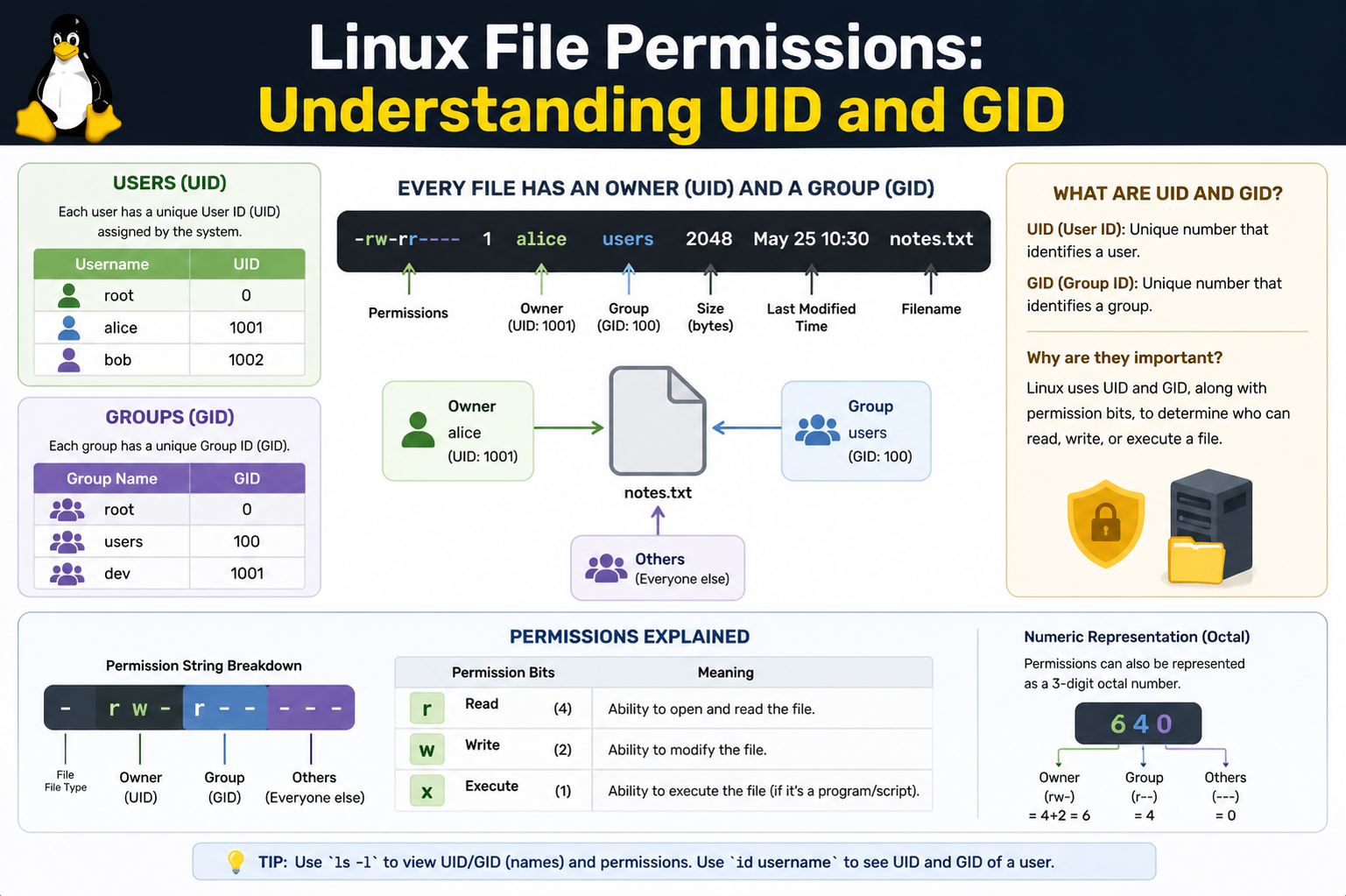
Linux is a multi-user operating system designed to manage many users simultaneously while keeping their data and processes isolated. At the core of this system lies the concept of identity, which is represented by User ID (UID) and Group ID (GID). These numeric identifiers are not just labels; they are fundamental building blocks that the kernel uses to enforce security, ownership, and access control across the system.
Every action in Linux, whether it is reading a file, executing a program, or modifying system settings, is tied back to a UID and GID. Instead of relying on usernames or group names, the system internally relies on these numeric values because they are faster to process and unambiguous.
Understanding User ID (UID) in Depth
A User ID is a unique number assigned to every user account on a Linux system. This number represents the identity of a user at the system level. When a user logs in, the system does not rely on the username alone; it translates the username into its corresponding UID and uses that for all operations.
The root user, which is the administrative superuser, always has UID 0. This UID has unrestricted access to all files and system operations. Regular users are assigned UIDs starting from a predefined range, typically 1000 and above in many modern Linux distributions.
The UID is critical because it determines ownership of files and processes. When a user creates a file, the system automatically assigns their UID as the owner of that file. This ownership directly affects what permissions apply when another user attempts to access it.
Understanding Group ID (GID) in Depth
The Group ID represents a collection of users who share certain permissions. Each user belongs to at least one primary group and may also belong to multiple secondary groups. The GID is the numeric identifier for these groups.
When a file is created, it is assigned a GID based on the creator’s primary group. This allows multiple users within the same group to share access to files without needing individual permission adjustments for every user.
Groups are essential for collaboration in Linux environments. For example, in a development team, all developers might belong to a single group, allowing them to access shared project files while still maintaining restrictions for other users.
How Linux Uses UID and GID Internally
When a process runs in Linux, it inherits the UID and GID of the user who started it. The kernel uses these identifiers to determine what the process is allowed to do. This includes accessing files, communicating with other processes, and modifying system resources.
Every file in Linux has metadata that includes its owner UID and group GID. When access is requested, the kernel compares the UID and GID of the requesting process with the file’s ownership details. Based on this comparison, it applies permission rules such as read, write, or execute access.
This system ensures that users can only interact with resources they are authorized to use, making Linux inherently secure and stable in multi-user environments.
User and Group Mapping in System Files
Linux maintains user and group information in system files. The most important ones are the user account database and group database. These files map human-readable names to numeric UIDs and GIDs.
When a user logs in, the system reads these mappings to determine the correct UID and GID. After login, all operations are performed using these numeric values instead of textual usernames or group names.
This abstraction allows Linux to remain efficient even in large environments with thousands of users.
File Ownership and Permission Model
Every file in Linux has three categories of permissions: owner permissions, group permissions, and others. The owner permissions are linked to the UID of the file owner. Group permissions are linked to the GID, and others represent all remaining users.
When a user tries to access a file, the system checks in the following order: first whether the UID matches the file owner, then whether the user belongs to the file’s group, and finally applies the “others” permissions if neither match applies.
This structured hierarchy ensures predictable and secure access behavior.
Real UID, Effective UID, and Saved UID
Linux processes may have multiple types of UIDs: real UID, effective UID, and saved UID. The real UID identifies the user who started the process. The effective UID determines the permissions currently applied to the process.
In many cases, these values are the same. However, in special cases such as privileged programs, the effective UID may temporarily change to allow the process to perform restricted operations.
The saved UID allows a process to switch back and forth between privilege levels safely without losing its original identity. This mechanism is commonly used in system utilities that require temporary elevated permissions.
Group Membership and Access Control
A single user can belong to multiple groups, and this significantly influences access control. When accessing a file, the system checks not only the primary group but also all secondary groups the user belongs to.
This flexible structure allows administrators to design complex permission systems without assigning permissions individually to each user. Instead, users are grouped based on roles or responsibilities.
For example, a user in both a “developers” group and a “testing” group can access resources from both areas depending on the assigned GID permissions.
Special Permission Bits: SUID, SGID, and Sticky Bit
Beyond basic permissions, Linux includes special permission bits that interact closely with UID and GID behavior. The Set User ID (SUID) bit allows a file to run with the permissions of its owner rather than the user executing it. This is often used in system programs that require elevated privileges.
The Set Group ID (SGID) bit allows a file or directory to inherit group ownership, ensuring consistent collaboration within shared directories. When applied to directories, new files automatically inherit the parent directory’s group.
The sticky bit is used primarily on shared directories to prevent users from deleting or modifying files they do not own, even if they have write permissions in the directory.
Security Implications of UID and GID
UID and GID form the backbone of Linux security. If these identifiers are misconfigured, it can lead to serious security vulnerabilities. For example, assigning incorrect ownership or overly broad group permissions may allow unauthorized access to sensitive files.
The system relies heavily on correct UID and GID assignment to enforce isolation between users. Even if a malicious program runs, it is restricted by the UID and GID of the user who executed it unless elevated privileges are explicitly granted.
This strict separation is one of the reasons Linux is widely used in servers and security-sensitive environments.
Process Ownership and System Behavior
Every running process in Linux carries UID and GID information. This ensures that system resources are protected even at runtime. When a process attempts to open a file, send a network request, or modify system settings, the kernel evaluates its UID and GID against the required permissions.
This mechanism ensures that processes cannot exceed their assigned privileges. Even system-level processes must operate within defined identity boundaries unless explicitly granted higher privileges.
Practical Understanding of UID and GID Usage
In real-world Linux administration, managing UID and GID correctly is essential. System administrators often create groups based on job roles, such as administrators, developers, or auditors, and assign users accordingly.
File ownership is also carefully managed to ensure that sensitive data is only accessible to intended users. When systems are scaled to hundreds or thousands of users, proper UID and GID management becomes critical for maintaining order and security.
The Foundation of Linux Security Model
UID and GID are not just simple identifiers; they are the foundation of Linux’s entire permission and security system. They define ownership, control access, manage process privileges, and enforce system-wide security policies.
Understanding how UID and GID work provides deep insight into how Linux maintains stability and security in complex environments. By combining numeric identity with structured permission rules, Linux achieves a robust multi-user system that remains both flexible and secure.
Relationship Between Users, Groups, and the Kernel
In Linux, the relationship between users, groups, and the kernel is tightly integrated. The kernel acts as the central authority that enforces all permission decisions based on UID and GID values. Whenever a system call is made, such as opening a file or executing a program, the kernel evaluates the identity of the requesting process using its UID and GID.
This evaluation is not symbolic but strictly numerical, which ensures consistency and speed. The kernel does not interpret usernames or group names during permission checks; instead, it directly compares numeric identifiers stored in process descriptors and file metadata.
How UID and GID Are Assigned During User Creation
When a new user is created in Linux, the system automatically assigns a unique UID and a primary GID. This process ensures that every user has a distinct identity within the system. The UID is generally chosen from a predefined range to avoid conflicts with system accounts.
At the same time, a primary group is created or assigned, and its GID is linked to the user. This group becomes the default group for any file or directory created by that user unless explicitly changed.
This automatic assignment ensures consistency and simplifies permission management, especially in environments with multiple users.
System Accounts vs Regular User Accounts
Linux distinguishes between system accounts and regular user accounts based on UID ranges. System accounts are used by services and background processes, while regular accounts are used by human users.
System accounts often have lower UIDs and are designed with restricted login capabilities. These accounts are critical for running services securely because they isolate system processes from human user activities.
Regular user accounts, on the other hand, are assigned higher UID values and are designed for interactive use. This separation enhances system security by limiting the scope of potential damage if a service is compromised.
File Access Decision Process in Linux
When a user attempts to access a file, Linux follows a structured decision-making process. First, the kernel checks whether the UID of the user matches the file owner. If it matches, owner permissions are applied.
If the UID does not match, the kernel then checks whether the user belongs to the group associated with the file’s GID. If the user is a member of that group, group permissions are applied.
If neither condition is satisfied, the system falls back to “others” permissions. This hierarchical evaluation ensures predictable and secure access control.
Permission Evaluation in Multi-Group Environments
In modern Linux systems, users often belong to multiple groups. When evaluating access, the system checks all groups associated with a user, not just the primary group.
If any of the user’s groups match the file’s GID, group permissions are granted. This allows flexible collaboration structures where users can participate in multiple projects or departments without needing separate accounts.
However, the system still prioritizes ownership checks first, ensuring that file owners retain the highest level of control over their files.
Impact of UID and GID on Process Execution
Every process in Linux carries identity information inherited from its parent process. This includes real UID, effective UID, real GID, and effective GID.
The real UID represents the user who launched the process, while the effective UID determines what the process is allowed to do at runtime. This distinction is especially important for privileged programs that temporarily elevate permissions to perform system-level tasks.
The same principle applies to GID, where processes may temporarily operate under different group privileges depending on the task being performed.
Privilege Escalation and Controlled Access
Linux uses UID and GID mechanisms to carefully control privilege escalation. Special permission bits like SUID and SGID allow certain programs to execute with elevated privileges.
When a file with the SUID bit is executed, the process temporarily assumes the UID of the file owner. This is commonly used in system utilities that require administrative access, even when executed by regular users.
Similarly, SGID allows group-level privilege elevation, enabling processes to access group-restricted resources safely.
These mechanisms are tightly controlled to prevent unauthorized privilege escalation and ensure system stability.
Directory Behavior and GID Inheritance
Directories in Linux exhibit unique behavior when it comes to GID inheritance. When the SGID bit is set on a directory, all newly created files within that directory automatically inherit the directory’s group ownership.
This feature is particularly useful in collaborative environments where multiple users need consistent group access to shared files.
Without SGID, new files would inherit the user’s primary group, which could lead to inconsistent permissions and access issues.
Security Boundaries Created by UID and GID
UID and GID create strong security boundaries within the Linux system. Each user operates within their own identity space, and access to files or processes outside that space is strictly controlled.
Even if a user runs a program, the system ensures that the program cannot exceed the permissions associated with that user’s UID and GID unless explicitly allowed.
This isolation is one of the key reasons Linux is considered a secure operating system, especially in multi-user and server environments.
Effect of UID and GID on System Services
System services often run under dedicated system accounts with specific UIDs and GIDs. This allows services to operate independently without interfering with user data.
For example, a web server may run under its own system user, ensuring that it only has access to necessary web files and nothing else on the system.
By isolating services through UID and GID assignment, Linux reduces the risk of system-wide compromise if a service is exploited.
File System Representation of Ownership
File systems in Linux store ownership information as numeric UID and GID values. When displaying file information to users, the system translates these numbers into readable usernames and group names.
However, internally, all permission checks rely solely on numeric values. This separation between human-readable representation and system-level identity ensures both usability and performance.
Changing Ownership and Group Assignments
Linux provides mechanisms to change file ownership and group assignments. When ownership is changed, the UID and GID stored in the file metadata are updated accordingly.
Changing ownership is a privileged operation, typically restricted to the root user or system administrators. This prevents unauthorized users from taking control of sensitive files.
Group changes are more flexible but still require appropriate permissions to maintain system security.
Role of UID and GID in Networked Systems
In networked or distributed Linux environments, UID and GID play a critical role in maintaining consistent identity across multiple systems.
When users access remote systems, their UID and GID are often mapped to ensure consistent permissions across the network. This prevents identity conflicts and ensures that access rules remain consistent regardless of location.
This consistency is essential in enterprise environments where users interact with multiple servers and services.
Misconfiguration Risks and System Vulnerabilities
Incorrect UID and GID configuration can lead to serious security risks. If multiple users share the same UID, it becomes impossible to distinguish between them at the system level, leading to identity confusion.
Similarly, incorrect group assignments can expose sensitive data to unauthorized users. Overly broad group permissions may allow unintended access, while overly restrictive settings can disrupt collaboration.
Proper UID and GID management is therefore essential for maintaining both security and usability.
UID and GID are deeply embedded in the architecture of Linux, influencing everything from file access to process execution and system security. They provide a structured identity model that allows the system to manage multiple users safely and efficiently.
Deep Internal Handling of UID and GID in the Kernel
At the lowest level of Linux, UID and GID are handled directly by the kernel’s security subsystem. Every process in the system is represented by a process descriptor, and within this structure, identity information is stored as numeric values. These values are continuously referenced during system calls to enforce access control.
When a process requests access to a file, the kernel does not perform any string-based comparison. Instead, it compares integer values stored in memory, which makes permission checks extremely fast and efficient even under heavy system load.
This internal mechanism ensures that UID and GID enforcement scales well in environments with thousands of simultaneous processes, such as servers and cloud systems.
UID and GID in Multi-User System Design
Linux was designed from the beginning as a multi-user operating system, and UID and GID are central to this design philosophy. Each user operates in a completely isolated identity space defined by their UID. Similarly, groups allow controlled sharing of resources without breaking isolation boundaries.
This structure enables multiple users to work on the same system without interfering with each other’s files or processes. Even when users share physical hardware, their digital identities remain separated through UID and GID enforcement.
This separation is not optional; it is enforced at the kernel level, making it extremely difficult for one user to access another user’s data without explicit permission.
Process Isolation and Identity Propagation
When a new process is created using system calls like fork or exec, it inherits the UID and GID of its parent process. This inheritance ensures that identity remains consistent throughout the lifecycle of a user session.
However, Linux also allows controlled changes in identity through specific mechanisms. For example, privileged programs can temporarily change their effective UID or GID to perform restricted operations before reverting back to their original identity.
This controlled propagation of identity ensures both flexibility and security, allowing system programs to function correctly without compromising the overall permission model.
File System-Level Storage of UID and GID
Every file stored in a Linux file system contains metadata that includes its owner UID and group GID. These values are stored as part of the inode structure, which is the core data structure representing files in Linux.
Because UID and GID are stored as numeric values, file systems do not need to resolve names during operation. This improves performance and ensures consistency across different system configurations.
When users view file details, the system translates these numeric identifiers into readable names using system databases, but internally, only numeric values are ever used.
UID and GID in Shared File Systems
In networked environments, shared file systems introduce additional complexity in UID and GID management. When multiple systems access the same storage, consistent identity mapping becomes essential.
If user IDs are not synchronized across systems, a file created by one user on one machine may appear to belong to a completely different user on another machine. To prevent this, distributed systems rely on consistent UID and GID mapping across all connected nodes.
This ensures that file ownership and permissions remain consistent regardless of which system is accessing the data.
Container Environments and UID/GID Mapping
Modern container technologies rely heavily on UID and GID mapping to isolate processes. Inside a container, users may appear to have root privileges, but on the host system, they are mapped to non-privileged UIDs.
This mapping ensures that even if a process inside a container behaves like an administrator, it does not have real administrative access on the host system.
This technique is known as user namespace isolation and is one of the key security features that allow containers to safely run multiple isolated environments on a single host.
Privilege Boundaries and UID Zero
The UID value of zero holds special significance in Linux. It represents the root user, which has unrestricted access to all system resources. Any process running with UID zero bypasses standard permission checks.
Because of this, UID zero is extremely powerful and must be carefully protected. Any compromise of a process running under UID zero can lead to full system control.
For this reason, modern Linux systems minimize the use of root-level processes and rely on privilege separation techniques wherever possible.
Group-Based Collaboration Models
GID plays a crucial role in enabling structured collaboration. Instead of giving multiple users individual access to files, administrators can assign them to groups and manage permissions collectively.
This group-based model simplifies administration in large systems. For example, all users working on a project can be assigned to a single group, allowing them to share files seamlessly without modifying individual permissions repeatedly.
This model also reduces configuration errors, since permissions are managed at the group level rather than per user.
Inheritance Rules in File Creation
When a new file is created in Linux, both UID and GID are assigned automatically based on the creating process. The UID is always set to the user who created the file, while the GID is usually inherited from the user’s primary group.
However, directory-level settings can modify this behavior. If a directory has special group inheritance rules enabled, new files inside that directory may inherit the directory’s GID instead of the user’s primary group.
This behavior is especially useful in shared work environments where consistent group ownership is required.
UID and GID in Backup and Migration Systems
When systems are backed up or migrated, preserving UID and GID information is critical. If this metadata is lost or changed, file ownership can become corrupted, leading to access issues after restoration.
Backup systems therefore store UID and GID explicitly to ensure that file ownership is restored exactly as it was on the original system.
During migration between systems, mismatched UID mappings can cause serious permission inconsistencies, which is why identity synchronization is often required.
Security Implications of Misaligned Identity Systems
If UID and GID mappings are inconsistent across systems, security vulnerabilities can arise. A user on one system may unintentionally gain access to another user’s files on a different system if their numeric identifiers overlap incorrectly.
This is particularly dangerous in distributed environments where multiple machines share resources. Proper coordination of identity ranges is essential to prevent such conflicts.
Administrators often design UID and GID allocation strategies to avoid overlaps and maintain consistency across infrastructure.
Role of UID and GID in Logging and Auditing
Linux systems use UID and GID information extensively in logging and auditing. Every action performed by a user or process is recorded along with its associated identity.
This allows system administrators to track which user performed a specific action, even if usernames change over time. Since UID values remain constant, they provide a reliable reference for auditing activities.
This is especially important in security-sensitive environments where accountability is required.
Dynamic Identity Changes in Running Processes
Some advanced system operations involve dynamic changes to UID and GID during runtime. Processes may temporarily switch identities to perform restricted tasks and then revert back to their original state.
This mechanism is tightly controlled by the kernel to prevent abuse. Only privileged processes are allowed to change their identity in this way, and even then, changes are subject to strict rules.
This flexibility allows system services to operate securely while still performing necessary administrative tasks.
Interaction with Other Security Mechanisms
UID and GID are often used alongside other security systems such as mandatory access control frameworks. While UID and GID handle basic ownership and permission checks, additional security layers can enforce more complex policies.
These systems work together to create a multi-layered security model. UID and GID provide the foundation, while higher-level mechanisms add additional restrictions based on context, behavior, or policy rules.
This layered approach significantly enhances system security.
Scalability of UID and GID Systems
One of the strengths of UID and GID design is scalability. Because the system relies on simple numeric comparisons, it can handle extremely large numbers of users and processes without performance degradation.
This makes Linux suitable for everything from small embedded systems to large-scale cloud infrastructures. The same identity model works consistently across all scales.
UID and GID as the Core of Linux Identity Architecture
UID and GID are not just administrative identifiers; they are the foundation of Linux’s entire identity and permission system. They define how users interact with files, how processes operate, and how security boundaries are enforced.
From simple file ownership to complex distributed systems and container environments, UID and GID remain central to ensuring consistent, secure, and scalable operation.
A deep understanding of these concepts reveals how Linux maintains its balance between flexibility, performance, and strong security in virtually every computing environment.
UID and GID in System Recovery Scenarios
In system recovery situations, UID and GID play a critical role in restoring system integrity. When a Linux system is repaired or recovered from backup, the ownership metadata of files must remain consistent. If UID and GID values are altered or reassigned incorrectly during recovery, files may appear to belong to the wrong users, even though the data itself is intact.
This mismatch can cause serious access issues, where users are unable to open their own files or system services fail due to incorrect ownership. For this reason, recovery tools and backup systems always prioritize preserving UID and GID mappings exactly as they were in the original system state.
Problems Caused by UID and GID Conflicts
One of the most common issues in multi-system environments is UID and GID conflict. This happens when two different systems assign the same numeric UID or GID to different users or groups. When data is shared between these systems, ownership confusion occurs.
For example, a file created on one system by a user with UID 1001 may belong to a completely different user with UID 1001 on another system. This can lead to unintended access or data exposure.
To prevent this, organizations often maintain centralized identity management systems to ensure consistent UID and GID assignment across all machines.
Diagnosing Permission Issues Related to UID and GID
When file access problems occur in Linux, UID and GID mismatches are often the root cause. A user may have correct username-based access but still be denied permission because their numeric UID does not match file ownership.
Similarly, group membership issues can occur if a user is not properly assigned to the required GID. Even if permissions appear correct at the surface level, the underlying numeric identity must align for access to succeed.
System administrators frequently diagnose such issues by checking file ownership, user identity, and group membership at the numeric level.
UID and GID in Script Execution and Automation
Automation scripts in Linux also rely on UID and GID behavior. When scripts are executed, they inherit the identity of the user who launched them. This determines what files the script can access and what system operations it can perform.
If a script requires elevated privileges, it must be carefully designed to avoid security risks. Improper handling of UID changes in scripts can lead to privilege escalation vulnerabilities.
This is why system automation tools often use controlled permission elevation mechanisms rather than direct UID manipulation.
Security Hardening Through UID and GID Restrictions
System administrators often enhance security by restricting UID and GID access. Sensitive files may be assigned to dedicated system users or groups that have no login access.
By isolating critical system components into separate identities, the attack surface is reduced. Even if one service is compromised, its UID and GID restrictions prevent it from accessing unrelated system resources.
This principle of least privilege is a core security strategy in Linux environments.
UID and GID in Logging, Monitoring, and Forensics
In system monitoring and forensic analysis, UID and GID provide essential information for tracking system activity. Every logged event typically includes the UID of the user responsible for the action.
This allows administrators and security analysts to reconstruct user behavior over time, identify unauthorized actions, and trace system changes back to specific identities.
Because UID values remain constant even if usernames change, they provide a reliable and permanent reference in audit logs.
Behavior in Edge File System Types
Different Linux file systems may handle UID and GID storage in slightly different ways, but the underlying concept remains the same. Whether the file system is local or network-based, ownership is always represented using numeric identifiers.
However, in networked file systems, additional translation layers may be used to map remote UIDs and GIDs to local equivalents. If this mapping is incorrect, permission errors or unexpected access behavior can occur.
Impact of UID and GID on System Performance
Although UID and GID checks are extremely fast, their design contributes significantly to system scalability. Because permissions are resolved using simple numeric comparisons, the system avoids expensive string operations.
This efficiency allows Linux to handle millions of file operations per second in high-performance environments without bottlenecks related to identity checks.
UID and GID Lifecycle in Long-Running Systems
In long-running systems, UID and GID assignments remain stable over time. This stability is important because changing UIDs for existing users can break file ownership consistency.
If a UID is reassigned, all files owned by that UID will still reference the old numeric value, potentially causing mismatches. For this reason, UID and GID are treated as permanent identifiers once assigned.
Final Integration of UID and GID in Linux Architecture
UID and GID are deeply embedded in almost every subsystem of Linux. They are used not only for file permissions but also for process control, inter-process communication, logging, networking, and system security policies.
This universal integration makes UID and GID one of the most fundamental concepts in the entire operating system. Without them, Linux would not be able to enforce consistent multi-user security or maintain stable process isolation.
Conclusion
UID and GID form the backbone of Linux identity management and permission control. They provide a simple but extremely powerful numeric system that governs how users, groups, files, and processes interact within the operating system.
Through UID, every user is uniquely identified, and through GID, collaborative access is structured and controlled. Together, they enforce strict security boundaries while still allowing flexibility for multi-user environments.
From basic file ownership to advanced system services, container isolation, distributed systems, and security auditing, UID and GID remain central to Linux functionality. Their simplicity, combined with deep kernel-level integration, is what makes Linux both powerful and secure across all types of computing environments.
If a UID is reassigned, all files owned by that UID will still reference the old numeric value, potentially causing mismatches. For this reason, UID and GID are treated as permanent identifiers once assigned.