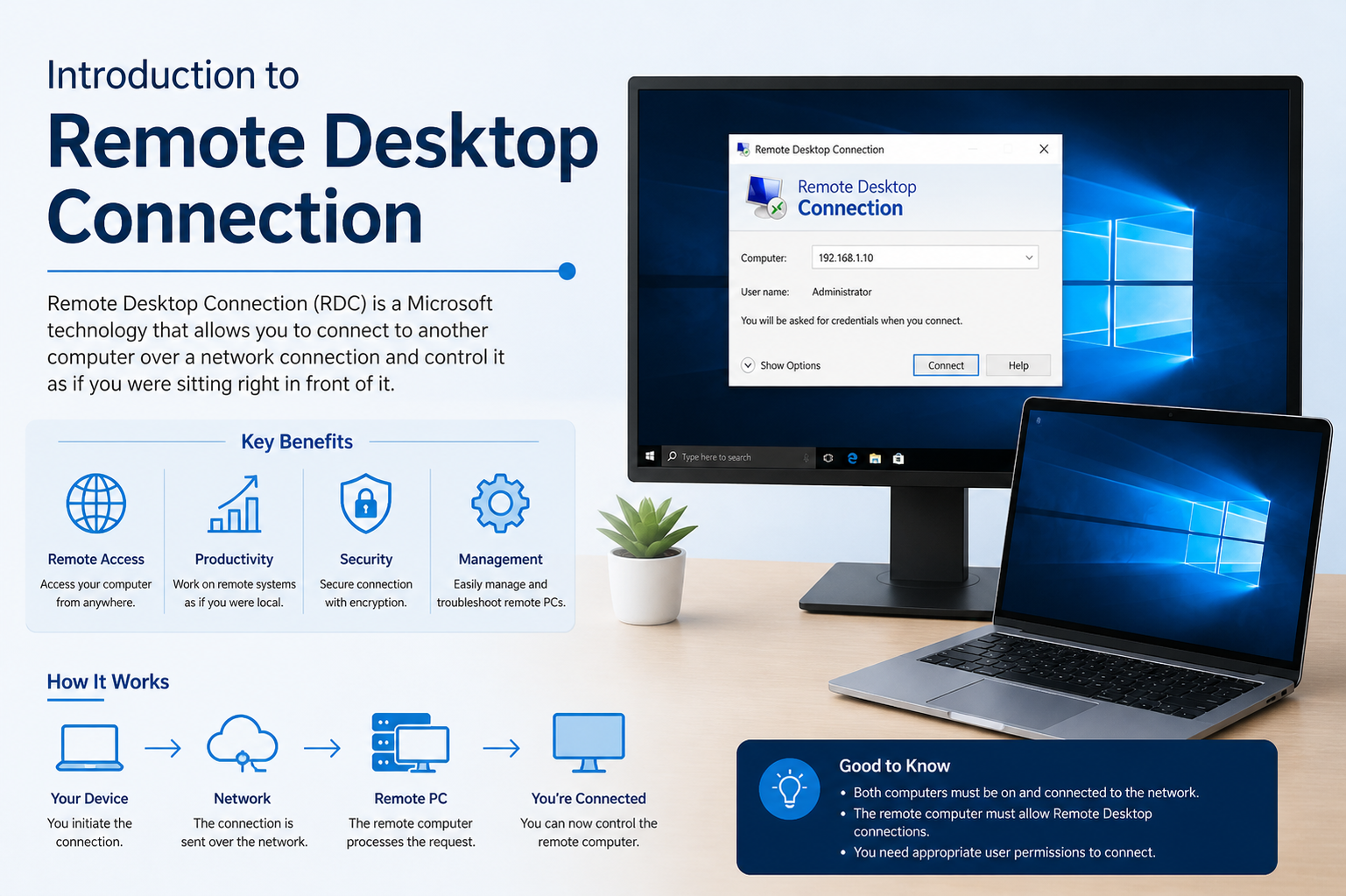
Remote Desktop Connection is a method that allows users to access and control a computer from a different location using another device. It creates a virtual connection between two systems so that the user can operate the remote machine as if they were physically present in front of it. This technology has become an essential part of modern computing, especially in workplaces where flexibility, remote access, and technical support are required.
The idea behind remote access is to remove physical limitations and allow computing resources to be used from anywhere. Whether a person is working from home, traveling, or providing technical support, Remote Desktop Connection ensures that important systems and files remain accessible at all times.
Basic Concept of Remote Access
Remote Desktop Connection works on a simple concept: one computer acts as the host, and another acts as the client. The host computer is the one being accessed, while the client is the device used to connect to it. Once a connection is established, the client can view the host’s screen, control its mouse and keyboard, and interact with its applications.
This interaction happens over a network, which may be a local network or the internet. The experience is designed to feel seamless, allowing users to work on remote systems without needing physical access.
How Remote Desktop Connection Establishes Communication
When a user initiates a remote connection, the client device sends a request to the host system. If the host allows the connection and proper authentication is provided, a secure session is created between the two devices.
During this session, screen data from the host is transmitted to the client, while input commands such as keystrokes and mouse movements are sent back to the host. This continuous exchange happens in real time, making the remote experience interactive and responsive.
The connection relies on network protocols that ensure data is transmitted securely and efficiently. These protocols help maintain stability, reduce delays, and protect sensitive information during communication.
Role of Authentication and Security
Security is one of the most important aspects of Remote Desktop Connection. Since it allows access to a complete computer system, proper authentication is required before a session begins. This usually involves a username and password, and sometimes additional verification methods depending on the system configuration.
Encryption is also used to protect data being transferred between devices. This ensures that sensitive information such as login credentials, files, and system activity cannot be easily intercepted by unauthorized users.
Access permissions are another layer of security. System administrators can control who is allowed to connect, what level of access they have, and what actions they can perform during a session.
Performance and User Experience
The performance of a Remote Desktop Connection depends heavily on network speed and system resources. A stable and fast internet connection ensures smoother interaction, while slower connections may result in delays or reduced display quality.
Modern remote desktop systems are designed to optimize performance by compressing data, adjusting screen resolution, and prioritizing essential visual elements. These improvements help maintain usability even in less-than-ideal network conditions.
From a user’s perspective, the experience feels similar to working directly on the computer. Applications can be opened, files can be edited, and system settings can be adjusted without physical access to the machine.
Common Uses in Professional Environments
Remote Desktop Connection is widely used in business and professional environments. One of its primary uses is remote work, where employees access their office computers from home or other locations. This allows organizations to maintain productivity even when staff are not physically present in the office.
It is also commonly used in IT support. Technicians can remotely access a user’s computer to diagnose problems, install software, or fix system errors without needing to be on-site. This saves time and improves efficiency in resolving technical issues.
Another important use is server management. System administrators often manage multiple servers remotely, ensuring they run smoothly without needing direct physical interaction.
Educational and Personal Applications
Beyond professional use, Remote Desktop Connection is also helpful in educational environments. Students can access lab computers from home, allowing them to use specialized software or resources that may not be available on personal devices.
In personal use cases, individuals may use remote access to retrieve files from their home computer while traveling or manage personal systems from a mobile device. This flexibility makes it easier to stay connected to important data at all times.
Advantages of Remote Desktop Connection
One of the main advantages of Remote Desktop Connection is flexibility. Users are not tied to a specific physical location and can work from virtually anywhere with an internet connection.
It also improves productivity by reducing downtime. Technical issues can be resolved quickly through remote support, and employees can continue working without delays caused by hardware or system problems.
Another benefit is cost efficiency. Organizations can reduce the need for physical infrastructure and on-site support, lowering operational costs while maintaining effective system management.
Additionally, remote access enhances collaboration. Teams can share resources and work on the same systems without needing to be in the same physical space.
Challenges and Limitations
Despite its advantages, Remote Desktop Connection also has some limitations. One of the main challenges is dependency on network quality. A weak or unstable internet connection can affect performance and cause interruptions during sessions.
Security risks are another concern if proper precautions are not taken. Unauthorized access attempts, weak passwords, or misconfigured systems can expose sensitive data.
Hardware limitations may also impact performance. Older devices or systems with limited processing power may struggle to handle remote sessions smoothly.
Importance in Modern Digital Workflows
Remote Desktop Connection plays a crucial role in modern digital workflows. As remote work becomes more common, the ability to access systems from anywhere has become essential for both individuals and organizations.
It supports business continuity by allowing employees to work even during emergencies or disruptions. It also enables global collaboration, where teams in different locations can work together efficiently.
In addition, it supports the growing trend of cloud-based and distributed computing environments, where physical location is no longer a barrier to productivity.
Technical Components Behind Remote Desktop Systems
Behind the scenes, Remote Desktop Connection relies on several technical components. These include display rendering systems, input capture mechanisms, and network communication protocols.
The display system ensures that the remote screen is accurately transmitted to the client device. Input mechanisms capture user actions such as typing and clicking, while communication protocols manage data exchange between devices.
Compression techniques are also used to reduce the amount of data being transmitted, improving speed and reducing bandwidth usage.
User Control and Customization
Remote Desktop Connection systems often provide users with customization options. These may include adjusting screen resolution, enabling or disabling sound redirection, and choosing performance settings based on network conditions.
Users can also control session behavior, such as whether the remote computer locks when disconnected or remains active. These settings help tailor the experience to specific needs and preferences.
Future of Remote Desktop Technology
As technology continues to evolve, Remote Desktop Connection is expected to become even more efficient and secure. Improvements in internet speed, cloud computing, and encryption methods will enhance performance and reliability.
Artificial intelligence and automation may also play a role in optimizing remote sessions, predicting connection issues, and improving user experience.
With the increasing demand for remote work and digital accessibility, remote desktop solutions will continue to be an important part of computing infrastructure in the future.
Introduction to Remote Desktop Architecture
Remote Desktop Connection is built on a structured architecture that allows two systems to communicate efficiently over a network. This architecture is based on a client-server model where the remote computer acts as the server and the accessing device acts as the client. The server is responsible for processing tasks, running applications, and managing system resources, while the client is responsible for displaying the interface and sending user inputs.
This separation of roles allows the remote system to perform all computing tasks while the client device only handles interaction and display. As a result, even low-powered devices can access high-performance systems remotely without needing strong hardware capabilities.
Data Transmission in Remote Desktop Systems
Data transmission is a key part of Remote Desktop Connection. When a session is active, the remote system continuously sends screen updates to the client device. These updates include everything visible on the screen, such as windows, icons, text, and images.
At the same time, the client sends input data back to the remote system. This includes keyboard strokes, mouse movements, and other user actions. The communication happens in small data packets to ensure smooth and continuous interaction.
To improve performance, the system compresses visual data before sending it across the network. This reduces bandwidth usage and helps maintain responsiveness even in slower network conditions.
Protocols Used in Remote Desktop Communication
Remote Desktop Connection relies on specific communication protocols to manage data exchange between systems. These protocols define how information is formatted, transmitted, and received during a session.
One of the most widely used protocols is designed to optimize graphical display transmission and user input handling. It ensures that screen updates are efficient and that user interactions are reflected quickly on the remote system.
Other protocols used in remote access technologies may include open-source alternatives that focus on flexibility and cross-platform compatibility. Each protocol has its own strengths in terms of speed, security, and performance.
Graphical Display Rendering Process
When a remote session is active, the graphical interface of the host system must be transmitted to the client device. Instead of sending raw images of the entire screen repeatedly, the system only sends updates where changes occur.
For example, if a window is moved or a text document is edited, only those specific changes are transmitted. This method reduces data usage and improves performance.
The client device reconstructs these updates and displays them in real time, creating the illusion that the user is directly interacting with the remote machine.
Input Handling and User Interaction
User input is an essential part of Remote Desktop Connection. Every action performed on the client device is captured and transmitted to the remote system.
When a user types on a keyboard or moves a mouse, those actions are instantly sent to the host computer. The host processes these inputs just as it would if a user were physically present at the machine.
This real-time interaction allows users to perform tasks such as editing documents, running software, or configuring system settings without delay.
Session Management in Remote Connections
A remote session is the active connection between the client and host systems. Session management ensures that this connection remains stable and secure throughout its duration.
When a session begins, the system allocates resources to support remote interaction. These resources are managed to maintain performance and prevent overload.
If a session is disconnected unexpectedly, many systems are designed to preserve the session state so that the user can reconnect without losing progress.
Security Layers in Remote Desktop Systems
Security is deeply integrated into Remote Desktop Connection. Multiple layers of protection are used to safeguard both systems during communication.
Authentication is the first layer, requiring users to verify their identity before gaining access. Once authenticated, encryption protects the data being transmitted, ensuring that sensitive information cannot be intercepted.
Access control policies further define what users can and cannot do during a session. For example, some users may have full administrative access, while others may only be allowed to view the system.
Common Remote Desktop Technologies
Several technologies exist to enable remote access, each designed with different goals in mind. Some focus on enterprise environments, offering advanced features such as multi-user support and centralized management.
Others are designed for simplicity, allowing quick and easy connections between devices without complex configuration. These tools are often used for personal access or basic technical support.
Despite differences in design, all remote desktop technologies share the same core principle of enabling access to a computer from a distant location.
Advantages of Network-Based Access
Remote Desktop Connection provides significant advantages in modern computing environments. One of the most important benefits is location independence, allowing users to access systems from anywhere.
It also improves collaboration by enabling multiple users to work on shared systems without being physically present. This is especially useful in distributed teams and global organizations.
Another advantage is centralized computing. Instead of relying on individual devices, organizations can maintain powerful central systems that users access remotely.
Performance Optimization Techniques
To ensure smooth performance, Remote Desktop systems use several optimization techniques. One of the most important is adaptive display scaling, which adjusts image quality based on network speed.
Compression techniques reduce the size of transmitted data, making communication faster and more efficient. Some systems also prioritize essential visual elements to ensure important actions remain responsive.
Caching mechanisms may be used to store frequently accessed data temporarily, reducing the need for repeated transmission.
Troubleshooting Common Connection Issues
Remote Desktop Connection may sometimes experience issues due to network instability, incorrect settings, or system restrictions. One common problem is failure to connect, which can occur if the host system is not configured properly or if firewall settings block the connection.
Slow performance is another issue, often caused by limited bandwidth or high network latency. In such cases, reducing display quality or closing unnecessary applications can help improve responsiveness.
Session drops may occur due to unstable internet connections, requiring users to reconnect and resume their work.
Role in Remote Work Environments
Remote Desktop Connection has become an essential tool in remote work environments. It allows employees to access office systems from home, ensuring continuity of work regardless of location.
This capability supports flexible working arrangements and reduces dependency on physical office spaces. It also enables organizations to maintain productivity during emergencies or disruptions.
By providing secure access to internal systems, it helps businesses operate efficiently in a distributed work model.
Use in Technical Support and Maintenance
Technical support teams rely heavily on Remote Desktop Connection to assist users. Instead of physically visiting a location, technicians can connect directly to a user’s device and resolve issues remotely.
This approach saves time and reduces operational costs. It also allows faster diagnosis and resolution of problems, improving overall service efficiency.
System maintenance tasks such as updates, configuration changes, and software installations can also be performed remotely.
Cross-Platform Accessibility
Modern remote desktop systems often support multiple operating systems, allowing connections between different types of devices. This cross-platform compatibility ensures flexibility in diverse computing environments.
Users can connect from desktops, laptops, or even mobile devices, depending on the system’s capabilities. This makes remote access highly versatile and widely usable.
Future Developments in Remote Access Technology
The future of Remote Desktop Connection is closely tied to advancements in networking and cloud computing. Faster internet speeds and improved infrastructure will enhance performance and reduce latency.
Artificial intelligence may also improve remote sessions by predicting user behavior and optimizing system resources automatically.
Security enhancements will continue to evolve, focusing on stronger encryption methods and more advanced authentication systems to protect against cyber threats.
Introduction to Remote Desktop Connectivity Challenges
Remote Desktop Connection offers powerful capabilities, but it is not without challenges. As users rely more on remote access for daily tasks, understanding potential limitations becomes important. These challenges can affect performance, security, and usability, especially when systems are not properly configured or when network conditions are unstable.
One of the most common issues is inconsistent connectivity. Since remote access depends heavily on internet communication, even minor disruptions can impact the session. This makes network reliability a critical factor in ensuring smooth operation.
Network Dependency and Latency Issues
Remote Desktop Connection requires a continuous and stable network link between the client and host systems. When the network speed is slow or unstable, users may experience delays in screen updates or input response.
Latency is another important factor that affects performance. It refers to the time taken for data to travel between two systems. High latency can cause noticeable lag, making interactions feel delayed or less responsive.
To reduce these issues, systems often use optimization techniques, but the quality of the user experience still depends largely on the underlying network infrastructure.
Bandwidth Limitations and Their Impact
Bandwidth plays a key role in determining how efficiently remote sessions operate. It refers to the amount of data that can be transmitted over a network in a given time.
When bandwidth is limited, screen updates may appear compressed or lower in quality. This helps reduce data usage but can affect visual clarity. In some cases, applications that require high graphical performance may not function smoothly under low bandwidth conditions.
Efficient bandwidth management is essential to balance performance and resource usage during remote sessions.
Security Risks in Remote Access Environments
Although Remote Desktop Connection uses encryption and authentication, it can still be vulnerable if not properly secured. Weak passwords, outdated systems, or misconfigured settings can expose systems to unauthorized access.
Cybersecurity threats such as brute-force attacks or credential theft may target remote systems. These risks make it important to implement strong security practices.
Regular updates, secure authentication methods, and restricted access policies help reduce potential vulnerabilities and protect sensitive data.
Importance of Proper Configuration
Correct configuration is essential for stable and secure Remote Desktop Connection. Systems must be set up to allow authorized access while blocking unauthorized attempts.
Firewall settings, user permissions, and network rules must be carefully defined. Incorrect configuration can either block legitimate access or expose the system to unnecessary risks.
Administrators often need to balance accessibility and security when configuring remote access environments.
Device Compatibility Considerations
Remote Desktop Connection must work across different devices and operating systems. However, compatibility issues can sometimes arise when systems are not aligned properly.
Older devices may not support modern remote access features, while certain operating systems may require additional configuration. These differences can affect performance and usability.
Ensuring compatibility across devices helps create a smoother and more consistent user experience.
User Experience and Interface Responsiveness
The quality of user experience in remote desktop systems depends on how responsive the interface feels. Ideally, actions performed by the user should reflect instantly on the remote system.
However, factors such as network delay, processing speed, and system load can affect responsiveness. When delays occur, the experience may feel less natural or efficient.
Optimizing system performance and reducing background load can help improve responsiveness during remote sessions.
Role of Encryption in Secure Communication
Encryption plays a critical role in protecting data during Remote Desktop Connection. It ensures that all information exchanged between client and host systems remains private and secure.
This includes screen data, input commands, and authentication details. Without encryption, this information could potentially be intercepted by unauthorized users.
Modern systems use advanced encryption methods to maintain confidentiality and protect against cyber threats.
Session Stability and Recovery Mechanisms
Remote sessions are designed to remain stable even under challenging network conditions. However, disconnections can still occur due to external factors.
To address this, many systems include session recovery mechanisms. These allow users to reconnect without losing their previous work state.
This feature is especially useful in environments where network interruptions are common, as it reduces disruption and improves productivity.
Administrative Control and User Permissions
Administrators play an important role in managing Remote Desktop environments. They define who can access systems, what actions they can perform, and how resources are allocated.
User permissions help maintain control over system access. Some users may be granted full control, while others may have limited access based on their role.
This structured approach helps maintain system security and ensures proper usage of remote resources.
Monitoring and Logging Activities
Remote Desktop systems often include monitoring and logging features. These tools track user activity during sessions, helping administrators maintain oversight and detect unusual behavior.
Logs can include details such as login times, session duration, and actions performed during access. This information is useful for security audits and troubleshooting.
Monitoring also helps organizations ensure compliance with internal policies and security standards.
Resource Management in Remote Environments
Efficient resource management is important in Remote Desktop systems. Since multiple users may access a single host system, resources such as CPU, memory, and storage must be managed carefully.
Overloading a system with too many remote sessions can reduce performance. Therefore, limits are often set to ensure stability and fair usage.
Proper resource allocation helps maintain smooth performance for all connected users.
Integration with Cloud-Based Systems
Modern remote desktop solutions are increasingly integrated with cloud environments. This allows users to access virtual machines and cloud-hosted systems from anywhere.
Cloud integration improves scalability and flexibility, making it easier for organizations to manage large numbers of remote users.
It also reduces dependency on physical hardware, allowing systems to be deployed and maintained more efficiently.
Mobile Access and Flexibility
Remote Desktop Connection is no longer limited to traditional computers. Many systems now support mobile devices such as smartphones and tablets.
This allows users to access remote systems on the go, increasing flexibility and convenience. However, smaller screens and touch-based input may require interface adjustments for optimal usability.
Mobile access continues to expand the reach of remote computing, making it more accessible in everyday life.
Importance in Disaster Recovery
Remote Desktop Connection plays an important role in disaster recovery planning. In situations where physical access to systems is unavailable, remote access allows operations to continue.
This ensures that critical systems remain accessible even during emergencies such as power outages or natural disasters.
By enabling remote management, organizations can reduce downtime and maintain continuity of operations.
Evolving Trends in Remote Access Technology
Remote Desktop technology continues to evolve with advancements in computing and networking. Improvements in internet speed, virtualization, and security protocols are enhancing overall performance.
New developments focus on reducing latency, improving visual quality, and strengthening security measures. These improvements aim to create a more seamless and reliable remote experience.
Automation and artificial intelligence are also being explored to optimize system performance and user interaction.
Key Concepts in Remote Desktop Systems
Remote Desktop Connection is a complex but highly useful technology that enables access to computers from distant locations. It relies on secure communication, efficient data transmission, and real-time interaction between systems.
Despite certain challenges such as network dependency and security risks, it remains an essential tool in modern computing environments.
Its continued development ensures that it will remain a key part of digital infrastructure, supporting remote work, technical support, and global connectivity in the future.
Introduction to Remote Desktop Use Cases in Modern Computing
Remote Desktop Connection has become deeply integrated into modern computing environments due to its flexibility and wide range of applications. It is no longer limited to technical experts or system administrators; instead, it is widely used by businesses, educators, students, and everyday users who need access to distant systems.
The ability to connect to another computer remotely has changed how people work, collaborate, and manage digital resources. It removes the need for physical presence and allows tasks to be performed from virtually any location.
Remote Desktop in Business Operations
In business environments, Remote Desktop Connection is used to support distributed teams and remote employees. Companies often rely on centralized systems that employees can access from different locations, ensuring consistent workflow regardless of geography.
This approach allows organizations to maintain productivity without requiring all employees to be in the same office. It also supports flexible working arrangements, which have become increasingly common in modern workplaces.
Businesses also use remote access to manage internal systems, run applications, and maintain secure access to corporate data without exposing sensitive infrastructure directly to external devices.
Remote Desktop in IT Support Services
IT support teams heavily depend on Remote Desktop Connection to assist users efficiently. Instead of physically visiting a device, technicians can connect remotely and troubleshoot issues in real time.
This method significantly reduces response time and improves service efficiency. Common tasks such as software installation, system configuration, and error diagnosis can be performed without delay.
It also allows support teams to handle multiple requests from different locations simultaneously, improving overall productivity.
Remote Learning and Educational Applications
Remote Desktop Connection plays an important role in education by enabling students to access lab environments and specialized software remotely. Many educational institutions provide virtual access to computer labs so students can complete assignments from home.
This is particularly useful for software that requires high system resources or specific configurations that may not be available on personal devices.
Educators also use remote access to demonstrate lessons, conduct practical sessions, and provide technical guidance in real time.
Personal Use and Everyday Convenience
For individual users, Remote Desktop Connection provides convenience and flexibility. People often use it to access their home computers while traveling or working from different locations.
It can also be used to retrieve important files, run applications, or manage personal systems without needing physical access to the device.
This level of accessibility ensures that users remain connected to their digital environment at all times.
Remote Desktop in System Administration
System administrators rely on Remote Desktop Connection to manage servers and network infrastructure. Many servers are located in data centers or remote facilities, making physical access impractical.
Through remote access, administrators can monitor system performance, apply updates, configure settings, and resolve technical issues efficiently.
This centralized control is essential for maintaining large-scale IT environments and ensuring system stability.
Virtualization and Remote Access Integration
Remote Desktop technology is often combined with virtualization systems to create virtual machines that users can access remotely. These virtual environments operate like physical computers but are hosted on centralized servers.
This approach improves resource utilization and allows multiple users to share computing infrastructure efficiently.
Virtualization also enhances security by isolating user environments, reducing the risk of system-wide issues.
Performance Optimization in Remote Environments
To ensure smooth remote access, systems use various optimization techniques. These include adjusting display resolution, compressing graphical data, and prioritizing essential processes.
Performance optimization helps reduce lag and improve responsiveness, especially in low-bandwidth environments.
Some systems also adapt dynamically based on network conditions, automatically adjusting quality settings to maintain stability.
User Experience Enhancements
Modern Remote Desktop systems focus heavily on improving user experience. Interfaces are designed to feel as close as possible to working on a physical machine.
Features such as clipboard sharing, file transfer, and multi-monitor support enhance usability and make remote sessions more practical.
These improvements help bridge the gap between local and remote computing experiences.
Cross-Network Accessibility
Remote Desktop Connection works across different types of networks, including local networks and the internet. This flexibility allows users to connect from virtually any location.
However, network configuration and security settings must be properly managed to ensure successful connections across different environments.
Cross-network accessibility is one of the key reasons remote desktop technology is widely adopted.
Data Privacy and Protection Measures
Protecting user data is a critical aspect of Remote Desktop systems. Sensitive information must remain secure during transmission and storage.
Encryption ensures that data cannot be easily intercepted, while authentication prevents unauthorized access.
Organizations often implement additional security policies such as access restrictions and monitoring to further enhance protection.
Challenges in Large-Scale Deployment
When Remote Desktop systems are deployed on a large scale, certain challenges may arise. Managing multiple users, maintaining system performance, and ensuring consistent security can become complex.
Scalability is an important factor, as systems must handle increasing numbers of connections without performance degradation.
Proper infrastructure planning and resource allocation are essential for successful large-scale implementation.
Automation and Remote Management Tools
Automation is increasingly being integrated into Remote Desktop environments. Administrative tasks such as updates, backups, and system monitoring can be automated to reduce manual effort.
Remote management tools allow administrators to control multiple systems simultaneously, improving efficiency and reducing workload.
These tools are especially useful in enterprise environments with large IT infrastructures.
Impact on Workplace Productivity
Remote Desktop Connection has a direct impact on workplace productivity by enabling continuous access to work systems. Employees can perform tasks without being restricted by location or device availability.
This flexibility reduces downtime and allows work to continue even outside traditional office hours.
It also supports faster decision-making by enabling instant access to important systems and data.
Energy Efficiency and Resource Utilization
Remote computing can also contribute to better energy efficiency. Instead of running powerful systems on every device, centralized servers handle processing tasks.
Client devices consume less power because they mainly handle display and input functions.
This centralized approach can reduce overall energy consumption in large organizations.
Scalability of Remote Desktop Systems
Scalability is an important feature of modern remote desktop environments. Systems must be able to support increasing numbers of users without compromising performance.
Cloud-based solutions make scalability easier by allowing resources to be expanded dynamically based on demand.
This ensures that systems remain efficient even as usage grows.
Future of Remote Work Technologies
Remote Desktop Connection is closely linked to the future of remote work. As digital transformation continues, more organizations are adopting remote-first or hybrid work models.
Advancements in network speed, cloud computing, and security will continue to improve remote access capabilities.
Future systems are expected to be more intelligent, adaptive, and seamless, providing even better user experiences.
Remote Desktop Applications
Remote Desktop Connection is a versatile and powerful technology with applications across many fields. It supports business operations, education, technical support, and personal computing needs.
Its ability to provide secure, flexible, and efficient access to remote systems makes it an essential tool in modern digital environments.
As technology continues to evolve, Remote Desktop systems will become even more advanced, supporting increasingly complex workflows and global connectivity.
Conclusion
Remote Desktop Connection is a powerful and practical technology that enables users to access and control computers from distant locations with ease. It has transformed the way people work, learn, and manage digital systems by removing the limitation of physical presence. Through secure communication, real-time interaction, and efficient data transmission, it provides a seamless experience that closely mirrors direct computer usage.
Its importance continues to grow in modern environments where remote work, online collaboration, and digital accessibility are becoming standard practices. Businesses rely on it for productivity and system management, IT professionals use it for support and maintenance, and individuals benefit from the convenience of accessing personal systems from anywhere.
Despite certain challenges such as network dependency, security risks, and performance limitations, continuous improvements in technology are addressing these issues effectively. Advances in encryption, cloud integration, and network optimization are making remote access more stable, secure, and efficient.
Overall, Remote Desktop Connection stands as a key component of modern computing infrastructure. Its ability to connect systems across distances ensures flexibility, improves efficiency, and supports the growing demand for remote accessibility in an increasingly digital world.