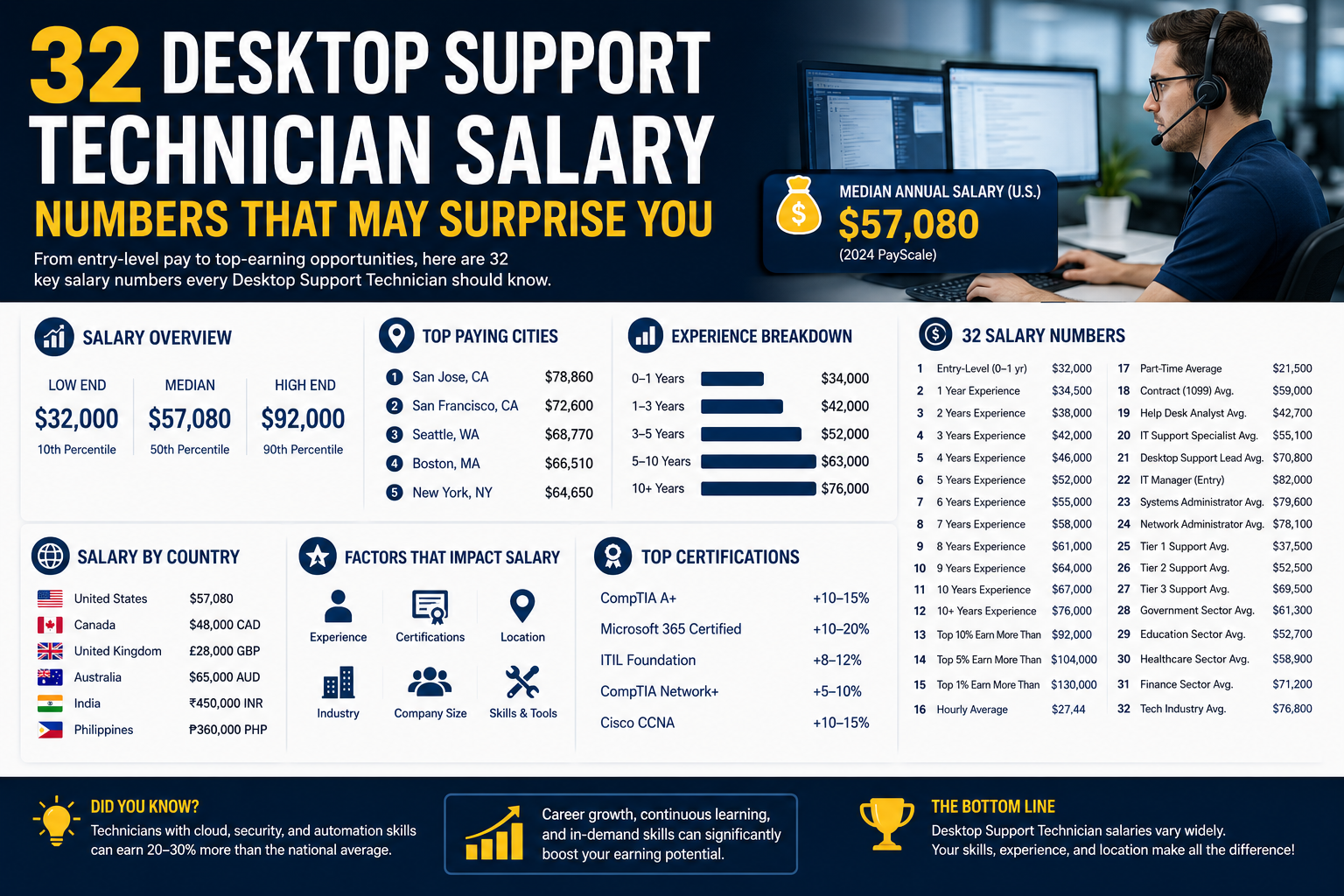
Desktop support technicians are the backbone of modern business technology operations. Nearly every company today depends on computers, laptops, mobile devices, printers, internet connectivity, cloud applications, and internal networks to complete daily tasks. When any of these systems stop working, employees often cannot perform their jobs effectively. Desktop support technicians are the professionals responsible for solving those technical problems and ensuring that organizations continue operating smoothly.
Although many people use technology every day, professional troubleshooting is a specialized skill. Knowing how to use a smartphone or install an application is very different from diagnosing hardware failures, fixing network issues, restoring operating systems, or identifying software conflicts. Desktop support technicians combine technical knowledge, problem-solving abilities, and communication skills to handle a wide range of IT challenges.
The role is broad because technicians must support many different technologies simultaneously. One moment they may be troubleshooting a printer connection issue, and the next they may be repairing a corrupted operating system, setting up email access, or helping an employee reconnect to the company network remotely. This variety makes desktop support one of the most dynamic positions in the IT industry.
Many organizations consider desktop support technicians the first line of technical defense. Employees contact support teams whenever systems malfunction or when they cannot access important business resources. A quick response from a technician can prevent major disruptions, lost productivity, and unnecessary downtime.
Desktop support technicians often work directly with users, which means communication skills are just as important as technical expertise. Employees experiencing technical problems are frequently frustrated or stressed because their work has been interrupted. A good technician must stay calm, explain issues clearly, and reassure users while resolving problems efficiently.
The role is commonly viewed as an entry-level IT position, but it provides valuable exposure to many areas of information technology. Many network engineers, cybersecurity analysts, cloud specialists, and systems administrators begin their careers in desktop support because the position develops foundational troubleshooting skills and broad technical knowledge.
Daily Responsibilities of Desktop Support Technicians
The daily tasks of desktop support technicians can vary significantly depending on the company size, industry, and technical environment. In smaller organizations, a technician may handle almost every aspect of IT support. In larger enterprises, support teams may be divided into specialized areas, but desktop technicians still perform a wide range of responsibilities.
One of the most common tasks involves troubleshooting hardware problems. Desktop support technicians diagnose issues with laptops, desktop computers, monitors, keyboards, printers, docking stations, scanners, and peripheral devices. Sometimes problems require simple fixes, while other cases demand deeper investigation and component replacement.
Software support is another major responsibility. Technicians install applications, configure operating systems, update drivers, resolve compatibility problems, and repair corrupted software environments. They may also remove malware, fix startup issues, or restore systems after crashes.
User account management is also an important part of the job. Technicians frequently reset passwords, unlock user accounts, configure permissions, and help employees access company resources securely. In many organizations, these tasks are handled through centralized directory systems such as Active Directory.
Networking support responsibilities often fall partially on desktop technicians as well. They may troubleshoot internet connectivity problems, Wi-Fi access issues, VPN failures, or communication errors between devices and servers. Even when companies employ dedicated network engineers, desktop support technicians usually handle the initial diagnosis before escalating larger infrastructure issues.
Remote support has become increasingly common in modern workplaces. Many employees now work from home or travel frequently, which means technicians must solve problems remotely. Using remote access software, desktop support technicians can connect to user devices from anywhere and perform troubleshooting tasks without being physically present.
Another responsibility involves maintaining inventory records. Companies need accurate tracking of laptops, monitors, software licenses, and other IT equipment. Desktop support technicians may help manage asset inventories, deploy new hardware, and retire outdated devices securely.
Technicians are also responsible for documenting issues and solutions through ticketing systems. Proper documentation allows organizations to track recurring problems, measure response times, and improve support processes over time. Clear documentation also helps technicians share information with coworkers and future support teams.
Why Desktop Support Technicians Are Essential
Businesses today depend on technology more than ever before. A single computer failure can interrupt communication, delay projects, prevent customer transactions, or even shut down entire departments temporarily. Because of this reliance on technology, desktop support technicians are critical to operational stability.
Without support teams, employees would spend large amounts of time trying to solve technical problems themselves. This reduces productivity and increases frustration across the organization. Desktop support technicians minimize downtime by resolving issues quickly and professionally.
Support technicians also contribute to cybersecurity efforts. They help ensure that systems receive updates, antivirus software remains active, and employees follow proper security practices. Many cybersecurity incidents begin with simple user mistakes or unpatched systems, so support technicians play a preventative role in organizational security.
In industries such as healthcare and finance, technical reliability is especially important. Hospitals rely on digital patient records and connected medical systems, while financial institutions depend on secure transaction processing and data management. Technical failures in these industries can create serious consequences, making skilled desktop support technicians highly valuable.
The growth of cloud computing, hybrid work environments, and mobile technologies has increased the importance of support technicians even further. Organizations now manage more devices, platforms, and remote users than ever before, creating greater demand for knowledgeable IT professionals.
Average Salary Expectations for Desktop Support Technicians
Desktop support technician salaries vary widely depending on several factors, including geographic location, certifications, technical expertise, industry, and years of experience. Entry-level technicians usually earn lower salaries because they are still building experience and technical confidence. However, experienced technicians with advanced skills can earn significantly higher pay.
National salary averages generally place desktop support technicians in a moderate income range within the IT industry. Entry-level positions often start near the lower salary ranges, while specialized or senior support roles can offer much higher compensation packages.
Geographic location has a major impact on salary levels. Large metropolitan areas and coastal cities typically offer higher salaries because of increased demand for technical talent and higher living costs. Technology-focused regions often pay premium salaries to attract skilled professionals.
Smaller cities and rural areas may offer lower salaries, but they can also provide lower living expenses. In some cases, technicians working in lower-cost regions may enjoy better overall financial balance despite lower salaries on paper.
The difference between low-paid and high-paid desktop support technicians can be substantial. Highly skilled technicians who understand networking, enterprise systems, security practices, cloud technologies, and advanced troubleshooting procedures often earn far more than technicians performing only basic support tasks.
Employers are willing to pay more for professionals who can work independently, handle complex technical environments, and support critical business operations. This creates strong opportunities for salary growth through continuous learning and skill development.
How Experience Influences Salary Growth
Experience is one of the strongest factors affecting salary growth in desktop support careers. Entry-level technicians typically focus on routine tasks such as password resets, software installations, and basic troubleshooting. As technicians gain experience, they become trusted with more advanced responsibilities.
Experienced technicians often handle escalated support issues that junior staff cannot resolve. They may troubleshoot complex networking problems, diagnose system performance issues, or assist with infrastructure projects. This increased responsibility usually leads to higher salaries and career advancement opportunities.
Long-term experience also improves troubleshooting efficiency. Skilled technicians learn to identify patterns, diagnose issues faster, and implement solutions more effectively. Companies value employees who can minimize downtime and maintain productivity.
Experienced technicians may also mentor junior staff, manage support teams, or coordinate technical projects. Leadership responsibilities can create pathways into management positions with even greater earning potential.
The IT industry rewards practical knowledge heavily. While formal education can help open doors, hands-on experience often becomes the most important qualification over time. Technicians who consistently solve problems and adapt to new technologies build strong professional reputations.
The Importance of Technical Knowledge
Technical knowledge directly influences a desktop support technician’s career opportunities and salary potential. Companies want technicians who can support multiple technologies confidently and efficiently.
Operating system expertise is especially important. Most organizations use Windows systems extensively, but many also rely on macOS and Linux devices. Technicians who understand multiple operating systems become more versatile and valuable.
Operating system support involves much more than simple installation. Technicians must understand system configuration, performance optimization, driver management, update processes, user permissions, and troubleshooting procedures. Advanced knowledge allows technicians to solve problems that less experienced professionals cannot handle.
Networking knowledge is another valuable skill area. Desktop support technicians frequently troubleshoot connectivity issues involving routers, switches, wireless networks, VPNs, and internet access. Understanding networking fundamentals improves problem-solving efficiency significantly.
Cloud technology knowledge has also become increasingly important. Many organizations now rely on cloud-based applications, remote collaboration tools, and virtualized environments. Technicians familiar with cloud services can support modern workplaces more effectively.
Security awareness is critical as cyber threats continue growing. Desktop support technicians often identify suspicious activity, assist with malware removal, and help enforce security policies. Organizations increasingly value technicians who understand cybersecurity fundamentals.
The Growing Demand for Remote Support Skills
Remote work has transformed the responsibilities of desktop support technicians. Employees now work from home, travel frequently, and connect from many different locations and devices. Supporting remote users requires both technical expertise and strong communication abilities.
Technicians must understand remote access tools, virtual private networks, cloud collaboration platforms, and remote troubleshooting methods. They often solve problems without physical access to devices, which requires careful communication and detailed diagnostic procedures.
Remote support skills have become highly desirable because companies increasingly operate distributed workforces. Organizations need technicians who can maintain productivity regardless of employee location.
This shift has also expanded career opportunities. Some desktop support technicians now work entirely remotely, supporting organizations across multiple regions or countries. Remote work flexibility can create additional employment possibilities and improve work-life balance for IT professionals.
Why Communication Skills Matter in IT Support
Many people assume desktop support is entirely technical, but communication skills are equally important. Support technicians interact with users constantly, and the ability to communicate clearly often determines customer satisfaction levels.
Employees experiencing technical issues may feel stressed, frustrated, or anxious about missed deadlines. A technician who listens carefully, explains solutions clearly, and remains professional can improve the entire support experience.
Good communication also improves teamwork within IT departments. Technicians frequently collaborate with network engineers, cybersecurity teams, systems administrators, and management staff. Clear documentation and effective information sharing help organizations resolve problems faster.
Communication skills also influence career advancement opportunities. Technicians who explain technical concepts effectively may transition into leadership roles, training positions, or consulting careers more easily than those who struggle with interpersonal communication.
How Industries Affect Desktop Support Salaries
Different industries pay desktop support technicians at different levels. Organizations with complex infrastructure or strict operational requirements usually offer higher salaries because technical reliability is critical to business success.
Financial institutions often pay well because they rely on secure systems, transaction processing, and sensitive customer data. Technical failures can result in financial losses or regulatory consequences, making experienced support staff highly valuable.
Healthcare organizations also depend heavily on technology. Hospitals, clinics, and medical offices require stable systems for patient records, scheduling, communication, and medical equipment. Support technicians in healthcare environments often manage highly important systems where downtime can affect patient care.
Government agencies provide stable career opportunities for desktop support technicians. Government IT environments can be large and complex, often combining older legacy systems with modern technologies. Technicians working in government roles may benefit from long-term stability and strong benefits packages.
Technology companies themselves also employ large support teams. Employees in technology-focused businesses often use advanced systems and specialized applications, requiring skilled support professionals capable of handling sophisticated environments.
Building Technical Skills for Desktop Support Success
Desktop support technicians are expected to understand a wide variety of technologies because they support the systems employees use every day. Companies rely on support technicians not only to solve technical problems but also to prevent disruptions before they affect productivity. The more technical skills a support technician develops, the more valuable they become to employers.
The IT industry changes constantly, and desktop support professionals must continue learning throughout their careers. New operating systems, cloud platforms, collaboration tools, and cybersecurity threats appear regularly. Technicians who stay updated with modern technologies are often rewarded with higher salaries, better job opportunities, and stronger career stability.
One of the biggest advantages of working in desktop support is the exposure to many different areas of IT. A technician may work with hardware, software, networking, cloud services, cybersecurity tools, printers, mobile devices, and communication platforms all within the same day. This broad exposure creates an excellent foundation for long-term professional growth.
Employers look for technicians who are adaptable and capable of handling unexpected technical challenges. Organizations depend on employees who can diagnose issues quickly, remain calm under pressure, and communicate solutions effectively. Developing strong technical skills is the key to becoming a trusted and reliable IT professional.
Mastering Operating Systems
One of the most important skills for desktop support technicians is understanding operating systems. Every computer, laptop, server, and mobile device depends on an operating system to function properly. Technicians must know how to install, configure, troubleshoot, maintain, and repair these systems.
Windows remains the most commonly used operating system in business environments. Desktop support technicians frequently manage Windows updates, troubleshoot startup issues, configure user accounts, install drivers, and optimize system performance. Understanding Windows administration tools and recovery methods is essential for almost every support role.
macOS support skills are also increasingly valuable because many companies use Apple devices for creative, executive, and development teams. Supporting macOS environments requires knowledge of Apple-specific settings, software compatibility, security features, and device management systems.
Linux knowledge can provide an additional advantage for desktop support technicians. Although Linux is less common on desktop computers, it is widely used for servers, cloud infrastructure, development environments, and cybersecurity systems. Understanding Linux commands and system administration can create opportunities for advancement into specialized IT roles.
Mobile operating systems are another important area. Employees rely heavily on smartphones and tablets for communication and remote work. Desktop support technicians often configure mobile email access, troubleshoot synchronization problems, and support Android and iOS devices within company environments.
Learning multiple operating systems improves flexibility and employability. Companies prefer technicians who can support a mixed technology environment rather than only one platform. Multi-platform knowledge also strengthens troubleshooting abilities because technicians learn how different systems behave under similar conditions.
Understanding Computer Hardware
Hardware troubleshooting remains a core responsibility for desktop support technicians. Even as cloud computing grows, organizations still depend on physical devices such as laptops, desktop computers, monitors, docking stations, printers, scanners, and networking equipment.
Support technicians must understand how computer components function together. Knowledge of processors, memory, storage devices, power supplies, graphics cards, motherboards, and cooling systems helps technicians diagnose hardware failures accurately.
Technicians frequently replace defective components, upgrade systems, and configure new devices for employees. They may install additional memory, replace failing hard drives, troubleshoot overheating problems, or repair damaged peripherals. Hands-on hardware experience is valuable because many technical issues originate from physical device failures.
Laptop troubleshooting has become especially important as remote work increases. Employees depend heavily on portable devices, and support technicians often handle battery problems, charging failures, damaged keyboards, broken screens, and wireless connectivity issues.
Printer support is another common responsibility. Although printers may seem simple, they frequently create technical issues involving drivers, network connections, print queues, permissions, and hardware malfunctions. Technicians who can quickly resolve printing problems help maintain workplace productivity.
Understanding hardware compatibility is also important. Technicians must ensure that upgrades, replacement parts, and peripheral devices function correctly within existing systems. Compatibility problems can lead to instability, performance issues, or hardware damage if not handled properly.
Developing Networking Knowledge
Networking skills are extremely valuable for desktop support technicians because many technical problems involve communication between devices and systems. Even when organizations have dedicated networking teams, desktop support technicians are usually responsible for the first stage of troubleshooting.
Understanding networking fundamentals allows technicians to identify connectivity issues efficiently. Basic knowledge includes IP addressing, subnetting, DNS, DHCP, switches, routers, wireless networks, and internet protocols. These concepts form the foundation of modern business communication systems.
Wireless networking support has become especially important in modern workplaces. Employees expect stable Wi-Fi connectivity whether they work in offices, homes, or public spaces. Desktop support technicians often troubleshoot weak signals, authentication failures, VPN connectivity issues, and network congestion problems.
Virtual private network support is another essential skill. Many remote employees use VPN connections to access company resources securely. Technicians must understand how VPNs function and how to resolve problems related to authentication, connectivity, and security settings.
Network troubleshooting requires logical thinking and patience. A connectivity problem may originate from the user device, local network hardware, internet provider, firewall settings, or remote infrastructure. Effective technicians learn how to isolate variables and identify root causes systematically.
Networking knowledge also supports career advancement. Many desktop support technicians eventually move into network administration or cybersecurity careers after developing strong networking foundations.
Learning Active Directory Administration
Active Directory is one of the most important technologies in enterprise IT environments. It provides centralized management for user accounts, computers, permissions, and network resources. Desktop support technicians interact with Active Directory frequently during daily operations.
Password resets are among the most common support requests handled through Active Directory. Technicians also unlock user accounts, assign permissions, create new accounts, disable old accounts, and troubleshoot login problems.
Understanding organizational units, group policies, security groups, and domain structures helps technicians manage enterprise systems effectively. Active Directory knowledge is highly valued because many business environments depend heavily on centralized authentication and user management.
Group policy management is another useful skill. Organizations use group policies to enforce security settings, configure user environments, manage software installations, and maintain consistent system behavior across devices. Desktop support technicians often troubleshoot issues related to group policy conflicts or configuration errors.
Technicians who understand Active Directory become more capable of handling enterprise-level support responsibilities. This expertise can lead to higher salaries and increased trust from employers.
The Importance of Cybersecurity Awareness
Cybersecurity has become a major concern for organizations worldwide. Desktop support technicians are often on the front lines of defense because they interact directly with user devices and daily technical operations.
Technicians help maintain secure environments by installing updates, applying security patches, configuring antivirus software, and monitoring suspicious behavior. They may also assist with malware removal and investigate unusual system activity.
Phishing attacks are one of the most common cybersecurity threats affecting organizations. Desktop support technicians often educate employees about recognizing suspicious emails, malicious links, and social engineering attempts. User awareness is an important part of preventing security incidents.
Endpoint security management is another growing responsibility. Organizations use various security tools to monitor laptops, desktops, and mobile devices for threats. Technicians may assist with deploying security software, troubleshooting alerts, and ensuring compliance with company policies.
Understanding cybersecurity fundamentals increases career opportunities significantly. Many professionals transition from desktop support into cybersecurity careers because they already possess strong troubleshooting skills and broad technical exposure.
Supporting Remote Work Environments
Remote work has permanently changed the IT support landscape. Desktop support technicians now assist employees working from homes, shared offices, hotels, and other remote locations. This shift requires both technical adaptability and excellent communication skills.
Remote troubleshooting tools allow technicians to access user devices from anywhere. By using secure remote desktop software, support professionals can diagnose issues, install updates, configure applications, and guide employees through technical procedures without physical access to the device.
Cloud collaboration platforms such as video conferencing applications, messaging systems, and shared productivity tools have become essential in modern workplaces. Desktop support technicians frequently troubleshoot audio problems, camera failures, connectivity issues, and synchronization errors related to these platforms.
Supporting remote workers also requires awareness of home network environments. Unlike office networks, home internet setups vary greatly in quality and configuration. Technicians must often troubleshoot router issues, Wi-Fi interference, bandwidth limitations, and ISP-related problems.
Remote support requires patience because technicians cannot always physically inspect devices. Clear communication becomes especially important when guiding users through troubleshooting steps over phone calls or video meetings.
Using Ticketing and Help Desk Systems
Most organizations use ticketing systems to manage technical support requests. These platforms help IT teams organize tasks, prioritize issues, document solutions, and measure performance.
Desktop support technicians spend significant time working within ticket management systems. They create tickets, update status information, record troubleshooting steps, and communicate with users through these platforms.
Good ticket documentation is extremely important. Clear notes allow other technicians to understand the issue history, identify recurring problems, and continue troubleshooting if escalation becomes necessary. Strong documentation also improves overall service quality within IT departments.
Priority management is another essential skill. Some issues affect only one employee, while others disrupt entire departments or business operations. Technicians must evaluate urgency carefully and respond appropriately.
Ticketing systems also help organizations measure performance through metrics such as response time, resolution time, and customer satisfaction. Technicians who consistently maintain strong performance metrics often improve their advancement opportunities.
Project Management and Organizational Skills
Desktop support work involves much more than solving isolated technical problems. Technicians frequently participate in larger IT projects such as hardware deployments, operating system upgrades, office relocations, and infrastructure migrations.
Organizational skills help technicians manage multiple responsibilities efficiently. IT environments can become chaotic without proper planning and coordination. Technicians who stay organized are better able to prioritize tasks, meet deadlines, and reduce disruptions.
Project management tools help IT teams coordinate responsibilities and track progress. Many organizations use platforms that organize assignments, monitor workflows, and improve collaboration between departments.
Time management is also critical. Desktop support technicians often handle numerous requests simultaneously while responding to emergencies. Effective scheduling and prioritization improve productivity and reduce stress.
Technicians who demonstrate strong organizational abilities may eventually move into supervisory or management roles within IT departments.
The Value of Communication Tools
Communication tools have become essential in modern technical support environments. Teams frequently collaborate across different locations and time zones, making digital communication platforms critical for efficient operations.
Desktop support technicians use messaging applications, video conferencing systems, email platforms, and collaboration tools daily. Understanding how these systems function helps technicians troubleshoot communication issues quickly.
Strong communication practices improve teamwork and reduce misunderstandings. Technicians who communicate clearly with coworkers and users help maintain smoother support operations.
Remote communication also requires professionalism and clarity. Since many interactions occur through digital platforms, technicians must write concise updates, explain technical concepts understandably, and maintain positive communication styles.
Why Certifications Matter
Certifications are highly valuable in the IT industry because they demonstrate technical competence and commitment to professional development. Employers often use certifications to evaluate candidates during hiring and promotion decisions.
One of the most respected certifications for desktop support technicians is the CompTIA A+ certification. It covers hardware, operating systems, networking, troubleshooting, security, and mobile devices. Many employers view A+ certification as proof of foundational IT knowledge.
The Google IT Support Professional Certificate is another popular option for aspiring support technicians. It introduces troubleshooting concepts, networking basics, operating systems, customer support skills, and system administration practices.
Entry-level certifications help individuals transition into IT careers, especially when they lack formal technical education or work experience. Certifications can improve confidence while providing structured learning paths.
Advanced certifications can further increase earning potential. As technicians gain experience, they may pursue networking, cloud computing, cybersecurity, or systems administration certifications to specialize in particular areas of IT.
Continuous learning is important because technology evolves rapidly. Employers value professionals who stay updated with modern systems, security practices, and industry standards.
Hands-On Experience and Career Development
While certifications are important, practical experience remains one of the strongest career advantages in desktop support. Hands-on troubleshooting teaches technicians how real-world environments function and how users interact with technology.
Lab environments, volunteer work, internships, and personal projects can all help build practical skills. Many successful technicians begin by repairing personal devices, building computers, or supporting small business systems before entering professional IT roles.
Problem-solving ability improves with experience. Over time, technicians become more efficient at identifying root causes and implementing solutions. Confidence grows as they encounter and resolve a wider variety of technical challenges.
Desktop support careers can lead to many different opportunities within IT. Some professionals move into systems administration, networking, cloud engineering, cybersecurity, or IT management after gaining foundational support experience.
The broad exposure provided by desktop support makes it one of the best starting points for long-term technology careers.
The Importance of Professional Certifications
Certifications play a major role in the career development of desktop support technicians. In the technology industry, employers want proof that candidates possess current technical knowledge and practical skills. Certifications provide a recognized standard that demonstrates competency in important IT areas.
For desktop support technicians, certifications are often the difference between staying in an entry-level position and moving into higher-paying opportunities. They help candidates stand out during hiring processes and can strengthen salary negotiations significantly.
Unlike many industries where experience alone may be enough, information technology changes constantly. Operating systems evolve, security threats become more advanced, and businesses adopt new cloud services and collaboration platforms every year. Certifications help professionals stay updated and demonstrate that they continue learning modern technologies.
Many employers specifically mention certifications in job descriptions. Some organizations even require certifications before candidates can apply for technical support positions. This is especially common in enterprise environments, healthcare systems, government agencies, and managed service providers.
Professional certifications also help build confidence. Preparing for certification exams forces technicians to study core concepts deeply, practice troubleshooting scenarios, and understand how different technologies interact. This stronger technical foundation improves real-world problem-solving abilities.
Although certifications require time and effort, the long-term career benefits can be substantial. Many desktop support technicians experience salary increases, promotion opportunities, and expanded job options after earning respected certifications.
CompTIA A+ Certification
The CompTIA A+ certification is widely considered one of the most important certifications for desktop support technicians. It is often viewed as the industry standard for entry-level IT support knowledge.
A+ certification covers a broad range of technical topics including hardware troubleshooting, operating systems, networking basics, mobile devices, security concepts, virtualization, cloud computing, and customer support practices. Because desktop support technicians work across many technical areas, the certification aligns closely with daily job responsibilities.
One of the biggest advantages of the A+ certification is that it is vendor-neutral. Instead of focusing only on one company’s products, it teaches general technical principles that apply across many environments. This makes the certification valuable regardless of where a technician works.
Employers trust the A+ certification because it validates practical troubleshooting abilities. Certified technicians are expected to understand how to diagnose common technical problems and implement effective solutions.
Many professionals begin their IT careers with A+ certification because it provides a strong foundation for future learning. Even experienced network engineers, cloud specialists, and cybersecurity analysts often started their careers by earning A+.
The certification also helps technicians communicate more effectively with employers during interviews. A certified candidate demonstrates commitment, discipline, and professional seriousness, which can improve hiring opportunities.
Google IT Support Professional Certificate
The Google IT Support Professional Certificate has become increasingly popular among aspiring desktop support technicians. It is especially useful for individuals transitioning into technology careers without formal IT education or previous technical work experience.
The program introduces learners to troubleshooting methods, networking concepts, operating systems, system administration, security basics, and customer service practices. It is designed to help beginners develop practical support knowledge step by step.
One reason the Google certificate gained popularity is accessibility. Many learners appreciate the structured online learning format and practical exercises. The certificate also focuses heavily on real-world scenarios, which helps students prepare for professional support environments.
Employers increasingly recognize the Google IT Support Professional Certificate as evidence of foundational IT skills. Although it may not carry the same long-term reputation as A+, it still provides strong entry-level preparation.
The program also encourages problem-solving and analytical thinking. Support technicians often face unfamiliar technical situations, and the ability to investigate issues logically is one of the most important skills in IT support.
For people entering technology careers for the first time, the certificate can provide confidence and direction. Many learners use it as a stepping stone toward additional certifications and advanced technical education.
CompTIA Tech+ Certification
CompTIA Tech+ is another certification option for individuals beginning their IT journey. It is designed for people with limited technical knowledge who want to understand the fundamentals of technology before moving into more advanced certifications.
The certification introduces concepts such as hardware, software, networking, cybersecurity, troubleshooting, and basic IT operations. It is often considered a preparatory certification for future technical studies.
Although Tech+ does not carry the same industry recognition as A+, it still demonstrates initiative and interest in technology careers. Employers may view it positively when evaluating candidates for entry-level support positions.
For some learners, Tech+ serves as a confidence-building step before attempting more challenging certifications. It helps students become comfortable with technical terminology and troubleshooting concepts.
The certification can also help individuals determine whether they truly enjoy working with technology before investing heavily in advanced IT training. Since desktop support requires continuous learning and technical curiosity, early exposure to IT fundamentals can be valuable.
How Certifications Increase Salary Potential
Certifications directly influence salary growth because they increase a technician’s perceived value to employers. Organizations prefer hiring professionals who can contribute immediately without requiring extensive additional training.
Certified technicians often qualify for positions with greater responsibility. They may support larger environments, manage more advanced systems, or handle escalated technical issues that less experienced technicians cannot resolve.
The difference in salary between certified and non-certified technicians can be significant. Employers recognize that certifications represent both technical knowledge and professional commitment. A technician willing to invest time in learning and testing usually appears more motivated and career-focused.
Certifications also improve promotion opportunities. Many companies have formal advancement paths that require specific certifications before employees can move into higher-level support or administration roles.
Another advantage is credibility. Users and coworkers often trust certified professionals more readily because certifications demonstrate recognized expertise. This trust can lead to increased responsibilities and leadership opportunities.
While certifications alone do not guarantee high salaries, they become extremely valuable when combined with practical experience, communication skills, and strong work performance.
Industries That Hire Desktop Support Technicians
Desktop support technicians are needed in almost every industry because modern organizations depend heavily on technology. However, some industries offer particularly strong career opportunities and higher salaries due to the complexity and importance of their IT systems.
Large corporations often maintain extensive support teams because thousands of employees depend on stable technology infrastructure. Industries such as finance, healthcare, government, manufacturing, education, and technology services consistently hire desktop support professionals.
The demand for technical support continues growing because businesses increasingly rely on digital systems, cloud applications, mobile devices, and remote collaboration tools. As organizations expand their technology infrastructure, the need for qualified support technicians grows as well.
Some industries provide better long-term advancement opportunities than others. Environments with large enterprise networks and complex systems often allow technicians to specialize and transition into advanced technical roles over time.
Working in Finance and Insurance
Financial institutions are among the largest employers of desktop support technicians. Banks, insurance companies, investment firms, and financial service providers depend on secure and reliable technology systems every day.
Financial organizations handle enormous amounts of sensitive customer data and financial transactions. Even small technical failures can create major business disruptions or security risks. Because of this, companies invest heavily in skilled IT support teams.
Desktop support technicians in finance environments often support enterprise applications, secure workstations, communication systems, and transaction platforms. They may also help enforce security policies and maintain compliance standards.
The financial sector often offers strong salaries because organizations understand the importance of technical reliability. Downtime can result in lost revenue, damaged customer trust, and regulatory problems.
Another advantage of working in finance is career growth. Large financial institutions frequently have opportunities for advancement into cybersecurity, systems administration, networking, cloud operations, and infrastructure management.
Healthcare and Medical Technology Support
Healthcare organizations rely heavily on stable IT systems for patient care, scheduling, communication, diagnostics, and medical records. Desktop support technicians working in healthcare environments often support mission-critical systems where reliability is extremely important.
Hospitals and clinics use a wide range of technologies including workstations, mobile devices, imaging systems, medical software, printers, and communication tools. Technical failures can affect patient treatment and operational efficiency.
Healthcare support technicians may troubleshoot electronic medical record systems, configure secure user access, support telemedicine platforms, and maintain connected medical devices. They must also follow strict privacy and security regulations.
Healthcare environments can be fast-paced and demanding, but they often provide strong job stability because medical organizations always require dependable technical support.
As healthcare technology continues advancing, the demand for IT professionals in medical environments is expected to remain strong for many years.
Government and Public Sector Opportunities
Government agencies provide another major employment sector for desktop support technicians. Local, regional, and national governments all depend on large technology infrastructures to deliver public services and maintain operations.
Government networks can be extremely complex because they often combine older legacy systems with modern technologies. Desktop support technicians working in government environments may support thousands of users across multiple departments and locations.
One of the biggest advantages of government work is stability. Public sector organizations generally maintain long-term technology operations and require continuous support services.
Government IT positions may also offer structured advancement opportunities, retirement benefits, and professional development programs. Technicians who gain experience in government environments often develop strong troubleshooting and infrastructure management skills.
Security clearance requirements in some government roles can also create specialized career opportunities with higher salaries and additional responsibilities.
Technology Companies and Enterprise Environments
Technology companies themselves employ large numbers of desktop support technicians. Software companies, cloud providers, telecommunications organizations, and managed service providers all require technical support teams.
Working in technology-focused environments often exposes technicians to cutting-edge systems and modern infrastructure. These roles can accelerate learning because technicians interact with advanced tools, cloud platforms, automation systems, and enterprise networks regularly.
Managed service providers are another common employer for desktop support professionals. These companies deliver IT support services to multiple client organizations. Technicians in these environments gain exposure to many different technologies and business environments quickly.
The fast-paced nature of technology companies can be challenging, but it also creates strong opportunities for skill development and career advancement.
Strategies for Increasing Salary
Desktop support technicians who want higher salaries must focus on continuous improvement. Entry-level support positions provide a starting point, but long-term salary growth depends on developing advanced skills and increasing professional value.
One of the best ways to increase earning potential is through specialization. Technicians who develop expertise in areas such as networking, cybersecurity, cloud computing, virtualization, or systems administration often qualify for higher-paying roles.
Continuous certification is another effective strategy. Employers value professionals who keep learning and updating their knowledge. Advanced certifications can open doors to leadership positions and specialized technical careers.
Communication skills also influence salary growth. Technicians who communicate effectively with users, management, and technical teams often become trusted employees within organizations. Strong communication can lead to supervisory or management opportunities.
Professional networking is another important factor. Building relationships with coworkers, managers, and industry professionals can lead to job referrals and career advancement opportunities.
Job mobility can also increase salaries significantly. Some technicians remain underpaid because they stay in the same role for too long without exploring better opportunities. Moving to larger organizations or more competitive industries can result in substantial salary increases.
Career Paths Beyond Desktop Support
Desktop support is often the beginning of a much larger IT career journey. The broad technical exposure gained in support roles creates strong foundations for many specialized technology careers.
Some technicians move into systems administration, where they manage servers, virtualization platforms, enterprise applications, and infrastructure systems. Others transition into networking careers focused on routers, switches, wireless systems, and enterprise connectivity.
Cybersecurity is another popular advancement path. Desktop support technicians already understand operating systems, troubleshooting, user behavior, and endpoint security, which provides a strong foundation for security careers.
Cloud computing has also become a major career direction. Technicians who learn cloud platforms and virtualization technologies can transition into cloud administration or cloud engineering roles.
IT management is another possibility. Experienced technicians with leadership and organizational skills may become support supervisors, service desk managers, or IT directors over time.
The versatility of desktop support experience makes it one of the strongest entry points into the broader technology industry.
The Future of Desktop Support Careers
Technology will continue evolving, but desktop support roles are unlikely to disappear. Instead, the responsibilities of support technicians will continue adapting alongside modern business environments.
Cloud services, artificial intelligence, automation, and remote work technologies are changing how support teams operate. Technicians increasingly support hybrid environments that combine physical devices, cloud platforms, and remote collaboration systems.
Automation may reduce some repetitive support tasks, but human troubleshooting skills will remain valuable. Complex technical problems, communication with users, and business-specific support requirements still require skilled professionals.
Cybersecurity concerns are also increasing demand for knowledgeable support technicians. Organizations need professionals who can maintain secure systems, identify suspicious activity, and support safe technology practices.
Remote support capabilities will continue expanding as businesses operate more globally and flexibly. Technicians comfortable supporting distributed workforces will remain highly valuable.
The future of desktop support belongs to professionals who embrace continuous learning, adapt to new technologies, and build both technical and communication skills.
Conclusion
Desktop support technicians play a critical role in modern organizations by ensuring that technology systems remain functional, secure, and efficient. They troubleshoot hardware and software issues, support users, maintain connectivity, manage devices, and help organizations avoid costly downtime.
Although desktop support is often considered an entry-level IT position, it offers enormous opportunities for growth. Skilled technicians can significantly increase their salaries through certifications, technical specialization, hands-on experience, and continuous learning.
Certifications such as CompTIA A+, Google IT Support Professional Certificate, and CompTIA Tech+ help professionals demonstrate technical competence and strengthen career opportunities. Combined with practical experience, these certifications can lead to higher-paying positions and long-term advancement.
Industries such as finance, healthcare, government, and technology services consistently rely on desktop support professionals because stable IT infrastructure is essential for daily operations. These environments often provide strong salaries, career stability, and advancement opportunities.
The IT industry will continue evolving rapidly, but organizations will always need skilled professionals capable of solving technical problems and supporting users effectively. Desktop support technicians who stay adaptable, continue learning, and develop both technical and communication skills can build highly successful and rewarding careers in information technology.