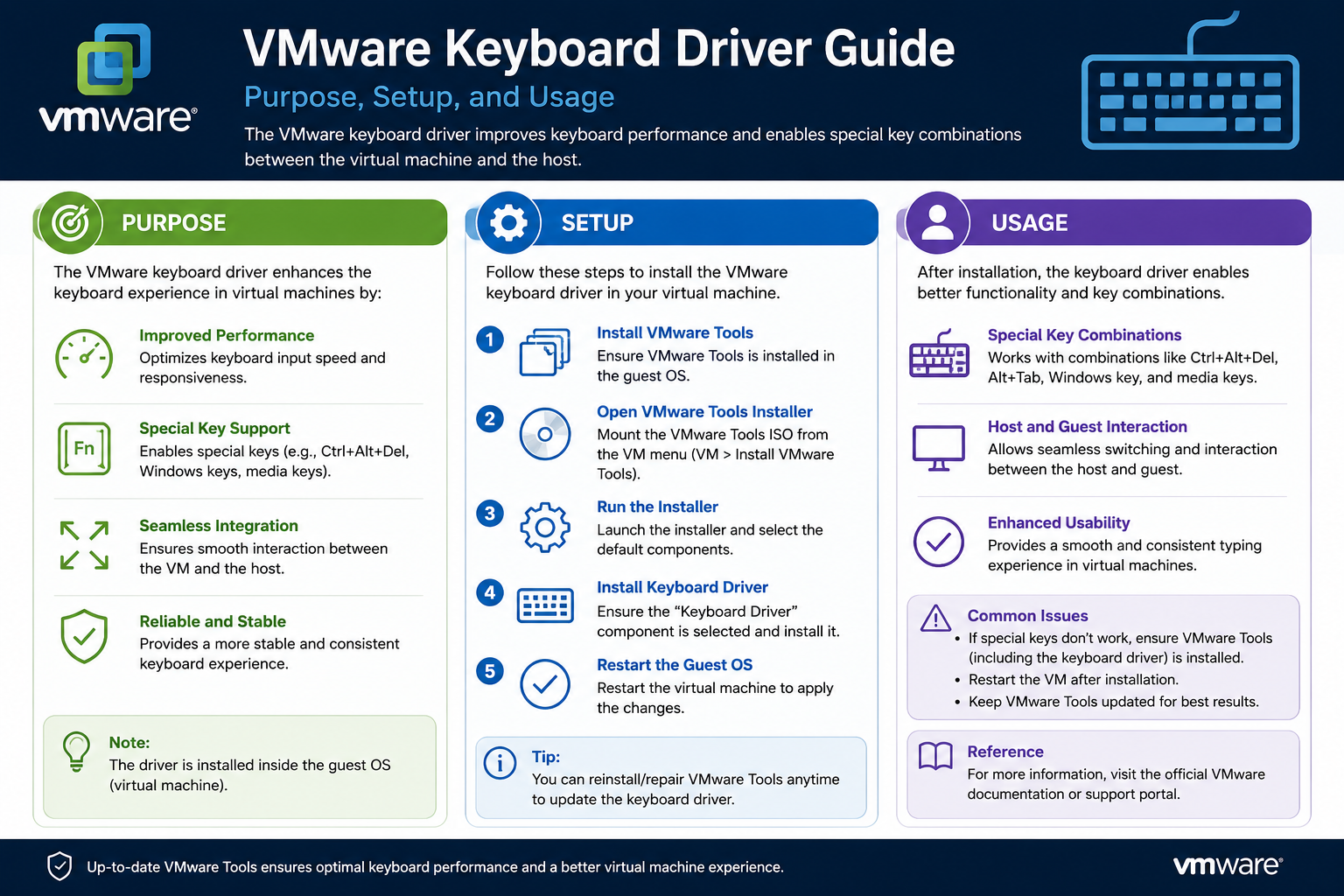
Virtualization has transformed modern computing by allowing a single physical machine to run multiple independent operating systems at the same time. Instead of dedicating one server or workstation to one operating system, virtualization software makes it possible to divide hardware resources among several virtual environments. This approach improves efficiency, lowers infrastructure costs, and simplifies system management for organizations of all sizes.
Before virtualization became mainstream, companies often purchased separate physical servers for every major application or service. One machine might host email services, another might run databases, and another might handle web applications. Many of these systems used only a small percentage of their available hardware resources, which resulted in wasted processing power, memory, storage space, and electricity.
Virtualization solved this problem by allowing one powerful server to host many virtual systems. Each virtual machine behaves as though it were a separate physical computer, even though all the virtual machines share the same hardware underneath. This concept made datacenters more efficient and allowed organizations to scale their infrastructure more effectively.
Today, virtualization is used almost everywhere. Large enterprises rely on it to manage thousands of workloads, while smaller businesses use virtualization to reduce hardware expenses and simplify IT administration. Developers use virtual machines to test software, cybersecurity professionals use them for isolated environments, and remote workers use virtual desktops to access corporate systems securely.
Among the most recognized virtualization platforms is VMware ESXi. ESXi is a hypervisor specifically designed for virtualization tasks. It allows administrators to create, manage, and operate virtual machines on a physical server while maintaining strong performance and stability.
What Is a Hypervisor?
To understand VMware ESXi properly, it is important to understand the role of a hypervisor. A hypervisor is software that creates and manages virtual machines. It acts as a bridge between physical hardware and guest operating systems running inside virtual environments.
The hypervisor allocates hardware resources such as processor time, memory, storage access, and network connectivity to each virtual machine. It ensures that every virtual system operates independently while sharing the same physical resources.
For example, a server with a large amount of RAM and multiple processors might host ten or twenty virtual machines simultaneously. One virtual machine may run Windows Server, another may run Linux, and another may function as a desktop operating system. Each system believes it has its own dedicated hardware, even though all the virtual machines share the same physical server.
Hypervisors are generally divided into two categories. Type 1 hypervisors run directly on hardware without requiring a traditional operating system underneath. VMware ESXi belongs to this category. Type 2 hypervisors run on top of an existing operating system such as Windows or Linux.
Type 1 hypervisors are often preferred in enterprise environments because they provide better performance, improved stability, and reduced overhead. Since they communicate directly with hardware, they can allocate resources more efficiently and reduce unnecessary software layers.
Understanding VMware ESXi
VMware ESXi is one of the most widely used enterprise hypervisors in the world. It is designed specifically for running and managing virtual machines in professional environments. Unlike traditional operating systems filled with unnecessary background services and graphical interfaces, ESXi is lightweight and optimized for virtualization performance.
Because ESXi focuses entirely on virtualization tasks, it uses fewer system resources than a standard operating system would. This allows more CPU power and memory to be dedicated to virtual machines instead of the host platform itself.
The ESXi hypervisor installs directly onto physical server hardware. Once installed, administrators can create and manage virtual machines through management tools and centralized interfaces. Each virtual machine operates independently and can run different operating systems or applications.
One of the reasons ESXi became so popular is its reliability and scalability. Organizations can deploy hundreds or even thousands of virtual machines across clusters of ESXi hosts. Advanced management tools make it easier to monitor performance, automate workloads, and maintain high availability.
Virtualization platforms like ESXi also provide flexibility that traditional physical infrastructure cannot easily match. Virtual machines can often be moved between hosts, cloned for rapid deployment, backed up as files, and restored quickly after failures.
How Virtual Machines Work
A virtual machine is essentially a software-based computer. It includes virtual hardware components such as processors, memory, hard drives, network adapters, and USB controllers. Guest operating systems installed inside the virtual machine interact with these virtual devices as though they were physical hardware.
When an application inside a virtual machine requests hardware resources, the hypervisor translates those requests and communicates with the physical server hardware. This translation process allows multiple virtual systems to coexist safely on the same machine.
For example, if two virtual machines both require processing power simultaneously, the hypervisor determines how CPU resources are distributed between them. If several virtual machines need memory, the hypervisor manages allocation while preventing conflicts.
This resource management process is one of the most important functions of a hypervisor. Without it, multiple operating systems could not share the same hardware efficiently or securely.
Virtual machines are also isolated from one another. Problems affecting one virtual machine usually do not impact others running on the same host. If one guest operating system crashes, the remaining virtual machines typically continue operating normally.
This isolation improves reliability and security. It also allows organizations to separate workloads more effectively. Development systems, production environments, testing labs, and user desktops can all run independently on the same physical hardware.
Benefits of Virtualization in Enterprise Environments
One major advantage of virtualization is hardware consolidation. Instead of maintaining dozens of underutilized physical servers, organizations can run many virtual machines on fewer powerful hosts. This reduces equipment costs, electricity usage, cooling requirements, and datacenter space consumption.
Virtualization also simplifies system deployment. Creating a new physical server traditionally required purchasing hardware, installing components, configuring storage, and deploying an operating system manually. Virtual machines can often be created within minutes using templates or cloned configurations.
Backup and disaster recovery processes are also easier in virtualized environments. Since virtual machines exist as files, administrators can back them up, replicate them, and restore them more efficiently than traditional physical systems.
Testing environments benefit greatly from virtualization as well. Developers can experiment with different operating systems, software configurations, and network settings without affecting production infrastructure. If problems occur, virtual machines can often be rolled back to earlier snapshots quickly.
Another major benefit is portability. Virtual machines can frequently be moved between physical hosts without major downtime. This flexibility allows administrators to perform hardware maintenance more easily and distribute workloads dynamically.
Remote work environments also rely heavily on virtualization technology. Virtual desktop infrastructure allows employees to access centralized desktop environments from almost any location. Instead of storing data on local devices, virtual desktops keep applications and information within centralized datacenters.
Challenges in Virtualized Environments
Although virtualization provides many advantages, it also introduces certain complexities. Hardware compatibility, driver support, resource allocation, and peripheral integration become more important when multiple operating systems share the same hardware.
Certain hardware devices may not behave exactly the same way inside virtual machines as they do on physical computers. Devices such as graphics adapters, USB peripherals, printers, and specialized keyboards sometimes require additional configuration or software support.
Input devices are especially important because they directly affect the user experience. Most users expect keyboards and mice to work seamlessly regardless of whether they are using a physical machine or a virtual desktop.
Standard keyboards usually function correctly using generic operating system drivers. However, advanced keyboards with multimedia buttons, programmable keys, regional layouts, or accessibility features may require enhanced support in virtual environments.
This is where components such as the VMware Enhanced Keyboard Driver become relevant.
Understanding Keyboard Integration in Virtual Machines
At first glance, keyboards may seem simple. Most people assume a keyboard will work universally on any system without requiring special software. In many situations, this assumption is correct. Standard operating systems already include generic Human Interface Device drivers that support basic keyboard functionality.
In a physical environment, a keyboard connects directly to the operating system through hardware controllers. The operating system receives scan codes generated by key presses and translates them into characters or commands.
In a virtualized environment, the process is more complicated. Keyboard input first passes through the host system and hypervisor before reaching the guest operating system inside the virtual machine.
Most of the time, this translation process works perfectly. Users can type normally, use shortcuts, and interact with applications without noticing any difference. However, specialized keyboards sometimes introduce compatibility challenges.
Some keyboards include multimedia controls for adjusting volume, controlling media playback, launching applications, or managing brightness settings. Others support unique language layouts or advanced macros. These features may not always translate correctly through virtualization layers.
As organizations adopt more remote work solutions and virtual desktop environments, reliable keyboard integration becomes increasingly important. Employees expect their virtual desktops to behave like physical workstations, including support for regional language input and specialized keyboard functions.
What Is the VMware Enhanced Keyboard Driver?
The VMware Enhanced Keyboard Driver is designed to improve keyboard compatibility within VMware virtual machines, especially for Windows-based guest operating systems. The driver helps ensure advanced keyboard functions and specialized scan codes are interpreted correctly.
This enhanced support may be useful for users working with international keyboard layouts or keyboards containing additional functionality beyond standard typing. Some language-specific keyboards include unique character mappings that generic drivers may not handle perfectly in virtual environments.
The driver can also improve support for multimedia keys, shortcut buttons, and certain accessibility devices. By improving how scan codes are translated inside the virtual machine, the Enhanced Keyboard Driver helps maintain consistent keyboard behavior.
It is important to understand that the driver is optional. Standard keyboard functionality generally works without it. Many organizations never install the Enhanced Keyboard Driver because their users do not require advanced keyboard features.
The driver is also limited to Windows guest operating systems. Linux and macOS virtual machines typically rely on their own native input handling mechanisms instead.
Why Some Administrators Avoid Extra Drivers
Many IT professionals prefer keeping virtual machines as simple as possible. Every additional driver introduces another component that must be maintained, tested, and monitored over time.
Drivers operate close to the operating system kernel, meaning compatibility problems can potentially affect system stability. Operating system updates may also change how drivers behave. Administrators often avoid unnecessary software installations unless there is a clear operational need.
Enterprise environments prioritize reliability and predictability. If standard HID drivers already provide adequate functionality, many organizations see little reason to install additional keyboard drivers.
This cautious approach helps reduce troubleshooting complexity and lowers the risk of compatibility issues after operating system upgrades or virtualization platform updates.
When Enhanced Keyboard Support Becomes Useful
Despite these concerns, some environments genuinely benefit from enhanced keyboard support. Virtual desktop infrastructure deployments often support users with diverse keyboard layouts, languages, and accessibility needs.
International organizations may employ users across multiple countries using different regional keyboards. Specialized workstations may rely on advanced keyboards containing custom shortcuts or multimedia controls.
In these situations, the Enhanced Keyboard Driver can help improve usability and reduce user frustration. Accurate key mapping and reliable scan code handling contribute to a smoother virtual desktop experience.
The decision to install the driver ultimately depends on the specific requirements of the environment. Organizations must balance convenience, compatibility, stability, and long-term maintenance considerations when deciding whether enhanced keyboard support is necessary.
The Growing Importance of Virtualization
Virtualization technology continues evolving rapidly as businesses adopt cloud computing, remote access solutions, and hybrid infrastructure models. Virtual machines remain central to modern IT operations because they provide flexibility, efficiency, and scalability.
Platforms such as VMware ESXi demonstrate how virtualization can maximize hardware utilization while simplifying system management. At the same time, smaller components like the VMware Enhanced Keyboard Driver illustrate the practical challenges involved in delivering seamless user experiences inside virtual environments.
Even though keyboard integration may seem like a minor technical detail, reliable input handling is essential for productivity. Users expect their virtual systems to function naturally, whether they are typing documents, using shortcuts, entering international characters, or controlling multimedia applications.
Understanding how ESXi works and how virtualization handles devices helps administrators make better decisions about software configuration and compatibility. The Enhanced Keyboard Driver is simply one example of the many specialized tools designed to improve usability within increasingly complex virtual infrastructures.
Understanding Keyboard Communication in Virtual Environments
In a traditional physical computer, keyboard communication is relatively straightforward. A keyboard connects directly to the operating system through USB ports or internal hardware interfaces. When a user presses a key, the keyboard generates a signal called a scan code. The operating system receives this signal and translates it into characters, commands, or shortcuts.
Inside a virtualized environment, the process becomes more complex because keyboard input must pass through several layers before reaching the guest operating system. The physical keyboard communicates first with the host machine, then with the hypervisor, and finally with the virtual machine itself. Each layer plays a role in translating and forwarding keyboard signals.
For most users, this process is invisible. They type normally and expect the virtual machine to respond exactly like a physical computer. In many cases, the virtualization platform handles this translation successfully without requiring any additional software. However, some keyboards include advanced features or specialized layouts that standard drivers may not process perfectly inside virtual machines.
This challenge is what led to the development of the VMware Enhanced Keyboard Driver. The driver exists to improve how certain keyboard inputs are recognized and translated within Windows-based VMware guest operating systems.
The Purpose of the VMware Enhanced Keyboard Driver
The VMware Enhanced Keyboard Driver is designed to provide better compatibility between physical keyboards and Windows guest operating systems running in VMware environments. It focuses particularly on advanced keyboard features, language-specific layouts, multimedia controls, and specialized input devices.
Standard Human Interface Device drivers included with Windows already support most common keyboards. Users can type letters, numbers, and standard symbols without problems. However, some advanced keyboards generate unique scan codes or additional commands that generic drivers may not interpret correctly in a virtual environment.
The Enhanced Keyboard Driver improves communication between the hypervisor and the Windows guest operating system. It helps ensure that special keyboard commands are passed accurately into the virtual machine.
This can be especially useful in virtual desktop infrastructure deployments where end users rely heavily on workstation-like functionality. Users often expect their virtual desktops to behave exactly like local computers, including support for multimedia keys, regional keyboard layouts, and advanced shortcut commands.
How Scan Codes Work
To understand the Enhanced Keyboard Driver more clearly, it helps to understand scan codes in greater detail. Every key on a keyboard produces a unique signal when pressed or released. These signals are known as scan codes.
The operating system interprets scan codes and determines what action should occur. For example, pressing the letter A generates one scan code, while pressing Enter generates another. Modifier keys such as Shift, Alt, and Ctrl influence how scan codes are interpreted.
Most standard keyboards use predictable scan code patterns supported by generic operating system drivers. Problems arise when keyboards contain extra buttons or non-standard layouts that generate unusual scan codes.
For example, multimedia keyboards may include keys for volume control, media playback, or launching specific applications. Gaming keyboards may contain programmable macro buttons. International keyboards may support additional characters not commonly used in English-language layouts.
In a physical computer, manufacturer-specific drivers often handle these advanced features. In virtualized environments, keyboard signals must pass through virtualization layers before reaching the guest operating system. This additional translation process can sometimes interfere with accurate scan code interpretation.
The Enhanced Keyboard Driver helps improve this translation process within VMware virtual machines.
Keyboard Translation Between Host and Guest Systems
When a user presses a key inside a VMware environment, several systems participate in the translation process. The physical keyboard first sends input to the host operating system. The VMware hypervisor captures that input and redirects it into the guest virtual machine.
The guest operating system then interprets the keyboard data and determines how applications should respond. If any layer in this chain mishandles the input, users may experience incorrect behavior.
For instance, a multimedia key might fail to function entirely. A special language character could appear incorrectly. Certain keyboard shortcuts might trigger unintended actions or fail to register.
The Enhanced Keyboard Driver works within the guest operating system to improve compatibility with VMware’s keyboard translation mechanisms. It helps ensure advanced keyboard inputs arrive correctly inside Windows virtual machines.
This is especially important when users access virtual desktops remotely. Remote desktop sessions already introduce another layer of keyboard translation between the user’s local machine and the remote virtual environment. Combined with virtualization layers, this can create additional complexity.
Why Windows Guests Use the Driver
The Enhanced Keyboard Driver is specifically intended for Windows guest operating systems. Windows environments often rely heavily on device-specific drivers and advanced hardware integration features. VMware developed the driver to address Windows-specific keyboard compatibility concerns.
Linux and macOS systems generally use different input handling mechanisms and driver architectures. As a result, the Enhanced Keyboard Driver is not commonly used or supported for those operating systems.
In enterprise environments, Windows remains one of the most widely deployed operating systems for virtual desktops and business applications. Because of this, VMware focused enhanced keyboard support primarily on Windows guests.
Organizations using VMware Horizon or other virtual desktop solutions frequently deploy Windows virtual machines to employees across different locations. Ensuring consistent keyboard functionality becomes important for maintaining productivity and reducing user frustration.
Multilingual Keyboard Support
One of the most important use cases for the Enhanced Keyboard Driver involves multilingual environments. International organizations often support employees using different keyboard layouts and language systems.
For example, keyboards used in East Asia may contain additional characters or input methods compared to standard English layouts. European keyboards may include different symbol placements and region-specific characters. Some languages rely on complex key combinations or alternate input systems.
Without proper translation support, users may encounter incorrect character mapping inside virtual machines. Typing certain symbols could produce unexpected results. Shortcut combinations may behave differently than expected.
The Enhanced Keyboard Driver helps improve handling of these language-specific keyboard inputs. This allows users to work more comfortably in multilingual virtual desktop environments.
As remote work and global collaboration continue expanding, multilingual compatibility has become increasingly important for many businesses.
Support for Multimedia and Specialty Keyboards
Modern keyboards often include more than standard typing functionality. Multimedia keyboards provide dedicated controls for volume adjustment, media playback, application launching, and system functions.
Professional users may rely on advanced keyboards with programmable shortcut keys for productivity workflows. Designers, editors, and content creators sometimes use keyboards optimized for specialized software applications.
Gaming keyboards may also include macro support, RGB lighting controls, and extra programmable buttons. While gaming is not typically a primary enterprise virtualization use case, some advanced productivity keyboards share similar features.
Standard HID drivers may not always pass these advanced functions correctly into virtual machines. Some keys may fail entirely or produce inconsistent behavior.
The Enhanced Keyboard Driver can improve support for these advanced features within Windows guest operating systems. This helps virtual desktops behave more naturally for users accustomed to feature-rich keyboards.
The Role of VMware Tools
The Enhanced Keyboard Driver is usually distributed as part of VMware Tools. VMware Tools is a package containing utilities, drivers, and performance enhancements designed for guest operating systems.
VMware Tools improves several aspects of virtual machine functionality. These enhancements may include optimized graphics drivers, better mouse integration, synchronized system clocks, improved network drivers, and enhanced display handling.
Many administrators install VMware Tools as a standard practice because it improves overall virtual machine performance and usability. During installation, administrators may have the option to include or exclude specific components such as the Enhanced Keyboard Driver.
This flexibility allows organizations to customize deployments according to their needs. Environments requiring advanced keyboard compatibility can enable the driver, while simpler environments may choose to omit it.
Common Situations Where the Driver Helps
The Enhanced Keyboard Driver is most useful in environments where users depend on advanced keyboard functionality. Virtual desktop infrastructure deployments are one of the most common examples.
In VDI environments, users often interact with virtual machines all day long. They expect their virtual desktops to behave like physical workstations. Even minor keyboard inconsistencies can negatively affect the user experience.
Organizations supporting multilingual employees may also benefit significantly from enhanced keyboard support. Accurate regional language input is critical for communication, documentation, and productivity.
Accessibility environments represent another important use case. Some adaptive keyboards or accessibility-focused input devices require more precise scan code handling than generic drivers provide.
Remote workstation deployments can also benefit from improved keyboard compatibility. Users connecting from different devices and locations may use various keyboard types and layouts. Enhanced support helps create more consistent behavior across different hardware configurations.
Potential Drawbacks of Installing Additional Drivers
Despite its advantages, the Enhanced Keyboard Driver is not always necessary. Many IT professionals prefer minimizing the number of installed drivers inside virtual machines.
Drivers operate close to the operating system kernel, meaning they interact directly with low-level system processes. While properly developed drivers are generally stable, compatibility problems can occasionally occur after operating system updates or software changes.
Microsoft regularly updates Windows through security patches and feature releases. These updates may modify driver handling behavior or introduce new compatibility requirements. Administrators must therefore test drivers carefully before broad deployment.
In large enterprise environments, even small driver-related issues can generate significant support workloads. If thousands of virtual desktops rely on a specific driver, compatibility problems could affect many users simultaneously.
Because of these risks, administrators often avoid installing optional components unless there is a clear operational need.
Why Many Organizations Use Standard Drivers Instead
For most users, standard Windows HID drivers already provide reliable keyboard functionality. Basic typing, navigation, and shortcut commands generally work without any issues inside VMware virtual machines.
Organizations focused primarily on server workloads often see no reason to install enhanced keyboard support. Server systems rarely require multimedia keys or advanced language-specific input methods.
Even in desktop environments, many employees use standard keyboards without advanced features. In these situations, the default Windows drivers are usually sufficient.
This minimalist approach simplifies maintenance and reduces the likelihood of compatibility problems after operating system updates.
Troubleshooting Keyboard Issues in Virtual Machines
Keyboard problems in virtual environments can sometimes be difficult to diagnose because multiple systems participate in input handling. Issues may originate from the physical keyboard, host operating system, virtualization platform, remote desktop software, or guest operating system settings.
For example, remote desktop applications may intercept certain keyboard shortcuts before they reach the virtual machine. Regional language settings on either the host or guest system can also influence keyboard behavior.
In some cases, users blame virtualization for issues actually caused by incorrect keyboard layout settings or local operating system configurations.
Administrators troubleshooting keyboard problems typically verify several factors including keyboard layout configuration, VMware Tools installation status, remote desktop client settings, and operating system updates.
The Enhanced Keyboard Driver may resolve certain compatibility issues, but it is not a universal solution for every keyboard-related problem.
Security and Stability Considerations
Enterprise IT departments often maintain strict policies regarding kernel-level software installations. Drivers operate with elevated privileges, making them important from both security and stability perspectives.
Although the Enhanced Keyboard Driver is designed for legitimate compatibility improvements, organizations still evaluate whether its benefits justify the additional software complexity.
Reducing unnecessary drivers can simplify compliance management and minimize potential attack surfaces. Stability is especially important in environments supporting large numbers of users.
As a result, many organizations deploy the Enhanced Keyboard Driver only when specific user requirements make it necessary.
Balancing Convenience and Simplicity
The decision to install the Enhanced Keyboard Driver ultimately depends on balancing convenience against simplicity. Environments requiring advanced keyboard support may benefit greatly from the driver. Other environments may function perfectly without it.
Administrators must evaluate actual user needs rather than assuming every virtual machine requires enhanced keyboard functionality. If users are not experiencing keyboard-related problems, installing additional drivers may provide little practical value.
On the other hand, organizations supporting international users, accessibility devices, or multimedia-heavy workflows may find enhanced compatibility worthwhile.
The key is understanding that the Enhanced Keyboard Driver exists to solve specific problems rather than serving as a mandatory virtualization component.
The Future of Peripheral Integration in Virtualization
As virtualization technology continues evolving, peripheral integration remains an important challenge. Users increasingly expect virtual desktops to provide experiences nearly identical to physical workstations.
Remote work trends have accelerated demand for high-quality virtual desktop environments. Employees access virtual machines from home offices, laptops, thin clients, and mobile devices using a wide variety of keyboards and input hardware.
Ensuring smooth compatibility across these diverse environments requires continued improvements in virtualization technology and device integration.
The VMware Enhanced Keyboard Driver represents one example of how virtualization platforms adapt to support increasingly sophisticated user expectations. While many users may never need the driver, it remains a valuable tool for environments requiring advanced keyboard compatibility within Windows virtual machines.
Understanding the Real Purpose of the Driver
The VMware Enhanced Keyboard Driver was created to improve compatibility between advanced keyboards and Windows virtual machines running in VMware environments. Although the name may sound highly technical, the core purpose of the driver is relatively simple. It helps ensure that specialized keyboard functions operate correctly inside virtualized systems.
Many people assume that every driver included with virtualization software is necessary for normal operation. In reality, the Enhanced Keyboard Driver is optional. Standard keyboard functionality already works in most virtual machines using the generic Human Interface Device drivers included with Windows.
This means users can usually type documents, use shortcuts, browse the web, and perform normal computing tasks without installing any additional keyboard software. The Enhanced Keyboard Driver becomes relevant mainly when advanced input features or unusual keyboard behaviors are involved.
Understanding this distinction is important because many IT administrators prefer avoiding unnecessary software installations whenever possible. A driver should solve a specific problem or fulfill a genuine requirement. If the virtual machine already functions correctly, adding another driver may introduce unnecessary complexity.
Why Most Virtual Machines Work Without It
Modern operating systems are designed with broad hardware compatibility in mind. Windows already contains built-in support for standard keyboards and many common multimedia devices. In most VMware virtual machines, these default drivers provide stable and reliable keyboard operation.
Users can usually perform all essential tasks without experiencing any keyboard-related issues. Basic typing functions, standard shortcuts, and ordinary commands generally work exactly as expected.
For this reason, many organizations never deploy the Enhanced Keyboard Driver at all. Their users simply do not require advanced keyboard functionality inside virtual machines.
Server environments are especially unlikely to need enhanced keyboard support. Most servers are managed remotely and rarely rely on direct user interaction. Administrators typically connect through remote management tools or command-line interfaces rather than physically operating the system with a keyboard.
Even when administrators use keyboards inside server virtual machines, standard functionality is usually more than sufficient. Multimedia keys, advanced shortcut controls, and regional language features are rarely important for server administration tasks.
As a result, server-focused environments often avoid installing optional keyboard drivers entirely.
Why Some IT Administrators Avoid Extra Drivers
Enterprise IT departments usually prioritize stability, predictability, and simplified maintenance. Every additional driver installed inside an operating system introduces another component that must be managed, updated, tested, and monitored over time.
Drivers interact closely with the operating system kernel, meaning they operate at a very low level. Because of this, compatibility problems involving drivers can sometimes affect overall system stability.
Even well-designed drivers can encounter issues after major operating system updates. Microsoft regularly releases Windows security patches, feature updates, and kernel modifications. These updates occasionally change how drivers interact with the operating system.
If an optional driver becomes incompatible after an update, administrators may suddenly face support requests, troubleshooting efforts, and deployment complications across many virtual machines.
In large organizations managing hundreds or thousands of virtual desktops, even minor compatibility problems can become major operational concerns. This is why many experienced administrators follow a minimalist philosophy when configuring systems.
If a feature is not truly necessary, they prefer not to install it.
The fewer components present within a virtual machine, the easier the environment becomes to maintain and troubleshoot.
The Maintenance Burden of Additional Drivers
Maintaining drivers in enterprise environments requires ongoing effort. IT teams must verify compatibility with operating system updates, virtualization platform upgrades, and security patches. They may also need to test drivers against different hardware configurations and remote access tools.
Suppose an organization deploys the Enhanced Keyboard Driver across thousands of Windows virtual desktops. If a future Windows update introduces a compatibility issue, the organization may need to delay updates, troubleshoot conflicts, or deploy revised driver versions.
These tasks consume time and resources. Even if the driver itself works properly most of the time, administrators must still include it within their long-term support and testing processes.
For organizations that do not require advanced keyboard functionality, avoiding this additional maintenance burden often makes practical sense.
This cautious approach is common in enterprise IT because stability is generally more important than optional convenience features.
Situations Where the Driver Becomes Useful
Despite the reasons many organizations avoid additional drivers, there are legitimate scenarios where the VMware Enhanced Keyboard Driver provides real value.
Virtual desktop infrastructure environments are among the most common examples. Unlike server systems, virtual desktops are intended to behave like full workstation computers. Users spend entire workdays interacting with them and expect them to feel natural and responsive.
Employees often assume their virtual desktops will support the same keyboard features available on physical computers. If certain multimedia buttons fail or language-specific characters behave incorrectly, users may become frustrated.
In these situations, the Enhanced Keyboard Driver can help improve compatibility and reduce user complaints.
Organizations supporting international workforces may also benefit from enhanced keyboard support. Different countries use different keyboard layouts, character systems, and language input methods.
Some regional keyboards contain additional keys, alternate symbol placements, or specialized character combinations. Without proper scan code translation, these keyboards may not behave correctly inside virtual machines.
The Enhanced Keyboard Driver helps improve handling of these advanced keyboard layouts within Windows guest operating systems.
The Importance of User Experience in Virtual Desktops
Virtual desktop environments place heavy emphasis on user experience. Employees accessing virtual workstations expect them to function similarly to physical devices.
Even small inconsistencies can negatively affect productivity. For example, incorrect keyboard mapping may interrupt typing workflows, confuse shortcuts, or create frustration during daily tasks.
As organizations increasingly support remote work, virtual desktops have become more important than ever. Employees connect from different devices, locations, and hardware configurations. Ensuring smooth compatibility across these environments is critical for maintaining efficient operations.
A user working from another country may rely on a localized keyboard layout for daily communication and documentation. Another employee may use a multimedia keyboard with dedicated controls for productivity software.
In these cases, enhanced keyboard support may improve the overall remote work experience significantly.
Accessibility and Specialized Input Devices
Accessibility requirements represent another important reason some organizations deploy the Enhanced Keyboard Driver.
Certain accessibility-focused keyboards include custom layouts, alternative key arrangements, or adaptive controls designed for users with specific needs. These devices may rely on specialized scan codes or advanced input handling.
Standard HID drivers may not always interpret these signals perfectly inside virtual machines. Improved scan code translation can help ensure accessibility devices behave consistently for users who depend on them.
Organizations committed to accessibility compliance often evaluate compatibility carefully when deploying virtual desktop environments. Reliable keyboard integration becomes particularly important in these situations because input devices directly affect usability.
Specialized professional keyboards may also benefit from enhanced support. Some industries rely on keyboards with programmable shortcuts, macro keys, or unique functionality designed for creative or technical workflows.
Although not every environment requires this level of support, some users genuinely depend on advanced keyboard features for productivity.
The Role of VMware Tools in Driver Deployment
The Enhanced Keyboard Driver is generally included within VMware Tools, which is a package containing utilities and drivers designed to improve guest operating system functionality.
VMware Tools provides several important enhancements for virtual machines. These may include better graphics performance, improved mouse handling, optimized network drivers, synchronized system clocks, and enhanced display integration.
Because VMware Tools delivers many useful features, administrators often install it as part of standard virtual machine configuration.
However, not every VMware Tools component must be enabled. Administrators can typically choose which features to install based on their environment requirements.
This flexibility allows organizations to deploy the Enhanced Keyboard Driver selectively rather than universally.
For example, an organization may enable the driver only for virtual desktop users with multilingual keyboards while leaving it disabled on server systems.
This targeted approach helps balance compatibility needs against maintenance concerns.
Security Considerations for Kernel-Level Drivers
Security teams often review driver installations carefully because drivers operate with elevated system privileges. A poorly designed or vulnerable driver can potentially create security risks.
Although the VMware Enhanced Keyboard Driver is intended for legitimate compatibility improvements, enterprise environments still evaluate whether every installed component is truly necessary.
Reducing the number of kernel-level components can simplify security management and reduce potential attack surfaces. This is another reason many organizations avoid optional drivers unless a clear operational requirement exists.
Security-conscious environments may also restrict driver installations through administrative policies or standardized virtual machine templates.
Before deploying additional drivers, organizations often conduct testing and security reviews to ensure compatibility with existing security controls and compliance requirements.
Common Misconceptions About the Driver
One common misconception is that the Enhanced Keyboard Driver improves general virtual machine performance. In reality, the driver specifically focuses on keyboard compatibility and input handling.
It does not significantly improve CPU speed, storage performance, memory utilization, or networking efficiency.
Another misconception is that all VMware virtual machines require the driver for proper operation. This is incorrect. Most virtual machines function perfectly well using standard Windows HID drivers.
Some users also assume that multimedia keyboards or international layouts will never work without enhanced support. In many cases, standard drivers already provide adequate functionality.
The Enhanced Keyboard Driver simply improves compatibility in certain specialized situations. It is not a universal requirement.
Understanding these distinctions helps administrators make more informed deployment decisions.
Troubleshooting Keyboard Problems Without the Driver
Before installing the Enhanced Keyboard Driver, administrators often investigate whether keyboard problems originate elsewhere.
Virtualized keyboard behavior can be affected by several different factors including remote desktop software, host operating system settings, regional language configurations, and application-level input handling.
For example, remote desktop clients sometimes intercept keyboard shortcuts before they reach the virtual machine. Incorrect language settings may also cause unexpected keyboard behavior.
In some cases, users blame virtualization when the actual problem is simply an incorrect keyboard layout selection.
Administrators typically verify configuration settings carefully before deciding additional drivers are necessary.
Testing helps determine whether the Enhanced Keyboard Driver genuinely resolves the issue or whether another layer of the environment is responsible.
The Importance of Controlled Testing
Enterprise IT environments rarely deploy software changes without testing. Even optional drivers undergo evaluation before broad rollout.
Organizations may create pilot groups or testing labs to observe how the Enhanced Keyboard Driver behaves under real-world conditions. Administrators evaluate compatibility with operating system versions, remote access platforms, keyboard hardware, and security tools.
This controlled testing process helps identify potential issues before they affect large numbers of users.
If testing reveals clear benefits without introducing instability, administrators may choose to deploy the driver selectively.
If no measurable improvement is observed, they may decide standard drivers are sufficient.
Testing also helps organizations document deployment procedures and troubleshooting processes for future support teams.
Balancing Simplicity and Functionality
The decision to install the VMware Enhanced Keyboard Driver ultimately comes down to balancing simplicity against functionality.
On one side, avoiding unnecessary drivers helps maintain stable, predictable environments with lower maintenance requirements. Standard Windows drivers already provide excellent keyboard support for most users.
On the other side, specialized environments may genuinely benefit from improved compatibility for advanced keyboards, multilingual input, or accessibility devices.
There is no universal answer that applies to every organization. A company operating only server workloads may never need enhanced keyboard support. Another organization running global virtual desktop infrastructure deployments may find the driver extremely valuable.
The key is understanding actual user needs rather than deploying optional components automatically.
Good IT management involves selecting tools based on practical requirements instead of assumptions.
The Evolution of User Expectations in Virtualization
As virtualization technology continues evolving, user expectations continue increasing as well. Early virtual machines focused mainly on server consolidation and backend infrastructure efficiency.
Today, many virtualized environments serve as full desktop replacements. Users expect virtual systems to provide experiences nearly identical to physical computers.
This includes support for advanced peripherals, high-resolution displays, multimedia functions, and regional language input.
Remote work trends have accelerated this shift even further. Employees now connect to virtual desktops from homes, offices, laptops, thin clients, and mobile devices across different countries and hardware platforms.
Ensuring consistent user experiences across these diverse environments has become an important goal for virtualization administrators.
The VMware Enhanced Keyboard Driver represents one small example of how virtualization platforms continue adapting to meet those expectations.
Conclusion
The VMware Enhanced Keyboard Driver is a specialized compatibility tool designed to improve keyboard integration within Windows virtual machines running on VMware platforms. It focuses primarily on advanced keyboard functionality, multilingual layouts, multimedia controls, and specialized input devices.
For many environments, the driver is completely unnecessary. Standard Windows Human Interface Device drivers already provide reliable support for ordinary typing and common keyboard functions. Server systems, basic virtual desktops, and standard office environments often operate perfectly well without enhanced keyboard support.
This is why many IT administrators choose not to install the driver unless users experience specific compatibility problems. Additional drivers increase maintenance responsibilities, introduce potential compatibility concerns, and require ongoing testing after operating system updates.
However, certain environments genuinely benefit from the Enhanced Keyboard Driver. Virtual desktop infrastructure deployments, international organizations, accessibility-focused systems, and specialized workstation environments may require improved keyboard compatibility to deliver smooth user experiences.
Ultimately, the decision to install the VMware Enhanced Keyboard Driver should be based on practical operational needs rather than assumptions. Organizations should evaluate actual user requirements, test compatibility carefully, and balance convenience against long-term maintenance considerations.
Virtualization technology continues expanding into every area of modern computing. As remote work, global collaboration, and virtual desktop environments become more common, reliable peripheral integration will remain an important part of delivering productive and user-friendly systems. The Enhanced Keyboard Driver may not be essential for everyone, but in the right environment, it can provide meaningful improvements to the virtual desktop experience.
Virtualization has transformed modern computing by allowing a single physical machine to run multiple independent operating systems at the same time. Instead of dedicating one server or workstation to one operating system, virtualization software makes it possible to divide hardware resources among several virtual environments. This approach improves efficiency, lowers infrastructure costs, and simplifies system management for organizations of all sizes.
Before virtualization became mainstream, companies often purchased separate physical servers for every major application or service. One machine might host email services, another might run databases, and another might handle web applications. Many of these systems used only a small percentage of their available hardware resources, which resulted in wasted processing power, memory, storage space, and electricity.
Virtualization solved this problem by allowing one powerful server to host many virtual systems. Each virtual machine behaves as though it were a separate physical computer, even though all the virtual machines share the same hardware underneath. This concept made datacenters more efficient and allowed organizations to scale their infrastructure more effectively.
Today, virtualization is used almost everywhere. Large enterprises rely on it to manage thousands of workloads, while smaller businesses use virtualization to reduce hardware expenses and simplify IT administration. Developers use virtual machines to test software, cybersecurity professionals use them for isolated environments, and remote workers use virtual desktops to access corporate systems securely.
Among the most recognized virtualization platforms is VMware ESXi. ESXi is a hypervisor specifically designed for virtualization tasks. It allows administrators to create, manage, and operate virtual machines on a physical server while maintaining strong performance and stability.
What Is a Hypervisor?
To understand VMware ESXi properly, it is important to understand the role of a hypervisor. A hypervisor is software that creates and manages virtual machines. It acts as a bridge between physical hardware and guest operating systems running inside virtual environments.
The hypervisor allocates hardware resources such as processor time, memory, storage access, and network connectivity to each virtual machine. It ensures that every virtual system operates independently while sharing the same physical resources.
For example, a server with a large amount of RAM and multiple processors might host ten or twenty virtual machines simultaneously. One virtual machine may run Windows Server, another may run Linux, and another may function as a desktop operating system. Each system believes it has its own dedicated hardware, even though all the virtual machines share the same physical server.
Hypervisors are generally divided into two categories. Type 1 hypervisors run directly on hardware without requiring a traditional operating system underneath. VMware ESXi belongs to this category. Type 2 hypervisors run on top of an existing operating system such as Windows or Linux.
Type 1 hypervisors are often preferred in enterprise environments because they provide better performance, improved stability, and reduced overhead. Since they communicate directly with hardware, they can allocate resources more efficiently and reduce unnecessary software layers.
Understanding VMware ESXi
VMware ESXi is one of the most widely used enterprise hypervisors in the world. It is designed specifically for running and managing virtual machines in professional environments. Unlike traditional operating systems filled with unnecessary background services and graphical interfaces, ESXi is lightweight and optimized for virtualization performance.
Because ESXi focuses entirely on virtualization tasks, it uses fewer system resources than a standard operating system would. This allows more CPU power and memory to be dedicated to virtual machines instead of the host platform itself.
The ESXi hypervisor installs directly onto physical server hardware. Once installed, administrators can create and manage virtual machines through management tools and centralized interfaces. Each virtual machine operates independently and can run different operating systems or applications.
One of the reasons ESXi became so popular is its reliability and scalability. Organizations can deploy hundreds or even thousands of virtual machines across clusters of ESXi hosts. Advanced management tools make it easier to monitor performance, automate workloads, and maintain high availability.
Virtualization platforms like ESXi also provide flexibility that traditional physical infrastructure cannot easily match. Virtual machines can often be moved between hosts, cloned for rapid deployment, backed up as files, and restored quickly after failures.
How Virtual Machines Work
A virtual machine is essentially a software-based computer. It includes virtual hardware components such as processors, memory, hard drives, network adapters, and USB controllers. Guest operating systems installed inside the virtual machine interact with these virtual devices as though they were physical hardware.
When an application inside a virtual machine requests hardware resources, the hypervisor translates those requests and communicates with the physical server hardware. This translation process allows multiple virtual systems to coexist safely on the same machine.
For example, if two virtual machines both require processing power simultaneously, the hypervisor determines how CPU resources are distributed between them. If several virtual machines need memory, the hypervisor manages allocation while preventing conflicts.
This resource management process is one of the most important functions of a hypervisor. Without it, multiple operating systems could not share the same hardware efficiently or securely.
Virtual machines are also isolated from one another. Problems affecting one virtual machine usually do not impact others running on the same host. If one guest operating system crashes, the remaining virtual machines typically continue operating normally.
This isolation improves reliability and security. It also allows organizations to separate workloads more effectively. Development systems, production environments, testing labs, and user desktops can all run independently on the same physical hardware.
Benefits of Virtualization in Enterprise Environments
One major advantage of virtualization is hardware consolidation. Instead of maintaining dozens of underutilized physical servers, organizations can run many virtual machines on fewer powerful hosts. This reduces equipment costs, electricity usage, cooling requirements, and datacenter space consumption.
Virtualization also simplifies system deployment. Creating a new physical server traditionally required purchasing hardware, installing components, configuring storage, and deploying an operating system manually. Virtual machines can often be created within minutes using templates or cloned configurations.
Backup and disaster recovery processes are also easier in virtualized environments. Since virtual machines exist as files, administrators can back them up, replicate them, and restore them more efficiently than traditional physical systems.
Testing environments benefit greatly from virtualization as well. Developers can experiment with different operating systems, software configurations, and network settings without affecting production infrastructure. If problems occur, virtual machines can often be rolled back to earlier snapshots quickly.
Another major benefit is portability. Virtual machines can frequently be moved between physical hosts without major downtime. This flexibility allows administrators to perform hardware maintenance more easily and distribute workloads dynamically.
Remote work environments also rely heavily on virtualization technology. Virtual desktop infrastructure allows employees to access centralized desktop environments from almost any location. Instead of storing data on local devices, virtual desktops keep applications and information within centralized datacenters.
Challenges in Virtualized Environments
Although virtualization provides many advantages, it also introduces certain complexities. Hardware compatibility, driver support, resource allocation, and peripheral integration become more important when multiple operating systems share the same hardware.
Certain hardware devices may not behave exactly the same way inside virtual machines as they do on physical computers. Devices such as graphics adapters, USB peripherals, printers, and specialized keyboards sometimes require additional configuration or software support.
Input devices are especially important because they directly affect the user experience. Most users expect keyboards and mice to work seamlessly regardless of whether they are using a physical machine or a virtual desktop.
Standard keyboards usually function correctly using generic operating system drivers. However, advanced keyboards with multimedia buttons, programmable keys, regional layouts, or accessibility features may require enhanced support in virtual environments.
This is where components such as the VMware Enhanced Keyboard Driver become relevant.
Understanding Keyboard Integration in Virtual Machines
At first glance, keyboards may seem simple. Most people assume a keyboard will work universally on any system without requiring special software. In many situations, this assumption is correct. Standard operating systems already include generic Human Interface Device drivers that support basic keyboard functionality.
In a physical environment, a keyboard connects directly to the operating system through hardware controllers. The operating system receives scan codes generated by key presses and translates them into characters or commands.
In a virtualized environment, the process is more complicated. Keyboard input first passes through the host system and hypervisor before reaching the guest operating system inside the virtual machine.
Most of the time, this translation process works perfectly. Users can type normally, use shortcuts, and interact with applications without noticing any difference. However, specialized keyboards sometimes introduce compatibility challenges.
Some keyboards include multimedia controls for adjusting volume, controlling media playback, launching applications, or managing brightness settings. Others support unique language layouts or advanced macros. These features may not always translate correctly through virtualization layers.
As organizations adopt more remote work solutions and virtual desktop environments, reliable keyboard integration becomes increasingly important. Employees expect their virtual desktops to behave like physical workstations, including support for regional language input and specialized keyboard functions.
What Is the VMware Enhanced Keyboard Driver?
The VMware Enhanced Keyboard Driver is designed to improve keyboard compatibility within VMware virtual machines, especially for Windows-based guest operating systems. The driver helps ensure advanced keyboard functions and specialized scan codes are interpreted correctly.
This enhanced support may be useful for users working with international keyboard layouts or keyboards containing additional functionality beyond standard typing. Some language-specific keyboards include unique character mappings that generic drivers may not handle perfectly in virtual environments.
The driver can also improve support for multimedia keys, shortcut buttons, and certain accessibility devices. By improving how scan codes are translated inside the virtual machine, the Enhanced Keyboard Driver helps maintain consistent keyboard behavior.
It is important to understand that the driver is optional. Standard keyboard functionality generally works without it. Many organizations never install the Enhanced Keyboard Driver because their users do not require advanced keyboard features.
The driver is also limited to Windows guest operating systems. Linux and macOS virtual machines typically rely on their own native input handling mechanisms instead.
Why Some Administrators Avoid Extra Drivers
Many IT professionals prefer keeping virtual machines as simple as possible. Every additional driver introduces another component that must be maintained, tested, and monitored over time.
Drivers operate close to the operating system kernel, meaning compatibility problems can potentially affect system stability. Operating system updates may also change how drivers behave. Administrators often avoid unnecessary software installations unless there is a clear operational need.
Enterprise environments prioritize reliability and predictability. If standard HID drivers already provide adequate functionality, many organizations see little reason to install additional keyboard drivers.
This cautious approach helps reduce troubleshooting complexity and lowers the risk of compatibility issues after operating system upgrades or virtualization platform updates.
When Enhanced Keyboard Support Becomes Useful
Despite these concerns, some environments genuinely benefit from enhanced keyboard support. Virtual desktop infrastructure deployments often support users with diverse keyboard layouts, languages, and accessibility needs.
International organizations may employ users across multiple countries using different regional keyboards. Specialized workstations may rely on advanced keyboards containing custom shortcuts or multimedia controls.
In these situations, the Enhanced Keyboard Driver can help improve usability and reduce user frustration. Accurate key mapping and reliable scan code handling contribute to a smoother virtual desktop experience.
The decision to install the driver ultimately depends on the specific requirements of the environment. Organizations must balance convenience, compatibility, stability, and long-term maintenance considerations when deciding whether enhanced keyboard support is necessary.
The Growing Importance of Virtualization
Virtualization technology continues evolving rapidly as businesses adopt cloud computing, remote access solutions, and hybrid infrastructure models. Virtual machines remain central to modern IT operations because they provide flexibility, efficiency, and scalability.
Platforms such as VMware ESXi demonstrate how virtualization can maximize hardware utilization while simplifying system management. At the same time, smaller components like the VMware Enhanced Keyboard Driver illustrate the practical challenges involved in delivering seamless user experiences inside virtual environments.
Even though keyboard integration may seem like a minor technical detail, reliable input handling is essential for productivity. Users expect their virtual systems to function naturally, whether they are typing documents, using shortcuts, entering international characters, or controlling multimedia applications.
Understanding how ESXi works and how virtualization handles devices helps administrators make better decisions about software configuration and compatibility. The Enhanced Keyboard Driver is simply one example of the many specialized tools designed to improve usability within increasingly complex virtual infrastructures.
Understanding Keyboard Communication in Virtual Environments
In a traditional physical computer, keyboard communication is relatively straightforward. A keyboard connects directly to the operating system through USB ports or internal hardware interfaces. When a user presses a key, the keyboard generates a signal called a scan code. The operating system receives this signal and translates it into characters, commands, or shortcuts.
Inside a virtualized environment, the process becomes more complex because keyboard input must pass through several layers before reaching the guest operating system. The physical keyboard communicates first with the host machine, then with the hypervisor, and finally with the virtual machine itself. Each layer plays a role in translating and forwarding keyboard signals.
For most users, this process is invisible. They type normally and expect the virtual machine to respond exactly like a physical computer. In many cases, the virtualization platform handles this translation successfully without requiring any additional software. However, some keyboards include advanced features or specialized layouts that standard drivers may not process perfectly inside virtual machines.
This challenge is what led to the development of the VMware Enhanced Keyboard Driver. The driver exists to improve how certain keyboard inputs are recognized and translated within Windows-based VMware guest operating systems.
The Purpose of the VMware Enhanced Keyboard Driver
The VMware Enhanced Keyboard Driver is designed to provide better compatibility between physical keyboards and Windows guest operating systems running in VMware environments. It focuses particularly on advanced keyboard features, language-specific layouts, multimedia controls, and specialized input devices.
Standard Human Interface Device drivers included with Windows already support most common keyboards. Users can type letters, numbers, and standard symbols without problems. However, some advanced keyboards generate unique scan codes or additional commands that generic drivers may not interpret correctly in a virtual environment.
The Enhanced Keyboard Driver improves communication between the hypervisor and the Windows guest operating system. It helps ensure that special keyboard commands are passed accurately into the virtual machine.
This can be especially useful in virtual desktop infrastructure deployments where end users rely heavily on workstation-like functionality. Users often expect their virtual desktops to behave exactly like local computers, including support for multimedia keys, regional keyboard layouts, and advanced shortcut commands.
How Scan Codes Work
To understand the Enhanced Keyboard Driver more clearly, it helps to understand scan codes in greater detail. Every key on a keyboard produces a unique signal when pressed or released. These signals are known as scan codes.
The operating system interprets scan codes and determines what action should occur. For example, pressing the letter A generates one scan code, while pressing Enter generates another. Modifier keys such as Shift, Alt, and Ctrl influence how scan codes are interpreted.
Most standard keyboards use predictable scan code patterns supported by generic operating system drivers. Problems arise when keyboards contain extra buttons or non-standard layouts that generate unusual scan codes.
For example, multimedia keyboards may include keys for volume control, media playback, or launching specific applications. Gaming keyboards may contain programmable macro buttons. International keyboards may support additional characters not commonly used in English-language layouts.
In a physical computer, manufacturer-specific drivers often handle these advanced features. In virtualized environments, keyboard signals must pass through virtualization layers before reaching the guest operating system. This additional translation process can sometimes interfere with accurate scan code interpretation.
The Enhanced Keyboard Driver helps improve this translation process within VMware virtual machines.
Keyboard Translation Between Host and Guest Systems
When a user presses a key inside a VMware environment, several systems participate in the translation process. The physical keyboard first sends input to the host operating system. The VMware hypervisor captures that input and redirects it into the guest virtual machine.
The guest operating system then interprets the keyboard data and determines how applications should respond. If any layer in this chain mishandles the input, users may experience incorrect behavior.
For instance, a multimedia key might fail to function entirely. A special language character could appear incorrectly. Certain keyboard shortcuts might trigger unintended actions or fail to register.
The Enhanced Keyboard Driver works within the guest operating system to improve compatibility with VMware’s keyboard translation mechanisms. It helps ensure advanced keyboard inputs arrive correctly inside Windows virtual machines.
This is especially important when users access virtual desktops remotely. Remote desktop sessions already introduce another layer of keyboard translation between the user’s local machine and the remote virtual environment. Combined with virtualization layers, this can create additional complexity.
Why Windows Guests Use the Driver
The Enhanced Keyboard Driver is specifically intended for Windows guest operating systems. Windows environments often rely heavily on device-specific drivers and advanced hardware integration features. VMware developed the driver to address Windows-specific keyboard compatibility concerns.
Linux and macOS systems generally use different input handling mechanisms and driver architectures. As a result, the Enhanced Keyboard Driver is not commonly used or supported for those operating systems.
In enterprise environments, Windows remains one of the most widely deployed operating systems for virtual desktops and business applications. Because of this, VMware focused enhanced keyboard support primarily on Windows guests.
Organizations using VMware Horizon or other virtual desktop solutions frequently deploy Windows virtual machines to employees across different locations. Ensuring consistent keyboard functionality becomes important for maintaining productivity and reducing user frustration.
Multilingual Keyboard Support
One of the most important use cases for the Enhanced Keyboard Driver involves multilingual environments. International organizations often support employees using different keyboard layouts and language systems.
For example, keyboards used in East Asia may contain additional characters or input methods compared to standard English layouts. European keyboards may include different symbol placements and region-specific characters. Some languages rely on complex key combinations or alternate input systems.
Without proper translation support, users may encounter incorrect character mapping inside virtual machines. Typing certain symbols could produce unexpected results. Shortcut combinations may behave differently than expected.
The Enhanced Keyboard Driver helps improve handling of these language-specific keyboard inputs. This allows users to work more comfortably in multilingual virtual desktop environments.
As remote work and global collaboration continue expanding, multilingual compatibility has become increasingly important for many businesses.
Support for Multimedia and Specialty Keyboards
Modern keyboards often include more than standard typing functionality. Multimedia keyboards provide dedicated controls for volume adjustment, media playback, application launching, and system functions.
Professional users may rely on advanced keyboards with programmable shortcut keys for productivity workflows. Designers, editors, and content creators sometimes use keyboards optimized for specialized software applications.
Gaming keyboards may also include macro support, RGB lighting controls, and extra programmable buttons. While gaming is not typically a primary enterprise virtualization use case, some advanced productivity keyboards share similar features.
Standard HID drivers may not always pass these advanced functions correctly into virtual machines. Some keys may fail entirely or produce inconsistent behavior.
The Enhanced Keyboard Driver can improve support for these advanced features within Windows guest operating systems. This helps virtual desktops behave more naturally for users accustomed to feature-rich keyboards.
The Role of VMware Tools
The Enhanced Keyboard Driver is usually distributed as part of VMware Tools. VMware Tools is a package containing utilities, drivers, and performance enhancements designed for guest operating systems.
VMware Tools improves several aspects of virtual machine functionality. These enhancements may include optimized graphics drivers, better mouse integration, synchronized system clocks, improved network drivers, and enhanced display handling.
Many administrators install VMware Tools as a standard practice because it improves overall virtual machine performance and usability. During installation, administrators may have the option to include or exclude specific components such as the Enhanced Keyboard Driver.
This flexibility allows organizations to customize deployments according to their needs. Environments requiring advanced keyboard compatibility can enable the driver, while simpler environments may choose to omit it.
Common Situations Where the Driver Helps
The Enhanced Keyboard Driver is most useful in environments where users depend on advanced keyboard functionality. Virtual desktop infrastructure deployments are one of the most common examples.
In VDI environments, users often interact with virtual machines all day long. They expect their virtual desktops to behave like physical workstations. Even minor keyboard inconsistencies can negatively affect the user experience.
Organizations supporting multilingual employees may also benefit significantly from enhanced keyboard support. Accurate regional language input is critical for communication, documentation, and productivity.
Accessibility environments represent another important use case. Some adaptive keyboards or accessibility-focused input devices require more precise scan code handling than generic drivers provide.
Remote workstation deployments can also benefit from improved keyboard compatibility. Users connecting from different devices and locations may use various keyboard types and layouts. Enhanced support helps create more consistent behavior across different hardware configurations.
Potential Drawbacks of Installing Additional Drivers
Despite its advantages, the Enhanced Keyboard Driver is not always necessary. Many IT professionals prefer minimizing the number of installed drivers inside virtual machines.
Drivers operate close to the operating system kernel, meaning they interact directly with low-level system processes. While properly developed drivers are generally stable, compatibility problems can occasionally occur after operating system updates or software changes.
Microsoft regularly updates Windows through security patches and feature releases. These updates may modify driver handling behavior or introduce new compatibility requirements. Administrators must therefore test drivers carefully before broad deployment.
In large enterprise environments, even small driver-related issues can generate significant support workloads. If thousands of virtual desktops rely on a specific driver, compatibility problems could affect many users simultaneously.
Because of these risks, administrators often avoid installing optional components unless there is a clear operational need.
Why Many Organizations Use Standard Drivers Instead
For most users, standard Windows HID drivers already provide reliable keyboard functionality. Basic typing, navigation, and shortcut commands generally work without any issues inside VMware virtual machines.
Organizations focused primarily on server workloads often see no reason to install enhanced keyboard support. Server systems rarely require multimedia keys or advanced language-specific input methods.
Even in desktop environments, many employees use standard keyboards without advanced features. In these situations, the default Windows drivers are usually sufficient.
This minimalist approach simplifies maintenance and reduces the likelihood of compatibility problems after operating system updates.
Troubleshooting Keyboard Issues in Virtual Machines
Keyboard problems in virtual environments can sometimes be difficult to diagnose because multiple systems participate in input handling. Issues may originate from the physical keyboard, host operating system, virtualization platform, remote desktop software, or guest operating system settings.
For example, remote desktop applications may intercept certain keyboard shortcuts before they reach the virtual machine. Regional language settings on either the host or guest system can also influence keyboard behavior.
In some cases, users blame virtualization for issues actually caused by incorrect keyboard layout settings or local operating system configurations.
Administrators troubleshooting keyboard problems typically verify several factors including keyboard layout configuration, VMware Tools installation status, remote desktop client settings, and operating system updates.
The Enhanced Keyboard Driver may resolve certain compatibility issues, but it is not a universal solution for every keyboard-related problem.
Security and Stability Considerations
Enterprise IT departments often maintain strict policies regarding kernel-level software installations. Drivers operate with elevated privileges, making them important from both security and stability perspectives.
Although the Enhanced Keyboard Driver is designed for legitimate compatibility improvements, organizations still evaluate whether its benefits justify the additional software complexity.
Reducing unnecessary drivers can simplify compliance management and minimize potential attack surfaces. Stability is especially important in environments supporting large numbers of users.
As a result, many organizations deploy the Enhanced Keyboard Driver only when specific user requirements make it necessary.
Balancing Convenience and Simplicity
The decision to install the Enhanced Keyboard Driver ultimately depends on balancing convenience against simplicity. Environments requiring advanced keyboard support may benefit greatly from the driver. Other environments may function perfectly without it.
Administrators must evaluate actual user needs rather than assuming every virtual machine requires enhanced keyboard functionality. If users are not experiencing keyboard-related problems, installing additional drivers may provide little practical value.
On the other hand, organizations supporting international users, accessibility devices, or multimedia-heavy workflows may find enhanced compatibility worthwhile.
The key is understanding that the Enhanced Keyboard Driver exists to solve specific problems rather than serving as a mandatory virtualization component.
The Future of Peripheral Integration in Virtualization
As virtualization technology continues evolving, peripheral integration remains an important challenge. Users increasingly expect virtual desktops to provide experiences nearly identical to physical workstations.
Remote work trends have accelerated demand for high-quality virtual desktop environments. Employees access virtual machines from home offices, laptops, thin clients, and mobile devices using a wide variety of keyboards and input hardware.
Ensuring smooth compatibility across these diverse environments requires continued improvements in virtualization technology and device integration.
The VMware Enhanced Keyboard Driver represents one example of how virtualization platforms adapt to support increasingly sophisticated user expectations. While many users may never need the driver, it remains a valuable tool for environments requiring advanced keyboard compatibility within Windows virtual machines.
Understanding the Real Purpose of the Driver
The VMware Enhanced Keyboard Driver was created to improve compatibility between advanced keyboards and Windows virtual machines running in VMware environments. Although the name may sound highly technical, the core purpose of the driver is relatively simple. It helps ensure that specialized keyboard functions operate correctly inside virtualized systems.
Many people assume that every driver included with virtualization software is necessary for normal operation. In reality, the Enhanced Keyboard Driver is optional. Standard keyboard functionality already works in most virtual machines using the generic Human Interface Device drivers included with Windows.
This means users can usually type documents, use shortcuts, browse the web, and perform normal computing tasks without installing any additional keyboard software. The Enhanced Keyboard Driver becomes relevant mainly when advanced input features or unusual keyboard behaviors are involved.
Understanding this distinction is important because many IT administrators prefer avoiding unnecessary software installations whenever possible. A driver should solve a specific problem or fulfill a genuine requirement. If the virtual machine already functions correctly, adding another driver may introduce unnecessary complexity.
Why Most Virtual Machines Work Without It
Modern operating systems are designed with broad hardware compatibility in mind. Windows already contains built-in support for standard keyboards and many common multimedia devices. In most VMware virtual machines, these default drivers provide stable and reliable keyboard operation.
Users can usually perform all essential tasks without experiencing any keyboard-related issues. Basic typing functions, standard shortcuts, and ordinary commands generally work exactly as expected.
For this reason, many organizations never deploy the Enhanced Keyboard Driver at all. Their users simply do not require advanced keyboard functionality inside virtual machines.
Server environments are especially unlikely to need enhanced keyboard support. Most servers are managed remotely and rarely rely on direct user interaction. Administrators typically connect through remote management tools or command-line interfaces rather than physically operating the system with a keyboard.
Even when administrators use keyboards inside server virtual machines, standard functionality is usually more than sufficient. Multimedia keys, advanced shortcut controls, and regional language features are rarely important for server administration tasks.
As a result, server-focused environments often avoid installing optional keyboard drivers entirely.
Why Some IT Administrators Avoid Extra Drivers
Enterprise IT departments usually prioritize stability, predictability, and simplified maintenance. Every additional driver installed inside an operating system introduces another component that must be managed, updated, tested, and monitored over time.
Drivers interact closely with the operating system kernel, meaning they operate at a very low level. Because of this, compatibility problems involving drivers can sometimes affect overall system stability.
Even well-designed drivers can encounter issues after major operating system updates. Microsoft regularly releases Windows security patches, feature updates, and kernel modifications. These updates occasionally change how drivers interact with the operating system.
If an optional driver becomes incompatible after an update, administrators may suddenly face support requests, troubleshooting efforts, and deployment complications across many virtual machines.
In large organizations managing hundreds or thousands of virtual desktops, even minor compatibility problems can become major operational concerns. This is why many experienced administrators follow a minimalist philosophy when configuring systems.
If a feature is not truly necessary, they prefer not to install it.
The fewer components present within a virtual machine, the easier the environment becomes to maintain and troubleshoot.
The Maintenance Burden of Additional Drivers
Maintaining drivers in enterprise environments requires ongoing effort. IT teams must verify compatibility with operating system updates, virtualization platform upgrades, and security patches. They may also need to test drivers against different hardware configurations and remote access tools.
Suppose an organization deploys the Enhanced Keyboard Driver across thousands of Windows virtual desktops. If a future Windows update introduces a compatibility issue, the organization may need to delay updates, troubleshoot conflicts, or deploy revised driver versions.
These tasks consume time and resources. Even if the driver itself works properly most of the time, administrators must still include it within their long-term support and testing processes.
For organizations that do not require advanced keyboard functionality, avoiding this additional maintenance burden often makes practical sense.
This cautious approach is common in enterprise IT because stability is generally more important than optional convenience features.
Situations Where the Driver Becomes Useful
Despite the reasons many organizations avoid additional drivers, there are legitimate scenarios where the VMware Enhanced Keyboard Driver provides real value.
Virtual desktop infrastructure environments are among the most common examples. Unlike server systems, virtual desktops are intended to behave like full workstation computers. Users spend entire workdays interacting with them and expect them to feel natural and responsive.
Employees often assume their virtual desktops will support the same keyboard features available on physical computers. If certain multimedia buttons fail or language-specific characters behave incorrectly, users may become frustrated.
In these situations, the Enhanced Keyboard Driver can help improve compatibility and reduce user complaints.
Organizations supporting international workforces may also benefit from enhanced keyboard support. Different countries use different keyboard layouts, character systems, and language input methods.
Some regional keyboards contain additional keys, alternate symbol placements, or specialized character combinations. Without proper scan code translation, these keyboards may not behave correctly inside virtual machines.
The Enhanced Keyboard Driver helps improve handling of these advanced keyboard layouts within Windows guest operating systems.
The Importance of User Experience in Virtual Desktops
Virtual desktop environments place heavy emphasis on user experience. Employees accessing virtual workstations expect them to function similarly to physical devices.
Even small inconsistencies can negatively affect productivity. For example, incorrect keyboard mapping may interrupt typing workflows, confuse shortcuts, or create frustration during daily tasks.
As organizations increasingly support remote work, virtual desktops have become more important than ever. Employees connect from different devices, locations, and hardware configurations. Ensuring smooth compatibility across these environments is critical for maintaining efficient operations.
A user working from another country may rely on a localized keyboard layout for daily communication and documentation. Another employee may use a multimedia keyboard with dedicated controls for productivity software.
In these cases, enhanced keyboard support may improve the overall remote work experience significantly.
Accessibility and Specialized Input Devices
Accessibility requirements represent another important reason some organizations deploy the Enhanced Keyboard Driver.
Certain accessibility-focused keyboards include custom layouts, alternative key arrangements, or adaptive controls designed for users with specific needs. These devices may rely on specialized scan codes or advanced input handling.
Standard HID drivers may not always interpret these signals perfectly inside virtual machines. Improved scan code translation can help ensure accessibility devices behave consistently for users who depend on them.
Organizations committed to accessibility compliance often evaluate compatibility carefully when deploying virtual desktop environments. Reliable keyboard integration becomes particularly important in these situations because input devices directly affect usability.
Specialized professional keyboards may also benefit from enhanced support. Some industries rely on keyboards with programmable shortcuts, macro keys, or unique functionality designed for creative or technical workflows.
Although not every environment requires this level of support, some users genuinely depend on advanced keyboard features for productivity.
The Role of VMware Tools in Driver Deployment
The Enhanced Keyboard Driver is generally included within VMware Tools, which is a package containing utilities and drivers designed to improve guest operating system functionality.
VMware Tools provides several important enhancements for virtual machines. These may include better graphics performance, improved mouse handling, optimized network drivers, synchronized system clocks, and enhanced display integration.
Because VMware Tools delivers many useful features, administrators often install it as part of standard virtual machine configuration.
However, not every VMware Tools component must be enabled. Administrators can typically choose which features to install based on their environment requirements.
This flexibility allows organizations to deploy the Enhanced Keyboard Driver selectively rather than universally.
For example, an organization may enable the driver only for virtual desktop users with multilingual keyboards while leaving it disabled on server systems.
This targeted approach helps balance compatibility needs against maintenance concerns.
Security Considerations for Kernel-Level Drivers
Security teams often review driver installations carefully because drivers operate with elevated system privileges. A poorly designed or vulnerable driver can potentially create security risks.
Although the VMware Enhanced Keyboard Driver is intended for legitimate compatibility improvements, enterprise environments still evaluate whether every installed component is truly necessary.
Reducing the number of kernel-level components can simplify security management and reduce potential attack surfaces. This is another reason many organizations avoid optional drivers unless a clear operational requirement exists.
Security-conscious environments may also restrict driver installations through administrative policies or standardized virtual machine templates.
Before deploying additional drivers, organizations often conduct testing and security reviews to ensure compatibility with existing security controls and compliance requirements.
Common Misconceptions About the Driver
One common misconception is that the Enhanced Keyboard Driver improves general virtual machine performance. In reality, the driver specifically focuses on keyboard compatibility and input handling.
It does not significantly improve CPU speed, storage performance, memory utilization, or networking efficiency.
Another misconception is that all VMware virtual machines require the driver for proper operation. This is incorrect. Most virtual machines function perfectly well using standard Windows HID drivers.
Some users also assume that multimedia keyboards or international layouts will never work without enhanced support. In many cases, standard drivers already provide adequate functionality.
The Enhanced Keyboard Driver simply improves compatibility in certain specialized situations. It is not a universal requirement.
Understanding these distinctions helps administrators make more informed deployment decisions.
Troubleshooting Keyboard Problems Without the Driver
Before installing the Enhanced Keyboard Driver, administrators often investigate whether keyboard problems originate elsewhere.
Virtualized keyboard behavior can be affected by several different factors including remote desktop software, host operating system settings, regional language configurations, and application-level input handling.
For example, remote desktop clients sometimes intercept keyboard shortcuts before they reach the virtual machine. Incorrect language settings may also cause unexpected keyboard behavior.
In some cases, users blame virtualization when the actual problem is simply an incorrect keyboard layout selection.
Administrators typically verify configuration settings carefully before deciding additional drivers are necessary.
Testing helps determine whether the Enhanced Keyboard Driver genuinely resolves the issue or whether another layer of the environment is responsible.
The Importance of Controlled Testing
Enterprise IT environments rarely deploy software changes without testing. Even optional drivers undergo evaluation before broad rollout.
Organizations may create pilot groups or testing labs to observe how the Enhanced Keyboard Driver behaves under real-world conditions. Administrators evaluate compatibility with operating system versions, remote access platforms, keyboard hardware, and security tools.
This controlled testing process helps identify potential issues before they affect large numbers of users.
If testing reveals clear benefits without introducing instability, administrators may choose to deploy the driver selectively.
If no measurable improvement is observed, they may decide standard drivers are sufficient.
Testing also helps organizations document deployment procedures and troubleshooting processes for future support teams.
Balancing Simplicity and Functionality
The decision to install the VMware Enhanced Keyboard Driver ultimately comes down to balancing simplicity against functionality.
On one side, avoiding unnecessary drivers helps maintain stable, predictable environments with lower maintenance requirements. Standard Windows drivers already provide excellent keyboard support for most users.
On the other side, specialized environments may genuinely benefit from improved compatibility for advanced keyboards, multilingual input, or accessibility devices.
There is no universal answer that applies to every organization. A company operating only server workloads may never need enhanced keyboard support. Another organization running global virtual desktop infrastructure deployments may find the driver extremely valuable.
The key is understanding actual user needs rather than deploying optional components automatically.
Good IT management involves selecting tools based on practical requirements instead of assumptions.
The Evolution of User Expectations in Virtualization
As virtualization technology continues evolving, user expectations continue increasing as well. Early virtual machines focused mainly on server consolidation and backend infrastructure efficiency.
Today, many virtualized environments serve as full desktop replacements. Users expect virtual systems to provide experiences nearly identical to physical computers.
This includes support for advanced peripherals, high-resolution displays, multimedia functions, and regional language input.
Remote work trends have accelerated this shift even further. Employees now connect to virtual desktops from homes, offices, laptops, thin clients, and mobile devices across different countries and hardware platforms.
Ensuring consistent user experiences across these diverse environments has become an important goal for virtualization administrators.
The VMware Enhanced Keyboard Driver represents one small example of how virtualization platforms continue adapting to meet those expectations.
Conclusion
The VMware Enhanced Keyboard Driver is a specialized compatibility tool designed to improve keyboard integration within Windows virtual machines running on VMware platforms. It focuses primarily on advanced keyboard functionality, multilingual layouts, multimedia controls, and specialized input devices.
For many environments, the driver is completely unnecessary. Standard Windows Human Interface Device drivers already provide reliable support for ordinary typing and common keyboard functions. Server systems, basic virtual desktops, and standard office environments often operate perfectly well without enhanced keyboard support.
This is why many IT administrators choose not to install the driver unless users experience specific compatibility problems. Additional drivers increase maintenance responsibilities, introduce potential compatibility concerns, and require ongoing testing after operating system updates.
However, certain environments genuinely benefit from the Enhanced Keyboard Driver. Virtual desktop infrastructure deployments, international organizations, accessibility-focused systems, and specialized workstation environments may require improved keyboard compatibility to deliver smooth user experiences.
Ultimately, the decision to install the VMware Enhanced Keyboard Driver should be based on practical operational needs rather than assumptions. Organizations should evaluate actual user requirements, test compatibility carefully, and balance convenience against long-term maintenance considerations.
Virtualization technology continues expanding into every area of modern computing. As remote work, global collaboration, and virtual desktop environments become more common, reliable peripheral integration will remain an important part of delivering productive and user-friendly systems. The Enhanced Keyboard Driver may not be essential for everyone, but in the right environment, it can provide meaningful improvements to the virtual desktop experience.