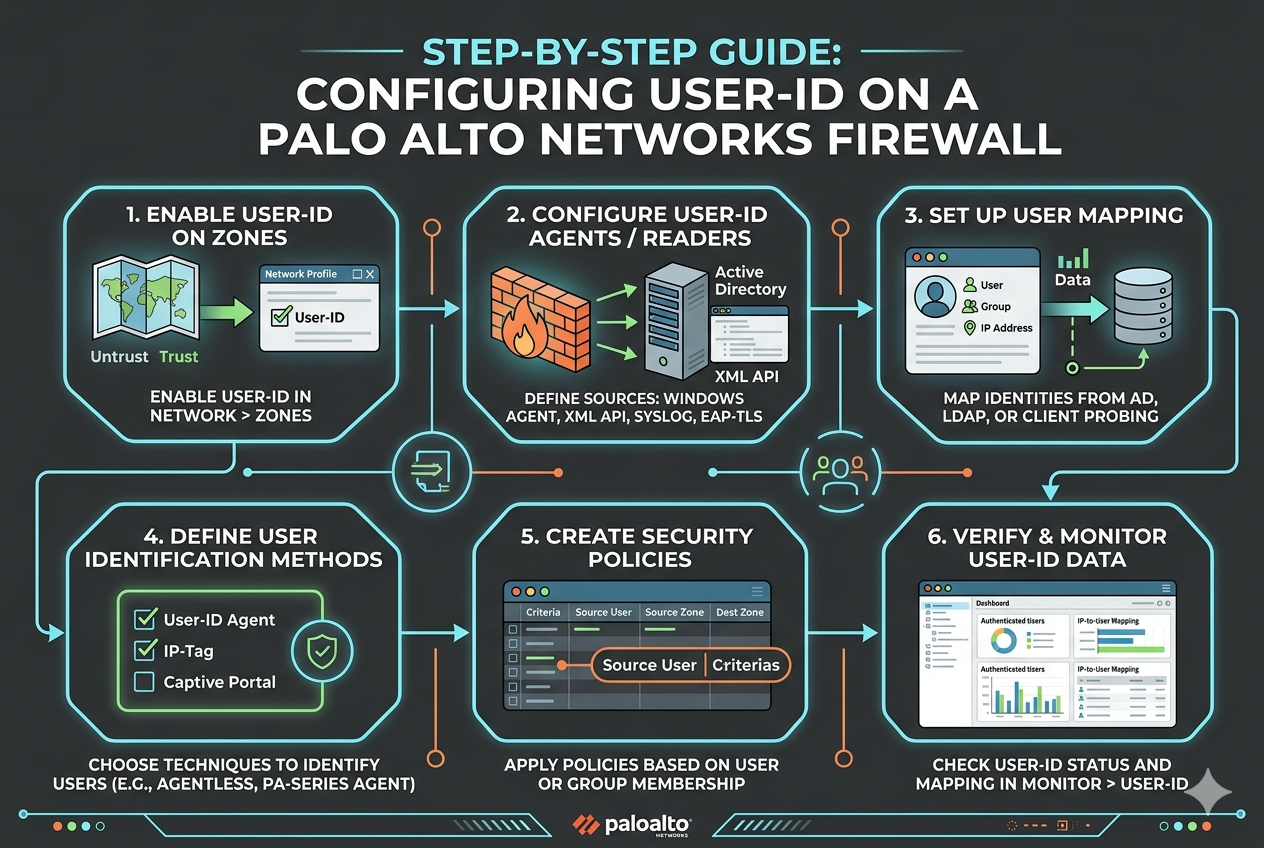
User-ID is a core capability in Palo Alto Networks firewalls that transforms security policy enforcement from being IP-based to identity-based. In traditional network security designs, administrators rely heavily on IP addresses, subnets, and static network objects to define rules. This approach becomes inefficient in modern environments where users move between devices, work remotely, and frequently change IP addresses due to DHCP or mobile connectivity.
User-ID solves this challenge by dynamically mapping IP addresses to authenticated user identities. Once this mapping is established, security policies can be written for users or user groups rather than network addresses. This significantly improves visibility, control, and auditability across the network. It also enables organizations to enforce consistent policies regardless of where the user connects from.
The concept is especially powerful in enterprise environments where Active Directory or similar directory services are already in use. By integrating with these services, the firewall can correlate login events and network activity, building a real-time understanding of who is accessing what resources.
Preparing the Environment Before Configuration
Before configuring User-ID, the environment must be properly prepared to ensure accurate and stable operation. One of the most important requirements is reliable connectivity between the firewall and directory services. Without this, user identity information cannot be retrieved effectively.
DNS resolution must be correctly configured so that domain controllers and related services can be located by hostname. Incorrect DNS settings are one of the most common causes of User-ID failures. Equally important is time synchronization. The firewall and domain controllers must use the same time source to prevent authentication mismatches and log inconsistencies.
A service account is typically required within the directory service. This account is used by the firewall to query user and group information. It should have read-only permissions to directory objects to maintain security while still allowing sufficient access for identity retrieval.
Network access between the firewall and domain controllers must also be verified. Required ports for directory queries, authentication log retrieval, and probing must not be blocked by intermediate firewalls or security devices.
Enabling User-ID on the Firewall
The first configuration step is enabling User-ID functionality on the firewall system. Once enabled, the firewall is capable of processing identity-based information, but no user mapping occurs until additional configuration is completed.
At this stage, administrators should also define which interfaces will participate in User-ID processing. Typically, internal interfaces connected to user networks are selected. External or untrusted interfaces are usually excluded to prevent unnecessary processing and security risks.
After enabling the feature, the firewall begins preparing internal processes for collecting and correlating identity data. However, actual user-to-IP mapping requires additional configuration steps involving directory integration and monitoring mechanisms.
Configuring Server Monitoring for Active Directory Integration
Server monitoring is one of the primary methods used to collect user identity information. It works by connecting directly to domain controllers and retrieving authentication logs that record user login events.
To configure this, a server profile must be created within the firewall. This profile includes the address of the domain controller, authentication credentials, and connection settings. The firewall uses this profile to securely communicate with the directory service.
Once the profile is created, a connection test should be performed to confirm that communication is successful. If the test fails, administrators should verify credentials, network connectivity, and firewall rules that may block required traffic.
After successful configuration, the firewall begins polling domain controllers for login events. These events contain information such as username, workstation, and IP address. The firewall uses this data to build and maintain a dynamic mapping table that associates users with their current IP addresses.
This mapping is continuously updated as users log in and out or change devices. As a result, the firewall always maintains an up-to-date view of active user sessions across the network.
Understanding the User Mapping Process
The user mapping process is at the core of User-ID functionality. When a user logs into a domain-joined system, authentication events are generated and stored in the domain controller logs. The firewall retrieves these logs and extracts relevant information.
Each login event typically includes the username, device name, and IP address. The firewall correlates this information and creates a mapping entry. This entry links the IP address to the specific user identity.
Once this mapping is established, all network traffic originating from that IP address is associated with the user. This allows security policies, logging, and reporting to reflect user-based activity rather than anonymous network traffic.
The mapping is not permanent. It is continuously refreshed based on new login events, logouts, and timeout settings. This ensures that stale or outdated mappings do not persist in the system.
Configuring Client Probing for Enhanced Accuracy
Client probing is an additional method used to improve the accuracy of user identification. While server monitoring provides login-based information, it may not always reflect real-time changes, especially in environments with frequent device switching or long session durations.
Client probing works by directly querying endpoint devices to verify which user is currently logged in. The firewall sends requests using supported protocols to determine the active session on a machine.
For client probing to function correctly, endpoints must be reachable from the firewall or from a User-ID agent. Security policies must allow these queries, and endpoint systems must be configured to respond appropriately.
Although client probing increases accuracy, it is generally used as a supplementary method. It works best when combined with server monitoring, ensuring that both login events and real-time session data are considered.
Implementing Group Mapping for Policy Control
Group mapping allows administrators to extend User-ID functionality by integrating user group information from directory services. Instead of applying policies to individual users, rules can be applied to entire groups such as departments, roles, or organizational units.
To configure group mapping, the firewall connects to the directory service and retrieves group membership information. This allows it to understand which users belong to which groups.
Once configured, security policies can be created based on these groups. For example, access rules for finance, engineering, or guest users can be defined easily without managing individual user entries.
Group mapping significantly reduces administrative overhead and improves scalability in large environments. It also ensures consistent policy enforcement across all users within a group.
Using Captive Portal for Non-Domain Devices
In environments where not all devices are domain-joined, Captive Portal can be used to manually authenticate users. This is particularly useful for guest users, contractors, or unmanaged devices.
When a user attempts to access network resources, they are redirected to a login page where they must enter credentials. Once authenticated, the firewall maps their identity to their IP address.
This method ensures that even non-domain devices can be included in User-ID policies. It provides flexibility while maintaining security control across the entire network.
Captive Portal can be configured in different modes depending on security requirements. It can use transparent authentication methods or explicit login prompts depending on the deployment scenario.
Verifying User-ID Configuration
After configuration, it is important to verify that User-ID is functioning correctly. This can be done by reviewing user mapping tables within the firewall. These tables display active mappings between IP addresses and user identities.
Logs can also be checked to confirm that authentication events are being successfully processed. If mappings are missing or incorrect, administrators should review server monitoring settings, network connectivity, and directory permissions.
Testing user-based security policies is another effective verification method. By applying a rule to a specific user or group, administrators can confirm whether traffic is being correctly identified and controlled.
Troubleshooting Common Issues
Several common issues can occur during User-ID deployment. One of the most frequent problems is missing user mappings. This is often caused by incorrect directory integration, blocked communication, or insufficient permissions on the service account.
Another common issue is stale mappings, where users remain associated with an IP address after logging out. This usually indicates that logoff events are not being properly collected or processed.
Time synchronization issues can also cause mapping inconsistencies. If the firewall and domain controllers are not synchronized, login events may be misinterpreted or delayed.
Network connectivity problems between the firewall and domain controllers can also disrupt User-ID functionality. Ensuring stable and reliable connectivity is essential for accurate operation.
Best Practices for User-ID Deployment
A successful User-ID deployment requires careful planning and adherence to best practices. One important practice is to use multiple identification methods together, such as server monitoring and client probing. This improves accuracy and reduces dependency on a single data source.
Another best practice is to regularly monitor User-ID logs and mappings. This helps identify issues early and ensures that the system is functioning as expected.
Service accounts should be properly secured and granted only the necessary permissions. Overprivileged accounts can introduce security risks.
It is also recommended to exclude unnecessary networks or interfaces from User-ID processing. This reduces system load and improves performance.
Regular updates and maintenance of the firewall and directory integration settings help ensure long-term stability and reliability.
Security Considerations in User-ID Implementation
While User-ID enhances security visibility, it also introduces additional considerations. Since identity information is being collected and processed, protecting this data is important.
Communication between the firewall and directory services should be secured using encrypted protocols where possible. Access to configuration settings should be restricted to authorized administrators only.
Audit logging should be enabled to track changes in User-ID configuration. This helps maintain accountability and traceability in case of security incidents.
Care should also be taken when deploying Captive Portal, as it involves user authentication. Proper safeguards must be in place to prevent unauthorized access or credential misuse.
Conclusion
User-ID is a powerful feature that significantly enhances the capabilities of Palo Alto Networks firewalls by enabling identity-based security policies. Instead of relying on static IP addresses, administrators can control access based on real user identities and group memberships.
The configuration process involves careful preparation of the environment, integration with directory services, and selection of appropriate identity collection methods such as server monitoring, client probing, and Captive Portal.
When properly implemented, User-ID provides improved visibility, simplified policy management, and stronger security enforcement across the network. It allows organizations to adapt to modern dynamic environments where users and devices are constantly changing.
By following structured configuration steps and adhering to best practices, administrators can ensure that User-ID operates reliably and efficiently, providing a strong foundation for identity-aware network security.