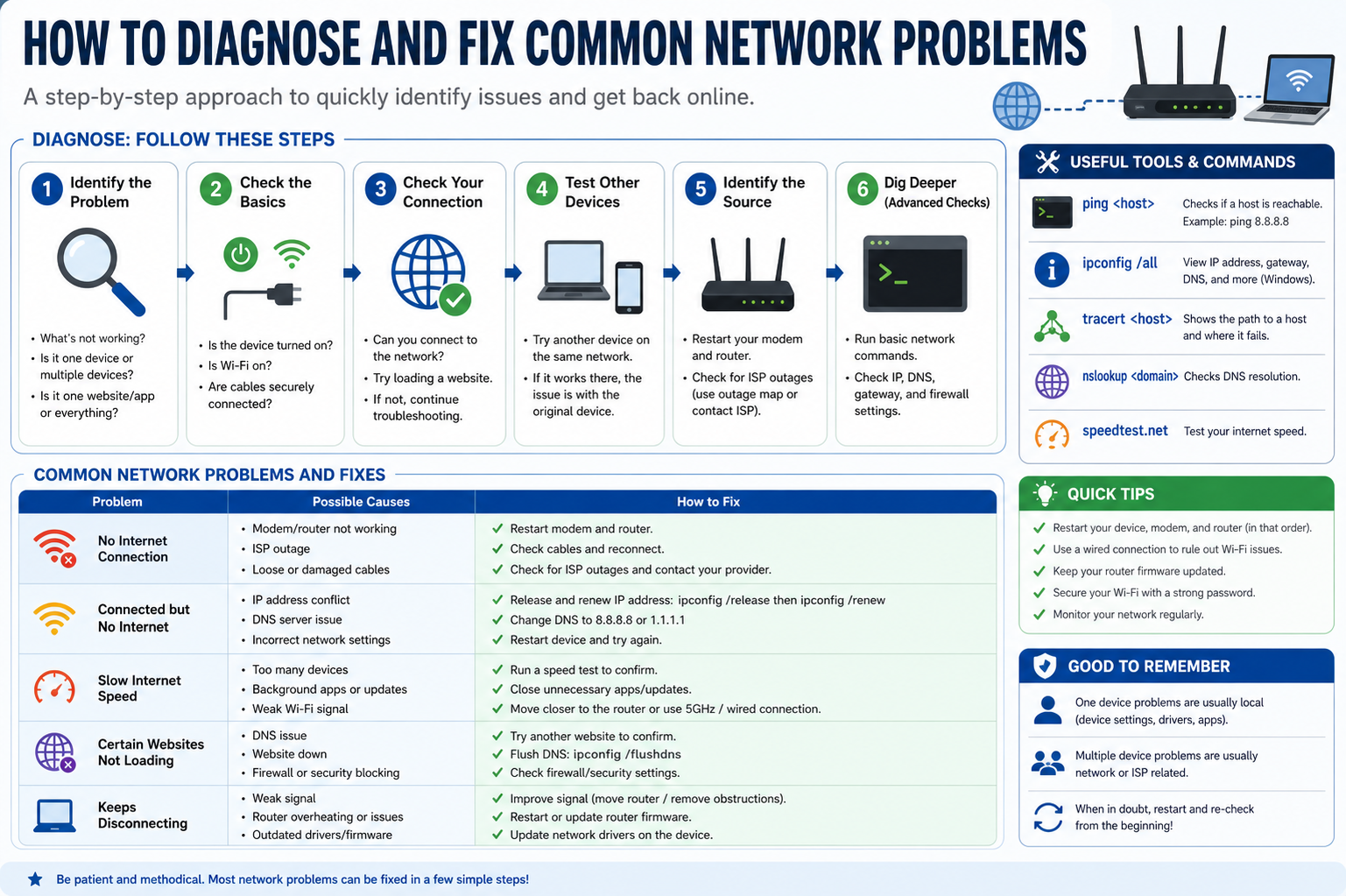
Network problems rarely occur without an underlying reason, and identifying that reason is the foundation of effective troubleshooting. Instability can be caused by overloaded routers, outdated hardware, incorrect configurations, or even environmental interference. In many cases, multiple small issues combine to create a larger connectivity problem, which makes systematic diagnosis essential. Observing patterns such as intermittent drops, slow speeds at specific times, or complete disconnections helps narrow down the cause.
Distinguishing Between Local and External Issues
One of the most important steps in troubleshooting is determining whether the issue originates within your own network or outside of it. Local issues affect individual devices or your home or office network setup, while external issues involve service provider disruptions or broader infrastructure failures. If multiple unrelated devices lose connectivity at the same time, the problem is more likely external. However, if only one device is affected, the issue is usually local and easier to fix.
Restarting Network Equipment Effectively
Restarting devices is often underestimated but remains one of the most effective troubleshooting steps. Routers, modems, and access points maintain temporary data that can become corrupted over time. Power cycling these devices clears this temporary state and allows them to establish fresh connections. It is important to turn off the device completely, wait a short period, and then restart it to ensure a full reset of network processes.
Understanding IP Address Conflicts
Every device on a network requires a unique IP address to communicate properly. When two devices accidentally share the same address, it results in a conflict that disrupts connectivity. This can cause one or both devices to lose internet access intermittently. Renewing the IP configuration or restarting the router usually resolves this issue by assigning fresh addresses to connected devices.
Evaluating Wi-Fi Signal Strength and Interference
Wireless networks are highly sensitive to physical obstructions and electronic interference. Walls, metal objects, and even household appliances can weaken signals. In addition, multiple overlapping networks in dense areas can create channel congestion. Moving closer to the router or reducing physical barriers often improves performance. Adjusting router placement to a central, elevated location can also significantly enhance signal distribution.
Analyzing Slow Network Performance
Slow internet speeds do not always indicate a complete failure but often point to congestion or bandwidth limitations. Multiple devices streaming, downloading, or gaming simultaneously can consume available resources. Background applications may also silently use bandwidth without being noticeable. Monitoring active connections and limiting high-usage activities can help restore expected performance levels.
Checking Device-Level Network Configuration
Each device has its own network configuration settings that determine how it connects to the internet. Incorrect DNS settings, disabled adapters, or misconfigured proxies can prevent proper connectivity. Ensuring that devices are set to automatically obtain network settings is often the simplest way to avoid configuration-related issues. Resetting network settings can also restore default functionality when problems persist.
Understanding Router Overload and Memory Limits
Routers are essentially small computers with limited processing power and memory. When too many devices are connected or excessive data is being processed, the router can become overloaded. This may lead to slow speeds, dropped connections, or temporary outages. Restarting the router clears its memory and reduces strain, but upgrading to a more powerful model may be necessary for high-demand environments.
Investigating Cable and Port Integrity
Wired connections are generally more stable than wireless ones, but they are not immune to problems. Damaged Ethernet cables, loose connections, or faulty ports can disrupt data transmission. Inspecting cables for physical wear and ensuring they are securely plugged in can quickly resolve many connectivity issues. Testing with alternative cables or ports helps confirm whether hardware failure is involved.
Identifying Firmware and Driver Issues
Network devices rely on firmware and drivers to function correctly. Outdated or corrupted versions can lead to performance issues or compatibility problems. Regular updates ensure that devices operate efficiently and remain compatible with modern network standards. Updating router firmware and device network drivers can often resolve persistent or unexplained connectivity problems.
Handling DNS Resolution Problems
Domain Name System issues can prevent websites from loading even when the internet connection is active. This happens when domain names cannot be translated into numerical IP addresses. Symptoms include partial connectivity or failure to access specific websites. Switching to alternative DNS configurations or refreshing network settings often resolves this type of issue.
Managing Network Security Restrictions
Security tools such as firewalls and antivirus programs are designed to protect devices but can sometimes block legitimate network traffic. Overly strict settings may prevent access to websites, applications, or services. Reviewing security configurations and temporarily disabling them for testing purposes can help identify whether they are interfering with connectivity.
Evaluating External Service Disruptions
Sometimes the problem is not within the user’s control. Internet service providers may experience outages, maintenance periods, or technical failures that affect connectivity. In such cases, troubleshooting local devices will not resolve the issue. Observing whether multiple networks in the same area are affected can help confirm external disruptions.
Optimizing Network Traffic Distribution
Modern networks often support multiple devices with different usage patterns. Without proper management, certain devices may consume disproportionate bandwidth. Prioritizing essential devices and limiting unnecessary background usage can help balance network load. Quality of service settings on routers can also be used to manage traffic distribution more efficiently.
Understanding Packet Loss and Latency
Network communication depends on data packets being sent and received reliably. Packet loss occurs when some of these packets fail to reach their destination, resulting in lag or interruptions. High latency refers to delays in data transmission. Both issues can severely impact online activities, especially real-time applications. Identifying whether these problems are consistent or intermittent helps determine their cause.
Troubleshooting Mobile and Wireless Devices
Mobile devices rely heavily on wireless connectivity, making them more susceptible to signal fluctuations. Switching between Wi-Fi and mobile data can help isolate the problem. Forgetting and reconnecting to a network can also clear incorrect configurations. Ensuring that software is updated reduces compatibility issues that may affect connectivity.
Assessing Hardware Aging and Replacement Needs
Network equipment does not last indefinitely. Over time, routers, modems, and cables degrade in performance. Older devices may not support modern speeds or security standards. If troubleshooting steps repeatedly fail, hardware replacement may be necessary to restore stable and efficient connectivity.
Monitoring Network Performance Continuously
Consistent monitoring helps detect issues before they become serious. Observing speed fluctuations, connection drops, and device behavior over time provides valuable insight into network health. Early detection allows for quicker resolution and prevents prolonged disruptions.
Maintaining Long-Term Network Stability
Preventing network issues is often easier than fixing them. Regularly updating devices, avoiding unnecessary network congestion, securing connections, and positioning hardware correctly all contribute to stable performance. A well-maintained network reduces downtime and ensures smoother daily operation across all connected devices.
Advanced Isolation of Network Faults
When basic troubleshooting does not resolve connectivity problems, deeper isolation techniques become necessary. At this stage, the goal is to systematically eliminate variables until the exact source of failure is identified. This often involves testing each component of the network independently, such as separating wired and wireless connections or connecting directly to the modem instead of the router. By simplifying the setup, hidden issues become easier to detect and address.
Testing Direct Internet Connectivity
One effective method for narrowing down problems is to bypass intermediary devices. Connecting a computer directly to the modem allows you to determine whether the router is responsible for the issue. If the connection works properly in this direct setup, the router is likely the source of the fault. If the problem persists even without the router, the issue may lie with the internet service or modem itself.
Understanding Router Configuration Errors
Routers operate using a variety of settings that control how data is distributed across a network. Misconfigured settings, such as incorrect DHCP ranges, disabled wireless broadcasting, or restricted access controls, can lead to connectivity problems. Reviewing these configurations helps ensure that devices are being assigned proper network parameters and are allowed to communicate freely within the network.
Evaluating Network Address Translation Issues
Network Address Translation plays a critical role in allowing multiple devices to share a single public IP address. When this process malfunctions, devices may lose access to external networks even though local connections still appear active. Restarting the router often resets this process, but persistent issues may require a deeper review of router configuration settings.
Identifying Bottlenecks in Data Flow
Network bottlenecks occur when one segment of the system cannot handle the volume of data being transmitted. This may be caused by outdated hardware, limited bandwidth, or excessive simultaneous usage. Identifying where congestion occurs helps determine whether upgrades or usage adjustments are needed to restore smooth performance.
Checking for Background Network Consumption
Many applications continue to use network resources even when not actively in use. Automatic updates, cloud synchronization, and background services can consume significant bandwidth. Monitoring active processes helps identify hidden usage patterns that may be slowing down the network. Disabling or scheduling these activities during off-peak times can improve overall performance.
Resolving Authentication and Access Failures
Sometimes devices fail to connect due to authentication issues rather than technical faults. Incorrect passwords, expired credentials, or mismatched security protocols can prevent access to wireless networks. Re-entering credentials and ensuring compatibility with current encryption standards often resolves these types of connection failures.
Understanding Channel Overlap in Wireless Networks
Wireless networks operate on specific frequency channels, and overlapping channels in dense environments can cause interference. This leads to unstable connections and reduced speeds. Adjusting the channel selection on the router can reduce interference from nearby networks, improving overall stability and performance.
Diagnosing Hardware Signal Degradation
Over time, wireless signals can degrade due to aging components or environmental changes. Antenna damage, overheating routers, or internal hardware wear can weaken signal strength. Identifying whether signal loss is gradual or sudden helps determine whether the issue is physical damage or configuration-related.
Analyzing Error Logs for Deeper Insight
Many routers and network devices maintain logs that record system activity and errors. Reviewing these logs can reveal recurring issues such as repeated disconnections, failed authentication attempts, or hardware malfunctions. These insights are valuable for identifying patterns that are not immediately visible through normal usage.
Checking for External Line Quality Problems
Even when internal equipment is functioning correctly, external wiring or infrastructure issues can still disrupt service. Damaged cables outside the building, signal degradation in service lines, or regional infrastructure faults can all affect performance. These problems usually require assistance from the service provider to resolve.
Managing Network Congestion During Peak Usage
Network performance often fluctuates based on usage patterns throughout the day. Peak hours, when many users are online simultaneously, can lead to reduced speeds and higher latency. Understanding these patterns helps in planning high-bandwidth activities during less congested periods for better performance.
Testing with Alternative Devices
Using different devices to test connectivity helps determine whether the issue is device-specific or network-wide. If one device consistently fails while others work normally, the problem is likely related to that device’s configuration or hardware. This approach helps avoid unnecessary changes to the entire network setup.
Investigating Software Conflicts with Network Drivers
Network drivers act as a bridge between hardware and software. Conflicts between drivers and operating systems can lead to unstable connections or complete failures. Updating or reinstalling drivers often resolves these issues by restoring proper communication between components.
Understanding Temporary Service Disruptions
Not all network issues are permanent. Temporary disruptions caused by maintenance, weather conditions, or system overloads can affect connectivity without indicating a deeper problem. Recognizing the temporary nature of these interruptions helps avoid unnecessary troubleshooting steps.
Optimizing Router Placement for Stability
The physical placement of a router has a significant impact on performance. Positioning it near walls, floors, or electronic devices can weaken signals. Placing it in an open, elevated, central location helps distribute signals more evenly across the environment, reducing dead zones and improving reliability.
Evaluating IPv6 and IPv4 Compatibility Issues
Modern networks may use both IPv4 and IPv6 protocols. Compatibility issues between these systems can occasionally cause connectivity problems. Ensuring that devices and routers support both protocols or disabling unnecessary ones can help maintain stable communication.
Identifying Overheating in Networking Equipment
Heat buildup can affect the performance of routers and modems. Overheating may lead to random disconnections, slow speeds, or complete shutdowns. Ensuring proper ventilation and avoiding enclosed spaces helps maintain optimal operating temperatures for networking equipment.
Monitoring Long-Term Connection Stability Trends
Consistent observation of network performance over time helps identify recurring issues. Tracking when problems occur, how long they last, and what activities are happening during those times provides valuable insight. This long-term analysis helps differentiate between random glitches and systematic failures.
Preparing for Hardware or Service Upgrades
When troubleshooting consistently reveals limitations in current equipment or service plans, upgrades may be necessary. Higher-speed routers, better-quality cables, or improved internet plans can significantly enhance performance. Evaluating needs based on usage patterns ensures that upgrades provide meaningful improvements rather than unnecessary expense.
Deep Diagnostic Approach to Persistent Network Failures
When network problems continue despite basic and intermediate troubleshooting, a deeper diagnostic approach is required. At this stage, issues are often hidden within layered configurations, hardware limitations, or complex interactions between devices. The focus shifts from simple fixes to structured analysis, where each component is examined in isolation and then reintegrated into the system to observe behavior changes.
Analyzing Layered Network Architecture Issues
Modern networks operate in layers, where each layer handles a specific function such as physical connectivity, data transfer, routing, and application communication. A failure in any layer can impact overall performance. For example, a physical layer issue like a faulty cable can appear similar to a software layer problem such as misconfigured settings. Understanding this layered structure helps in systematically identifying where the breakdown occurs.
Investigating Intermittent Connectivity Patterns
Intermittent connectivity is often more difficult to diagnose than complete failure because it suggests unstable rather than broken components. These issues may be caused by fluctuating signal strength, overloaded routers, or unstable service provider connections. Observing when disconnections occur—such as during peak usage, heavy downloads, or specific device activity—helps narrow down the root cause.
Evaluating Network Throughput Limitations
Throughput refers to the actual amount of data successfully transmitted through a network over time. Even if a connection appears stable, low throughput can result in slow browsing, buffering, or delayed responses. Limitations in throughput can stem from outdated hardware, poor cabling, or excessive simultaneous device usage that exceeds network capacity.
Understanding DNS Propagation Delays and Failures
Domain resolution plays a crucial role in accessing online services. When DNS systems are slow or misconfigured, websites may take longer to load or fail entirely. These delays can sometimes be temporary due to propagation or caching issues. Clearing local DNS cache or switching to a more responsive configuration can improve resolution speed and reliability.
Checking for Firmware Corruption or Instability
Firmware corruption in routers or modems can cause unpredictable behavior such as random restarts, dropped connections, or configuration resets. This can happen due to interrupted updates or long-term system instability. Reinstalling or updating firmware restores core functionality and ensures compatibility with modern network standards.
Assessing Load Distribution Across Connected Devices
In environments with multiple connected devices, uneven load distribution can create performance imbalances. Some devices may consume excessive bandwidth while others experience lag or disconnection. Monitoring usage distribution helps identify whether certain devices or applications are disproportionately affecting overall network stability.
Identifying Signal Reflection and Environmental Distortion
Wireless signals can be affected by reflection, refraction, and absorption caused by surrounding objects. Large metallic surfaces, dense walls, or electronic appliances can distort signal paths, creating weak spots or unstable connections. Adjusting device placement or reducing physical obstructions can significantly improve signal consistency.
Diagnosing NAT and Port Handling Conflicts
Network Address Translation and port management control how external requests reach internal devices. Misconfigured port settings or restrictive NAT types can prevent applications from functioning properly, especially in gaming, remote access, or communication services. Adjusting router settings or enabling appropriate port forwarding can resolve these limitations.
Testing Stability Under Controlled Network Conditions
Creating a controlled environment helps isolate issues more effectively. Disconnecting non-essential devices, disabling background applications, and using a single wired connection allows for precise testing. If stability improves under these conditions, the issue is likely related to congestion or interference rather than core hardware failure.
Evaluating ISP-Level Routing Inefficiencies
Sometimes network issues occur due to inefficient routing paths used by service providers. Data may take longer or unstable routes to reach its destination, leading to latency or packet loss. These issues are not visible from within the local network but can be identified through consistent performance degradation across multiple external services.
Understanding Bandwidth Allocation Imbalances
Bandwidth is often shared among multiple devices and services. Without proper allocation, high-demand applications can dominate available resources, leaving others underperforming. Identifying which applications consume the most bandwidth helps in balancing usage and maintaining fair distribution across the network.
Investigating Security Protocol Mismatches
Security protocols such as WPA2, WPA3, or mixed-mode settings determine how devices authenticate and communicate securely. Mismatches between device capabilities and router settings can prevent successful connections. Ensuring compatibility across all connected devices helps avoid authentication failures and unstable connections.
Checking for Hidden Network Loops or Redundancies
Improper network setups can sometimes create loops where data circulates redundantly between devices. This can overwhelm the network and cause severe slowdowns or outages. Ensuring proper topology and avoiding unnecessary bridging between devices helps maintain efficient data flow.
Monitoring Real-Time Network Metrics for Anomalies
Advanced troubleshooting often involves observing real-time metrics such as latency, jitter, packet loss, and throughput. Sudden spikes or irregular fluctuations in these values indicate underlying instability. Continuous monitoring helps detect issues that may not be visible through standard usage.
Understanding the Impact of Power Supply Instability
Unstable power supply to networking equipment can lead to random resets, degraded performance, or hardware damage. Voltage fluctuations or inadequate power sources may cause routers and modems to behave unpredictably. Ensuring stable power delivery helps maintain consistent network operation.
Evaluating Compatibility Between Old and New Devices
Mixing older networking devices with modern hardware can sometimes create compatibility issues. Older devices may not support newer protocols or speeds, leading to bottlenecks or connection failures. Gradual replacement or proper configuration bridging helps maintain compatibility across mixed environments.
Identifying Background System Updates and Network Interruptions
Operating systems and applications often perform automatic updates that consume significant bandwidth and temporarily disrupt connectivity. These processes can create the illusion of network instability. Scheduling updates during low-usage periods helps reduce their impact on performance.
Assessing Physical Infrastructure Limitations
The quality of internal wiring, connectors, and installation methods plays a significant role in network stability. Poorly installed cables, outdated infrastructure, or degraded internal lines can introduce constant interference. Inspecting and upgrading physical infrastructure can significantly improve reliability.
Understanding Cumulative Effects of Minor Network Issues
Small issues such as slight signal loss, minor configuration mismatches, or occasional packet delays may seem insignificant individually but can accumulate over time to create noticeable instability. Addressing these minor issues collectively often leads to a substantial improvement in overall performance.
Preparing for Long-Term Network Optimization
Sustained network performance requires ongoing optimization rather than one-time fixes. Regular maintenance, periodic updates, careful monitoring, and thoughtful configuration adjustments ensure that the network adapts to changing demands. A well-optimized system remains stable even under increased usage and evolving technological requirements.
Advanced ISP Interaction and Escalation Steps
When all local troubleshooting methods fail, the issue may lie beyond the home or office network and require interaction with the internet service provider. At this stage, the focus shifts toward identifying external faults such as line degradation, routing issues, or regional outages. Providing clear information about symptoms, timing, and affected services helps the provider diagnose the issue more efficiently.
Understanding Line Synchronization Problems
Internet connections rely on proper synchronization between the user’s modem and the provider’s infrastructure. If synchronization is unstable, users may experience frequent disconnections or failure to establish a connection altogether. This can be caused by line noise, signal degradation, or infrastructure faults that require technical intervention from the service provider.
Diagnosing Latency Spikes and Route Instability
Latency spikes occur when data packets take inconsistent time intervals to reach their destination. This often results in lag during browsing, streaming, or real-time communication. Route instability within the provider’s network can cause data to take inefficient paths, increasing delays. These issues typically require provider-level adjustments rather than local fixes.
Evaluating Signal Attenuation in External Lines
Signal attenuation refers to the gradual loss of signal strength as it travels through physical cables or infrastructure. Longer distances from the service source or degraded external wiring can contribute to weaker connections. When attenuation becomes severe, service quality drops significantly and may require infrastructure repair or line replacement.
Identifying Regional Network Congestion
In some cases, entire regions experience reduced internet performance due to high user demand or limited infrastructure capacity. This type of congestion usually occurs during peak hours when many users are online simultaneously. Since this issue is external, local troubleshooting has limited impact, and performance typically improves during off-peak times.
Understanding Modem Registration Failures
A modem must successfully register with the provider’s network to establish an active connection. Registration failures can occur due to incorrect configuration, service interruptions, or authentication mismatches. When this happens, the modem may show connectivity indicators without providing actual internet access.
Checking for Signal Quality Fluctuations
Even when a connection is established, fluctuating signal quality can lead to inconsistent performance. Variations in signal strength may cause intermittent buffering, slow loading times, or dropped sessions. Monitoring stability over time helps determine whether the issue is persistent or environment-dependent.
Evaluating External Hardware Interference Sources
External interference from nearby electrical systems, industrial equipment, or large-scale communication devices can disrupt signal quality. These disturbances are often unpredictable and may vary throughout the day. Identifying patterns in performance degradation can help determine whether external interference is contributing to instability.
Understanding Service-Level Configuration Restrictions
Internet service providers may impose certain configuration limitations on user connections, such as restricted port usage or predefined routing rules. These restrictions are typically designed for security or network management purposes but can sometimes interfere with specific applications or services.
Diagnosing Multi-Point Failure Scenarios
In complex networks, multiple small failures can occur simultaneously across different layers. For example, minor signal degradation combined with router overload and DNS delays can collectively create severe connectivity issues. Identifying these overlapping problems requires methodical testing of each component individually.
Analyzing Connection Stability Under Load Testing
Load testing involves intentionally increasing network usage to observe how the system responds under pressure. If the connection becomes unstable during high usage, it may indicate insufficient bandwidth, hardware limitations, or infrastructure constraints. Stable performance under load suggests that issues may be unrelated to capacity.
Evaluating Authentication Server Responsiveness
Some network connections rely on external authentication servers to validate access. If these servers are slow or unresponsive, users may experience delays in connecting or repeated login failures. These issues are external and typically resolve once server performance stabilizes.
Identifying Firmware Compatibility with ISP Requirements
Certain internet providers require compatible firmware configurations for optimal performance. Incompatibility between modem firmware and provider systems can result in reduced speeds or intermittent connectivity. Ensuring updated and compatible firmware helps maintain seamless communication.
Understanding Cross-Network Routing Delays
Data traveling between different networks must pass through multiple routing points. Delays can occur if any of these routes are congested or inefficient. These delays are often outside the user’s control but can sometimes be mitigated by switching DNS settings or using alternative routing paths provided by the ISP.
Assessing Long-Distance Signal Degradation Effects
Users located far from network distribution points may experience reduced performance due to long-distance signal travel. This natural degradation can affect both speed and stability. While it cannot always be eliminated, infrastructure upgrades or service plan adjustments may improve overall performance.
Checking for Maintenance Windows and Service Interruptions
Internet service providers occasionally perform maintenance that temporarily affects connectivity. These maintenance windows may cause partial or complete service interruptions. Awareness of such periods helps distinguish between planned outages and unexpected technical issues.
Understanding Modem Error Code Interpretation
Modern modems often display error codes that indicate specific types of failures. These codes can provide valuable insight into whether the issue is related to authentication, signal loss, or hardware malfunction. Interpreting these codes correctly helps guide the next troubleshooting steps.
Evaluating Shared Infrastructure Limitations
In shared network environments, multiple users rely on the same infrastructure. Heavy usage by others on the same network segment can impact performance for everyone. This shared dependency means that individual troubleshooting may not fully resolve performance issues during peak demand.
Diagnosing DNS Propagation Across External Networks
When changes are made to domain settings, it can take time for updates to propagate across global DNS servers. During this period, users may experience inconsistent access to certain websites. This issue is temporary and resolves as propagation completes across the network.
Understanding Provider-Level Traffic Shaping
Some providers manage network performance by prioritizing or limiting certain types of traffic. This process, known as traffic shaping, can affect download speeds, streaming quality, or application responsiveness. While designed to optimize overall network usage, it may sometimes be perceived as reduced performance.
Preparing for Professional Network Assessment
When persistent issues remain unresolved after exhaustive troubleshooting, a professional assessment may be required. Technicians can perform advanced diagnostics, test physical infrastructure, and access provider-level data not available to end users. This step ensures that hidden or complex issues are properly identified and resolved.
Final Layer Diagnostics and System-Level Verification
At this stage of troubleshooting, the focus shifts to verifying the entire network ecosystem as a single integrated system. Instead of isolating individual components, attention is placed on how all elements interact under real-world conditions. This includes devices, routers, external infrastructure, and service provider behavior working together in a continuous flow of data exchange.
Confirming End-to-End Connectivity Stability
End-to-end connectivity testing ensures that data can travel from a local device to external servers and back without interruption. This helps confirm whether the network is functioning holistically or breaking down at a specific transition point. Stable end-to-end performance indicates that both internal and external systems are operating correctly.
Validating Cross-Device Synchronization Consistency
Modern environments rely on multiple devices operating simultaneously within the same network. Ensuring synchronization across devices helps confirm that network settings are being applied uniformly. Inconsistent behavior between devices can reveal hidden configuration mismatches or hardware limitations that need correction.
Assessing Adaptive Network Behavior Under Changing Conditions
Networks often behave differently under varying conditions such as peak usage, low activity periods, or sudden spikes in demand. Observing how the system adapts to these changes helps determine its resilience. A stable network should recover quickly from fluctuations without sustained performance degradation.
Checking for Residual Configuration Conflicts
Even after resets and adjustments, outdated or overlapping configurations can persist in certain devices or routers. These residual settings may interfere with normal operation. Ensuring a clean configuration state across all network components helps eliminate hidden conflicts that are difficult to detect through standard testing.
Verifying Consistency of Wireless and Wired Performance
Comparing wired and wireless performance provides insight into whether issues are related to signal transmission or broader network infrastructure. If wired connections remain stable while wireless connections fail, the issue likely lies in wireless configuration or interference. If both are unstable, the problem may be deeper within the network or external service.
Monitoring Long-Term Recovery After Adjustments
After implementing fixes, it is important to observe network performance over time rather than immediately assuming resolution. Some issues may temporarily improve before recurring. Long-term monitoring helps confirm whether the applied solutions are stable and effective under normal usage conditions.
Evaluating Environmental Stability Factors
Environmental factors such as temperature, humidity, and physical placement of devices can influence network performance. Overheating equipment, poorly ventilated spaces, or unstable power sources can gradually degrade reliability. Ensuring a controlled environment supports consistent long-term performance.
Confirming Firmware and Software Alignment Across Devices
A fully stable network requires that firmware and software versions across all devices remain compatible. Mismatches between versions can lead to unexpected behavior, reduced performance, or intermittent failures. Maintaining consistent updates across the system ensures smoother interaction between components.
Understanding Recovery Behavior After Network Interruptions
How a network recovers after interruptions provides important diagnostic information. A healthy system should restore full functionality quickly without requiring repeated resets. Slow or incomplete recovery often indicates deeper configuration or hardware issues that need further attention.
Final Validation of Network Efficiency and Responsiveness
The final step in troubleshooting is confirming that the network meets expected performance levels under normal conditions. This includes stable speeds, consistent latency, reliable connections, and smooth device interaction. Once these criteria are met, the system can be considered fully optimized.
Conclusion
Effective network troubleshooting is a structured process that moves from simple checks to advanced system-wide analysis. Most issues can be resolved by systematically identifying whether the cause is physical, configuration-based, or external. Stability is achieved not through isolated fixes but through a balanced combination of proper setup, regular maintenance, and continuous monitoring.
A well-functioning network depends on both proactive prevention and responsive troubleshooting. Keeping equipment updated, managing usage efficiently, ensuring correct configurations, and understanding external dependencies all contribute to long-term reliability. When these principles are applied consistently, networks become more resilient, efficient, and capable of handling increasing demands without disruption.