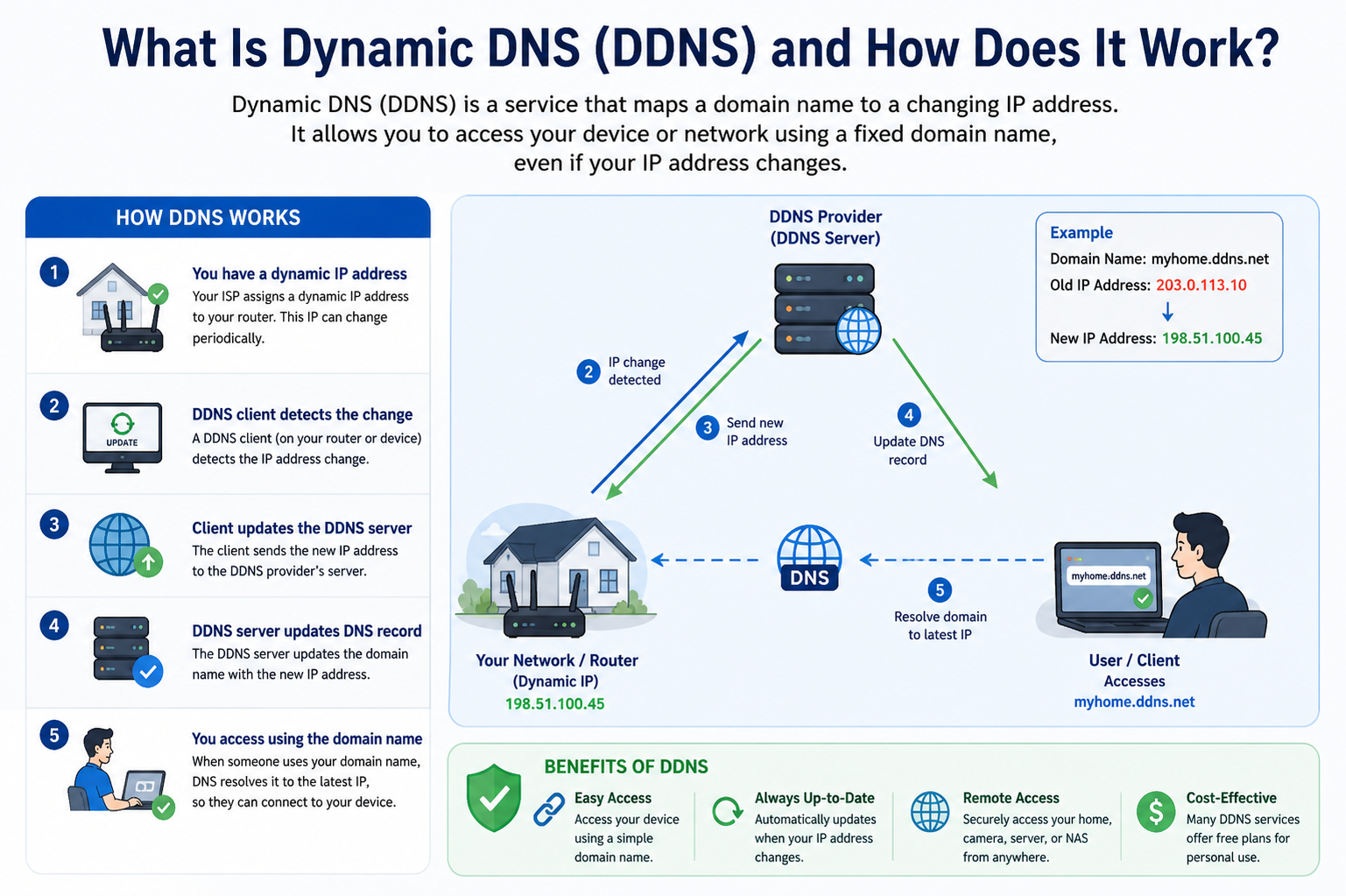
Dynamic DNS (DDNS) is a method used to automatically keep a domain name linked to a changing IP address. In traditional networking, a fixed IP address is assigned to a device, making it easy to locate. However, in many real-world internet connections, especially residential or small office networks, IP addresses are dynamic and can change frequently. DDNS solves this problem by continuously updating the mapping between a human-readable name and the current IP address so that access remains uninterrupted.
The core idea behind DDNS is simplicity for the user. Instead of tracking constantly changing numerical addresses, users rely on a stable name that always points to the correct location. This is especially useful in environments where internet service providers assign new IP addresses periodically, either after a router restart or at set intervals.
The Need for Dynamic Address Management
The internet relies on IP addresses to identify devices and route traffic correctly. However, maintaining a permanent IP address for every user is not always practical. With the growing number of connected devices worldwide, dynamic addressing allows service providers to reuse IP addresses efficiently. While this system is efficient for providers, it creates challenges for users who want consistent remote access.
Without a system like DDNS, every change in IP address would require manual updates to ensure connectivity. This would be inconvenient for users managing remote systems such as home automation setups, surveillance systems, or personal servers. DDNS eliminates this burden by automating the entire process.
How Dynamic DNS Operates in Practice
DDNS works through a continuous background process that monitors IP address changes. A small software application or built-in router feature checks the current public IP address assigned to a network. When it detects a change, it sends an update request to a DDNS service.
This service then updates the record associated with the user’s chosen hostname. The updated record ensures that any future requests using that name are directed to the correct IP address. This entire process happens automatically, without requiring user involvement.
The speed of this update process is important. In most systems, the update occurs within seconds or minutes, ensuring minimal downtime. As a result, services relying on DDNS remain accessible even during IP transitions.
Role of Hostnames in DDNS
A hostname is a user-friendly label that represents a network location. Instead of remembering a string of numbers, users access devices through a recognizable name. In DDNS systems, this hostname remains constant even when the underlying IP address changes.
The stability of the hostname is what makes DDNS useful. It acts as a fixed reference point, while the actual IP address behind it is flexible. This separation between identity and location is a key concept in how modern networking remains scalable and manageable.
Automatic Updates and Synchronization
One of the most important features of DDNS is automatic synchronization. The system must always ensure that the hostname points to the correct IP address. To achieve this, update clients run either on a router or a connected device.
These clients periodically check the public IP address and compare it with the previously recorded value. If a difference is found, an update request is triggered. This ensures that even unexpected changes, such as those caused by network reconnections, are handled immediately.
This automation removes the need for manual intervention, which is especially useful for users who may not have technical expertise or constant access to their network settings.
Use Cases of Dynamic DNS
DDNS is widely used in various real-world applications. One common use case is remote access to home networks. For example, users may want to access security cameras or storage devices from outside their home. Since their home IP address may change, DDNS ensures that access remains consistent.
Another use case is small business infrastructure. Businesses that host internal services such as file servers or internal applications can benefit from DDNS without investing in expensive static IP solutions.
It is also used by developers and IT professionals who need to test applications on remote systems. Instead of constantly updating connection details, they rely on DDNS for stable access.
Advantages of Using DDNS
One of the major advantages of DDNS is convenience. It removes the need for users to manually track and update IP addresses. This is especially helpful in environments where IP changes occur frequently and unpredictably.
Another advantage is cost efficiency. Static IP addresses often come at an additional cost from internet service providers. DDNS provides a more affordable alternative while still offering similar accessibility benefits.
DDNS also improves accessibility by ensuring that remote systems can always be reached using a consistent address. This reliability is essential for applications that require continuous uptime or remote monitoring.
Limitations and Considerations
Although DDNS is highly useful, it does have some limitations. One limitation is that it depends on the availability of a stable internet connection. If the connection goes down, updates cannot be sent, which may temporarily affect accessibility.
Another consideration is update delay. While most systems update quickly, there can be a short delay between IP change and record update. During this time, connections may briefly fail.
Security is also an important factor. Since DDNS makes remote access easier, it must be combined with proper authentication and security measures to prevent unauthorized access.
DDNS in Home Networks
In home environments, DDNS is often used to manage personal devices that require external access. These can include smart home systems, media servers, and personal cloud storage setups.
Home routers often include built-in DDNS support, making configuration relatively simple. Once set up, the system operates automatically in the background, ensuring that devices remain accessible from anywhere.
This ease of use has made DDNS a popular solution for tech-savvy homeowners who want more control over their home networks without investing in complex infrastructure.
DDNS in Business Environments
In business settings, DDNS provides a flexible solution for remote connectivity. Small and medium-sized businesses often rely on it to manage internal tools and services without maintaining expensive dedicated IP addresses.
It is especially useful for businesses with remote employees who need secure access to internal systems. DDNS ensures that these connections remain stable even if network conditions change.
However, businesses typically combine DDNS with additional security layers such as encrypted connections and access control systems to ensure safe usage.
Technical Components Behind DDNS
DDNS relies on several technical components working together. These include a client application, a DNS server, and an update mechanism. The client is responsible for detecting IP changes, while the server stores and manages the hostname-to-IP mapping.
When an update occurs, the new IP address is communicated to the server, which replaces the old record. This ensures that any request for the hostname is directed to the updated location.
The communication between client and server is typically secure, preventing unauthorized changes to DNS records.
Reliability and Performance Factors
The performance of a DDNS system depends on how quickly it can detect and apply IP changes. Faster detection results in less downtime and better reliability. Most modern systems are optimized for near-instant updates.
Another factor is DNS propagation. Once an update is made, it must spread across the internet’s DNS infrastructure. While this process is usually fast, slight delays can occasionally occur depending on caching systems.
Despite these minor delays, DDNS remains highly reliable for most practical applications.
Security Aspects of DDNS
Security is an important consideration when using DDNS. Since it exposes network services to external access, proper safeguards must be implemented. Strong authentication methods help ensure that only authorized devices can update DNS records.
Encryption is also commonly used to protect communication between the client and server. This prevents interception or manipulation of update requests.
Additionally, users are encouraged to secure the services they expose through DDNS with strong passwords and firewall configurations.
Importance in Modern Networking
DDNS plays an important role in modern networking by bridging the gap between dynamic IP systems and the need for stable access. As more devices become connected to the internet, the demand for flexible and reliable access solutions continues to grow.
It enables users to maintain connectivity without requiring expensive infrastructure or complex configurations. This makes it an essential tool in both personal and professional networking environments.
Future of DDNS Technology
As internet technology evolves, DDNS systems are also improving. Faster update mechanisms, stronger security protocols, and better integration with networking hardware are making the system more efficient.
With the growth of smart devices and remote services, DDNS is expected to remain relevant for years to come. Its ability to provide stable access in a dynamic environment ensures its continued importance in network management.
DDNS Configuration and Setup Process
Setting up Dynamic DNS involves linking a device or network to a DDNS service so that it can automatically update its IP address whenever it changes. The process usually begins with creating an account on a DDNS provider and selecting a hostname. This hostname will be the stable reference used to access the network remotely.
After selecting a hostname, the next step is configuring the router or device that will communicate with the DDNS service. Most modern routers include built-in support for DDNS, allowing users to enter their account details directly into the router’s settings panel. Once configured, the router continuously monitors the public IP address and sends updates whenever a change occurs.
Some systems require installing a small client application on a computer or server within the network. This client performs the same function as a router-based system by detecting IP changes and notifying the DDNS service automatically. Once the setup is complete, the system runs in the background without further user interaction.
How DDNS Maintains Continuous Connectivity
The main strength of DDNS lies in its ability to maintain continuous connectivity despite changing network conditions. Every time an internet connection is reset or refreshed, the assigned IP address may change. Without DDNS, this would break any remote connection relying on the previous address.
DDNS solves this by ensuring that the hostname always points to the most recent IP address. When a user tries to connect, the request is automatically directed to the updated location. This creates a seamless experience where the user does not notice any underlying network changes.
This continuous synchronization is what allows remote services to remain stable over long periods, even in environments with frequently changing network configurations.
DNS Update Mechanism Explained
The update mechanism in DDNS is based on communication between a client and a DNS server. The client is responsible for detecting changes in the IP address, while the server manages the database that links hostnames to IP addresses.
When a change is detected, the client sends an update request to the server. This request includes the new IP address and the associated hostname. The server then replaces the old entry with the new one, ensuring that future requests are routed correctly.
This process is designed to be lightweight and efficient, allowing updates to happen quickly without affecting network performance. In most cases, the update process completes in a very short time, minimizing any potential downtime.
Types of DDNS Services
There are generally two main types of DDNS services: free and paid. Free services provide basic functionality and are often used for personal projects or small-scale applications. They are suitable for users who need occasional remote access without advanced requirements.
Paid services, on the other hand, offer more reliability, faster update speeds, and additional features such as enhanced security and custom domain options. These services are commonly used by businesses or users who require higher levels of stability and performance.
Both types operate on the same basic principle of updating IP addresses automatically, but they differ in quality, support, and feature sets.
Router-Based DDNS Integration
Many modern routers come with built-in DDNS support, making the setup process much simpler. Instead of installing separate software, users can directly configure DDNS through the router’s administration interface.
Once enabled, the router handles all communication with the DDNS provider. It constantly checks the external IP address and sends updates whenever a change is detected. This eliminates the need for additional devices or manual intervention.
Router-based integration is widely preferred because it centralizes the entire process and ensures that updates are handled at the network level.
Client Software in DDNS Systems
In some cases, especially in advanced setups, DDNS client software is installed on a specific device within the network. This software performs the same function as a router-based system but offers more flexibility.
The client monitors network changes and communicates directly with the DDNS provider. It is often used in systems where the router does not support DDNS or where more control over the update process is required.
This method is commonly used in server environments where precise configuration and monitoring are important.
Role of DNS Propagation in DDNS
When a DDNS update occurs, the new information must be distributed across the global DNS network. This process is known as DNS propagation. It ensures that all servers around the world recognize the updated IP address.
Although DDNS updates are usually fast, DNS propagation can introduce slight delays due to caching mechanisms. Different servers may take varying amounts of time to refresh their stored data.
Despite this, modern systems are optimized to reduce delays and ensure that most users receive the updated information quickly.
Security Mechanisms in DDNS Systems
Security plays an important role in DDNS functionality. Since the system allows remote access, it must ensure that only authorized users can make changes to DNS records.
Most DDNS services use authentication methods such as login credentials or update tokens. These ensure that unauthorized users cannot modify IP address mappings.
In addition, secure communication protocols are often used to encrypt data between the client and server, preventing interception or tampering during transmission.
Common Challenges in DDNS Usage
While DDNS is highly effective, it is not without challenges. One common issue is temporary connectivity loss during IP changes. Although updates are fast, there may still be brief moments when the system is unreachable.
Another challenge is dependency on external services. Since DDNS relies on third-party servers, any downtime on the provider’s side can affect accessibility.
Network configuration errors can also cause issues, especially if the client is not properly set up or authentication details are incorrect.
DDNS in Remote Monitoring Systems
One of the most practical applications of DDNS is in remote monitoring systems. These include surveillance cameras, environmental sensors, and industrial monitoring devices.
By using DDNS, these systems can be accessed from any location without needing a fixed IP address. This makes it easier for users to check real-time data or view live feeds from remote locations.
This capability is especially valuable in security and industrial environments where constant monitoring is required.
Use in Remote Work Environments
With the rise of remote work, DDNS has become increasingly useful for accessing office systems from home. Employees can connect to internal resources such as file servers or applications using a consistent hostname.
This eliminates the need for complex VPN configurations in some cases and simplifies access to essential tools. However, it is often used alongside secure connection methods to ensure data protection.
DDNS provides the stability needed for uninterrupted access in distributed work environments.
Performance Optimization in DDNS Systems
To ensure smooth operation, DDNS systems are designed to optimize performance. This includes minimizing update delays, reducing server load, and improving synchronization speed.
Efficient caching mechanisms are used to balance performance and accuracy. These systems ensure that updates are propagated quickly while maintaining stability across the network.
Performance optimization is essential for applications that require real-time or near-real-time connectivity.
Scalability of DDNS Infrastructure
DDNS systems are built to handle a large number of users and frequent updates. As the number of connected devices continues to grow, scalability becomes an important factor.
Modern DDNS infrastructures use distributed servers and load balancing techniques to manage high traffic volumes. This ensures that updates remain fast and reliable even under heavy usage conditions.
Scalability allows DDNS to support both individual users and large organizations effectively.
Role of TTL in DDNS Operations
Time to Live (TTL) is an important concept in DNS systems, including DDNS. It determines how long a DNS record is stored in cache before being refreshed.
In DDNS, TTL values are often set to lower durations to ensure that IP changes are reflected quickly. Shorter TTL values improve accuracy but may increase query frequency.
Balancing TTL settings is important for achieving both performance and reliability in DDNS systems.
Reliability in Real-World Applications
In real-world usage, DDNS has proven to be a reliable solution for managing dynamic IP environments. It is widely used in both personal and professional contexts due to its simplicity and effectiveness.
Even in situations where network conditions are unstable, DDNS continues to function by automatically updating records whenever connectivity is restored. This resilience makes it suitable for a wide range of applications.
DDNS Troubleshooting and Common Fixes
Even though Dynamic DNS systems are designed to run automatically, users can sometimes experience issues where remote access stops working or updates do not reflect correctly. One of the most common problems is outdated IP information. This happens when the update client fails to send the latest IP change to the DDNS server. In such cases, restarting the router or manually triggering an update usually resolves the issue.
Another frequent issue is incorrect login credentials or authentication failure between the client and the DDNS service. If the system cannot verify the user, it will not accept updates, leading to mismatched IP records. Ensuring that credentials are correctly entered and updated can prevent this problem.
Network configuration errors can also interfere with DDNS functionality. For example, if the device running the update client is not connected properly to the internet or is behind restrictive firewall rules, update requests may not reach the server. Checking network settings and allowing necessary outbound connections often restores proper operation.
IP Change Detection Problems
In some situations, DDNS systems may fail to detect IP changes immediately. This can happen when the change is too subtle or when the detection interval is set too long. As a result, the system may continue using an outdated address for a short period.
To minimize this issue, many systems use frequent polling intervals or real-time detection methods. These ensure that even small or unexpected changes in IP addresses are quickly identified and updated.
Routers with built-in DDNS support typically handle this more efficiently because they monitor the external connection directly at the network gateway level.
Firewall and Port Access Considerations
DDNS itself only manages name-to-IP mapping, but actual remote access depends on proper firewall and port configuration. If ports are blocked or incorrectly forwarded, even a correctly updated DDNS record will not allow successful connection.
For example, services like remote desktop access or security cameras require specific ports to be open. If these ports are closed, users will not be able to reach the device even though the DDNS hostname resolves correctly.
Proper configuration of firewall rules and port forwarding is essential for DDNS to function effectively in real-world applications.
DDNS vs Static IP Addressing
One of the most common comparisons in networking is between DDNS and static IP addressing. A static IP remains fixed and never changes, making it ideal for services that require constant availability. However, static IPs often come at a higher cost and may not be available in all internet plans.
DDNS provides a more flexible and cost-effective alternative by adapting to changing IP addresses automatically. While it does not eliminate IP changes, it hides their complexity from the user.
In practical terms, DDNS is often preferred for home users and small businesses, while static IPs are used in enterprise-grade infrastructure where absolute stability is required.
Performance Differences Between DDNS and Static IP Systems
From a performance perspective, both DDNS and static IP systems provide similar results once connectivity is established. The main difference lies in the initial resolution process.
With a static IP, the connection is direct and does not require lookup updates. With DDNS, there is a small dependency on DNS resolution, which introduces a slight delay during IP changes. However, this delay is usually minimal and not noticeable in everyday usage.
Once the connection is established, both systems perform equally well in terms of speed and reliability.
Advanced DDNS Configurations
Advanced users often implement DDNS in more complex network setups involving multiple devices, subnets, or services. In such environments, DDNS may be configured to support multiple hostnames pointing to different internal systems.
This allows users to access different services under a unified network structure without needing separate static IP addresses for each device. It also improves scalability for growing networks.
Advanced configurations may also include redundancy setups where multiple DDNS providers or update clients are used to ensure continuous availability even if one system fails.
Integration with VPN Systems
DDNS is often combined with Virtual Private Networks to enhance secure remote access. In such setups, DDNS provides the stable address needed to locate the network, while the VPN ensures that all communication is encrypted and secure.
This combination is commonly used in business environments where employees need safe access to internal systems from remote locations. The DDNS service ensures connectivity, while the VPN protects data transmission.
This layered approach improves both accessibility and security at the same time.
Security Risks and Mitigation Strategies
While DDNS is useful, it can introduce potential security risks if not properly configured. By making a network accessible from outside, it increases exposure to unauthorized access attempts.
One of the main risks is weak authentication. If services exposed through DDNS do not have strong passwords or encryption, they may become vulnerable to attacks. Using strong credentials and secure protocols is essential.
Another risk is exposure of unnecessary services. Only required ports and applications should be made accessible through DDNS. Everything else should remain protected behind firewalls or internal networks.
Regular monitoring and updates also help reduce security risks in DDNS-enabled systems.
Role of Encryption in DDNS-Based Access
Encryption plays a critical role in ensuring safe communication in DDNS environments. When users connect to a remote system, encrypted protocols help protect data from interception.
Without encryption, sensitive information could potentially be exposed during transmission. This is why secure protocols are widely used in conjunction with DDNS to maintain privacy and data integrity.
Encryption ensures that even though the network is accessible through a public address, the actual communication remains protected.
DDNS in Cloud and Hybrid Networks
With the rise of cloud computing, DDNS has also found applications in hybrid network environments. Some systems combine local infrastructure with cloud-based services, and DDNS helps maintain connectivity between them.
In such setups, DDNS can act as a bridge between on-premise devices and cloud platforms. This allows seamless communication without requiring permanent static addressing for local networks.
It also supports flexible scaling, as devices can be added or removed without major configuration changes.
Impact of Network Address Translation (NAT) on DDNS
Most home and small business networks use NAT to share a single public IP address among multiple devices. DDNS works at the public IP level, which means it is typically configured on the router rather than individual devices.
NAT can sometimes create challenges for remote access because internal devices are not directly visible from outside the network. To overcome this, port forwarding is used alongside DDNS.
This combination ensures that external requests are correctly directed to the appropriate internal device.
Latency and DNS Caching Effects
One factor that affects DDNS performance is DNS caching. When a device resolves a hostname, the result is stored temporarily to improve performance. However, if an IP address changes during this caching period, users may still be directed to the old address until the cache expires.
This can cause short-term connectivity issues. Lowering cache duration settings or using optimized DNS configurations helps reduce this delay.
Despite this limitation, caching is necessary for overall internet efficiency, so DDNS systems are designed to work within these constraints.
Scalability in Large Networks
In large-scale environments, DDNS must handle frequent updates from multiple devices. This requires robust infrastructure capable of processing high volumes of update requests without delays.
Load balancing and distributed server architecture are often used to maintain performance. These systems ensure that no single server becomes overloaded, allowing smooth operation even during peak usage.
Scalability is particularly important in enterprise environments where many devices rely on dynamic addressing.
Future Developments in DDNS Technology
The future of DDNS is closely tied to advancements in networking and automation. As more devices become connected through smart systems, the need for seamless address management will continue to grow.
Future DDNS systems are expected to integrate more closely with cloud platforms and artificial intelligence-driven network management tools. This will allow even faster detection and resolution of IP changes.
Improved security protocols and automated configuration systems will also make DDNS easier and safer to use.
Automation and Smart Networking Integration
Modern networks are becoming increasingly automated, and DDNS is evolving alongside them. In smart networking environments, devices can automatically register themselves and manage their own connectivity settings.
This reduces manual configuration and allows systems to adapt dynamically to changes in network conditions. DDNS plays a key role in enabling this level of automation by handling address resolution in real time.
As automation expands, DDNS will become even more integrated into everyday network operations.
Best Practices for Using DDNS Effectively
To use DDNS effectively, it is important to maintain proper configuration and security practices. Keeping update clients active and ensuring stable internet connectivity helps maintain accurate IP mapping.
Using strong authentication methods and limiting exposed services improves security. Regularly reviewing network settings also ensures that the system remains optimized and secure.
Following these practices ensures that DDNS continues to function reliably over long periods.
DDNS Concepts
Dynamic DNS remains a powerful solution for managing changing IP addresses in modern networks. It combines automation, flexibility, and accessibility to simplify remote connectivity.
By continuously updating hostname-to-IP mappings, it removes the complexity of dynamic addressing and allows users to maintain stable access to their systems. When properly configured and secured, DDNS provides a reliable foundation for remote networking in both personal and professional environments.
DDNS in Internet of Things (IoT) Environments
Dynamic DNS plays an increasingly important role in Internet of Things ecosystems where a large number of devices need to communicate and remain accessible remotely. Many IoT devices operate on networks with dynamic IP addresses, especially in residential or small business environments. DDNS helps ensure that these devices can still be reached consistently even when their network address changes.
In practical IoT applications, devices such as smart cameras, sensors, and automation controllers rely on DDNS to maintain remote accessibility. This allows users to monitor and control systems from anywhere without worrying about changing network configurations. As IoT ecosystems expand, DDNS becomes a foundational layer that supports continuous connectivity.
DDNS in Smart Home Systems
Smart home technology depends heavily on stable remote access. Devices like smart locks, lighting systems, thermostats, and security cameras often require external connectivity for monitoring and control. Since most home internet connections use dynamic IP addresses, DDNS provides the stability needed for seamless operation.
With DDNS, homeowners can access their entire smart home system using a single consistent address. This simplifies management and improves usability. Even when the home network restarts or the IP address changes, the connection remains intact through automatic updates.
This makes DDNS a key enabling technology behind modern smart living environments.
Network Stability and Reliability Factors
The reliability of DDNS depends on several underlying network conditions. A stable internet connection is essential because frequent disconnections can delay IP updates and affect accessibility. While DDNS can recover automatically after reconnection, temporary disruptions may still occur.
Router stability also plays an important role. Devices that frequently restart or lose synchronization with the internet service provider may introduce delays in update reporting. Ensuring proper router configuration and firmware updates improves overall DDNS performance.
Additionally, the quality of the DDNS provider influences reliability. Well-maintained services offer faster update propagation and higher uptime consistency.
Load Distribution in DDNS Systems
In large-scale DDNS infrastructures, load distribution is critical for maintaining performance. As thousands or even millions of devices send update requests, the system must distribute these requests efficiently across multiple servers.
This is achieved through distributed architecture where different servers handle specific regions or user groups. Load balancing ensures that no single server becomes overwhelmed, maintaining consistent performance across the system.
This structure allows DDNS services to scale globally while still delivering fast and reliable updates.
Redundancy and Failover Mechanisms
To improve reliability, many DDNS systems implement redundancy and failover strategies. Redundancy involves maintaining multiple copies of DNS records across different servers. If one server fails, another can immediately take over.
Failover mechanisms ensure that updates are not lost if a primary system becomes unavailable. This guarantees continuous service even during maintenance or unexpected outages.
These mechanisms are especially important for critical applications where downtime is not acceptable, such as security systems or remote business infrastructure.
Latency Optimization in Global Networks
Since DDNS operates across the internet, latency can affect how quickly updates are reflected worldwide. To reduce this delay, many systems use geographically distributed servers. This allows updates to be processed closer to the user’s location.
Edge servers also play a role in improving speed by handling requests locally before synchronizing with central databases. This reduces communication delays and improves response times.
Although some latency is unavoidable due to internet structure, modern DDNS systems are optimized to minimize its impact.
Role of Dynamic Updates in Cloud Connectivity
As cloud services become more integrated with local networks, DDNS acts as a bridge between static cloud environments and dynamic local IP addresses. Many hybrid systems rely on DDNS to maintain stable connections between on-premise devices and cloud-based platforms.
This allows organizations to connect local infrastructure with remote applications without requiring permanent IP configurations. The flexibility provided by DDNS supports modern distributed computing models.
It also simplifies the process of scaling services between local and cloud environments.
Monitoring and Logging in DDNS Systems
Monitoring is an important aspect of managing DDNS environments. Many systems include logging features that track IP updates, connection attempts, and authentication events. These logs help users identify potential issues and monitor network behavior.
For example, repeated failed update attempts may indicate configuration errors or connectivity problems. By reviewing logs, users can quickly diagnose and resolve such issues.
Advanced systems may also include alert mechanisms that notify users of significant events such as IP changes or service interruptions.
Energy Efficiency in Network Operations
While DDNS itself does not directly consume large amounts of energy, it contributes to overall network efficiency by reducing the need for constant manual monitoring and configuration. Automated updates reduce administrative workload and system overhead.
Efficient DNS resolution also helps optimize internet traffic routing, which indirectly contributes to better resource utilization across networks.
As networks become more automated, energy efficiency will continue to improve through smarter resource management.
Compatibility Across Devices and Platforms
One of the strengths of DDNS is its wide compatibility. It works across various operating systems, network devices, and hardware platforms. Whether used on routers, servers, or embedded systems, DDNS can be integrated with minimal configuration changes.
This flexibility makes it suitable for diverse environments, from home networks to enterprise systems. Many manufacturers include built-in support for DDNS, further simplifying deployment.
Cross-platform compatibility ensures that DDNS remains a versatile solution in different technological ecosystems.
Impact of Internet Service Providers on DDNS Performance
Internet service providers influence DDNS performance through their handling of IP address allocation and network stability. Frequent IP changes or restrictive network policies can affect how often DDNS updates are required.
Some providers use carrier-grade NAT, which can complicate direct remote access. In such cases, DDNS still functions but may need additional configuration such as port forwarding or tunneling solutions.
Understanding ISP behavior is important for optimizing DDNS performance in real-world scenarios.
Mobile Network Usage and DDNS
DDNS can also be used in mobile network environments, although with some limitations. Mobile networks often change IP addresses more frequently than fixed broadband connections, which increases the frequency of updates.
This can lead to higher update traffic but also demonstrates the flexibility of DDNS in handling rapidly changing network conditions. It is particularly useful for mobile-based monitoring systems or remote field equipment.
However, stability may vary depending on network coverage and provider policies.
Evolution of DNS Technologies and DDNS Role
DNS technology has evolved significantly over time, and DDNS is a natural extension of this evolution. Traditional DNS was designed for static environments, but modern internet usage requires dynamic adaptability.
DDNS addresses this need by introducing automation into the DNS system. This evolution reflects the shift from static infrastructure to highly dynamic, cloud-connected environments.
As internet usage continues to grow, DDNS will remain an important part of DNS evolution.
Integration with Automation and AI Systems
Future DDNS systems are expected to integrate more deeply with automation and artificial intelligence technologies. These systems could predict network changes and preemptively adjust configurations before disruptions occur.
AI-driven optimization could also improve update speed, reduce latency, and enhance security monitoring. This would make DDNS systems more intelligent and self-managing.
Such advancements will further reduce the need for manual intervention in network management.
Security Enhancements in Modern DDNS Systems
Security continues to evolve in DDNS systems through stronger encryption methods and improved authentication protocols. Multi-factor authentication and token-based access control are becoming more common.
These enhancements reduce the risk of unauthorized updates and improve overall system integrity. Secure communication channels ensure that update requests cannot be intercepted or altered.
As cyber threats increase, security improvements remain a key focus area for DDNS development.
Future Role of DDNS in Global Networking
DDNS is expected to remain a critical component of global networking infrastructure. As more devices connect to the internet and rely on remote access, the need for dynamic address management will continue to grow.
Its role will expand further in smart cities, industrial automation, and large-scale distributed systems. DDNS provides the flexibility needed to support these complex environments.
With ongoing improvements in speed, security, and automation, DDNS will continue to adapt to future networking demands.
Expansion of DDNS Understanding
Dynamic DNS represents a bridge between changing network realities and the need for stable digital access. It simplifies complex networking challenges by automating the relationship between names and dynamic IP addresses.
Through continuous updates, global synchronization, and secure communication, DDNS ensures that remote systems remain accessible at all times. Its importance spans across home networks, businesses, IoT ecosystems, and future cloud-integrated infrastructures, making it a fundamental part of modern internet functionality.
Conclusion
Dynamic DNS (DDNS) is an essential networking solution that bridges the gap between constantly changing IP addresses and the need for stable, reliable remote access. It removes the complexity of tracking dynamic IP changes by automatically updating the connection between a hostname and its current IP address, ensuring uninterrupted communication with devices and services over the internet.
Across home networks, businesses, IoT systems, and cloud-connected environments, DDNS provides a simple yet powerful way to maintain accessibility without requiring expensive static IP configurations. Its automation reduces manual effort, improves convenience, and supports continuous connectivity even in unpredictable network conditions.
Although DDNS has some limitations, such as slight update delays or dependency on external services, its advantages far outweigh these challenges when properly configured. With correct setup, security measures, and reliable network conditions, it delivers stable performance for a wide range of applications.
As modern networks continue to evolve toward greater automation, mobility, and cloud integration, DDNS will remain an important component of internet infrastructure. Its ability to adapt to dynamic environments ensures that it will continue playing a key role in enabling seamless and consistent remote access in the future.