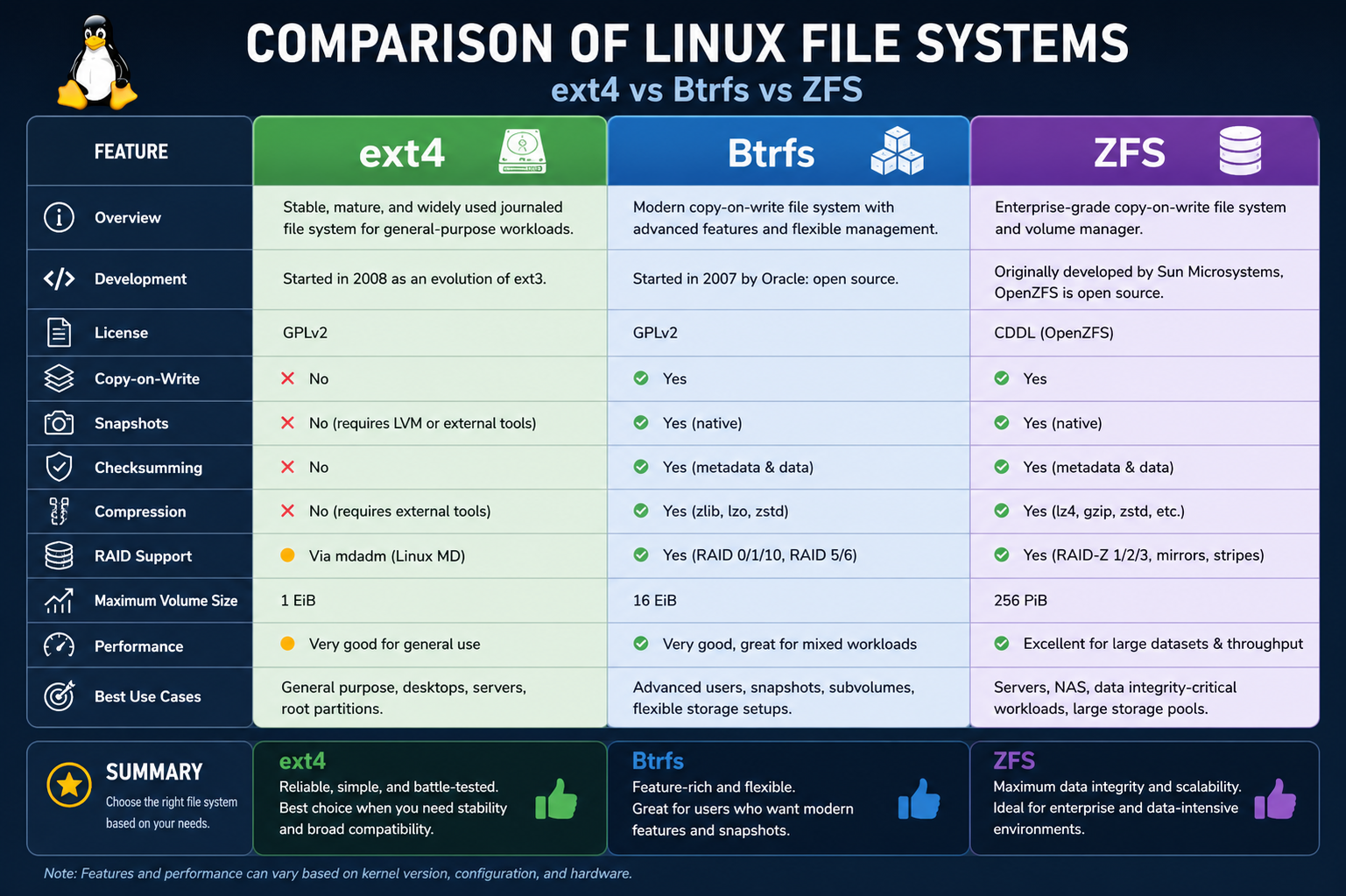
ext4 (Fourth Extended File System) is one of the most established and widely deployed file systems in Linux-based operating systems. It evolved from ext3 with the goal of improving scalability, performance, and reliability while maintaining backward compatibility. Its design focuses on simplicity and efficiency, which is one of the main reasons it remains the default choice for many Linux distributions even today.
At its core, ext4 uses a journaling mechanism to track changes before they are written to disk. This journaling system helps protect against data corruption in cases of sudden power loss or system crashes. Instead of directly modifying data on the storage device, ext4 first records intended changes in a journal. Once the operation is safely logged, it is then committed to the main file system. This approach significantly improves reliability without introducing excessive overhead.
Another important feature of ext4 is its support for large file systems and large file sizes. It can handle volumes up to several exabytes and individual files up to multiple terabytes in size. This makes it suitable for both personal computing and enterprise workloads that require significant storage capacity. It also reduces fragmentation through techniques such as delayed allocation, which allows the system to optimize how data is written to disk.
Performance is one of ext4’s strongest advantages. Because it avoids overly complex features, it tends to deliver consistent and predictable speed across a wide range of workloads. It performs especially well in scenarios involving general file storage, boot drives, and traditional application usage. Its low overhead makes it efficient on systems with limited resources, which is why it is still commonly used in lightweight Linux installations.
Despite its strengths, ext4 has limitations when compared to newer file systems. It lacks advanced features such as built-in snapshotting, native compression, and integrated volume management. These limitations make it less suitable for modern data-intensive environments where flexibility and advanced storage features are required. However, its stability and maturity continue to make it a trusted option for many users.
Btrfs File System
Btrfs (B-tree File System) was developed as a next-generation file system designed to address many of the limitations found in older systems like ext4. It introduces a modern architecture based on copy-on-write (CoW) principles, which fundamentally changes how data is written and managed on disk. Instead of overwriting existing data, Btrfs writes changes to new locations and then updates metadata pointers. This design significantly improves data integrity and enables a wide range of advanced features.
One of the most powerful capabilities of Btrfs is its snapshot functionality. Snapshots allow users to capture the exact state of a file system at a specific point in time. These snapshots are space-efficient because they initially share data with the original system and only store differences as changes occur. This makes it possible to roll back to previous states quickly, which is especially useful for system recovery, backups, and testing environments.
Btrfs also supports subvolumes, which act as independent file system trees within a single physical storage pool. Subvolumes allow for more flexible data organization and management. They can be backed up, snapshot independently, and managed separately without requiring separate partitions. This feature provides a level of flexibility that traditional file systems like ext4 cannot offer.
Another notable feature of Btrfs is built-in support for RAID configurations. Unlike traditional systems that rely on external tools for RAID management, Btrfs integrates RAID functionality directly into the file system. It supports various RAID levels, allowing users to distribute data across multiple drives for redundancy or performance improvements. This integration simplifies storage management in many scenarios.
Btrfs also includes native compression capabilities. By compressing data before writing it to disk, it reduces storage consumption and can improve performance in certain workloads due to reduced I/O operations. Common compression algorithms used in Btrfs are optimized for a balance between speed and efficiency, making it suitable for both desktop and server environments.
Despite its advanced capabilities, Btrfs is considered more complex than ext4. Its feature-rich design introduces additional overhead and potential stability concerns in certain configurations. While it has matured significantly over time, some enterprise environments still prefer more conservative file systems for mission-critical workloads. However, for users who value flexibility, snapshots, and advanced storage management, Btrfs offers a powerful and modern solution.
ZFS File System
ZFS (Zettabyte File System) is one of the most advanced and robust file systems available. Originally developed for enterprise environments, it is designed to handle extremely large storage systems with a strong focus on data integrity, scalability, and resilience. Unlike traditional file systems, ZFS combines the functionality of a file system and a volume manager into a single integrated system.
One of the most defining features of ZFS is its end-to-end data integrity model. Every block of data and metadata is checksummed, allowing the system to detect silent corruption that might otherwise go unnoticed. When redundancy is available, ZFS can automatically repair corrupted data using healthy copies stored across drives. This self-healing capability makes it highly reliable for critical data storage.
ZFS also offers powerful snapshot and cloning functionality. Snapshots in ZFS are extremely efficient and can be created almost instantly. They capture the exact state of the file system without duplicating data, making them ideal for backups and system recovery. Clones allow users to create writable copies of snapshots, enabling safe testing and development environments without affecting original data.
Another major strength of ZFS is its storage pooling system. Instead of managing individual disks separately, ZFS allows multiple drives to be combined into a single storage pool. This pool can then be dynamically allocated and expanded as needed. This abstraction simplifies storage management and improves scalability, especially in large environments.
ZFS also includes advanced compression and caching mechanisms. Compression reduces storage usage while improving performance by minimizing disk I/O. The adaptive caching system, known as ARC (Adaptive Replacement Cache), optimizes memory usage to speed up data access. These features make ZFS highly efficient in both performance and storage utilization.
However, ZFS is known for its higher resource requirements compared to ext4 and Btrfs. It performs best in systems with significant memory and processing power. This makes it less suitable for lightweight or resource-constrained environments. Additionally, its complexity can make configuration and maintenance more challenging for beginners.
Despite these challenges, ZFS is widely respected in enterprise and data center environments due to its unmatched reliability and feature set. It is often chosen for systems where data integrity and long-term stability are top priorities.
Data Integrity and Reliability Comparison
When comparing ext4, Btrfs, and ZFS in terms of data integrity, each file system takes a different approach. ext4 relies on journaling to protect against sudden crashes, ensuring that metadata remains consistent. However, it does not inherently protect against silent data corruption.
Btrfs improves upon this by using checksumming for both data and metadata. This allows it to detect corruption and, in some cases, repair it if redundancy is configured. Its copy-on-write design further enhances safety by preventing direct overwrites.
ZFS goes even further by implementing end-to-end checksumming with automatic repair capabilities. It continuously verifies data integrity and corrects errors when possible. This makes ZFS the strongest option for data reliability among the three.
Performance Considerations
Performance varies significantly between these file systems depending on workload and hardware. ext4 generally provides the fastest and most consistent performance for everyday tasks due to its simplicity and low overhead. It is highly efficient for read and write operations in standard environments.
Btrfs introduces additional overhead due to its advanced features like copy-on-write and snapshots. While it can perform well in many scenarios, certain workloads may experience reduced performance compared to ext4, especially under heavy write conditions.
ZFS, while highly optimized, requires more system resources. Its performance can be excellent in high-end systems with sufficient memory and storage infrastructure. However, on low-resource systems, it may feel slower due to its complexity and memory demands.
Flexibility and Feature Set
ext4 offers a stable but limited feature set. It focuses on core file system functionality without advanced tools for modern storage management. This makes it simple but less flexible.
Btrfs introduces a wide range of features such as snapshots, subvolumes, compression, and RAID integration. This makes it highly flexible and suitable for dynamic storage environments.
ZFS provides the most comprehensive feature set, including advanced pooling, snapshots, cloning, compression, and self-healing. It is designed for maximum control and reliability in complex storage systems.
Use Case Suitability
ext4 is best suited for general-purpose computing, desktop systems, and situations where stability and simplicity are more important than advanced features. It is widely trusted and easy to maintain.
Btrfs is ideal for users who need modern features such as snapshots and flexible storage management. It is often used in development environments, testing systems, and some desktop setups.
ZFS is best suited for enterprise environments, large-scale storage systems, and scenarios where data integrity is critical. It is commonly used in servers, data centers, and backup systems.
Scalability Differences
ext4 offers good scalability for most traditional use cases but is not designed for extremely complex storage architectures. It performs well within moderate limits.
Btrfs improves scalability with subvolumes and dynamic management, allowing more flexible growth of storage systems.
ZFS is the most scalable of the three, capable of managing massive storage pools with high reliability and performance consistency.
Overall Perspective
Each file system represents a different design philosophy. ext4 prioritizes simplicity and stability, making it dependable for everyday use. Btrfs focuses on flexibility and modern features, bridging the gap between traditional and advanced storage systems. ZFS emphasizes maximum reliability and enterprise-grade functionality, offering the most powerful but resource-intensive solution.
The choice between them depends heavily on system requirements, workload type, and available resources.
Btrfs File System (Advanced Design and Internal Architecture)
Btrfs is built on a modern copy-on-write architecture, which is one of its most defining technical characteristics. In this design, data is never overwritten in place. Instead, whenever a change is made, the modified data is written to a new location on disk, and only after that are the file system’s metadata pointers updated to reference the new data. This method ensures that older versions of data remain intact until they are safely replaced, which significantly reduces the risk of corruption during unexpected interruptions such as power failures or system crashes.
At the heart of Btrfs lies a B-tree based metadata structure. This allows efficient indexing, searching, and management of large amounts of file system data. The tree structure ensures that operations like file lookup, modification, and deletion remain efficient even as the file system scales to large capacities. The use of B-trees also enables Btrfs to maintain consistency across complex operations involving multiple files or directories.
One of the key advantages of Btrfs is its snapshot mechanism, which is deeply integrated into its copy-on-write design. Snapshots are not separate copies of data but rather references to existing blocks at a specific point in time. When changes occur after a snapshot is created, only the modified blocks consume additional space. This makes snapshots extremely space-efficient and fast to create. They are commonly used for system backups, testing updates, and recovery points.
Subvolumes in Btrfs further enhance its flexibility. A subvolume acts like an independent file system within the main storage pool. Each subvolume can have its own snapshots, quotas, and mount options. This allows users to organize data in a structured way without needing separate partitions or physical volumes. Subvolumes also make system administration more flexible, especially in environments where multiple services or applications share the same storage pool.
Btrfs also includes built-in support for data checksumming. Every block of data and metadata is assigned a checksum that is verified during read operations. If corruption is detected, and redundancy is configured, Btrfs can attempt to recover the correct data from another copy. This makes it more reliable than traditional file systems that do not verify data integrity at this level.
Compression is another important feature in Btrfs. It allows data to be compressed transparently before being written to disk. This reduces storage usage and can also improve performance by decreasing the amount of data that needs to be physically written or read. Compression is especially beneficial for systems with limited storage or workloads involving large numbers of similar files.
Despite these advantages, Btrfs introduces complexity that can affect stability in certain scenarios. Its advanced features require careful configuration and understanding, particularly in production environments. While it has matured significantly over time, some edge cases and workload-specific issues may still arise. This makes it more suitable for users who are comfortable managing modern file systems or who specifically need its advanced capabilities.
ZFS File System (Deep Storage Integration and Enterprise Features)
ZFS is designed as a fully integrated storage platform that combines file system functionality with volume management. This means it does not rely on external tools for tasks like RAID configuration or disk pooling. Instead, it manages everything within a unified architecture, which simplifies administration while improving consistency and reliability across the entire storage system.
One of the most important design principles in ZFS is end-to-end data integrity. Every piece of data, including metadata, is protected by checksums that are verified whenever the data is accessed. This ensures that any corruption, whether caused by hardware failure, firmware bugs, or other issues, can be detected immediately. Unlike simpler file systems, ZFS does not assume that stored data remains unchanged or error-free over time.
When redundancy is configured, such as in mirrored or RAID-Z setups, ZFS can automatically repair corrupted data using healthy copies stored on other disks. This self-healing capability is one of its strongest advantages and is particularly valuable in enterprise environments where data loss can have serious consequences.
ZFS uses a transactional copy-on-write model similar in concept to Btrfs but implemented in a more robust and enterprise-focused manner. Every change is written to new storage locations, and metadata is only updated once the write is complete. This ensures that the file system always remains in a consistent state, even in the event of sudden system failures.
Storage pooling is another fundamental concept in ZFS. Instead of treating disks as individual units, ZFS combines them into a single storage pool called a zpool. This pool abstracts physical storage devices and allows dynamic allocation of space across datasets. Administrators can easily expand storage by adding new drives to the pool without complex reconfiguration or downtime.
ZFS datasets provide further organization within storage pools. Each dataset can have its own properties such as compression settings, quotas, and access controls. This hierarchical structure allows fine-grained management of storage resources, making it suitable for multi-user or multi-service environments.
Snapshots in ZFS are extremely efficient and instantaneous. Like in Btrfs, they rely on copy-on-write principles, but ZFS snapshots are often considered more mature and stable. They allow administrators to capture system states for backup, rollback, or replication purposes without significant performance impact. Clones extend this functionality by allowing writable versions of snapshots, which are useful in testing and development workflows.
ZFS also includes advanced caching mechanisms that significantly improve performance. The Adaptive Replacement Cache (ARC) uses system memory to store frequently accessed data, reducing disk I/O and improving response times. In some configurations, a secondary cache layer called L2ARC can extend caching to faster storage devices like SSDs, further improving performance in large systems.
Compression in ZFS is both efficient and flexible. It can be enabled per dataset and uses algorithms optimized for speed and storage savings. Compression reduces disk usage and can also improve performance by reducing the amount of data transferred between storage and memory.
Despite its strengths, ZFS has higher resource requirements compared to ext4 and Btrfs. It performs best on systems with ample memory, as caching plays a major role in its performance optimization. This makes it less suitable for lightweight systems or environments with limited hardware resources. Additionally, its advanced features can introduce complexity in configuration and maintenance, especially for users unfamiliar with enterprise storage concepts.
Performance Behavior in Real-World Workloads
In real-world usage, ext4 tends to deliver the most consistent baseline performance across a wide range of workloads. Its simple architecture and low overhead make it highly efficient for everyday tasks such as file browsing, application execution, and system boot operations. It is particularly strong in environments where predictable performance is more important than advanced functionality.
Btrfs, while feature-rich, may show variable performance depending on workload type. Its copy-on-write nature can introduce fragmentation over time, especially in write-heavy environments. However, its performance can be optimized through proper configuration, and in many cases, its advanced features outweigh the performance trade-offs.
ZFS delivers excellent performance in high-end systems with sufficient memory and storage bandwidth. Its caching system and optimized data structures allow it to handle large-scale workloads efficiently. However, on lower-end hardware, its resource demands may result in reduced responsiveness compared to simpler file systems.
Reliability and Long-Term Data Safety
ext4 provides reliable data storage through journaling, which ensures metadata consistency after crashes. However, it does not continuously verify stored data, which means silent corruption may go undetected in rare cases.
Btrfs improves reliability by adding checksums for both data and metadata, along with snapshot-based recovery options. This makes it more resilient to certain types of corruption compared to older file systems.
ZFS offers the highest level of reliability due to its end-to-end data verification and automatic repair capabilities. It continuously validates data integrity and can correct errors when redundancy is available, making it highly trusted in critical environments.
Scalability and Future Suitability
ext4 remains highly stable but has limited scalability in terms of modern storage management features. It is best suited for traditional workloads where extreme flexibility is not required.
Btrfs scales more effectively due to its support for subvolumes and dynamic storage management. It is well-suited for evolving systems that require flexibility without moving to full enterprise solutions.
ZFS is designed for massive scalability and can handle extremely large storage pools and datasets. It is widely used in enterprise environments where long-term scalability and data integrity are essential.
ext4 File System (Limitations and Practical Constraints)
Although ext4 is highly reliable and widely adopted, it has several limitations that become more noticeable in modern computing environments. One of its main constraints is the lack of advanced storage features. It does not natively support snapshots, which means users cannot easily capture system states or roll back changes without external tools or file system overlays. This limits its flexibility in backup and recovery scenarios.
Another limitation is the absence of built-in data compression. In environments where storage efficiency is important, this can lead to higher disk usage compared to newer file systems that support transparent compression. Similarly, ext4 does not include integrated RAID functionality, meaning users must rely on external software or hardware solutions for redundancy and performance scaling.
ext4 also does not provide end-to-end data integrity checking. While journaling protects against incomplete writes and metadata corruption, it does not continuously verify stored data against silent corruption. This makes it less suitable for systems where long-term data preservation and integrity verification are critical.
In terms of scalability, ext4 performs well within conventional limits but is not designed for highly dynamic or large-scale storage architectures. It handles large volumes effectively, but it lacks the flexible pooling and dynamic resizing capabilities found in more modern file systems. This makes it less adaptable in environments where storage requirements change frequently.
Despite these limitations, ext4 remains extremely stable and predictable. Its simplicity is also its strength, as it reduces the likelihood of configuration errors and system complexity. For many everyday use cases, these trade-offs are acceptable and even preferred, especially in systems where reliability and ease of maintenance are more important than advanced functionality.
Btrfs File System (Challenges, Stability, and Real-World Adoption)
While Btrfs offers a rich feature set, it also introduces certain challenges that have influenced its adoption in different environments. One of the most commonly discussed concerns is its complexity. Because it integrates advanced features such as snapshots, subvolumes, compression, and RAID-like functionality, managing Btrfs requires a deeper understanding of its internal behavior. This complexity can lead to misconfiguration if not properly handled.
Another challenge is performance consistency under heavy workloads. The copy-on-write mechanism, while beneficial for data integrity, can lead to fragmentation over time. In write-intensive scenarios, this fragmentation may result in performance degradation unless regular maintenance or optimization strategies are applied.
Btrfs has also historically faced concerns regarding maturity in certain configurations. While it has improved significantly and is widely used in many modern Linux distributions, some advanced features have taken time to stabilize. As a result, certain enterprise environments have been cautious in adopting it for mission-critical workloads, preferring more established file systems.
Despite these challenges, Btrfs continues to evolve and improve. Its snapshot system remains one of its most practical advantages, especially for system recovery and backup workflows. The ability to quickly roll back system changes without external tools makes it highly valuable in development, testing, and desktop environments.
Its flexibility in storage management is another strong point. Subvolumes allow users to structure data in a logical and scalable way, while built-in compression helps optimize storage usage. These features make Btrfs particularly attractive for users who want modern file system capabilities without moving to a full enterprise storage solution.
Overall, Btrfs occupies a middle ground between simplicity and advanced functionality. It is more powerful than ext4 but not as heavyweight or enterprise-focused as ZFS. Its suitability depends heavily on the user’s technical comfort level and workload requirements.
ZFS File System (Complexity, Resource Demands, and Operational Considerations)
ZFS is widely regarded as one of the most powerful file systems available, but this power comes with increased complexity and resource requirements. One of its main considerations is memory usage. ZFS relies heavily on caching mechanisms, particularly the Adaptive Replacement Cache, which benefits significantly from large amounts of system memory. Systems with limited RAM may experience reduced performance compared to simpler file systems.
Another operational factor is administrative complexity. ZFS introduces its own ecosystem of concepts such as zpools, datasets, snapshots, and redundancy configurations. While these features provide exceptional control over storage systems, they also require a higher level of expertise to manage effectively. Misconfiguration can lead to inefficient performance or underutilization of features.
ZFS is also more resource-intensive in terms of CPU usage, especially when compression, checksumming, and data verification are heavily utilized. These processes, while enhancing data integrity, add computational overhead that may not be suitable for low-power systems or embedded environments.
Compatibility and licensing considerations have also historically influenced ZFS adoption in some ecosystems. Although it is widely used and supported in many platforms, its integration into certain Linux distributions has required additional layers of support due to licensing differences.
Despite these challenges, ZFS remains unmatched in terms of data protection and storage reliability. Its ability to detect and correct silent data corruption is a major advantage in environments where data integrity is critical. Features like snapshots, cloning, and replication make it extremely powerful for backup strategies and disaster recovery planning.
ZFS is particularly effective in enterprise storage systems, cloud infrastructure, and large-scale data centers. Its design prioritizes correctness and long-term stability over minimal resource usage, making it ideal for environments where hardware resources are abundant and reliability is non-negotiable.
Comparative Perspective on Architecture and Design Philosophy
ext4 follows a traditional design philosophy focused on simplicity and stability. It prioritizes predictable behavior and minimal overhead, making it easy to deploy and maintain. Its architecture reflects a mature and conservative approach to file system design.
Btrfs adopts a more modern and flexible philosophy. It aims to integrate advanced storage features directly into the file system layer, reducing reliance on external tools. Its design emphasizes adaptability, data protection, and efficient storage management.
ZFS takes an even more integrated and holistic approach. It treats storage as a unified system, combining file system and volume management into a single architecture. Its design philosophy is centered on data integrity, scalability, and enterprise-grade reliability.
These differing philosophies explain why each file system excels in different environments. ext4 is optimized for simplicity, Btrfs for flexibility, and ZFS for comprehensive data management.
Data Protection Strategies Compared Across File Systems
ext4 relies primarily on journaling to protect metadata consistency. This ensures that incomplete transactions do not corrupt the file system structure, but it does not fully protect against all forms of data corruption.
Btrfs enhances protection through checksumming and copy-on-write mechanisms. It verifies data integrity and can detect corruption, with recovery options available when redundancy is configured.
ZFS implements the most comprehensive protection strategy by validating every block of data and metadata through checksums and automatically repairing corrupted data when redundancy exists. This end-to-end approach provides the highest level of assurance among the three.
Long-Term Use and Practical Adoption Trends
ext4 continues to dominate general-purpose Linux installations due to its stability and simplicity. It is often chosen as the default file system for operating systems where predictable performance is preferred over advanced features.
Btrfs is increasingly adopted in modern Linux distributions, especially for desktop systems and environments that benefit from snapshots and flexible storage management. Its usage is growing steadily as stability continues to improve.
ZFS remains a strong choice in enterprise and high-reliability environments. It is widely used in storage servers, backup systems, and data-intensive applications where integrity and scalability are top priorities.
Final Perspective Across All Three File Systems
Each file system represents a different stage in the evolution of storage technology. ext4 embodies maturity and stability, offering dependable performance with minimal complexity. Btrfs introduces modern innovations that enhance flexibility and usability while maintaining a balance between performance and features. ZFS represents the most advanced and comprehensive approach, prioritizing data integrity, scalability, and enterprise-level reliability at the cost of higher resource usage and complexity.
ext4 File System (Use Cases and System Suitability)
ext4 is most commonly used in environments where stability, simplicity, and predictable performance are the primary requirements. It is widely adopted as the default file system in many Linux distributions because it integrates smoothly with a variety of system configurations without requiring advanced tuning. Its straightforward design makes it highly suitable for desktop operating systems, laptops, and general-purpose servers where workload demands are moderate and consistent.
In desktop environments, ext4 performs efficiently for everyday tasks such as application launches, file browsing, multimedia usage, and software installation. Its low overhead ensures that system resources are not heavily consumed by file system operations, allowing more processing power to be allocated to applications. This makes it especially effective on systems with limited hardware capabilities or older devices where performance efficiency is important.
In server environments, ext4 is often used for web hosting, application hosting, and lightweight database systems. It provides reliable performance without introducing unnecessary complexity, which simplifies maintenance and reduces the likelihood of configuration errors. Many administrators prefer ext4 in such environments because it is well-understood, extensively tested, and supported across virtually all Linux distributions.
ext4 is also suitable for embedded systems and virtual machines where simplicity and stability are more important than advanced storage features. Its predictable behavior ensures that system performance remains consistent over time, which is essential in environments where reliability is more valuable than flexibility.
However, ext4 is less suited for environments that require advanced data management capabilities. Systems that rely heavily on snapshots, dynamic storage pooling, or automated data redundancy may find ext4 too limited. In such cases, more modern file systems like Btrfs or ZFS are typically preferred.
Despite these limitations, ext4 remains one of the most trusted file systems due to its maturity and long-standing presence in the Linux ecosystem. It continues to serve as a foundational storage solution for a wide range of computing environments.
Btrfs File System (Practical Applications and Deployment Scenarios)
Btrfs is designed for environments that require greater flexibility and modern storage features while still operating within a Linux-based ecosystem. It is particularly well-suited for systems that benefit from snapshots, data recovery options, and dynamic storage management.
One of the most common use cases for Btrfs is in desktop Linux distributions that offer snapshot-based system recovery. In such environments, users can create snapshots before system updates or configuration changes. If an update causes instability, the system can be quickly restored to a previous working state. This capability significantly enhances system resilience and user confidence during software updates.
Btrfs is also widely used in development and testing environments. Developers often need to experiment with different configurations or software versions without risking system stability. Snapshots and subvolumes allow multiple isolated environments to coexist on the same physical storage, making it easier to manage testing workflows efficiently.
In storage-focused environments, Btrfs provides flexible volume management through its integrated subvolume system. This allows administrators to organize data logically without creating separate partitions. It also simplifies backup strategies, as individual subvolumes can be snapshotted and restored independently.
Another important use case is in systems that require efficient storage utilization. With built-in compression, Btrfs can significantly reduce disk usage for certain types of data, such as logs, text files, and redundant datasets. This makes it a practical choice for systems where storage capacity is limited or expensive.
Btrfs is also used in some server environments, particularly where its snapshot and replication capabilities provide operational advantages. However, it is typically selected in cases where flexibility is more important than absolute maximum stability.
Despite its strengths, Btrfs is generally not the first choice for mission-critical enterprise systems that demand the highest level of long-term stability. While it continues to mature and improve, some organizations still prefer more established file systems for workloads where downtime or data risk must be minimized.
ZFS File System (Enterprise Deployment and High-Reliability Systems)
ZFS is primarily designed for enterprise environments where data integrity, scalability, and long-term reliability are the most critical requirements. It is commonly deployed in data centers, storage servers, backup systems, and cloud infrastructure where large volumes of data must be managed safely and efficiently.
One of the most important use cases for ZFS is in large-scale storage arrays. Its ability to manage multiple disks as a single storage pool allows organizations to scale storage capacity seamlessly. As storage demands grow, additional drives can be added to the pool without disrupting existing data or requiring complex reconfiguration.
ZFS is also widely used in backup and archival systems. Its snapshot and replication capabilities make it ideal for creating consistent backups of entire file systems. These snapshots can be transferred to remote systems for disaster recovery, ensuring that data can be restored quickly in the event of hardware failure or data loss.
In virtualization environments, ZFS provides strong advantages due to its support for cloning and efficient storage allocation. Virtual machine images can be created as clones of snapshots, allowing rapid provisioning of new instances without duplicating large amounts of data. This improves efficiency in environments where multiple virtual systems are deployed.
Another key application of ZFS is in high-availability systems where data integrity is critical. Its end-to-end checksumming ensures that any data corruption is detected immediately. When redundancy is configured, ZFS can automatically repair corrupted data using healthy copies, which significantly reduces the risk of silent data loss.
ZFS is also favored in environments that require long-term data retention, such as archival storage systems and scientific data repositories. Its ability to maintain data integrity over extended periods makes it suitable for preserving critical information without degradation or unnoticed corruption.
However, ZFS is not typically used in lightweight systems or environments with limited hardware resources. Its memory and CPU requirements make it better suited for systems with robust infrastructure. It also requires a higher level of expertise to configure and manage effectively, which is why it is more commonly found in enterprise and professional settings rather than consumer devices.
Architectural Comparison in Practical Environments
In practical deployment scenarios, the differences between ext4, Btrfs, and ZFS become more apparent based on system requirements. ext4 is often chosen for its simplicity and reliability in general-purpose computing. It requires minimal maintenance and works consistently across a wide range of hardware configurations.
Btrfs occupies a middle ground, offering modern features that improve flexibility and data management. It is particularly useful in systems that benefit from snapshots and dynamic storage organization, such as desktops, development environments, and some server setups.
ZFS represents the most advanced and feature-rich option, designed for environments where data integrity and scalability are essential. It is most effective in enterprise systems where hardware resources are sufficient to support its advanced functionality.
Maintenance and Administration Considerations
ext4 requires minimal maintenance, making it easy to manage even for less experienced users. Routine system operations are straightforward, and there are few advanced configuration options that need ongoing attention.
Btrfs requires more active management, especially in environments where snapshots, subvolumes, and compression are frequently used. Administrators may need to monitor system behavior to ensure optimal performance over time.
ZFS requires the most administrative expertise due to its complexity and wide range of features. Proper configuration is essential to fully benefit from its capabilities, and ongoing monitoring is often necessary in large-scale deployments.
Final Practical Perspective
Each file system serves a distinct role in the Linux ecosystem. ext4 is best suited for stable, general-purpose computing where simplicity is a priority. Btrfs is ideal for users and systems that require modern features such as snapshots and flexible storage management. ZFS is designed for high-end environments where data integrity, scalability, and advanced storage control are essential.
The choice among them depends not only on technical features but also on workload type, hardware resources, and administrative requirements.
Conclusion
ext4, Btrfs, and ZFS represent three different generations of file system design, each reflecting a distinct balance between simplicity, functionality, and reliability. ext4 stands as the most mature and stable option, built for consistency and predictable performance. Its straightforward architecture makes it highly dependable for everyday computing, general server workloads, and systems where ease of maintenance is more important than advanced storage features. It may lack modern capabilities like snapshots or integrated compression, but its reliability and low overhead keep it widely relevant.
Btrfs introduces a more modern approach by integrating advanced storage features directly into the file system. Its copy-on-write design, snapshot capability, subvolume structure, and built-in compression make it highly flexible and powerful for dynamic environments. It bridges the gap between traditional and enterprise-grade systems, offering users greater control over data management. However, its complexity and evolving stability mean it is best suited for environments that can tolerate occasional trade-offs in favor of functionality and flexibility.
ZFS represents the most advanced and comprehensive solution among the three. It is designed with a strong emphasis on data integrity, scalability, and enterprise-level storage management. Features such as end-to-end checksumming, self-healing data, pooled storage, and efficient snapshot handling make it extremely reliable for large-scale systems. At the same time, its higher resource demands and operational complexity position it primarily in enterprise, data center, and high-availability environments where data protection is critical.
Overall, ext4 prioritizes simplicity and stability, Btrfs focuses on flexibility and modern features, and ZFS emphasizes maximum reliability and enterprise-grade data integrity. The best choice depends entirely on system requirements, available hardware resources, and the level of complexity one is prepared to manage.