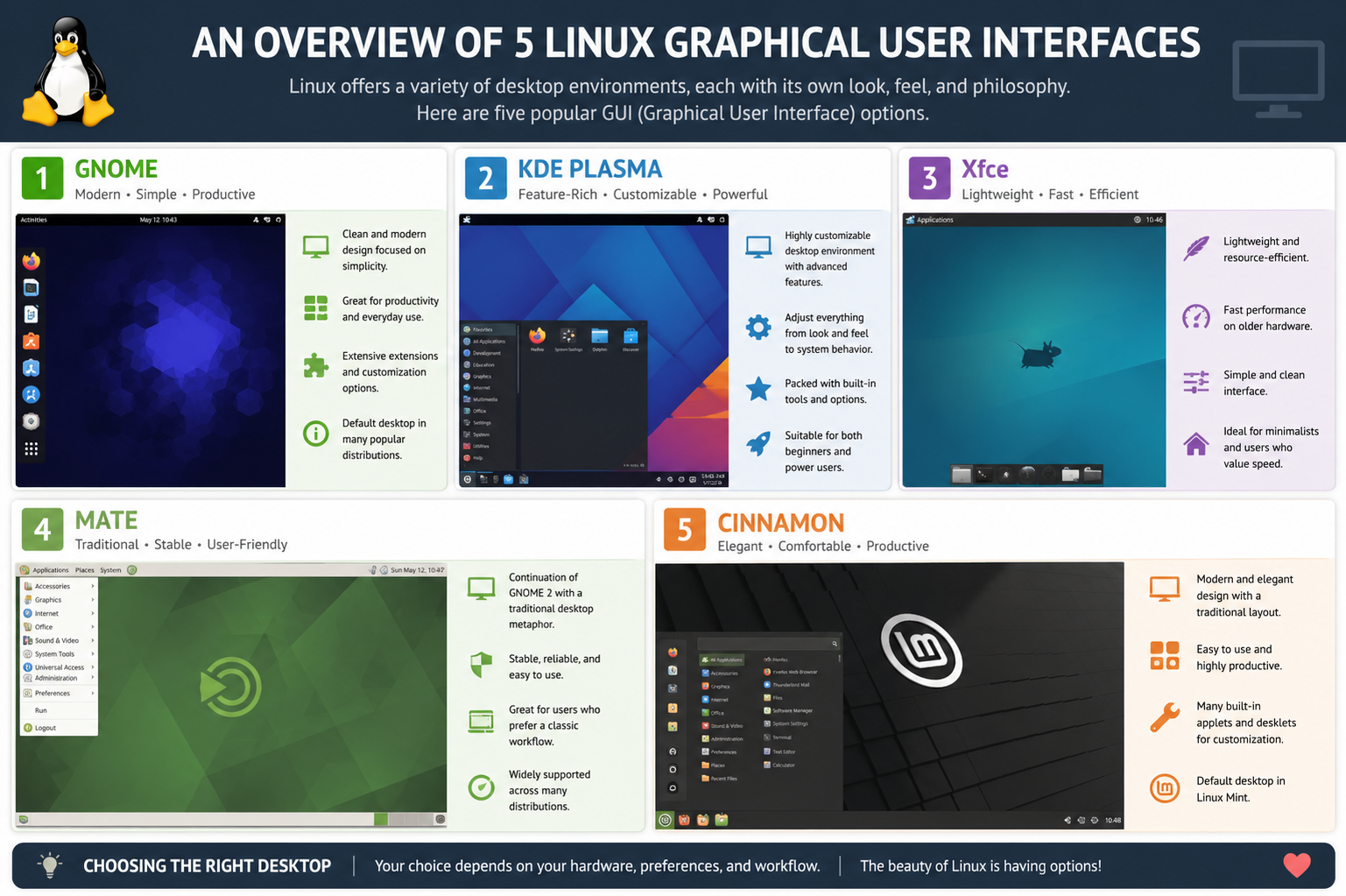
GNOME is one of the most prominent and widely adopted graphical user interfaces in the Linux ecosystem, designed with a strong emphasis on simplicity, usability, and a modern user experience. Its design philosophy revolves around reducing unnecessary complexity and presenting users with a clean, distraction-free workspace. Instead of relying on traditional desktop metaphors filled with icons and widgets, GNOME introduces an activities-based workflow where users can access applications, search files, and manage workspaces from a unified overview screen. This approach encourages productivity by minimizing the need to navigate through multiple menus.
Over the years, GNOME has evolved significantly, transitioning from a more traditional desktop layout in earlier versions to its current streamlined form. This evolution has sparked both praise and criticism. Supporters appreciate its consistent design and focus on usability, especially for users who prefer a guided and structured environment. It integrates well with modern workflows, offering smooth multitasking, virtual desktops, and intuitive window management. The system search feature is particularly powerful, allowing users to quickly launch applications, find documents, or perform system actions without opening separate utilities.
GNOME also places a strong emphasis on accessibility and internationalization, making it suitable for a wide global audience. It includes built-in accessibility tools that support users with different needs, ensuring that the environment remains inclusive. However, its minimalist approach means that advanced customization options are somewhat limited compared to other desktop environments. Users who prefer heavy visual tweaking or deep system modifications may find GNOME restrictive.
In terms of performance, GNOME is moderately resource-intensive compared to lightweight environments, but it is well-optimized for modern hardware. It delivers a smooth and consistent experience across different distributions, making it a default choice for many major Linux systems. Its ecosystem of applications is also tightly integrated, providing a unified and coherent user experience. Overall, GNOME is best suited for users who value simplicity, consistency, and a modern workflow over extensive customization.
KDE Plasma
KDE Plasma is known for being one of the most flexible and visually rich desktop environments available in Linux. It offers a traditional desktop layout that includes a taskbar, application launcher, system tray, and desktop icons, making it familiar to users transitioning from other operating systems. However, what sets KDE Plasma apart is its deep level of customization, allowing users to modify nearly every aspect of the interface, from window behavior and animations to themes and widgets.
The development philosophy behind KDE Plasma focuses on providing power users with complete control over their desktop experience. Users can adjust visual styles, create custom panels, and install widgets that enhance productivity or aesthetics. Despite this extensive customization capability, KDE Plasma is also designed to be efficient, ensuring that performance remains smooth even with advanced visual effects enabled. Over time, it has undergone significant optimization improvements, making it both visually appealing and resource-conscious.
KDE Plasma also offers a wide range of built-in applications that follow the same design principles of flexibility and functionality. These applications are often highly configurable, giving users control over features and behavior. The desktop environment supports multiple workflows, allowing users to tailor it for casual use, professional work, or development tasks. Its file manager, system settings, and utility tools are particularly powerful, offering more options than many other desktop environments.
One of the key strengths of KDE Plasma is its balance between aesthetics and performance. It supports modern graphical effects such as transparency, animations, and smooth transitions without becoming overly heavy on system resources. This makes it suitable for both high-end systems and moderately powered machines. However, the large number of configuration options can sometimes feel overwhelming for new users who prefer a simpler setup.
Overall, KDE Plasma is ideal for users who enjoy customizing their environment and want a desktop that adapts to their personal workflow. It provides a highly polished experience while still maintaining flexibility and efficiency.
Xfce
Xfce is a lightweight and efficient desktop environment designed to deliver a fast, stable, and resource-friendly computing experience. It is especially popular among users who operate older hardware or prefer a system that prioritizes performance over visual complexity. Unlike heavier desktop environments, Xfce focuses on simplicity and responsiveness, ensuring that system resources are used efficiently.
The interface of Xfce follows a traditional desktop model, with a panel, application menu, and desktop icons. This familiar structure makes it easy for users to navigate without needing to learn new workflows. Despite its simplicity, Xfce is highly functional and includes all the essential components required for everyday computing tasks such as file management, system configuration, and application launching.
One of the defining characteristics of Xfce is its modular design. Instead of being a tightly integrated monolithic system, it consists of individual components that work together while remaining independent. This allows users to replace or customize parts of the environment without affecting the entire system. As a result, Xfce offers a good balance between stability and flexibility.
Performance is where Xfce truly excels. It uses significantly fewer system resources compared to more modern and feature-heavy desktop environments. This makes it an excellent choice for systems with limited memory or older processors. Even on low-spec machines, Xfce provides a smooth and responsive experience without lag or delay.
While Xfce does not offer as many visual effects or advanced features as other environments, it compensates with reliability and speed. It is often chosen by users who prioritize function over form, or by those who want a clean system without unnecessary background processes. Customization is available but remains relatively straightforward, focusing on practical adjustments rather than deep visual transformations.
Overall, Xfce is best suited for users who need a stable, fast, and efficient desktop environment that performs well on a wide range of hardware without demanding significant system resources.
Cinnamon
Cinnamon is a desktop environment designed to provide a traditional and user-friendly computing experience with a modern touch. It was created to offer a balance between familiarity and visual appeal, making it especially attractive to users who prefer a conventional desktop layout. The interface typically includes a bottom panel, a start-style menu, and a system tray, which together create a comfortable and intuitive workflow.
One of Cinnamon’s main strengths is its accessibility. It is designed to be easy for beginners to understand while still offering enough flexibility for experienced users. The menu system is straightforward, allowing quick access to applications, system settings, and recent files. This makes it an ideal choice for users transitioning from other operating systems who want a familiar environment without a steep learning curve.
Cinnamon also includes a range of customization options, allowing users to modify themes, add applets, and adjust desktop behavior. While it is not as deeply customizable as KDE Plasma, it strikes a balance that avoids overwhelming users with too many options. This makes it more approachable while still allowing personalization.
In terms of performance, Cinnamon is moderately lightweight but slightly heavier than environments like Xfce or LXQt. It provides a smooth experience on modern hardware and offers visual enhancements such as animations and transparency effects. These features contribute to a polished and visually appealing interface without significantly affecting performance on most systems.
Cinnamon integrates well with its underlying ecosystem, providing a cohesive set of tools and utilities that enhance usability. These tools include system configuration utilities, file management applications, and desktop enhancements that improve productivity. The overall experience is designed to feel consistent and well-organized.
Cinnamon is particularly popular among users who want a balance between traditional desktop design and modern usability. It offers enough visual refinement to feel contemporary while maintaining the simplicity and structure of a classic desktop environment.
LXQt
LXQt is a lightweight desktop environment built with efficiency and simplicity as its core principles. It is designed to provide a fast and responsive user experience, especially on low-powered systems or older hardware. Unlike more feature-rich environments, LXQt focuses on essential functionality while minimizing system resource usage.
The interface of LXQt is clean and straightforward, following a traditional desktop layout that includes a panel, application menu, and system tray. This simplicity ensures that users can quickly adapt to the environment without needing to learn complex navigation structures. It avoids unnecessary visual effects, which helps maintain high performance even under limited system conditions.
One of the key advantages of LXQt is its modular architecture. Similar to Xfce, it is composed of independent components that work together seamlessly. This modularity allows users to replace or configure individual parts of the system without affecting overall stability. It also provides flexibility for advanced users who want to fine-tune their environment.
Performance is the defining feature of LXQt. It consumes minimal system resources, making it an excellent choice for machines with limited memory or processing power. Despite its lightweight nature, it still provides essential desktop functionalities such as file management, application launching, and system configuration tools.
LXQt does not focus heavily on visual effects or extensive customization options, but it offers enough flexibility for basic personalization. Users can adjust themes, panel layouts, and desktop behavior to suit their preferences. The emphasis remains on efficiency rather than aesthetic complexity.
Overall, LXQt is best suited for users who prioritize speed, simplicity, and low resource consumption. It is an ideal choice for reviving older hardware or for those who prefer a minimal and distraction-free computing environment that performs reliably under all conditions.
MATE Desktop Environment
MATE Desktop Environment is a continuation of the classic GNOME 2 experience, created for users who prefer a traditional and stable desktop layout over modern, highly simplified interfaces. It retains the familiar structure of a classic desktop, including a panel-based layout, application menus, system tray, and desktop icons. This design makes it especially comfortable for users who have been using Linux for many years or those who prefer a straightforward and predictable workflow.
One of the defining qualities of MATE is its emphasis on stability and consistency. Unlike some modern desktop environments that frequently change design paradigms, MATE maintains a steady interface that evolves gradually. This makes it highly reliable for long-term use, especially in environments where stability is more important than frequent visual changes. Users often appreciate that once they learn MATE, the interface remains familiar over time, reducing the need for constant adaptation.
MATE is also known for being lightweight compared to newer, more graphically intensive environments. It performs efficiently on older systems while still offering a complete set of desktop features. This balance between functionality and performance makes it a popular choice for users who want a full desktop experience without high system demands. Even on modest hardware, MATE provides smooth window management, responsive menus, and stable multitasking capabilities.
Customization in MATE is practical rather than overly complex. Users can adjust panel layouts, themes, icons, and window behaviors without being overwhelmed by excessive configuration options. This makes it accessible to both beginners and experienced users who want control without unnecessary complexity. The environment also supports a variety of applets and extensions that enhance productivity while maintaining its traditional structure.
Another important aspect of MATE is its compatibility with a wide range of Linux distributions and applications. It integrates well with system tools and provides a consistent experience across different setups. This reliability has made it a preferred choice for educational institutions, lightweight systems, and users who prioritize long-term usability over modern visual trends.
Overall, MATE Desktop Environment is best suited for users who appreciate a classic desktop experience combined with stability, efficiency, and straightforward usability.
Budgie Desktop Environment
Budgie Desktop Environment is a modern and elegant desktop interface designed with simplicity and visual appeal in mind. It offers a clean and minimal layout while still incorporating contemporary design elements that enhance usability. Budgie is often associated with a smooth and refined user experience that balances aesthetics with functionality.
At its core, Budgie focuses on providing a distraction-free environment. It uses a single-panel layout combined with a system menu and notification center that is both intuitive and visually polished. This design allows users to access essential features quickly without cluttering the screen. The Raven sidebar, which is one of Budgie’s signature features, combines notifications, calendar, and system controls in one unified space, improving workflow efficiency.
Budgie is designed to integrate seamlessly with modern workflows, supporting multitasking, workspace management, and smooth window transitions. Its interface is built using modern technologies, which gives it a responsive and fluid feel. Users often appreciate the attention to detail in animations and transitions, which contribute to a polished desktop experience without being overly resource-heavy.
Despite its modern appearance, Budgie maintains a balance between performance and visual quality. It is not as lightweight as minimal environments like LXQt or Xfce, but it is optimized to run efficiently on most modern systems. This makes it suitable for users who want a visually appealing desktop without sacrificing too much system performance.
Customization in Budgie is available but intentionally kept simple. Users can adjust themes, panel settings, and certain desktop behaviors without dealing with overly complex configuration tools. This approach makes Budgie approachable for new users while still offering enough flexibility for personalization.
Budgie is particularly well-suited for users who prefer a clean, modern desktop that emphasizes usability and aesthetics without overwhelming complexity. It provides a balanced experience that sits between lightweight minimalism and feature-rich customization environments.
Enlightenment Desktop Environment
Enlightenment is a highly unique and visually distinctive desktop environment known for its advanced graphical capabilities and strong focus on aesthetics. Unlike traditional desktop environments, Enlightenment emphasizes artistic design, smooth animations, and a highly configurable visual experience. It stands out for its ability to deliver a desktop that feels both futuristic and lightweight at the same time.
One of the most notable characteristics of Enlightenment is its window management system. It offers advanced effects such as smooth transitions, compositing, and flexible window behaviors that can be customized in great detail. Despite these visual enhancements, Enlightenment is designed to remain efficient, using fewer resources than many other feature-rich environments.
The interface of Enlightenment is not strictly bound to conventional desktop layouts. Instead, it provides a more flexible and dynamic approach where users can define how elements behave and appear. This makes it highly appealing to users who enjoy experimenting with design and want a desktop that can be shaped to their personal preferences.
Customization in Enlightenment is extremely powerful, offering deep control over themes, animations, and desktop interactions. However, this level of flexibility can also make it more complex to configure compared to simpler environments. Users who enjoy fine-tuning every aspect of their desktop will find it rewarding, while beginners may need some time to adjust.
Performance-wise, Enlightenment is surprisingly efficient considering its visual richness. It is designed to deliver smooth graphics without heavily burdening system resources. This makes it suitable for both modern systems and older hardware, depending on configuration choices.
Enlightenment is often chosen by advanced users who value creativity, visual expression, and deep customization. It provides a desktop experience that is both artistic and functional, standing apart from more conventional Linux environments.
Deepin Desktop Environment
Deepin Desktop Environment is known for its modern, elegant, and highly polished user interface that focuses on visual appeal and ease of use. It is designed to provide a smooth and intuitive experience, particularly for users who prefer a visually refined desktop with a consistent design language.
The interface of Deepin is centered around simplicity and elegance. It features a dock-style launcher, a clean control center, and fluid animations that create a cohesive and visually pleasing environment. The control center, in particular, is designed to consolidate system settings in a clear and organized manner, making it easy for users to manage their system without navigating through multiple menus.
Deepin places a strong emphasis on user experience design. Every element of the desktop is carefully crafted to maintain visual harmony and consistency. This results in a polished and modern appearance that feels similar to contemporary commercial operating systems. The animations and transitions are smooth, contributing to a high-quality user experience.
In terms of usability, Deepin is very beginner-friendly. It simplifies many system interactions and presents information in a visually intuitive way. This makes it especially suitable for users who are new to Linux or prefer a guided computing environment. Applications within the Deepin ecosystem are also designed with a consistent interface style, enhancing overall usability.
However, Deepin is more resource-intensive compared to lightweight environments. Its visual effects and background services require more system resources, making it better suited for modern hardware. Despite this, it remains optimized to deliver smooth performance on supported systems.
Customization in Deepin is somewhat limited compared to environments like KDE Plasma, as it prioritizes consistency over deep user modification. While users can change themes and adjust certain settings, the overall design remains tightly controlled to preserve its unified appearance.
Deepin is ideal for users who value aesthetics, simplicity, and a modern user experience. It offers a visually rich desktop environment that is easy to use while maintaining a high level of design consistency and usability.
Pantheon Desktop Environment
Pantheon Desktop Environment is the default interface of elementary OS and is designed with a strong focus on simplicity, elegance, and consistency. Its design philosophy closely follows the idea of minimalism, where every element serves a clear purpose and unnecessary complexity is avoided. The result is a clean, organized desktop experience that feels intuitive and visually balanced.
Pantheon is heavily inspired by modern user interface design principles, emphasizing clarity and ease of use. The desktop layout is simple, featuring a top panel and a centered dock at the bottom. This arrangement keeps the interface uncluttered while still providing quick access to applications and system functions. The overall design is carefully crafted to maintain visual harmony, with consistent spacing, typography, and icon styles throughout the system.
One of Pantheon’s strongest qualities is its user experience consistency. Every built-in application is designed to match the same visual and interaction style, creating a seamless environment where everything feels unified. This reduces confusion for users and makes the system feel more cohesive compared to environments where applications may vary in design.
Pantheon also emphasizes ease of use, making it especially suitable for beginners or users transitioning from other operating systems. The system settings are straightforward, and common tasks are designed to require minimal steps. This simplicity helps users focus on their work rather than navigating complex configuration menus.
Despite its minimalistic design, Pantheon is visually polished and modern. It includes smooth animations and subtle effects that enhance the user experience without overwhelming the system. However, because of its design focus on aesthetics and consistency, it offers limited customization compared to more flexible desktop environments like KDE Plasma.
Performance-wise, Pantheon is moderately lightweight but not as minimal as Xfce or LXQt. It runs efficiently on modern hardware and provides a stable, responsive experience. It is best suited for users who prioritize design quality and simplicity over deep customization or advanced system control.
Overall, Pantheon is ideal for users who want a clean, modern, and distraction-free desktop that emphasizes usability and visual consistency.
UKUI Desktop Environment
UKUI Desktop Environment is a lightweight and efficient desktop system designed to offer a traditional yet modernized user experience. It is often used in systems that aim to provide a familiar interface while maintaining good performance on a variety of hardware configurations. The design philosophy behind UKUI focuses on simplicity, usability, and accessibility.
The interface of UKUI resembles a classic desktop layout, featuring a bottom taskbar, application menu, and system tray. This familiar structure makes it easy for users to adapt quickly, especially those coming from conventional operating systems. At the same time, it incorporates modern design improvements such as cleaner icons, refined window styling, and smoother transitions.
UKUI is designed to be efficient in terms of system resource usage. It performs well on both older and newer hardware, making it a practical choice for users who need a stable and responsive environment without heavy system demands. The desktop environment is optimized to run smoothly even in low-resource conditions.
One of UKUI’s key strengths is its balance between simplicity and functionality. It does not overwhelm users with excessive features or complicated settings, yet it still provides all essential tools needed for everyday computing tasks. File management, system configuration, and application launching are all designed to be straightforward and accessible.
Customization options in UKUI are present but limited compared to more advanced environments. Users can adjust themes, layouts, and basic system behavior, but the focus remains on maintaining a consistent and stable experience rather than deep personalization.
UKUI is particularly suited for users who prefer a traditional desktop layout combined with lightweight performance. It is often chosen for environments where stability, familiarity, and efficiency are more important than advanced visual effects or extensive customization.
Sugar Desktop Environment
Sugar Desktop Environment is a unique graphical interface originally designed for educational purposes, particularly to support learning in schools and among young users. Unlike traditional desktop environments, Sugar is built around an activity-based model rather than an application-based one. This means that instead of focusing on launching programs, users engage in specific tasks or “activities” designed to promote learning and collaboration.
The interface of Sugar is highly distinctive, featuring a circular layout where activities are displayed around the screen. This design encourages exploration and interaction rather than conventional file and window management. It is intentionally simplified to remove distractions and help users focus on learning tasks.
Sugar is designed to be extremely user-friendly for children and beginners. Its interface avoids traditional desktop concepts like menus and taskbars, replacing them with more intuitive visual elements. This makes it easier for new users to understand basic computing concepts without being overwhelmed by complexity.
A key feature of Sugar is its emphasis on collaboration. Many of its activities are designed for group learning, allowing users to share work and interact with others in real time. This makes it particularly valuable in educational environments where teamwork and interactive learning are important.
In terms of performance, Sugar is lightweight and can run on low-spec hardware, which is important for educational deployments in resource-limited settings. However, its specialized design means it is not intended for general-purpose desktop use in the same way as other environments.
Customization in Sugar is minimal, as its primary goal is to provide a structured learning environment rather than a flexible desktop system. The focus is on usability and education rather than personalization or advanced configuration.
Overall, Sugar is best suited for educational environments and young learners who benefit from an interactive, activity-based approach to computing.
Cutefish Desktop Environment
Cutefish Desktop Environment is a modern and visually appealing desktop interface designed with simplicity and elegance in mind. It focuses on delivering a clean and intuitive user experience with a strong emphasis on visual consistency and smooth interactions. The overall design is inspired by contemporary interface trends that prioritize minimalism and usability.
The interface of Cutefish features a centered dock, clean top bar, and neatly organized system components. It aims to create a visually balanced environment that feels modern and easy to navigate. The design is lightweight in appearance but still provides a polished and refined user experience.
Cutefish is designed to be user-friendly, especially for beginners or users who prefer a straightforward computing environment. It reduces complexity by presenting system functions in a simple and accessible manner. This makes it easy for users to perform common tasks without dealing with complicated settings or menus.
Performance-wise, Cutefish is relatively lightweight and optimized for smooth operation on modern systems. It avoids heavy visual effects and focuses on delivering a responsive experience. However, since it is still a developing environment, its ecosystem and feature set may not be as mature as more established desktop environments.
Customization in Cutefish is somewhat limited, as it prioritizes design consistency and simplicity over extensive user modifications. Users can adjust basic settings and themes, but the overall structure of the interface remains consistent.
Cutefish is ideal for users who appreciate modern design, simplicity, and a clean user experience without unnecessary complexity. It provides a fresh and visually pleasing alternative to more traditional desktop environments while maintaining ease of use.
IceWM Window Manager
IceWM is a lightweight window manager designed to provide a fast and efficient graphical interface for Linux systems without consuming significant system resources. Unlike full desktop environments, IceWM focuses primarily on window management rather than offering a complete suite of integrated desktop tools. This makes it extremely efficient and ideal for older hardware or systems where performance is a priority.
The interface of IceWM is intentionally simple and minimal. It typically includes a taskbar, start menu, and basic system tray functionality. Despite its simplicity, it remains highly functional, allowing users to manage windows, switch applications, and perform essential desktop tasks with ease. Its design is inspired by traditional desktop layouts, making it familiar to users who prefer classic computing environments.
One of the strongest aspects of IceWM is its speed. It consumes very little memory and CPU usage, allowing it to run smoothly even on very low-spec machines. This makes it a popular choice for reviving older computers or building lightweight Linux setups where efficiency is more important than visual effects.
IceWM also offers a reasonable level of customization, especially through configuration files. Users can adjust themes, key bindings, and window behavior according to their preferences. However, this customization is more technical compared to graphical settings panels found in full desktop environments, which means it may be more suitable for advanced users.
While IceWM does not provide built-in applications or advanced graphical tools, it integrates well with external programs and utilities. Users can build their own lightweight desktop setup by combining IceWM with other applications of their choice.
Overall, IceWM is best suited for users who prioritize speed, simplicity, and minimal resource usage over visual polish or integrated desktop features.
Trinity Desktop Environment
Trinity Desktop Environment is a continuation of the older KDE 3 series, designed to preserve the traditional desktop experience while maintaining stability and usability. It is ideal for users who prefer a classic interface that resembles earlier versions of KDE before modern design changes were introduced.
The interface of Trinity is highly traditional, featuring a start menu, taskbar, desktop icons, and system tray. This familiar layout makes it very easy for long-time Linux users or those coming from older operating systems to adapt quickly. It provides a sense of continuity and stability that many modern environments have moved away from.
Trinity focuses heavily on stability and reliability. It is designed to remain consistent over time, avoiding frequent design changes or experimental features. This makes it a strong choice for environments where predictable behavior is important, such as older enterprise systems or users who prefer a stable computing setup.
Despite its older design foundation, Trinity is still actively maintained and optimized for modern systems. It offers reasonable performance while preserving its classic look and feel. It is not as lightweight as minimal window managers, but it is efficient enough for most standard hardware.
Customization in Trinity is extensive, allowing users to modify themes, panels, menus, and system behavior. It retains many of the configuration options that were popular in earlier desktop environments, giving users a high degree of control over their workspace.
Overall, Trinity Desktop Environment is best suited for users who appreciate a traditional Linux desktop experience with stability, familiarity, and moderate customization.
Conclusion
Linux graphical user interfaces offer a wide and diverse range of desktop environments and window managers, each designed with different priorities and user needs in mind. From modern, visually refined interfaces to ultra-lightweight and performance-focused systems, Linux provides flexibility that allows users to choose an environment that best matches their workflow, hardware, and personal preferences.
Modern desktop environments such as GNOME, KDE Plasma, and Deepin focus on delivering polished, user-friendly experiences with smooth visuals and integrated workflows. These environments are ideal for users who want a complete and contemporary computing experience with strong usability and design consistency. They prioritize ease of use and visual appeal, making them suitable for everyday productivity, creative work, and general computing.
On the other hand, lightweight environments like Xfce, LXQt, IceWM, and UKUI focus on performance and efficiency. These interfaces are designed to run smoothly on older or less powerful hardware while still providing essential desktop functionality. They are perfect for users who value speed, responsiveness, and low system resource usage over advanced visual effects.
Classic-style environments such as MATE and Trinity preserve traditional desktop layouts, offering familiarity and stability. These are especially appreciated by long-time Linux users or those who prefer a straightforward and predictable interface without frequent design changes.
More specialized environments like Sugar and Enlightenment demonstrate how diverse Linux interfaces can be, serving unique purposes such as education or advanced visual customization. They highlight the flexibility of Linux as an operating system that can adapt to different use cases beyond standard desktop computing.
Overall, the variety of Linux graphical user interfaces ensures that every type of user—from beginners to advanced professionals—can find a suitable environment. Whether the priority is performance, customization, simplicity, or visual design, Linux provides a desktop solution that can be tailored to nearly any need.