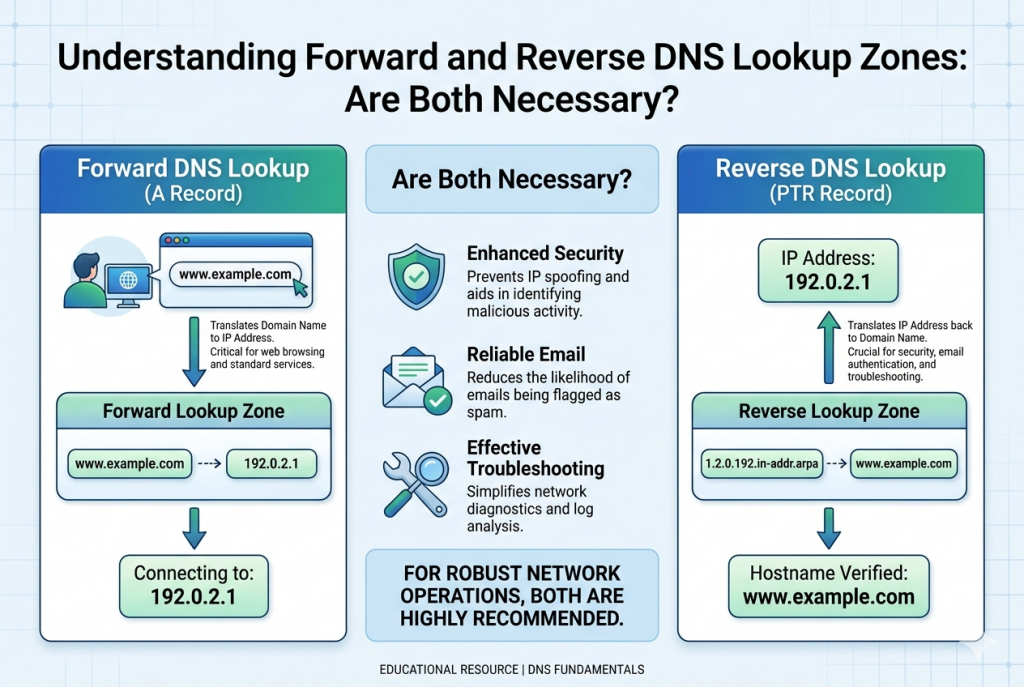
Forward and reverse DNS lookups answer different questions. A forward lookup starts with a hostname and asks which address record it has. A reverse lookup starts with an IP address and asks whether the address’s reverse namespace contains a PTR record naming a host. Most ordinary connections use forward resolution; reverse DNS is useful for operational identification, logging, and some application policies, but it is not mandatory for every network and does not establish identity by itself.
Forward resolution: name to address
An application may ask a recursive resolver for the address of a service such as app.example.com. For IPv4, an A record can provide an address; for IPv6, an AAAA record can do so. The resolver may obtain a cached result or follow the appropriate DNS delegation to authoritative servers. The application then connects to a chosen address, subject to routing, firewalls, and application security checks.
Forward DNS zones host more than A and AAAA records. CNAME aliases, MX mail-routing records, service-discovery records, and TXT records have different roles. The presence of a domain name alone does not imply that a host responds on a particular port or that a service is trusted. DNS data helps locate a service; transport and application checks still matter.
Reverse resolution: address to name
Reverse lookup uses a PTR record stored under a specially organized namespace. For an IPv4 address such as 203.0.113.25, the reverse query name is 25.113.0.203.in-addr.arpa. The four octets are reversed because DNS labels are arranged hierarchically. A PTR record at that name might point to a hostname such as mail.example.com, but there is no guarantee that one will exist or that it will name the application a user expects.
IPv6 reverse names use the ip6.arpa domain and reverse hexadecimal nibbles rather than IPv4 decimal octets. This matters when administering IPv6 reverse zones: the delegation and record format are different, even though the purpose is similar. Microsoft documents both forms in its Windows Server reverse-lookup guidance.
Are both lookup zones required?
| Question | Forward zone | Reverse zone |
|---|---|---|
Where is app.example.com? |
Can answer with A/AAAA data | Not needed for the forward lookup itself |
Which name is associated with 203.0.113.25? |
Does not directly answer an address-to-name query | May answer with PTR data |
| Must an ordinary web client have both? | Usually relies on forward DNS or another approved name-resolution path | Not a universal DNS requirement |
| Can reverse DNS verify who operates a host? | Not by itself | Not by itself: PTR data and forward confirmation can be useful signals, not proof of identity |
The reverse namespace is optional in the general DNS implementation. Some operational systems and email infrastructure expect well-maintained PTR records or use forward-confirmed reverse DNS as a heuristic. Those application-specific expectations do not make reverse zones a universal prerequisite for DNS, browsing, or routing.
Who controls reverse DNS?
Forward and reverse zones frequently have different delegation paths. An organization may administer example.com, but the reverse zone for an IP block is commonly controlled or delegated by the address-space holder or its service provider. Publishing a PTR record under a forward zone does not create a working reverse lookup.
For private addresses, a local DNS administrator may operate reverse zones that are meaningful only inside the organization. For public addresses, coordinate the necessary reverse-zone delegation with the provider or allocation holder, and confirm which authoritative servers actually answer the PTR query.
Diagnose a mismatch instead of assuming one zone is broken
If an application fails to connect by name, first test its A/AAAA lookup, resolver selection, cached answers, address reachability, and application security policy. If an operations tool reports an unexpected hostname for an IP, test the PTR query in the correct reverse namespace and compare the result with the forward records. These are two separate checks.
For example, the following commands illustrate distinct questions on a system with nslookup available:
nslookup app.example.com
nslookup 203.0.113.25
The first asks for normal name resolution; the second initiates address-to-name resolution. Resolver settings, local caches, split DNS, and DNS server access can change what each client sees. Check authoritative data if a recursive result is stale or missing. A PTR result can legitimately differ from the name a user typed, especially where several names share an address.
Where PTR records fit into the wider DNS system
PTR records are one record type with a specific operational purpose. The site’s PTR-record guide covers the address-to-name mechanism in more depth, while DNS-record fundamentals helps connect reverse records to the broader zone architecture.
Takeaway: Configure forward records where applications need dependable name-to-address resolution. Add accurate reverse records where operational needs or application policy justify them, and verify the delegation. Do not interpret an absent or surprising PTR response as proof that the entire DNS system is broken or that a host is malicious.