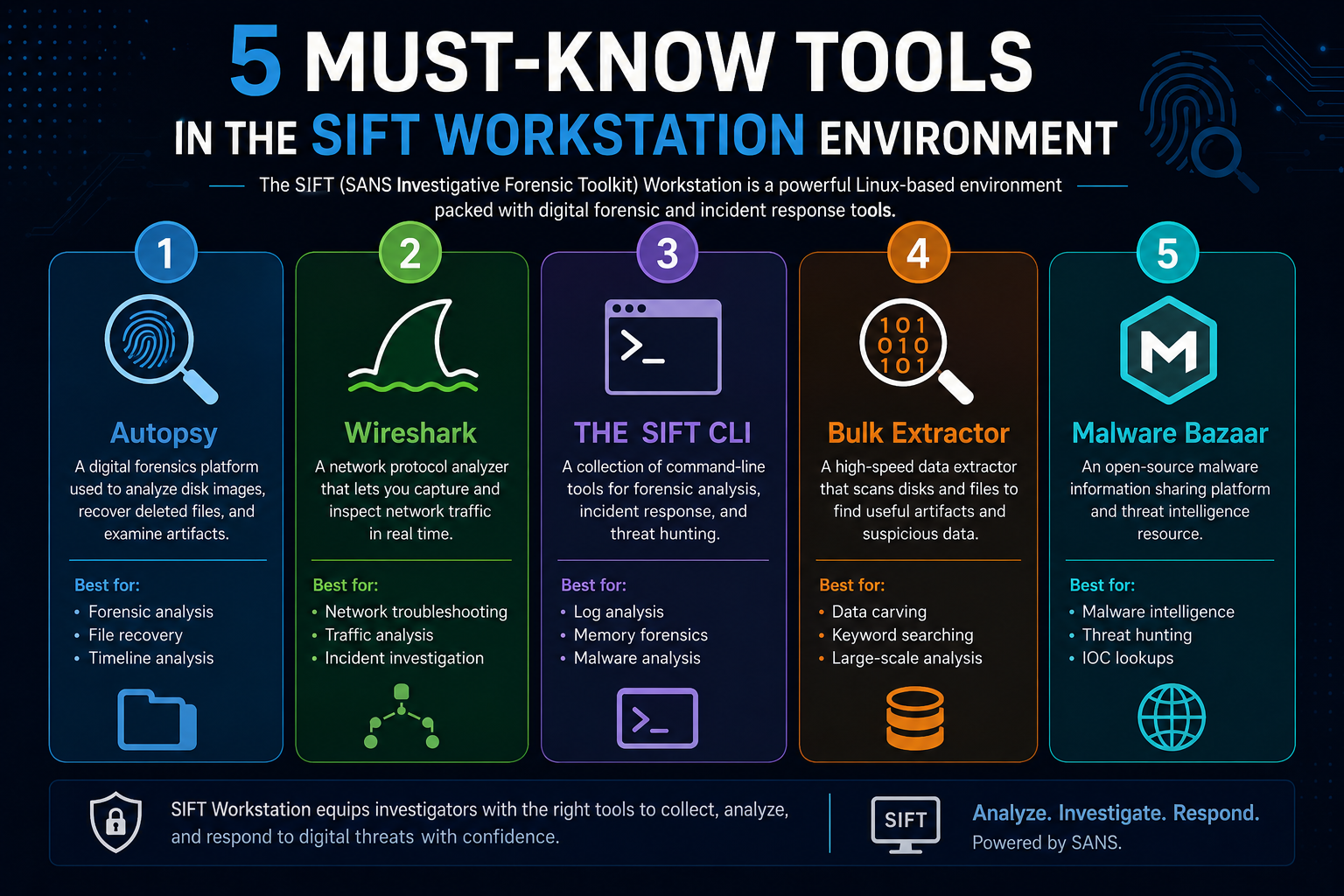
Cybersecurity threats continue to grow in both frequency and complexity. Organizations of every size now face attacks that can disrupt operations, steal sensitive information, damage reputations, and create financial losses. Because of this, digital forensics and incident response, commonly known as DFIR, has become one of the most important areas in modern cybersecurity.
DFIR focuses on identifying, investigating, and responding to cyber incidents. When a system is compromised, investigators need to determine how the attack occurred, what systems were affected, what data may have been exposed, and whether attackers still maintain access to the environment. These investigations require specialized tools and techniques capable of collecting and analyzing digital evidence.
Digital forensics involves preserving evidence in a way that maintains integrity and allows investigators to reconstruct events accurately. Incident response focuses on managing and containing security incidents while minimizing damage and restoring normal operations. Together, these disciplines help organizations recover from attacks while improving future defenses.
One of the most respected resources in the DFIR community is the SIFT Workstation. SIFT stands for SANS Investigative Forensic Toolkit. It is a collection of open-source forensic and incident response tools designed to help analysts perform detailed investigations on compromised systems.
The SIFT Workstation provides a centralized environment containing many of the most important forensic utilities used in cybersecurity. Analysts can use it to inspect disks, recover deleted files, analyze memory dumps, investigate malware activity, and generate detailed timelines of system events.
Because it combines so many tools into a single platform, SIFT has become extremely popular among DFIR professionals, cybersecurity students, security operations teams, and investigators. It allows analysts to conduct investigations more efficiently while learning industry-standard forensic methods.
Understanding the tools inside SIFT is an important step for anyone interested in cybersecurity investigations. Some tools specialize in timeline creation, while others focus on memory analysis, registry parsing, malware detection, or disk examination. Together, they help investigators piece together the evidence left behind after a cyberattack.
Why DFIR Matters in Modern Cybersecurity
The modern threat landscape is constantly evolving. Attackers use ransomware, phishing campaigns, malware, insider threats, and advanced persistence techniques to compromise systems. Many attacks are designed specifically to avoid detection by traditional security tools.
When organizations experience a security incident, confusion can spread quickly. Systems may become unavailable, employees may not know how to respond, and attackers may continue moving through the environment. DFIR helps organizations establish structured procedures for handling these situations.
One major goal of digital forensics is evidence preservation. Investigators must ensure that evidence remains accurate and unchanged throughout the investigative process. This often involves creating forensic copies of storage devices and memory captures before conducting analysis.
Another important goal is understanding attacker behavior. Investigators attempt to determine the techniques, tools, and processes used during the attack. This information helps organizations strengthen defenses and prevent future incidents.
DFIR also supports legal and compliance requirements. Many industries must follow regulations regarding breach reporting and evidence handling. Proper forensic investigations can provide the documentation necessary for audits, legal proceedings, or insurance claims.
Threat intelligence is another area where DFIR plays a major role. By studying attacks and malware behavior, investigators can identify patterns associated with specific threat actors or attack campaigns. This information can be shared across organizations to improve security awareness.
Incident response planning is equally important. Organizations should not wait until an attack occurs before preparing their response procedures. Effective incident response plans define roles, communication channels, escalation procedures, and technical workflows ahead of time.
Training is also essential in DFIR. Analysts need hands-on experience using forensic tools and investigating realistic scenarios. Platforms like SIFT Workstation allow students and professionals to practice forensic techniques safely within controlled environments.
As attacks continue to become more advanced, DFIR professionals must develop expertise across many technical areas, including operating systems, networking, scripting, malware analysis, cloud computing, and evidence handling. SIFT Workstation provides an excellent environment for developing these skills.
Introduction to SIFT Workstation
SIFT Workstation was originally developed to support forensic training and investigations. It provides a complete forensic toolkit that investigators can use for incident response, malware analysis, and evidence examination.
The workstation can be installed as a standalone Linux environment or run as a virtual machine. Many analysts deploy SIFT inside virtualization platforms because this allows investigations to occur safely without risking contamination of production systems.
One of the greatest strengths of SIFT is that it contains a broad collection of open-source forensic tools. Rather than forcing analysts to install and configure each tool individually, SIFT provides a ready-made environment optimized for investigations.
Open-source tools have become increasingly valuable in cybersecurity because they allow transparency, customization, and collaboration. Security researchers around the world contribute improvements and plugins that help keep forensic tools current against evolving threats.
SIFT supports investigations involving Windows, Linux, and macOS systems. This flexibility is essential because enterprise environments often contain multiple operating systems and technologies.
Analysts use SIFT during many stages of investigations. They may create forensic images of storage devices, analyze system memory, inspect logs, recover deleted files, identify malware, or correlate evidence from multiple systems.
Because cybersecurity incidents often involve large amounts of data, automation is critical. SIFT includes tools capable of parsing logs, generating timelines, searching evidence, and extracting forensic artifacts automatically. This saves investigators significant amounts of time.
The workstation also supports collaboration among investigation teams. Analysts can share evidence, timeline data, and reports with other investigators, helping organizations respond more effectively to incidents.
SIFT Workstation continues to evolve alongside the cybersecurity landscape. As attackers develop new techniques, forensic tools must adapt to detect hidden activity, analyze emerging malware, and investigate cloud-based infrastructure.
Learning SIFT is valuable not only for dedicated DFIR professionals but also for system administrators, SOC analysts, penetration testers, and security engineers. Understanding forensic techniques improves an organization’s overall security posture.
The Importance of Evidence Collection
Before investigators can analyze a compromised system, they must collect evidence carefully. Improper evidence handling can alter data and compromise investigations. Evidence collection is therefore one of the most important stages in DFIR.
Investigators typically begin by identifying affected systems and determining what evidence should be preserved. This may include storage devices, memory captures, log files, network traffic, and cloud data.
One of the primary methods of preserving evidence is forensic imaging. A forensic image is an exact copy of a storage device that includes active files, deleted files, metadata, timestamps, and unallocated space.
Unlike standard file copies, forensic imaging preserves hidden and deleted information that may contain important evidence. Investigators analyze the copy instead of the original device to avoid accidental modifications.
Memory acquisition is another critical process. RAM contains temporary data related to active processes, open files, network connections, and encryption keys. Because memory contents disappear when systems power down, investigators often prioritize memory capture during live incidents.
Evidence integrity is maintained through cryptographic hashing. Investigators calculate hash values before and after evidence acquisition to confirm that data has not changed.
Documentation is equally important during evidence collection. Analysts record acquisition procedures, timestamps, system information, and chain-of-custody details to maintain investigative credibility.
Once evidence is collected, investigators can begin forensic analysis using tools available within SIFT Workstation.
Understanding Timeline Analysis
Timeline analysis is one of the most effective techniques in digital forensics. During an attack, systems generate logs and artifacts that record user activity, process execution, file changes, and network connections.
However, these events are often spread across multiple systems and stored in different formats. Manually correlating them can be extremely difficult.
Timeline analysis organizes events chronologically, allowing investigators to reconstruct the sequence of actions during an incident. Analysts can identify when attackers gained access, what files they modified, what commands they executed, and how they moved through the environment.
Timeline analysis also helps identify anomalies. For example, investigators may notice suspicious activity occurring outside normal business hours or detect unauthorized access from unusual locations.
The ability to correlate events across systems is especially important during enterprise investigations. Attackers frequently move laterally between devices, meaning investigators must analyze evidence from many sources simultaneously.
This is where tools like Plaso become extremely valuable.
Introduction to Plaso
Plaso is one of the most powerful timeline analysis tools included in SIFT Workstation. It automates the process of collecting timestamps and generating timelines from forensic evidence.
The name Plaso stands for “log2timeline,” reflecting its primary purpose of converting forensic artifacts into detailed chronological records.
Plaso can ingest evidence from many different sources, including operating system logs, browser histories, registry files, application logs, metadata, and user activity records.
During investigations, analysts may need to process millions of events from multiple systems. Plaso automates this process and allows investigators to focus on analysis instead of manual log collection.
One of the biggest strengths of Plaso is its broad artifact support. It can parse data from Windows, Linux, and macOS systems, making it suitable for diverse enterprise environments.
Plaso extracts timestamps from many artifact types, including event logs, shell histories, browser caches, USB device history, and application usage records.
After collecting this information, Plaso organizes events into unified timelines that investigators can search and analyze.
How Plaso Helps Investigators
Timeline analysis provides investigators with valuable insight into attacker behavior. By reviewing events chronologically, analysts can reconstruct incidents more accurately.
For example, an investigation may reveal that a phishing email was opened shortly before malware execution began. Analysts might then observe unauthorized login attempts, suspicious PowerShell activity, and outbound network connections.
Without timeline analysis, identifying these relationships would be far more difficult.
Plaso also helps investigators identify persistence mechanisms. Attackers often create scheduled tasks, startup entries, or registry modifications that allow malware to survive system reboots.
Because these activities generate timestamps, they appear within forensic timelines and can help analysts identify long-term compromise.
The tool is especially useful during ransomware investigations. Analysts can determine when encryption began, what systems were affected first, and how quickly attackers spread across the environment.
Plaso timelines also support collaboration among security teams. Investigators can share timeline data with other analysts, enabling faster and more accurate incident reconstruction.
Another advantage is scalability. Enterprise environments generate enormous amounts of log data, and manual analysis is rarely practical. Plaso allows investigators to process large datasets efficiently.
The Role of Automation in DFIR
Automation has become increasingly important in cybersecurity investigations. Modern organizations generate massive volumes of logs and forensic artifacts every day.
Without automation, analysts would struggle to keep up with the workload created by large-scale incidents.
Tools like Plaso automate evidence parsing, timestamp extraction, and timeline generation. This reduces manual effort while improving consistency and speed.
Automation also helps reduce human error. Repetitive manual tasks increase the likelihood of mistakes, especially during high-pressure investigations.
However, automation does not replace human expertise. Investigators still need to interpret evidence, identify suspicious behavior, and understand attacker techniques.
Effective DFIR combines automated tooling with skilled analytical thinking.
Challenges in Modern Investigations
Cybersecurity investigations have become more difficult as attackers adopt advanced evasion techniques.
Many forms of malware now operate primarily in memory, leaving limited traces on disk. Attackers may delete logs, manipulate timestamps, or abuse legitimate administrative tools to avoid detection.
Cloud computing introduces additional challenges because evidence may exist across virtual machines, containers, cloud services, and distributed infrastructure.
Remote work environments have also expanded attack surfaces. Employees access corporate systems from personal devices and home networks, increasing security complexity.
Investigators must therefore understand not only traditional forensic techniques but also cloud logging, virtualization, and modern endpoint security technologies.
SIFT Workstation helps analysts address these challenges by providing access to many different investigative tools within one environment.
Building a Career in DFIR
The demand for skilled DFIR professionals continues to grow worldwide. Organizations increasingly recognize the importance of incident response and forensic readiness.
Careers in DFIR often include roles such as incident responder, forensic analyst, SOC analyst, malware analyst, or threat hunter.
Successful DFIR professionals combine technical knowledge with strong analytical and problem-solving abilities. They must think critically, remain detail-oriented, and work effectively under pressure.
Hands-on experience is essential. Reading about forensic tools is valuable, but practical investigations provide deeper understanding.
Many cybersecurity students use SIFT Workstation to practice analyzing logs, investigating malware infections, and recovering forensic artifacts.
Continuous learning is also necessary because cybersecurity threats evolve constantly. Analysts must stay updated on new attack techniques, malware families, and investigative methods.
Learning tools like Plaso is an important first step toward building expertise in digital forensics and incident response.
The Growing Importance of Forensic Analysis
Cybersecurity investigations rely heavily on the ability to uncover hidden evidence from compromised systems. Attackers rarely leave obvious clues behind. Instead, they attempt to hide malicious activity, erase traces, manipulate timestamps, or disguise malware as legitimate software. Because of this, investigators require specialized forensic tools capable of extracting and analyzing evidence from storage devices and operating systems.
Modern organizations generate massive amounts of data every day. Servers, workstations, mobile devices, cloud platforms, and network equipment all produce logs and digital artifacts. During a security incident, investigators must sort through this data to determine what happened and how attackers gained access.
This process would be extremely difficult without forensic utilities designed specifically for digital investigations. The SIFT Workstation contains several powerful tools that simplify forensic analysis and improve investigative accuracy. Among the most important are The Sleuth Kit and Autopsy.
These tools focus on storage analysis, file recovery, metadata examination, and evidence preservation. Together, they allow analysts to inspect compromised systems without altering evidence and help reconstruct attacker activity in detail.
Understanding how these tools work is essential for anyone pursuing a career in digital forensics or incident response.
Introduction to The Sleuth Kit
The Sleuth Kit, often abbreviated as TSK, is one of the most respected forensic frameworks in cybersecurity. It consists of a collection of command-line tools used to analyze disk images and investigate file systems.
TSK allows investigators to examine storage devices in a forensically sound manner. Instead of working directly on the original drive, analysts typically create forensic copies known as disk images. These images preserve all information stored on the drive, including deleted files, hidden partitions, metadata, and unused disk space.
Investigators use TSK to inspect this data safely while preserving the integrity of the original evidence.
One reason TSK is so widely respected is its flexibility. It supports many different file systems, including NTFS, FAT, ext-based Linux file systems, HFS+, and others. This allows investigators to work across diverse operating systems and enterprise environments.
The toolset includes utilities for listing files, recovering deleted data, identifying partitions, analyzing metadata, and searching forensic images for evidence.
Because it operates primarily through the command line, TSK offers investigators detailed control over forensic analysis. Advanced users can automate workflows and integrate TSK into larger investigation pipelines.
Although command-line interfaces may seem intimidating at first, they provide significant power and flexibility for experienced investigators.
The Importance of Disk Imaging
Before investigators analyze a compromised system, they must first preserve evidence correctly. One of the most important forensic practices is disk imaging.
A forensic image is an exact bit-for-bit copy of a storage device. Unlike ordinary file copies, forensic images preserve deleted content, hidden files, slack space, metadata, timestamps, and partition information.
Investigators analyze the image rather than the original device to prevent accidental evidence modification.
This process is essential because even small changes to a system can alter timestamps or overwrite deleted data. If evidence integrity becomes compromised, the investigation may lose credibility.
Forensic imaging also supports repeatable analysis. Multiple investigators can examine copies of the same image independently without affecting the original evidence.
Disk imaging becomes especially important during legal investigations and compliance audits. Proper evidence handling procedures ensure that findings remain defensible if reviewed later.
TSK works closely with forensic images, allowing analysts to inspect storage devices in detail after acquisition.
Understanding File System Analysis
File systems organize how data is stored on storage devices. Different operating systems use different file system structures, each with unique methods for managing files and directories.
Windows systems commonly use NTFS, while Linux environments often rely on ext4. Apple devices may use APFS or HFS+.
File system analysis involves examining how data is stored, modified, and deleted within these structures.
TSK allows investigators to inspect file systems directly. Analysts can identify files, review directory structures, inspect metadata, and recover deleted content.
One major advantage of file system analysis is the ability to uncover hidden evidence. Attackers may attempt to conceal malware, scripts, or stolen data within obscure directories or deleted space.
Investigators can use TSK to identify these artifacts even if they are not visible through the operating system itself.
Metadata analysis is another important capability. Metadata includes information such as file creation times, modification dates, ownership, and permissions.
These details often provide valuable clues during investigations. For example, investigators may discover that malware files were created shortly before suspicious network activity occurred.
By correlating metadata with logs and timelines, analysts can reconstruct attacker actions more accurately.
Recovering Deleted Files
Attackers frequently attempt to erase evidence after completing malicious activities. They may delete malware samples, remove stolen documents, or clear logs in an effort to hide their tracks.
However, deleting a file does not immediately erase its contents from the disk. In many cases, the operating system simply marks the space as available for reuse.
Until that space is overwritten, forensic tools may still recover the deleted data.
TSK provides powerful file recovery capabilities that allow investigators to retrieve deleted artifacts from forensic images.
Recovered files often contain critical evidence. Investigators may uncover malware payloads, command scripts, sensitive documents, screenshots, or communications related to the attack.
Deleted browser history and temporary files can also reveal valuable information about user activity and attacker behavior.
Recovering deleted data is particularly important during insider threat investigations. Employees attempting to hide unauthorized activity may delete files before leaving an organization.
Forensic recovery techniques can help investigators reconstruct those actions and identify evidence of misconduct.
Analyzing Partitions and Hidden Data
Attackers sometimes attempt to hide data in unusual locations within storage devices. This may include hidden partitions, unused disk areas, or manipulated file system structures.
TSK allows investigators to analyze partitions and inspect storage layouts in detail.
Partition analysis can reveal hidden operating systems, concealed storage areas, or evidence of tampering.
Some malware families even create hidden partitions specifically for storing malicious tools or stolen information.
By inspecting disk structures carefully, investigators can identify anomalies that might otherwise remain unnoticed.
Unused disk space, often called unallocated space, can also contain valuable evidence. Deleted files may still exist partially within these areas, and fragments of data can provide important investigative clues.
TSK helps investigators inspect unallocated space and recover remnants of deleted information.
Keyword Searching in Forensic Investigations
Large forensic images may contain millions of files and artifacts. Manually reviewing all this information would be extremely time-consuming.
Keyword searching helps investigators identify relevant evidence more efficiently.
TSK allows analysts to search forensic images for specific terms, filenames, email addresses, usernames, IP addresses, or malware indicators.
For example, investigators examining a ransomware incident may search for suspicious file extensions or known malware filenames.
In insider threat investigations, analysts may search for sensitive project names or confidential data references.
Keyword searching accelerates investigations and helps analysts focus on the most relevant evidence first.
Combined with timeline analysis and metadata examination, search capabilities significantly improve investigative efficiency.
Hashing and File Verification
Forensic investigations require methods for verifying evidence integrity. Cryptographic hashing plays a major role in this process.
A hash is a unique digital fingerprint generated from a file or storage device. Even a tiny modification changes the resulting hash value.
Investigators use hashes to confirm that evidence remains unchanged throughout the investigative process.
TSK supports hashing capabilities that allow analysts to verify forensic images and identify known files.
Hash databases are also useful for malware detection. Investigators can compare file hashes against threat intelligence repositories to identify known malicious software.
Hashing also helps investigators eliminate irrelevant files. Many operating system files are standard across systems and do not require detailed analysis.
By filtering known files, analysts can focus more efficiently on suspicious artifacts.
Introduction to Autopsy
While command-line tools offer flexibility and power, many investigators prefer graphical interfaces that simplify evidence review.
Autopsy serves as a graphical frontend for The Sleuth Kit. It provides investigators with visual tools for browsing forensic images, analyzing evidence, generating reports, and conducting investigations more efficiently.
Autopsy makes forensic analysis more accessible for beginners while still supporting advanced investigative workflows.
The platform includes dashboards, searchable interfaces, file viewers, timeline analysis, and reporting capabilities.
Investigators can navigate forensic images visually, inspect metadata, search artifacts, and categorize evidence within a user-friendly environment.
Because of its ease of use, Autopsy is widely adopted in cybersecurity training programs, enterprise investigations, and law enforcement operations.
How Autopsy Simplifies Investigations
Autopsy streamlines many forensic processes that would otherwise require multiple command-line utilities.
Investigators can load forensic images directly into the platform and begin analyzing files immediately.
The interface organizes evidence into categories such as images, documents, web activity, deleted files, registry data, and communications.
This organization helps analysts identify relevant evidence more quickly.
Autopsy also supports keyword searching, hash analysis, timeline generation, and artifact extraction.
Visual workflows improve efficiency because investigators can inspect evidence without memorizing complex command syntax.
The platform includes modules capable of identifying suspicious files, extracting browser history, and analyzing user activity automatically.
These capabilities reduce investigative workload and improve consistency.
Timeline Analysis Within Autopsy
Timeline analysis is one of the most valuable forensic techniques, and Autopsy integrates timeline functionality directly into investigations.
By organizing events chronologically, investigators can identify sequences of activity associated with attacks.
Timelines reveal when files were modified, when applications executed, and when suspicious behavior occurred.
For example, investigators may observe malware execution shortly after a phishing attachment was opened.
They may also identify persistence mechanisms created after initial compromise.
Visual timelines make it easier to correlate events across multiple systems and evidence sources.
This capability significantly improves incident reconstruction efforts.
Browser and User Activity Analysis
Web browsers generate extensive forensic artifacts that reveal user activity. These artifacts may include browsing history, downloads, cookies, cached files, and saved credentials.
Autopsy can extract and analyze browser evidence automatically.
Investigators often rely on browser artifacts during phishing investigations and insider threat cases.
For example, analysts may identify visits to malicious websites or evidence of unauthorized data transfers.
User activity analysis also helps investigators understand how systems were used during attacks.
Autopsy can reveal login activity, file access patterns, connected devices, and application usage.
These details support broader investigative conclusions.
The Role of Reporting in DFIR
Technical analysis alone is not enough during cybersecurity investigations. Investigators must also communicate findings effectively.
Reports are essential for informing executives, legal teams, auditors, regulators, and law enforcement agencies.
Autopsy includes reporting capabilities that allow investigators to generate structured summaries of evidence and findings.
Professional reports help organizations understand the scope of incidents and support remediation efforts.
Reports may include timelines, screenshots, file listings, hash values, and summaries of suspicious activity.
Clear documentation improves collaboration and ensures investigative findings remain understandable to non-technical stakeholders.
Challenges in Storage Forensics
Although storage forensics remains essential, modern investigations face increasing complexity.
Solid-state drives introduce challenges because deleted data may disappear more quickly due to wear-leveling technologies.
Encryption also complicates investigations. Many systems now use full-disk encryption, making evidence inaccessible without credentials or decryption keys.
Cloud computing introduces additional difficulties because data may exist across distributed virtual infrastructure instead of physical storage devices.
Investigators must therefore combine traditional forensic techniques with cloud-specific investigation methods.
Despite these challenges, storage analysis remains a cornerstone of digital forensics.
The Relationship Between TSK and Other Forensic Tools
The Sleuth Kit and Autopsy rarely operate in isolation during investigations.
Investigators often combine them with timeline analysis tools, memory forensics frameworks, malware scanners, and threat intelligence platforms.
For example, analysts may use TSK to recover malware samples from a disk image and then analyze memory artifacts using Volatility.
Timeline tools such as Plaso can correlate storage activity with logs and network events.
This layered investigative approach provides deeper visibility into attacker behavior.
No single forensic tool can solve every investigative challenge. Effective DFIR relies on combining multiple techniques and evidence sources.
Developing Practical DFIR Skills
Hands-on practice is one of the most important aspects of learning digital forensics.
Reading about forensic tools provides theoretical understanding, but real expertise comes from conducting investigations directly.
Cybersecurity students and professionals often use sample forensic images and intentionally vulnerable systems to practice investigations.
SIFT Workstation provides an ideal environment for these exercises because it contains many widely used forensic utilities.
Investigators can practice recovering deleted files, analyzing browser history, identifying malware, and reconstructing attack timelines.
Over time, this practical experience improves analytical thinking and investigative confidence.
Strong DFIR professionals also develop patience and attention to detail. Small forensic artifacts may reveal major clues about attacker behavior.
Investigators must therefore approach evidence carefully and methodically.
The Future of Storage Forensics
Storage forensics continues to evolve alongside technological advancements.
Cloud computing, virtualization, containerization, and remote work environments are changing how organizations store and process data.
Future forensic tools will likely incorporate more automation, artificial intelligence, and large-scale evidence correlation.
However, core forensic principles will remain the same. Evidence preservation, careful analysis, and investigative integrity will always be essential.
The Sleuth Kit and Autopsy remain highly relevant because they teach foundational forensic concepts that apply across many technologies.
Understanding storage analysis, metadata examination, and evidence handling prepares investigators for more advanced DFIR challenges.
Understanding the Role of Memory Forensics
Modern cyberattacks are becoming increasingly sophisticated, and many attackers now rely on techniques designed specifically to avoid traditional detection methods. In the past, malware commonly left obvious traces on storage devices, making it easier for investigators to locate malicious files and analyze their behavior. Today, however, attackers frequently use memory-based attacks, fileless malware, and stealth techniques that leave very limited evidence on disk.
Because of this shift, memory forensics has become one of the most important disciplines within digital forensics and incident response. Memory forensics involves capturing and analyzing the contents of RAM to uncover evidence of malicious activity occurring on a system.
Random access memory contains valuable information about running processes, active network connections, loaded drivers, encryption keys, user activity, and malware operating in real time. Since memory is volatile, this information disappears when systems shut down or reboot. Investigators must therefore capture memory quickly during incidents to preserve evidence.
The SIFT Workstation includes one of the most respected memory analysis frameworks available in cybersecurity: Volatility.
Volatility gives investigators the ability to inspect memory dumps and uncover evidence that might never appear in log files or storage devices. Understanding how memory forensics works is essential for modern DFIR professionals because many advanced attacks depend heavily on memory-resident activity.
Introduction to Volatility
Volatility is an open-source memory forensics framework widely used by incident responders, malware analysts, and forensic investigators. It is designed to analyze memory captures from Windows, Linux, and macOS systems.
The framework allows investigators to extract and interpret information stored in RAM during the time a memory capture was created.
Volatility provides visibility into active processes, open files, command-line activity, network sessions, registry data, injected code, loaded modules, and many other system components.
Unlike traditional antivirus tools that focus mainly on files stored on disk, Volatility examines the live state of a system captured within memory. This makes it especially effective against advanced threats that attempt to evade detection.
Attackers increasingly use malware that executes entirely within memory to avoid leaving traces behind. These attacks may use legitimate system tools, scripts, or memory injection techniques to operate covertly.
Volatility helps investigators identify these threats by examining low-level system structures directly from memory dumps.
Why Memory Analysis Matters
Memory analysis has become essential because many modern attacks rely on temporary activity that never touches permanent storage.
Fileless malware is one example. Instead of installing traditional executable files, attackers may execute malicious scripts directly in memory using PowerShell, WMI, or other legitimate administrative tools.
Since little or no evidence appears on disk, traditional file-based security solutions may fail to detect the attack.
Memory captures can reveal evidence of these activities even after attackers attempt to erase logs or hide processes.
RAM may also contain encryption keys, authentication tokens, browser sessions, clipboard data, and credentials that help investigators understand attacker behavior.
During ransomware incidents, memory analysis may uncover command-and-control communications, encryption processes, or malware configuration details.
Memory analysis also helps investigators understand what was happening on a system at a specific point in time. This provides valuable context during incident reconstruction.
Without memory forensics, investigators may miss critical evidence that disappears once systems restart.
Capturing Memory Safely
Before investigators can analyze memory, they must first acquire a memory dump correctly.
Memory acquisition is a sensitive process because improper handling may alter system behavior or destroy evidence.
Investigators typically use specialized acquisition tools to create copies of RAM while systems remain powered on.
The resulting memory dump contains raw memory data that forensic frameworks like Volatility can analyze.
Documentation is extremely important during acquisition. Analysts record timestamps, system details, acquisition methods, and cryptographic hashes to preserve evidence integrity.
Because memory contents change constantly, timing is critical. Delaying acquisition may allow attackers to terminate malicious processes or overwrite important evidence.
Live response procedures therefore play a major role in modern incident response operations.
Analyzing Running Processes
One of the most valuable capabilities of Volatility is process analysis.
Every active program running on a system creates processes in memory. Attackers often disguise malware by naming malicious processes similarly to legitimate system applications.
Volatility allows investigators to inspect running processes, review execution paths, identify parent-child process relationships, and detect hidden or suspicious activity.
For example, investigators may discover unusual PowerShell instances executing encoded commands or unauthorized command shells launched from unexpected parent processes.
Malware frequently injects code into trusted applications to avoid detection. Process analysis helps investigators identify these anomalies.
Volatility can also detect hidden processes that attackers attempt to conceal from the operating system itself.
This visibility is especially valuable when investigating advanced malware and rootkits.
Detecting Malware in Memory
Many malware families use memory injection techniques to evade traditional security tools.
Instead of running independently, malicious code may inject itself into legitimate applications such as web browsers, system services, or antivirus processes.
This technique helps attackers blend malicious activity into normal system behavior.
Volatility can identify injected code regions, suspicious memory structures, and unauthorized modifications within processes.
Investigators may also uncover unpacked malware payloads stored temporarily in memory.
Some malware encrypts or compresses itself on disk to avoid antivirus detection. Once executed, however, the malware must unpack itself in memory to function.
Memory analysis can therefore reveal malicious code in a more accessible form for further analysis.
Malware analysts often combine memory analysis with sandbox testing and reverse engineering to understand threat behavior more completely.
Investigating Network Activity
Network connections provide valuable insight during cyber investigations.
Attackers frequently communicate with external command-and-control servers to receive instructions, exfiltrate data, or download additional malware.
Volatility allows investigators to inspect active and historical network connections stored within memory.
Analysts can identify suspicious IP addresses, unusual ports, remote sessions, and unauthorized communications.
For example, investigators may discover malware communicating with external infrastructure shortly before sensitive files were encrypted or transferred.
Network evidence helps investigators trace attacker activity and determine the scope of compromise.
Correlating network data with logs and timelines further improves investigative accuracy.
Understanding Rootkits and Hidden Threats
Rootkits are among the most dangerous forms of malware because they are specifically designed to hide malicious activity from users and security software.
These threats manipulate operating system structures to conceal files, processes, drivers, or network connections.
Traditional detection tools may fail to identify rootkits because the operating system itself has been compromised.
Volatility helps investigators uncover hidden artifacts by analyzing raw memory structures directly instead of relying entirely on the operating system.
This low-level visibility allows analysts to detect discrepancies between what the system reports and what actually exists in memory.
Rootkit detection is a critical component of advanced forensic investigations because attackers often use stealth techniques to maintain persistence over long periods.
Introduction to RegRipper
Another highly valuable forensic tool included in SIFT Workstation is RegRipper.
RegRipper specializes in analyzing the Windows Registry, one of the richest sources of forensic evidence on Windows systems.
The Windows Registry stores system configurations, user preferences, installed software information, startup settings, hardware details, and application activity.
Because the registry records so much information, it often contains critical evidence related to cyber incidents.
However, manually navigating registry hives can be extremely difficult due to their complexity and size.
RegRipper simplifies this process by automatically extracting useful forensic artifacts from registry files.
The tool uses plugins to analyze specific registry areas and present investigators with relevant findings quickly.
The Importance of Registry Analysis
Registry analysis helps investigators understand how a system was used and how attackers may have modified it.
Attackers frequently create registry entries to maintain persistence, execute malware automatically, or modify security settings.
RegRipper helps investigators identify these modifications efficiently.
For example, malware may create startup registry keys that launch malicious code whenever the system boots.
Investigators can also identify recently executed applications, connected USB devices, network configurations, and login activity.
Registry evidence often supports timeline reconstruction efforts because many registry entries contain timestamps.
This information allows analysts to correlate user activity with suspicious events discovered elsewhere during investigations.
Analyzing User Activity Through the Registry
The registry records extensive information about user behavior on Windows systems.
Investigators can identify recently opened documents, application execution history, search activity, mounted drives, and desktop configurations.
These artifacts help analysts understand what users were doing before or during an incident.
For example, investigators may discover evidence that a user opened a malicious attachment shortly before malware execution began.
Registry analysis can also reveal evidence of unauthorized software installations or administrative activity.
In insider threat investigations, registry artifacts may indicate attempts to access restricted data or connect unauthorized devices.
Because users interact with systems constantly, registry evidence often becomes a key component of forensic investigations.
Tracking USB Devices and External Media
External storage devices create important forensic artifacts within the Windows Registry.
When USB drives connect to a system, Windows records information about the device, including identifiers, timestamps, and usage details.
RegRipper can extract this information automatically.
USB analysis is particularly important during data theft investigations.
Investigators may determine whether removable storage devices were connected before sensitive files disappeared or were copied.
This evidence can help organizations identify insider threats or unauthorized data transfers.
USB artifacts also contribute to broader timeline analysis and investigative reconstruction.
Understanding Persistence Mechanisms
Persistence allows attackers to maintain access to compromised systems even after reboots or temporary disruptions.
Registry modifications are among the most common persistence techniques used by malware.
Attackers may create autorun entries, modify startup folders, alter service configurations, or change system policies.
RegRipper helps investigators identify these persistence mechanisms quickly.
Finding persistence artifacts is essential because organizations must remove all attacker access points during remediation efforts.
If persistence mechanisms remain active, attackers may regain access even after systems appear clean.
Registry analysis therefore plays a major role in containment and recovery operations.
Introduction to ClamAV
While forensic analysis focuses heavily on investigation and evidence reconstruction, malware detection remains equally important.
ClamAV is an open-source antivirus engine included in SIFT Workstation that helps investigators identify malicious files and suspicious content.
ClamAV supports real-time scanning, on-demand analysis, and signature-based malware detection.
Investigators use it to scan forensic images, extracted files, email attachments, archives, and compromised systems.
Although no antivirus solution can detect every threat, ClamAV provides an effective first layer of malware identification within forensic workflows.
The tool integrates well into open-source environments and supports automated analysis pipelines.
How ClamAV Supports Investigations
ClamAV helps investigators identify known malware quickly.
By scanning evidence sources, analysts can detect malicious files associated with ransomware, trojans, spyware, web shells, and other threats.
This accelerates triage processes during major incidents.
For example, investigators may scan extracted files from a forensic image to identify malware samples requiring deeper analysis.
The tool can also detect malicious email attachments and infected archives.
Combined with timeline analysis and memory forensics, malware scanning helps investigators understand attacker techniques and determine the scope of compromise.
ClamAV is especially valuable during large-scale incidents involving many systems because it automates portions of malware detection.
The Limitations of Antivirus Detection
While antivirus scanning is useful, investigators should never rely entirely on malware signatures.
Modern attackers frequently use obfuscation, encryption, polymorphism, and fileless techniques to avoid detection.
Some malware may remain undetected by traditional antivirus engines entirely.
Because of this, investigators combine antivirus results with forensic analysis, memory inspection, behavioral analysis, and threat intelligence.
This layered approach provides more reliable investigative outcomes.
DFIR professionals must therefore think critically rather than depending solely on automated detection tools.
Human expertise remains essential for understanding attacker behavior and validating evidence.
Combining Forensic Tools During Investigations
No single forensic tool can solve every investigative challenge.
Effective DFIR requires combining evidence from multiple sources and using different analysis techniques together.
For example, investigators may use Volatility to identify suspicious memory activity, RegRipper to analyze persistence mechanisms, and ClamAV to scan recovered malware samples.
Timeline analysis tools can then correlate these findings chronologically.
Disk forensics, network analysis, registry inspection, malware detection, and memory analysis all contribute different perspectives.
When investigators combine these perspectives, they gain a more complete understanding of incidents.
This layered investigative methodology is one of the defining characteristics of professional DFIR operations.
The Future of DFIR and SIFT Workstation
Cybersecurity threats continue evolving rapidly, and DFIR tools must adapt alongside them.
Cloud computing, virtualization, artificial intelligence, remote work environments, and Internet of Things devices all introduce new investigative challenges.
Attackers increasingly target cloud infrastructure, identity systems, and remote access technologies.
As a result, forensic investigations now extend beyond traditional endpoints into distributed digital ecosystems.
Despite these changes, core DFIR principles remain the same.
Evidence preservation, careful analysis, timeline reconstruction, and investigative accuracy will always remain fundamental.
SIFT Workstation continues to evolve by incorporating updated tools and supporting modern investigative techniques.
Its open-source nature allows the cybersecurity community to contribute improvements and adapt to emerging threats.
For students and professionals alike, learning SIFT provides valuable exposure to real-world forensic workflows and investigative methodologies.
Building Strong DFIR Skills
Technical knowledge alone is not enough for successful investigations.
Strong DFIR analysts also develop patience, curiosity, communication skills, and critical thinking abilities.
Investigators must analyze incomplete evidence, identify patterns, and make informed decisions under pressure.
Hands-on practice is essential for building these skills.
Many analysts improve their expertise by participating in labs, capture-the-flag competitions, malware analysis exercises, and simulated incident response scenarios.
Practical experience with tools like Volatility, RegRipper, and ClamAV helps analysts understand how evidence behaves during real attacks.
Continuous learning is also critical because cyber threats constantly evolve.
The most successful DFIR professionals remain adaptable and committed to expanding their knowledge.
Conclusion
Digital forensics and incident response play a critical role in modern cybersecurity operations. As attackers adopt increasingly advanced techniques, organizations rely on forensic investigators to uncover evidence, reconstruct incidents, and strengthen defenses against future attacks.
The SIFT Workstation provides an exceptional environment for learning and performing forensic analysis. Tools such as Volatility, RegRipper, and ClamAV allow investigators to analyze memory dumps, inspect registry artifacts, identify malware, and uncover hidden attacker activity.
Memory forensics has become especially important because many modern threats operate primarily in RAM. Volatility helps investigators detect hidden processes, malicious injections, network activity, and rootkits that traditional security tools may miss.
RegRipper simplifies registry analysis and allows analysts to uncover persistence mechanisms, user activity, USB history, and system modifications. ClamAV supports malware detection and triage efforts by identifying suspicious files and known threats.
Together, these tools demonstrate how layered forensic analysis improves investigative accuracy and incident response effectiveness.
As cybersecurity continues evolving, skilled DFIR professionals will remain essential for protecting organizations from increasingly sophisticated attacks. Learning the tools within SIFT Workstation provides a strong foundation for anyone pursuing a career in digital forensics, incident response, malware analysis, or cybersecurity operations.