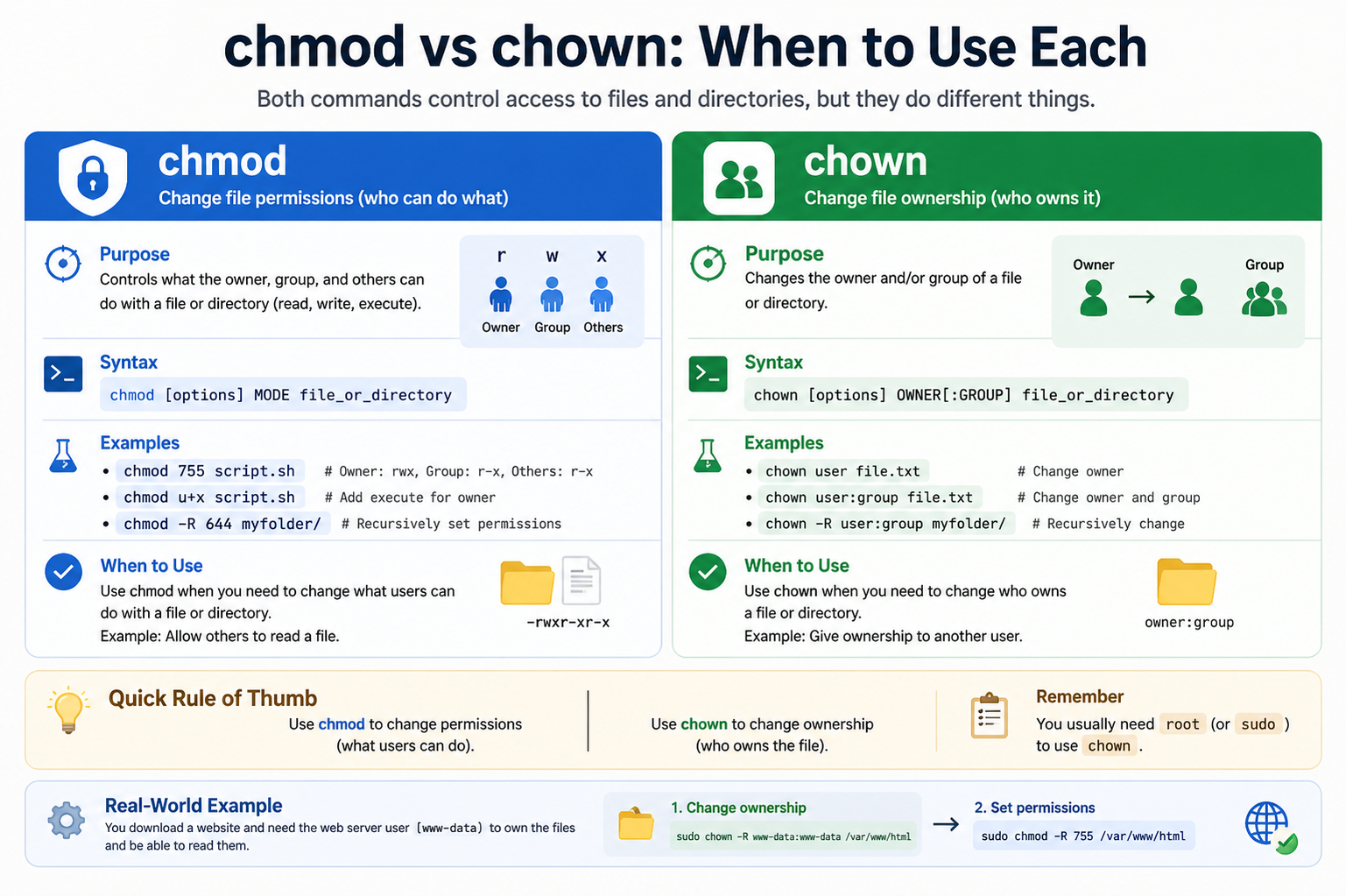
In Unix-like operating systems, every file and directory is governed by a structured system of permissions and ownership. This system determines who can access a file and what actions they are allowed to perform. Two of the most important commands used to manage this system are chmod and chown. While they are often used together, they serve very different purposes. One focuses on controlling access rights, while the other focuses on assigning ownership. Understanding the distinction between them is essential for managing systems securely and efficiently, especially in multi-user environments where resources are shared.
What chmod actually does in a system
The chmod command stands for “change mode,” and its primary function is to modify the permission settings of files and directories. These permissions define what actions users can perform, such as reading the contents of a file, modifying it, or executing it as a program. Every file has three categories of users: the owner, the group, and others. Each category can be granted different levels of access depending on system requirements.
When chmod is used, it does not change who owns the file. Instead, it only changes what can be done with the file. For example, a script file may exist that is not executable by default. By applying chmod, it can be made executable so the system can run it as a program. Similarly, sensitive configuration files can be restricted so that only the owner can modify them, while others may only have read access or no access at all.
Permissions are commonly represented in two ways: symbolic and numeric. In symbolic form, letters such as r, w, and x are used to represent read, write, and execute permissions. In numeric form, values like 4, 2, and 1 are combined to represent permission sets. This dual representation allows both readability and precision when managing access control.
Understanding how permissions affect system behavior
File permissions are not just about convenience; they are a critical part of system security. Incorrect permission settings can expose sensitive data or allow unauthorized modifications. On the other hand, overly restrictive permissions can break applications or prevent users from performing necessary tasks.
For example, a web server might need read access to certain files in order to serve them to users. If chmod is misused and those permissions are removed, the website may stop functioning correctly. Similarly, granting execute permission to the wrong file could allow unintended code execution. This is why chmod must be used carefully, with a clear understanding of the impact of each permission change.
Permissions also behave differently depending on whether they are applied to files or directories. On directories, read allows listing contents, write allows creating or deleting files, and execute allows entering the directory. This distinction is important when managing system structure and access flow.
What chown does and why it matters
The chown command stands for “change owner,” and it is used to modify the ownership of files and directories. Every file in a system is associated with a specific user and a specific group. These ownership attributes determine which users have primary control over the file and how group collaboration is handled.
When chown is used, the file is reassigned to a different user or group. This is especially important in environments where multiple users work on the same system. For example, if a file is created by one user but needs to be managed by another, chown allows that transfer of responsibility.
Unlike chmod, which adjusts what is allowed, chown changes who is responsible for the file. This distinction is fundamental. Ownership often determines the baseline level of control, and permissions define the specific actions allowed on top of that ownership structure.
User and group ownership in practice
Every file belongs to a single user and a single group. The user owner typically has the highest level of control over the file, while group ownership allows multiple users to share access under a defined set of permissions.
chown can modify both user and group ownership. This flexibility is essential in collaborative environments. For instance, in a development team, files may need to be reassigned to a shared project group so that all team members can access them. Similarly, system administrators may transfer ownership of configuration files between services or users to maintain proper system organization.
Changing ownership can also affect security. If a file is owned by a privileged user, it may have stricter access rules. If ownership is transferred to a less privileged user, the file may become more accessible. This makes chown a powerful command that must be used with care.
How chmod and chown work together
Although chmod and chown serve different purposes, they are often used together to properly configure file access. Ownership determines the baseline relationship between users and files, while permissions refine what actions are allowed.
For example, a file may be owned by a system administrator but needs to be accessible to a specific service user. First, chown can assign ownership to the correct service account. Then, chmod can set appropriate permissions so the service can read or execute the file as needed.
This combination ensures both proper control and functionality. Using only one of the commands often leads to incomplete configuration. Ownership without correct permissions can still restrict access, and permissions without correct ownership can create security risks.
Common scenarios where chmod is used
chmod is frequently used in everyday system management. One common use case is making scripts executable so they can be run directly from the terminal. Another is restricting access to sensitive files such as private keys or configuration settings.
It is also used when setting up web servers or shared directories. In such cases, administrators may adjust permissions to ensure that only specific users can modify content while others can view it.
Another important use is in troubleshooting. When a program fails to run or access a file, incorrect permissions are often the cause. Adjusting chmod settings can quickly resolve such issues without changing ownership.
Common scenarios where chown is used
chown is typically used when responsibility for a file changes. This can happen when files are created by one user but need to be managed by another. It is also common in system administration tasks where services run under dedicated user accounts.
In collaborative environments, chown is used to assign files to shared groups. This ensures that multiple users can work on the same resources without constantly modifying permissions for individual accounts.
It is also used during system migrations or backups, where files may need to be reassigned to match the new system’s user structure.
Security implications of both commands
Both chmod and chown play a major role in system security. Incorrect usage can lead to serious vulnerabilities. Overly permissive chmod settings can expose sensitive data or allow unauthorized execution of programs. Improper chown usage can transfer control of important files to unintended users, potentially compromising system integrity.
Security best practices involve applying the principle of least privilege. This means giving users and processes only the access they absolutely need. chmod is used to enforce this principle at the permission level, while chown ensures correct ownership boundaries.
Practical mistakes users often make
One common mistake is using overly broad permissions with chmod, such as granting full access to all users. This can create serious security risks. Another mistake is changing ownership unnecessarily with chown, which can break system services or cause confusion about file responsibility.
Another issue arises when users confuse the two commands and try to solve ownership problems using chmod. While permissions can restrict access, they cannot change file ownership structure. Similarly, using chown instead of chmod will not resolve permission-related errors.
Understanding the role of each command helps avoid these mistakes and ensures proper system configuration.
Best practices for using chmod and chown
A good approach to using these commands is to always verify the current state of a file before making changes. Checking ownership and permissions first helps prevent accidental misconfiguration.
It is also important to make incremental changes rather than applying broad modifications. Testing access after each change ensures that the system behaves as expected.
Using administrative privileges carefully is another key practice. Both chmod and chown can affect critical system files, so they should be used with caution, especially when executed with elevated permissions.
chmod and chown are fundamental tools in file system management, but they serve distinct roles. chmod controls what actions are allowed on a file, while chown determines who owns it. Understanding this difference is essential for maintaining both functionality and security in a system.
When used correctly, they provide a powerful way to manage access, collaboration, and control in multi-user environments. Mastery of both commands leads to better system organization, safer configurations, and fewer operational issues.
Deeper look at permission structure in Unix systems
To fully understand how chmod works, it is important to understand how permissions are structured at a deeper level. Every file and directory is associated with a set of permission bits that define how it can be accessed. These bits are grouped into three categories: owner permissions, group permissions, and others permissions. Each category contains three basic actions: read, write, and execute.
The read permission allows viewing the contents of a file or listing a directory. The write permission allows modifying or deleting a file, or adding and removing items in a directory. The execute permission allows running a file as a program or accessing a directory.
chmod directly manipulates these permission bits. When a change is applied, it modifies how these bits are set for each user category. This makes chmod a precise tool for controlling access behavior at a very granular level.
Symbolic vs numeric permission methods in depth
chmod can be used in two main ways: symbolic mode and numeric mode. In symbolic mode, letters and symbols are used to represent permission changes. This method is often easier to read and understand, especially for beginners. For example, adding execute permission to a file might be written in a way that clearly indicates the action and target.
Numeric mode, on the other hand, uses a three-digit or four-digit number system. Each digit represents a combination of permissions. This method is more compact and often preferred by advanced users and system administrators because it allows faster configuration.
Both methods achieve the same result, but the choice depends on readability versus efficiency. Understanding both approaches helps in interpreting system configurations and scripts that use chmod.
Real-world importance of correct chmod usage
In real-world systems, chmod is constantly used behind the scenes. Web servers, databases, application frameworks, and scripts all rely on correct permission settings to function properly. Even a small mistake in permission configuration can cause system failures.
For example, a deployed application might suddenly stop working because a configuration file lost its read permission. In another case, a deployment script might fail because it does not have execute permission. These issues are often resolved by carefully adjusting chmod settings.
System administrators also use chmod to protect sensitive data. Private files such as authentication keys or system configuration files are often restricted so that only specific users can access them. This reduces the risk of unauthorized access or accidental modification.
Advanced understanding of chown behavior
While chmod deals with access rules, chown operates at a higher structural level by changing file ownership. Ownership is not just a label; it influences how permissions are interpreted and enforced.
When a file is owned by a specific user, that user is considered the primary controller of the file. The group ownership determines shared access among multiple users. Changing ownership with chown can significantly alter how a file is managed within the system.
For example, if a file is initially created by a root user but needs to be managed by a service account, chown can transfer ownership to that service. This allows the service to operate on the file without requiring elevated privileges.
How ownership affects system processes
Many system processes run under specific user accounts. These accounts are designed to isolate services for security and stability. When a process interacts with files, ownership determines whether it has the necessary rights to do so.
If ownership is incorrect, even proper permissions set by chmod may not be enough to allow access. This is because some operations require ownership-level control. In such cases, chown becomes necessary to realign file ownership with the correct system process.
This interaction between ownership and process behavior is a key part of system design in Unix-like environments.
Group management and collaboration use cases
Group ownership plays an important role in collaborative systems. Instead of giving multiple users individual access rights, administrators often assign files to a shared group. This simplifies permission management and improves consistency.
Using chown to assign a file to a group ensures that all members of that group can access the file according to the permissions set by chmod. This combination allows flexible collaboration without compromising security.
For example, in a software development environment, all developers on a team may belong to the same group. Project files can be assigned to that group so that everyone can read and modify them as needed.
Interaction between chmod and file inheritance
When new files are created inside a directory, they often inherit certain permission settings from the parent directory. This behavior is controlled by system defaults and user configurations. chmod can be used to adjust these defaults indirectly by changing directory permissions.
However, ownership behavior does not always follow the same inheritance pattern. New files are usually assigned to the user who created them. This is where chown becomes necessary when files need to be reassigned to a different owner after creation.
Understanding this difference helps prevent confusion when managing large file systems.
System administration workflows involving both commands
In professional system administration, chmod and chown are rarely used in isolation. They are part of structured workflows that ensure proper system setup.
A common workflow might involve creating a directory structure, assigning ownership using chown, and then applying permission rules using chmod. This ensures that both identity and access rules are properly configured.
Another workflow might involve migrating applications from one system to another. In such cases, chown is used to adjust ownership to match the new environment, while chmod is used to restore correct access levels.
Risks of incorrect usage in production systems
Incorrect use of chmod or chown in production environments can lead to serious problems. If critical system files are assigned incorrect ownership, services may fail to start or operate correctly. If permissions are misconfigured, sensitive data may become exposed.
One of the most dangerous mistakes is applying recursive changes without understanding the full directory structure. This can unintentionally modify system-wide settings and break applications.
Because of these risks, changes involving chmod and chown are often carefully reviewed and tested before being applied in production.
Debugging issues caused by permissions and ownership
Many system errors are related to either permissions or ownership. When a file cannot be accessed, the first step in troubleshooting is usually to check both chmod and chown settings.
If a file exists but cannot be read or executed, permission settings are often the cause. If access is denied even when permissions appear correct, ownership may be the underlying issue.
By systematically checking both factors, administrators can quickly identify and resolve access problems.
Conceptual difference between access and control
A useful way to understand chmod and chown is to think of them as representing two different concepts. chmod represents access control, meaning what actions are allowed. chown represents ownership control, meaning who is responsible for the file.
Access control defines behavior, while ownership defines authority. Both are necessary for a complete security model. Without ownership, files would not have clear responsibility. Without permissions, ownership would not define how files can be used.
Importance in multi-user operating systems
In multi-user systems, many people share the same machine or server. This makes file management more complex. chmod and chown help solve this complexity by separating responsibility and access.
Ownership ensures that each file has a clear owner, while permissions ensure that other users interact with it safely. This separation is one of the core reasons Unix-like systems are stable and secure in shared environments.
Long-term system maintenance considerations
Over time, systems accumulate many files, users, and services. Proper use of chmod and chown becomes essential for maintaining order. Without consistent ownership and permission practices, systems can become difficult to manage.
Regular audits are often performed to ensure that files have correct ownership and appropriate permissions. This helps prevent security issues and ensures smooth system operation.
chmod and chown are not competing tools but complementary ones. One defines what can be done, and the other defines who can do it. Together, they form the foundation of file security and management in Unix-like systems.
Understanding both commands in depth allows for better control over system behavior, improved security practices, and more reliable system administration.
How system security depends on both commands
System security in Unix-like environments is built on layered protection, and both chmod and chown form the foundation of that structure. Ownership defines the primary controller of a file, while permissions define what actions are allowed. If either layer is misconfigured, security can be weakened.
For example, even if permissions are properly restricted using chmod, incorrect ownership set by chown may still allow unintended users or services to gain control. Similarly, correct ownership without proper permission settings can still expose sensitive data. This layered model ensures that no single setting is responsible for system safety, but both must work together.
Understanding privilege levels and their impact
Different users in a system operate at different privilege levels. The root user typically has full control over all files and processes, while regular users have limited access based on ownership and permissions. chown plays a critical role in defining which user has primary authority over a file.
When ownership is assigned to a privileged account, that file may inherit a higher level of control. When assigned to a standard user, control becomes limited to that user’s permission scope. chmod then refines how that control is exercised by defining read, write, and execute rights.
This separation ensures that system privileges are not granted casually but are carefully structured.
File execution control and real system behavior
One of the most practical uses of chmod is controlling execution behavior. A file may contain valid code, but without execute permission, the system will refuse to run it. This prevents accidental or unauthorized execution of scripts.
In contrast, chown does not directly influence execution but determines which user has authority over the executable file. This distinction is important in environments where multiple users manage scripts or applications.
For example, a deployment script may be owned by a system administrator but executed by a service account. In this case, chown ensures correct ownership, while chmod ensures execution rights are properly set.
Understanding recursive changes and their risks
Both chmod and chown support recursive operations, meaning changes can be applied to entire directories and all their contents. While this is useful for large projects, it also introduces risk.
A recursive chmod change can unintentionally modify permissions of critical system files, leading to application failures or security vulnerabilities. Similarly, a recursive chown operation can change ownership of system directories, potentially breaking services or altering system behavior.
Because of these risks, recursive usage should always be carefully planned and reviewed before execution.
Role in software deployment and updates
During software deployment, both commands are frequently used to prepare applications for execution. Files are first placed into directories, ownership is then assigned using chown to match the correct service or user account, and finally chmod is applied to ensure proper execution and access.
This structured approach ensures that applications run under controlled conditions. Without correct ownership, services may not be able to access required files. Without correct permissions, applications may fail to execute or read necessary resources.
How system logs and configuration files are protected
System logs and configuration files are critical components of any operating system. These files often contain sensitive information and must be carefully protected. chmod is used to restrict access so that only authorized users can read or modify them.
chown ensures that these files are owned by trusted system accounts, preventing unauthorized reassignment or control. Together, they form a protective barrier around essential system data.
Mismanagement of either command in this context can expose sensitive information or disrupt system stability.
Impact on automated processes and services
Many system services operate automatically without direct user interaction. These services rely heavily on correct file ownership and permissions to function properly. chown ensures that service accounts own the necessary files, while chmod ensures they have the correct level of access.
For example, a database service may require access to data files and configuration settings. If ownership is incorrect, the service may be unable to start. If permissions are too restrictive, it may fail to read or write required data.
This dependency makes both commands essential for reliable automation.
Troubleshooting permission and ownership conflicts
When systems fail to behave as expected, permission and ownership conflicts are often the cause. A structured approach is needed to diagnose such issues. First, chmod settings are checked to confirm whether access rights are correct. Then, chown settings are reviewed to ensure proper ownership.
In many cases, problems arise when ownership and permissions are inconsistent. For example, a user may have read permission but not ownership, limiting their ability to modify files. Alternatively, a file may be owned by the correct user but lack necessary execution rights.
Resolving these conflicts requires understanding both commands together rather than in isolation.
System isolation and user separation
Unix-like systems are designed to support multiple users working on the same machine simultaneously. This requires strict separation of files and processes. chown ensures that each user has ownership over their own files, while chmod ensures that access to those files is controlled.
This separation prevents users from interfering with each other’s data while still allowing controlled collaboration. It also improves system stability by reducing accidental interference between processes.
Best practices for secure system configuration
A secure system configuration relies on careful use of both commands. Files should always be assigned appropriate ownership immediately after creation or deployment. Permissions should then be set according to the principle of least privilege, meaning users should only have access to what they need.
Avoid using overly broad permissions or unnecessary ownership changes. Regular audits should be performed to ensure that files remain correctly configured over time. This helps maintain both security and system reliability.
Understanding default system behavior
When files are created, the system automatically assigns ownership based on the creating user and their primary group. Default permissions are also applied based on system configuration. Over time, these defaults may not match application requirements, which is where chmod and chown become necessary.
chown is used to correct ownership mismatches, while chmod adjusts default permission behavior to match operational needs. Understanding these defaults helps reduce configuration errors and improves system consistency.
Long-term stability and maintenance strategy
As systems grow, managing files manually becomes increasingly complex. A consistent strategy for using chmod and chown is essential for long-term stability. Clear rules for ownership assignment and permission structures help prevent confusion and reduce errors.
Many organizations develop internal guidelines for how these commands should be used. This ensures that all system administrators follow the same standards, making systems easier to maintain and troubleshoot.
Final perspective on their combined role
chmod and chown are not just technical commands but foundational tools for system organization. chmod defines how resources can be used, while chown defines who controls them. Together, they create a structured environment where security, collaboration, and functionality can coexist.
A strong understanding of both allows for better system design, safer operations, and more efficient administration in any multi-user computing environment.
Advanced permission scenarios in complex systems
In larger systems with many users, services, and applications, permission management becomes more complex. chmod is often used not just for basic access control but for finely tuning how different components interact with files. For example, in environments where multiple applications share resources, permissions must be carefully balanced so that each service can access only what it needs without exposing unnecessary control.
chown becomes equally important in these scenarios because ownership determines the primary responsibility for each file. In enterprise systems, different services often run under dedicated user accounts, and chown is used to assign files to those accounts. This ensures that each service operates within its own secure boundary.
When both commands are used correctly together, they create a controlled ecosystem where applications can coexist safely without interfering with one another.
Permission inheritance and system consistency
In many cases, directories are configured in such a way that new files inherit certain permission patterns. This helps maintain consistency across large projects or system directories. chmod plays a key role in defining these baseline rules at the directory level.
However, ownership does not always follow the same inheritance pattern. Files created by a user will naturally belong to that user unless chown is explicitly used afterward. This can sometimes lead to inconsistencies in shared environments where multiple users are working on the same directory structure.
To maintain system consistency, administrators often combine both commands in structured workflows, ensuring that both ownership and permissions align with expected system behavior.
Real-world system architecture considerations
In modern system architecture, especially in server environments, file access control is a critical design component. Applications are often separated into layers, each with different access requirements. chmod is used to enforce these layered access rules by defining what each layer can do with specific files.
chown complements this structure by ensuring that each layer or service has proper ownership of the files it needs to manage. For instance, a backend service may own its configuration files, while a logging service may own log directories.
This separation improves security, reduces risk of accidental modification, and supports scalable system design.
Security hardening through proper configuration
System hardening involves reducing vulnerabilities by restricting access and minimizing unnecessary privileges. chmod is a primary tool in this process, as it allows administrators to remove unnecessary permissions from files and directories. By limiting write or execute access, systems become less vulnerable to unauthorized changes or execution of malicious code.
chown contributes to hardening by ensuring that only trusted users or service accounts own sensitive files. If ownership is incorrectly assigned, even correct permissions may not be enough to prevent misuse. Proper ownership assignment reduces the attack surface by ensuring that only intended users have control.
Together, these commands form a key part of a secure system configuration strategy.
Common operational workflows in administration
In practical system administration, chmod and chown are used as part of routine workflows. When setting up a new application, the first step is usually to create required directories and files. After that, chown is used to assign ownership to the appropriate user or service account.
Once ownership is set, chmod is applied to define how those files can be accessed or executed. This sequence ensures that both identity and access rules are properly established from the beginning.
During maintenance or troubleshooting, administrators may revisit these settings to fix issues related to access failures or service misconfigurations.
Error patterns caused by incorrect usage
Incorrect usage of chmod or chown often leads to predictable system errors. One common issue is permission denied errors, which occur when chmod settings are too restrictive. Another frequent problem is service failure due to incorrect ownership, which happens when chown has not been applied correctly.
Sometimes both issues appear together, making troubleshooting more complex. In such cases, administrators must carefully analyze both ownership and permissions to identify the root cause.
Understanding these patterns helps reduce downtime and improves system reliability.
The importance of structured access control policies
Large systems often rely on structured access control policies to ensure consistency. These policies define how chmod and chown should be used across the system. For example, certain directories may always be owned by specific service accounts, and specific permission patterns may be enforced across all files.
Following such policies ensures that systems remain predictable and easier to manage. It also reduces the risk of accidental misconfiguration by different administrators.
Balancing flexibility and security
One of the main challenges in system management is balancing flexibility with security. chmod provides flexibility by allowing detailed control over access levels, while chown provides structural control by defining ownership boundaries.
Too much flexibility in permissions can lead to security risks, while overly strict ownership rules can limit functionality. Finding the right balance is essential for stable system operation.
Experienced administrators carefully adjust both commands to achieve this balance based on system requirements.
Long-term impact of proper configuration practices
Proper use of chmod and chown has long-term benefits for system stability and maintainability. Systems that follow consistent ownership and permission practices are easier to troubleshoot, upgrade, and scale.
Over time, well-configured systems experience fewer access-related issues and require less manual intervention. This improves overall efficiency and reduces operational risk.
Final conclusion
chmod and chown are foundational tools in Unix-like systems, each serving a distinct but complementary purpose. chmod controls what actions are allowed on files and directories, shaping how resources are accessed and used. chown determines who owns those resources, establishing responsibility and control.
When used together, they create a structured and secure file management system that supports both collaboration and protection. Understanding their differences and interactions is essential for anyone working with multi-user systems or server environments.
A well-managed system relies on clear ownership, carefully defined permissions, and consistent application of both commands. Mastering chmod and chown leads to stronger security, better organization, and more reliable system behavior over time.