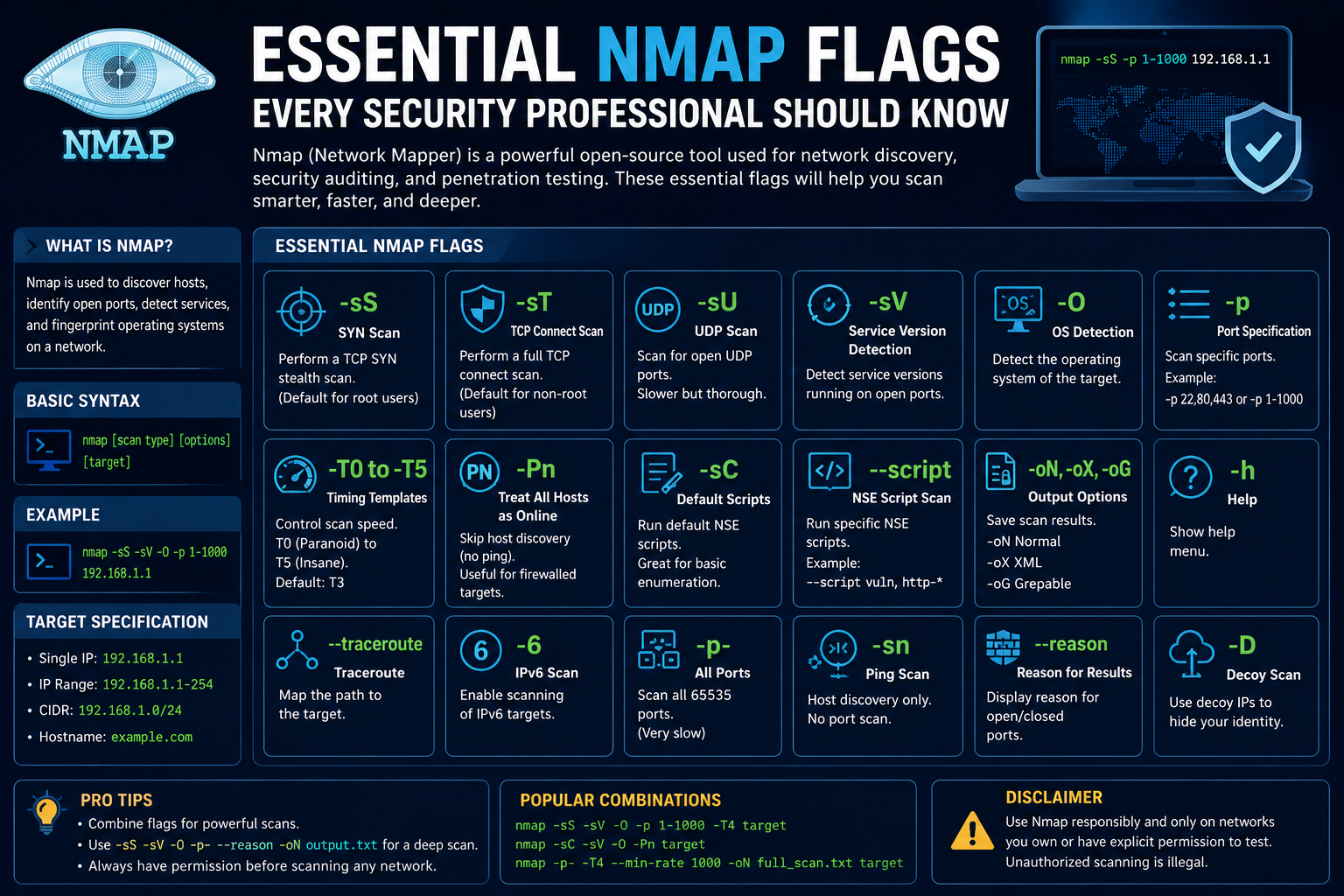
Nmap is one of the most recognized tools in cybersecurity and network administration. Professionals in penetration testing, vulnerability assessment, digital forensics, and defensive security use it regularly to gather information about systems and networks. The name Nmap stands for “Network Mapper,” which accurately describes what the tool does. It maps networks, identifies devices, detects services, and helps security professionals understand how systems communicate.
Nmap became popular because it combines speed, flexibility, and detailed analysis into one command-line utility. Instead of manually inspecting every device on a network, administrators and security engineers can use Nmap to automate the discovery process. This saves time while improving visibility into the environment.
For ethical hackers and penetration testers, Nmap serves as one of the first tools used during reconnaissance. Before testing vulnerabilities or attempting exploitation, professionals need information. They need to know which devices are online, which ports are open, which operating systems are running, and which services are exposed. Nmap provides those answers.
Another reason Nmap is so valuable is portability. It works on Linux, Windows, and macOS. Because of this, security professionals can use it in almost any environment. Whether working from a laptop, a cloud virtual machine, or a dedicated penetration testing platform, Nmap remains accessible and effective.
Nmap also has a strong reputation within the cybersecurity community because it is open source and constantly improved by contributors around the world. Over time, the tool has evolved from a simple port scanner into a complete network reconnaissance framework.
Despite its power, Nmap is not difficult to begin using. Basic commands are straightforward, and users can gradually build advanced knowledge by learning additional flags and scan techniques.
Understanding flags is the key to mastering Nmap.
What Are Nmap Flags?
Nmap flags are command-line options that modify how scans behave. They tell Nmap exactly what actions to perform and how to perform them. Without flags, Nmap would only perform basic default scans. Flags unlock advanced functionality and customization.
Every flag starts with a hyphen followed by one or more letters. Each one controls a different aspect of the scan.
Some flags determine how ports are scanned. Others control host discovery, timing, output formats, service detection, or operating system identification.
For example, one flag may tell Nmap to perform a stealthy scan, while another tells it to detect software versions running on a server. By combining multiple flags together, users can create highly targeted scans designed for specific objectives.
This flexibility is what makes Nmap so powerful.
A network administrator troubleshooting connectivity issues might use simple scanning flags to verify service availability. A penetration tester performing reconnaissance might combine stealth scanning, version detection, and operating system fingerprinting into one command.
Flags allow both approaches to exist within the same tool.
The more flags a user understands, the more effective their scans become.
Breaking Down a Basic Nmap Command
One of the best ways to understand Nmap flags is by examining a complete command.
Consider the following example:
nmap -sT -sV -Pn -p 1-60000 -T2 -oA scanresults target
At first glance, the command may seem intimidating. However, each component serves a specific purpose.
The command begins with nmap, which launches the tool itself.
The -sT flag tells Nmap to perform a TCP Connect scan. This scan type attempts to establish full TCP connections with target ports to determine whether they are open.
The -sV flag enables version detection. Nmap attempts to identify the services running behind open ports and determine their software versions.
The -Pn flag disables host discovery through ping requests. Instead of checking whether the target responds to ICMP requests, Nmap assumes the target is online and proceeds directly to scanning.
The -p 1-60000 flag defines the port range to scan. In this example, ports 1 through 60000 will be checked.
The -T2 flag controls timing and scan speed. Timing templates affect how quickly packets are sent and how aggressively Nmap interacts with the target.
The -oA scanresults flag saves output in multiple formats using the filename “scanresults.”
Finally, the command ends with the target address or hostname.
Once you understand each flag individually, large Nmap commands become much easier to read and construct.
Why Security Professionals Depend on Nmap
Nmap provides a level of visibility that is difficult to achieve manually. Networks often contain hundreds or thousands of devices. Without automated tools, understanding that environment becomes nearly impossible.
Security teams rely on Nmap because it quickly identifies exposed services and potential attack surfaces.
Open ports are especially important because they represent communication pathways into systems. Every open port corresponds to a service or application listening for traffic. If those services are vulnerable or misconfigured, attackers may gain unauthorized access.
By identifying open ports early, organizations can reduce their exposure before vulnerabilities are exploited.
Nmap also helps organizations maintain accurate asset inventories. Devices are constantly added, removed, or reconfigured within enterprise environments. Nmap helps administrators detect unknown or unmanaged systems.
Another reason professionals trust Nmap is reliability. The tool has been refined over many years and remains accurate across a wide variety of network environments.
Its scripting engine also allows advanced automation, enabling users to perform vulnerability checks, service enumeration, and configuration analysis.
Although beginners often use Nmap for basic scans, experienced professionals can use it as a sophisticated reconnaissance platform.
The Importance of Reconnaissance in Cybersecurity
Reconnaissance is one of the most critical stages of any penetration test or security assessment.
Before attempting exploitation, security professionals need information about the target environment. Without proper reconnaissance, attacks become inefficient and unreliable.
Nmap excels during reconnaissance because it gathers detailed technical information quickly.
This information helps security teams answer several important questions.
Which devices are online?
Which ports are open?
What services are running?
Which operating systems are present?
Are firewalls filtering traffic?
Which systems appear outdated?
The answers to these questions guide the rest of the assessment process.
For example, discovering an outdated web server may lead to web application testing. Identifying exposed remote access services may trigger authentication assessments.
Reconnaissance reduces guesswork and improves accuracy.
Attackers also rely heavily on reconnaissance. This is why organizations monitor scanning activity closely. Unusual scans often trigger alerts within intrusion detection systems and security information platforms.
Understanding how scans work therefore benefits both offensive and defensive security professionals.
Defenders can recognize suspicious behavior more effectively, while testers can perform assessments more responsibly and efficiently.
Introduction to Scanning Flags
Scanning flags are among the most commonly used Nmap options.
These flags determine how Nmap communicates with target ports and services. Different scan types provide different levels of speed, stealth, and detail.
Choosing the correct scan type is extremely important because network environments vary significantly.
Some environments are heavily monitored, while others prioritize speed and efficiency.
Understanding scanning flags helps users adapt their techniques appropriately.
TCP SYN Scan
The -sS flag enables a TCP SYN scan.
This is one of the most popular scan types in Nmap because it balances stealth and effectiveness.
Instead of completing a full TCP handshake, Nmap sends a SYN packet to the target port. If the target responds with a SYN-ACK packet, the port is considered open.
Nmap then terminates the connection before the handshake fully completes.
Because the connection is never finalized, SYN scans are sometimes referred to as half-open scans.
This approach reduces logging on some systems and makes the scan slightly harder to detect.
SYN scans are commonly used during penetration testing because they are relatively fast and reliable.
However, administrative privileges are often required to perform SYN scans properly.
TCP Connect Scan
The -sT flag enables a TCP Connect scan.
Unlike SYN scans, this method completes the entire TCP handshake process.
Nmap establishes a full connection with the target port before closing it.
TCP Connect scans are useful when raw packet privileges are unavailable.
For example, users without elevated permissions may still be able to perform TCP Connect scans successfully.
Although effective, these scans are easier to detect because they create full network connections that may be logged by security systems.
Still, they remain an important fallback scanning method.
UDP Scan
The -sU flag performs a UDP scan.
UDP scanning is more complicated than TCP scanning because UDP is connectionless.
Services using UDP do not establish formal handshakes, making response analysis more difficult.
Despite this challenge, UDP scanning is extremely important.
Several critical services rely on UDP, including DNS, DHCP, TFTP, and SNMP.
Attackers frequently target exposed UDP services because administrators sometimes overlook them during security hardening.
UDP scans are typically slower because Nmap must wait for responses or timeouts to determine port states.
Even so, thorough security assessments often include UDP analysis.
ACK Scan
The -sA flag performs an ACK scan.
ACK scans differ from traditional port scans because they are primarily used to analyze firewall behavior rather than identify open ports directly.
By examining how systems respond to ACK packets, Nmap can determine whether ports are filtered or unfiltered.
This information reveals valuable insights about firewall configurations and packet filtering rules.
Understanding firewall behavior helps testers determine which scan techniques may succeed later.
ACK scans are particularly useful in environments with strict perimeter security.
Why Scan Types Matter
Different scan types exist because no single method works perfectly in every situation.
A stealthy SYN scan may work well against one network but fail against another protected by advanced intrusion detection systems.
A TCP Connect scan may generate more reliable results but increase visibility.
UDP scans may reveal critical services that TCP scans completely miss.
Selecting the correct scan type requires understanding the target environment, assessment objectives, and acceptable risk levels.
Experienced professionals often combine multiple scan types to achieve comprehensive visibility.
This layered approach improves accuracy while minimizing blind spots.
Understanding Host Discovery
Before scanning ports, Nmap often attempts to determine whether hosts are online.
This process is called host discovery.
Host discovery improves efficiency because scanning offline systems wastes time and resources.
However, many organizations block common discovery methods such as ICMP echo requests.
To address this challenge, Nmap includes several host discovery flags.
Disabling Ping with -Pn
The -Pn flag tells Nmap to skip host discovery entirely.
Instead of checking whether the host responds to ping requests, Nmap assumes the target is online and proceeds directly to scanning.
This flag is useful when firewalls block ICMP traffic.
Without -Pn, Nmap might incorrectly assume the target is offline.
Penetration testers frequently use this option when working in restrictive environments.
However, skipping host discovery can slow scans because Nmap attempts to scan every specified target regardless of availability.
Ping Sweep with -sn
The -sn flag performs host discovery without port scanning.
This type of scan is often called a ping sweep.
The purpose is to identify active devices on a network quickly.
Administrators commonly use ping sweeps to inventory systems or identify unknown hosts.
Because no port scanning occurs, this method generates less traffic and often completes quickly.
It is especially useful during the early stages of reconnaissance.
ARP Discovery with -PR
The -PR flag performs ARP discovery on local networks.
ARP maps IP addresses to MAC addresses, allowing devices to communicate within local segments.
ARP discovery is highly reliable on local networks because most systems respond to ARP requests even if ICMP is blocked.
This technique helps identify physical devices connected to the network.
Security professionals can also use MAC addresses to infer hardware vendors and device types.
Disabling DNS Resolution
The -n flag disables DNS resolution.
Normally, Nmap attempts to resolve IP addresses into hostnames.
While useful in some situations, DNS lookups slow scans significantly.
Disabling DNS resolution speeds up reconnaissance and reduces unnecessary traffic.
Fast scanning becomes especially important when assessing large networks.
Balancing Speed and Stealth
Every scan involves tradeoffs between speed, detail, and stealth.
Fast scans generate results quickly but may trigger alerts.
Slow scans reduce visibility but require more time.
Highly detailed scans provide valuable intelligence but create additional network traffic.
Security professionals must balance these factors carefully.
Understanding flags allows users to customize scans for specific environments and objectives.
This flexibility is one of the reasons Nmap remains a foundational cybersecurity tool decades after its creation.
Understanding Port Specification Flags
Port specification flags are some of the most practical and frequently used options in Nmap. These flags allow security professionals to define exactly which ports should be scanned during an assessment. Since networks can contain thousands of open and closed ports across multiple devices, controlling the scope of a scan is extremely important.
Without port specification flags, scans can become unnecessarily slow and noisy. Security professionals often need targeted information quickly, especially during penetration tests where time matters.
Port specification flags help narrow the focus of a scan and improve efficiency.
Every network service communicates through ports. Web servers commonly use port 80 or 443, email services use ports like 25 and 587, and remote management tools may use ports such as 22 or 3389. By identifying which ports are open, testers gain insight into what services are running and which systems may be vulnerable.
The ability to target specific ports gives Nmap a significant advantage during reconnaissance.
Using the -p Flag
The -p flag is one of the most essential port specification options in Nmap.
This flag allows users to define specific ports or ranges of ports to scan.
For example:
nmap -p 80 target
This command scans only port 80 on the target system.
Users can also specify multiple ports at once.
Example:
nmap -p 21,22,25,80,443 target
This command scans several commonly used service ports simultaneously.
Port ranges are also supported.
Example:
nmap -p 1-1000 target
This scans ports 1 through 1000.
The ability to define precise scan ranges makes Nmap highly efficient during focused assessments.
A penetration tester investigating web services might scan only ports 80 and 443, while a database administrator may focus on ports associated with SQL servers.
Instead of scanning everything, professionals can target areas most relevant to their objectives.
Scanning All Ports with -p-
The -p- flag instructs Nmap to scan every available TCP port.
This includes all 65535 ports.
Comprehensive scans are useful because many organizations configure services on non-standard ports. Attackers and administrators alike know that moving a service away from its default port does not make it secure.
For example, an administrator may move SSH from port 22 to port 2222. A limited scan might miss it entirely, while a full-port scan would detect it.
Full scans are especially valuable during deep reconnaissance phases.
However, scanning every port takes significantly more time than targeted scans.
The duration depends on factors such as network latency, firewall filtering, scan timing, and host responsiveness.
Because full scans generate more traffic, they are also more likely to trigger monitoring systems.
Security professionals must decide whether completeness or stealth is more important for the situation.
Fast Scanning with -F
The -F flag enables fast scanning mode.
Instead of scanning all ports, Nmap scans only the most commonly used ports listed in its internal database.
This dramatically reduces scan time.
Fast scans are useful during early reconnaissance stages when testers want a quick overview of exposed services.
For example, an administrator troubleshooting connectivity issues may only need to identify whether major services are available.
Fast scans are not comprehensive, but they are highly practical for rapid assessments.
Because they generate less traffic, they may also reduce the likelihood of detection.
However, relying solely on fast scans can leave blind spots. Services operating on uncommon ports may remain undiscovered.
This is why experienced professionals often combine fast scans with deeper analysis later.
Why Port Selection Matters
Efficient port selection is an important skill in cybersecurity.
Scanning too few ports may miss critical services.
Scanning too many ports may waste time and increase detection risk.
The best approach depends on the environment and assessment goals.
For example, during external penetration testing, stealth may be prioritized. A tester might scan only common service ports initially.
In contrast, during internal security audits, comprehensive scanning may be preferred to identify all exposed services.
Understanding when to perform targeted scans versus full scans is part of becoming proficient with Nmap.
Introduction to Service Detection Flags
Open ports alone do not provide complete information.
A port may be open, but without understanding what service is running behind it, the data remains limited.
Service detection flags help solve this problem.
These flags allow Nmap to identify applications, protocols, and software versions running on target systems.
This information is extremely valuable because vulnerabilities are often tied to specific software versions.
An outdated service may contain publicly known exploits, while a fully patched version may not.
Service detection transforms simple port scanning into detailed reconnaissance.
Service Version Detection with -sV
The -sV flag enables version detection.
When enabled, Nmap interacts with open ports and analyzes responses to determine what services are running and which versions are installed.
For example, instead of simply reporting that port 80 is open, Nmap may reveal that the target is running Apache HTTP Server version 2.4.
This additional detail significantly improves the value of reconnaissance data.
Version detection is especially important because software vulnerabilities are often version-specific.
A penetration tester identifying outdated FTP software may immediately recognize known weaknesses associated with that version.
Similarly, administrators can use version detection to identify systems requiring updates or patches.
Version detection also helps identify unexpected services.
Sometimes systems run applications administrators did not intend to expose publicly. Nmap helps reveal those misconfigurations.
Aggressive Detection Mode with -A
The -A flag enables aggressive detection mode.
This option combines several advanced Nmap features into one command.
Aggressive mode includes:
Operating system detection
Version detection
Script scanning
Traceroute functionality
The goal of aggressive mode is to gather as much information as possible quickly.
This approach is extremely useful during internal assessments and lab environments where stealth is less important.
However, aggressive scanning generates more traffic and increases the likelihood of detection.
Intrusion detection systems often flag aggressive scans because of their volume and behavior.
Even so, aggressive mode remains popular because it saves time and simplifies command construction.
Instead of typing several separate flags, users can activate multiple reconnaissance features simultaneously.
Operating System Detection with -O
The -O flag enables operating system detection.
Nmap analyzes TCP/IP stack behavior to estimate the target operating system.
Different operating systems implement networking protocols slightly differently. By examining packet responses, Nmap can identify patterns associated with Windows, Linux, BSD, macOS, and other platforms.
Operating system detection helps testers tailor their techniques and expectations.
For example, exploitation methods that work against Linux may not apply to Windows systems.
Similarly, patch management practices often differ between operating systems.
Accurate operating system identification therefore improves assessment efficiency and precision.
Although Nmap operating system detection is impressive, it is not always perfect. Firewalls, packet filtering, and unusual configurations can affect accuracy.
Still, it provides valuable intelligence during reconnaissance.
Why Service and Version Detection Are Important
Identifying services and operating systems helps security professionals prioritize risk.
An open port alone may not appear dangerous.
However, discovering an outdated service version behind that port changes the situation significantly.
Version detection also helps organizations maintain accurate inventories.
Many enterprises struggle with shadow IT, forgotten services, and unmanaged devices. Nmap helps reveal those hidden assets.
Additionally, service detection supports incident response investigations.
If suspicious activity occurs on a network, responders can use Nmap to verify what services are exposed and whether unexpected software is present.
The more visibility defenders have, the stronger their security posture becomes.
Understanding Timing Flags
Timing plays a major role in how Nmap behaves.
Scanning too quickly can overwhelm networks or trigger detection systems.
Scanning too slowly may waste valuable time.
Timing flags help users balance speed, accuracy, and stealth.
Nmap includes several timing templates ranging from extremely cautious to highly aggressive.
These templates are controlled using the -T flag.
Using Timing Templates
Nmap timing templates range from -T0 to -T5.
Each level changes how aggressively Nmap sends packets and processes responses.
-T0 is the slowest timing option.
This mode is designed for maximum stealth. It spaces packets out carefully to avoid detection.
However, scans using -T0 can take an extremely long time.
-T1 is slightly faster while still prioritizing caution.
-T2 is considered polite mode. It reduces scan speed to minimize network impact.
-T3 is the default timing template.
It balances speed and reliability for general-purpose scanning.
-T4 increases speed significantly and is commonly used on reliable local networks.
-T5 is the most aggressive option. It prioritizes speed above all else.
Aggressive timing can produce rapid results, but it also increases the risk of packet loss, inaccurate results, and detection.
Choosing the correct timing template depends heavily on the environment.
Stealth Versus Speed
One of the biggest challenges in network reconnaissance is balancing stealth and speed.
Fast scans complete quickly but generate noticeable traffic patterns.
Slow scans reduce visibility but require patience.
Highly monitored environments may require cautious timing settings to avoid alerts.
Internal testing environments may allow faster scans because stealth is less important.
Understanding timing flags helps professionals adapt to different assessment scenarios.
Experienced testers rarely rely on one approach exclusively. Instead, they adjust timing based on target sensitivity and operational requirements.
Output Flags and Documentation
Collecting information is only useful if it can be analyzed and documented effectively.
Output flags allow Nmap users to save scan results in multiple formats for later review.
This is especially important during penetration testing and compliance audits where evidence must be preserved.
Proper documentation also helps teams collaborate more effectively.
Instead of rerunning scans repeatedly, analysts can review saved results.
Nmap includes several output options designed for different use cases.
Normal Output with -oN
The -oN flag saves results in normal human-readable format.
This format resembles the standard output displayed in the terminal.
Example:
nmap -oN results.txt target
Normal output is easy to read and useful for quick analysis.
Security professionals often use this format when manually reviewing findings.
Because it is simple and straightforward, normal output is also useful for reports and documentation.
XML Output with -oX
The -oX flag saves results in XML format.
XML output is designed for integration with other tools and automation platforms.
Many vulnerability management systems and reporting applications can import XML data directly.
This makes XML extremely valuable in enterprise environments.
Automation is a major part of modern cybersecurity operations, and structured data formats help streamline workflows.
XML output also supports custom scripting and data processing.
Greppable Output with -oG
The -oG flag produces greppable output.
This format is optimized for text processing and command-line filtering.
Security professionals working in Linux environments often combine greppable output with utilities like grep, awk, and sed.
This allows rapid extraction of specific information from large scan results.
For example, analysts can quickly identify open SSH ports or vulnerable services across multiple hosts.
Although newer formats are often preferred today, greppable output remains useful in certain workflows.
All Formats with -oA
The -oA flag saves output in all major formats simultaneously.
This includes normal output, XML output, and greppable output.
Example:
nmap -oA scanresults target
This option is convenient because it preserves flexibility.
Different team members or tools may prefer different formats.
By generating all formats at once, users avoid rerunning scans later.
This approach is especially valuable during large assessments where scans may take considerable time to complete.
Why Output Management Matters
Many beginners focus only on scanning itself while overlooking documentation.
However, professional cybersecurity work depends heavily on accurate records.
Penetration testers must provide detailed reports to clients.
Incident responders must preserve evidence for investigations.
Administrators must maintain records for auditing and compliance purposes.
Proper output management therefore plays a critical role in operational security workflows.
Well-organized scan data improves communication, supports analysis, and reduces redundant work.
Nmap output flags help professionals transform raw scan results into usable intelligence.
Combining Multiple Flags Together
The real strength of Nmap appears when multiple flags are combined into a single command.
For example:
nmap -sS -sV -O -p 1-1000 -T3 -oA fullscan target
This command performs:
A SYN scan
Version detection
Operating system detection
A scan of ports 1 through 1000
Moderate timing
Output saving in multiple formats
Instead of running separate commands for each task, Nmap combines them efficiently.
This flexibility is one of the reasons Nmap remains one of the most respected tools in cybersecurity.
Mastering flag combinations allows professionals to perform highly customized assessments tailored to specific environments and objectives.
Understanding Advanced Nmap Usage
Once users become comfortable with basic scanning techniques, they often begin exploring more advanced Nmap capabilities. At this stage, Nmap transforms from a simple port scanner into a sophisticated reconnaissance and security auditing platform.
Advanced Nmap usage involves combining flags strategically, tuning performance, understanding network behavior, and interpreting results accurately. Experienced cybersecurity professionals rarely use default scans because every network environment behaves differently.
Some environments prioritize stealth and caution. Others require speed and broad visibility. Nmap allows users to adapt to both situations through careful flag selection.
One of the reasons Nmap remains widely respected is that it scales effectively from beginner-level tasks to highly advanced penetration testing operations.
A beginner may use Nmap to check whether a website is reachable, while an experienced tester may use it to map an enterprise network, identify exposed services, bypass filtering controls, and gather operating system intelligence simultaneously.
The difference lies in understanding how flags work together.
How Nmap Builds Network Intelligence
Every scan conducted with Nmap contributes to a larger intelligence-gathering process.
An open port by itself may not reveal much. However, when combined with service detection, operating system identification, timing analysis, and firewall behavior, a detailed picture of the target begins to emerge.
For example, imagine a scan reveals the following:
Port 22 open running OpenSSH
Port 80 open running Apache
Port 3306 open running MySQL
Linux operating system detected
Firewall filtering certain TCP packets
This information tells a security professional much more than simple connectivity details.
It suggests the target may be hosting a web application backed by a database server. It also indicates that remote administration is enabled through SSH. Firewall filtering reveals the presence of network security controls that may influence future testing methods.
This layered intelligence gathering is one of the core principles of penetration testing.
Attackers rely heavily on reconnaissance because informed attacks are more effective than random attempts.
Defenders use the same information to identify weaknesses before attackers can exploit them.
Nmap serves both purposes by revealing the technical structure of a target environment.
Understanding Stealth Scanning
Stealth is an important consideration during many security assessments.
Modern organizations deploy intrusion detection systems, intrusion prevention systems, firewall logging, behavioral analytics, and security information platforms capable of detecting suspicious activity.
Aggressive scanning often generates alerts.
Stealth scanning techniques aim to reduce visibility while still gathering information.
The TCP SYN scan using the -sS flag is one of the most common stealth scanning methods.
Because the TCP handshake is not fully completed, some systems may log less information compared to full TCP connections.
Another stealth-related strategy involves timing control.
Slower scans generate less obvious traffic patterns. By reducing packet transmission speed, testers can avoid triggering threshold-based detection systems.
Flags such as -T1 or -T2 help support quieter scanning behavior.
Disabling DNS resolution using the -n flag also reduces unnecessary traffic.
DNS queries themselves can reveal reconnaissance activity to monitoring systems.
Stealth scanning is not about becoming invisible. Most advanced security systems can still detect sophisticated scans.
Instead, stealth scanning attempts to reduce noise, lower detection probability, and minimize disruption to the target environment.
Understanding stealth concepts is essential for ethical hackers because real-world security assessments often occur in monitored networks.
Firewall Evasion and Packet Filtering Awareness
Firewalls play a major role in modern network security.
These systems filter traffic based on predefined rules and help prevent unauthorized access.
Nmap includes several features that help users understand firewall behavior.
The -sA ACK scan is particularly useful for this purpose.
Instead of identifying open ports directly, ACK scans analyze how firewalls respond to packets.
This helps determine whether ports are filtered or unfiltered.
Understanding filtering behavior is valuable because it reveals how traffic is controlled within the environment.
For example, a firewall may allow outbound traffic while blocking inbound requests. Another may filter only certain protocols or ports.
These details influence how security professionals approach further testing.
Packet filtering also affects scan accuracy.
Some firewalls intentionally drop packets silently instead of rejecting them. This behavior can make ports appear filtered or unresponsive.
Experienced Nmap users learn to interpret these patterns carefully rather than relying solely on automated results.
Firewalls may also rate-limit responses to scanning activity.
This means aggressive scans could produce incomplete or misleading results.
Timing adjustments often help improve reliability in heavily filtered environments.
Understanding how filtering impacts reconnaissance is a critical part of advanced Nmap usage.
The Importance of UDP Scanning
Many beginners focus heavily on TCP scanning while overlooking UDP services.
This is a significant mistake because several critical services operate over UDP.
Examples include:
DNS
DHCP
SNMP
TFTP
NTP
VoIP protocols
The -sU flag enables UDP scanning.
UDP scanning is more difficult than TCP scanning because UDP does not establish formal connections.
Without handshake responses, determining port states becomes more complicated.
Nmap often relies on ICMP unreachable messages and response timing to estimate whether UDP ports are open.
As a result, UDP scans are generally slower.
Despite these challenges, UDP scanning is extremely valuable during security assessments.
Many organizations fail to secure UDP services properly because they focus primarily on TCP-based applications.
Exposed SNMP services, for example, may leak sensitive infrastructure information.
Misconfigured DNS servers may allow unauthorized zone transfers.
VoIP services may expose communication infrastructure to attacks.
Comprehensive reconnaissance should therefore include both TCP and UDP analysis whenever possible.
Operating System Fingerprinting in Detail
Operating system detection is one of Nmap’s most impressive capabilities.
Using the -O flag, Nmap analyzes network responses and compares them against known fingerprints.
Different operating systems handle TCP/IP communication differently.
Variations in packet size, response timing, flag behavior, and protocol implementation create identifiable patterns.
Nmap uses these patterns to estimate the target operating system.
This information is highly valuable during penetration testing.
Different operating systems have different default configurations, patch management practices, and vulnerabilities.
Knowing the operating system helps testers choose appropriate tools and techniques.
For example, Windows environments may expose SMB-related attack surfaces, while Linux environments may rely more heavily on SSH-based administration.
Operating system fingerprinting also helps defenders maintain accurate asset inventories.
Unknown devices on a network often represent unmanaged or shadow IT systems.
Nmap helps identify those systems more effectively.
Although fingerprinting is highly useful, it is not infallible.
Firewalls, load balancers, virtualization platforms, and unusual network configurations can affect accuracy.
Experienced analysts therefore treat operating system detection as guidance rather than absolute truth.
Version Detection and Vulnerability Research
Version detection using the -sV flag provides one of the most actionable forms of reconnaissance.
Software vulnerabilities are often tied directly to specific versions.
An outdated service may contain known security flaws with publicly available exploits.
For example, discovering an old Apache version may reveal exposure to known remote code execution vulnerabilities.
Similarly, identifying outdated FTP software may expose weak authentication or buffer overflow issues.
Version detection therefore serves as a bridge between reconnaissance and vulnerability analysis.
Penetration testers often follow version detection with vulnerability research.
This process involves comparing discovered software versions against vulnerability databases, security advisories, and exploit repositories.
Administrators can use the same process defensively.
By identifying outdated services proactively, organizations can patch vulnerabilities before attackers exploit them.
This is one reason Nmap remains valuable not only for offensive security but also for defensive operations.
Visibility is essential for effective security management.
You cannot secure systems you do not fully understand.
Understanding Nmap Timing Strategies
Timing configuration significantly affects scan behavior.
The -T timing templates allow users to control scan speed and aggressiveness.
Choosing the wrong timing strategy can produce inaccurate results or trigger detection systems unnecessarily.
Aggressive timing such as -T5 sends packets rapidly and prioritizes speed.
This may work well in controlled lab environments or fast local networks.
However, aggressive scans can overwhelm slower systems or cause packet loss.
Packet loss leads to incomplete scan results.
Conversely, cautious timing such as -T1 or -T2 slows scanning considerably.
This reduces visibility but increases scan duration.
Slow scans may be necessary in highly monitored environments where stealth matters more than speed.
The default -T3 timing template balances reliability and performance reasonably well for general-purpose scanning.
Experienced professionals adjust timing based on network conditions.
High-latency environments often require slower scanning to maintain accuracy.
Internal high-speed networks may tolerate faster scans without issue.
Understanding timing strategies improves both efficiency and reliability during reconnaissance.
The Role of Nmap in Penetration Testing
Nmap is deeply integrated into penetration testing workflows.
Most professional assessments begin with reconnaissance, and Nmap frequently serves as the starting point.
During external testing, Nmap helps identify publicly exposed services and infrastructure.
During internal assessments, it reveals lateral movement opportunities and insecure internal services.
Penetration testers often use Nmap in multiple stages:
Host discovery
Port scanning
Service identification
Operating system fingerprinting
Firewall analysis
Version detection
Script-based enumeration
Each stage builds upon the previous one.
For example, identifying an open web server may lead to web application testing. Discovering exposed SMB services may lead to authentication assessments.
Nmap does not perform exploitation itself, but it provides the intelligence necessary to guide exploitation efforts.
Without effective reconnaissance, penetration testing becomes inefficient and incomplete.
This is why strong Nmap knowledge is considered foundational in cybersecurity careers.
The Importance of Accurate Documentation
Professional cybersecurity work depends heavily on documentation.
Finding vulnerabilities is important, but communicating findings clearly is equally critical.
Nmap output flags help users preserve and organize scan data effectively.
The -oN flag produces human-readable output suitable for reports and manual review.
The -oX flag generates XML output that integrates with automation tools and reporting platforms.
The -oG flag creates greppable output optimized for command-line analysis.
The -oA flag generates all major formats simultaneously.
Good documentation supports several important goals.
It preserves evidence for future analysis.
It allows team collaboration.
It supports compliance requirements.
It helps organizations track remediation progress.
Penetration testers must often provide detailed reports explaining vulnerabilities, affected systems, and recommended mitigations.
Without accurate scan records, producing professional reports becomes difficult.
Well-organized documentation also improves long-term security operations.
Organizations can compare historical scans over time to identify changes in exposure and infrastructure.
Nmap output management therefore plays a major role in operational maturity.
Common Mistakes Beginners Make with Nmap
Many new users misunderstand how to use Nmap effectively.
One common mistake is relying exclusively on default scans.
Default scans provide useful information, but they often miss important details.
Another common mistake is scanning too aggressively.
Fast scans may trigger security alerts or overwhelm target systems.
Beginners also frequently ignore UDP services.
Focusing only on TCP ports leaves major visibility gaps.
Poor timing choices can create inaccurate results.
Running extremely aggressive scans across unreliable networks may produce misleading findings.
Another issue involves misunderstanding filtered ports.
Filtered responses do not necessarily mean ports are closed. Firewalls may intentionally obscure port states.
Experienced analysts learn to interpret ambiguity carefully.
Documentation is another area beginners often overlook.
Failing to save scan results properly can create unnecessary rework later.
Learning from these mistakes helps users become more effective and professional with Nmap.
Using Nmap Responsibly
Nmap is a legitimate and valuable security tool, but it must be used responsibly.
Unauthorized scanning can violate organizational policies or legal regulations.
Even harmless-looking scans may trigger security alerts or disrupt sensitive systems.
Security professionals should always obtain proper authorization before conducting scans.
Testing should occur within approved environments and defined scopes.
Responsible usage also includes avoiding unnecessary network impact.
Extremely aggressive scans against fragile systems may cause service interruptions.
Ethical cybersecurity practice requires balancing thoroughness with operational safety.
Nmap was designed to improve security visibility, not to cause harm.
Used responsibly, it helps organizations strengthen defenses, identify weaknesses, and improve resilience.
Conclusion
Nmap remains one of the most powerful and respected tools in cybersecurity because of its flexibility, depth, and reliability. From basic host discovery to advanced service detection and operating system fingerprinting, Nmap provides security professionals with the visibility needed to understand complex network environments.
The true strength of Nmap lies in its flags. Every flag changes how the tool behaves, allowing users to customize scans for different goals, environments, and security requirements. Scanning flags reveal open ports, host discovery flags identify active systems, timing flags control stealth and performance, and output flags preserve valuable reconnaissance data for analysis and reporting.
Understanding how these flags work together is essential for effective penetration testing and network security assessment. Security professionals who master Nmap gain the ability to perform faster, more accurate, and more strategic reconnaissance.
Beyond offensive security, Nmap also plays a critical role in defensive operations. Administrators use it to maintain visibility into infrastructure, identify exposed services, detect outdated software, and verify firewall configurations. In modern cybersecurity, visibility is one of the most important components of defense, and Nmap helps provide that visibility.
Although learning Nmap takes time and practice, the investment is worthwhile. As networks continue to grow in complexity, the ability to gather accurate technical intelligence quickly becomes increasingly valuable.
Whether you are pursuing cybersecurity certifications, working in penetration testing, managing enterprise infrastructure, or improving defensive security practices, understanding Nmap flags is a foundational skill that will continue to benefit you throughout your career.