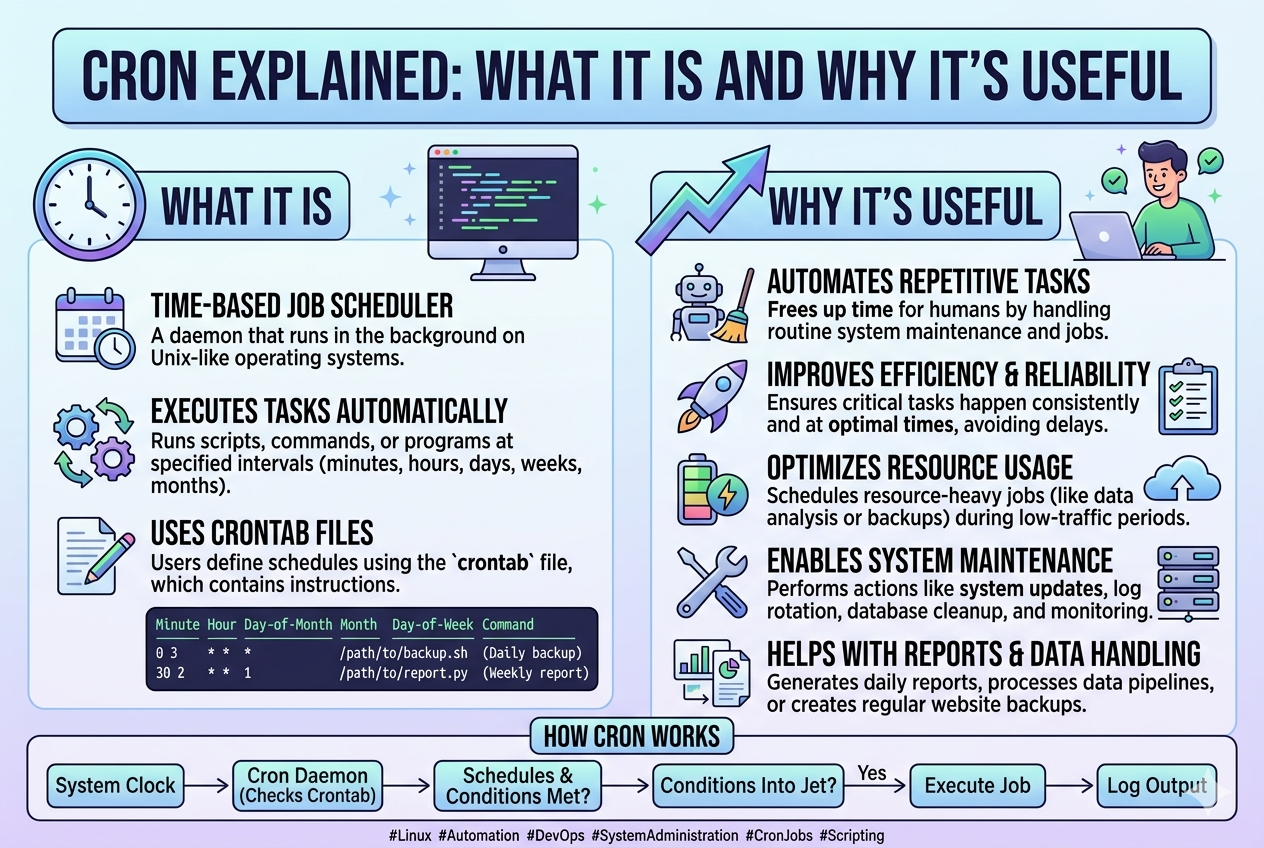
Cron is more than just a scheduling tool; it is a foundational component in Unix-like operating systems that enables automation at the system level. Its primary purpose is to ensure that tasks can be executed repeatedly and reliably without human intervention. This becomes especially important in environments where servers must operate continuously and consistently. Instead of relying on manual execution, Cron provides a structured mechanism to delegate routine work to the system itself, allowing users to focus on more complex tasks.
Cron Architecture and Background Process
At the core of Cron is a background service often referred to as a daemon. This daemon runs continuously once the system starts and quietly monitors scheduled instructions. It does not require user interaction after configuration. Its main responsibility is to check whether any task matches the current system time and, if so, execute it immediately.
The design is intentionally lightweight so it does not consume unnecessary system resources. This makes Cron suitable even for older systems or environments where performance efficiency is critical. The daemon works in cycles, waking up at regular intervals to scan scheduled tasks and ensure nothing is missed.
Understanding Crontab and Its Role
The scheduling system in Cron is controlled through a configuration file known as a crontab. Each user can have their own crontab, and the system itself may also maintain a separate one for administrative tasks.
A crontab is essentially a list of commands paired with timing instructions. These instructions determine when a task should be executed. Once saved, the file is interpreted by the Cron daemon, which then takes responsibility for running the tasks at the appropriate time.
What makes crontab powerful is its simplicity. Even though it follows a strict structure, it allows for a wide range of scheduling possibilities, from executing a task every minute to running it once a year.
Structure of a Cron Schedule
A Cron schedule is built using five time-based fields followed by the command to be executed. These fields represent minutes, hours, day of the month, month, and day of the week. Each field can contain specific values, ranges, or special symbols that define execution patterns.
This structure allows precise control over when tasks should run. For example, a user can schedule a script to run every day at midnight, every Monday morning, or every five minutes depending on the requirement. The flexibility of this structure is one of the main reasons Cron remains widely used.
How Cron Interprets Time Values
Cron evaluates time in a systematic way by comparing the current system time with the defined schedule. Each field is checked individually, and only when all conditions match does the command execute.
This means that even a single mismatch in one field will prevent execution. For instance, if a task is scheduled for a specific hour but the current minute does not match, the system will wait until the next valid cycle. This precise matching mechanism ensures accuracy and prevents unintended executions.
Special Symbols and Their Functionality
Cron supports several special symbols that enhance scheduling flexibility. The most commonly used symbol is the asterisk, which represents all possible values in a field. This allows tasks to run continuously at every interval of that field.
Other symbols allow users to define ranges, specific lists, or step values. These features enable complex scheduling patterns without requiring multiple separate entries. As a result, Cron can handle both simple and advanced automation needs efficiently.
Execution Environment and Behavior
When Cron executes a task, it does so in a minimal environment. This means that many system variables that are normally available in a user session may not be present. Because of this, scripts scheduled through Cron often need explicit paths and environment definitions to run correctly.
Understanding this behavior is important because tasks that work manually in a terminal may fail under Cron due to missing environment settings. Proper configuration ensures consistent execution regardless of how the task is triggered.
System-Level vs User-Level Cron Jobs
Cron operates at two primary levels: system-wide and user-specific. System-level jobs are typically managed by administrators and are used for essential system maintenance tasks. These may include log cleanup, system updates, or service monitoring.
User-level jobs, on the other hand, are defined individually by each user. These tasks are often personal or application-specific, such as running backups, sending automated reports, or executing scripts at regular intervals. Both levels follow the same scheduling principles but serve different operational purposes.
Importance of Automation in Modern Systems
Automation is a critical component of modern computing, and Cron plays a key role in enabling it. Without automation, system administrators would need to manually perform repetitive tasks, which increases the risk of errors and inefficiency.
By delegating these tasks to Cron, systems become more reliable and self-sustaining. This is particularly important in server environments where uptime and consistency are essential. Automated scheduling ensures that tasks are performed exactly when needed, even if no user is actively monitoring the system.
Reliability and Consistency in Task Execution
One of the strongest advantages of Cron is its reliability. Once a task is correctly configured, it will continue to run at the specified intervals without fail unless manually changed or disabled.
This consistency is crucial for operations that depend on timing accuracy. For example, database backups must occur regularly to prevent data loss, and system monitoring scripts must run continuously to detect issues early. Cron ensures these tasks are not missed due to human oversight.
Common Practical Applications
Cron is used in a wide variety of real-world scenarios. System administrators rely on it for maintenance tasks such as clearing temporary files, rotating logs, and checking system health. Developers use it to schedule code execution, automate testing, and manage deployment processes.
It is also commonly used in applications that require periodic updates, such as fetching data from external sources, generating reports, or sending notifications. The versatility of Cron makes it applicable across many different fields of computing.
Security Considerations in Cron Usage
While Cron is highly useful, it must be used carefully from a security perspective. Since it can execute commands automatically, incorrect configurations or unauthorized access to crontab files can lead to system vulnerabilities.
Proper permission management is essential to ensure that only trusted users can create or modify scheduled tasks. Additionally, scripts executed through Cron should be reviewed and tested to prevent unintended behavior.
Logging and Monitoring of Cron Activities
Cron maintains logs of executed tasks, which are useful for tracking system behavior and diagnosing issues. These logs record whether tasks were executed successfully or if any errors occurred during execution.
Monitoring these logs helps administrators ensure that scheduled operations are functioning as expected. If a task fails, the logs provide valuable information for troubleshooting and correction.
Common Issues and Troubleshooting
Despite its reliability, Cron can sometimes produce unexpected results if not configured correctly. Common issues include incorrect time settings, missing file permissions, or environment-related errors.
Another frequent problem is the use of incorrect file paths, especially since Cron does not always inherit the same environment variables as a user session. Careful configuration and testing help avoid these issues and ensure smooth operation.
Best Practices for Using Cron Effectively
To use Cron effectively, it is important to follow structured practices. Tasks should be clearly defined and tested before scheduling. Absolute paths should be used to avoid ambiguity, and logs should be regularly reviewed to confirm successful execution.
It is also advisable to avoid overly complex schedules when simpler ones can achieve the same result. Keeping configurations clean and organized improves maintainability and reduces the chance of errors.
Limitations of Cron
While Cron is powerful, it does have limitations. It is primarily time-based and does not inherently support event-driven execution. This means it cannot react to system events in real time without external scripting.
Additionally, Cron is not designed for complex workflow management. For more advanced automation scenarios, additional tools or frameworks may be required. However, for time-based scheduling, it remains highly effective.
Long-Term Importance of Cron in System Administration
Even with modern automation tools available, Cron continues to remain relevant due to its simplicity and reliability. It has been used for decades and remains a standard component in many systems.
Its lightweight nature, combined with its precise scheduling capability, ensures that it continues to play a vital role in system administration. Whether used in small personal systems or large enterprise servers, Cron remains a trusted solution for automating repetitive tasks efficiently.
Advanced Scheduling Techniques in Cron
As users become more familiar with Cron, they often move beyond basic scheduling into more advanced configurations. These advanced techniques allow for greater precision and flexibility in task execution. Instead of simply running tasks at fixed times, Cron can be configured to handle complex timing patterns that align with system demands or business requirements.
For example, tasks can be scheduled to run at multiple specific times within a day, or at irregular intervals that still follow a predictable pattern. This level of control is especially useful in environments where workloads vary throughout the day and require optimized timing for efficiency.
Using Step Values for Repeated Intervals
One of the powerful features of Cron scheduling is the ability to use step values. Step values allow tasks to run at regular intervals within a defined range. Instead of specifying every individual time, a user can define a pattern that repeats automatically.
This is particularly useful for tasks that need frequent execution, such as system checks or data synchronization processes. By reducing the need for multiple entries, step values simplify configuration while maintaining precise control over execution frequency.
Combining Multiple Time Conditions
Cron also allows multiple conditions to be combined within a single schedule. This means a task can be set to run only when several specific time conditions are met simultaneously.
For instance, a task may be configured to execute only on certain days of the week and at specific hours. This combination of conditions provides a high level of customization, making it possible to align system tasks with organizational workflows or operational schedules.
Environment Variables and Execution Context
When Cron executes a task, it operates in a limited environment compared to a standard user session. This difference can lead to unexpected behavior if not properly managed. Environment variables that are normally available during manual execution may not be present when Cron runs a task.
To address this, scripts scheduled through Cron often need explicit definitions of environment variables. This ensures that the task behaves consistently regardless of how it is executed. Proper handling of the execution context is essential for reliable automation.
File Permissions and Security Boundaries
Security is an important aspect of Cron usage, especially in multi-user systems. Each user’s crontab is isolated, but system-level tasks require careful permission management. Only authorized users should have access to modify or create scheduled tasks.
File permissions also play a critical role in ensuring that scripts executed by Cron are safe and controlled. If a script lacks proper permissions, it may fail to execute or expose the system to unintended risks. Maintaining strict permission structures helps preserve system integrity.
System Load Considerations
Although Cron is lightweight, improper scheduling can lead to system overload. If multiple resource-intensive tasks are scheduled to run at the same time, it can negatively impact system performance.
To prevent this, tasks should be distributed across different time intervals when possible. This ensures that system resources are used efficiently and avoids unnecessary spikes in CPU or memory usage. Careful planning of task timing contributes to overall system stability.
Error Handling in Cron Jobs
Error handling is an essential part of working with Cron. Since tasks run automatically in the background, any errors that occur may go unnoticed unless properly logged.
Most Cron implementations allow output and error messages to be redirected to log files. This enables administrators to review execution results and identify issues quickly. Without proper error handling, diagnosing failed tasks can become difficult.
Logging Mechanisms and Debugging
Logs provide a detailed record of Cron activity, including successful executions and failures. These logs are often stored at the system level and can be reviewed to understand how tasks are behaving over time.
Debugging Cron jobs typically involves checking these logs to identify mismatches in timing, missing files, or incorrect command execution. A systematic approach to reviewing logs helps ensure long-term reliability of scheduled tasks.
Difference Between Cron and Manual Execution
A key distinction between Cron execution and manual execution lies in the environment and timing. When a user runs a command manually, it inherits the full session environment, including variables, paths, and permissions.
In contrast, Cron runs tasks in a minimal environment with limited context. This difference can lead to unexpected behavior if scripts are not designed with Cron in mind. Understanding this distinction is essential for ensuring consistent results across both execution methods.
Automation in Large-Scale Systems
In large-scale systems, automation becomes not just a convenience but a necessity. Cron plays a critical role in maintaining operational efficiency by handling repetitive tasks across multiple servers and services.
Tasks such as database synchronization, backup rotation, and system monitoring are often distributed across different schedules. This ensures that large systems remain stable and responsive without requiring constant manual oversight.
Role of Cron in DevOps Practices
Cron is widely used in DevOps environments where automation and continuous integration are key principles. It helps streamline deployment processes, schedule testing routines, and manage background services.
By automating repetitive tasks, Cron supports faster development cycles and reduces the risk of human error. It integrates well with scripts and deployment pipelines, making it a valuable tool in modern software workflows.
Limitations in Complex Workflow Management
Despite its usefulness, Cron has limitations when it comes to managing complex workflows. It is primarily designed for time-based execution and does not inherently support dependencies between tasks.
This means that while Cron can trigger tasks at specific times, it cannot manage multi-step workflows that require conditional logic or dynamic decision-making. For such scenarios, additional tools are often required to complement Cron’s capabilities.
Maintenance and Updating of Cron Jobs
Over time, scheduled tasks may need to be updated or removed as system requirements change. Regular maintenance of Cron jobs ensures that outdated or unnecessary tasks do not continue to consume system resources.
This includes reviewing schedules, updating scripts, and removing redundant entries. Proper maintenance helps keep the system organized and reduces the risk of conflicts or errors.
Best Practices for Long-Term Reliability
To ensure long-term reliability, Cron configurations should be kept simple and well-documented. Each scheduled task should have a clear purpose and be tested before deployment.
It is also important to use absolute file paths, avoid ambiguous commands, and regularly review logs. These practices help maintain system stability and reduce the likelihood of unexpected failures.
Importance of Testing Cron Jobs
Testing is a crucial step before deploying any Cron job in a production environment. Running scripts manually first helps verify that they function correctly.
Once confirmed, they can be scheduled in Cron with confidence. Testing ensures that potential issues are identified early, preventing disruptions in automated workflows.
Future Relevance of Cron in Modern Systems
Even with the emergence of more advanced scheduling and automation tools, Cron continues to remain relevant due to its simplicity and reliability. It is deeply embedded in Unix-like systems and remains a standard for time-based task scheduling.
Its lightweight design ensures that it can function efficiently across a wide range of environments, from small personal machines to large enterprise servers. This enduring relevance highlights its importance in the evolution of system automation.
Cron in Modern Infrastructure and Cloud Systems
Even though Cron is an older technology, it still plays a meaningful role in modern infrastructure, including cloud-based systems and containerized environments. Many modern platforms continue to support Cron-like scheduling because time-based automation remains a fundamental requirement in computing.
In cloud environments, Cron is often used inside virtual machines or containers to handle internal tasks such as health checks, scheduled data processing, and maintenance scripts. While cloud providers may also offer advanced scheduling services, Cron remains popular due to its simplicity and predictability.
Cron Inside Containerized Applications
With the rise of container technologies, Cron has found a new place inside containerized applications. Developers often include Cron within containers to manage recurring internal tasks without relying on external scheduling systems.
This approach allows each container to operate independently, handling its own scheduled jobs. It is especially useful in microservices architectures where different services may require different scheduling rules. However, careful configuration is required to ensure Cron continues running properly inside lightweight container environments.
Relationship Between Cron and System Performance
System performance can be directly influenced by how Cron jobs are configured. Poorly timed or resource-heavy tasks can create unnecessary load on the system. On the other hand, well-planned scheduling can improve overall efficiency by distributing workloads evenly.
For example, running multiple heavy backup processes at the same time can slow down a system significantly. Adjusting schedules to avoid overlap helps maintain smooth performance and prevents bottlenecks.
Handling Large Numbers of Scheduled Tasks
In complex systems, there may be dozens or even hundreds of scheduled Cron jobs running simultaneously. Managing such a large number of tasks requires organization and careful planning.
Grouping related tasks, using consistent naming conventions, and maintaining documentation can help administrators keep track of all scheduled activities. Without proper organization, it becomes difficult to maintain and troubleshoot Cron configurations over time.
Dependency Challenges in Cron Scheduling
One of the challenges with Cron is that it does not inherently support task dependencies. Each job runs independently based on its schedule, without awareness of other tasks.
This can create issues when certain tasks must run only after others have completed. To handle this, administrators often use scripting techniques or external logic to manage dependencies. This limitation highlights the need for careful design when building automated workflows.
Cron and Data Processing Workflows
Cron is widely used in data processing systems where tasks need to run at regular intervals. These tasks may include data extraction, transformation, and loading processes.
By scheduling these operations, systems can ensure that data remains up to date without manual intervention. This is particularly important in analytics, reporting systems, and data-driven applications where timely updates are essential.
Backup Systems and Data Protection
One of the most critical uses of Cron is in automated backup systems. Regular backups are essential for protecting data against loss, corruption, or system failures.
Cron allows backups to be scheduled at specific times, often during periods of low system activity. This ensures that important data is safely stored without interfering with normal system operations. Automated backups significantly reduce the risk of human error and improve data reliability.
Log Rotation and System Maintenance
System logs can grow rapidly in size if not managed properly. Cron is commonly used to automate log rotation, ensuring that old logs are archived or removed at regular intervals.
This helps free up storage space and keeps log files manageable for analysis. Regular maintenance through Cron ensures that system resources are used efficiently and that important diagnostic information remains accessible.
Security Monitoring and Automated Checks
Cron is also used in security monitoring systems to run periodic checks on system integrity. These checks may include scanning for unauthorized changes, verifying file permissions, or monitoring unusual system activity.
By automating these tasks, systems can detect potential security issues early. This proactive approach helps maintain system safety and reduces the risk of unnoticed vulnerabilities.
Scheduling Frequency and System Balance
Choosing the right scheduling frequency is important for maintaining system balance. Running tasks too frequently can waste resources, while running them too infrequently can reduce effectiveness.
Finding the right balance depends on the nature of the task and system requirements. For example, critical monitoring tasks may need to run every minute, while backups may only be needed daily or weekly.
Human Error Reduction Through Automation
One of the major benefits of Cron is its ability to reduce human error. Manual execution of repetitive tasks increases the likelihood of mistakes, especially in complex systems.
By automating these tasks, Cron ensures consistency and accuracy. Once configured correctly, it eliminates the need for manual intervention, reducing operational risks and improving reliability.
Scalability of Cron-Based Automation
Cron scales well in small to medium environments, but in large-scale systems, it is often combined with additional tools. Despite this, its core scheduling capability remains useful even in complex infrastructures.
Its simplicity makes it easy to deploy across multiple systems without heavy configuration. This scalability is one of the reasons it continues to be widely used in both legacy and modern environments.
Cron in Development and Testing Environments
Developers often use Cron in testing environments to simulate real-world scheduling conditions. This allows them to test how applications behave when tasks are executed automatically over time.
It is also used to run automated test suites, refresh development data, and simulate production-like workloads. This helps ensure that applications perform reliably before deployment.
Troubleshooting Failed Scheduled Tasks
When a Cron job fails, troubleshooting typically begins by checking logs and verifying the script manually. Common causes include incorrect file paths, missing permissions, or environment mismatches.
Systematic debugging is important because Cron does not always provide direct feedback when something goes wrong. Proper logging and structured testing make it easier to identify and resolve issues.
Optimization of Cron Jobs for Efficiency
Optimizing Cron jobs involves reducing unnecessary executions and improving script performance. Efficient scripts complete tasks faster and use fewer system resources.
Optimization may also include adjusting schedules to avoid peak system usage times. This ensures that automated tasks do not interfere with critical system operations.
Long-Term System Stability and Cron
Cron contributes significantly to long-term system stability by ensuring that essential tasks are performed consistently. Regular maintenance, backups, and monitoring help prevent system degradation over time.
Its reliability makes it a key component in maintaining healthy and stable computing environments. Even as systems evolve, the need for time-based automation remains constant.
Evolution of Scheduling Tools Beyond Cron
While Cron remains widely used, newer scheduling systems have emerged that offer more advanced features such as event-driven execution, dependency management, and distributed scheduling.
However, these tools often build upon the same fundamental concept introduced by Cron: executing tasks automatically based on defined conditions. This shows how influential Cron has been in shaping modern automation systems.
Why Cron Still Remains Relevant Today
Despite technological advancements, Cron continues to be relevant because of its simplicity, efficiency, and reliability. It does not require complex setup or heavy system resources, making it suitable for a wide range of applications.
Its long-standing presence in Unix-like systems ensures compatibility and familiarity for system administrators and developers. As long as time-based automation is needed, Cron will continue to remain an important tool in system management.
Cron in Enterprise-Level Systems
In enterprise environments, Cron continues to serve as a dependable scheduling mechanism for background operations. Large organizations often rely on it for routine system tasks that must run consistently across multiple servers. Even though more advanced orchestration tools exist, Cron is still widely used because of its simplicity and predictability.
Enterprise systems typically integrate Cron with monitoring tools and centralized logging systems. This ensures that every scheduled task can be tracked, verified, and audited. In such environments, reliability is more important than complexity, and Cron provides exactly that.
Role of Cron in Distributed Systems
In distributed architectures, Cron is often deployed on individual nodes to handle localized tasks. Each system may run its own scheduled jobs while still contributing to a larger workflow.
This decentralized approach allows systems to operate independently while maintaining synchronization with other services. However, coordination becomes important to avoid duplicate executions or conflicts between nodes. Proper planning ensures that Cron jobs across distributed systems work harmoniously.
Cron and Microservice Architectures
Microservice-based systems often use Cron for internal service-level scheduling. Each microservice may require periodic tasks such as cache refreshing, data cleanup, or status updates.
By embedding Cron within individual services, developers can ensure that each component manages its own lifecycle tasks. This reduces dependency on external schedulers and keeps services modular and self-contained.
Time Synchronization and Cron Accuracy
Accurate timekeeping is essential for Cron to function correctly. If system time is not synchronized properly, scheduled tasks may execute at incorrect times.
Most modern systems use time synchronization services to ensure consistency across servers. This is especially important in distributed environments where multiple systems must follow the same schedule. Even small time differences can lead to inconsistencies in task execution.
Impact of System Restarts on Cron Jobs
When a system restarts, Cron automatically resumes its scheduling activities once the service is restarted. However, tasks that were supposed to run during downtime are not executed unless specifically configured otherwise.
This behavior means that administrators must consider system availability when designing schedules. For critical tasks, additional mechanisms may be needed to ensure missed executions are handled appropriately.
Handling Missed Executions
Cron itself does not inherently track missed executions. If a system is offline at the scheduled time, the task is simply skipped.
To handle this limitation, administrators sometimes implement additional logic within scripts to check for missed runs and execute necessary recovery actions. This ensures that important processes are not permanently skipped due to downtime.
Resource Optimization Through Scheduling Design
Efficient scheduling design plays a key role in optimizing system resources. Properly spaced Cron jobs prevent resource contention and ensure smooth system operation.
For example, spreading tasks evenly across time reduces the likelihood of CPU spikes or memory pressure. Thoughtful scheduling improves both performance and system responsiveness.
Cron in Backup Rotation Strategies
Backup rotation strategies often depend heavily on Cron scheduling. Different types of backups—such as daily, weekly, or monthly—are typically managed through separate Cron jobs.
This structured approach ensures that data is consistently protected at multiple levels. It also allows organizations to maintain historical backups without overwhelming storage systems.
Automation of Software Updates
Cron is frequently used to automate software update processes. Regular updates are essential for security and performance improvements, and scheduling them ensures they are applied consistently.
Automated updates reduce the risk of outdated software and help maintain system security without requiring manual intervention.
System Health Checks and Monitoring
Health monitoring is another important application of Cron. Scheduled scripts can check system performance, resource usage, and service availability.
These checks help administrators detect potential issues early and respond before they escalate into critical failures. Continuous monitoring through Cron contributes to system reliability and uptime.
Cron and Task Prioritization Challenges
Cron does not inherently support task prioritization. All scheduled jobs are treated equally when their time conditions are met.
This can create challenges in systems where certain tasks are more critical than others. To manage this, administrators often design external control mechanisms or carefully structure schedules to avoid conflicts between high and low priority tasks.
Scaling Limitations of Basic Cron Usage
While Cron is highly effective for individual systems, scaling it across very large infrastructures can become complex. Managing hundreds of Cron jobs across multiple machines requires careful coordination.
To address this, organizations often adopt centralized scheduling systems that build on Cron principles but provide enhanced control and visibility.
Cron and Event-Based Alternatives
Modern systems sometimes rely on event-driven scheduling tools instead of time-based Cron jobs. These tools execute tasks based on system events rather than fixed schedules.
However, Cron remains relevant because many tasks are inherently time-dependent. In many cases, both approaches are used together to achieve complete automation coverage.
Debugging Complex Cron Environments
As systems grow, debugging Cron-related issues becomes more challenging. Problems may arise from overlapping schedules, conflicting scripts, or environment inconsistencies.
A structured debugging approach is essential. This includes reviewing logs, isolating individual jobs, and testing scripts independently. Proper documentation also plays a key role in simplifying troubleshooting.
Documentation Practices for Cron Jobs
Clear documentation is essential in environments where multiple Cron jobs exist. Each scheduled task should be documented with its purpose, schedule, and dependencies.
Good documentation ensures that future administrators can understand and manage existing configurations without confusion. It also reduces the risk of accidental misconfiguration.
Cron in Educational and Learning Environments
Cron is often introduced in system administration and programming courses as a foundational concept. It helps learners understand automation, scheduling logic, and system-level task management.
By practicing with Cron, students gain practical experience in managing real-world system tasks, which is valuable for careers in IT and software development.
Efficiency Gains Through Automation Strategy
A well-designed automation strategy using Cron can significantly improve operational efficiency. By reducing manual intervention, organizations save time and reduce operational costs.
Automation also allows systems to operate consistently, ensuring that tasks are performed exactly as intended without variation or delay.
Long-Term Maintenance of Cron Configurations
Over time, Cron configurations can become complex and require regular maintenance. Outdated jobs should be removed, and existing schedules should be reviewed periodically.
This ongoing maintenance ensures that the system remains efficient and avoids unnecessary resource usage caused by obsolete tasks.
Evolution of Cron Usage Over Time
Although Cron has remained fundamentally unchanged for many years, its usage has evolved alongside modern computing practices. It is now commonly integrated with cloud systems, container platforms, and automated deployment pipelines.
This evolution demonstrates its adaptability and continued relevance in changing technological environments.
Why Cron Remains a Core Automation Tool
Cron remains a core tool in system automation because it is simple, stable, and universally supported across Unix-like systems. It does not require complex infrastructure, yet it provides powerful scheduling capabilities.
Its longevity and reliability make it a trusted solution for time-based automation across a wide range of computing environments, from small personal systems to large enterprise infrastructures.
Conclusion
Cron remains one of the most fundamental and reliable tools for task scheduling in Unix-like systems. Its ability to automate repetitive processes through simple time-based rules makes it essential for system administration, software development, and infrastructure management. From basic maintenance tasks to complex enterprise workflows, Cron provides a consistent and efficient way to ensure that important operations run without manual intervention.
Its strength lies in its simplicity. By relying on a clear scheduling structure, it allows users to define exactly when and how tasks should execute. This reduces human error, improves system reliability, and supports continuous operation in both small-scale and large-scale environments. Even as modern automation tools continue to evolve, Cron maintains its relevance because it solves a core need that does not change over time: the need for dependable scheduling.
Although it has limitations in handling complex workflows and event-driven logic, Cron’s lightweight design and widespread availability make it a practical choice in many scenarios. It integrates easily into scripts, systems, and development pipelines, making it a versatile tool across different use cases.
In the broader context of system automation, Cron represents a foundational concept that has influenced many modern scheduling solutions. Its continued use in cloud systems, containers, and enterprise infrastructure highlights its adaptability and long-term value.
Ultimately, Cron is not just a scheduling utility but a critical building block in automated computing, helping systems run efficiently, consistently, and with minimal human effort.