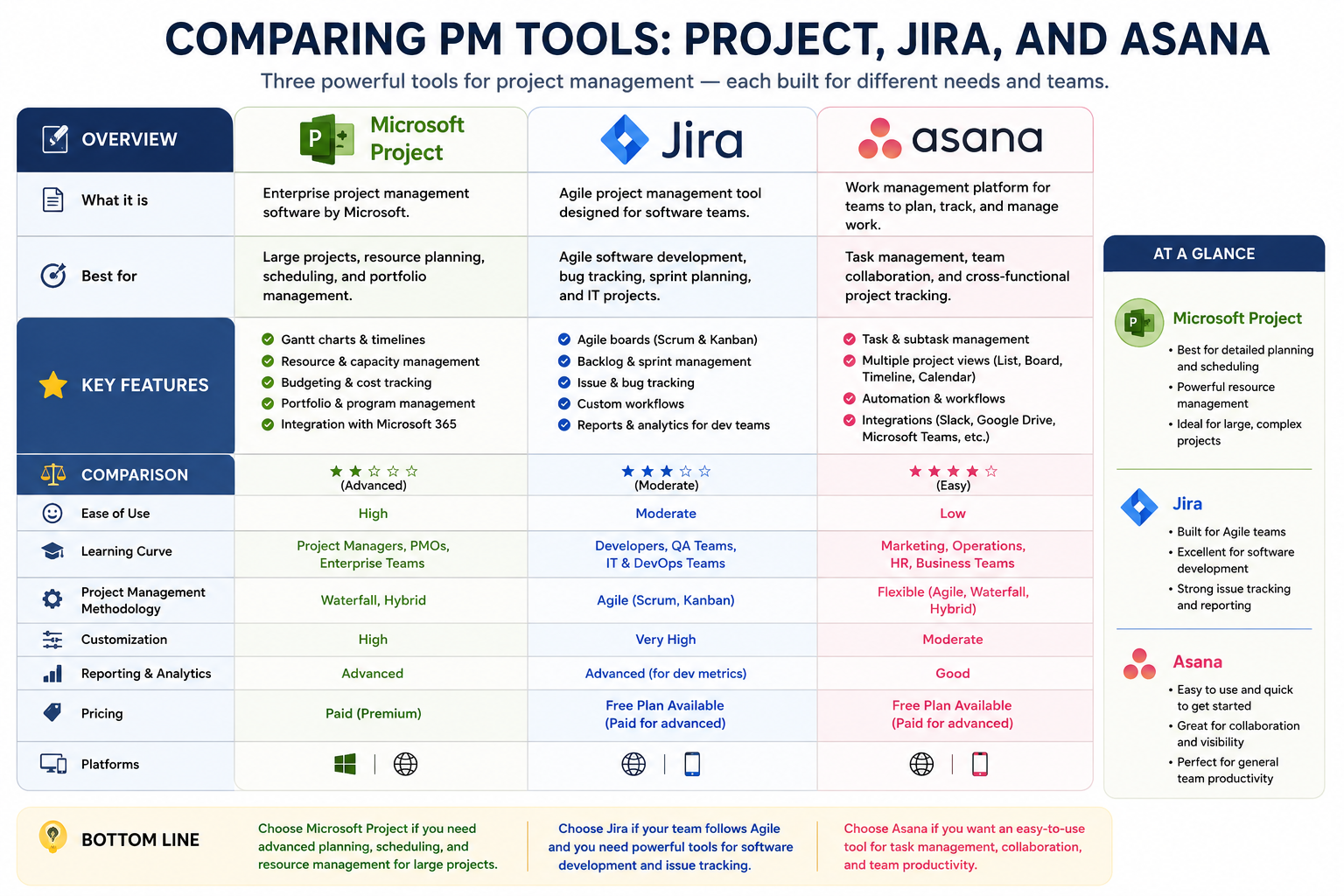
Building on the foundational comparison of Microsoft Project, Jira, and Asana, it becomes important to examine how each tool behaves in more advanced workflow environments. Modern organizations rarely rely on a single linear process; instead, they operate through interconnected workflows involving multiple teams, shifting priorities, and evolving deliverables. The way a project management tool handles these complexities often determines its long-term usefulness.
Microsoft Project handles advanced workflows through strict dependency structures. Every task is connected through predefined relationships, which allows for highly predictable scheduling. When one task changes, the entire project timeline recalculates automatically. This level of precision is extremely valuable in industries where delays carry significant cost implications. However, this rigidity can become a limitation in fast-changing environments where flexibility is more important than predictability.
Jira approaches workflow management in a more dynamic and modular way. It allows teams to build custom workflows that reflect their actual development process. Tasks can move through multiple stages such as “to do,” “in progress,” “in review,” and “done,” but these stages can be customized extensively. This flexibility is one of Jira’s strongest advantages, especially for teams practicing continuous integration and continuous delivery. However, the complexity of customization can sometimes lead to inconsistent workflows across teams if not carefully managed.
Asana sits in the middle of these two extremes. It offers structured workflows but keeps them simple and visually intuitive. Teams can create task dependencies and multi-step workflows, but without the heavy configuration requirements seen in Microsoft Project or Jira. This makes Asana particularly effective for teams that want structure without operational overhead.
Collaboration Depth and Communication Flow
Collaboration is one of the most critical elements of modern project management, and each of these tools approaches it differently. Microsoft Project traditionally focuses more on planning than collaboration. While it integrates with communication tools, its core design is centered around the project manager rather than the entire team. This makes it less conversational and more analytical in nature.
Jira improves collaboration within technical teams by embedding communication directly into issue tracking. Developers, testers, and project managers can discuss tasks, attach files, and track progress within a single issue. However, the communication style is often structured and technical, which may not suit non-engineering teams.
Asana places strong emphasis on collaboration as a core feature. Every task becomes a communication hub where team members can discuss progress, share updates, and clarify requirements. This reduces the need for external communication tools and ensures that conversations remain tied to actionable work. As a result, Asana often feels more natural for cross-functional teams that include marketing, design, operations, and business stakeholders.
Performance in Large-Scale Enterprise Environments
In large enterprise environments, scalability is not just about handling more users but also about managing complexity, governance, and control. Microsoft Project performs strongly in this area due to its deep integration with enterprise resource planning and financial systems. It allows organizations to maintain strict control over project budgets, timelines, and resource allocation at a macro level.
Jira also scales effectively in enterprise environments, especially within technology-driven organizations. Its ability to manage multiple projects, teams, and workflows makes it suitable for large software development ecosystems. However, as organizations grow, Jira often requires significant administrative effort to maintain consistency across projects.
Asana scales well in terms of usability and team adoption, but it may face limitations when dealing with highly complex program management requirements. While it can handle large teams, it is more effective when used for coordination rather than deep financial or resource governance.
Customization vs Standardization Trade-Off
One of the most important strategic decisions when choosing a project management tool is balancing customization with standardization. Microsoft Project leans heavily toward standardization. It enforces structured planning methods that reduce variability across projects. This is beneficial for organizations that prioritize predictability and compliance.
Jira represents the opposite end of the spectrum. It offers extensive customization, allowing teams to define their own workflows, issue types, and automation rules. While this flexibility is powerful, it can also lead to fragmentation if different teams create inconsistent systems.
Asana attempts to balance both approaches by offering customization within a simplified framework. It allows teams to adapt workflows without overwhelming them with configuration complexity. This makes it easier to maintain consistency across departments while still allowing some level of flexibility.
Automation and Productivity Enhancement
Automation has become a key feature in modern project management tools. Microsoft Project offers automation primarily in scheduling and dependency updates. When one task changes, related tasks automatically adjust. This reduces manual effort in maintaining timelines but does not extend deeply into workflow automation.
Jira provides one of the most powerful automation engines among the three tools. Teams can create rules that automatically assign tasks, update statuses, trigger notifications, and integrate with other systems. This makes it highly efficient for repetitive development workflows.
Asana also offers automation features, but they are designed to be user-friendly rather than highly technical. Users can automate routine tasks such as assigning work, setting due dates, and moving tasks between stages. While not as advanced as Jira, it is significantly easier to implement.
User Experience and Interface Design
User experience plays a major role in adoption and long-term usage. Microsoft Project has a dense and data-heavy interface that reflects its focus on detailed planning. While powerful, it can feel overwhelming to new users.
Jira has a functional but complex interface that prioritizes information density over simplicity. It is optimized for technical users who need detailed issue tracking and workflow visibility.
Asana stands out for its clean, modern, and visually appealing interface. It prioritizes simplicity and ease of navigation, making it accessible to users with varying levels of technical experience. This often leads to faster adoption across organizations.
Adaptability to Different Industries
Different industries require different project management approaches. Microsoft Project is widely used in construction, engineering, manufacturing, and government sectors where structured planning is essential. Its strength lies in managing long-term, resource-heavy projects with strict dependencies.
Jira is dominant in the software development and IT industries. Its agile framework aligns naturally with the iterative nature of software delivery. It is also increasingly used in product management and DevOps environments.
Asana is widely adopted across creative industries, marketing agencies, startups, and operational teams. Its flexibility allows it to adapt to a wide range of workflows without requiring deep technical knowledge.
Cost Efficiency and Organizational Investment
Cost considerations often influence tool selection. Microsoft Project typically involves higher licensing and training costs due to its enterprise-grade capabilities. However, it can provide strong value in environments where detailed planning prevents costly project overruns.
Jira offers scalable pricing based on team size and feature requirements. While affordable for small teams, costs can increase significantly as organizations expand and require additional plugins or advanced features.
Asana provides a more predictable and accessible pricing structure, making it attractive for small to mid-sized organizations. Its lower implementation overhead also reduces indirect costs such as training and onboarding.
Security and Data Governance
Security is a critical concern in project management systems, especially for enterprise use. Microsoft Project benefits from Microsoft’s broader security ecosystem, including enterprise-grade compliance, encryption, and identity management.
Jira also offers strong security features, particularly in cloud deployments, with robust access controls and audit logs. It is widely trusted in large-scale software environments where data protection is essential.
Asana provides modern security standards including encryption and access control, but it is generally more focused on usability than complex governance frameworks.
Long-Term Evolution and Future Direction
The future of project management tools is moving toward increased automation, AI-driven insights, and deeper integration across platforms. Microsoft Project is gradually evolving toward more cloud-based and collaborative features, aligning with modern workplace demands.
Jira continues to expand its automation and DevOps capabilities, positioning itself as a central hub for software delivery pipelines. It is becoming increasingly integrated with development ecosystems and CI/CD tools.
Asana is focusing heavily on simplicity combined with intelligent automation. Its direction suggests a future where non-technical users can manage complex workflows without needing deep configuration knowledge.
Real-World Application Scenarios
In real-world usage, organizations often combine these tools rather than relying on a single platform. A large enterprise might use Microsoft Project for strategic planning, Jira for software development, and Asana for marketing and operational coordination. This multi-tool ecosystem allows each department to operate within a system that best matches its workflow style.
However, this also introduces challenges such as data fragmentation and communication gaps between tools. As a result, organizations must invest in integration strategies and workflow alignment to ensure smooth collaboration.
Conclusion
The comparison between Microsoft Project, Jira, and Asana reveals that there is no single best project management tool. Instead, each platform reflects a distinct approach to organizing work. Microsoft Project emphasizes precision, structure, and long-term planning. Jira focuses on agility, iterative development, and technical workflow management. Asana prioritizes simplicity, collaboration, and accessibility across diverse teams.
The decision ultimately depends on organizational needs, team structure, and project complexity. Structured industries benefit from Microsoft Project’s control and predictability. Software-driven environments thrive with Jira’s agile capabilities. Cross-functional and fast-moving teams often prefer Asana’s balance of simplicity and flexibility.
As work continues to evolve toward hybrid, remote, and highly collaborative models, these tools will continue to adapt. The future of project management lies not in choosing one perfect system, but in understanding how different tools complement different types of work.