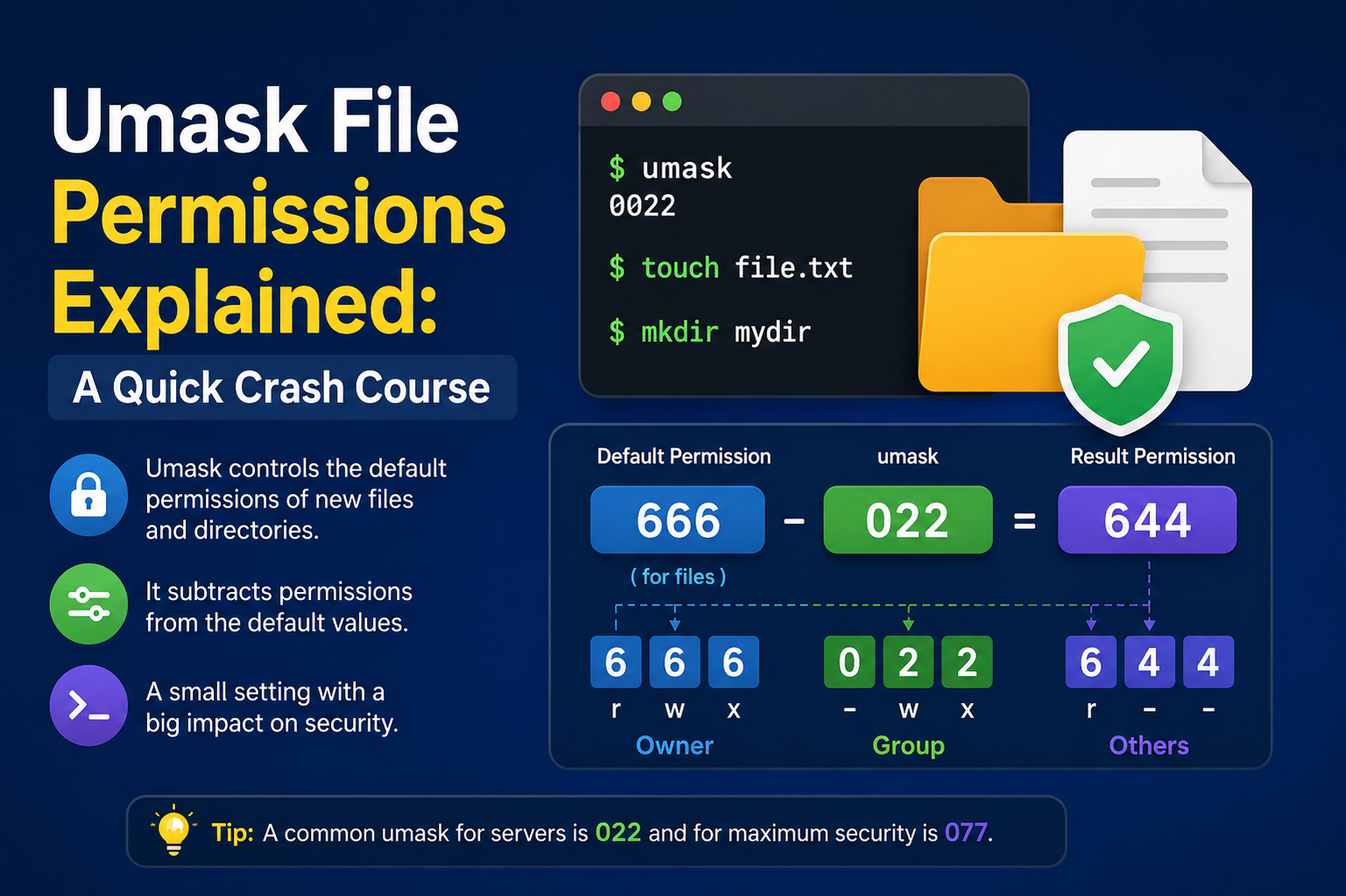
File security in Unix-like operating systems is built on a foundation of permissions, and one of the most important yet often overlooked components of this system is umask. Every time a file or directory is created, the operating system assigns it a set of default permissions. However, these defaults are not absolute. They are shaped and restricted by a mechanism known as the user file-creation mask, commonly called umask.
Umask plays a silent but powerful role in determining how secure or open newly created files will be. It does not directly grant permissions; instead, it removes specific permission bits from the system’s default values. This subtle behavior makes it essential for controlling privacy, collaboration, and system-wide security.
Understanding umask is not just a theoretical exercise. It has practical implications for developers, system administrators, DevOps engineers, and even regular Linux users. A misconfigured umask can expose sensitive data or unnecessarily restrict access, causing workflow disruptions. Therefore, mastering its behavior is a critical step toward understanding how Linux systems enforce security at the file level.
Understanding the Foundation: File Permissions in Unix Systems
Before diving deeper into umask, it is important to understand how file permissions work in general. Every file and directory in a Unix-like system is associated with three categories of users: the owner, the group, and others. Each of these categories can be assigned three types of permissions: read, write, and execute.
Read permission allows viewing a file’s contents or listing a directory. Write permission allows modifying or deleting a file. Execute permission allows running a file as a program or accessing a directory.
These permissions are often represented numerically using a simple system. Read is 4, write is 2, and execute is 1. By combining these values, different permission sets can be created. For example, a value of 7 means full access (4+2+1), while 5 means read and execute only.
When a file is created, the system assigns default permissions before applying any restrictions from umask. This default stage is important because umask modifies these values rather than replacing them.
Default Permissions and the Starting Point of Umask
In most Unix-like systems, newly created files start with default permissions of 666, while directories start with 777. These values might seem overly permissive, but they serve as a baseline for the system.
A file with 666 permissions means it is readable and writable by everyone but not executable. A directory with 777 means full access for all users, including the ability to enter, modify, and create files inside it.
However, these defaults are never used directly. Instead, the system applies umask immediately after creation to restrict access based on security policies.
This two-step process ensures flexibility. The system defines a general level of openness, and umask refines it according to user or system requirements.
What Umask Actually Does in Simple Terms
Umask can be thought of as a filtering mechanism. Instead of defining what permissions a file should have, it defines what permissions should be removed from the default set.
For example, if the default file permission is 666 and the umask is 022, the system subtracts the mask from the default, resulting in 644. This means the owner can read and write, while group members and others can only read.
For directories, the same logic applies. If the default is 777 and the umask is 022, the final permission becomes 755. This allows the owner full control, while others can read and execute but not modify content.
This behavior is consistent across all file creation processes. Whether a file is created through a terminal command, a script, or an application, umask is always applied unless explicitly overridden.
Step-by-Step Breakdown of Umask Calculation
To understand umask deeply, it helps to break down how the system calculates final permissions.
First, the system determines the default permission value. For files, this is typically 666. For directories, it is 777. Next, the umask value is applied digit by digit.
Consider a file creation scenario:
Default permission: 666
Umask: 027
Now subtract the umask:
6 – 0 = 6
6 – 2 = 4
6 – 7 = 0 (adjusted to ensure no invalid permissions)
The final result is 640. This means the owner has read and write access, the group has read-only access, and others have no access at all.
For directories:
Default: 777
Umask: 027
Result: 750
This gives full access to the owner, read and execute access to the group, and no access to others.
This step-by-step subtraction shows that umask is not additive but subtractive in nature, which is a key concept to understand.
Symbolic Meaning Behind Umask Values
While umask is typically expressed in numeric form, it has a deeper symbolic meaning. Each digit represents a level of restriction applied to the owner, group, and others.
A umask value of 000 means no restrictions, allowing full default permissions. A value of 022 removes write permissions for group and others, promoting safe sharing. A value of 077 creates a highly private environment where only the owner can access files.
This symbolic interpretation helps users understand not just what the system is doing, but why it behaves in a certain way. It turns umask from a technical value into a security policy expression.
Common Umask Values and Their Practical Effects
Different environments use different umask settings depending on their security needs and collaboration requirements.
A umask of 022 is the most commonly used setting. It provides a balanced approach where files are readable by others but not writable. This is suitable for general-purpose systems where sharing information is common but modification control is necessary.
A umask of 027 is more restrictive. It allows group members to read files but blocks all access for others. This is often used in organizational systems where privacy between departments is important.
A umask of 077 is extremely restrictive. It ensures that only the file owner can access newly created files. This is ideal for sensitive environments where confidentiality is critical.
A umask of 002 is more collaborative. It allows group members to both read and write files, making it useful in team-based development environments where shared editing is required.
Each value reflects a different balance between security and usability.
How Umask Affects Files and Directories Differently
One important aspect of umask is that it affects files and directories differently due to their default permission structures.
Files typically do not start with execute permissions because most files are not meant to be executed. Directories, on the other hand, require execute permission to allow users to access their contents.
This difference means that umask calculations can produce different practical outcomes depending on whether a file or directory is being created. Even if the same umask value is applied, the resulting permissions may differ in behavior.
System Behavior and Persistence of Umask
Umask is usually set at the session level. When a user logs into a system, a default umask is applied. This value remains active throughout the session unless changed manually.
Different shells or environments may initialize umask differently. For example, system administrators often configure a global default to ensure consistency across all users.
Applications and services can also define their own umask values. This ensures that files created by automated processes follow specific security rules, independent of user settings.
This layered structure ensures flexibility while maintaining control over file creation behavior.
Security Importance of Proper Umask Configuration
Umask plays a crucial role in system security. A poorly configured umask can lead to serious vulnerabilities. For example, a umask of 000 would allow all users to modify any newly created file, which is extremely dangerous in multi-user environments.
On the other hand, overly restrictive settings can hinder collaboration and productivity. If users cannot access or modify necessary files, workflows may break, leading to inefficiency.
Therefore, selecting the right umask value is about balancing security with usability. It is not just a technical decision but also an organizational policy choice.
Common Misunderstandings About Umask
One of the most common misunderstandings is that umask directly sets file permissions. In reality, it only modifies default permissions.
Another misconception is that changing umask affects existing files. This is incorrect. Umask only applies to newly created files and directories.
Some users also confuse umask with chmod. While chmod explicitly sets permissions on existing files, umask only influences initial creation behavior.
Understanding these differences is essential to avoid permission-related confusion and system misconfigurations.
Troubleshooting Permission Issues Related to Umask
When file permissions do not behave as expected, umask is often a hidden factor. If newly created files are too open or too restricted, checking the current umask value is a logical first step.
In some cases, scripts or applications override system umask settings, leading to inconsistent behavior. This can make debugging permission issues more complex.
System administrators often inspect startup configurations and service settings to identify where umask is being modified. Consistency across environments is key to avoiding such problems.
Best Practices for Using Umask Effectively
Choosing the right umask depends on the environment. For personal systems, a moderately open setting may be acceptable. For enterprise systems, stricter values are usually preferred.
Consistency is critical. Using different umask values across systems can lead to unpredictable behavior and security gaps. It is also important to document the chosen settings clearly.
Regular audits help ensure that file permissions remain aligned with organizational security policies.
Conclusion
Umask may appear to be a small configuration detail, but its impact on system behavior is significant. It silently controls the default permissions of every file and directory created on a system.
By defining what should be restricted rather than what should be allowed, umask provides a flexible and powerful way to enforce security policies. It helps maintain a balance between openness and protection, ensuring that systems remain both usable and secure.
Understanding umask is not just about learning a technical concept. It is about understanding how operating systems manage trust, access, and control at a fundamental level. Once mastered, it becomes an essential tool in maintaining secure and efficient computing environments.