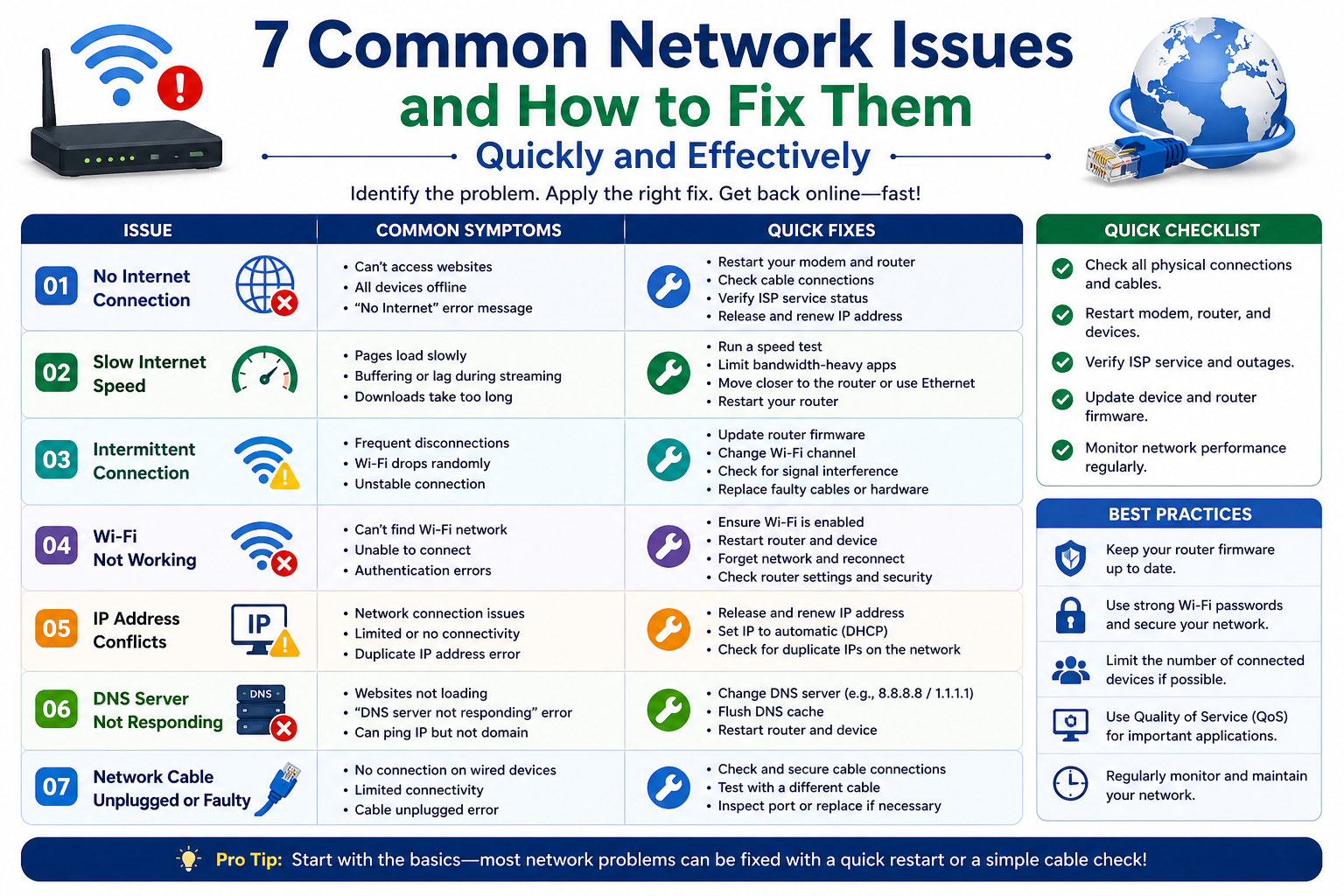
Network problems are a common part of modern digital life, whether at home, in offices, or in large organizations. These issues can appear suddenly and disrupt work, communication, streaming, gaming, or any online activity. Understanding why they happen is the first step toward solving them effectively. Most network problems arise due to a combination of hardware limitations, software misconfigurations, signal interference, service provider issues, or overload of connected devices. Even small misalignments in settings or temporary glitches can result in noticeable disruptions. The good news is that most of these issues can be resolved quickly with a structured approach and basic troubleshooting knowledge.
A network is essentially a system of interconnected devices that rely on routers, modems, cables, and wireless signals. When any part of this system becomes weak or unstable, the entire connection can suffer. For example, a poorly positioned router can reduce Wi-Fi coverage, while outdated firmware can lead to compatibility issues. Similarly, excessive background applications can consume bandwidth, leaving little for essential tasks. Recognizing these root causes helps in applying the right solution instead of guessing randomly.
Deep Dive into Slow Internet Performance
Slow internet is one of the most frustrating issues users face. It often feels like everything is working, but the speed is not as expected. This can happen due to network congestion during peak hours, weak Wi-Fi signals, or bandwidth-heavy applications running in the background. Sometimes the problem is not within the home network but with the internet service provider’s infrastructure.
To improve slow performance, the first step is to restart the router and modem. This simple action clears temporary cache and refreshes the connection with the service provider. Another effective method is reducing the number of devices connected at the same time. Streaming videos, online gaming, and large downloads can consume a significant portion of available bandwidth.
Router placement also plays a major role. When placed near walls, corners, or electronic appliances, signals can weaken. Positioning the router in an open and central location helps distribute signals more evenly. In more complex cases, upgrading to a dual-band router or switching to a wired Ethernet connection can significantly improve speed and stability.
Handling Frequent Disconnections and Signal Drops
Frequent disconnections can interrupt important tasks and cause data loss or delays. This issue often stems from unstable Wi-Fi signals, outdated router software, or interference from nearby devices such as microwaves, cordless phones, or Bluetooth equipment.
A practical solution is to update the router firmware regularly. Manufacturers often release updates to fix bugs and improve performance. Another helpful step is switching Wi-Fi channels, especially in crowded areas where multiple networks overlap and cause interference.
If the problem persists, checking the physical condition of cables and connectors is essential. Loose or damaged cables can interrupt the signal flow. Additionally, using a Wi-Fi analyzer tool can help identify less congested channels, leading to a more stable connection.
Solving the No Internet Access Problem
One of the most confusing network issues is when a device shows it is connected, but there is no internet access. This usually indicates a deeper issue in network configuration or service availability. It can also occur due to IP address conflicts or DNS misconfigurations.
Restarting both the router and the device is often the first step. This helps refresh network settings and re-establish a proper connection. If that does not work, renewing the IP address or switching to automatic IP assignment can resolve internal conflicts.
Another effective solution is changing the DNS settings. Sometimes default DNS servers provided by the ISP may be slow or unresponsive. Switching to a more reliable DNS configuration can improve connectivity and browsing speed. Checking with the internet provider is also important, as outages or maintenance work can cause temporary disruptions.
Improving Weak Wi-Fi Coverage
Weak Wi-Fi signals are usually the result of distance, obstacles, or poor router placement. Thick walls, metal objects, and electronic interference can significantly reduce signal strength. As a result, users may experience buffering, slow downloads, or unstable connections in certain areas of the home or office.
To improve coverage, repositioning the router is one of the simplest yet most effective solutions. Elevating it and placing it in a central location ensures better distribution of signals. Using Wi-Fi extenders or mesh network systems can also help cover larger areas with consistent strength.
Another important step is minimizing interference. Keeping the router away from devices like microwaves or cordless phones reduces signal disruption. Additionally, switching between 2.4 GHz and 5 GHz bands depending on usage can optimize performance, as each band has different strengths in terms of range and speed.
Reducing High Latency and Network Lag
High latency, often experienced as lag, is especially noticeable during online gaming, video calls, or real-time streaming. It occurs when data takes too long to travel between devices and servers. This delay can be caused by network congestion, poor routing, or overloaded bandwidth.
One effective way to reduce latency is by closing unnecessary applications running in the background. These applications may silently consume bandwidth without the user realizing it. Another solution is prioritizing network traffic through Quality of Service settings available in many routers.
Using a wired Ethernet connection instead of Wi-Fi can also dramatically reduce lag, as it provides a more direct and stable connection. Additionally, selecting servers closer to your geographical location in online applications can improve response times.
Fixing Devices That Fail to Connect to the Network
Sometimes a device simply refuses to connect to a network, even when everything appears to be working correctly. This can be caused by incorrect passwords, outdated drivers, or temporary system glitches.
For mobile devices or computers, forgetting the network and reconnecting often solves the problem. Updating network drivers is also important, especially for laptops and desktop systems, as outdated drivers may not support newer network configurations.
Restarting both the device and router can clear temporary errors. If multiple devices are unable to connect, the issue is likely with the router itself rather than the individual device. In such cases, resetting the router to factory settings may be necessary, though it should be done carefully.
Resolving IP Address Conflicts Effectively
IP address conflicts occur when two or more devices are assigned the same IP address within the same network. This creates confusion in data routing and results in connectivity issues or limited access.
The simplest fix is restarting the router, which automatically reassigns IP addresses. However, if the problem continues, setting devices to obtain IP addresses automatically is a more permanent solution.
In larger networks, assigning static IP addresses carefully can prevent conflicts. Ensuring that each device has a unique identifier within the network structure helps maintain smooth communication between devices.
Preventive Measures for Long-Term Network Stability
While fixing network issues is important, preventing them is even more effective. Regular maintenance of network equipment ensures long-term stability and performance. Updating router firmware, checking cables, and rebooting devices periodically can prevent many common issues before they occur.
Monitoring network usage also helps identify unusual patterns, such as excessive bandwidth consumption or unauthorized access. Using strong passwords and enabling security protocols protects the network from external interference.
Additionally, investing in modern networking equipment can make a significant difference. Newer routers are designed to handle multiple devices efficiently and offer better coverage and speed management features.
Effective Network Troubleshooting
Network issues can be disruptive, but most of them are manageable with the right approach. Understanding the root cause is the key to applying an effective solution. Whether it is slow speed, weak signals, or connection failures, each problem has a logical explanation and a practical fix.
A structured troubleshooting method—starting from simple steps like restarting devices to more advanced solutions like adjusting DNS or upgrading hardware—ensures faster resolution and fewer repeated issues. With proper care and maintenance, a stable and efficient network environment is achievable in almost any setting.
Advanced Network Troubleshooting Techniques for Persistent Issues
When basic fixes are not enough, network problems often require deeper analysis and more advanced troubleshooting techniques. Persistent issues usually indicate underlying problems in configuration, hardware performance, or external network conditions. At this stage, it becomes important to approach the situation systematically rather than relying on random fixes. Advanced troubleshooting focuses on identifying patterns, isolating faulty components, and optimizing network structure for long-term stability.
One of the key steps in advanced troubleshooting is network diagnosis using built-in tools available in most operating systems. These tools can detect issues such as packet loss, DNS failures, or routing problems. By analyzing test results, it becomes easier to determine whether the issue is local or external. If multiple devices are affected, the router or internet service provider is often the source of the problem. However, if only one device is impacted, the issue is likely device-specific.
Another important technique is checking for firmware and driver compatibility. Outdated firmware in routers or outdated network drivers in computers can cause hidden performance issues that are not immediately visible. Regular updates ensure compatibility with modern network protocols and improve overall stability.
Understanding Router Configuration Problems
Router misconfiguration is one of the most overlooked causes of network instability. Incorrect settings can lead to slow speeds, frequent disconnections, or even complete network failure. Many users unknowingly change settings or leave default configurations that are not optimized for their environment.
Accessing the router’s control panel allows users to review and adjust important settings such as channel selection, security protocols, and bandwidth allocation. Selecting the correct wireless channel is particularly important in crowded areas where multiple networks overlap. Using auto-channel selection or manually choosing a less congested channel can improve performance significantly.
Security settings also play a role in network efficiency. Older encryption methods may slow down performance or expose the network to vulnerabilities. Upgrading to modern encryption standards improves both speed and security.
Dealing with Network Congestion in Shared Environments
In homes, offices, or public spaces where multiple users share the same network, congestion is a common problem. When too many devices compete for limited bandwidth, overall performance decreases. This leads to slow browsing, buffering videos, and delayed responses in online applications.
One effective solution is bandwidth management. Many modern routers allow administrators to prioritize specific devices or applications. This ensures that essential tasks like video conferencing or work-related activities receive sufficient bandwidth even during peak usage.
Another approach is scheduling high-bandwidth activities during off-peak hours. Large downloads or software updates can be planned when fewer users are active on the network. This reduces strain and improves overall efficiency for everyone connected.
Identifying Hardware-Related Network Failures
Hardware issues can have a major impact on network performance. Faulty routers, damaged cables, or aging modems can all contribute to unstable connections. Unlike software issues, hardware problems often worsen over time if not addressed.
Inspecting physical components is an essential step in troubleshooting. Loose Ethernet cables, damaged ports, or overheating routers can all disrupt connectivity. Ensuring proper ventilation for networking equipment helps prevent overheating, which can degrade performance or cause sudden shutdowns.
Replacing old hardware is sometimes necessary, especially when devices no longer support modern internet speeds or protocols. Upgrading to newer equipment can provide better stability, faster speeds, and improved coverage.
Resolving DNS and Website Access Issues
DNS (Domain Name System) problems can prevent users from accessing websites even when the internet connection appears to be active. This occurs when the system is unable to translate domain names into IP addresses correctly.
Switching to alternative DNS servers is a common solution. Many users experience improved performance by using more reliable DNS services instead of default ISP-provided ones. Clearing DNS cache on devices can also resolve temporary lookup errors.
If certain websites are inaccessible while others work normally, the issue may be related to DNS filtering or regional restrictions. In such cases, verifying network settings and ensuring correct DNS configuration can help restore access.
Improving Network Security to Avoid Hidden Disruptions
Security issues can also indirectly affect network performance. Unauthorized users accessing a network can consume bandwidth and slow down connections. Malware or malicious software on connected devices can also interfere with normal network operations.
Securing a network begins with using strong and unique passwords. Regularly updating these passwords reduces the risk of unauthorized access. Enabling firewall protection and using secure encryption protocols further strengthens network defense.
Monitoring connected devices is another important practice. Unknown or suspicious devices should be removed immediately. Some routers provide real-time monitoring features that help track network activity and identify unusual behavior.
Optimizing Wi-Fi Performance in Complex Environments
In environments with multiple walls, floors, or electronic interference, Wi-Fi performance can degrade significantly. Optimizing signal distribution becomes essential for maintaining consistent connectivity.
Mesh network systems are highly effective in such situations. Instead of relying on a single router, multiple nodes are used to distribute signals evenly across large areas. This eliminates dead zones and ensures stable coverage throughout the space.
Another optimization technique is adjusting transmission power settings on the router. Increasing or balancing signal strength can improve reach, but it must be done carefully to avoid interference with nearby networks.
Handling ISP-Related Network Problems
Sometimes the issue is not within the user’s control but lies with the internet service provider. Service outages, maintenance work, or infrastructure problems can cause widespread connectivity issues.
In such cases, checking service status updates or contacting the provider is the most effective approach. Restarting equipment may temporarily restore connection, but long-term resolution depends on the provider’s response.
Switching to a backup connection, such as mobile data or secondary internet service, can help maintain productivity during outages. Businesses often use redundant connections to avoid downtime during ISP failures.
Preventing Future Network Issues Through Best Practices
Preventive maintenance plays a crucial role in ensuring long-term network stability. Regularly restarting networking equipment helps clear temporary glitches and refresh system performance. Keeping firmware and drivers updated ensures compatibility with evolving technologies.
Organizing connected devices and limiting unnecessary connections reduces network load. Using modern routers with advanced traffic management features also improves efficiency.
Educating users about proper network usage helps prevent accidental misconfigurations. Simple practices such as avoiding unauthorized changes to settings or using secure connections can make a significant difference.
Final Understanding of Network Stability and Efficiency
Advanced network troubleshooting goes beyond simple fixes and focuses on understanding the entire system. Every component, from hardware to software and external service providers, plays a role in overall performance.
By combining diagnostic tools, proper configuration, security measures, and preventive maintenance, it is possible to build a stable and efficient network environment. While occasional issues are inevitable, most can be resolved quickly when the underlying cause is clearly identified.
A well-maintained network not only improves speed and reliability but also enhances productivity, communication, and user experience in both personal and professional settings.
Network Optimization Strategies for Long-Term Performance
After addressing common and advanced network issues, the next step is focusing on long-term optimization. A network that works today may still develop inefficiencies over time due to increased device usage, software updates, or environmental changes. Optimization ensures that the system continues to perform smoothly under growing demand. This involves balancing speed, stability, coverage, and security in a way that supports consistent performance.
One of the most important optimization strategies is understanding network load distribution. Every connected device consumes a portion of available bandwidth, whether actively or in the background. Over time, the number of smart devices in homes and offices increases, including phones, laptops, smart TVs, and IoT devices. Without proper management, this can overwhelm even a strong internet connection.
To manage this effectively, prioritizing critical devices helps maintain performance where it matters most. For example, work devices or streaming systems can be given higher priority than background devices. This ensures that essential tasks remain unaffected even during peak usage. Proper load distribution creates a more balanced and efficient network environment.
Importance of Regular Router Maintenance
Routers are the central point of any network, and their performance directly affects overall connectivity. Regular maintenance of routers is often overlooked but plays a crucial role in preventing long-term issues. Like any electronic device, routers can slow down due to continuous operation, overheating, or outdated software.
Restarting the router periodically helps clear temporary memory buildup and refresh system processes. This simple step can significantly improve performance without any technical changes. In addition, checking for firmware updates ensures that the router remains compatible with modern devices and security protocols.
Physical maintenance is also important. Dust accumulation around routers can cause overheating, which reduces efficiency and may lead to unexpected shutdowns. Keeping the device in a clean, ventilated space helps maintain stable operation over time.
Improving Network Efficiency with Smart Device Management
As networks grow, managing connected devices becomes increasingly important. Many users are unaware of how many devices are actively connected to their network at any given time. Some devices may remain connected even when not in use, consuming bandwidth unnecessarily.
Monitoring connected devices through router settings allows users to identify and remove unused or unknown connections. This not only improves speed but also enhances security. Disconnecting idle devices frees up bandwidth for more important tasks and reduces unnecessary network load.
In addition, assigning static IP addresses to frequently used devices can improve stability. This helps prevent conflicts and ensures that essential devices always maintain consistent access to the network.
Enhancing Wireless Performance Through Environmental Adjustments
The physical environment has a major impact on wireless performance. Many network issues are caused not by technical faults but by physical obstacles that weaken signals. Walls, floors, furniture, and electronic devices can all interfere with Wi-Fi transmission.
Improving wireless performance often starts with repositioning the router. Placing it at a higher elevation and in an open space allows signals to spread more evenly. Avoiding corners or enclosed areas reduces signal blockage and improves coverage.
In larger spaces, signal boosters or mesh systems can be used to extend coverage. These solutions create multiple access points, ensuring that signals remain strong even in distant rooms. This eliminates dead zones and provides consistent connectivity throughout the area.
Balancing Security and Performance in Networks
Security and performance must always be balanced carefully. While strong security protects the network from threats, overly complex configurations can sometimes slow down performance. The goal is to maintain a secure environment without compromising speed or usability.
Using modern encryption methods is essential for protecting data while maintaining efficiency. Older security protocols may be less secure and can also reduce performance. Regularly updating passwords and avoiding default credentials helps prevent unauthorized access.
Firewalls and security settings should be configured properly to avoid unnecessary restrictions. Overly strict settings may block legitimate traffic, leading to connectivity issues. A balanced configuration ensures both safety and smooth operation.
Managing Network Traffic for Smooth Performance
Network traffic management plays a key role in ensuring smooth performance, especially in environments with multiple users. Without proper control, heavy usage by one application can slow down the entire network.
Traffic shaping allows administrators to control how bandwidth is distributed among different applications and devices. For example, video calls and streaming services can be prioritized over background downloads. This ensures that real-time activities remain uninterrupted.
Some modern routers offer built-in Quality of Service features that automatically manage traffic based on usage patterns. These systems help maintain consistent performance without manual intervention.
Addressing Latency and Jitter in Real-Time Applications
Latency and jitter are critical issues in real-time applications such as online gaming, video conferencing, and live streaming. While latency refers to delay in data transmission, jitter refers to inconsistency in packet delivery. Both can severely affect user experience.
Reducing latency often involves using wired connections instead of wireless ones. Wired connections provide more direct communication paths, reducing delays. Choosing servers closer to the user’s location also helps minimize transmission time.
Jitter can be reduced by stabilizing network traffic and avoiding sudden spikes in bandwidth usage. Ensuring that background applications do not consume excessive resources helps maintain consistent data flow.
Understanding the Role of Internet Service Providers in Network Quality
Even with perfect internal setup, external factors controlled by internet service providers can affect network quality. Providers manage infrastructure that delivers internet connectivity, and any issues on their end can impact users.
Network congestion at the provider level often occurs during peak hours when many users are active simultaneously. This can lead to slower speeds and reduced performance. In such cases, switching usage times or upgrading service plans may help improve experience.
Service outages or maintenance activities can also disrupt connectivity. While these issues are temporary, they highlight the importance of having backup connectivity options in critical environments.
Using Network Monitoring Tools for Better Control
Network monitoring tools provide valuable insights into how a network is performing. These tools can track bandwidth usage, detect unusual activity, and identify performance bottlenecks.
By analyzing this data, users can make informed decisions about optimizing their network. For example, identifying devices that consume excessive bandwidth allows for better management and restriction if necessary.
Monitoring tools also help detect early signs of network failure, such as increasing latency or packet loss. Early detection allows for faster resolution before issues become severe.
Preventing Overload Through Smart Usage Habits
User behavior plays a major role in network performance. Even the best network can struggle if it is not used efficiently. Developing smart usage habits helps prevent overload and ensures smoother performance.
Avoiding unnecessary downloads during peak usage times reduces strain on the network. Similarly, limiting simultaneous high-bandwidth activities helps maintain balance.
Encouraging responsible usage across all connected users is especially important in shared environments. Simple habits like closing unused applications or limiting streaming quality can significantly improve overall performance.
Future Trends in Network Optimization
Network technology continues to evolve, bringing new solutions for performance and reliability. Future networks are expected to become more intelligent, automatically adjusting to user behavior and environmental conditions.
Artificial intelligence is increasingly being used in network management to predict congestion, optimize routing, and improve efficiency. These systems can automatically adjust settings to ensure the best possible performance at all times.
The expansion of high-speed technologies such as fiber optics and advanced wireless standards will further enhance connectivity. These advancements will reduce common issues like latency, congestion, and weak signals.
Building a Reliable Network Environment
Creating a stable and efficient network is not a one-time task but an ongoing process. It requires regular maintenance, monitoring, and optimization to keep up with changing demands.
By combining proper hardware setup, smart configuration, traffic management, and preventive care, users can significantly reduce common network problems. Understanding how each component contributes to overall performance helps in making better decisions.
A well-optimized network provides not only faster speeds but also greater reliability, security, and user satisfaction. With consistent attention and smart practices, network issues can be minimized, ensuring a smooth and uninterrupted digital experience.
Troubleshooting Wireless Interference in Modern Networks
Wireless interference is one of the most subtle yet impactful causes of network instability. Unlike obvious issues such as disconnections or complete outages, interference often shows up as random slowdowns, inconsistent speeds, or poor performance in specific areas of a building. This happens when multiple signals overlap or when electronic devices disrupt Wi-Fi frequencies.
Modern environments are full of wireless signals, including neighboring Wi-Fi networks, Bluetooth devices, cordless phones, and even smart home appliances. All of these can contribute to signal congestion. When too many signals operate on the same frequency, especially in densely populated areas, performance naturally declines.
One effective way to handle interference is by switching Wi-Fi channels. Routers often operate on multiple channels, and selecting a less crowded one can significantly improve stability. In many cases, automatic channel selection works well, but manual adjustment may be needed in heavily congested environments.
Another useful approach is separating devices across different frequency bands. The 2.4 GHz band offers wider coverage but is more prone to interference, while the 5 GHz band provides faster speeds with less congestion but shorter range. Using both bands strategically allows better distribution of devices based on their needs.
Strengthening Network Performance in Multi-Device Environments
As the number of connected devices continues to grow, managing performance in multi-device environments has become increasingly important. Homes and offices now often include smartphones, laptops, tablets, smart TVs, gaming consoles, and IoT devices all connected simultaneously. Without proper management, this can overload even high-speed networks.
One effective strategy is segmenting the network into different usage groups. For example, work-related devices can be prioritized over entertainment devices. This ensures that critical tasks remain unaffected during heavy usage periods.
Another important factor is controlling background activity. Many devices automatically update software, sync data, or run cloud backups without user awareness. These background processes can consume significant bandwidth. Scheduling updates during off-peak hours helps maintain smoother performance during active use.
Resolving Packet Loss and Connection Instability
Packet loss occurs when data traveling across a network fails to reach its destination. This leads to lag, buffering, and incomplete loading of websites or applications. Even a small percentage of packet loss can noticeably affect performance, especially in real-time applications like gaming or video calls.
Common causes of packet loss include network congestion, faulty hardware, and unstable wireless connections. In some cases, overloaded routers struggle to handle large amounts of data, resulting in dropped packets.
One way to reduce packet loss is by reducing network congestion. Limiting the number of active connections or distributing traffic more efficiently can improve stability. Using wired connections instead of wireless ones also helps reduce data loss, as wired networks are generally more reliable.
Checking cables and replacing damaged ones is another important step. Even minor physical damage can disrupt data transmission and lead to inconsistent performance.
Improving Network Responsiveness for Real-Time Applications
Real-time applications require consistent and fast network responses. These include video conferencing, online gaming, VoIP calls, and live streaming. Any delay or inconsistency in data transmission can negatively impact user experience.
Improving responsiveness starts with reducing unnecessary network load. Closing background applications and limiting simultaneous high-bandwidth activities ensures that enough resources are available for real-time tasks.
Another important factor is server selection. Many applications allow users to connect to different servers. Choosing a server closer to the user’s physical location reduces travel time for data, resulting in faster response times.
Quality of Service settings in routers can also be used to prioritize real-time traffic. By assigning higher priority to critical applications, routers can ensure smoother performance even during heavy usage.
Managing Bandwidth Consumption Efficiently
Bandwidth management is essential for maintaining a balanced and efficient network. Without proper control, a few devices or applications can consume most of the available bandwidth, leaving others with poor performance.
One effective method is monitoring usage patterns. Many routers provide insights into which devices are consuming the most data. This allows users to identify and manage heavy consumers.
Setting bandwidth limits for certain devices can also help maintain balance. For example, limiting streaming quality on entertainment devices ensures that work-related activities are not affected.
Another useful approach is scheduling large downloads or updates during off-peak hours. This prevents unnecessary strain on the network during peak usage times and ensures smoother performance throughout the day.
Addressing Authentication and Login Failures in Networks
Authentication issues occur when devices fail to connect to a network due to incorrect credentials or configuration errors. These problems are common but often easy to resolve.
The first step is verifying the network password. Even small typing errors can prevent successful connections. Forgetting and re-entering the network details often resolves the issue.
In some cases, security settings on the router may block new devices. Reviewing access control settings ensures that legitimate devices are not accidentally restricted.
Updating router firmware can also fix authentication bugs that may interfere with device connections. Keeping systems up to date ensures compatibility with newer devices and security protocols.
Improving Coverage in Large Buildings and Complex Layouts
Large buildings or multi-floor environments often face coverage issues due to distance and physical barriers. In such cases, a single router may not be sufficient to provide consistent connectivity throughout the space.
Mesh network systems are an effective solution for such environments. Instead of relying on one central router, multiple nodes are placed throughout the area to create a seamless network. This ensures consistent coverage without dead zones.
Wi-Fi extenders can also be used to boost signal strength in specific areas. However, proper placement is important to avoid signal overlap or degradation.
Adjusting router placement remains a simple yet powerful solution. Positioning the router centrally and at an elevated location improves signal distribution across multiple directions.
Understanding Network Failures Caused by Overheating
Overheating is an often overlooked cause of network instability. Routers and modems generate heat during continuous operation, and excessive heat can affect performance or even cause temporary shutdowns.
Ensuring proper ventilation is essential for maintaining device health. Routers should be placed in open areas with good airflow, away from enclosed spaces or heat sources.
Regularly turning off devices for short periods can also help reduce heat buildup. This allows internal components to cool down and function more efficiently.
In environments with heavy usage, investing in higher-quality networking equipment designed for continuous operation can significantly reduce overheating issues.
Maintaining Long-Term Network Stability Through Routine Checks
Long-term network stability depends heavily on consistent maintenance. Routine checks help identify potential issues before they become serious problems.
Restarting networking equipment on a regular basis helps refresh system processes and clear temporary errors. Checking cable conditions ensures that physical connections remain strong and reliable.
Monitoring network performance over time also helps identify patterns, such as recurring slowdowns or peak usage times. This information can be used to make better optimization decisions.
Security audits are also important. Regularly reviewing connected devices and access settings ensures that the network remains secure and efficient.
Conclusion
Network performance depends on a combination of hardware quality, proper configuration, user behavior, and environmental conditions. Most network issues arise from a mix of these factors rather than a single cause.
By understanding common problems such as interference, congestion, packet loss, and authentication failures, users can take effective steps toward resolution. Advanced strategies like bandwidth management, traffic prioritization, and mesh networking further enhance performance in complex environments.
Long-term stability requires regular maintenance, smart usage habits, and continuous monitoring. Simple actions such as restarting devices, updating firmware, and optimizing placement can have a significant impact on overall performance.
Ultimately, a well-structured network is not just about speed but also about reliability and consistency. With proper planning and ongoing care, it is possible to build a network environment that supports smooth communication, efficient work, and uninterrupted digital experiences in both personal and professional settings.