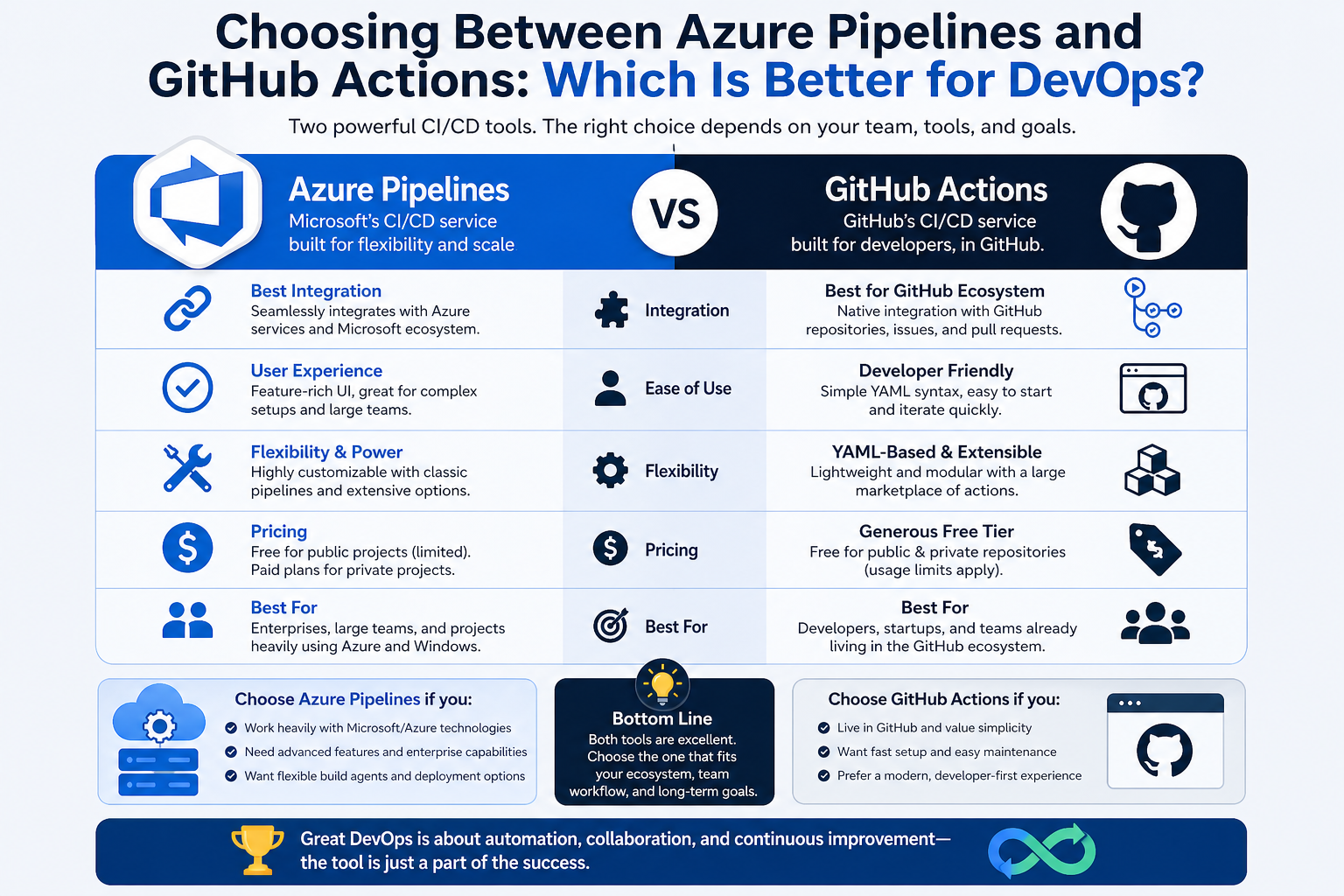
DevOps practices today are driven by the need for speed, reliability, and automation across software delivery pipelines. Both Azure Pipelines and GitHub Actions aim to solve these needs, but they approach the problem from slightly different perspectives. Understanding their strengths requires looking beyond basic features and focusing on how each tool behaves in real-world development environments where teams need consistency, scalability, and maintainability.
Azure Pipelines tends to position itself as a fully structured enterprise-grade solution. It is designed for organizations that operate across multiple teams, services, and environments. It supports complex workflows where code is not just built and tested, but also deployed across multiple stages such as development, staging, and production with strict approval processes.
GitHub Actions, in contrast, is designed for speed and simplicity within a developer-centric ecosystem. It enables automation directly within repositories, allowing developers to define workflows close to the codebase itself. This reduces context switching and makes automation feel more integrated into daily development activities.
Architecture and Workflow Design
The architectural philosophy behind Azure Pipelines is centered on centralized control. Pipelines are defined with a strong emphasis on stages, jobs, and deployment groups. This structure makes it easier to manage large-scale systems where multiple services must be coordinated in a predictable sequence. It is particularly effective in environments where release governance is critical.
GitHub Actions follows a more decentralized model where workflows are defined per repository. Each workflow is triggered by events such as code pushes, pull requests, or scheduled tasks. This event-driven approach allows teams to build automation that is tightly coupled with development activity, making it highly responsive and flexible.
The difference in architecture also affects how teams scale their DevOps practices. Azure Pipelines scales well in centralized enterprise operations, while GitHub Actions scales organically across many repositories with minimal overhead.
Pipeline Configuration and Complexity
In Azure Pipelines, configuration is often more detailed and explicit. YAML-based pipeline definitions allow for advanced customization, including conditional logic, multi-stage deployments, and environment-specific configurations. This level of control is powerful but can introduce complexity for smaller teams or simpler projects.
GitHub Actions also uses YAML for workflow configuration, but its structure is generally more straightforward. Workflows are easier to read and maintain for small to medium-sized projects. Reusable actions from the community also reduce the need to build everything from scratch, accelerating development speed.
However, when workflows become highly complex, Azure Pipelines may offer better clarity due to its more structured pipeline hierarchy.
Integration with Development Ecosystems
One of the most significant differences between the two tools lies in ecosystem integration. Azure Pipelines is part of a broader DevOps suite that integrates with repositories, project tracking, testing tools, and cloud infrastructure services. This makes it ideal for organizations that prefer a unified DevOps environment with centralized governance.
GitHub Actions is deeply embedded within the GitHub ecosystem. This means that repository management, issue tracking, and CI/CD workflows exist in a single platform. For teams already using GitHub for version control, this creates a seamless experience where automation is just another layer on top of existing workflows.
This tight integration reduces friction and improves developer productivity, especially in fast-moving projects where quick iterations are essential.
Deployment Strategies and Environment Management
Azure Pipelines provides strong support for advanced deployment strategies such as blue-green deployments, canary releases, and multi-stage approvals. These features are particularly valuable for enterprise applications where downtime must be minimized and releases must be carefully controlled.
GitHub Actions also supports deployment workflows, but it often relies on external configuration or third-party tools for more advanced strategies. While it can handle most deployment scenarios effectively, Azure Pipelines offers more built-in capabilities for managing complex release pipelines.
Environment management in Azure Pipelines is also more mature, with built-in support for approvals, checks, and gated deployments. GitHub Actions has been improving in this area, but it still leans toward simplicity rather than deep enterprise governance.
Performance and Execution Model
Both tools execute workflows in cloud-based environments, but their performance characteristics differ slightly. Azure Pipelines uses a pool-based system where jobs are distributed across agents. This allows for controlled execution environments and predictable performance in enterprise settings.
GitHub Actions uses hosted runners that scale dynamically based on demand. This makes it highly efficient for burst workloads and unpredictable usage patterns. It is particularly effective for open-source projects or teams with variable workloads.
In terms of raw performance, both are competitive, but GitHub Actions often feels faster to start due to its lightweight setup process, while Azure Pipelines provides more consistent performance in large-scale deployments.
Security and Access Control
Security is a critical aspect of DevOps pipelines, and both tools provide strong capabilities, but with different focuses.
Azure Pipelines offers granular access control through role-based permissions, service connections, and enterprise-level policy enforcement. It is designed for organizations that require strict governance over who can modify pipelines, trigger deployments, or access production environments.
GitHub Actions also provides strong security features such as encrypted secrets, environment protection rules, and approval workflows. However, its model is slightly more simplified, focusing on ease of use while still maintaining strong security standards.
For highly regulated industries, Azure Pipelines may offer more comprehensive governance features, while GitHub Actions provides sufficient security for most modern development workflows.
Scalability and Enterprise Readiness
Azure Pipelines is often the preferred choice for large enterprises due to its ability to handle complex, multi-team environments. It supports hybrid deployments, on-premises agents, and integration with legacy systems, making it highly adaptable.
GitHub Actions scales extremely well within cloud-native environments. It is particularly strong in distributed development setups where multiple repositories and microservices need independent CI/CD workflows.
The scalability difference is less about capability and more about structure. Azure Pipelines scales vertically with complexity, while GitHub Actions scales horizontally across repositories.
Community and Ecosystem Support
GitHub Actions benefits from a massive community-driven ecosystem where reusable actions are shared publicly. This reduces development time and allows teams to leverage pre-built automation components.
Azure Pipelines has a more enterprise-focused ecosystem with official extensions and integrations. While it may not have the same level of community-driven expansion, it offers more controlled and officially supported integrations.
This difference reflects their target audiences: GitHub Actions thrives in open collaboration environments, while Azure Pipelines excels in structured enterprise ecosystems.
Learning Curve and Developer Experience
GitHub Actions is generally easier to learn for developers who are already familiar with Git-based workflows. Its configuration is intuitive, and the close integration with repositories reduces onboarding time.
Azure Pipelines has a steeper learning curve due to its broader feature set and more complex pipeline structures. However, once mastered, it provides significantly more control over deployment pipelines and enterprise workflows.
Developer experience ultimately depends on team size and project complexity. Smaller teams often prefer GitHub Actions for its simplicity, while larger teams benefit from Azure Pipelines’ structured approach.
Use Case Suitability
GitHub Actions is best suited for modern web applications, open-source projects, microservices, and teams that prioritize speed and simplicity. It is particularly effective when development and deployment happen frequently and need tight integration with source control.
Azure Pipelines is better suited for enterprise applications, large-scale systems, and organizations with strict compliance requirements. It excels in scenarios where deployment workflows must be carefully controlled and audited.
Limitations of Each Platform
GitHub Actions, while flexible, can become complex when workflows grow very large or when multiple environments require sophisticated orchestration. It may also require external tools for advanced deployment strategies.
Azure Pipelines, on the other hand, can feel heavy for small projects. Its setup and configuration overhead may slow down rapid prototyping or lightweight development workflows.
Future Direction of DevOps Automation
The future of both tools is moving toward deeper integration, improved automation intelligence, and better developer experience. GitHub Actions is increasingly focusing on simplifying workflows and improving native integrations, while Azure Pipelines continues to strengthen enterprise governance and hybrid cloud support.
As DevOps continues to evolve, the distinction between the two may blur, but their core philosophies will likely remain the same: GitHub Actions focusing on developer-first simplicity, and Azure Pipelines focusing on enterprise-grade control and scalability.
Final Reflection on Selection Criteria
Choosing between Azure Pipelines and GitHub Actions is not about identifying a universally superior tool. Instead, it is about aligning the tool with the specific needs of a team or organization. Factors such as project size, complexity, compliance requirements, and existing ecosystem play a critical role in this decision.
Teams that value speed, simplicity, and tight repository integration often gravitate toward GitHub Actions. Those that require structured governance, complex deployment pipelines, and enterprise-level control often find Azure Pipelines to be a better fit.
Both tools are powerful, mature, and capable of supporting modern DevOps practices. The real difference lies in how they shape workflow design and how comfortably they integrate into the existing development culture of an organization.
Advanced Workflow Orchestration Capabilities
As DevOps practices mature, workflow orchestration becomes one of the most critical aspects of CI/CD systems. Azure Pipelines provides a highly structured orchestration model that allows teams to define multi-stage pipelines with clear dependencies between jobs and environments. This makes it easier to coordinate complex software delivery processes where multiple services must be deployed in a specific order.
GitHub Actions approaches orchestration through event-driven workflows and reusable jobs. Instead of relying heavily on centralized pipeline structures, it allows workflows to be triggered by repository events and external signals. This makes it extremely flexible in distributed development environments, but it can require more planning when building highly interconnected systems.
In practice, Azure Pipelines tends to feel more predictable when managing large release trains, while GitHub Actions excels in dynamic environments where workflows need to respond quickly to changes across multiple repositories.
Reusability and Modular Design
Reusability plays a significant role in reducing duplication and improving maintainability in DevOps pipelines. Azure Pipelines supports templates and YAML reuse, allowing teams to define standardized pipeline components that can be shared across multiple projects. This is particularly valuable in organizations with strict engineering standards and shared deployment patterns.
GitHub Actions introduces reusability through composite actions and reusable workflows. These can be published and shared across repositories, enabling teams to build a library of automation components. The community ecosystem also contributes heavily here, making it easy to adopt pre-built solutions for common tasks.
While both platforms support modular design, GitHub Actions often feels more community-driven, whereas Azure Pipelines is more internally governed and standardized within organizations.
Monitoring, Logging, and Observability
Monitoring pipeline execution is essential for diagnosing failures and optimizing performance. Azure Pipelines provides detailed logs, stage-level visibility, and integration with monitoring tools that help teams track pipeline health across complex systems. It is especially useful in enterprise environments where auditability and traceability are required.
GitHub Actions also provides comprehensive logs for each workflow run, including step-by-step execution details. While it is highly effective for debugging individual workflows, large-scale observability across multiple repositories may require additional tooling or integrations.
Azure Pipelines generally offers deeper insights into long-running, multi-stage deployments, while GitHub Actions provides faster access to execution logs within a developer-friendly interface.
Customization and Extensibility
Customization is a key factor when selecting a CI/CD platform. Azure Pipelines offers a wide range of extensions and service integrations that can be added to pipelines. It supports custom agents, allowing teams to run pipelines in controlled environments, including self-hosted infrastructure.
GitHub Actions extends functionality through marketplace actions and custom scripts. Developers can create and share actions written in JavaScript, Docker, or composite formats. This makes it highly extensible, especially for teams that prefer lightweight automation components.
The key difference lies in control versus convenience. Azure Pipelines offers deeper control over execution environments, while GitHub Actions emphasizes ease of extension through pre-built or community-driven components.
Handling Microservices Architectures
Modern software systems often rely on microservices, which require independent build and deployment pipelines. GitHub Actions is particularly strong in this area because it allows each repository to define its own workflow independently. This aligns naturally with microservice architecture, where each service is developed, tested, and deployed separately.
Azure Pipelines also supports microservices effectively, but it often does so through centralized or multi-stage pipeline configurations. This can be beneficial for coordinating releases across multiple services but may introduce complexity when services evolve independently.
In highly distributed architectures, GitHub Actions tends to offer more flexibility, while Azure Pipelines provides stronger coordination for tightly coupled systems.
Cost Considerations and Resource Usage
Cost is an important factor in DevOps decision-making. GitHub Actions offers a usage-based pricing model that is often cost-effective for small to medium-sized projects, especially open-source repositories that may qualify for free usage tiers.
Azure Pipelines also uses a consumption-based model, but pricing structures are often more aligned with enterprise usage and may include additional costs for parallel jobs and hosted agents. For large organizations, this cost is justified by the advanced features and governance capabilities provided.
Ultimately, GitHub Actions can be more economical for smaller teams, while Azure Pipelines provides better value for enterprise-scale operations where advanced features outweigh cost considerations.
Collaboration and Developer Workflow Alignment
DevOps is not just about automation; it is also about collaboration between developers, testers, and operations teams. GitHub Actions enhances collaboration by keeping workflows close to pull requests, issues, and code reviews. This tight integration encourages continuous feedback and faster iteration cycles.
Azure Pipelines supports collaboration through integration with project management and work tracking systems. It is particularly useful in structured environments where changes must go through formal approval processes before deployment.
The difference here is cultural as much as technical. GitHub Actions aligns with agile, fast-moving teams, while Azure Pipelines supports more structured, process-driven organizations.
Reliability and Stability in Production Environments
Reliability is a cornerstone of any CI/CD system. Azure Pipelines is widely recognized for its stability in enterprise environments, especially when dealing with long-running builds and complex deployment chains. Its agent-based architecture provides predictable execution behavior.
GitHub Actions is also highly reliable, but because it is more dynamic and event-driven, some teams may experience variability in execution timing depending on workload and runner availability. However, for most use cases, it performs consistently and efficiently.
In mission-critical systems where predictable deployment behavior is essential, Azure Pipelines often has an advantage.
Hybrid and Multi-Cloud Support
Modern infrastructure rarely exists in a single environment. Azure Pipelines offers strong support for hybrid deployments, including on-premises servers, multiple cloud providers, and virtual machines. This makes it ideal for organizations transitioning to cloud or operating in hybrid environments.
GitHub Actions primarily focuses on cloud-native workflows but can also integrate with external environments using self-hosted runners. While flexible, it is generally less specialized for complex hybrid infrastructure scenarios compared to Azure Pipelines.
Organizations with diverse infrastructure landscapes often benefit more from Azure Pipelines in this area.
Speed of Innovation and Feature Evolution
GitHub Actions has rapidly evolved since its introduction, with frequent updates and a growing ecosystem of actions. Its development pace reflects the fast-moving nature of GitHub’s platform strategy, focusing on developer experience and automation simplicity.
Azure Pipelines evolves at a more measured pace, prioritizing stability, enterprise readiness, and backward compatibility. This slower but controlled evolution is often preferred in large organizations where sudden changes could disrupt production workflows.
The trade-off is between innovation speed and operational stability.
Learning Curve in Real-World Adoption
In real-world adoption scenarios, teams often report that GitHub Actions is easier to adopt incrementally. Developers can start with simple workflows and gradually introduce more complexity as needed. This makes it ideal for teams transitioning into DevOps practices.
Azure Pipelines requires more upfront understanding of pipeline structure, environments, and deployment strategies. However, this investment pays off in large-scale systems where structured workflows become essential for maintainability.
The learning curve difference often determines which tool teams adopt first when starting their DevOps journey.
Strategic Fit in Modern DevOps Culture
Modern DevOps culture emphasizes automation, collaboration, and continuous improvement. GitHub Actions aligns closely with this philosophy by embedding automation directly into the development workflow. It encourages rapid iteration and continuous feedback loops.
Azure Pipelines aligns with a more structured DevOps model where processes, approvals, and governance play a central role. It supports organizations that require controlled releases and strict operational oversight.
Both approaches are valid; the choice depends on whether the organization prioritizes agility or control.
Long-Term Sustainability and Ecosystem Maturity
Both platforms are backed by strong ecosystems and long-term support strategies. GitHub Actions benefits from the massive GitHub developer community and continuous investment in cloud-native tooling. Azure Pipelines benefits from enterprise adoption and integration within a broader cloud ecosystem.
Sustainability is strong in both cases, but their evolution paths differ. GitHub Actions is likely to continue expanding its developer-centric automation capabilities, while Azure Pipelines will continue strengthening enterprise governance and hybrid infrastructure support.
Final Perspective on Strategic Decision Making
Selecting between Azure Pipelines and GitHub Actions ultimately comes down to understanding organizational priorities. Teams focused on developer speed, simplicity, and repository-centric workflows tend to benefit more from GitHub Actions. Organizations that require deep control, structured release pipelines, and enterprise-grade governance often find Azure Pipelines more suitable.
Both tools are capable of supporting modern DevOps at scale, and in some cases, organizations even use them together for different parts of their infrastructure. The key is not choosing the most popular tool, but choosing the one that best aligns with engineering culture, operational needs, and long-term scalability goals.
Enterprise Governance and Compliance Requirements
In large organizations, governance and compliance often become the deciding factors when selecting a CI/CD platform. Azure Pipelines is designed with enterprise governance in mind, offering fine-grained control over permissions, approvals, and deployment policies. Teams can enforce strict rules around who can approve releases, which branches can trigger deployments, and what environments are allowed for production changes.
GitHub Actions also supports governance features, but it approaches them in a more lightweight and developer-friendly manner. Environment protection rules, required reviewers, and secret management provide a solid foundation for secure deployments. However, in highly regulated industries where compliance auditing and strict separation of duties are essential, Azure Pipelines tends to offer more comprehensive control mechanisms.
This difference makes Azure Pipelines particularly attractive to organizations in finance, healthcare, and government sectors, where regulatory requirements demand detailed traceability and structured approval flows.
Environment Segmentation and Release Control
Managing multiple environments such as development, staging, and production is a core requirement in DevOps workflows. Azure Pipelines provides built-in support for environment segmentation with clearly defined deployment stages. Each environment can have its own approval gates, validation checks, and deployment conditions, ensuring controlled progression from one stage to another.
GitHub Actions handles environments through configuration-based definitions. While it supports environment protection and approvals, the structure is less rigid, allowing teams more freedom but requiring more discipline in setup and maintenance.
Azure Pipelines is often preferred when strict separation between environments is necessary, especially in enterprise systems where production stability is critical. GitHub Actions works well when environments are simpler or when teams prefer flexible deployment flows.
Handling Legacy Systems and Modernization Efforts
Many organizations operate hybrid environments where legacy systems coexist with modern cloud-native applications. Azure Pipelines is particularly strong in such scenarios because it supports a wide range of deployment targets, including on-premises servers, virtual machines, and legacy infrastructure.
It allows teams to gradually modernize systems without requiring a complete overhaul of existing infrastructure. This makes it highly suitable for organizations undergoing digital transformation.
GitHub Actions, while capable of interacting with legacy systems through self-hosted runners, is more naturally aligned with cloud-native development. It is best suited for modern applications built with microservices, containers, and serverless architectures.
The difference lies in adaptability versus modernization focus, with Azure Pipelines offering broader compatibility for older systems.
Developer Productivity and Workflow Efficiency
Developer productivity is heavily influenced by how seamlessly CI/CD tools integrate into daily workflows. GitHub Actions excels in this area by embedding automation directly within the repository experience. Developers can trigger workflows, view results, and manage automation without leaving the codebase environment.
This tight integration reduces context switching and accelerates feedback loops, allowing developers to identify and fix issues faster. It also encourages a culture of continuous integration where every change is automatically validated.
Azure Pipelines supports productivity through its structured pipelines and integrations, but it often involves navigating multiple interfaces and configurations. While powerful, it may feel more formal compared to the lightweight experience of GitHub Actions.
In fast-paced development environments, GitHub Actions often provides a more fluid and intuitive experience.
Debugging and Troubleshooting Pipelines
Effective debugging tools are essential for maintaining reliable CI/CD pipelines. Azure Pipelines offers detailed diagnostic capabilities, including step-level logs, retry mechanisms, and pipeline visualization tools. These features make it easier to trace issues in complex multi-stage workflows.
GitHub Actions provides straightforward logs for each workflow run, allowing developers to quickly inspect failures. However, when workflows become highly complex, debugging may require additional effort due to the distributed nature of actions across repositories and external dependencies.
Azure Pipelines generally provides more structured debugging support, especially for enterprise-grade pipelines where failures must be analyzed in detail.
Parallelism and Build Optimization
Performance optimization is a key consideration in large-scale DevOps systems. Azure Pipelines offers advanced parallel job execution, allowing multiple stages of a pipeline to run concurrently. This reduces build times significantly in complex systems with multiple dependencies.
GitHub Actions also supports parallel execution through matrix builds and concurrent workflows. This is particularly useful for testing across multiple environments or configurations, such as different operating systems or runtime versions.
While both platforms support parallelism, Azure Pipelines provides more control over execution order and dependency management, whereas GitHub Actions focuses on simplicity and ease of configuration.
Integration with Containerization and Kubernetes
Modern applications frequently rely on containers and orchestration platforms. Both Azure Pipelines and GitHub Actions provide strong support for containerized workflows, but their approaches differ slightly.
Azure Pipelines offers deep integration with container registries and orchestration platforms, making it easier to manage multi-stage deployments into Kubernetes clusters. It is often used in enterprise environments where containerized workloads require strict deployment control.
GitHub Actions integrates well with container-based workflows and provides native support for building and publishing container images. It is particularly popular in cloud-native development environments where Kubernetes and Docker are standard tools.
Both tools are capable in this space, but Azure Pipelines leans toward structured enterprise deployment, while GitHub Actions favors developer-centric automation.
Impact on DevOps Culture Transformation
Adopting a CI/CD platform is not just a technical decision; it also influences organizational culture. GitHub Actions encourages a culture of rapid iteration, shared responsibility, and continuous feedback. Developers are empowered to manage automation directly within their workflows, fostering a more collaborative environment.
Azure Pipelines supports a more formalized DevOps culture where processes, approvals, and structured workflows are emphasized. This is beneficial in organizations that require predictability and control but may slow down rapid experimentation.
The choice between the two often reflects the maturity and goals of the DevOps transformation within an organization.
Extensibility Through Third-Party Integrations
Modern DevOps pipelines rarely operate in isolation. They must integrate with testing frameworks, monitoring tools, security scanners, and deployment platforms. GitHub Actions has a strong advantage in this area due to its extensive marketplace of reusable actions contributed by the community.
Azure Pipelines also supports a wide range of extensions and integrations, but these are typically more curated and enterprise-focused. This ensures stability but may limit the variety of community-driven innovations.
GitHub Actions encourages rapid experimentation with third-party tools, while Azure Pipelines emphasizes reliability and vetted integrations.
Maintenance Overhead and Long-Term Manageability
As pipelines grow in complexity, maintenance becomes a critical concern. GitHub Actions can become difficult to manage if workflows are not well structured, especially across multiple repositories with duplicated logic.
Azure Pipelines addresses this through centralized templates and reusable components that help standardize pipeline definitions across teams. This reduces duplication and improves long-term maintainability in large organizations.
However, the centralized nature of Azure Pipelines can also introduce rigidity, making quick changes more controlled but less flexible.
Adoption Trends in Modern Development Teams
In recent years, GitHub Actions has seen rapid adoption among startups, open-source projects, and cloud-native teams. Its simplicity, tight GitHub integration, and strong community support make it an attractive choice for modern development workflows.
Azure Pipelines continues to dominate in enterprise environments where structured governance, hybrid infrastructure support, and long-term stability are essential. It remains a core component of many large-scale DevOps strategies.
The trend suggests a growing divide where GitHub Actions leads in developer-first environments, while Azure Pipelines maintains strength in enterprise-grade systems.
Strategic Decision Framework
When evaluating both tools, organizations should consider several strategic factors rather than focusing solely on features. These include team size, regulatory requirements, infrastructure complexity, and development speed expectations.
If the primary goal is rapid development, frequent releases, and tight integration with code repositories, GitHub Actions is often the better fit. If the goal is controlled deployments, enterprise governance, and support for complex hybrid systems, Azure Pipelines becomes the stronger candidate.
In some cases, organizations adopt a hybrid approach, using GitHub Actions for lightweight automation and Azure Pipelines for critical production deployments.
Both Azure Pipelines and GitHub Actions are powerful CI/CD solutions, but they are optimized for different philosophies of software delivery. One emphasizes structure, control, and enterprise readiness, while the other emphasizes simplicity, speed, and developer-centric automation.
The most effective choice depends on aligning the tool with the organization’s DevOps maturity, architectural complexity, and cultural priorities. Neither platform is universally better; instead, each excels in environments that match its design philosophy.
Security Model and Secret Management
Security in CI/CD pipelines is not optional; it is a foundational requirement. Azure Pipelines provides a highly structured security model with service connections, variable groups, secure files, and tightly controlled permission layers. These features are designed for environments where access must be strictly governed and where auditability is essential for compliance.
GitHub Actions handles security through encrypted secrets, environment-level protection rules, and repository access controls. It is highly effective for most modern development workflows, especially when teams follow best practices around secret isolation and least-privilege access. However, Azure Pipelines generally provides more granular control for large organizations that require strict segmentation of duties across teams and environments.
The key difference is depth versus simplicity. Azure Pipelines focuses on enterprise-grade governance, while GitHub Actions focuses on streamlined developer experience with strong but simpler security primitives.
Performance Consistency in Large-Scale Systems
Performance consistency becomes critical as systems scale. Azure Pipelines uses a managed agent pool model that allows organizations to control execution environments more precisely. This leads to predictable build behavior, especially in large, multi-stage deployments where consistency is more important than raw speed.
GitHub Actions relies heavily on hosted runners that scale dynamically. This provides excellent responsiveness for small to medium workloads, but performance can vary depending on system load and concurrency limits. Self-hosted runners can mitigate this, but they require additional maintenance effort.
In practice, Azure Pipelines often delivers more stable performance in enterprise-grade systems, while GitHub Actions offers more elastic scalability for rapidly changing workloads.
Workflow Standardization Across Teams
In large engineering organizations, maintaining consistency across teams is a major challenge. Azure Pipelines addresses this through templates, shared libraries, and centralized pipeline definitions that enforce standard practices. This ensures that all teams follow consistent deployment and testing procedures.
GitHub Actions supports reusable workflows and shared actions, but its decentralized nature means teams have more autonomy. While this encourages flexibility, it can sometimes lead to inconsistency if governance is not enforced.
Azure Pipelines is stronger when uniformity and standardization are critical, while GitHub Actions is better suited for environments that value team independence.
Flexibility in Tooling and Language Support
Both platforms support a wide range of programming languages and frameworks, including JavaScript, Python, Java, .NET, Go, and more. Azure Pipelines provides strong integration with enterprise development stacks, particularly those built around Microsoft technologies.
GitHub Actions is language-agnostic and highly flexible due to its container-based and script-driven execution model. Developers can easily define workflows using custom scripts or community-built actions, making it extremely adaptable across diverse technology stacks.
This flexibility makes GitHub Actions particularly attractive for polyglot environments where multiple programming languages and frameworks coexist.
Incident Response and Rollback Capabilities
In production systems, the ability to respond quickly to failures is critical. Azure Pipelines provides structured rollback mechanisms through deployment stages and release pipelines. Teams can define rollback strategies and automatically revert deployments if failures are detected.
GitHub Actions can implement rollback strategies, but they often require custom configuration or integration with external tools. While flexible, this places more responsibility on the development team to design recovery workflows.
Azure Pipelines offers more built-in support for controlled recovery processes, making it more suitable for mission-critical systems.
Observability and Integration with Monitoring Tools
Modern DevOps requires strong observability across the entire pipeline lifecycle. Azure Pipelines integrates deeply with monitoring and logging ecosystems, enabling teams to track deployment performance, failure rates, and system health over time.
GitHub Actions provides detailed workflow logs and integrates well with external observability tools. However, its native observability features are more focused on individual workflow runs rather than enterprise-wide analytics.
For organizations that require deep insights into deployment trends and operational metrics, Azure Pipelines offers a more comprehensive observability framework.
Cost Efficiency at Scale
Cost considerations become increasingly important as usage grows. GitHub Actions offers flexible pricing that can be highly cost-effective for smaller teams or open-source projects. However, costs can increase with heavy usage of hosted runners and complex workflows.
Azure Pipelines follows a model that is often more predictable at enterprise scale, especially when integrated with broader organizational agreements. While it may appear more expensive initially, its value increases significantly in large-scale deployments due to advanced governance and control features.
The cost difference often depends on scale rather than tool efficiency alone.
Developer Autonomy vs Centralized Control
One of the most important distinctions between these tools is the balance between developer autonomy and centralized control. GitHub Actions strongly empowers developers to define and manage their own workflows. This autonomy accelerates innovation and reduces dependency on centralized DevOps teams.
Azure Pipelines emphasizes centralized control, where DevOps or platform teams often define and manage pipelines for multiple development teams. This ensures consistency but may reduce flexibility for individual teams.
Organizations must decide whether they prioritize speed of innovation or strict operational control.
Future Evolution of CI/CD Platforms
The future of CI/CD platforms is moving toward greater automation intelligence, improved developer experience, and deeper integration with cloud ecosystems. GitHub Actions is expected to continue expanding its role as a developer-first automation platform, with increasing support for AI-assisted workflows and smarter automation triggers.
Azure Pipelines is likely to continue evolving as a robust enterprise-grade orchestration system, with improvements in hybrid cloud support, governance automation, and large-scale deployment optimization.
Both platforms are converging toward more intelligent, event-driven automation, but their core philosophies will remain distinct.
Conclusion
Choosing between Azure Pipelines and GitHub Actions ultimately depends on the balance between simplicity, control, and scale required by an organization.
GitHub Actions is best suited for teams that value speed, developer autonomy, and seamless integration with code repositories. It excels in modern cloud-native environments, open-source projects, and fast-moving development cycles where rapid iteration is essential.
Azure Pipelines is better suited for enterprises that require structured governance, complex deployment orchestration, and strong hybrid infrastructure support. It provides deeper control over environments, more robust compliance features, and highly predictable execution for large-scale systems.
Both tools are mature, powerful, and capable of supporting modern DevOps practices effectively. The real decision is not about which tool is objectively better, but which one aligns more closely with the organization’s architecture, culture, and long-term engineering goals.