Wireless networking has become one of the most important parts of modern life. People use Wi-Fi every day in homes, offices, schools, hospitals, shopping malls, airports, hotels, factories, and even public spaces. Smartphones, laptops, tablets, printers, smart televisions, gaming consoles, CCTV cameras, and smart home devices all depend on wireless connections for communication and internet access. Today, most people simply call it Wi-Fi, but behind Wi-Fi there is a technical system known as 802.11 standards. These standards define how wireless devices communicate with each other, how signals travel through the air, how speed is improved, how security is maintained, and how network performance becomes stronger over time.
What Are 802.11 Standards
The 802.11 standards are wireless networking protocols created for wireless local area networks, commonly called WLANs. These standards were developed to ensure that wireless devices can connect and communicate properly without compatibility issues. Without these standards, every manufacturer would create its own wireless communication system, and devices from different companies would struggle to work together. A laptop from one brand might fail to connect with a router from another brand. The 802.11 standards solve this problem by creating a universal set of rules that all manufacturers follow.
These standards control how devices discover wireless networks, how they connect, how data is sent and received, how security is managed, and how interference is reduced. They also help improve speed, coverage, reliability, and support for multiple connected devices. As older standards became too slow for modern needs, newer versions were introduced to solve those limitations and improve the user experience.
Difference Between Wi-Fi and 802.11
Many people think Wi-Fi and 802.11 are exactly the same thing, but there is a small difference between them. 802.11 is the technical name of the wireless networking standard, while Wi-Fi is the simple public name used for marketing and easy understanding. For example, when someone says Wi-Fi 5, they are usually referring to 802.11ac, and when they say Wi-Fi 6, they mean 802.11ax.
The technical standard explains how the wireless system works, while the Wi-Fi name makes it easier for everyday users to compare devices and understand technology without needing technical knowledge. This simpler naming system helps people make better choices when buying routers, smartphones, laptops, and wireless access points.
How Wireless Communication Works
In a traditional wired network, devices connect using physical cables such as Ethernet cables. In a wireless network, devices use radio signals instead of wires. A wireless router or wireless access point sends radio waves through the air, and devices like mobile phones, laptops, tablets, and smart TVs detect those signals and connect to the network.
These radio signals travel using frequency bands. The most common frequency bands used in wireless networking are 2.4 GHz, 5 GHz, and 6 GHz. Each frequency band has different strengths and weaknesses. The 2.4 GHz band offers better range because lower-frequency signals travel farther and pass through walls more easily. However, it is slower and often crowded because many other devices use the same frequency.
The 5 GHz band provides faster speed and less interference, but the signal range is shorter and walls weaken it more easily. The 6 GHz band is the newest option and offers even better speed, lower latency, and less congestion, but it requires newer devices that support modern wireless standards. Different versions of 802.11 use different frequency bands depending on their design and purpose.
Why Wi-Fi Standards Are Important
Choosing the correct Wi-Fi standard has a major impact on network performance. It affects internet speed, signal strength, connection stability, video streaming quality, gaming performance, video conferencing, smart home functionality, office productivity, and device compatibility. It also influences battery efficiency and wireless security.
For example, if someone uses an old standard like 802.11b on a modern internet connection, the network will feel slow and unstable. If the same user upgrades to a newer standard like 802.11ax, they will experience faster speed, stronger stability, and smoother performance even when many devices are connected at the same time.
This is why understanding Wi-Fi standards is important before buying routers, access points, or wireless devices. It helps users choose the right technology for their needs instead of relying only on marketing labels.
The Beginning of Wireless Networking
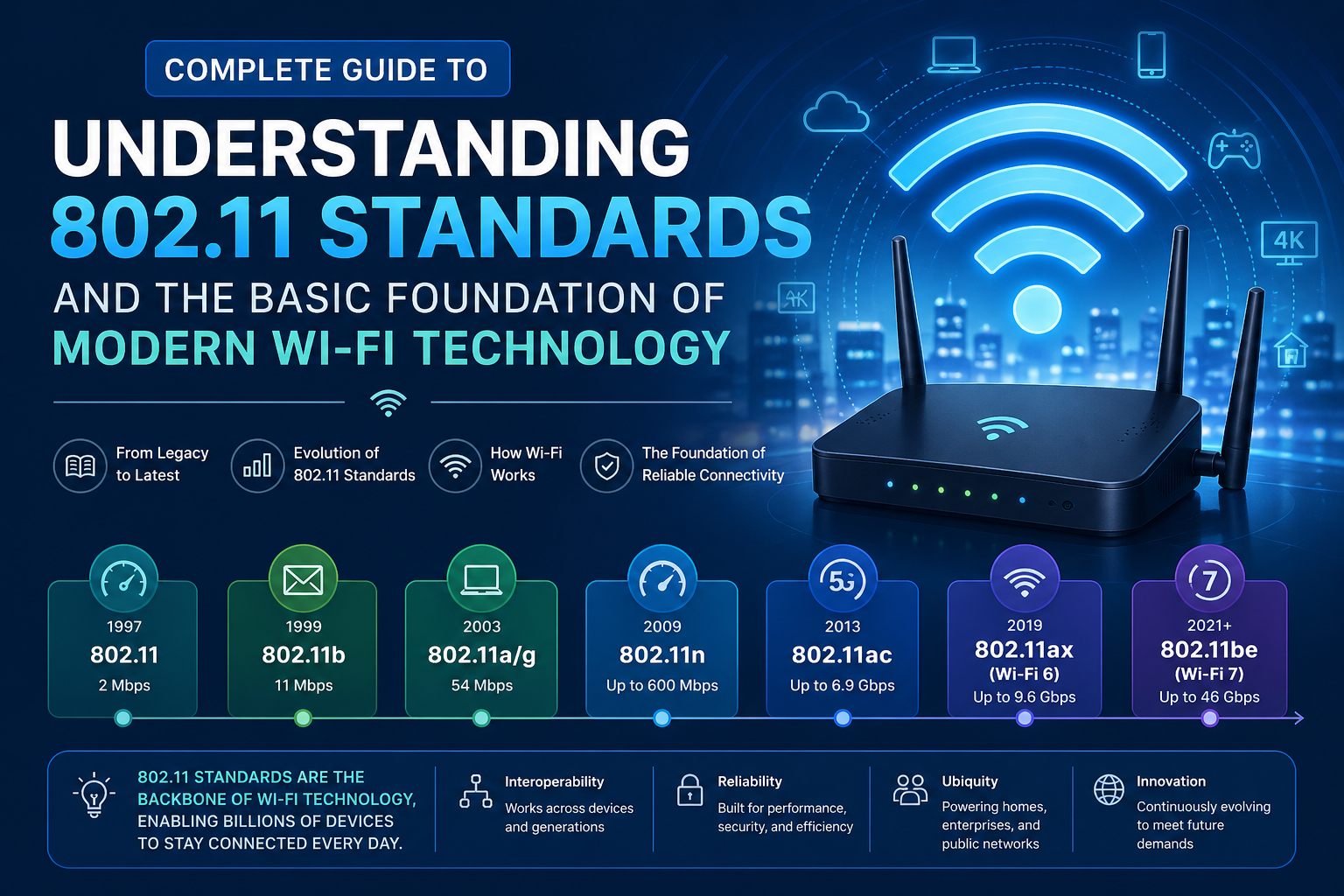
The first wireless networking standard was introduced in 1997. This early version supported only 2 Mbps speed and operated on the 2.4 GHz frequency band. At that time, wireless networking itself was a new concept. Even though the speed was very low compared to modern standards, it was considered useful because it allowed devices to connect without physical cables.
This was a major technological step because it gave users flexibility and mobility. People could move devices without depending on wires. However, as internet usage increased and users demanded better performance, 2 Mbps quickly became too slow. This first version became outdated very quickly and was replaced by faster and stronger standards.
Even though it was limited, it created the foundation for all future Wi-Fi technology and made modern wireless communication possible.
802.11a
802.11a was introduced in 1999 and was one of the first major improvements in wireless networking. It used the 5 GHz frequency band and supported speeds up to 54 Mbps, which was a huge improvement compared to earlier wireless technology.
The main advantage of 802.11a was speed. Because it used the 5 GHz band, there was less interference from household devices like microwave ovens and cordless phones. This made it useful for environments where performance was more important than signal range.
However, it also had some disadvantages. The 5 GHz signal did not travel as far as 2.4 GHz. It also had more difficulty passing through walls, doors, and furniture. This meant users often needed more access points to cover the same building.
Another problem was cost. Devices using 802.11a were more expensive, so they were more common in business environments than in homes. Although it was advanced for its time, 802.11a is now considered a legacy standard and is mainly used only when supporting older equipment.
802.11b
Also released in 1999, 802.11b used the 2.4 GHz frequency band and supported speeds up to 11 Mbps. Even though it was slower than 802.11a, it became much more popular because it was cheaper and offered better signal range.
The 2.4 GHz frequency allowed signals to travel farther and pass through walls more easily. This made it ideal for homes, small offices, and public wireless environments. Because of its lower cost and stronger coverage, 802.11b became one of the most widely used wireless standards during the early growth of Wi-Fi.
Many early laptops, wireless adapters, and home routers were built using 802.11b. Today, it is considered outdated and should only be used when very old devices require support.
Why 802.11b Became More Popular Than 802.11a
Many people wonder why 802.11b became more popular than 802.11a even though 802.11a was faster. The answer is cost and practicality.
Most home users cared more about affordability and range than maximum speed. They wanted a wireless connection that worked across the house without spending too much money. Since 802.11b devices were cheaper and the signal reached farther, it became the better option for normal users.
Businesses sometimes preferred 802.11a because they needed stronger performance and could afford the higher cost. This shows that the fastest technology does not always become the most popular. Real-world needs often matter more than technical speed.
802.11g
In 2003, 802.11g was introduced as a major upgrade over 802.11b. It continued using the 2.4 GHz frequency band, which meant it kept the strong signal range and better wall penetration, but it increased speed up to 54 Mbps.
This gave users a strong balance between speed and coverage. Another major advantage of 802.11g was backward compatibility. Devices using 802.11g could still communicate with older 802.11b devices.
This made upgrades much easier because users did not need to replace all their wireless devices at once. Homes and businesses could improve speed while still supporting older equipment. For many years, 802.11g became the standard wireless choice for both home and office networks.
Today, it is mostly used only for legacy support, but it played a major role in expanding Wi-Fi around the world.
Understanding Backward Compatibility
Backward compatibility is one of the most important concepts in wireless networking. It means newer Wi-Fi standards can still work with older devices.
For example, if a router supports a newer standard and a laptop supports an older standard, they can still communicate using the older supported method. This helps users upgrade slowly instead of replacing every device at the same time.
Backward compatibility saves money and makes network upgrades much easier. However, it also creates limitations. A wireless network can only perform as fast as the slowest supported communication method. If old devices remain connected, they may reduce the speed and efficiency of the whole network.
This is why businesses often replace very old wireless equipment instead of keeping outdated devices connected for too long.
Signal Range and Network Performance
Many people think newer Wi-Fi standards only mean faster speed, but signal range is equally important. Wireless performance depends heavily on frequency.
Lower frequencies like 2.4 GHz travel farther and pass through walls more easily. Higher frequencies like 5 GHz and 6 GHz provide faster speed but shorter range. This creates an important balance between speed and coverage.
For example, a warehouse may need stronger range more than high speed because devices are spread across a large area. A gaming room may need faster speed and lower latency more than long-distance coverage. A hospital may require both wide coverage and stable performance because many devices must stay connected continuously.
Choosing the correct Wi-Fi standard depends on the real environment and the actual purpose of the network.
Wireless Interference
Wireless signals can be affected by interference, and interference reduces speed and connection quality. Microwave ovens, Bluetooth devices, cordless phones, baby monitors, neighboring Wi-Fi networks, thick concrete walls, metal shelves, industrial machinery, and crowded office spaces can all create wireless interference.
The 2.4 GHz band is more likely to suffer from interference because many devices use it. The 5 GHz and 6 GHz bands usually offer cleaner and faster connections because fewer devices compete there.
Modern Wi-Fi standards are designed to reduce interference and improve performance in busy environments. This becomes very important in apartments, shopping malls, airports, and office buildings where many wireless networks exist close together.
Security in Early Wireless Networks
Older wireless standards often had weaker security protections. In the early days of Wi-Fi, wireless security methods were simple and easier for attackers to break. As internet usage increased and businesses started depending heavily on wireless communication, stronger protection became necessary.
Wireless security became especially important for online banking, business communication, medical systems, remote work, cloud storage, government offices, school networks, and smart home systems.
Modern Wi-Fi standards work much better with stronger encryption and safer authentication methods. This helps protect users from unauthorized access, hacking attempts, data theft, and network attacks. Security is now one of the strongest reasons for upgrading older wireless equipment.
Why Legacy Standards Still Matter
Many people ask why old standards like 802.11a, 802.11b, and 802.11g still matter when modern Wi-Fi is much better. The answer is simple because older devices still exist.
Many businesses still use old printers, medical machines, security systems, warehouse scanners, point-of-sale machines, factory equipment, industrial sensors, and legacy business hardware. These devices may still work perfectly for their purpose and may be expensive to replace.
Because of this, organizations often continue supporting older Wi-Fi standards until a full upgrade becomes possible. This is why network professionals must understand both modern and legacy wireless standards. Even outdated technology can still be important in real business environments.
Detailed Explanation of Modern 802.11 Standards and Their Real-World Uses
As wireless networking continued to grow, older standards like 802.11a, 802.11b, and 802.11g slowly became too limited for modern internet needs. People started using high-definition video streaming, online gaming, cloud storage, video conferencing, smart home systems, and large business applications that required faster speeds and stronger wireless performance. This created the need for more advanced Wi-Fi standards that could handle higher traffic, more connected devices, and better security.
This is where modern standards such as 802.11n, 802.11ac, 802.11ax, and 802.11be became important. These newer versions changed wireless networking completely by improving speed, reliability, efficiency, and overall user experience. They are the reason modern Wi-Fi feels much faster and more stable than older wireless networks.
Understanding these modern standards helps users choose the right wireless technology for homes, offices, schools, hospitals, and business environments.
802.11n
802.11n was introduced in 2009 and became one of the biggest upgrades in Wi-Fi history. It is also commonly known as Wi-Fi 4. This standard brought major improvements in speed, range, and flexibility compared to older versions.
One of the biggest advantages of 802.11n was that it supported both 2.4 GHz and 5 GHz frequency bands. Earlier standards usually worked on only one frequency band, but 802.11n allowed users to benefit from both wider coverage and faster performance.
It offered speeds up to 600 Mbps, which was a huge improvement compared to 54 Mbps in 802.11g. This made it suitable for video streaming, file sharing, business applications, and general internet use.
Another major improvement was the use of multiple antennas, known as MIMO, which stands for Multiple Input Multiple Output. This technology allowed routers and devices to send and receive multiple data streams at the same time, improving speed and stability.
802.11n also improved backward compatibility because it could work with older standards like 802.11a, 802.11b, and 802.11g. This made upgrades easier for users who still had older devices.
Even today, many older laptops, smart TVs, printers, and IoT devices still use 802.11n. It remains useful in environments where very high speed is not required.
Real-World Use of 802.11n
Although 802.11n is considered old by modern standards, it still has practical use in many situations.
It works well for small offices, basic home internet usage, older smartphones, wireless printers, and smart home devices where maximum speed is not the top priority.
For example, a smart security camera or wireless printer does not need the extreme speed of Wi-Fi 6. In such cases, 802.11n is still good enough.
Many businesses also continue using 802.11n because replacing all devices at once can be expensive. It provides stable performance for normal office tasks like email, browsing, and cloud access.
However, it is no longer the best choice for building a brand-new high-performance network.
802.11ac
802.11ac was introduced in 2013 and is commonly known as Wi-Fi 5. This standard became one of the most popular wireless technologies for homes and businesses because it provided a strong balance between speed, performance, and cost.
Unlike 802.11n, 802.11ac mainly works on the 5 GHz frequency band. This allows faster data transfer and less interference compared to the crowded 2.4 GHz band.
It offers speeds up to 1.3 Gbps and even higher depending on the hardware version. This made it ideal for HD video streaming, online gaming, video conferencing, and high-speed internet connections.
One of the biggest improvements in 802.11ac was stronger beamforming. Beamforming allows the router to focus the wireless signal directly toward connected devices instead of sending the signal equally in all directions. This improves speed, stability, and overall efficiency.
Another important feature was support for more antennas and wider channels. This allowed higher throughput and better handling of multiple devices.
Although 802.11ac officially focuses on 5 GHz, most routers supporting this standard also include dual-band capability. This means they can still support older 2.4 GHz devices using older standards when needed.
This made Wi-Fi 5 a practical and affordable choice for most users.
Why 802.11ac Became the Standard Choice
802.11ac became the standard choice for many homes and businesses because it offered the best balance between price and performance.
It was fast enough for streaming, gaming, office work, and smart home devices without the higher cost of newer technologies.
Most modern devices such as smartphones, laptops, tablets, and smart TVs released during the last several years support Wi-Fi 5, making compatibility very strong.
For many users, upgrading from 802.11n to 802.11ac created a major improvement in internet speed and wireless stability.
Even today, Wi-Fi 5 remains a very strong choice for users who want reliable high-speed internet without spending extra money on the newest technology.
802.11ax
802.11ax was introduced in 2019 and is commonly known as Wi-Fi 6. It represents one of the most important upgrades in modern wireless networking because it focuses not only on speed but also on efficiency.
While Wi-Fi 5 improved raw speed, Wi-Fi 6 was designed to improve performance in crowded environments where many devices connect at the same time.
It supports 2.4 GHz, 5 GHz, and in newer versions, the 6 GHz band. This gives users better flexibility and stronger performance across different environments.
The theoretical maximum speed of 802.11ax can reach up to 9.6 Gbps, which is significantly faster than previous standards.
However, the biggest improvement is not just speed. It is the ability to handle many connected devices more efficiently.
Modern homes and offices often have dozens of connected devices including phones, laptops, smart TVs, security cameras, voice assistants, gaming consoles, and IoT devices. Older standards struggle in these crowded situations.
Wi-Fi 6 improves this by using smarter data management, lower latency, and better power efficiency.
This means devices connect faster, respond faster, and use less battery power.
Wi-Fi 6E
Wi-Fi 6E is an extension of Wi-Fi 6 that adds support for the 6 GHz frequency band.
This new frequency creates more available wireless space, which reduces congestion and improves performance.
In crowded places like offices, apartments, airports, and shopping centers, too many devices using the same channels can slow down the network.
The 6 GHz band solves this by providing cleaner channels and less interference.
This makes Wi-Fi 6E especially useful for high-performance environments where speed and stability are critical.
It is excellent for cloud gaming, 4K and 8K streaming, virtual reality, remote work, and large business operations.
However, both the router and the client device must support Wi-Fi 6E to use the 6 GHz band.
Real-World Use of 802.11ax
Wi-Fi 6 is ideal for modern smart homes, businesses, hospitals, schools, and public environments where many devices connect at the same time.
For example, in a smart home, there may be phones, tablets, TVs, cameras, lights, speakers, thermostats, and voice assistants all connected together. Wi-Fi 6 handles this much better than older standards.
In offices, it improves video meetings, cloud access, remote work, and productivity.
In hospitals and schools, stable connections are extremely important because many devices must stay online continuously.
Wi-Fi 6 is also excellent for gamers and content creators who need low latency and strong performance.
Although it costs more than Wi-Fi 5, it is often the best choice for future-proofing a network.
802.11be
802.11be is commonly known as Wi-Fi 7 and is the newest major step in wireless networking.
It is designed to provide extremely high speed, ultra-low latency, and stronger support for next-generation applications.
Wi-Fi 7 supports 2.4 GHz, 5 GHz, and 6 GHz frequency bands and is expected to deliver speeds above 30 Gbps in real high-performance environments.
This is far beyond what most home users currently need, but it is important for future technology growth.
Wi-Fi 7 is designed for advanced applications such as 8K video streaming, cloud gaming, virtual reality, augmented reality, smart factories, industrial automation, and enterprise-level networking.
It also improves responsiveness, making real-time applications much smoother and more reliable.
The goal is not only faster internet but also better wireless performance for demanding tasks that require instant response.
Is Wi-Fi 7 Necessary Right Now
For most home users today, Wi-Fi 7 is not yet necessary.
Many people still get excellent performance from Wi-Fi 5 and Wi-Fi 6. Internet service providers in many areas do not even offer speeds that require Wi-Fi 7.
Also, Wi-Fi 7 hardware is still expensive, and many devices do not fully support it yet.
However, for businesses planning long-term upgrades, high-performance users, and early technology adopters, Wi-Fi 7 can be a strong future investment.
As more devices begin supporting it, Wi-Fi 7 will become more common in homes and offices.
Device Compatibility Matters
One of the most important things people forget is that wireless performance depends on both the router and the connected device.
For example, buying a new Wi-Fi 6 router does not automatically give Wi-Fi 6 performance if the laptop or phone only supports Wi-Fi 4.
The connection will only work at the highest standard both devices support.
This means upgrading only the router may not create the full performance improvement users expect.
To get the best results, both the access point and the client devices should support the same modern standard.
This is especially important in business environments where network upgrades are planned carefully.
Choosing the Right Standard
The best Wi-Fi standard depends on the user’s needs.
If someone has basic internet use with older devices, 802.11n may still be enough.
For most homes and offices, 802.11ac remains an excellent choice because it offers strong speed and wide compatibility.
For users who want future-proofing, smart home support, and better performance with many devices, 802.11ax is often the best option.
For high-performance business networks and next-generation technology environments, Wi-Fi 7 offers the strongest long-term value.
There is no single answer for everyone. The right choice depends on speed requirements, budget, number of connected devices, and long-term upgrade plans.
Understanding these standards helps users make better decisions instead of simply buying the newest product without knowing if they actually need it.
Lesser-Known 802.11 Standards, Advanced Wireless Concepts, and
While most people are familiar with common Wi-Fi standards like 802.11n, 802.11ac, 802.11ax, and Wi-Fi 7, there are several other 802.11 standards created for special purposes. These standards may not be common in homes, but they play an important role in industries, smart cities, healthcare systems, factories, transportation, and advanced business environments.
These lesser-known standards were designed to solve specific problems such as long-range communication, battery efficiency, ultra-fast short-distance transfer, and industrial automation. Understanding them helps create a complete picture of how wireless technology continues to evolve beyond normal home internet use.
At the same time, building a strong wireless network is not only about choosing the latest Wi-Fi standard. Network design, access point placement, channel selection, bandwidth planning, and client device compatibility are equally important. A powerful Wi-Fi standard alone cannot guarantee excellent performance if the network is poorly designed.
This final part explains these special standards, advanced wireless concepts, and how all of them work together to create a reliable wireless environment.
802.11ah
802.11ah is also known as Wi-Fi HaLow. It was created for long-range, low-power wireless communication and is mainly used for Internet of Things environments.
Unlike common Wi-Fi standards that use 2.4 GHz, 5 GHz, or 6 GHz, 802.11ah works below 1 GHz. Lower frequencies can travel much farther and pass through walls and physical barriers more easily.
This makes it very useful for large outdoor environments, industrial systems, agriculture, warehouses, and smart city projects.
For example, smart street lights, water monitoring systems, parking sensors, and industrial machines may use 802.11ah because they need stable long-distance communication with low power consumption.
Battery life is extremely important in these environments because replacing batteries for thousands of sensors can be expensive and difficult.
Wi-Fi HaLow solves this problem by providing longer battery life while maintaining reliable wireless communication.
802.11ad
802.11ad is one of the first standards designed for extremely high-speed wireless communication over short distances.
It uses the 60 GHz frequency band, which is much higher than traditional Wi-Fi frequencies. Because of this, it can deliver very high throughput, often around 7 Gbps.
However, the signal range is very short, usually around 30 feet, and walls can block the signal easily.
This means 802.11ad is not ideal for full-building wireless coverage, but it is useful for situations where devices are close together and require very fast data transfer.
Examples include wireless docking stations, high-speed file transfer between nearby devices, conference rooms, and advanced media streaming.
It is often called WiGig because it focuses on gigabit-level wireless speed.
Although it did not become common in homes, it introduced important ideas for future high-speed wireless technology.
802.11ay
802.11ay is the improved version of 802.11ad and also works on the 60 GHz frequency band.
It was created to provide much higher speed and longer range than 802.11ad. Speeds can exceed 20 Gbps, and range is significantly better.
This makes it useful for high-performance business environments, advanced wireless backhaul systems, industrial automation, and large data transfer applications.
Wireless backhaul means connecting access points to the main network wirelessly instead of using physical cables. This can be useful in places where running cables is difficult or expensive.
802.11ay supports this type of high-capacity communication while maintaining strong speed and reliability.
It is not common for normal home users, but it is important for future enterprise wireless solutions.
802.11ba
802.11ba is known as Wake-Up Radio or WUR. It was designed mainly to improve battery life for wireless devices, especially Internet of Things devices.
Many IoT devices do not need to stay fully active all the time. Examples include smart locks, temperature sensors, alarm systems, and environmental monitoring devices.
Keeping the main wireless radio active continuously wastes battery power.
802.11ba solves this problem by using a low-power secondary radio that listens for wake-up signals. The main radio stays asleep until needed.
This greatly improves battery efficiency and allows devices to stay connected for much longer without frequent charging or battery replacement.
This technology is especially valuable in smart homes, industrial systems, healthcare monitoring, and large sensor networks.
802.11af
802.11af is sometimes called White Space Wi-Fi. It uses unused television broadcast frequencies to provide wireless communication.
These lower frequencies can travel very long distances and pass through walls and buildings more effectively than normal Wi-Fi.
This makes it useful for rural internet access, remote monitoring systems, and areas where traditional broadband infrastructure is difficult to build.
Although it is not common for normal users, it shows how wireless technology can expand internet access in underserved regions.
802.11p
802.11p was created for vehicle communication systems.
It supports wireless communication between vehicles and between vehicles and road infrastructure.
This helps improve traffic safety, accident prevention, and transportation management.
For example, cars can exchange information about traffic conditions, road hazards, weather, and emergency braking.
It plays an important role in smart transportation systems and future self-driving vehicle technology.
Although people do not see it as normal Wi-Fi, it is still part of the 802.11 family.
Wireless Access Point Placement
Even the best Wi-Fi standard cannot perform well if access points are placed incorrectly.
Many people buy powerful routers but still experience weak signals because of poor placement.
Wireless access points should be placed in open central locations where signals can spread evenly. They should not be hidden inside cabinets, placed behind large furniture, or installed near heavy metal objects.
Walls, mirrors, elevators, concrete structures, and industrial equipment can weaken wireless signals.
In large offices, hospitals, schools, and warehouses, multiple access points are usually required for full coverage.
Proper placement reduces dead zones, improves stability, and helps users receive stronger signals without unnecessary interference.
Network design is just as important as the Wi-Fi standard itself.
Channel Width and Performance
Wireless networks also depend on channel width.
Common channel widths include 20 MHz, 40 MHz, 80 MHz, and 160 MHz.
Wider channels provide faster speed because they allow more data to pass at once.
However, wider channels also create more interference if too many nearby networks use the same space.
For example, using 80 MHz channels may improve speed in a private home with little interference, but in crowded apartment buildings, smaller channels may perform better.
Choosing the correct channel width depends on the environment, not just speed goals.
A well-balanced network often performs better than one designed only for maximum speed.
Dual-Band and Tri-Band Routers
Modern routers are often dual-band or tri-band.
A dual-band router supports both 2.4 GHz and 5 GHz.
A tri-band router supports 2.4 GHz, 5 GHz, and an additional 5 GHz or 6 GHz band depending on the model.
This helps distribute devices more efficiently and reduces congestion.
For example, smart home devices may use 2.4 GHz because they need better range, while gaming consoles and streaming devices may use 5 GHz or 6 GHz for higher speed.
This separation improves overall network performance.
Choosing between dual-band and tri-band depends on the number of devices, internet speed, and user requirements.
Client Device Limitations
Many users believe buying the newest router automatically solves all wireless problems.
This is not always true because wireless performance depends on both the router and the client device.
If someone buys a powerful Wi-Fi 6 router but their laptop only supports Wi-Fi 4, the connection will still work at Wi-Fi 4 speed.
The router cannot force the client device to perform beyond its hardware capability.
This is why upgrading only the router may not provide the expected speed improvement.
For best results, both the router and the connected devices should support the same modern standard.
Businesses especially must consider this when planning network upgrades.
Security Still Matters
No matter how fast a Wi-Fi network is, weak security creates serious risks.
Modern wireless networks should use strong encryption and secure authentication methods to protect users from hacking, unauthorized access, and data theft.
Businesses handling customer information, hospitals managing patient records, schools protecting student data, and homes using smart devices all require strong wireless security.
Older wireless standards often rely on weaker security systems, which is another reason they should be replaced when possible.
A fast network without security is not a good network.
Performance and protection must work together.
Future of Wireless Networking
Wireless technology continues to grow rapidly.
Future standards will focus not only on faster speed but also on lower latency, better energy efficiency, stronger device management, and improved support for artificial intelligence, automation, and smart environments.
Smart cities, self-driving vehicles, industrial robotics, remote healthcare, virtual reality, and advanced cloud services will all depend heavily on stronger wireless communication.
Wi-Fi 7 is already moving in this direction, and future generations will continue pushing those limits.
The goal is no longer just internet access. The goal is creating fully connected digital environments where everything communicates smoothly and instantly.
Conclusion
Understanding 802.11 standards is essential for building strong, reliable, and future-ready wireless networks.
Older standards like 802.11a, 802.11b, and 802.11g helped create the foundation of wireless communication, but they are now mostly used only for legacy support. Standards like 802.11n and 802.11ac became the bridge between early Wi-Fi and modern high-speed networking. Today, 802.11ax and Wi-Fi 7 represent the future of wireless performance, offering better speed, stronger efficiency, and support for many connected devices.
At the same time, choosing the right Wi-Fi standard is only one part of good network design. Access point placement, channel planning, frequency selection, device compatibility, and security all play major roles in overall performance.
A fast router alone cannot create a strong wireless network if the design is poor. Real success comes from combining the right standard with smart planning and proper hardware choices.
Whether for homes, offices, schools, hospitals, factories, or smart cities, understanding Wi-Fi standards helps users make better decisions, improve network stability, and prepare for future technology growth.
Wireless networking is no longer a luxury. It is now a basic part of everyday life, and knowing how it works gives people the power to build better digital experiences for the future.