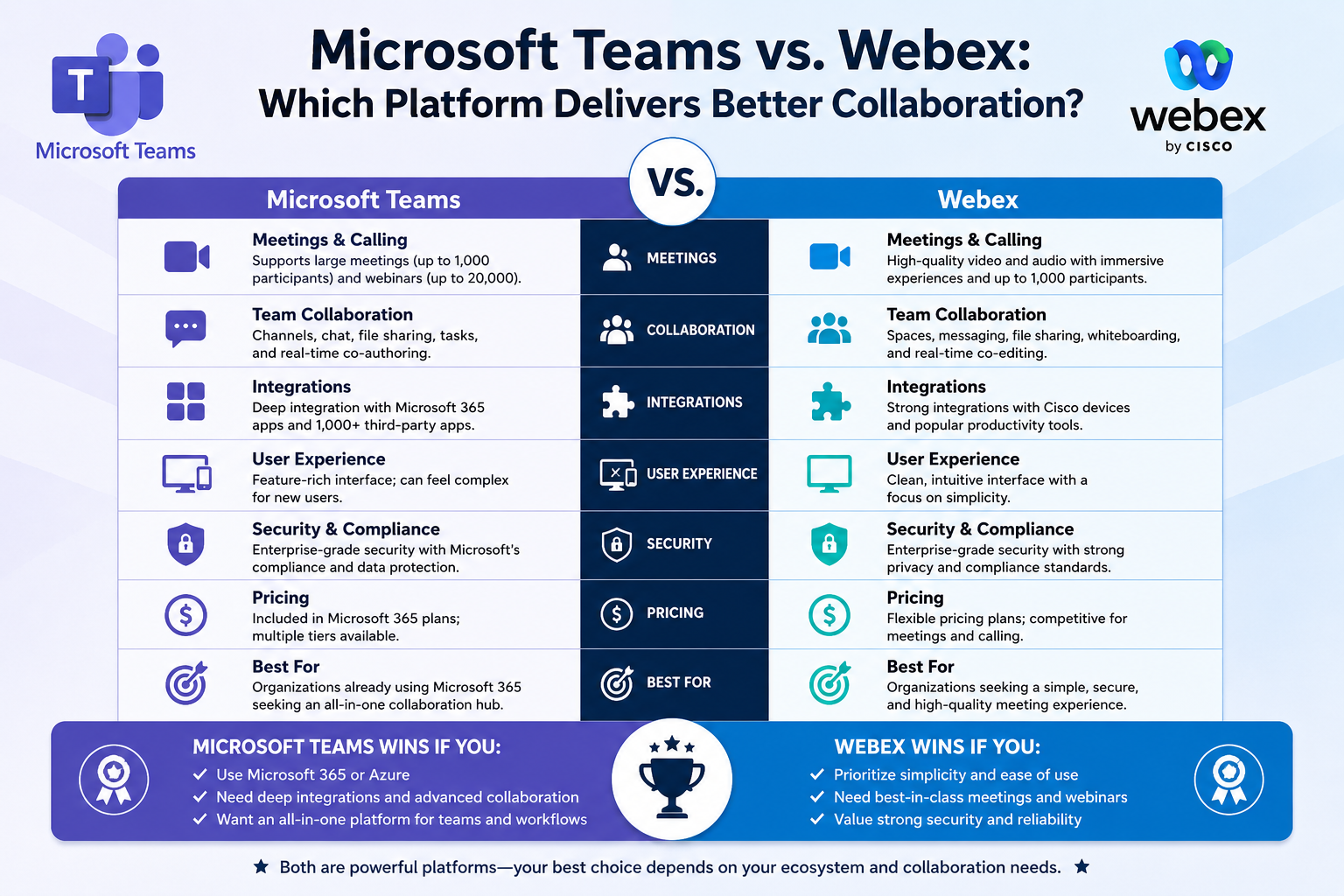
Communication and collaboration platforms have become the backbone of modern business operations. Whether employees are working remotely, traveling between offices, or collaborating across multiple countries, organizations depend on digital communication tools to maintain productivity and efficiency. Video conferencing, messaging, file sharing, project collaboration, and enterprise calling are now essential business functions rather than optional conveniences.
Among the most recognized enterprise communication platforms are Cisco Webex and Microsoft Teams. Both platforms offer a wide range of collaboration capabilities designed to help organizations improve communication and streamline teamwork. However, despite having similar core functions, they are built around different philosophies and ecosystems.
Cisco Webex has long been associated with enterprise-grade conferencing, networking reliability, and advanced communication infrastructure. Many large organizations adopted Webex years before remote work became mainstream because of Cisco’s reputation for stability, security, and networking expertise.
Microsoft Teams, on the other hand, entered the market later but experienced explosive growth due to its integration with Microsoft 365. What began as a workplace messaging application gradually evolved into a comprehensive collaboration hub that combines meetings, messaging, file sharing, task management, and calling into a single interface.
As organizations continue modernizing their IT environments, many decision-makers are asking an important question: should they continue investing in Webex or migrate to Microsoft Teams?
The answer depends on several factors, including existing infrastructure, employee workflows, licensing costs, collaboration requirements, and long-term digital transformation goals.
Choosing a communication platform is not just a technical decision. It directly affects employee productivity, IT management complexity, training requirements, operational costs, and overall workplace experience. Migrating from one platform to another also requires careful planning because communication tools are deeply integrated into daily business operations.
This guide explores the reasons many organizations are evaluating Teams as an alternative to Webex, the situations where migration makes sense, and the strategic factors businesses should analyze before making a final decision.
The Evolution of Workplace Collaboration
Business communication has changed dramatically over the last two decades. Traditional office environments once relied heavily on email, desk phones, and in-person meetings. Collaboration technologies were often separate systems managed independently by IT teams.
Companies commonly used:
One platform for video conferencing
Another for instant messaging
Separate systems for phone calls
Independent tools for document storage
Third-party applications for project management
This fragmented approach created operational inefficiencies. Employees frequently switched between applications just to complete simple tasks. Information became scattered across platforms, increasing confusion and reducing productivity.
As remote work and hybrid work models became more common, organizations began searching for unified collaboration environments capable of centralizing communication and teamwork.
This demand fueled the rise of integrated collaboration platforms like Microsoft Teams.
Instead of functioning only as conferencing software, Teams was designed as a complete digital workspace where messaging, meetings, files, calendars, applications, and collaboration tools coexist within one ecosystem.
Cisco responded by continuing to enhance Webex with broader collaboration capabilities, AI-powered meeting intelligence, and hybrid workplace solutions.
Today, both platforms compete aggressively for enterprise customers seeking secure and scalable communication solutions.
Why Organizations Reevaluate Their Collaboration Platforms
Businesses rarely change communication platforms without strong reasons. Migrating enterprise collaboration tools requires time, resources, employee retraining, and technical planning.
However, several trends are encouraging organizations to reevaluate existing communication systems.
Increasing Demand for Unified Workspaces
Modern employees want seamless digital experiences.
Switching constantly between multiple tools slows productivity and creates unnecessary frustration. Organizations increasingly prioritize platforms capable of consolidating communication and collaboration into one workspace.
Unified platforms help employees:
Access files faster
Reduce context switching
Collaborate in real time
Join meetings instantly
Share information efficiently
Maintain organized communication histories
Microsoft Teams strongly emphasizes this all-in-one collaboration model.
Remote and Hybrid Work Expansion
The growth of hybrid work environments accelerated demand for flexible communication solutions.
Employees now expect collaboration tools that function consistently across:
Office locations
Remote home offices
Mobile devices
Shared workspaces
International teams
Teams and Webex both support hybrid work, but organizations often compare how well each platform integrates with their broader workplace strategy.
Simplifying IT Operations
Managing multiple disconnected collaboration systems increases operational complexity.
IT teams must maintain:
Separate security policies
Multiple admin portals
Independent user permissions
Different update cycles
Various support processes
Consolidating platforms can reduce administrative overhead and simplify support operations.
Cost Optimization
Economic pressures push organizations to analyze software spending carefully.
Businesses already paying for Microsoft 365 often discover that Teams is included within existing subscriptions. This raises questions about whether maintaining additional Webex licensing remains financially practical.
Reducing duplicate software costs becomes an attractive incentive for migration.
Microsoft Teams and the Microsoft 365 Ecosystem
One of Teams’ biggest advantages is its deep integration with Microsoft 365.
Organizations already using Microsoft services often experience smoother workflows because Teams connects naturally with applications employees use daily.
These integrations include:
Outlook
SharePoint
OneDrive
Word
Excel
PowerPoint
Exchange Online
Microsoft Entra ID
Power Automate
Planner
Because Microsoft controls the entire ecosystem, Teams interactions feel highly interconnected.
For example, when users share files in Teams chats, those files automatically save to SharePoint or OneDrive. Employees can collaborate on documents simultaneously during meetings without leaving the Teams interface.
Meeting scheduling integrates directly with Outlook calendars. Authentication remains centralized through Microsoft identity management systems.
This seamless connectivity reduces workflow interruptions and simplifies collaboration.
Native Integration Advantages
Native integration plays a major role in Teams adoption.
Although Webex integrates with Microsoft services, Teams generally delivers a smoother experience because the services were designed together.
Organizations using Teams benefit from:
Single sign-on across Microsoft applications
Shared security policies
Unified compliance management
Integrated file storage
Consistent user experiences
Centralized administration
Employees do not need to jump between disconnected environments to complete routine tasks.
This efficiency becomes particularly valuable in large organizations where collaboration occurs continuously throughout the workday.
Reducing Tool Sprawl
Many companies suffer from what IT professionals call tool sprawl.
Over time, businesses adopt multiple overlapping platforms for communication, collaboration, meetings, file storage, and project coordination.
A typical organization may use:
Webex Meetings for conferencing
Slack for messaging
Zoom for webinars
Separate VoIP systems for calls
SharePoint for file storage
Independent project management software
This fragmented environment increases complexity for both users and administrators.
Employees waste time navigating different interfaces and locating information spread across multiple systems.
IT departments must manage integrations, troubleshoot compatibility issues, and enforce security policies across disconnected applications.
Microsoft Teams addresses this challenge by consolidating multiple collaboration functions into one platform.
Inside Teams, users can:
Send messages
Host meetings
Make phone calls
Collaborate on files
Access calendars
Integrate applications
Manage projects
Store shared documents
This consolidation reduces operational friction and simplifies daily workflows.
Simplifying Employee Workflows
Workflow efficiency directly affects productivity.
When employees constantly switch between applications, they lose focus and waste time reorienting themselves.
Teams minimizes these interruptions by allowing conversations, meetings, and document collaboration to occur within one environment.
For example:
A user can begin a chat conversation
Convert the chat into a voice call
Upgrade the call into a video meeting
Share files instantly
Collaborate on documents live
Continue messaging afterward
All without switching platforms.
This seamless workflow structure appeals strongly to organizations seeking higher operational efficiency.
IT Administration Benefits
Consolidated collaboration environments also simplify IT administration.
Organizations already managing Microsoft infrastructure can oversee Teams using familiar administrative tools.
Administrators can manage:
Security policies
Compliance requirements
Data retention rules
User permissions
Meeting configurations
Application integrations
Authentication settings
From centralized Microsoft management consoles.
This reduces duplicated administrative work and improves consistency across the organization.
Businesses already using:
Microsoft Intune
Microsoft Defender
Microsoft Entra ID
Microsoft Purview
Often benefit from tighter integration between security management and collaboration systems.
Webex Strengths Still Matter
Despite Teams’ growth, Webex remains highly respected within enterprise environments.
Cisco continues investing heavily in Webex capabilities, particularly in areas such as:
Meeting reliability
Network optimization
Enterprise security
Hybrid workplace solutions
AI-powered conferencing
Advanced webinar experiences
Webex also integrates exceptionally well with Cisco hardware ecosystems.
Organizations already using Cisco networking infrastructure or conference room equipment may find remaining within the Cisco ecosystem operationally advantageous.
Webex has historically performed especially well in:
Large-scale enterprise conferencing
Formal webinar environments
Advanced host controls
Bandwidth optimization
Meeting hardware experiences
This is why some enterprises continue choosing Webex despite the growing popularity of Teams.
User Adoption Considerations
Technology adoption succeeds only when employees actually embrace the platform.
User resistance is one of the biggest challenges organizations face during collaboration platform migrations.
Employees often develop strong habits around existing tools. Even relatively small interface changes can create frustration during transition periods.
Microsoft invested heavily in making Teams accessible and user-friendly.
The platform follows familiar Microsoft design patterns that resemble other Microsoft applications employees already know.
For existing Webex users, many concepts transfer naturally:
Meetings remain meeting-centric
Channels resemble communication spaces
Calling functions remain integrated
Calendars operate similarly
Document sharing feels familiar
This familiarity helps reduce the learning curve.
The Learning Curve During Migration
Even with intuitive design, migration still requires adjustment.
Employees may initially struggle with:
Different navigation layouts
New notification systems
Channel organization
Meeting controls
Calling workflows
File storage structures
Organizations that underestimate training requirements often experience slower adoption and increased support tickets.
Successful migrations usually include:
Structured onboarding programs
Video tutorials
Internal support resources
Department champions
Hands-on workshops
Phased rollout strategies
These efforts significantly improve user confidence and reduce transition resistance.
Building Internal Champions
One highly effective migration strategy involves identifying internal platform champions.
Champions are employees who:
Learn the platform early
Assist coworkers
Answer basic questions
Promote adoption
Share best practices
Provide peer-level support
Employees often feel more comfortable asking coworkers for guidance than contacting IT support directly.
Department champions help accelerate adoption and reduce frustration during rollout phases.
Teams as a Long-Term Collaboration Hub
Microsoft increasingly positions Teams as the central hub for workplace collaboration.
Beyond messaging and meetings, Teams now supports:
Workflow automation
Task management
AI-generated meeting summaries
Integrated applications
Collaborative document editing
Virtual events
Enterprise calling
Cross-platform productivity
This expansion aligns with broader workplace transformation trends where communication platforms become comprehensive digital workspaces rather than standalone meeting tools.
Organizations investing heavily in Microsoft ecosystems often view Teams as a long-term strategic platform rather than simply conferencing software.
Strategic Questions Organizations Must Ask
Before deciding whether to migrate from Webex to Teams, organizations should evaluate several important questions.
What ecosystem does the business already rely on?
Organizations deeply invested in Microsoft 365 often gain operational advantages from Teams integration.
Companies heavily invested in Cisco infrastructure may continue benefiting from Webex compatibility.
What are the collaboration priorities?
Businesses focused on:
Real-time document collaboration
Integrated productivity workflows
Unified communication hubs
May prefer Teams.
Organizations prioritizing:
Advanced conferencing reliability
Cisco hardware integration
Formal webinar experiences
May lean toward Webex.
What are the long-term IT goals?
Digital transformation strategies should influence platform decisions.
The chosen platform should support future workplace goals rather than simply solving immediate communication needs.
What are the migration costs?
Migration involves more than licensing changes.
Organizations must consider:
Training expenses
Hardware upgrades
Support requirements
Workflow redesign
Potential productivity disruption
These indirect costs can significantly impact project outcomes.
Preparing for Future Collaboration Needs
Workplace communication continues evolving rapidly.
Artificial intelligence, workflow automation, hybrid work technologies, and integrated productivity tools are reshaping collaboration environments.
Microsoft continues embedding AI features into Teams through Copilot integrations and broader Microsoft 365 enhancements.
Cisco is also advancing Webex with intelligent meeting experiences and AI-powered collaboration features.
Organizations evaluating these platforms should think beyond current features alone.
The most important consideration is whether the platform aligns with long-term operational strategy, workplace flexibility, employee experience goals, and overall digital transformation direction.
Choosing the right collaboration ecosystem today can influence productivity, scalability, and workplace efficiency for many years to come.
Evaluating Communication and Calling Features
One of the most important areas organizations examine when comparing Webex and Microsoft Teams is communication functionality. Businesses rely on these platforms not only for meetings, but also for internal messaging, enterprise voice services, webinars, and day-to-day collaboration.
Over the years, Microsoft Teams has evolved into a complete communication solution capable of handling many tasks that once required separate applications. Organizations that previously depended on multiple communication tools are increasingly consolidating these functions within Teams.
Cisco Webex, however, remains highly competitive because of its long-standing reputation in enterprise communications. Cisco’s expertise in networking and telephony continues to give Webex strong credibility among large organizations.
When evaluating the two platforms, businesses must look carefully at how communication flows across their organization and determine which platform best supports those workflows.
Enterprise Messaging and Collaboration
Messaging has become a central part of workplace productivity. Employees frequently rely on instant communication instead of traditional email because messaging allows faster collaboration and more direct interaction.
Microsoft Teams organizes communication using teams and channels. Departments, projects, or workgroups can create dedicated channels where conversations, files, meetings, and applications remain centralized.
This structure creates persistent collaboration spaces that help employees maintain organized discussions around specific topics.
Teams channels support:
Text conversations
File sharing
Integrated applications
Task tracking
Meeting scheduling
Collaborative editing
Searchable communication history
Employees can quickly locate past conversations, shared documents, or project updates without switching systems.
Webex offers similar collaboration spaces through Webex App, where users can create messaging environments for teams and projects. Conversations, files, and meetings can also remain connected inside dedicated spaces.
However, many organizations feel that Teams provides tighter workflow integration because of its relationship with Microsoft 365 services.
For example, files shared inside Teams channels automatically integrate with SharePoint document libraries. Employees can collaborate on Word, Excel, or PowerPoint files directly within the Teams environment.
This reduces workflow interruptions and improves collaboration efficiency.
Meeting Experiences and Video Conferencing
Video conferencing remains one of the most heavily used collaboration functions in both Teams and Webex.
Cisco Webex built its reputation on enterprise-grade conferencing quality. For years, Webex was considered one of the leading professional meeting platforms available for large organizations.
Webex became especially popular among enterprises requiring:
Reliable global conferencing
Advanced host controls
Stable meeting performance
Large webinar environments
High-quality audio and video optimization
Cisco’s networking expertise contributed significantly to Webex’s strong conferencing performance, particularly in complex enterprise environments.
Microsoft Teams initially focused more on messaging and collaboration than conferencing. However, Microsoft rapidly expanded Teams meeting capabilities and significantly closed the gap with traditional conferencing platforms.
Today, Teams meetings support:
Large participant capacities
Breakout rooms
Meeting recordings
Live transcription
Background effects
Live captions
Interactive polls
AI-generated summaries
Meeting chat integration
Collaborative presentations
For many organizations, Teams now delivers meeting functionality comparable to dedicated conferencing platforms.
One major Teams advantage is workflow continuity.
Employees can move seamlessly from chat conversations into meetings without changing applications. Shared files remain accessible during calls, and meeting chats continue after meetings end.
This integration supports more fluid collaboration experiences.
Meeting Scalability for Large Organizations
Large enterprises often require communication platforms capable of supporting thousands of participants simultaneously.
Microsoft Teams expanded significantly in this area by introducing large meeting support and virtual event capabilities.
Organizations can host:
Large webinars
Company town halls
Training sessions
Executive broadcasts
Client presentations
Teams supports extensive participant counts depending on licensing levels and event configurations.
Webex also remains highly capable in large-scale conferencing environments. Cisco’s webinar and event management tools continue serving enterprises requiring advanced event hosting functionality.
Many organizations still view Webex as slightly stronger for formal webinar production and highly controlled presentation environments.
However, Teams has narrowed this gap considerably in recent years.
For businesses already invested in Microsoft ecosystems, Teams often provides sufficient scalability without requiring separate event platforms.
Voice Calling and Telephony
Voice services are another major consideration when evaluating communication platforms.
Historically, many organizations maintained separate phone systems alongside conferencing and messaging applications.
Modern collaboration platforms increasingly integrate enterprise calling directly into communication environments.
Microsoft Teams Phone enables organizations to:
Assign phone numbers
Make external calls
Receive incoming calls
Access voicemail
Manage call queues
Support call routing
Handle conference calling
This allows businesses to consolidate voice communication within Teams rather than maintaining entirely separate telephony systems.
Microsoft offers several approaches for Teams calling integration.
These include:
Calling Plans
Direct Routing
Operator Connect
Calling Plans allow Microsoft to provide phone numbers and calling services directly.
Direct Routing enables businesses to connect existing phone infrastructure to Teams.
Operator Connect allows organizations to work with approved telecom providers while maintaining Teams integration.
These options provide flexibility for businesses with different infrastructure needs.
Cisco also offers robust enterprise calling capabilities through Webex Calling.
Organizations already invested in Cisco telephony systems may find Webex Calling integrates more naturally with existing infrastructure.
Cisco’s extensive history in enterprise voice services remains a major advantage in certain environments.
The best choice often depends on whether the organization prioritizes Microsoft ecosystem integration or Cisco communication infrastructure continuity.
Reducing Communication Complexity
Many businesses seek to simplify communication workflows by consolidating multiple tools into one environment.
Employees frequently become frustrated when communication functions are spread across separate systems.
For example:
Meetings may occur in one application
Chat conversations in another
Phone calls in a separate system
Files stored elsewhere
This fragmentation increases inefficiency and confusion.
Teams addresses this challenge by centralizing communication services into one workspace.
An employee can:
Start a chat conversation
Escalate it into a voice call
Transition into a video meeting
Share files instantly
Collaborate live on documents
Continue follow-up communication afterward
All within the same interface.
This continuity reduces friction and improves productivity.
Webex also supports integrated communication workflows, but organizations already standardized on Microsoft applications often find Teams more cohesive.
Document Collaboration During Meetings
One area where Teams performs particularly well is real-time document collaboration.
During Teams meetings, users can:
Open shared files
Edit documents simultaneously
Review presentations collaboratively
Track changes live
Access stored content immediately
Because Teams integrates tightly with SharePoint and OneDrive, document management becomes deeply embedded within communication workflows.
Employees no longer need to download files, email attachments, or switch platforms during collaboration sessions.
This functionality is especially valuable for organizations with document-heavy workflows.
Webex supports file sharing and collaboration as well, but Teams often feels more integrated for businesses already relying heavily on Microsoft productivity tools.
Mobile Collaboration Capabilities
Modern work environments require communication platforms capable of functioning consistently across mobile devices.
Employees increasingly participate in meetings, chats, and workflows from smartphones and tablets.
Microsoft Teams provides mobile applications supporting:
Messaging
Meetings
Calling
File collaboration
Notifications
Calendar access
Channel participation
Webex also offers strong mobile functionality with enterprise conferencing support and messaging capabilities.
The mobile experience is important because hybrid work environments demand flexibility.
Employees expect communication continuity whether they are:
Working remotely
Traveling
Moving between offices
Working from client locations
Both Teams and Webex perform well in this area, although organizations often evaluate which interface employees find easier to navigate.
Meeting Room and Hardware Integration
Conference room technology remains an important factor for enterprise collaboration environments.
Organizations investing heavily in meeting room hardware must evaluate compatibility carefully before migrating platforms.
Cisco has traditionally maintained strong control over Webex hardware experiences.
Webex integrates exceptionally well with Cisco devices, including:
Conference room systems
Desk phones
Video endpoints
Collaboration boards
Networking equipment
This creates highly optimized meeting experiences within Cisco-centric environments.
Microsoft Teams Rooms, however, expanded rapidly through partnerships with numerous hardware vendors.
Teams-certified hardware is available from companies including:
Logitech
Poly
Yealink
Lenovo
HP
Dell
This broader vendor ecosystem gives organizations greater flexibility when designing meeting rooms at different budget levels.
Teams Rooms support:
One-touch meeting joins
Integrated calendars
Centralized management
Consistent interfaces
Video conferencing integration
Wireless collaboration
For organizations seeking flexibility and broader hardware choices, Teams often provides attractive options.
Businesses already deeply invested in Cisco meeting hardware may face higher migration costs if transitioning away from Webex.
User Experience and Familiarity
User experience significantly affects platform adoption success.
Employees resist communication platforms that feel confusing, inefficient, or disruptive to established workflows.
Microsoft designed Teams around familiar Microsoft interface patterns.
Employees already using Outlook, Office applications, and Microsoft 365 services often adapt relatively quickly to Teams.
Familiar elements include:
Ribbon-style controls
Microsoft navigation structures
Integrated calendars
Consistent file management behaviors
This familiarity helps reduce training complexity.
Webex users transitioning to Teams generally find many concepts transferable.
Meetings remain meeting-focused.
Channels resemble messaging spaces.
Calling features remain integrated.
However, adaptation still requires guidance and support.
Organizations that underestimate change management often experience slower adoption and increased frustration.
Training and Change Management
Successful communication platform migrations require strong change management strategies.
Employees need clear guidance during transitions.
Organizations often create:
Training videos
Quick-start guides
Live workshops
Department champions
FAQ resources
Support channels
Microsoft provides extensive Teams onboarding materials designed to accelerate user adoption.
These include:
Interactive tutorials
Built-in guidance
Administrative training
End-user learning resources
Organizations migrating from Webex frequently benefit from phased rollouts rather than immediate organization-wide transitions.
Pilot groups help identify workflow challenges and training gaps before broader deployment.
Security and Compliance Considerations
Security remains a top priority for enterprise communication platforms.
Organizations handling sensitive information require strong protection capabilities.
Microsoft Teams benefits from Microsoft’s broader enterprise security ecosystem.
Security features include:
Multi-factor authentication
Data loss prevention
Compliance policies
Retention management
Conditional access controls
Threat detection integration
Encryption services
Audit logging
Organizations already using Microsoft security services often benefit from unified policy enforcement across collaboration and productivity environments.
Cisco Webex also maintains strong enterprise security capabilities and has long served industries with strict compliance requirements.
Webex supports:
End-to-end encryption
Administrative controls
Compliance management
Secure meeting configurations
Identity integration
Security evaluations often depend on existing enterprise infrastructure and regulatory obligations.
AI and Intelligent Collaboration Features
Artificial intelligence is becoming increasingly important within collaboration platforms.
Microsoft has aggressively integrated AI capabilities into Teams through Copilot and Microsoft 365 intelligence services.
AI features include:
Meeting summaries
Action item generation
Conversation recaps
Live transcription
Intelligent search
Productivity recommendations
These capabilities aim to reduce administrative workloads and improve meeting efficiency.
Cisco is also investing heavily in AI-powered collaboration enhancements within Webex.
Features include:
Meeting intelligence
Noise removal
Automatic transcription
Real-time translation
Smart camera optimization
Both companies view AI as a major future differentiator.
Organizations evaluating long-term platform strategies increasingly consider AI integration potential alongside traditional collaboration features.
Operational Efficiency Through Consolidation
One major reason organizations migrate toward Teams is operational simplification.
Maintaining multiple communication systems increases:
Licensing costs
Support complexity
Administrative overhead
Training requirements
Integration challenges
Consolidating messaging, meetings, calling, and collaboration into one platform can significantly streamline operations.
IT departments benefit from managing fewer disconnected systems.
Employees benefit from simpler workflows.
Executives benefit from improved cost visibility and operational consistency.
However, consolidation only succeeds when the chosen platform aligns properly with organizational workflows and technical requirements.
This is why businesses must carefully evaluate communication needs before making migration decisions.
Understanding Organizational Priorities
No collaboration platform is universally superior in every situation.
The best choice depends on organizational priorities.
Businesses emphasizing:
Microsoft ecosystem integration
Unified collaboration
Document-centric workflows
Operational consolidation
May strongly prefer Teams.
Organizations prioritizing:
Cisco hardware integration
Advanced conferencing control
Specialized webinar environments
Established telephony infrastructure
May continue benefiting from Webex.
Understanding these priorities is essential before committing to migration strategies.
The decision affects not only communication systems, but also long-term productivity, workplace experience, and digital transformation planning.
Comparing Costs, Licensing, and Long-Term Value
One of the most influential factors in deciding between Webex and Microsoft Teams is cost. Organizations evaluating collaboration platforms rarely focus only on features. Financial efficiency, scalability, operational savings, and long-term return on investment all play major roles in the final decision-making process.
At first glance, pricing comparisons between Webex and Teams may appear straightforward. However, the real financial impact goes far beyond monthly subscription fees. Businesses must also evaluate infrastructure investments, support costs, training expenses, administration requirements, hardware compatibility, and productivity improvements.
For many organizations, the shift toward Microsoft Teams is driven largely by the realization that they are already paying for Microsoft 365 licenses that include Teams functionality. This creates a perception of duplicate spending when businesses continue maintaining separate Webex subscriptions.
However, pricing alone should never determine a migration strategy. Organizations must carefully evaluate total operational value rather than only comparing subscription costs.
Understanding Microsoft Teams Licensing
Microsoft Teams is deeply integrated into Microsoft 365 subscriptions, which gives Microsoft a major competitive advantage.
Many Microsoft 365 plans already include Teams access alongside services such as:
Outlook
Word
Excel
PowerPoint
OneDrive
SharePoint
Exchange Online
Planner
Power Automate
This bundled approach often makes Teams appear financially attractive because organizations are already using Microsoft productivity tools.
Businesses using Microsoft 365 Business Standard, Business Premium, E3, or E5 plans typically gain access to Teams without purchasing an entirely separate collaboration platform.
However, not all Teams functionality is included in standard licensing.
Organizations may still require additional licenses for features such as:
Enterprise calling
Advanced compliance tools
Premium webinars
AI-powered Copilot features
Advanced analytics
Specialized security controls
Even with these additional costs, many organizations still find Teams financially efficient because of platform consolidation benefits.
Webex Licensing Structures
Cisco Webex traditionally uses a more modular licensing structure.
Organizations often purchase separate licensing for:
Webex Meetings
Webex Calling
Webex Messaging
Webex Events
Advanced webinar capabilities
Contact center functionality
This modular approach allows organizations to customize deployments according to specific business needs.
However, some companies find the layered licensing model more expensive over time, especially when compared to bundled Microsoft 365 environments.
Businesses using Webex alongside Microsoft 365 sometimes feel they are effectively paying twice for overlapping collaboration capabilities.
This becomes particularly noticeable in large enterprises with thousands of users.
The Hidden Costs of Multiple Platforms
Many organizations underestimate the indirect costs associated with maintaining multiple collaboration systems.
Beyond licensing fees, fragmented communication environments create operational expenses such as:
IT administration overhead
Employee training requirements
Integration maintenance
Security management complexity
Support ticket volume
Workflow inefficiencies
When businesses operate several disconnected communication tools simultaneously, support teams must maintain expertise across multiple environments.
Employees also spend more time navigating between systems.
These hidden productivity losses accumulate over time.
Consolidating collaboration into a unified platform can reduce many of these inefficiencies.
This is one reason Teams appeals strongly to organizations already centered around Microsoft ecosystems.
Administrative Cost Reduction
IT management complexity directly affects operational spending.
Maintaining separate communication systems requires administrators to:
Manage multiple dashboards
Configure independent security policies
Handle separate user provisioning systems
Troubleshoot integration problems
Monitor several update cycles
Maintain multiple vendor relationships
A consolidated Teams environment often simplifies these responsibilities because communication services become integrated into existing Microsoft management infrastructure.
Administrators can manage collaboration alongside:
Identity management
Endpoint security
Compliance tools
Productivity applications
Cloud services
This centralization may reduce staffing pressures and improve operational consistency.
However, organizations already heavily invested in Cisco administration environments may continue finding Webex operationally efficient within existing workflows.
Training and Adoption Costs
Migration projects often involve substantial training expenses.
Employees accustomed to one communication platform may initially struggle adapting to another.
Training costs may include:
Formal workshops
Video tutorials
Internal documentation
Support staff hours
Temporary productivity losses
Consulting services
Pilot program management
Organizations that underestimate user adoption challenges frequently encounter delays and frustration during migrations.
Teams generally benefits from employee familiarity with Microsoft interfaces, which can reduce onboarding complexity.
Workers already using Outlook, Office applications, and Microsoft 365 tools often adapt more quickly to Teams environments.
However, businesses must still allocate sufficient resources for change management.
Evaluating Productivity Gains
Productivity improvements are difficult to measure precisely, but they significantly influence long-term platform value.
Unified collaboration environments may reduce time lost through:
Application switching
Disconnected workflows
File management confusion
Communication delays
Integration failures
Duplicate administrative tasks
Teams attempts to centralize collaboration functions into one workspace.
Employees can:
Chat with coworkers
Schedule meetings
Collaborate on files
Manage projects
Join calls
Share content
Access applications
Without constantly moving between platforms.
This continuity may improve operational efficiency over time.
Webex also supports strong collaboration experiences, but organizations must evaluate which workflow model better matches employee behavior and business processes.
Meeting and Webinar Capabilities
Meeting quality and webinar functionality remain major considerations when evaluating collaboration platforms.
Cisco Webex has long maintained a strong reputation for enterprise-grade conferencing performance.
Webex historically excelled in:
Large webinars
Formal presentation environments
Advanced host controls
High-quality audio optimization
Reliable meeting stability
Cisco’s experience in enterprise networking contributed significantly to Webex’s strong conferencing credibility.
Microsoft Teams initially lagged behind in some conferencing areas but expanded rapidly over recent years.
Teams now supports:
Large participant meetings
Breakout rooms
Town halls
Interactive webinars
Meeting recordings
Live transcription
AI-generated summaries
Background effects
Collaborative presentations
For many organizations, Teams now delivers conferencing capabilities sufficient for most business scenarios.
However, some enterprises still prefer Webex for highly specialized webinar production or advanced event management needs.
Calling Infrastructure Considerations
Voice communication remains critical for many businesses.
Organizations migrating collaboration platforms must carefully evaluate telephony requirements before making decisions.
Microsoft Teams Phone enables integrated enterprise calling within Teams environments.
Businesses can support:
External phone calls
Voicemail systems
Call queues
Conference bridges
Direct routing
Operator integrations
This consolidation can reduce dependence on separate PBX systems.
However, organizations already using Cisco telephony infrastructure may face migration complexity.
Cisco voice environments often integrate deeply with:
Desk phones
Call routing systems
Conference room devices
Enterprise networks
Transitioning away from established Cisco voice ecosystems may require additional investments in hardware and configuration changes.
The financial impact of replacing telephony infrastructure should always be considered carefully.
Hardware and Meeting Room Investments
Meeting room technology can significantly influence migration costs.
Organizations heavily invested in Cisco conference hardware may encounter challenges transitioning fully to Teams environments.
Cisco hardware often integrates exceptionally well with Webex systems, creating highly optimized meeting experiences.
Microsoft Teams Rooms, however, supports a broad ecosystem of certified hardware vendors.
These include:
Logitech
Poly
Yealink
Lenovo
Dell
HP
This wider hardware ecosystem gives businesses more flexibility in meeting room design and budget planning.
Organizations building new conference environments may find Teams Rooms attractive because of broader vendor options.
However, replacing existing Cisco room infrastructure can become expensive.
Businesses must evaluate whether the operational benefits justify hardware migration costs.
Integration with Existing Business Systems
Modern collaboration platforms rarely function in isolation.
Organizations increasingly depend on integrations with:
CRM systems
Project management platforms
HR systems
Customer support applications
Automation tools
Business intelligence platforms
Microsoft Teams benefits strongly from Microsoft’s broader ecosystem integration capabilities.
Teams connects naturally with:
Power Automate
Power BI
Dynamics 365
SharePoint
OneDrive
Azure services
Businesses already invested heavily in Microsoft cloud infrastructure often experience smoother integration workflows within Teams environments.
Webex also supports integrations with many third-party systems, but organizations centered around Microsoft productivity ecosystems may find Teams operationally simpler.
Security and Compliance Financial Impacts
Security requirements influence collaboration platform decisions significantly.
Regulated industries often require strict compliance controls, data governance policies, and secure communication environments.
Microsoft integrates Teams into broader Microsoft security ecosystems, including:
Microsoft Defender
Purview
Entra ID
Intune
Conditional Access
Data Loss Prevention
Organizations already using Microsoft security tools may benefit from centralized compliance management.
Cisco Webex also maintains strong enterprise security capabilities and remains trusted within highly regulated industries.
The financial impact of compliance management should not be underestimated.
Unified security environments can reduce administrative complexity and improve policy consistency.
Hybrid Work and Long-Term Workplace Strategy
Hybrid work environments continue reshaping collaboration priorities.
Organizations increasingly seek platforms capable of supporting:
Remote work
Mobile collaboration
Flexible office environments
Distributed teams
Virtual meetings
Cross-location communication
Both Teams and Webex support hybrid work strategies effectively.
However, Teams often appeals strongly to organizations pursuing broader digital workplace transformation initiatives.
Microsoft positions Teams as a central digital workspace rather than only a conferencing platform.
This strategy aligns with businesses seeking long-term workplace modernization.
Webex continues focusing heavily on enterprise communication quality, meeting experiences, and Cisco ecosystem optimization.
The best fit depends largely on organizational strategy.
Artificial Intelligence and Future Innovation
Artificial intelligence is rapidly becoming a major differentiator in collaboration platforms.
Microsoft has aggressively integrated AI capabilities into Teams through Copilot and Microsoft 365 intelligence services.
AI-powered features include:
Meeting summaries
Action item generation
Conversation recaps
Intelligent search
Workflow recommendations
Real-time transcription
Productivity insights
These features aim to improve meeting efficiency and reduce manual administrative work.
Cisco is also investing heavily in AI-powered collaboration within Webex.
Features include:
Noise cancellation
Meeting intelligence
Automatic camera framing
Live translation
Smart meeting assistance
Organizations evaluating long-term platform strategies increasingly consider AI roadmaps when selecting collaboration ecosystems.
Future productivity improvements may depend heavily on intelligent automation capabilities.
Migration Challenges and Risks
Despite potential advantages, migration projects always involve risks.
Organizations transitioning from Webex to Teams may encounter:
Employee resistance
Workflow disruption
Temporary productivity declines
Compatibility challenges
Training gaps
Infrastructure adjustments
Unexpected costs
Poorly planned migrations often create frustration among employees and IT teams.
Successful transitions require:
Clear communication
Strong leadership support
Phased deployment strategies
Comprehensive training
Pilot testing
Dedicated support resources
Organizations should never assume collaboration migrations will happen automatically without operational impact.
When Remaining with Webex Makes Sense
Not every organization benefits from migrating to Teams.
Businesses deeply invested in Cisco infrastructure may continue gaining significant value from Webex environments.
Remaining with Webex often makes sense for organizations prioritizing:
Cisco hardware integration
Advanced conferencing control
Specialized webinar experiences
Established Cisco telephony systems
Network optimization capabilities
Existing enterprise workflows
Migration costs may outweigh operational benefits in certain environments.
Companies satisfied with current workflows and infrastructure performance may choose stability over transition.
When Migrating to Teams Makes Sense
Migration to Teams often becomes attractive when organizations prioritize:
Microsoft 365 integration
Platform consolidation
Unified collaboration
Operational simplification
Document-centric workflows
Long-term digital workplace transformation
Businesses already paying for Microsoft 365 frequently discover Teams can reduce duplicate collaboration spending.
Organizations seeking tighter integration between productivity tools and communication systems often find Teams highly compelling.
Strategic Decision-Making for IT Leaders
The decision between Webex and Teams should always align with broader business strategy.
Technology leaders must evaluate:
Infrastructure investments
Employee collaboration patterns
Operational efficiency goals
Long-term IT roadmaps
Security requirements
Financial priorities
Hybrid work strategies
Future scalability
No single platform is universally better for every organization.
The right decision depends entirely on organizational needs, workflows, and long-term objectives.
Conclusion
Webex and Microsoft Teams are both powerful enterprise collaboration platforms capable of supporting modern workplace communication. Each platform offers messaging, meetings, calling, file sharing, and collaboration tools designed to improve productivity and streamline teamwork.
Microsoft Teams has become especially attractive for organizations already invested in Microsoft 365 because of its seamless integration with productivity applications, centralized administration, unified collaboration model, and growing AI capabilities. Businesses seeking platform consolidation and simplified workflows often view Teams as a strong long-term solution.
Cisco Webex, however, continues maintaining major strengths in enterprise conferencing reliability, Cisco hardware integration, networking optimization, advanced meeting environments, and enterprise communication infrastructure. Organizations deeply integrated into Cisco ecosystems may continue finding Webex operationally advantageous.
The decision to migrate should never be based solely on feature comparisons or subscription pricing. Businesses must evaluate total operational impact, employee workflows, infrastructure investments, security requirements, and long-term workplace strategy.
Successful organizations approach collaboration platform decisions strategically rather than reactively. They assess how communication technology supports productivity, scalability, employee experience, and digital transformation goals over time.
Ultimately, the best collaboration platform is the one that aligns most effectively with the organization’s operational priorities, technology ecosystem, and future vision for workplace communication.