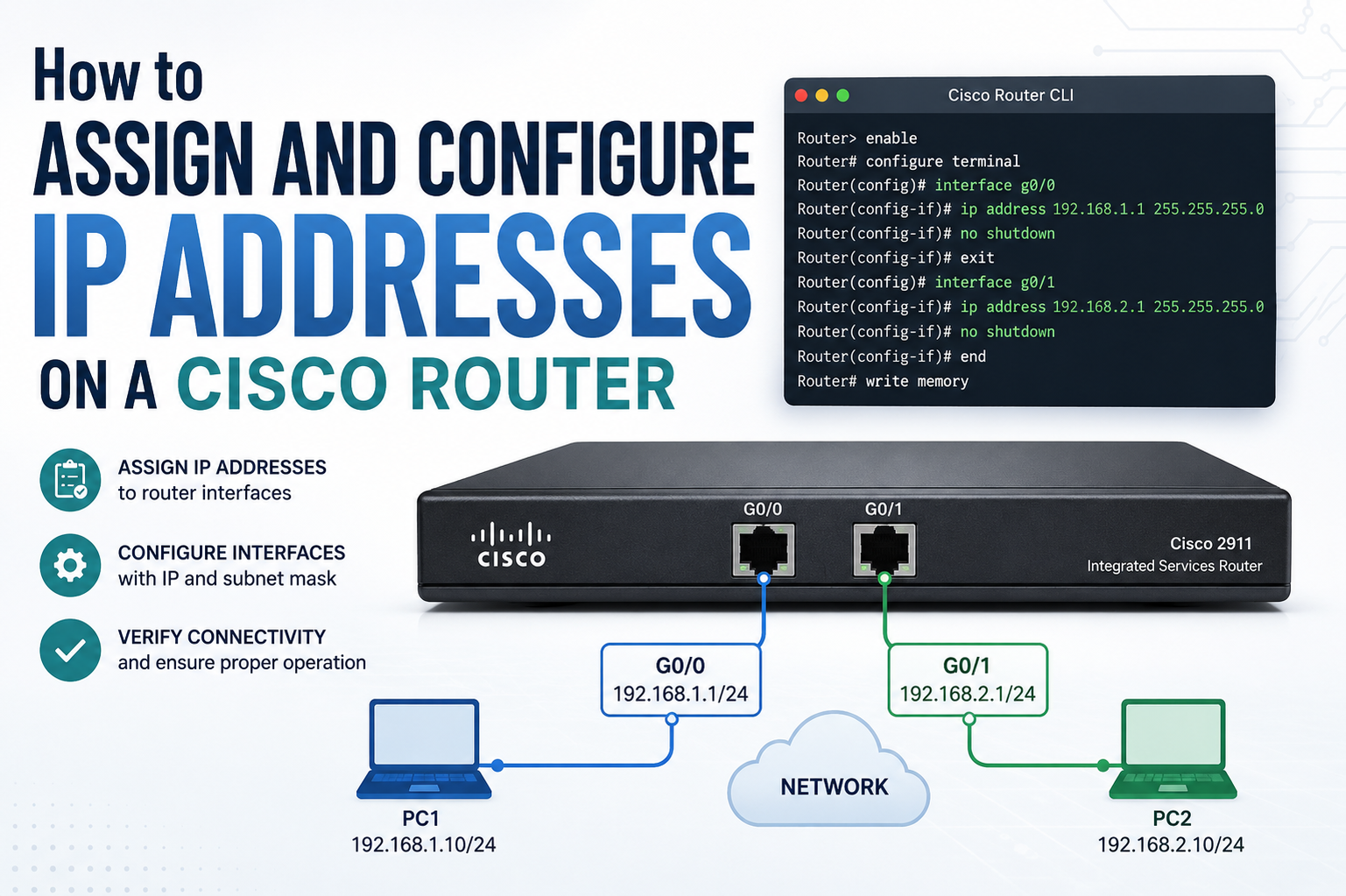
Configuring IP addresses on a Cisco router is a foundational skill in networking that allows different devices and networks to communicate effectively. A router functions as a central device that directs traffic between multiple networks, and each interface on the router must have a properly assigned IP address to perform this role. Without correct IP configuration, the router cannot determine where to send data packets, which leads to communication failures across the network.
In a real-world environment, routers connect local networks, wide area networks, and sometimes multiple internal subnetworks. Each of these connections requires a unique IP address configuration. Understanding how to assign these addresses correctly is essential for building stable, scalable, and secure networks.
Cisco routers use a command-line interface known as Cisco IOS, which provides a structured environment for configuration. This interface allows administrators to enter commands, modify settings, and verify configurations. IP address assignment is one of the most important tasks performed within this system.
Understanding Cisco Router Interfaces
A Cisco router is built with multiple interfaces, each serving as a connection point to a network segment. These interfaces may be physical ports such as GigabitEthernet or logical interfaces such as loopbacks. Each interface operates independently and requires its own IP configuration.
An interface essentially acts as a gateway between the router and another network. When data enters an interface, the router examines the destination IP address and determines where to forward the packet. This decision-making process depends entirely on correct IP addressing.
Each interface must belong to a different network or subnet. If two interfaces are assigned IP addresses from the same network, routing conflicts may occur, leading to communication issues.
Accessing Cisco IOS for Configuration
To begin configuring IP addresses, access to the Cisco IOS environment is required. This is typically done through a console connection or secure remote access. Once connected, the router presents a command prompt that starts in user EXEC mode.
From user EXEC mode, privileged EXEC mode must be entered to allow configuration changes. This mode provides access to advanced commands, including system monitoring and configuration commands. After entering privileged mode, global configuration mode is used to make system-wide changes.
These modes form a hierarchical structure that ensures secure and controlled configuration. Each level provides different permissions and capabilities, preventing unauthorized changes to critical settings.
Entering Global Configuration Mode
Global configuration mode is the central environment where most router configurations are performed. From here, administrators can access interface configuration mode, routing protocols, security settings, and more.
Once in global configuration mode, the router is ready to accept commands that modify its behavior. This is where IP address assignment begins. The structure of Cisco IOS ensures that changes are made in a controlled and logical sequence.
Navigating into this mode correctly is important because it ensures that all configuration changes are applied at the appropriate system level.
Selecting the Correct Interface
Before assigning an IP address, the correct interface must be selected. Cisco routers contain multiple interfaces, and each one serves a different purpose. Common interface types include Ethernet and GigabitEthernet ports.
Each interface is identified by a unique name and number. Selecting the wrong interface can lead to network misconfiguration. Therefore, careful identification of the interface is essential.
Once the correct interface is selected, the configuration mode shifts specifically to that interface. This allows changes to be applied only to that selected connection point.
Assigning IP Address and Subnet Mask
The primary step in configuring a router interface is assigning an IP address. This address must be unique within the network segment to avoid conflicts. Along with the IP address, a subnet mask is also required.
The subnet mask defines which portion of the IP address represents the network and which portion represents the host. This helps the router understand network boundaries and routing paths.
When assigning an IP address, careful planning is essential. Network administrators typically design an IP addressing scheme before configuration begins. This ensures consistency across the entire network and prevents overlapping addresses.
After entering the IP address and subnet mask, the configuration is stored in the router’s running configuration.
Activating the Interface
After assigning an IP address, the interface must be activated. By default, many Cisco router interfaces are in a shutdown state for safety reasons. This means they are inactive until manually enabled.
Activating an interface allows it to begin processing network traffic. Once enabled, the interface becomes operational and starts communicating with connected devices.
If an interface remains disabled, it will not participate in routing, even if it has a valid IP address assigned. Therefore, activation is a critical step in the configuration process.
Configuring Multiple Interfaces
In most network setups, a router has more than one interface. Each interface must be configured with a unique IP address corresponding to its connected network.
For example, one interface may connect to a local area network, while another connects to a wide area network. These interfaces act as separate communication points, allowing the router to manage traffic between different networks.
Each interface configuration is performed individually. This ensures that each network segment is properly defined and isolated. Proper configuration of multiple interfaces is essential for efficient routing.
Understanding Subnetting in Router Configuration
Subnetting plays a major role in IP address configuration. It allows a large network to be divided into smaller, manageable segments. Each subnet operates independently but can still communicate through routing.
When configuring IP addresses on a Cisco router, subnetting ensures that each interface belongs to a specific network segment. This improves performance, reduces congestion, and enhances security.
A well-designed subnetting plan simplifies routing decisions and helps maintain an organized network structure.
Loopback Interfaces and Their Role
In addition to physical interfaces, Cisco routers also support loopback interfaces. A loopback interface is a logical interface that is always active as long as the router is operational.
Loopback interfaces are often used for testing, management, and routing stability. They are not tied to physical hardware, which makes them reliable for network identification purposes.
Assigning an IP address to a loopback interface follows a similar process as physical interfaces. However, loopback interfaces are typically used for internal router functions and advanced configurations.
Verifying IP Address Configuration
After completing IP address configuration, verification is essential. Cisco IOS provides commands that allow administrators to check interface status, IP assignments, and connectivity.
Verification ensures that the IP address has been correctly applied and that the interface is operational. It also helps identify common configuration errors such as incorrect subnet masks or disabled interfaces.
Regular verification is a key part of network maintenance. It ensures that the router is functioning correctly and that all interfaces are properly configured.
Troubleshooting IP Configuration Issues
Even with careful configuration, issues may arise. One common problem is IP address duplication, which occurs when two devices are assigned the same address. This leads to network conflicts and communication failure.
Another issue is incorrect subnet masking, which can prevent devices from communicating even when they are on the same network. Misconfigured or inactive interfaces can also disrupt connectivity.
Troubleshooting involves systematically checking each configuration element. This includes verifying IP addresses, checking interface status, and ensuring physical connections are active.
A structured troubleshooting approach helps quickly identify and resolve issues.
Importance of Proper IP Address Planning
Before configuring a Cisco router, proper IP address planning is essential. A well-organized addressing scheme prevents conflicts and makes network management easier.
Planning includes dividing networks into logical subnets, assigning address ranges, and documenting configurations. This ensures that future expansions can be implemented without redesigning the entire network.
Without proper planning, networks can become disorganized, leading to routing inefficiencies and increased maintenance complexity.
Security Considerations in IP Configuration
IP configuration also plays a role in network security. Properly assigned addresses help control access between networks and prevent unauthorized communication.
Routers can be configured to restrict traffic based on IP addresses. This adds an additional layer of security to the network.
Consistent IP management also reduces the risk of misconfiguration, which can expose networks to vulnerabilities.
Best Practices for Cisco IP Configuration
Following best practices ensures stable and efficient network performance. One important practice is maintaining clear documentation of all IP addresses and interfaces.
Another practice is using consistent naming and addressing conventions. This simplifies troubleshooting and future modifications.
Regular audits of IP configurations help ensure that the network remains organized and free from conflicts. Avoiding unnecessary complexity also improves long-term reliability.
Conclusion
Assigning and configuring IP addresses on a Cisco router is a critical task that forms the backbone of network communication. It involves selecting interfaces, assigning unique IP addresses with appropriate subnet masks, and activating interfaces to enable communication.
Each step in the process contributes to building a stable and efficient network environment. Proper planning, careful configuration, and regular verification ensure that the router operates correctly and efficiently manages network traffic.
Understanding these principles allows network administrators to design scalable and secure networks that can support both small and large infrastructures.