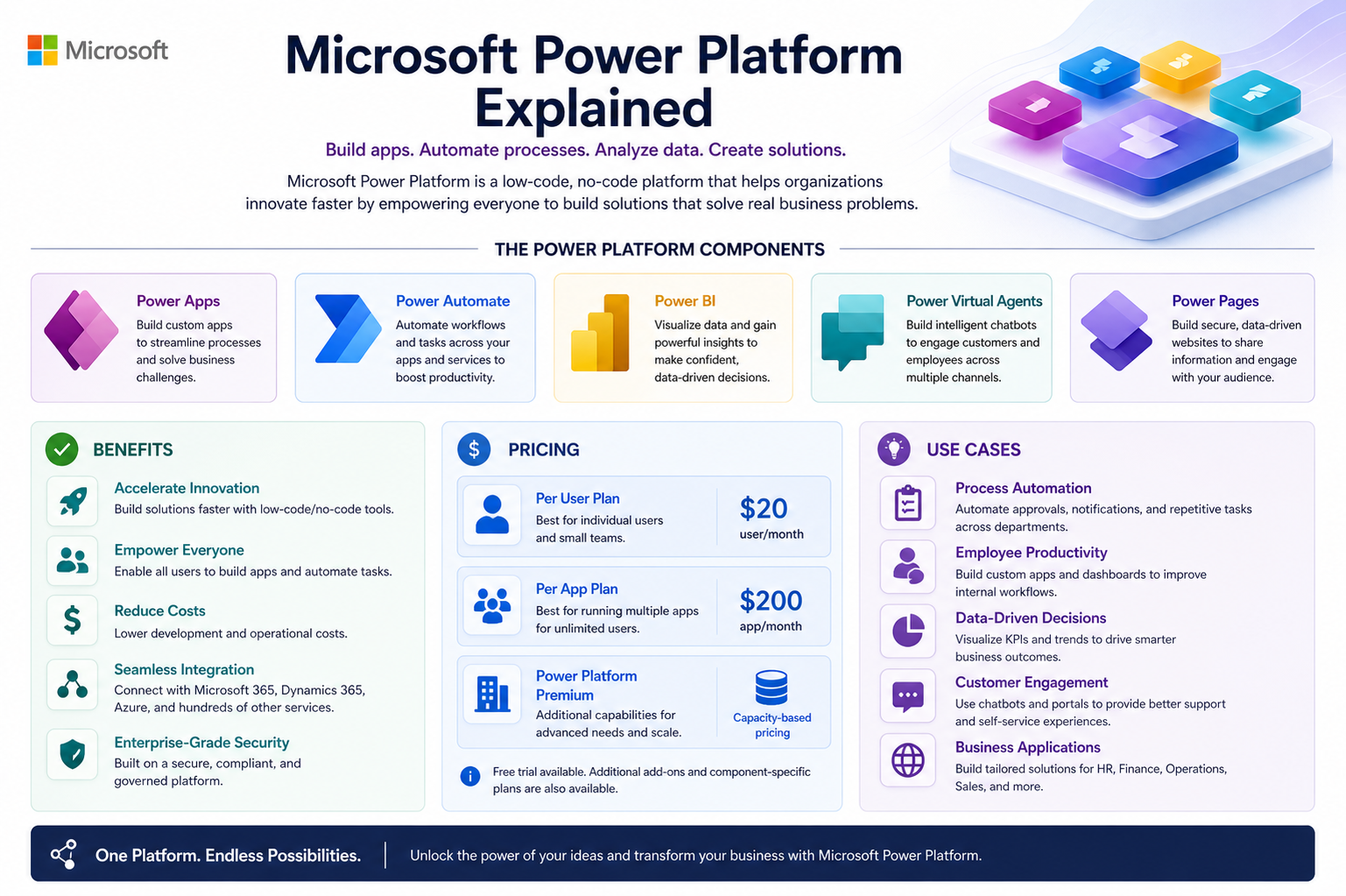
Microsoft Power Platform is an integrated suite of tools designed to empower organizations to analyze data, automate processes, build custom applications, and create virtual assistants with minimal coding effort. It is built on the idea of low-code and no-code development, allowing both technical professionals and business users to create solutions without relying heavily on traditional software development cycles. This makes it especially valuable in modern digital environments where speed, efficiency, and adaptability are essential. By connecting data, processes, and people in one ecosystem, it helps organizations respond quickly to business needs and improve overall operational efficiency.
Core Components of Microsoft Power Platform
Microsoft Power Platform consists of several key components that work together to deliver end-to-end business solutions. Each tool serves a unique purpose, but they are designed to integrate seamlessly with one another to create a unified experience.
Power BI for Data Analytics
Power BI is a business intelligence tool that allows users to visualize data and gain meaningful insights from it. It transforms raw data into interactive dashboards and reports, helping organizations understand trends, patterns, and performance metrics. With its ability to connect to multiple data sources, it provides a centralized view of business information. This makes it easier for decision-makers to identify opportunities, detect problems, and make informed choices based on real-time data.
Power Apps for Application Development
Power Apps enables users to build custom applications tailored to specific business needs without requiring advanced programming knowledge. These applications can run on web and mobile devices, making them highly accessible. Organizations use Power Apps to replace manual processes, streamline workflows, and improve efficiency. Because it uses a low-code approach, development time is significantly reduced, allowing businesses to quickly deploy solutions and adapt them as requirements change.
Power Automate for Workflow Automation
Power Automate focuses on automating repetitive tasks and business processes. It allows users to create workflows that connect different applications and services, reducing the need for manual intervention. For example, it can automate approval processes, send notifications, or synchronize data between systems. This not only saves time but also reduces the chances of human error, improving overall productivity and consistency in operations.
Power Pages for Web Solutions
Power Pages is used to create secure, data-driven websites with minimal coding effort. It enables organizations to build external-facing portals where users can interact with business data and services. These portals can be used for customer engagement, partner collaboration, or self-service applications. The simplicity of its design tools makes it easier for non-developers to create professional websites that are both functional and visually appealing.
AI and Virtual Assistance Capabilities
The platform also includes AI-driven features that enhance automation and decision-making. Virtual agents can be created to handle customer queries, provide support, and guide users through processes. These AI capabilities help businesses improve customer service while reducing the workload on human staff. By combining artificial intelligence with automation, organizations can deliver faster and more accurate responses.
Benefits of Microsoft Power Platform
One of the strongest advantages of Microsoft Power Platform is its ability to democratize technology development. It enables employees across different departments to create solutions without needing deep technical expertise. This reduces dependency on IT teams and allows faster innovation within organizations.
Another major benefit is improved efficiency through automation. Repetitive tasks that once required manual effort can now be handled automatically, freeing employees to focus on more strategic work. This leads to better productivity and reduced operational costs.
The platform also enhances decision-making by providing real-time insights through data analytics. Organizations can monitor performance continuously and make adjustments based on accurate information. This improves agility and helps businesses stay competitive in fast-changing markets.
Integration is another key strength. The platform works seamlessly with a wide range of Microsoft services and third-party applications. This ensures that organizations can connect their existing systems without major disruptions or complex migrations.
Scalability is also an important advantage. Whether a small business or a large enterprise, the platform can grow with organizational needs. Users can start with simple solutions and gradually expand to more advanced capabilities as required.
Pricing Structure and Considerations
Microsoft Power Platform follows a flexible pricing model designed to accommodate different types of users and business sizes. The cost generally depends on the specific tools being used, the number of users, and the level of functionality required.
Some features are included within existing Microsoft subscriptions, which makes it easier for organizations already using Microsoft services to adopt the platform. However, advanced capabilities such as enterprise-level automation, premium connectors, and large-scale deployments may require additional licensing.
This flexible approach allows businesses to control costs while still accessing powerful tools. Small organizations can start with basic plans, while larger enterprises can invest in more comprehensive solutions based on their operational demands. The pricing model is designed to scale alongside business growth, ensuring long-term value.
Common Use Cases Across Industries
Microsoft Power Platform is widely used across different industries due to its versatility and ease of use. In business operations, it is commonly used to automate approval workflows, manage internal requests, and streamline reporting processes. This reduces delays and improves operational efficiency.
In customer service, organizations use virtual agents and automated systems to handle inquiries, provide support, and resolve common issues. This improves response times and enhances customer satisfaction.
In finance and accounting, the platform is used to automate invoice processing, track expenses, and generate financial reports. This reduces manual workload and improves accuracy in financial management.
In supply chain and logistics, businesses use it to monitor inventory levels, track shipments, and optimize resource allocation. This helps ensure smooth operations and reduces delays in delivery processes.
In human resources, it supports employee onboarding, leave management, and performance tracking. By automating administrative tasks, HR teams can focus more on employee engagement and development.
Implementation Approach and Adoption Strategy
Successful implementation of Microsoft Power Platform requires a clear strategy and structured approach. Organizations typically begin by identifying key business challenges that can be addressed through automation or digital solutions.
Once use cases are identified, the next step involves building small-scale solutions or pilot projects. These initial implementations help organizations understand the capabilities of the platform and measure its impact.
Training and user adoption are also critical. Since the platform is designed for both technical and non-technical users, providing proper training ensures employees can use it effectively. This encourages broader adoption across the organization.
Governance and data management should also be established early. This ensures that applications and workflows remain secure, compliant, and aligned with organizational policies.
Challenges and Limitations
Despite its advantages, Microsoft Power Platform also comes with certain challenges. One of the main concerns is governance, as allowing many users to create applications can lead to inconsistencies or duplication if not properly managed.
Another challenge is the learning curve for users who are new to low-code environments. While it is easier than traditional development, some level of understanding is still required to build effective solutions.
Performance limitations may also arise in highly complex or large-scale applications. In such cases, careful planning and optimization are necessary to ensure smooth operation.
Cost management can become an issue if usage grows rapidly without proper monitoring. Organizations need to regularly evaluate their licensing and usage patterns to avoid unexpected expenses.
Security and Compliance Considerations
Security is a major focus of Microsoft Power Platform. It includes built-in compliance features and data protection mechanisms to ensure sensitive information is handled safely. Organizations can define access controls, manage permissions, and monitor activity to maintain security standards.
Data encryption, identity management, and compliance certifications help ensure that solutions built on the platform meet industry regulations. This is especially important for industries such as healthcare, finance, and government where data protection is critical.
Future of Microsoft Power Platform
The future of Microsoft Power Platform is closely tied to advancements in artificial intelligence and automation. As AI capabilities continue to evolve, the platform is expected to become even more intelligent and autonomous in handling business processes.
Greater integration with AI-driven tools will likely make it easier for users to build applications using natural language instructions. This will further reduce the technical barrier and expand accessibility to a wider audience.
Additionally, increased focus on data connectivity and real-time analytics will enhance its ability to support complex decision-making processes. Organizations will be able to operate with greater speed, accuracy, and flexibility.
Enterprise Adoption of Microsoft Power Platform
As organizations grow, the need for scalable, flexible, and efficient digital solutions becomes more critical. Microsoft Power Platform has become a key choice for enterprises looking to modernize operations without relying heavily on traditional software development. Large organizations often deal with complex systems, multiple departments, and large volumes of data, making integration and automation essential. The platform helps unify these elements into a connected ecosystem where processes can be streamlined and managed more effectively.
Enterprises also benefit from the platform’s ability to reduce development bottlenecks. Instead of waiting for long software development cycles, business teams can independently create solutions for their specific needs. This reduces pressure on IT departments while accelerating innovation across the organization. It also encourages a culture of problem-solving, where employees actively contribute to improving workflows and efficiency.
Another important factor in enterprise adoption is the platform’s ability to integrate with existing systems. Most large organizations already use a combination of legacy systems and modern applications. Microsoft Power Platform acts as a bridge between these systems, enabling smooth data flow and process automation without requiring complete system replacement.
Role in Digital Transformation
Digital transformation is no longer optional for modern businesses, and Microsoft Power Platform plays a central role in this shift. It enables organizations to move away from manual, paper-based, or fragmented processes and adopt fully digital workflows. This transformation leads to better efficiency, reduced costs, and improved customer experiences.
One of the most significant contributions of the platform is its ability to empower non-technical users. Employees in departments such as finance, marketing, and operations can directly participate in building digital solutions. This reduces the gap between business needs and technical implementation, ensuring faster and more accurate results.
Digital transformation through this platform also enhances agility. Businesses can quickly adapt to market changes, customer demands, or internal requirements without undergoing lengthy development processes. This flexibility is essential in today’s fast-paced business environment where responsiveness can determine competitiveness.
Automation and Process Optimization
Automation is one of the strongest pillars of Microsoft Power Platform. Organizations use it to eliminate repetitive tasks, reduce human error, and improve consistency across operations. Processes such as approvals, notifications, data entry, and reporting can be fully automated, saving significant time and effort.
Process optimization goes beyond simple automation. It involves redesigning workflows to make them more efficient and effective. The platform allows businesses to map out existing processes and identify areas of improvement. Once optimized, these workflows can be automated to ensure long-term efficiency gains.
In many organizations, automation also improves compliance. By standardizing processes and reducing manual intervention, businesses can ensure that rules and regulations are consistently followed. This is particularly important in industries with strict compliance requirements.
Data-Driven Decision Making
Data plays a crucial role in modern business strategy, and Microsoft Power Platform enhances the ability to use data effectively. Through advanced analytics and visualization tools, organizations can convert raw data into meaningful insights. These insights support better decision-making at all levels of the organization.
Instead of relying on intuition or outdated reports, decision-makers can access real-time dashboards that reflect current business performance. This enables faster responses to challenges and opportunities. It also improves forecasting accuracy, helping businesses plan more effectively for the future.
Data-driven decision-making also supports continuous improvement. By regularly analyzing performance metrics, organizations can identify weaknesses, track progress, and implement improvements over time. This creates a cycle of ongoing optimization and growth.
Customization and Flexibility
One of the key strengths of Microsoft Power Platform is its high level of customization. Businesses are not limited to predefined solutions; instead, they can build applications and workflows tailored specifically to their needs. This flexibility makes it suitable for a wide range of industries and use cases.
Customization also extends to user experience. Applications built using the platform can be designed to match branding, user preferences, and operational requirements. This ensures that solutions are not only functional but also user-friendly and aligned with organizational identity.
Flexibility is also evident in deployment options. Solutions can be scaled up or down depending on demand. This allows organizations to start small and expand gradually as their needs evolve, without requiring major structural changes.
Integration with Artificial Intelligence
Artificial intelligence is becoming an increasingly important part of Microsoft Power Platform. AI capabilities enhance automation, improve decision-making, and provide predictive insights. For example, AI can be used to analyze customer behavior, detect anomalies in data, or recommend actions based on historical trends.
Virtual agents powered by AI are also widely used for customer support and internal assistance. These agents can handle common queries, guide users through processes, and provide instant responses. This improves efficiency while reducing workload on human employees.
AI integration also supports advanced analytics. Instead of simply displaying data, the platform can interpret patterns and provide recommendations. This helps organizations move from reactive decision-making to proactive strategy development.
Collaboration and Team Productivity
Microsoft Power Platform enhances collaboration by enabling teams to work together on shared solutions. Applications, workflows, and dashboards can be accessed and managed by multiple users, ensuring transparency and coordination across departments.
This collaborative environment improves productivity by reducing communication gaps and streamlining project execution. Teams can quickly share insights, update processes, and monitor progress in real time. This leads to faster completion of tasks and better alignment with business goals.
Collaboration also extends beyond internal teams. Organizations can create external portals for customers, partners, or vendors, allowing them to interact directly with business systems. This improves engagement and strengthens relationships with external stakeholders.
Scalability for Growing Businesses
Scalability is a critical feature of Microsoft Power Platform, especially for growing businesses. As organizations expand, their operational needs become more complex. The platform is designed to handle this growth without requiring major changes to existing systems.
Businesses can start with simple applications and gradually move toward more advanced solutions as their needs increase. This ensures a smooth transition from small-scale operations to enterprise-level systems. Scalability also applies to user capacity, data volume, and process complexity.
This flexibility makes the platform suitable for startups, small businesses, and large enterprises alike. Each organization can use it according to its current stage of growth while maintaining the ability to scale in the future.
Operational Efficiency Improvements
Operational efficiency is one of the most direct benefits of Microsoft Power Platform. By automating tasks, improving workflows, and centralizing data, organizations can significantly reduce operational costs and improve output quality.
Employees spend less time on manual tasks and more time on strategic activities that add value to the business. This improves job satisfaction and overall workforce productivity.
Efficiency improvements also reduce delays and bottlenecks in processes. Tasks that previously required multiple approvals or manual steps can now be completed quickly through automated workflows. This results in faster turnaround times and improved service delivery.
Challenges in Large-Scale Implementation
While Microsoft Power Platform offers many advantages, large-scale implementation can present challenges. One common issue is maintaining governance across multiple users and departments. Without proper control, there is a risk of creating redundant or poorly managed applications.
Another challenge is ensuring consistent data quality. Since the platform integrates with multiple data sources, organizations must establish strong data governance practices to maintain accuracy and reliability.
Training and change management are also important considerations. Employees need to be properly trained to use the platform effectively, and organizations must support them during the transition to new digital processes.
Long-Term Business Impact
Over time, Microsoft Power Platform can have a significant impact on business growth and sustainability. By improving efficiency, reducing costs, and enabling innovation, it helps organizations stay competitive in evolving markets.
It also fosters a culture of continuous improvement. Employees are encouraged to identify problems and create solutions, leading to ongoing innovation within the organization. This cultural shift is often one of the most valuable long-term outcomes.
In addition, the platform supports digital maturity by helping organizations evolve from traditional systems to fully integrated digital ecosystems. This positions businesses for future growth and technological advancement.
Governance and Control in Microsoft Power Platform
As organizations increasingly adopt Microsoft Power Platform, governance becomes a critical factor in ensuring sustainable and secure usage. Governance refers to the policies, controls, and guidelines that determine how applications, data, and workflows are created and managed within the platform. Without proper governance, there is a risk of uncontrolled app development, data duplication, and security vulnerabilities.
To address this, organizations typically establish structured environments where development, testing, and production activities are separated. This ensures that new solutions are properly evaluated before being deployed into live business operations. Role-based access control is also implemented to ensure that only authorized users can create, modify, or publish applications and workflows.
Another important aspect of governance is monitoring usage across the platform. Organizations often track which applications are being used, how frequently they are accessed, and what type of data they interact with. This visibility helps IT teams maintain control while still encouraging innovation across departments. Proper governance ensures that the platform remains scalable, secure, and aligned with business objectives.
Security Framework and Data Protection
Security is a foundational element of Microsoft Power Platform, especially given its integration with sensitive business data. The platform is built on Microsoft’s secure cloud infrastructure, which includes advanced encryption, identity management, and threat detection mechanisms. These features help protect data both in transit and at rest.
Organizations can define detailed access permissions, ensuring that users only interact with the data relevant to their roles. This minimizes the risk of unauthorized access and data breaches. Multi-factor authentication further strengthens security by requiring additional verification during login processes.
Data loss prevention policies are also a key feature of the platform. These policies help prevent sensitive information from being shared outside approved systems or applications. For industries such as healthcare, finance, and government, these security controls are essential for maintaining compliance with regulatory standards.
Continuous monitoring and auditing capabilities allow organizations to track system activity in real time. This helps detect unusual behavior, identify potential risks, and respond quickly to security incidents. Overall, the security framework ensures that businesses can confidently adopt the platform without compromising data integrity.
Low-Code Development Revolution
Microsoft Power Platform is at the forefront of the low-code development revolution. Traditional software development often requires extensive coding knowledge, long development cycles, and significant technical resources. In contrast, low-code development allows users to build applications using visual interfaces, drag-and-drop components, and prebuilt templates.
This approach dramatically reduces development time and makes application creation accessible to a broader audience. Business users who understand operational challenges can directly build solutions without waiting for IT intervention. This leads to faster problem-solving and more relevant applications.
Low-code development also encourages experimentation and innovation. Users can quickly prototype ideas, test them in real environments, and refine them based on feedback. This iterative approach improves the quality of solutions and ensures they align closely with business needs.
However, while low-code simplifies development, it still requires planning and structure. Organizations must ensure that applications are designed with scalability, security, and maintainability in mind.
Impact on IT Departments
The adoption of Microsoft Power Platform has significantly changed the role of traditional IT departments. Instead of being the sole creators of business applications, IT teams now act more as enablers and governance leaders. Their focus shifts from building every solution to supporting and guiding business users in creating their own applications.
This shift reduces workload pressure on IT teams and allows them to focus on more complex and strategic initiatives such as system architecture, cybersecurity, and infrastructure management. At the same time, IT departments play a crucial role in ensuring that solutions built by business users comply with organizational standards.
IT teams also provide training, support, and best practices to ensure that citizen developers can effectively use the platform. This collaborative model between IT and business users creates a more efficient and innovative environment.
Citizen Development and Business Empowerment
One of the most transformative aspects of Microsoft Power Platform is the rise of citizen development. Citizen developers are employees who create applications and workflows without formal programming backgrounds. This concept empowers individuals across departments to actively contribute to digital transformation efforts.
Citizen development reduces dependency on centralized IT resources and allows faster solution delivery. Employees who are closest to business problems can design solutions that directly address their needs. This leads to higher relevance and effectiveness of applications.
However, successful citizen development requires proper training and governance. Organizations must ensure that users understand best practices, security requirements, and data management principles. When properly managed, citizen development can significantly accelerate innovation and operational improvement.
Business Agility and Competitive Advantage
In today’s fast-changing business environment, agility is a key factor for success. Microsoft Power Platform enhances business agility by enabling rapid development and deployment of solutions. Organizations can quickly respond to market changes, customer demands, and internal challenges without lengthy development delays.
This speed of execution provides a competitive advantage, allowing businesses to stay ahead of competitors. For example, companies can quickly launch new digital services, automate emerging processes, or adapt existing systems to new requirements.
Agility also improves resilience. Businesses that can quickly adjust their operations are better equipped to handle disruptions, whether they are caused by market fluctuations, regulatory changes, or unexpected events.
Industry-Specific Applications
Microsoft Power Platform is used across a wide range of industries, each benefiting in unique ways. In healthcare, it is used to manage patient data, automate appointment scheduling, and improve communication between medical staff. This leads to better patient care and operational efficiency.
In retail, the platform helps manage inventory, track customer behavior, and personalize marketing campaigns. This improves customer engagement and increases sales performance.
In manufacturing, it is used to monitor production processes, manage supply chains, and predict maintenance needs. This reduces downtime and improves productivity.
In education, institutions use the platform to manage student data, automate administrative tasks, and enhance learning experiences through digital tools.
Each industry leverages the platform differently, but the core benefits of automation, analytics, and integration remain consistent across all use cases.
Integration with Cloud Ecosystem
Microsoft Power Platform is deeply integrated with cloud computing, which enhances its flexibility and scalability. Cloud integration allows organizations to access their applications and data from anywhere, supporting remote work and global collaboration.
It also enables seamless connectivity with other cloud-based services, creating a unified digital ecosystem. This integration reduces complexity and ensures that data flows smoothly across different systems.
Cloud infrastructure also provides scalability on demand. Organizations can increase or decrease resources based on usage requirements without investing in additional physical infrastructure. This makes the platform cost-efficient and highly adaptable.
Innovation Through Continuous Improvement
One of the defining characteristics of Microsoft Power Platform is its continuous evolution. The platform is regularly updated with new features, improvements, and capabilities. This ensures that organizations always have access to the latest technology advancements.
Continuous improvement also encourages innovation within businesses. As new tools and features become available, organizations can enhance existing applications or build entirely new solutions. This creates a dynamic environment where digital transformation is ongoing rather than a one-time effort.
Feedback from users also plays an important role in shaping the platform’s development. This ensures that updates are aligned with real-world business needs and challenges.
Measuring Success and ROI
Organizations adopting Microsoft Power Platform often measure success through key performance indicators such as time savings, cost reduction, process efficiency, and user adoption rates. These metrics help determine the return on investment (ROI) of the platform.
Time savings are typically achieved through automation of repetitive tasks. Cost reduction comes from reduced development expenses and improved operational efficiency. Process efficiency is measured by how quickly and accurately workflows are completed.
User adoption is also a critical factor. The more widely the platform is used across an organization, the greater its overall impact. High adoption rates indicate that employees find value in the tools and are actively using them to improve their work.
Long-Term Strategic Value
Beyond immediate operational benefits, Microsoft Power Platform provides long-term strategic value. It helps organizations build a strong digital foundation that supports future growth and innovation.
By enabling continuous automation, data-driven decision-making, and rapid application development, it positions businesses to adapt to future technological changes. This long-term adaptability is essential in an increasingly digital world.
Organizations that fully embrace the platform often experience cultural transformation as well. They shift toward a more agile, innovative, and collaborative way of working. This cultural change can be just as valuable as the technological benefits.
Advanced Analytics and Business Intelligence Capabilities
Microsoft Power Platform significantly enhances how organizations handle analytics and business intelligence by transforming raw data into meaningful insights. Through integrated tools, businesses can collect, process, and visualize data from multiple sources in real time. This allows decision-makers to gain a clearer understanding of performance trends, customer behavior, and operational efficiency.
Advanced analytics capabilities enable organizations to move beyond basic reporting and into predictive insights. Instead of only understanding what has already happened, businesses can anticipate future outcomes based on historical data patterns. This shift from reactive to proactive decision-making improves strategic planning and risk management.
The ability to create interactive dashboards also improves accessibility of information across departments. Employees at different levels of the organization can view customized reports relevant to their roles, ensuring that decisions are based on accurate and timely data.
Workflow Intelligence and Automation Enhancement
Workflow automation within Microsoft Power Platform is not limited to simple task execution; it also incorporates intelligent decision-making. Workflows can be designed to adapt based on conditions, data inputs, and external triggers. This creates smarter systems that reduce manual intervention while improving accuracy.
For example, approval processes can automatically route requests based on priority, department, or budget thresholds. Similarly, notifications and escalations can be triggered automatically when certain conditions are met. This ensures that critical tasks are never overlooked and business operations continue smoothly.
As automation matures, organizations begin to develop interconnected workflows that span multiple departments and systems. This leads to end-to-end process automation, where entire business cycles are streamlined from start to finish.
User Experience and Interface Simplicity
One of the strengths of Microsoft Power Platform is its focus on user-friendly design. The interface is built to be intuitive, allowing users with minimal technical background to navigate and build solutions easily. This simplicity reduces the learning curve and encourages wider adoption across organizations.
Drag-and-drop functionality, visual editors, and prebuilt templates make application development more accessible. Users can design workflows, dashboards, and applications without writing complex code. This not only speeds up development but also reduces dependency on specialized developers.
A consistent user experience across all components of the platform also ensures smoother transitions between tools. Whether working on analytics, automation, or application development, users experience a unified environment that enhances productivity.
Collaboration Between Business and IT Teams
Microsoft Power Platform fosters a stronger collaboration model between business users and IT teams. Instead of operating in isolation, both groups work together to design and implement solutions that align with organizational goals.
Business users contribute domain expertise, identifying real-world problems and requirements. IT teams provide technical guidance, ensuring that solutions are secure, scalable, and compliant with organizational standards. This partnership leads to more effective and sustainable solutions.
This collaborative approach also reduces development delays. Instead of long communication cycles between departments, solutions are built more directly and iteratively. Feedback is incorporated continuously, resulting in better alignment between expectations and outcomes.
Customization for Industry-Specific Needs
Different industries require tailored solutions, and Microsoft Power Platform provides the flexibility to meet these unique demands. Organizations can customize applications, workflows, and dashboards to match specific operational requirements.
In financial services, the platform is used to automate compliance reporting, detect fraud patterns, and manage customer onboarding processes. In logistics, it helps track shipments, optimize delivery routes, and manage warehouse operations efficiently.
In the public sector, it supports citizen services, document management, and resource allocation. Educational institutions use it to streamline admissions, manage student records, and improve communication between staff and students.
This adaptability makes the platform suitable for virtually any industry, regardless of complexity or scale.
Mobile Accessibility and Remote Work Enablement
Microsoft Power Platform is designed to support modern work environments, including remote and hybrid models. Applications and dashboards created within the platform are accessible across devices such as smartphones, tablets, and desktops.
This mobility ensures that employees can stay connected to business processes from anywhere. Field workers, for example, can update data in real time, access workflows, and receive notifications without being tied to a physical office location.
Remote accessibility also improves business continuity. Even in situations where physical operations are disrupted, organizations can continue functioning effectively through cloud-based access to critical systems.
Performance Optimization and System Efficiency
As organizations scale their use of Microsoft Power Platform, performance optimization becomes increasingly important. Efficient design of applications and workflows ensures that systems remain responsive even under heavy usage.
Optimization involves reducing unnecessary steps in workflows, improving data handling processes, and ensuring efficient use of system resources. Well-designed applications load faster, process data more efficiently, and provide smoother user experiences.
Regular monitoring and performance tuning help maintain system stability. Organizations can identify bottlenecks and optimize processes to ensure consistent performance across all applications.
Innovation Ecosystem and Continuous Development
Microsoft Power Platform operates within a broader innovation ecosystem that encourages continuous development and improvement. New features, connectors, and capabilities are regularly introduced, allowing organizations to expand their solutions over time.
This ecosystem encourages experimentation and creativity. Users can continuously refine existing applications or build new ones based on evolving business needs. This dynamic environment supports long-term digital growth.
The platform also benefits from community-driven innovation, where users share templates, solutions, and best practices. This collective knowledge accelerates learning and improves implementation efficiency across organizations.
Risk Management and Operational Control
Risk management is an essential aspect of any enterprise system, and Microsoft Power Platform provides tools to help organizations manage operational risks effectively. Automated monitoring systems detect anomalies and alert administrators to potential issues.
Controls can be implemented to prevent unauthorized changes, restrict sensitive data access, and ensure compliance with internal policies. This reduces the likelihood of operational failures and security breaches.
By standardizing processes and automating critical tasks, organizations also reduce the risk of human error. This leads to more reliable and predictable business outcomes.
Scalability in Complex Environments
As organizations grow in complexity, their digital systems must scale accordingly. Microsoft Power Platform is designed to handle increasing workloads, data volumes, and user demands without compromising performance.
Scalability is achieved through cloud-based infrastructure, modular design, and flexible licensing models. Organizations can expand their usage gradually, adding new applications and workflows as needed.
This scalability ensures that the platform remains viable for both small teams and large multinational enterprises. It adapts to changing requirements without requiring complete system overhauls.
Cultural Transformation Within Organizations
Beyond technology, Microsoft Power Platform also drives cultural transformation. It encourages a shift toward innovation, collaboration, and continuous improvement. Employees become more engaged in problem-solving and process optimization.
This cultural shift fosters a sense of ownership, where individuals feel empowered to contribute to organizational success. Over time, this leads to a more agile and responsive business environment.
Organizations that embrace this culture often experience higher levels of employee satisfaction, improved efficiency, and stronger innovation outcomes.
Conclusion
Microsoft Power Platform stands as a powerful and unified solution that transforms how organizations build applications, manage data, automate workflows, and drive decision-making. Its low-code approach removes traditional barriers of software development, allowing both technical and non-technical users to actively participate in creating digital solutions. This democratization of technology accelerates innovation and reduces dependency on specialized development resources.
Across different industries, the platform delivers measurable value by improving operational efficiency, enhancing productivity, and enabling data-driven decision-making. Through automation, businesses can eliminate repetitive tasks and focus more on strategic priorities. Through analytics, they gain deeper insights into performance and trends, helping them respond faster to changing conditions.
Its flexibility and scalability make it suitable for organizations of all sizes, from small businesses to global enterprises. At the same time, strong security, governance, and integration capabilities ensure that solutions remain reliable, compliant, and well-managed.
Beyond technology, Microsoft Power Platform also influences organizational culture by promoting collaboration, innovation, and continuous improvement. Employees become more engaged in problem-solving, and businesses become more agile in adapting to new challenges and opportunities.
Overall, Microsoft Power Platform is not just a set of tools but a comprehensive ecosystem that supports long-term digital transformation. It empowers organizations to work smarter, innovate faster, and build a more connected and efficient future.