FAT32, short for File Allocation Table 32, is built on a very simple and early file management structure. It organizes data using a table that keeps track of where files are stored on a disk. When a file is saved, FAT32 divides it into clusters and records their locations in the file allocation table. This design makes it lightweight and easy to implement, which is one of the reasons it became so widely adopted in early storage devices.
The simplicity of FAT32 is also the reason behind its limitations. Because the system uses 32-bit addressing, it cannot efficiently manage very large files or extremely large partitions. The maximum individual file size is restricted to 4 GB, which creates challenges for modern multimedia files such as high-definition videos, large software packages, and system backups. Additionally, partition size limitations make it less suitable for modern high-capacity storage drives.
FAT32 does not include advanced features like file permissions or journaling. This means it cannot track changes in a way that protects against corruption during sudden power loss or system crashes. As a result, it is more vulnerable to data inconsistencies compared to modern file systems. However, its lightweight structure allows it to work efficiently on low-power devices such as cameras, gaming consoles, and embedded systems.
Despite its age, FAT32 remains important due to its universal compatibility. Almost every operating system, including older versions, can read and write FAT32 without additional drivers. This makes it a reliable choice for transferring files between different platforms, especially when compatibility is more important than performance or storage efficiency.
ExFAT – Modern Flexibility for Large Storage Needs
ExFAT, or Extended File Allocation Table, was developed to overcome the limitations of FAT32 while maintaining simplicity and cross-platform compatibility. It is optimized for flash storage devices such as USB drives and SD cards, where large file handling is essential.
Unlike FAT32, ExFAT removes the 4 GB file size restriction, allowing storage of extremely large files. This makes it highly suitable for modern usage scenarios like 4K video recording, large data backups, and high-capacity external storage devices. It also supports significantly larger partition sizes, making it more adaptable for modern hardware.
The internal structure of ExFAT is more efficient than FAT32, with improved allocation strategies that reduce fragmentation and improve performance on flash-based storage. It uses a free space bitmap instead of relying solely on traditional file allocation tables, which helps the system locate free space more quickly and manage storage more effectively.
ExFAT does not include the full complexity of NTFS, such as advanced security permissions or journaling, but it strikes a balance between simplicity and modern functionality. This makes it faster and less resource-intensive while still being capable of handling large, modern files.
Compatibility is another major advantage of ExFAT. It is supported by most modern operating systems, including Windows, macOS, and many Linux distributions. This makes it a preferred choice for portable storage devices that need to work seamlessly across different platforms without file size restrictions.
NTFS – Advanced File System for Modern Computing
NTFS, or New Technology File System, is the standard file system used in modern Windows operating systems. It was designed to replace older systems like FAT32 by introducing advanced features that improve performance, reliability, and security.
One of the key strengths of NTFS is its support for journaling. This feature keeps a log of changes before they are fully committed to the disk. In the event of a system crash or power failure, NTFS can use this journal to restore consistency and prevent data corruption. This makes it significantly more reliable than FAT32 or ExFAT.
NTFS also supports file permissions and access control, allowing users and administrators to define who can read, write, or modify specific files. This makes it ideal for multi-user environments and enterprise systems where security is essential.
Another important feature of NTFS is its support for large file sizes and partition capacities. It can handle extremely large files and drives, making it suitable for modern storage needs such as high-resolution video editing, database management, and system-level storage.
In addition to these features, NTFS supports compression, encryption, and disk quotas. File compression reduces storage usage, encryption protects sensitive data, and quotas help manage disk space usage across multiple users. These advanced capabilities make NTFS a powerful and flexible file system for professional and enterprise environments.
However, NTFS is more complex than FAT32 and ExFAT. This complexity can lead to slightly higher overhead, and compatibility outside Windows environments is more limited. While many systems can read NTFS drives, write support may require additional drivers or tools.
Performance Differences Between FAT32, ExFAT, and NTFS
Performance varies significantly across the three file systems depending on usage scenarios. FAT32 performs well on small storage devices and simple file operations due to its lightweight structure. However, performance degrades when handling large files or heavily fragmented data.
ExFAT offers better performance than FAT32 for large files and modern storage devices. Its optimized allocation system reduces overhead and improves read and write speeds, especially on flash-based storage like USB drives and SD cards. It is designed specifically for scenarios where large file transfer efficiency is important.
NTFS provides the most consistent performance in complex environments. Its journaling system and advanced indexing improve data management efficiency, especially on large drives with frequent file operations. While it may have slightly higher overhead compared to ExFAT, it delivers superior stability and reliability in long-term use.
Compatibility Across Different Systems
Compatibility plays a crucial role in choosing a file system. FAT32 is the most universally compatible, working across almost all devices and operating systems, including older hardware. This makes it ideal for simple file transfers and legacy systems.
ExFAT is widely supported on modern systems and has become the standard for many external storage devices. It is particularly useful when transferring large files between Windows and macOS environments. However, some older devices may not fully support it without updates.
NTFS is primarily designed for Windows systems. While other operating systems can often read NTFS drives, full write support is not always guaranteed without additional software. This makes NTFS less suitable for cross-platform portable storage but excellent for internal system drives.
Use Cases and Practical Applications
FAT32 is best suited for small storage devices, such as USB flash drives used for basic file transfers, older gaming consoles, and embedded systems. Its limitations make it unsuitable for modern large-file usage, but its compatibility ensures it remains useful in specific scenarios.
ExFAT is ideal for external storage devices that need to handle large files across multiple operating systems. It is commonly used in portable hard drives, high-capacity USB drives, and SD cards for cameras and recording devices. Its balance of simplicity and modern capability makes it a versatile choice.
NTFS is best for internal system drives, especially on Windows computers. It is ideal for operating systems, software installations, databases, and environments where security, reliability, and performance are critical. Its advanced features make it unsuitable for simple portable use but essential for professional computing.
Limitations and Trade-Offs
Each file system has inherent trade-offs. FAT32 offers maximum compatibility but suffers from strict file size and volume limitations. It lacks modern features such as security permissions and data recovery mechanisms.
ExFAT removes many of FAT32’s limitations but does not include advanced features like journaling or strong security controls. While it is efficient for large storage, it is not designed for complex system-level operations.
NTFS provides the most advanced feature set but sacrifices some compatibility and simplicity. It is more resource-intensive and may not be fully supported on non-Windows systems without additional tools.
Data Integrity and Reliability Mechanisms
One of the most important differences between FAT32, ExFAT, and NTFS lies in how each system handles data integrity and protects against corruption. FAT32 provides no built-in protection mechanisms. When data is written to a FAT32 drive, it is directly recorded without maintaining a structured log of changes. This means that if a device loses power or is removed abruptly, there is a higher risk of file corruption or incomplete writes. The system relies on manual disk checking tools to repair errors after they occur, rather than preventing them during operation.
ExFAT improves slightly over FAT32 in terms of structure and efficiency, but it still lacks journaling capabilities. While it is optimized for flash storage and reduces some risks through better allocation methods, it does not maintain a transaction log of file changes. As a result, sudden interruptions can still lead to data inconsistencies, especially during large file transfers. However, because ExFAT is often used on portable storage devices, it is generally paired with hardware designed to handle safer removal practices.
NTFS, in contrast, includes a robust journaling system that records changes before they are fully applied. This means that if a system crashes or loses power, NTFS can refer to its journal to restore the file system to a consistent state. This significantly reduces the risk of corruption and makes NTFS far more reliable for critical systems. It also performs background checks and repairs more efficiently, which helps maintain long-term stability in operating systems and enterprise environments.
Storage Efficiency and Allocation Behavior
Storage efficiency is another key area where these file systems differ. FAT32 uses a simple cluster-based allocation system that assigns fixed-size blocks to files. While this makes it easy to manage, it can lead to internal fragmentation, where space within clusters is wasted if files do not fully occupy them. Over time, this can reduce overall storage efficiency, especially on large drives with many small files.
ExFAT improves allocation efficiency by using a more modern approach that reduces unnecessary overhead. It introduces a bitmap-based system for tracking free space, which allows the system to quickly identify available storage without scanning large allocation tables. This improves performance on large-capacity flash drives and reduces fragmentation compared to FAT32. It is particularly efficient when dealing with large media files that require continuous storage blocks.
NTFS uses a highly optimized allocation strategy with support for advanced indexing and metadata management. It reduces fragmentation through smarter file placement and can reorganize data more effectively over time. NTFS also supports smaller cluster sizes on large drives, which improves space utilization for small files. This makes it especially efficient in environments where a mix of large and small files is stored regularly.
Security Features and Access Control
Security is one of the biggest distinctions between these file systems. FAT32 offers no built-in security features. There are no permissions, encryption options, or user-level access controls. Any system that can read the drive can access all its contents without restriction. This simplicity makes it easy to use but unsuitable for environments where data protection is important.
ExFAT also lacks native security features. It does not support file-level permissions or encryption within the file system itself. Like FAT32, it is designed for portability and simplicity rather than security. Any protection must be handled at the device or operating system level rather than the file system level.
NTFS, however, introduces a comprehensive security model. It supports file and folder permissions, allowing administrators to define precise access rules for different users and groups. It also supports encryption through built-in features, enabling sensitive data to be protected directly at the file system level. This makes NTFS suitable for business environments, shared systems, and any situation where controlled access is necessary.
Scalability and Modern Storage Requirements
As storage technology has evolved, the need for scalable file systems has become increasingly important. FAT32 struggles significantly in this area due to its design limitations. Its maximum file size of 4 GB and partition size restrictions make it unsuitable for modern high-capacity drives and large multimedia files. Even though it can still function on small devices, it is no longer practical for advanced computing needs.
ExFAT was designed specifically to address scalability limitations. It supports extremely large files and storage volumes, making it suitable for modern external drives that may reach terabytes in size. This scalability is one of its strongest advantages, especially for users who work with high-resolution video, large backups, or data-intensive applications.
NTFS goes even further in terms of scalability. It is designed to handle extremely large file systems and supports advanced metadata structures that allow it to manage complex storage environments. It is commonly used in enterprise systems, servers, and modern Windows installations where large-scale data management is required.
Performance in Real-World Usage Scenarios
In practical use, performance differences between these file systems become more noticeable depending on workload type. FAT32 performs adequately for simple tasks such as transferring small files or using basic storage devices. However, performance declines when handling large files or when the drive becomes heavily fragmented.
ExFAT performs well in portable storage scenarios, especially when transferring large files between different operating systems. It offers faster write speeds compared to FAT32 in many flash-based devices because of its simplified structure and reduced overhead. However, it may not perform as consistently as NTFS under heavy or complex workloads.
NTFS delivers the most stable and consistent performance in demanding environments. It handles multitasking, large file operations, and frequent read/write activity more efficiently. Its ability to manage metadata, indexing, and journaling contributes to smoother performance in long-term usage, particularly on internal drives.
Device Compatibility and Practical Limitations
Compatibility remains an important consideration when selecting a file system. FAT32 is the most universally supported format, working across nearly all operating systems, gaming consoles, and embedded devices. This makes it highly reliable for simple data transfer tasks, especially when compatibility is more important than performance.
ExFAT has gained wide support in modern systems, including Windows, macOS, and many Linux distributions. It is commonly used in external storage devices because it balances compatibility with the ability to handle large files. However, some older devices may not support it without firmware updates or additional drivers.
NTFS is primarily designed for Windows environments. While other systems can often read NTFS drives, full compatibility, especially write access, may require additional software. This makes it less ideal for cross-platform portable storage but highly effective for internal system use.
Long-Term Usage and Maintenance Considerations
Over long-term usage, each file system behaves differently in terms of maintenance and durability. FAT32 may require frequent manual checks to repair file system errors due to its lack of built-in recovery mechanisms. It is more susceptible to fragmentation and performance degradation over time.
ExFAT requires less maintenance than FAT32 in many cases because of its improved structure, but it still lacks advanced self-repair capabilities. Users may need to rely on operating system tools to check and repair drives when issues occur.
NTFS is designed for long-term stability. Its journaling system reduces the need for manual intervention, and it can recover from unexpected shutdowns more effectively. It also includes built-in tools for error checking and repair, making it suitable for systems that require continuous operation without frequent maintenance.
Choosing the Right File System Based on Purpose
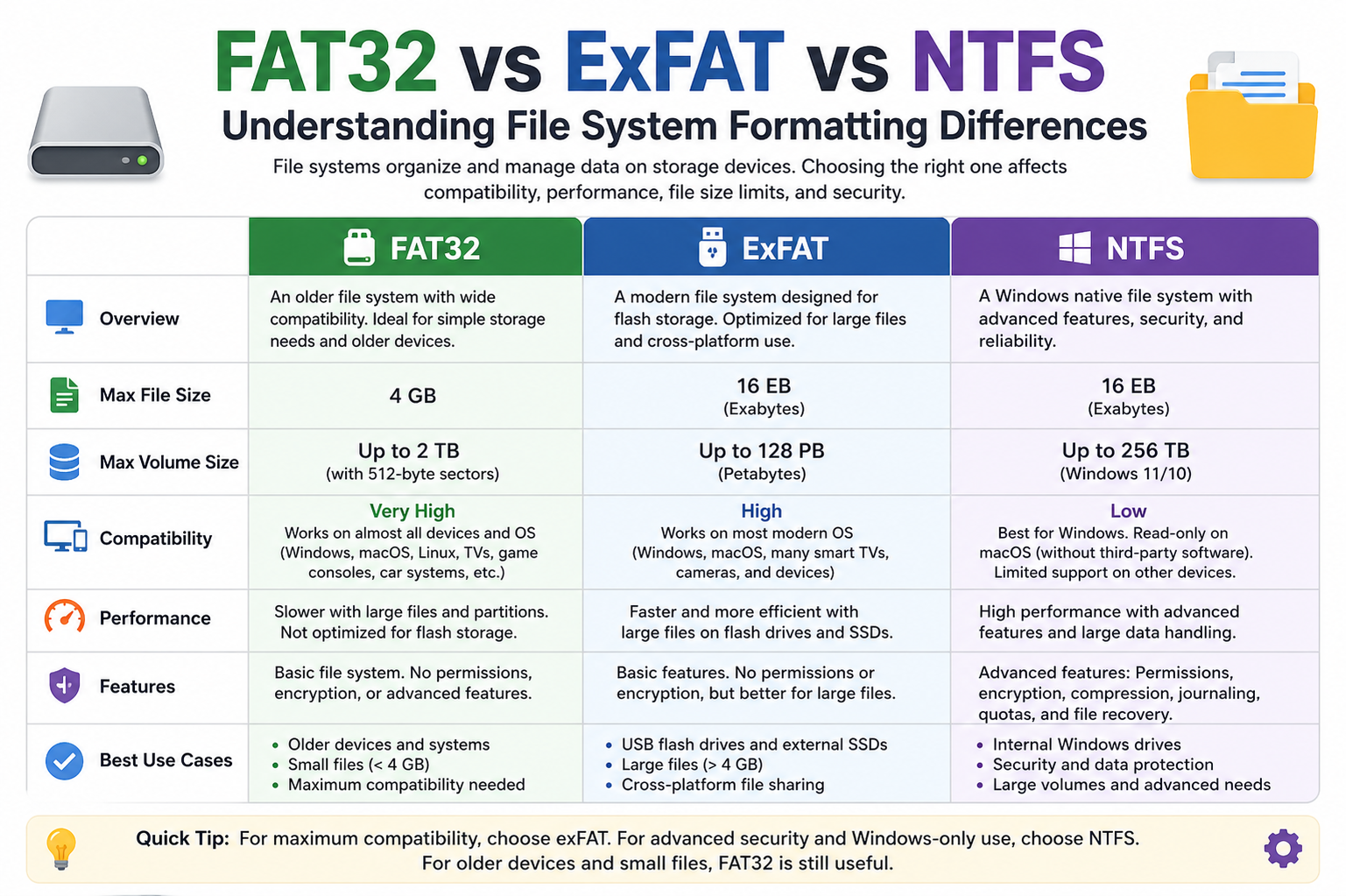
The choice between FAT32, ExFAT, and NTFS ultimately depends on usage requirements. FAT32 is best suited for maximum compatibility and simple storage tasks involving small files. ExFAT is ideal for portable storage devices that need to handle large files across multiple platforms. NTFS is the preferred choice for internal drives where performance, security, and reliability are essential.
Each file system reflects a different stage in the evolution of digital storage. FAT32 represents simplicity and universal access, ExFAT bridges the gap between old and modern storage needs, and NTFS provides a powerful, feature-rich system designed for modern computing environments.
Fragmentation and Its Impact on Performance
Fragmentation is an important factor that affects how efficiently a file system operates over time. In FAT32, fragmentation occurs frequently because the system uses a relatively simple method of allocating space. When files are written, deleted, and rewritten, available space becomes scattered across the drive. As a result, larger files may be split into many small parts stored in different locations. This increases the time required for the system to read or write data because it must access multiple areas of the disk to retrieve a single file.
ExFAT handles fragmentation more efficiently than FAT32 due to its improved allocation strategy. It reduces unnecessary overhead and manages free space more intelligently, which helps keep large files stored in more continuous blocks. However, it is still not immune to fragmentation, especially when used heavily over long periods or on devices with frequent file modifications. Since it is often used on flash storage, the impact is less noticeable compared to traditional hard drives.
NTFS manages fragmentation far more effectively through advanced allocation techniques and background optimization processes. It attempts to place related data closer together and can reorganize file structures more efficiently over time. While fragmentation can still occur, NTFS includes mechanisms that reduce its performance impact significantly. This makes it more suitable for systems with continuous read and write operations, such as operating systems and databases.
Metadata Handling and File System Structure
Metadata refers to information about files, such as creation date, size, permissions, and location. FAT32 has a very basic metadata structure. It stores only essential information, which keeps the system lightweight but limits its ability to manage complex file attributes. This simplicity is one of the reasons FAT32 performs well on low-resource devices but lacks advanced organizational features.
ExFAT improves metadata handling by introducing more efficient structures that allow better tracking of file information. It supports larger file attributes and reduces the overhead associated with managing storage entries. This makes it more efficient for handling large media files and modern storage requirements.
NTFS has a highly sophisticated metadata system. It stores detailed information about every file and directory, enabling advanced features such as indexing, permissions, encryption, and auditing. This rich metadata structure allows NTFS to support complex operations and large-scale file management systems. It is one of the key reasons NTFS is preferred in professional and enterprise environments.
Error Handling and Recovery Capabilities
Error handling is a critical aspect of any file system, especially in environments where data integrity is important. FAT32 has very limited error recovery capabilities. When errors occur, such as file corruption or bad sectors, the system relies on external tools to detect and repair issues. There is no built-in mechanism to track changes or recover from unexpected interruptions, making it more vulnerable to data loss.
ExFAT improves upon FAT32 by reducing the likelihood of errors through better allocation design, but it still lacks built-in recovery mechanisms. It does not maintain a journal or transaction log, which means it cannot automatically restore system consistency after a crash. Recovery must still be handled externally, although errors are generally less frequent due to its modern structure.
NTFS provides the most advanced error handling system among the three. Its journaling feature ensures that all changes are recorded before being committed to disk. In case of a crash or power failure, NTFS can replay or rollback incomplete transactions, restoring the file system to a consistent state. It also includes built-in tools for detecting and repairing disk errors, making it far more reliable in critical applications.
Energy Efficiency and Device Suitability
File systems also influence how efficiently a device uses power, especially in portable environments. FAT32 is very lightweight, which means it requires minimal processing power. This makes it suitable for low-energy devices such as older USB drives, digital cameras, and embedded systems where efficiency is more important than advanced features.
ExFAT is also designed with portability in mind. It is optimized for flash storage, which means it minimizes unnecessary write operations and reduces wear on storage cells. This contributes to better energy efficiency compared to more complex systems, especially in portable devices like external SSDs and SD cards used in cameras or drones.
NTFS consumes more system resources due to its advanced features, including journaling, indexing, and security management. While this increases power usage slightly, modern hardware compensates for this overhead effectively. On desktops and laptops, the difference in energy consumption is generally negligible, but NTFS is less ideal for extremely low-power embedded systems.
Use in Modern Devices and Operating Systems
FAT32 continues to exist mainly due to legacy support and universal compatibility. It is commonly used in small-capacity USB drives, BIOS firmware systems, and older hardware devices that do not support newer file systems. Its role today is mostly limited to simple data transfer and compatibility scenarios.
ExFAT has become the standard for many modern portable storage devices. It is widely used in high-capacity SD cards, external hard drives, and USB drives intended for cross-platform use. Its ability to handle large files without the complexity of NTFS makes it ideal for consumer electronics such as cameras, gaming consoles, and media devices.
NTFS dominates internal storage in Windows-based systems. It is the default file system for modern Windows installations and is also used in servers and enterprise environments. Its advanced features make it essential for system drives, software installations, and professional workloads that require reliability and security.
Data Transfer Speed Considerations
Speed performance varies depending on file type and system workload. FAT32 performs reasonably well with small files but slows down significantly when handling large or fragmented data sets. Its simple structure limits its efficiency in modern high-speed storage environments.
ExFAT offers improved transfer speeds, especially when dealing with large files on flash-based storage. It reduces overhead and minimizes unnecessary system operations, resulting in faster write and read performance compared to FAT32 in many scenarios.
NTFS provides stable and consistent transfer speeds, particularly in environments with mixed file sizes and heavy usage. While it may not always be the fastest for simple transfers, its ability to handle complex workloads efficiently makes it more reliable in long-term performance scenarios.
System Overhead and Resource Usage
System overhead refers to the amount of processing power and memory required to manage a file system. FAT32 has very low overhead, which is why it performs well on older or resource-constrained devices. However, this simplicity comes at the cost of missing advanced features.
ExFAT also maintains relatively low overhead compared to NTFS. It is designed to be efficient while supporting modern storage needs, making it suitable for portable devices where performance and simplicity must be balanced.
NTFS has the highest system overhead due to its advanced capabilities. Features such as journaling, permissions, and indexing require additional processing resources. However, on modern systems, this overhead is generally acceptable given the benefits in reliability, security, and performance.
Evolution of File System Design
The progression from FAT32 to ExFAT and then to NTFS reflects the evolution of storage technology and computing needs. FAT32 was designed in an era where storage capacities were small and file sizes were limited. Its simplicity made it widely usable but also restricted its long-term scalability.
ExFAT was introduced as a bridge between legacy systems and modern requirements. It removed key limitations of FAT32 while maintaining simplicity and cross-platform compatibility. It represents a transitional design focused on portable storage and large file support.
NTFS represents a fully modern file system designed for complex computing environments. It integrates performance optimization, security features, and data integrity mechanisms into a unified system. Its design supports the demands of contemporary operating systems, enterprise workloads, and high-capacity storage systems.
Final Comparative Understanding
Each file system serves a distinct role in the computing ecosystem. FAT32 remains relevant for maximum compatibility and simple usage scenarios. ExFAT provides a balanced solution for portable storage and large file handling across multiple platforms. NTFS delivers advanced functionality for secure, reliable, and high-performance computing environments.
Understanding these differences helps in selecting the right file system based on storage size, file type, device compatibility, and performance requirements.
Real-World Compatibility Trade-offs
When choosing between FAT32, ExFAT, and NTFS, compatibility in real-world usage often becomes the deciding factor. FAT32 is still widely recognized across nearly all devices, including older gaming consoles, smart TVs, digital cameras, and legacy operating systems. This universal recognition makes it extremely useful when transferring files between devices that may not support modern file systems. However, this broad compatibility comes at the cost of performance limitations and strict file size restrictions.
ExFAT was introduced to bridge the gap between legacy compatibility and modern storage requirements. It is now supported by most modern operating systems, including Windows, macOS, and Linux distributions, as well as many consumer electronics devices. This makes it highly practical for external storage devices that need to move between different platforms without conversion issues. While it is not as universally supported as FAT32 in older hardware, its adoption has become widespread in newer technology ecosystems.
NTFS, on the other hand, is deeply integrated into the Windows environment. It performs best within its native ecosystem, where all features are fully supported. Outside of Windows, compatibility becomes more limited. Some systems may allow read-only access, while full read and write support often requires additional drivers or software. This makes NTFS less flexible for cross-platform portability but extremely powerful within Windows-based systems.
Suitability for External vs Internal Storage
The choice of file system also depends heavily on whether the storage device is internal or external. FAT32 is often used for small external devices where compatibility is more important than capacity or performance. It is commonly found in USB drives used for file sharing, firmware updates, and simple data transfer tasks.
ExFAT is the preferred choice for modern external storage devices that handle large files. It is widely used in portable hard drives, high-capacity USB drives, and SD cards in cameras and mobile devices. Its ability to handle large files and work across multiple operating systems makes it ideal for portable workflows, especially in creative industries such as photography and video production.
NTFS is primarily used for internal storage, especially in Windows computers. It is designed for system drives, software installations, and environments where data security and stability are critical. While it can be used on external drives, its advanced features are most beneficial in controlled, single-system environments rather than portable use.
File System Behavior Under Heavy Usage
Under heavy usage conditions, the differences between these file systems become more noticeable. FAT32 tends to degrade in performance over time due to fragmentation and lack of optimization features. As files are continuously written and deleted, the system becomes less efficient, leading to slower access times.
ExFAT handles moderate workloads more efficiently, especially on flash-based storage. It reduces some fragmentation issues and maintains relatively stable performance even with large file transfers. However, it does not have advanced optimization tools, so performance may decline under very intensive or long-term usage.
NTFS performs best under heavy workloads due to its advanced design. It can manage frequent file operations, large databases, and multitasking environments with minimal performance loss. Its built-in journaling system also ensures that even under stress, the file system remains consistent and recoverable.
Long-Term Reliability and Maintenance
Long-term reliability is another major factor when comparing file systems. FAT32 requires more manual maintenance over time. Users may need to run disk checking utilities to fix errors or inconsistencies, especially after improper shutdowns or sudden device removal.
ExFAT reduces some maintenance needs due to its improved structure, but it still lacks automated recovery systems. Errors may still require manual intervention, although they are generally less frequent than in FAT32.
NTFS is designed for long-term reliability with minimal user intervention. Its journaling system, error correction tools, and built-in recovery mechanisms significantly reduce the need for manual maintenance. This makes it ideal for systems that need continuous operation without frequent downtime or repairs.
Data Organization and Indexing Efficiency
FAT32 uses a basic directory structure that stores file locations in a simple table format. While easy to manage, this structure becomes inefficient as the number of files increases, leading to slower search and retrieval times.
ExFAT improves on this by using a more efficient indexing method, allowing faster access to files and better handling of large directories. However, it still lacks advanced indexing capabilities found in more modern systems.
NTFS uses a highly advanced Master File Table (MFT) system that stores detailed metadata about every file. This allows extremely fast file access, efficient searching, and powerful indexing capabilities. Even on large drives with thousands of files, NTFS maintains strong performance due to this structured approach.
Security and Data Protection Comparison
Security is one of the most significant differences between these file systems. FAT32 offers no security features, making it unsuitable for sensitive data storage. Anyone with access to the drive can read, modify, or delete files without restriction.
ExFAT also lacks built-in security controls. It does not support encryption or file permissions at the file system level, meaning protection must be handled externally by the operating system or hardware.
NTFS provides strong security features, including file permissions, encryption, and access control. This allows users to define exactly who can access or modify specific files. It is widely used in environments where data protection and controlled access are essential, such as businesses and enterprise systems.
Conclusion
Each file system—FAT32, ExFAT, and NTFS—serves a distinct purpose based on its design, capabilities, and limitations. FAT32 remains relevant for its unmatched compatibility and simplicity, making it suitable for small storage devices and basic file transfers. However, its strict file size limits and lack of modern features make it unsuitable for current high-capacity storage needs.
ExFAT represents a modern balance between compatibility and performance. It is designed for portable storage devices that handle large files and need to work across multiple operating systems. Its simplicity and efficiency make it a practical choice for external drives, especially in media and data transfer applications.
NTFS stands as the most advanced and feature-rich option, offering strong performance, security, and reliability. It is best suited for internal system drives and professional environments where data integrity, access control, and long-term stability are essential.
In summary, the choice between FAT32, ExFAT, and NTFS depends on the specific use case. FAT32 is ideal for universal compatibility with small files, ExFAT is best for modern portable storage with large file support, and NTFS is the preferred solution for secure, high-performance internal storage systems.